



There are so many web browsers you can try and use that their sheer number might feel overwhelming. So, if you’re trying to find the best web browser in 2023, we thought it would be a good idea to check out the most popular ones for you. There are a lot of aspects to consider when deciding on a web browser, including but not limited to speed, features, security, and privacy. Let’s take a look at the most popular web browsers and see what each of them has to offer and, most importantly, which ones are the fastest:
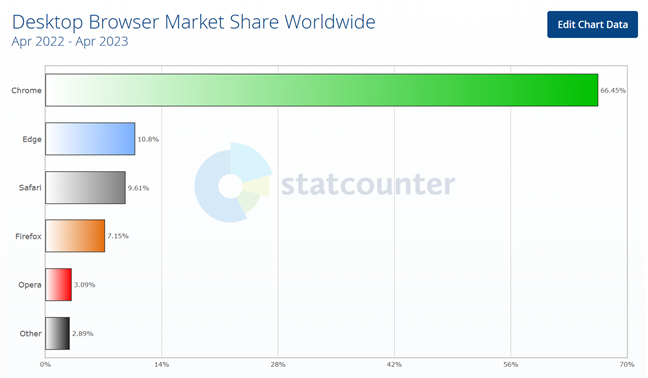
 Desktop Browser Market Share Worldwide in 2023
As you can see in the chart above, Google Chrome is the undisputed leader, holding a huge 66.45% market share, which is six times more than the next competitor, Microsoft Edge.
After hearing what some of our readers had to say, I decided to benchmark and test not only the main browsers (Chrome, Edge, Firefox, Opera) but also a few other niche browsers that an increasing number of people are starting to use: Opera GX, Vivaldi, Brave. As this is an analysis for Windows, made on a Windows PC, I couldn’t and didn’t include Safari, the default web browser for Mac computers.
Before getting to the benchmarking part and seeing which of the browsers are faster, let’s first take a look at all of them and what they have to offer besides raw speed and performance:
Desktop Browser Market Share Worldwide in 2023
As you can see in the chart above, Google Chrome is the undisputed leader, holding a huge 66.45% market share, which is six times more than the next competitor, Microsoft Edge.
After hearing what some of our readers had to say, I decided to benchmark and test not only the main browsers (Chrome, Edge, Firefox, Opera) but also a few other niche browsers that an increasing number of people are starting to use: Opera GX, Vivaldi, Brave. As this is an analysis for Windows, made on a Windows PC, I couldn’t and didn’t include Safari, the default web browser for Mac computers.
Before getting to the benchmarking part and seeing which of the browsers are faster, let’s first take a look at all of them and what they have to offer besides raw speed and performance:
 Google Chrome
TIP: Chromium, the browser on which Chrome is based, uses the Blink browser engine. Blink was built as part of the Chromium project, and large companies such as Google, Meta, Microsoft, Opera Software, Adobe, Intel, IBM, and Samsung are contributing to its development. The rendering engine is the one responsible for drawing and animating web pages, creating everything that you see on a website.
Google Chrome
TIP: Chromium, the browser on which Chrome is based, uses the Blink browser engine. Blink was built as part of the Chromium project, and large companies such as Google, Meta, Microsoft, Opera Software, Adobe, Intel, IBM, and Samsung are contributing to its development. The rendering engine is the one responsible for drawing and animating web pages, creating everything that you see on a website.
 Microsoft Edge
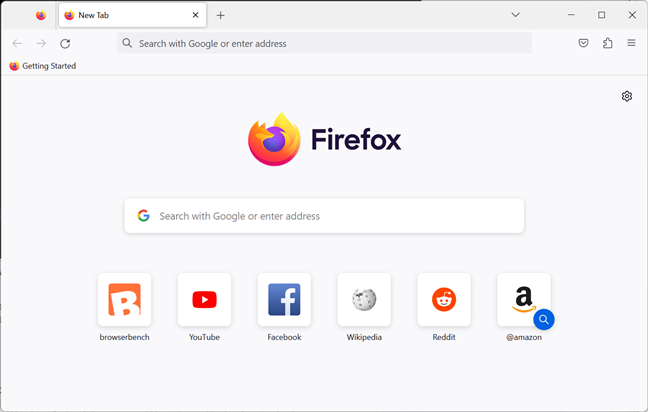
 Mozilla Firefox
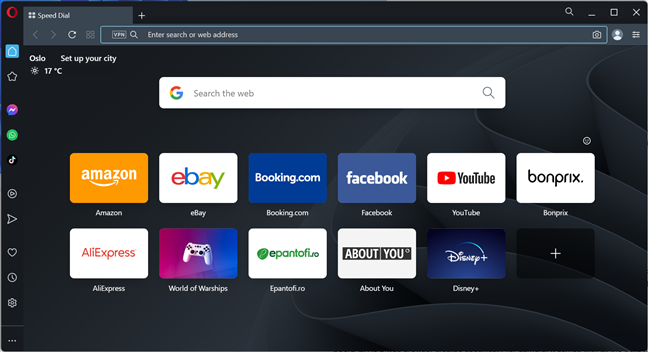
 Opera
Opera
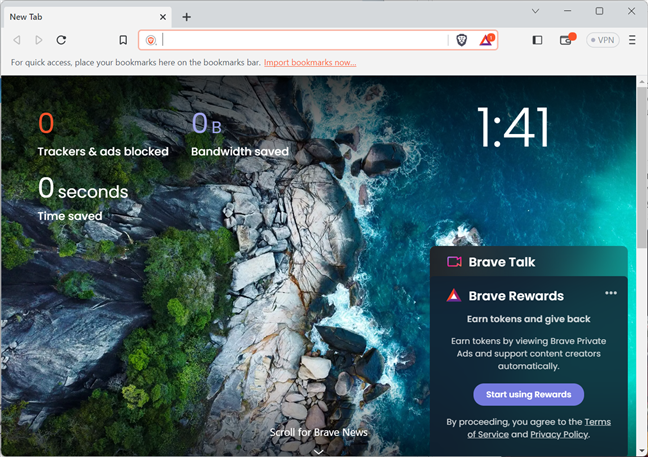
 Brave
Brave
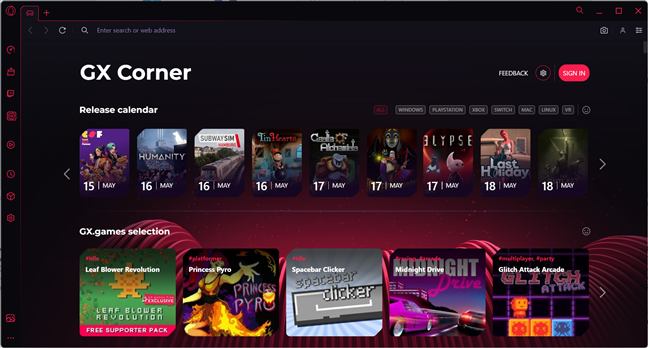
 Opera GX
 Vivaldi
TIP: Before seeing what’s the fastest browser out there, find out which browsers are best for your laptop’s battery life.
Vivaldi
TIP: Before seeing what’s the fastest browser out there, find out which browsers are best for your laptop’s battery life.
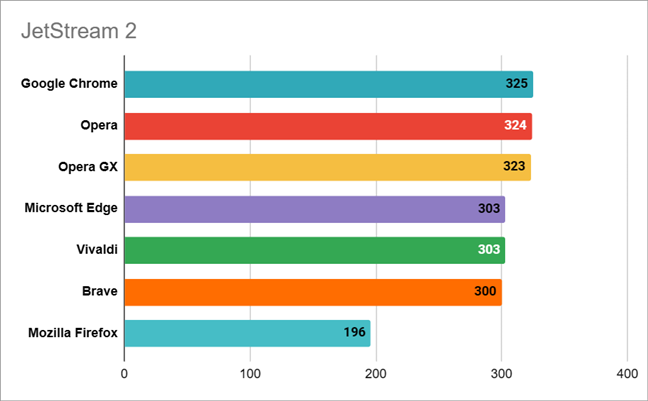
 Web browsers results in the JetStream 2 benchmark
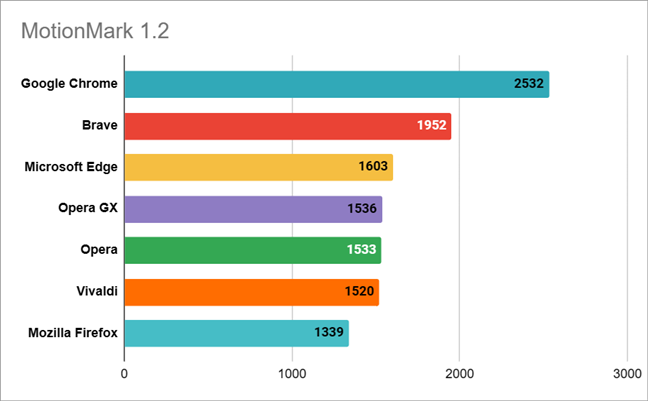 Web browsers results in the MotionMark 1.2 benchmark
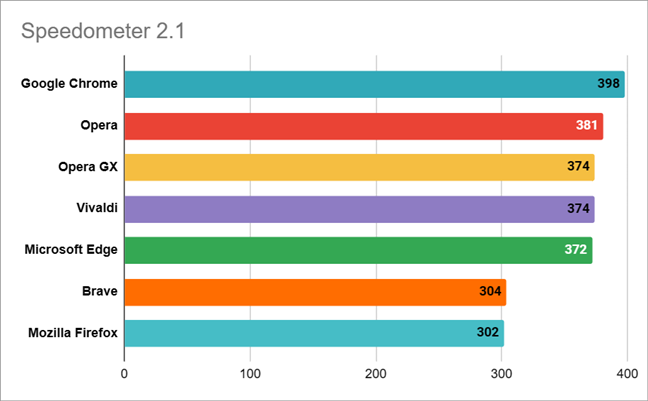 Web browsers results in the Speedometer 2.1 benchmark
After testing Chrome, Edge, Firefox, Opera, Opera GX, Vivaldi, and Brave, the benchmarking results paint a clearer picture than I expected. The uncontested winner in terms of web browsing speed is Google Chrome. It’s the fastest browser at running scripts, web applications, and even graphics. No other browsers can match it when looking at the overall performance.
However, Edge, Opera, Opera GX, Vivaldi, and Brave are fast too, and if you like the features or tools of one of them, using any of these browsers will offer plenty of performance and speed.
On a last and sad note, Firefox looks like the worst choice you could make right now. Others like me share the same sentiment. Leaving all its personalization features, tools, and options aside, the performance and web browsing speed you get from it are very poor compared to what the other browsers can offer. Hopefully, Mozilla will wake up and shake things up before it is too late.
Web browsers results in the Speedometer 2.1 benchmark
After testing Chrome, Edge, Firefox, Opera, Opera GX, Vivaldi, and Brave, the benchmarking results paint a clearer picture than I expected. The uncontested winner in terms of web browsing speed is Google Chrome. It’s the fastest browser at running scripts, web applications, and even graphics. No other browsers can match it when looking at the overall performance.
However, Edge, Opera, Opera GX, Vivaldi, and Brave are fast too, and if you like the features or tools of one of them, using any of these browsers will offer plenty of performance and speed.
On a last and sad note, Firefox looks like the worst choice you could make right now. Others like me share the same sentiment. Leaving all its personalization features, tools, and options aside, the performance and web browsing speed you get from it are very poor compared to what the other browsers can offer. Hopefully, Mozilla will wake up and shake things up before it is too late.
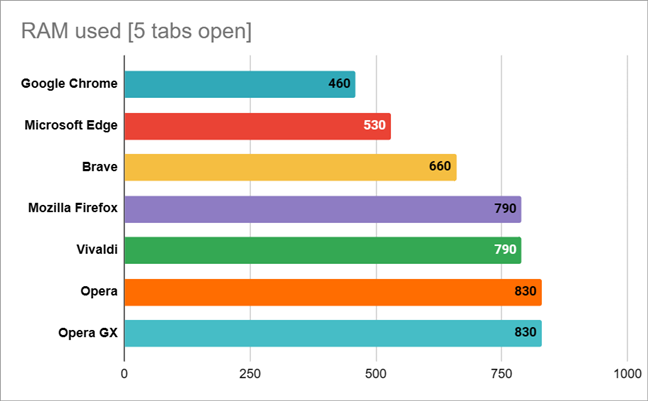 Web browsers RAM utilization in MB
As you can see, Chrome confirms once again that it’s the best web browser in this roundup, needing less memory than any of the other ones. Second in place is Edge, which was something I expected as Microsoft couldn’t have built it into its operating system without optimizing it. The third place is Brave, a pleasant surprise, followed by Firefox and Vivaldi, and continuing with Opera and Opera GX. It seems that with more customization options and features, RAM consumption increases.
Taking everything into account, including benchmarks results and RAM utilization, I can say that the winner of the browser battle in 2023 is Google Chrome!
Web browsers RAM utilization in MB
As you can see, Chrome confirms once again that it’s the best web browser in this roundup, needing less memory than any of the other ones. Second in place is Edge, which was something I expected as Microsoft couldn’t have built it into its operating system without optimizing it. The third place is Brave, a pleasant surprise, followed by Firefox and Vivaldi, and continuing with Opera and Opera GX. It seems that with more customization options and features, RAM consumption increases.
Taking everything into account, including benchmarks results and RAM utilization, I can say that the winner of the browser battle in 2023 is Google Chrome!
The best browsers of 2023: What do they offer?
According to statcounter.com, the most popular web browsers for desktop computers in the last twelve months are Chrome, Edge, Safari, Firefox, and Opera. These five browsers have a total market share of 97.11%, leaving only 2.89% for all the other niche browsers.Google Chrome
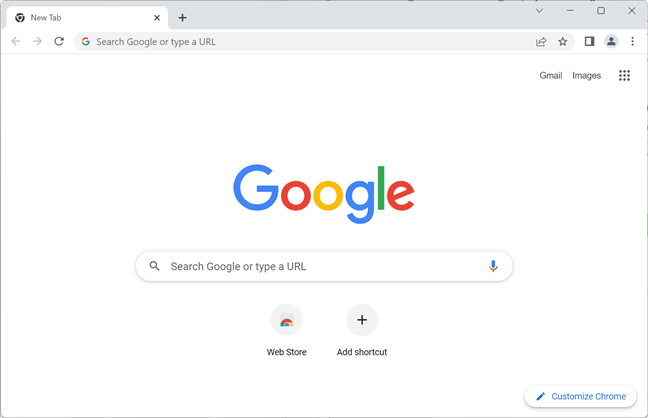
Chrome, which is based on the free and open-source Chromium web browser, is the uncontested market leader of all desktop web browsers, with a global market share of more than 65% in the last 12 months. Google’s Chrome browser is well-known for its speed, minimalist design, and outstanding integration with other Google services. Furthermore, this web browser offers a huge collection of extensions and personalization options that allow you to change the way it works and looks in order to improve your browsing experience. However, many people complain about Chrome’s unreasonable memory utilization, as well as its privacy-invading built-in features.Microsoft Edge
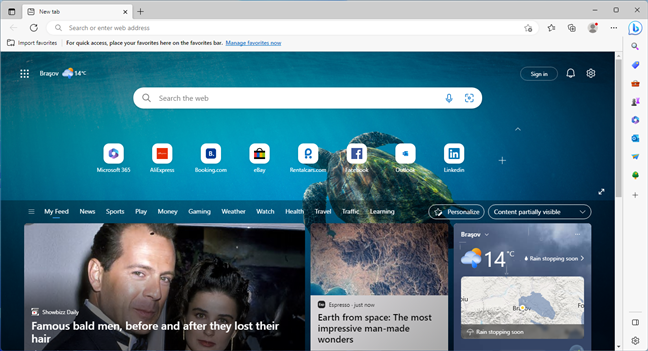
Edge, which is Microsoft’s replacement for the old Internet Explorer, started by using a completely new rendering engine when it first launched but ultimately just moved on to using the same Chromium base as Google’s Chrome. This allows it to offer improved speed and compatibility with extensions designed originally for Chrome. In addition, because it’s made by Microsoft, Edge is also the best browser if you want the best level of integration with the company’s services and features, including but not limited to Windows 11 and Windows 10 operating systems, as well as Microsoft 365. The browser also stands out with its detailed privacy settings and additional features, such as vertical tabs, a sidebar, and built-in support for Bing Chat (based on Chat GPT). Although its market share has seen a significant boost lately, it still has a long way to go to seriously compete with Chrome on this front.Mozilla Firefox
Firefox, unfortunately, lost a lot of its momentum during the last couple of years, even if it’s one of the oldest and most iconic web browsers in history. Although its developers and user base are quite dedicated and loyal, it struggles to gain new users and only managed a market share of about seven percent during the last 12 months. Firefox is known for using its own rendering engine (Gecko) that draws the text and images from the websites you visit. It also aims to deliver excellent user control and privacy while offering plenty of personalization features. Among others, it’s worth mentioning that Firefox offers support for themes and tab groups, it has picture-in-picture mode, and even a VPN service. However, besides losing popularity, Firefox is also lagging behind Chrome and Edge when it comes to the speed and performance offered while browsing the web. But more on that later in this review.Opera
Opera is one of the most customizable web browsers today, and its features easily set it apart from all the others, although it’s based on the same Chromium browser and the same engine (Blink). On top of its built-in ad blocker and VPN service, Opera also comes with a sidebar where you can quickly access your favorite apps and services like WhatsApp, Facebook Messenger, Instagram, and Twitter. While Edge has a sidebar, too, the one in Opera is better when it comes to features, customization options, and how much it enhances your productivity.Brave
Brave is a niche web browser based on the Chromium project with a small market share, but special in its own way. You could say that its main purpose is to offer privacy, first and foremost. That’s something you immediately notice when using this web browser, as it disables, by default, advertisements, and trackers. That, on its own, makes the whole web surfing experience feel faster. To compensate creators, Brave allows users to opt-in to watch privacy-protecting adverts in exchange for Basic Attention Tokens (BAT), a type of cryptocurrency that users can offer to their favorite websites and/or authors as a tip. These tokens can be stored in a wallet built into the Brave browser that can also hold other crypto tokens.Opera GX
Opera GX is another web browser based on the open-source Chromium project, but created specifically for gamers. It comes with all the bells and whistles of the standard Opera browser but adds gamer-oriented features such as CPU and RAM limiters, Twitch connectivity, simple access to gaming news, and a whole range of mods and themes to customize the way it looks and sounds. As far as I know, no other browsers provide similar tools and customization possibilities.Vivaldi
Yet another browser based on the free and open-source Chromium project, Vivaldi is what you might call the ultimate customization browser. As far as I can tell, this is the browser with the most tools, settings, and options available for personalization, which makes it unique among other browsers. Considering how many options you get for changing everything from colors to fonts, tabs, panels, menus, shortcuts, mouse gestures, and keyboard commands, it’s very likely that there aren’t two users out there with identical-looking Vivaldi browsers.What’s the fastest browser of 2023?
Answering what is the best and the fastest web browser without further investigation is tough, as each browser has its strengths and weaknesses. For instance, some may be faster at loading web pages, some can be faster at running scripts, and some are faster at rendering graphics. So, the best way to determine which browser is the fastest is to benchmark them all. Furthermore, instead of running just one, I decided to run all three benchmarks offered by browserbench.org:- JetStream 2: A benchmark suite for JavaScript and WebAssembly that advertises itself as being focused on the most advanced web applications. It rewards browsers that start up quickly, execute code quickly, and run smoothly.
- MotionMark: A graphics benchmark that measures a browser’s capability to animate complex scenes at a target frame rate.
- Speedometer: A browser benchmark that measures the responsiveness of web applications. It uses demo web applications to simulate user actions, such as adding to-do items.
- Motherboard: ASUS Prime X670E-Pro WiFi
- Processor: AMD Ryzen 9 7900X
- CPU cooler: Cooler Master MasterLiquid ML360R RGB
- Memory: Kingston Fury Beast RGB DDR5-6000 32GB
- Graphics Card: AMD Radeon RX 7900 XT
- Storage: Kingston KC3000 NVMe PCIe 4.0 SSD (2TB)
- Monitor: ASUS ROG Strix XG32UQ
- Power Supply Unit: ASUS ROG Thor 850W Platinum
- Operating System: Windows 11 Pro version 22H2
JetStream 2
The first benchmark I ran was JetStream 2. Results in this benchmark suite tell you how fast browsers are at running scripts and performing advanced tasks. A higher score means that your browser is going to be faster and perform better at loading and rendering complex web pages with many elements on them. In my tests with Jet Stream 2, there were three winners: Chrome, Opera, and Opera GX. Their results were almost identical, with a tiny difference of just one point between them, which can be safely considered within the margin of error. The second place was also shared by three browsers: Microsoft Edge, Vivaldi, and Brave. Again, their results were identical or very close. Mozilla Firefox is the web browser that lost this competition, managing a poor result compared to the others. If you set Firefox’s results and Chrome’s or Opera’s side by side, you’ll see that the latter browsers offer a performance increase of about 65%, which is huge!MotionMark
The MotionMark benchmark tests browser graphics performance by drawing multiple rendering elements. These elements could be SVG nodes, HTML elements with CSS styles, or series of canvas operations. The effects of the tests aim to reflect techniques commonly used on the web, stressing the graphics system rather than JavaScript. A higher score in this benchmark means the web browser is better at rendering visuals on webpages than browsers with lower scores. The uncontested winner in MotionMark was Google Chrome, far ahead of all the other browsers. The surprise here was that Brave easily took second place, ahead of other browsers with a larger market share like Microsoft Edge or Opera. Edge was third by a small margin, while Opera GX, Opera, and Vivaldi managed similar results and took fourth place on the ladder. Unfortunately, or even shamefully, I’d say, Mozilla Firefox was the slowest browser in this test too. Its score is roughly half that of Chrome, which is quite telling.Speedometer
The third benchmark, Speedometer, is designed to test a browser’s responsiveness in web apps by timing simulated user interactions. Among the user tasks it simulates, there are actions for adding, completing, and removing to-do items. In doing so, the benchmark calculates a score that shows you how fast a browser is on websites such as Facebook or Twitter, which by their nature involve a lot of user interaction. In Speedometer, Chrome won again. Next came Opera, Opera GX, Vivaldi, and Microsoft Edge, all with pretty similar results and not far behind Chrome. The losers were Brave and, as you might have expected after seeing the previous charts, Mozilla Firefox.How do web browsers compare in terms of RAM utilization?
Another good indicator of performance is memory consumption. After all, sometimes it may not matter if a web browser is fast at rendering web pages if it hogs your computer by requiring too much RAM to do it. In order to get an idea of what happens with the RAM when using the tested browsers, I devised a simple test: I took the browsers compared earlier and opened five tabs in each of them, loading the same websites: Digital Citizen, Facebook, Twitter, Amazon, and Wikipedia. Then, I used Windows 11’s Task Manager to see how many MB of RAM each browser was using. These are the results:
Discussion (9)
That’s a load of bs,
made-up tests to measure made-up concepts of speed,
you won’t notice the difference between 0.001 sec and 0.0015 sec it takes to do something on the page but you will notice that the damn Chrome takes half a minute to load while firefox takes just few sec to start
The browser startup time is one metric, web browsing performance is another. However, we will keep your feedback in mind when redoing our tests in 2024. Thanks for sharing your feedback!
Speed and memory usage are not the only criteria. What is very important IMHO and only revealed indirectly in this article is that they all use the chromium display engine, except Firefox, which uses Gecko. Google has been taking chromium in an even more privacy unfriendly direction with things such as hyperlink auditing and manifest v3. Now if Firefox was completely competed out of the market, then google would be free to implement even more surveillance.
Of course some people would not care, and others would say that you have no privacy on the net anyway. I don’t agree; there are degrees of more or less privacy, and giving google a completely free hand would not be a good thing.
That’s a solid perspective. Thanks for sharing it.
Overall an interesting & informative article, it has inspired me.
My results for Opera 99 vs 100 (aka the new’Opera One’), vs Firefox 114.0.2. Running Win 10 22H2 with Intel I7-3770, DDR4 16GB ram, 250 SATA3 SSD and GTX 1050ti are:
Jetstream2. 121.33 vs 129.89 vs 76.13.
MotionMark v1.0. 588.86 vs 652.05 vs 496.
Speedometer v2.1. 104 vs 107 vs 109.
The ram usage with 3 tabs open are Opera 99 1206mb, Opera 100 802mb and FF 104 890mb.
The new Opera One browser gives a nice MotionMark graphics test increase and surprisingly a 1/3rd reduction in ram usage.
Of cause running a system that is not up to the high end spec in the above article gives about 1/3rd the performance.
FireFox on my system is indeed not as fast as stated.
Yes there are faster browsers then, but looks like a better spec computer will give a much faster browser. An AMD Ryzen 9 7900X running even Firefox we will beat a lesser spec system such as mine running Opera and likely Chrome as well.
Can the browser actual versions be added to the above article please, to give it more accuracy for current and future reference. And maybe run the same test with a lesser spec computer, more like the average spec, adding that for comparison.
PS, The Speedometer test outfit should give a WARNING as to the photosensitivity of viewing their test. It could cause a seizure!.
I noticed the tab needs to be the only one in view to run, viewing another tab freezes the test. So if run best to leave the room.
Opera is a decent enough browser for me, it is what folks ‘get on with’ what matters, what they are comfortable with.
Now with such a big reduction in ram usage by Opera One, 1206mb down to 802mb, (with 8 Opera extensions running), more than happy with it, very surprised.
Noticed there are just 13 instances of Opera listed in Task Manager in Opera 100 compared to 26 with Opera 99. Could be that then.
Opera are not even publicising this better ram usage achievement or the speed increases either.
If Opera One was not used in the above article, (Test could have been conducted a while before article was published, we don’t know), I bet now it will give Chrome a better run for the money.
Detailing what the exact versions are will help.
Opera One was not included in this test. Thank you for your feedback!
Why isn’t there Safari? In my opinion it is the best browser in every way. It’s certainly the best for web pages loading and rendering speed.
Is there a Safari for Windows? From my knowledge, it works on a Mac, and other Apple products, not Windows.
Also, Safari isn’t the fastest browser for Mac. Chrome is. See some benchmarks here: https://www.makeuseof.com/fastest-browser-on-a-mac/