



In 2017, Microsoft started to offer a new line of subscription services called Microsoft 365. At the same time, it also had Office 365 subscription plans available. However, later on, the company decided to abandon the Office 365 naming and only keep the Microsoft 365 branding. What is Microsoft 365, and how is it different from Office 365? What do you use Microsoft 365 for? In this article, we’re going to answer these questions, so if you’re curious to find out more about Microsoft 365, read on:
 Microsoft 365 is Office 365 plus added benefits
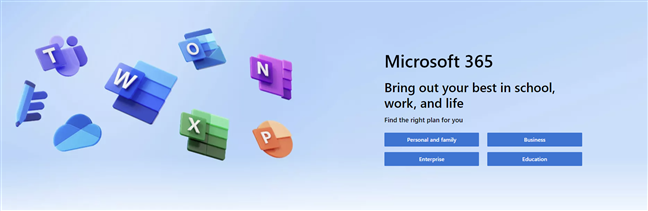
There are different plans for Microsoft 365 that you can subscribe to, depending on what software and services you need, as well as for how many users and devices. They cover all audiences, from personal and home users to small to mid-size businesses and large enterprises.
Microsoft 365 is Office 365 plus added benefits
There are different plans for Microsoft 365 that you can subscribe to, depending on what software and services you need, as well as for how many users and devices. They cover all audiences, from personal and home users to small to mid-size businesses and large enterprises.
 Microsoft 365 for home
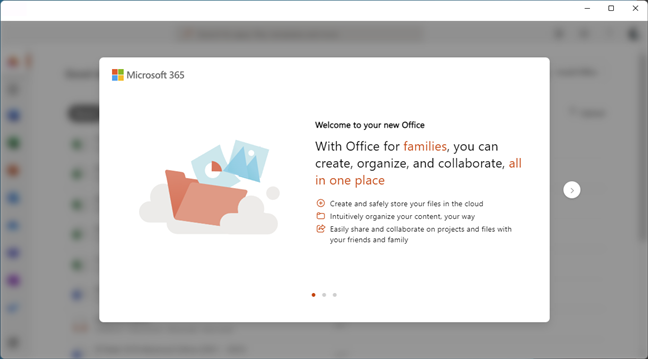
All the Office apps included are permanently updated and receive the newest features available for as long as you hold a valid subscription. Also, to buy and use Microsoft 365, you must have a Microsoft account (for home users), a school account (for educational institutions), or a work account (for business users). You need it to log in and download the apps, as well as to access the other services bundled with Microsoft 365.
Microsoft 365 for home
All the Office apps included are permanently updated and receive the newest features available for as long as you hold a valid subscription. Also, to buy and use Microsoft 365, you must have a Microsoft account (for home users), a school account (for educational institutions), or a work account (for business users). You need it to log in and download the apps, as well as to access the other services bundled with Microsoft 365.
 Microsoft 365 Family and Personal
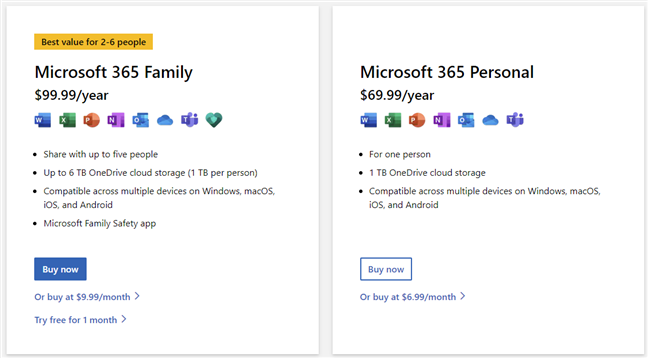
Microsoft 365 Family is a monthly or annual subscription plan for up to 6 users and includes Word, Excel, PowerPoint, OneNote, Outlook, OneDrive, Teams, and the Microsoft Family Safety app. In addition, each of the users that are part of the Microsoft 365 Family subscription gets 1 TB of cloud storage space in OneDrive. You can use the apps and services on multiple PCs, Macs, tablets, and smartphones, that run on Windows, macOS, iOS, or Android. When we published this article, a Microsoft 365 Family subscription was $99.99 per year or $9.99 per month.
Microsoft 365 Personal includes all the apps and services found in the Microsoft 365 Family plan, except for the Microsoft Family Safety app, and it’s designed for only one user. Microsoft 365 Personal costs $69.99 per year or $6.99 per month.
For more details on the home plans, visit this webpage: Microsoft 365 for home.
Microsoft 365 Family and Personal
Microsoft 365 Family is a monthly or annual subscription plan for up to 6 users and includes Word, Excel, PowerPoint, OneNote, Outlook, OneDrive, Teams, and the Microsoft Family Safety app. In addition, each of the users that are part of the Microsoft 365 Family subscription gets 1 TB of cloud storage space in OneDrive. You can use the apps and services on multiple PCs, Macs, tablets, and smartphones, that run on Windows, macOS, iOS, or Android. When we published this article, a Microsoft 365 Family subscription was $99.99 per year or $9.99 per month.
Microsoft 365 Personal includes all the apps and services found in the Microsoft 365 Family plan, except for the Microsoft Family Safety app, and it’s designed for only one user. Microsoft 365 Personal costs $69.99 per year or $6.99 per month.
For more details on the home plans, visit this webpage: Microsoft 365 for home.
 Microsoft 365 for business
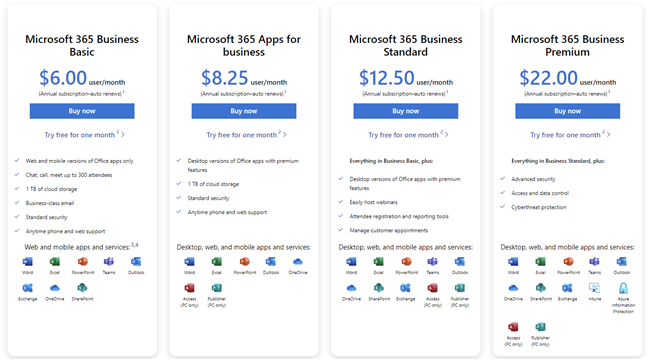
Microsoft 365 Business Basic (formerly known as Office 365 Business Essentials) is a subscription plan that includes the following web and mobile apps and services: Word, Excel, PowerPoint, Teams (up to 300 attendees to a chat, call, or meet up), Outlook, Exchange, OneDrive (1 TB of cloud storage), and SharePoint. This plan doesn’t include the Office desktop apps, and the price for each user is $6.00 per month.
Microsoft 365 Apps for business (formerly known as Office 365 Business) offers your employees these desktop, web, and mobile services: Word, Excel, PowerPoint, Outlook, OneDrive (1 TB of cloud storage), Access, and Publisher. The price per user is $8.25 per month.
Microsoft 365 Business Standard (formerly known as Office 365 Business Premium) includes everything in Business Basic, plus desktop versions of the Office apps, webinars hosting tools, attendee registration & reporting tools, and easy ways of managing customer appointments. The price for Microsoft 365 Business Standard is $12.50 per user/month.
Microsoft 365 Business Premium (formerly known as Microsoft 365 Business) has all the apps and services included in Business Standard but also comes with advanced security, access and data control, and cyber threat protection.
You can read more about everything offered here: Microsoft 365 for business.
Microsoft 365 for business
Microsoft 365 Business Basic (formerly known as Office 365 Business Essentials) is a subscription plan that includes the following web and mobile apps and services: Word, Excel, PowerPoint, Teams (up to 300 attendees to a chat, call, or meet up), Outlook, Exchange, OneDrive (1 TB of cloud storage), and SharePoint. This plan doesn’t include the Office desktop apps, and the price for each user is $6.00 per month.
Microsoft 365 Apps for business (formerly known as Office 365 Business) offers your employees these desktop, web, and mobile services: Word, Excel, PowerPoint, Outlook, OneDrive (1 TB of cloud storage), Access, and Publisher. The price per user is $8.25 per month.
Microsoft 365 Business Standard (formerly known as Office 365 Business Premium) includes everything in Business Basic, plus desktop versions of the Office apps, webinars hosting tools, attendee registration & reporting tools, and easy ways of managing customer appointments. The price for Microsoft 365 Business Standard is $12.50 per user/month.
Microsoft 365 Business Premium (formerly known as Microsoft 365 Business) has all the apps and services included in Business Standard but also comes with advanced security, access and data control, and cyber threat protection.
You can read more about everything offered here: Microsoft 365 for business.

 Microsoft 365 for enterprise, government, and schools
There are many different plans available for each, and everything is highly customizable in terms of apps and services included so that your company, institution, or school can choose in detail what it needs. Accordingly, the price per user varies and is likely negotiable. Here’s where to contact Microsoft Sales for further information: Microsoft 365 team.
Microsoft 365 for enterprise, government, and schools
There are many different plans available for each, and everything is highly customizable in terms of apps and services included so that your company, institution, or school can choose in detail what it needs. Accordingly, the price per user varies and is likely negotiable. Here’s where to contact Microsoft Sales for further information: Microsoft 365 team.
What is Microsoft 365 (formerly known as Office 365)?
Microsoft 365 is the (relatively) new name of Microsoft’s Office 365 subscription-based service. It includes widely popular applications such as Word, Excel, and PowerPoint, as well as cloud services like OneDrive or communication tools like Microsoft Teams. The switch from the old naming of Office 365 to the new Microsoft 365 took place in April 2020.Microsoft 365 plans and pricing
When writing this article, Microsoft offers three different categories of Microsoft 365 subscriptions:Microsoft 365 for home
Home users can subscribe to Microsoft 365 Family or Microsoft 365 Personal:Microsoft 365 for business
There are four different plans for small and mid-sized businesses: Microsoft 365 Business Basic, Microsoft 365 Apps for business, Microsoft 365 Business Standard, and Microsoft 365 Business Premium.Microsoft 365 for enterprise, government, and schools
Microsoft 365 Enterprise and Microsoft 365 Government are the company’s offers for large companies and institutions, usually with over 300 users. Similarly, Microsoft 365 Education for Schools is addressed to schools and universities that have a lot of teachers and students.


Discussion (2)
I would like to use my computer for large downloads and processing which will take days to run, or even weeks. So far with my new laptop and Windows 10 , I have not had any large downloads successfully completed. Last time it was windows update wanting to restart my computer , and a popup stopped the download? I have no idea why as the download was aborted with this, and I decided to allow Windows update to do an update..only there was nothing there?Interruptions have happend for 5 days now. I really do not want any program that updates itself. If I could control when I would like to do updates, as I could with Windows updates in windows 7, I could use this computer. Why would I want to be interuppted for an Office update? I like the storage though I would be concerned it would want to sync or update too…
Hi Codrut,
As a geek computer user since Windows 95 I have only paid for one Microsoft Office program with each released Windows O/S systems.
To pay an annual fee is a rort, and not surprising many of my clients are using Libre or Open Office.
I am using Office 10 and will eventually continue using the Ashampoo Office program.
Thanks for your continued great articles,
Kind Regards,
JohnD in Australia.