



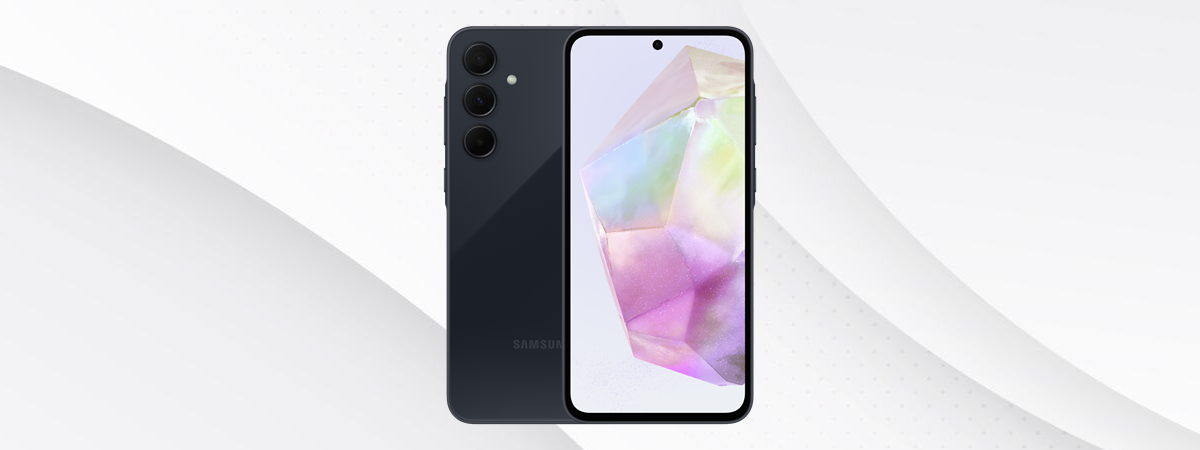
In this review, I’m going to tell you about the Samsung Galaxy A35, the company’s latest affordable mid-ranger that has to distinguish itself from the huge variety of offerings from other manufacturers. Some of its competitors boast better hardware specifications at comparable prices. However, Samsung’s Galaxy A35 has some tricks up its sleeve, like an attractive design and a solid camera setup that might make you consider it as the ideal choice. Without further ado, here’s what you should know about the Samsung Galaxy A35:
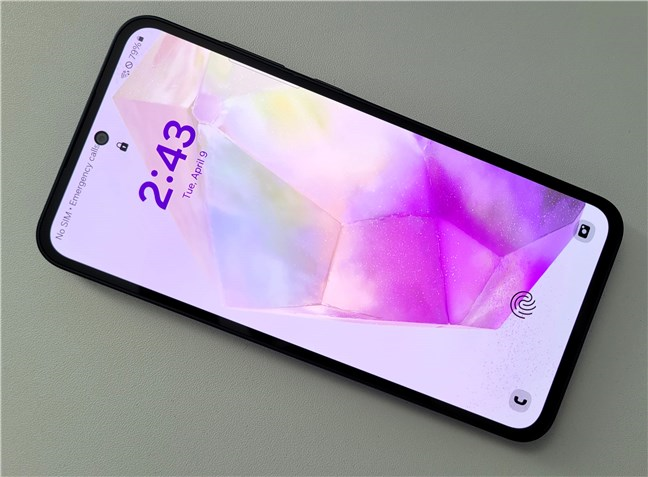
 The Samsung Galaxy A35 is large and heavy
Similar to the Galaxy A55, the smartphone’s back is covered by glass, but its frame is made of plastic instead of aluminum.
With a minimalist appearance that only includes the cameras and the Samsung branding, the back looks good but is prone to collecting smudges and fingerprints. You may get around this issue with a cover, which would also protect all that glass. 🙂
The Samsung Galaxy A35 is large and heavy
Similar to the Galaxy A55, the smartphone’s back is covered by glass, but its frame is made of plastic instead of aluminum.
With a minimalist appearance that only includes the cameras and the Samsung branding, the back looks good but is prone to collecting smudges and fingerprints. You may get around this issue with a cover, which would also protect all that glass. 🙂
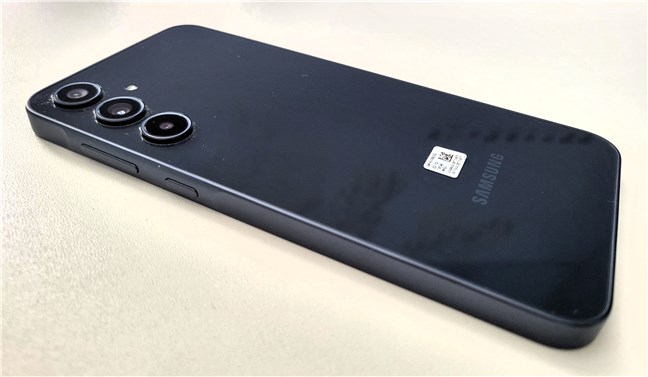
 The back of the Samsung Galaxy A35 is covered by glass
The Galaxy A35 sample I received from Samsung was in Awesome Navy. The smartphone is also available in Awesome Iceblue, Awesome Lilac, and Awesome Lemon. Younger audiences are likely to prefer these colors. 🙂
The back of the Samsung Galaxy A35 is covered by glass
The Galaxy A35 sample I received from Samsung was in Awesome Navy. The smartphone is also available in Awesome Iceblue, Awesome Lilac, and Awesome Lemon. Younger audiences are likely to prefer these colors. 🙂
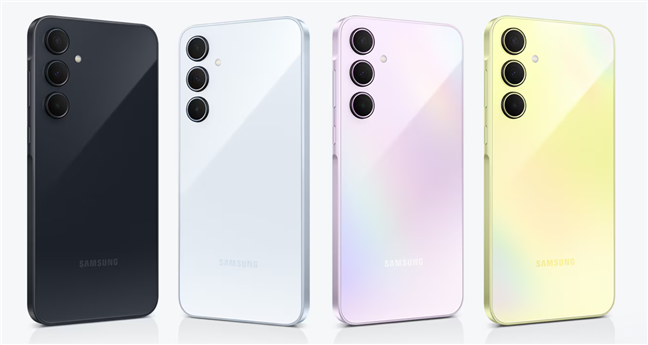
 Color options available for the Galaxy A35
On the front, a sheet of Corning Gorilla Glass Victus+ protects the generous 6.6-inch Super AMOLED screen of the Galaxy A35. The screen’s surface is broken only by a tiny hole in the top-center area where the selfie camera resides. Above it, an extremely thin cutout in the phone’s frame holds the ear speaker.
Color options available for the Galaxy A35
On the front, a sheet of Corning Gorilla Glass Victus+ protects the generous 6.6-inch Super AMOLED screen of the Galaxy A35. The screen’s surface is broken only by a tiny hole in the top-center area where the selfie camera resides. Above it, an extremely thin cutout in the phone’s frame holds the ear speaker.
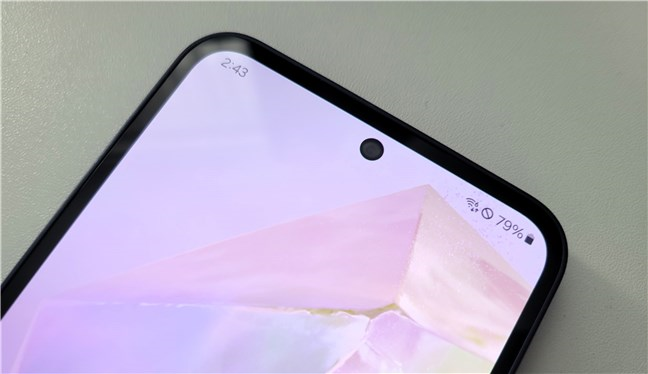
 The selfie camera on the Samsung Galaxy A35
Moving on to the sides, the top edge of the Galaxy A35 holds the SIM card tray and one of the smartphone’s microphones.
The selfie camera on the Samsung Galaxy A35
Moving on to the sides, the top edge of the Galaxy A35 holds the SIM card tray and one of the smartphone’s microphones.
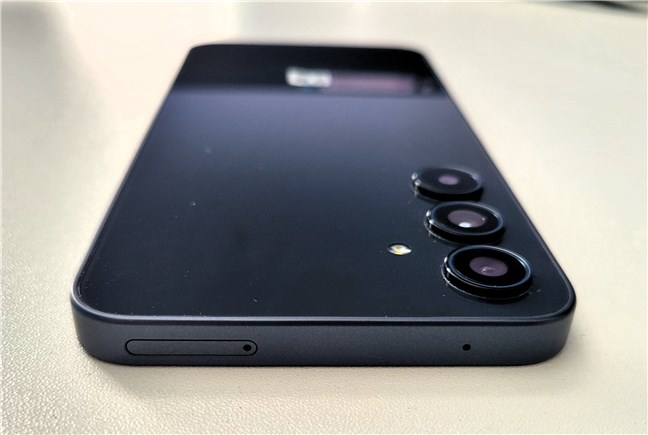
 The top edge of the Samsung Galaxy A35
On the left edge, there are no elements whatsoever, while on the right, you can find the usual buttons: the Volume rocker and the Power buttons.
The top edge of the Samsung Galaxy A35
On the left edge, there are no elements whatsoever, while on the right, you can find the usual buttons: the Volume rocker and the Power buttons.
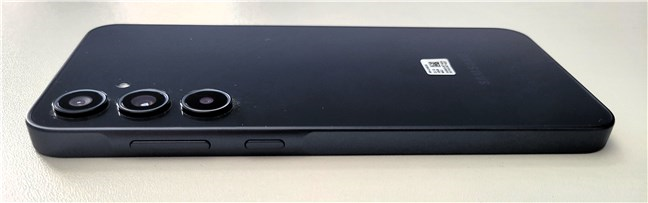
 The right edge of the Samsung Galaxy A35
The bottom edge is more crowded; it’s home to the USB-C port, the main loudspeaker, and two other microphones.
The right edge of the Samsung Galaxy A35
The bottom edge is more crowded; it’s home to the USB-C port, the main loudspeaker, and two other microphones.
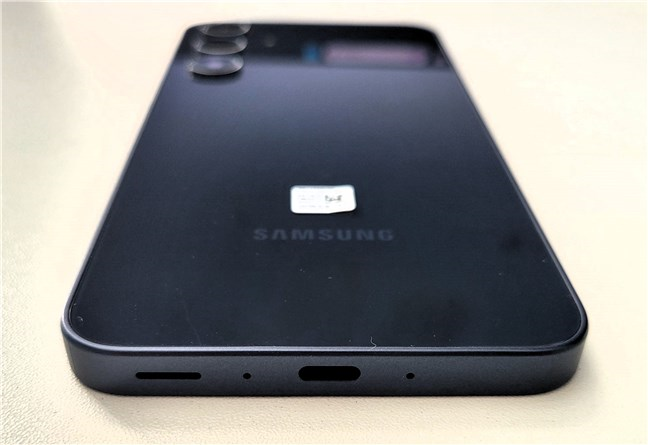
 The bottom edge of the Samsung Galaxy A35
The Samsung Galaxy A35 is protected against dust and water (1-meter depth, for a maximum of 30 minutes), as evidenced by its IP67 certification.
The Samsung Galaxy A35 is built and looks extremely similar to the Galaxy A55. It’s a big phone with glass on both sides. However, its frame is made of plastic instead of aluminum, likely to keep costs down.
The bottom edge of the Samsung Galaxy A35
The Samsung Galaxy A35 is protected against dust and water (1-meter depth, for a maximum of 30 minutes), as evidenced by its IP67 certification.
The Samsung Galaxy A35 is built and looks extremely similar to the Galaxy A55. It’s a big phone with glass on both sides. However, its frame is made of plastic instead of aluminum, likely to keep costs down.
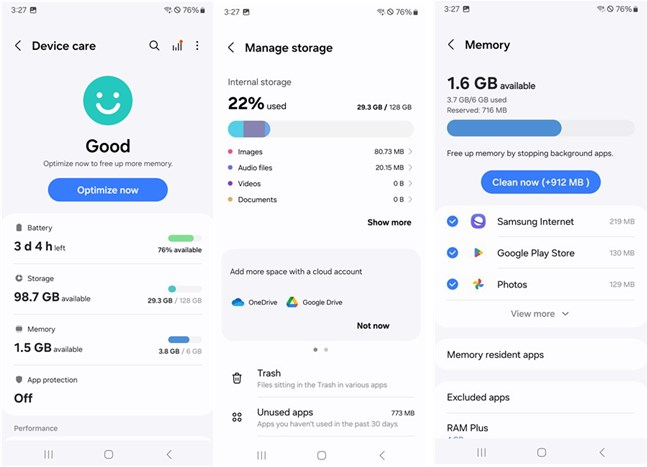
 Storage and memory details
The display on the Samsung Galaxy A35 is almost identical to the one on the pricier Galaxy A55 model. It’s based on a 6.6” Super AMOLED panel that offers vivid colors, a maximum refresh rate of 120 Hz, and a brightness that can reach 1000 nits. Its 1080 by 2340 pixels resolution gives you a 390 ppi density (pixels per inch), which means fonts and edges are smooth and clear both in text and images. The only obvious difference between this screen and the one on the Galaxy A55 is the lack of HDR support for the former.
Storage and memory details
The display on the Samsung Galaxy A35 is almost identical to the one on the pricier Galaxy A55 model. It’s based on a 6.6” Super AMOLED panel that offers vivid colors, a maximum refresh rate of 120 Hz, and a brightness that can reach 1000 nits. Its 1080 by 2340 pixels resolution gives you a 390 ppi density (pixels per inch), which means fonts and edges are smooth and clear both in text and images. The only obvious difference between this screen and the one on the Galaxy A55 is the lack of HDR support for the former.
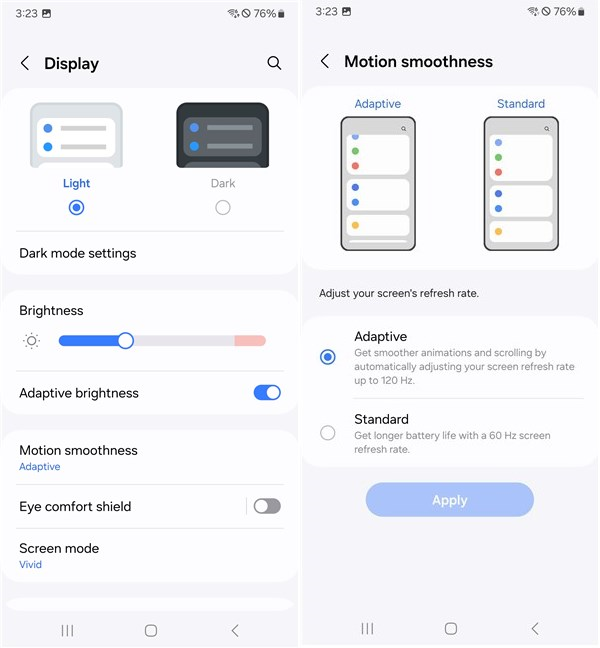
 The display has a maximum refresh rate of 120 Hz
The camera setup on the Samsung Galaxy A35 includes:
The display has a maximum refresh rate of 120 Hz
The camera setup on the Samsung Galaxy A35 includes:
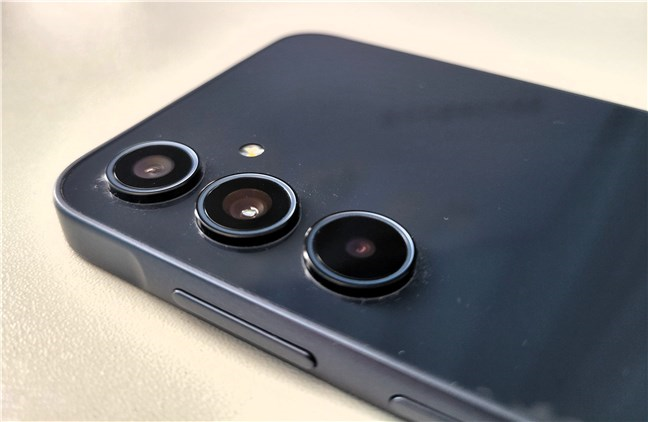
 The rear cameras on the Samsung Galaxy A35
Regarding connectivity and sensors, the Samsung Galaxy A35 is a dual-SIM phone with options for nano-SIM plus eSIM and supports 5G networks. We also get a microSD card slot for extending the storage. 🙂
The rear cameras on the Samsung Galaxy A35
Regarding connectivity and sensors, the Samsung Galaxy A35 is a dual-SIM phone with options for nano-SIM plus eSIM and supports 5G networks. We also get a microSD card slot for extending the storage. 🙂
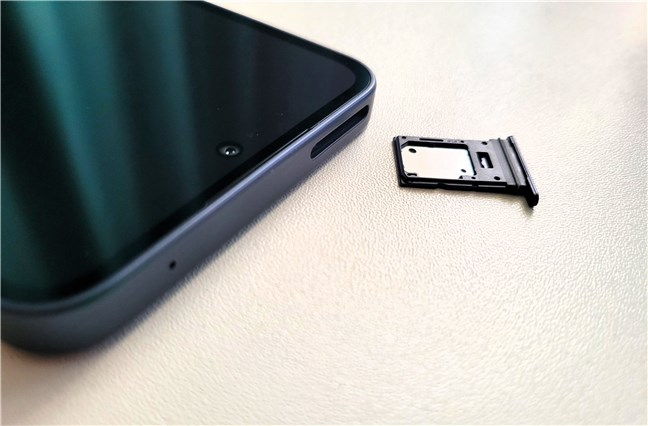
 The Samsung Galaxy A35 is a dual SIM phone
It’s also equipped with Wi-Fi 6 and Bluetooth 5.3 chips, and depending on your region (such as the US or European Union), it may include an NFC chip. Additionally, the smartphone features common sensors like GPS, fingerprint (optical, under the display), accelerometer, gyro, virtual proximity, and compass.
The Samsung Galaxy A35 has a large battery capacity of 5000 milliampere-hours (mAh), ensuring it lasts for at least a full day, if not two, before recharging. It supports 25-watt wired fast charging, but it’s not compatible with wireless charging.
The Samsung Galaxy A35 is a dual SIM phone
It’s also equipped with Wi-Fi 6 and Bluetooth 5.3 chips, and depending on your region (such as the US or European Union), it may include an NFC chip. Additionally, the smartphone features common sensors like GPS, fingerprint (optical, under the display), accelerometer, gyro, virtual proximity, and compass.
The Samsung Galaxy A35 has a large battery capacity of 5000 milliampere-hours (mAh), ensuring it lasts for at least a full day, if not two, before recharging. It supports 25-watt wired fast charging, but it’s not compatible with wireless charging.
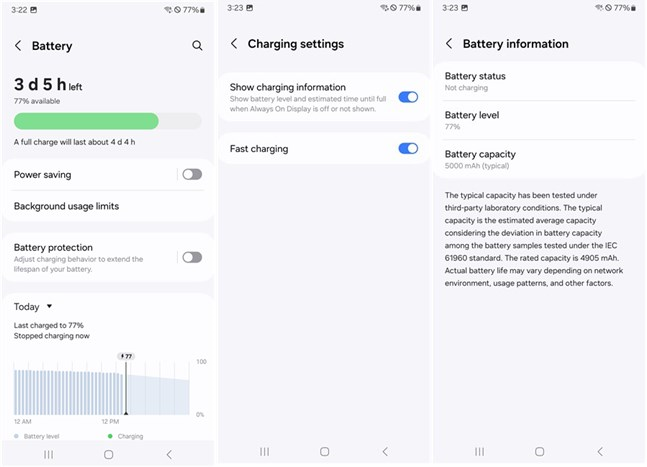 Battery details and fast charging settings
For the complete list of technical specifications, check the official product page here: Samsung Galaxy A35.
Flip the page to see what using the Samsung Galaxy A35 is like, what its cameras can do, and how it fares in benchmarks.
Battery details and fast charging settings
For the complete list of technical specifications, check the official product page here: Samsung Galaxy A35.
Flip the page to see what using the Samsung Galaxy A35 is like, what its cameras can do, and how it fares in benchmarks.
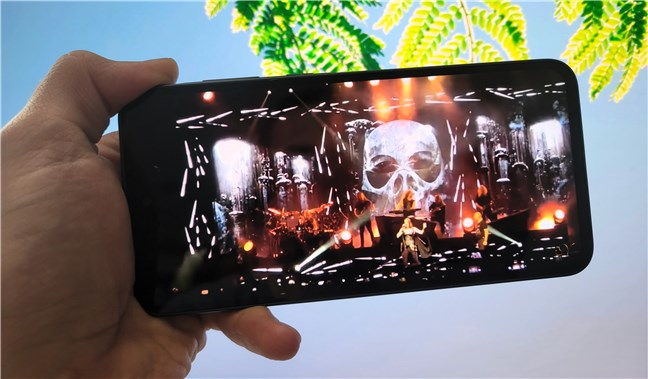
 Watching videos is a pleasant experience
In most situations, the phone’s biometric authentication via the fingerprint sensor and face recognition were reliable. The fingerprint sensor sometimes had trouble identifying my prints, but nothing bad enough to consider it a significant fault.
Watching videos is a pleasant experience
In most situations, the phone’s biometric authentication via the fingerprint sensor and face recognition were reliable. The fingerprint sensor sometimes had trouble identifying my prints, but nothing bad enough to consider it a significant fault.
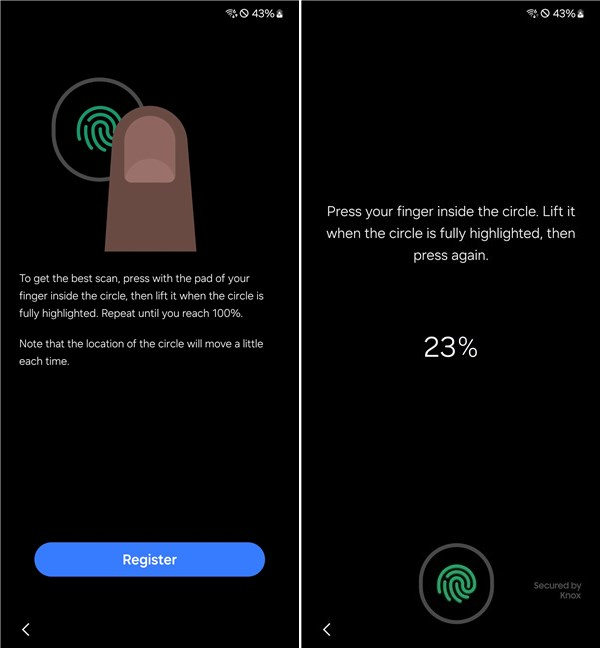 The fingerprint reader misses at times
Though I’ve mentioned this before, it’s worth noting once more that the Samsung Galaxy A35 is a large phone. While I found it relatively easy to navigate and access all the buttons with only one hand, those with smaller hands or shorter fingers might have issues with that.
A standout feature of the Samsung Galaxy A35 is its impressive screen. With vibrant colors and smooth animations, it also manages to be visible in bright outdoor conditions.
The fingerprint reader misses at times
Though I’ve mentioned this before, it’s worth noting once more that the Samsung Galaxy A35 is a large phone. While I found it relatively easy to navigate and access all the buttons with only one hand, those with smaller hands or shorter fingers might have issues with that.
A standout feature of the Samsung Galaxy A35 is its impressive screen. With vibrant colors and smooth animations, it also manages to be visible in bright outdoor conditions.
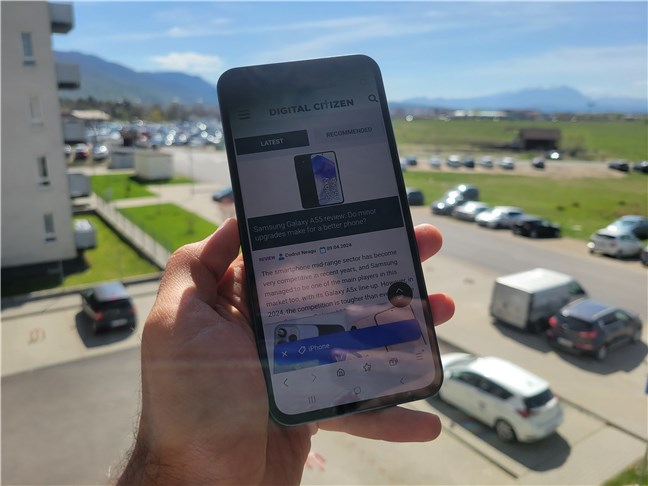
 The screen is bright and readable even in direct sunlight
In terms of performance, the built-in chipset handles everyday tasks admirably, delivering a seamless user experience without slowdowns or glitches. Playing demanding games at high framerates or high visual settings, on the other hand, is not something you should expect. The smartphone’s graphics unit is able to run games, but you’ll have to make do with lower graphics settings and frame rates, at least in demanding titles.
The screen is bright and readable even in direct sunlight
In terms of performance, the built-in chipset handles everyday tasks admirably, delivering a seamless user experience without slowdowns or glitches. Playing demanding games at high framerates or high visual settings, on the other hand, is not something you should expect. The smartphone’s graphics unit is able to run games, but you’ll have to make do with lower graphics settings and frame rates, at least in demanding titles.
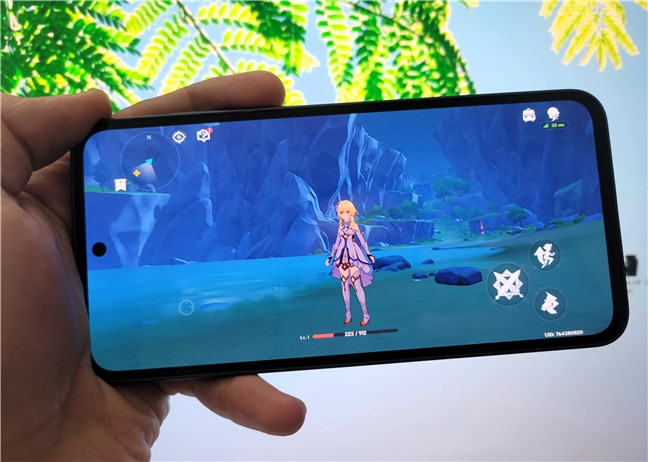
 Playing Genshin Impact on the Samsung Galaxy A35
In terms of battery life, the Samsung Galaxy A35 delivers good performance, lasting up to two days under regular usage conditions. Supporting “fast charging” at 25 watts, the smartphone can reach a 51% charge in just 30 minutes with an original Samsung charger. Note that Samsung doesn’t include a charger in the package. A complete battery recharge takes approximately 85 minutes, which is decent but not as fast as other similarly-priced smartphones.
Playing Genshin Impact on the Samsung Galaxy A35
In terms of battery life, the Samsung Galaxy A35 delivers good performance, lasting up to two days under regular usage conditions. Supporting “fast charging” at 25 watts, the smartphone can reach a 51% charge in just 30 minutes with an original Samsung charger. Note that Samsung doesn’t include a charger in the package. A complete battery recharge takes approximately 85 minutes, which is decent but not as fast as other similarly-priced smartphones.
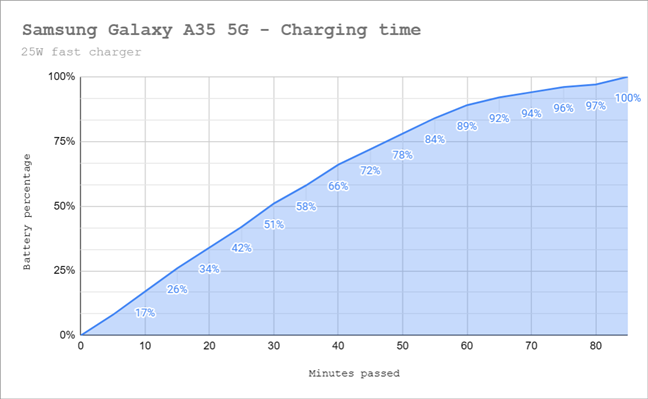
 Battery charging time
Overall, the Samsung Galaxy A35 presents itself as a reliable choice for everyday use. Its display is excellent, its battery is large, and it handles common tasks and apps well. However, it’s not a smartphone made for gamers who want high performance.
Battery charging time
Overall, the Samsung Galaxy A35 presents itself as a reliable choice for everyday use. Its display is excellent, its battery is large, and it handles common tasks and apps well. However, it’s not a smartphone made for gamers who want high performance.
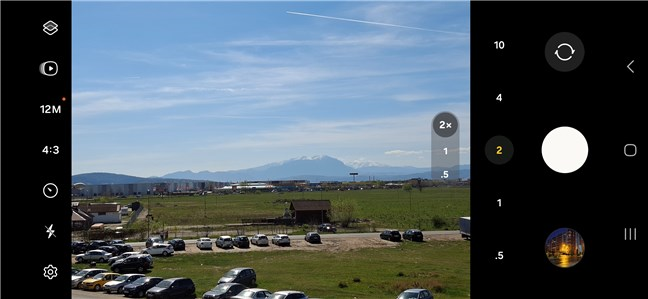
 The Camera app on the Samsung Galaxy A35
During daytime shooting, the Samsung Galaxy A35 produces good photos characterized by crisp details and naturally vibrant colors. Zooming in at 2x, the images look relatively good, too, although I do feel like they’re a bit more soft than standard 1x captures.
The Camera app on the Samsung Galaxy A35
During daytime shooting, the Samsung Galaxy A35 produces good photos characterized by crisp details and naturally vibrant colors. Zooming in at 2x, the images look relatively good, too, although I do feel like they’re a bit more soft than standard 1x captures.
 A photo shot with the Samsung Galaxy A35 in daylight
The ultrawide camera does a relatively good job in daylight, with good contrast and brightness. There’s a bit of color mismatch compared to the main sensor, but it’s not bad.
A photo shot with the Samsung Galaxy A35 in daylight
The ultrawide camera does a relatively good job in daylight, with good contrast and brightness. There’s a bit of color mismatch compared to the main sensor, but it’s not bad.
 A picture captured with the ultrawide camera
Nighttime photography is okay. The photos I shot with the Samsung Galaxy A35 have decent contrast, the colors look natural, and there’s enough detail in them. Some graininess is present in the darker areas, but overall, the results are quite good for a smartphone in this price range.
A picture captured with the ultrawide camera
Nighttime photography is okay. The photos I shot with the Samsung Galaxy A35 have decent contrast, the colors look natural, and there’s enough detail in them. Some graininess is present in the darker areas, but overall, the results are quite good for a smartphone in this price range.
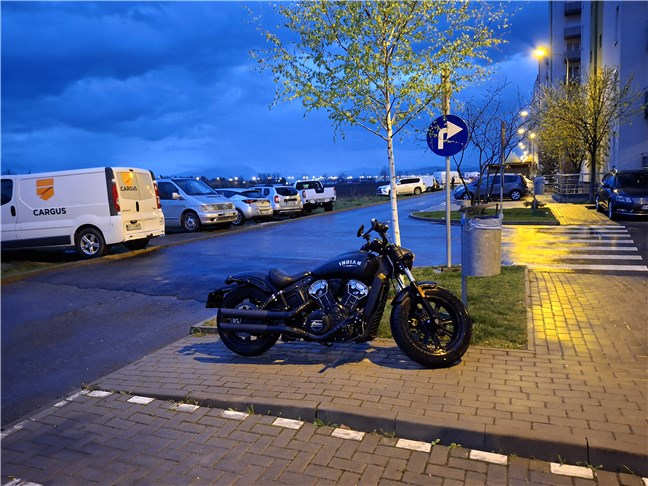 Photograph shot at night
The macro camera has a fixed focus, which means you must be a bit careful about the distance from your subject. The colors are pleasant, and the contrast is good, but in some situations, the edges seem too soft.
Photograph shot at night
The macro camera has a fixed focus, which means you must be a bit careful about the distance from your subject. The colors are pleasant, and the contrast is good, but in some situations, the edges seem too soft.
 A closeup captured with the macro camera
Selfies taken with the front camera of the Samsung Galaxy A35 under good lighting conditions turn out nicely, with enough detail, natural appearance, and accurately rendered skin textures.
A closeup captured with the macro camera
Selfies taken with the front camera of the Samsung Galaxy A35 under good lighting conditions turn out nicely, with enough detail, natural appearance, and accurately rendered skin textures.
 A selfie portrait taken with the Samsung Galaxy A35
For further examples, please check this gallery. It showcases images taken in varying lighting conditions, including daytime and nighttime shots, with and without zoom.
A selfie portrait taken with the Samsung Galaxy A35
For further examples, please check this gallery. It showcases images taken in varying lighting conditions, including daytime and nighttime shots, with and without zoom.
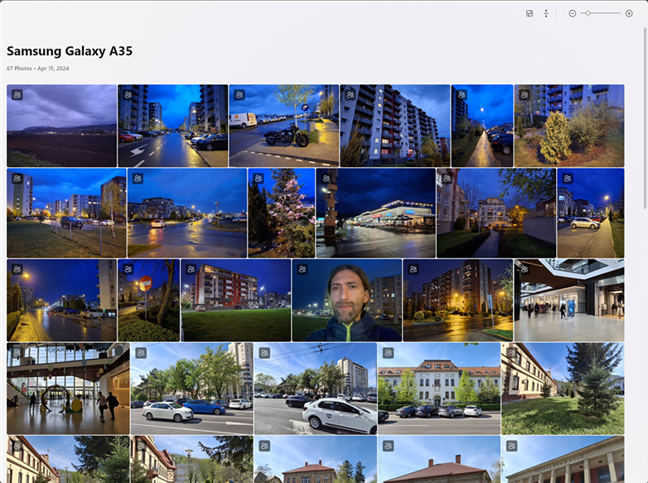
 Sample pictures taken with Samsung Galaxy A35
The Galaxy A35 5G is capable of recording 4K videos using both its primary and front-facing cameras. The videos captured with the main camera have plenty of sharpness and vibrant colors. Here’s a brief clip I recorded using the main camera on this smartphone:
Videos captured in 1080p resolution at 60 frames per second appear even better. Check the sample clip below to get an idea of what to expect:
To conclude, the Samsung Galaxy A35 can shoot photos of good quality, both during the day and at night. While its cameras can’t compare with those of a flagship device, the results are very satisfactory for a smartphone in this price range.
Sample pictures taken with Samsung Galaxy A35
The Galaxy A35 5G is capable of recording 4K videos using both its primary and front-facing cameras. The videos captured with the main camera have plenty of sharpness and vibrant colors. Here’s a brief clip I recorded using the main camera on this smartphone:
Videos captured in 1080p resolution at 60 frames per second appear even better. Check the sample clip below to get an idea of what to expect:
To conclude, the Samsung Galaxy A35 can shoot photos of good quality, both during the day and at night. While its cameras can’t compare with those of a flagship device, the results are very satisfactory for a smartphone in this price range.
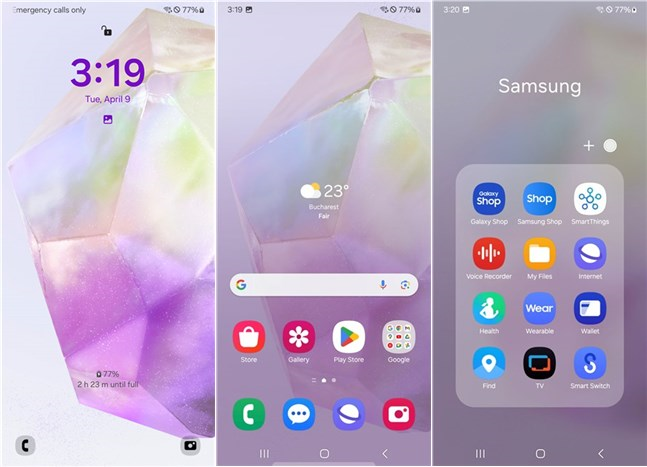 The Samsung Galaxy A35 comes with OneUI 6.1 and many apps
In addition to the standard Google apps integrated into Android and a few popular Microsoft apps (OneDrive, LinkedIn, Office, Outlook), the Galaxy A35 5G phone is preloaded with a bunch of applications:
The Samsung Galaxy A35 comes with OneUI 6.1 and many apps
In addition to the standard Google apps integrated into Android and a few popular Microsoft apps (OneDrive, LinkedIn, Office, Outlook), the Galaxy A35 5G phone is preloaded with a bunch of applications:
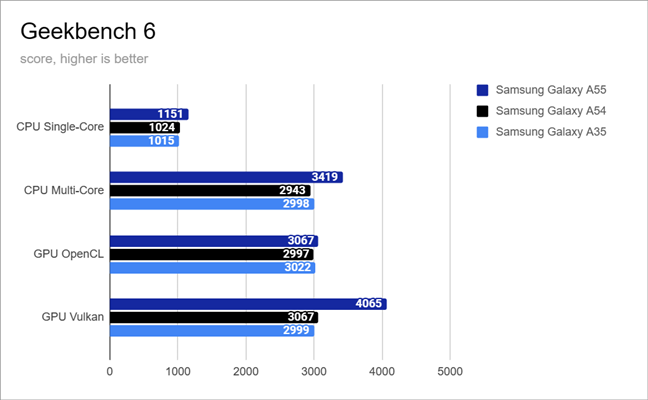
 Benchmark results in Geekbench 6
Geekbench ML is a tool for evaluating smartphones’ performance in machine learning tasks. However, the results I got testing the Samsung Galaxy A35 proved surprising. Traditionally, the GPU assumes the primary role in handling Artificial Intelligence tasks. Nevertheless, if available, AI tasks may be distributed across the CPU, GPU, or NPU (neural processing unit) depending on factors such as app development and operating system optimization. In the case of the Galaxy A35 5G, Geekbench ML produced the following scores: 474 points for the CPU, 342 points for the GPU, and 334 points for the NPU. Notably, the CPU score outperforms both the Galaxy A54 and Galaxy A55 models. While the GPU score aligns closely with that of the A54, it falls considerably short of the Galaxy A55’s performance. Moreover, the NPU score for the Galaxy A35 closely resembles that of the A54 but surpasses that of the Galaxy A55 by a significant margin.
Benchmark results in Geekbench 6
Geekbench ML is a tool for evaluating smartphones’ performance in machine learning tasks. However, the results I got testing the Samsung Galaxy A35 proved surprising. Traditionally, the GPU assumes the primary role in handling Artificial Intelligence tasks. Nevertheless, if available, AI tasks may be distributed across the CPU, GPU, or NPU (neural processing unit) depending on factors such as app development and operating system optimization. In the case of the Galaxy A35 5G, Geekbench ML produced the following scores: 474 points for the CPU, 342 points for the GPU, and 334 points for the NPU. Notably, the CPU score outperforms both the Galaxy A54 and Galaxy A55 models. While the GPU score aligns closely with that of the A54, it falls considerably short of the Galaxy A55’s performance. Moreover, the NPU score for the Galaxy A35 closely resembles that of the A54 but surpasses that of the Galaxy A55 by a significant margin.
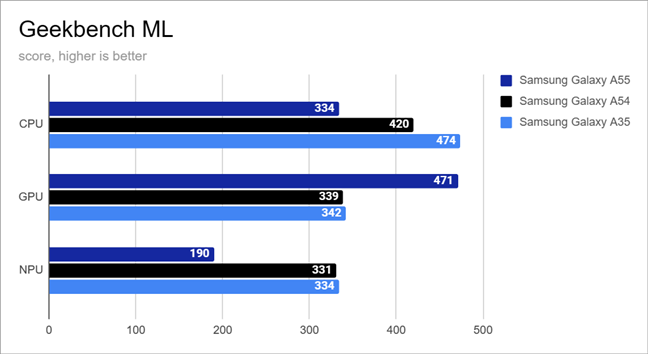
 Benchmark results in Geekbench ML
Continuing, I evaluated the smartphone’s gaming capabilities using 3DMark. Both in the Wild Life and Sling Shot tests, the Samsung Galaxy A35 demonstrated nearly identical performance to the Galaxy A54. However, it notably lagged behind the more powerful Galaxy A55. These findings match my personal gaming experience with the Galaxy A35, showing that while it can handle games adequately at lower visual settings, you shouldn’t expect excellent performance in resource-heavy games.
Benchmark results in Geekbench ML
Continuing, I evaluated the smartphone’s gaming capabilities using 3DMark. Both in the Wild Life and Sling Shot tests, the Samsung Galaxy A35 demonstrated nearly identical performance to the Galaxy A54. However, it notably lagged behind the more powerful Galaxy A55. These findings match my personal gaming experience with the Galaxy A35, showing that while it can handle games adequately at lower visual settings, you shouldn’t expect excellent performance in resource-heavy games.
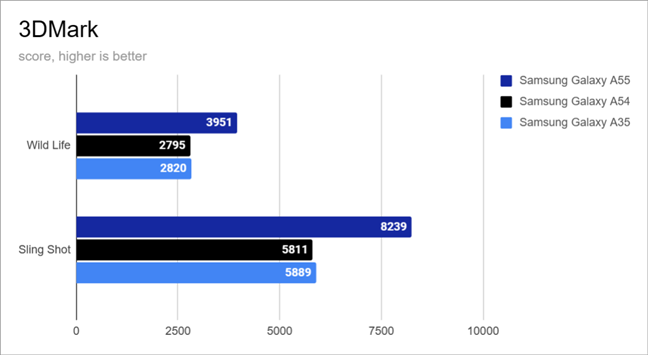
 Benchmark results in 3DMark
Onwards, I used PCMark for Android to assess Samsung’s Galaxy A35 proficiency in handling everyday tasks. In the Work 3.0 performance test, the Galaxy A35 scored 13254 points. This result falls slightly below the score I got with the Galaxy A54 but surpasses that of the Galaxy A55. It’s intriguing to note that the scores of the A35 and A55 are lower compared to the A54. This suggests that the OneUI 6.1 interface may have an impact on performance compared to the OneUI 6.0 found on the Galaxy A54.
Benchmark results in 3DMark
Onwards, I used PCMark for Android to assess Samsung’s Galaxy A35 proficiency in handling everyday tasks. In the Work 3.0 performance test, the Galaxy A35 scored 13254 points. This result falls slightly below the score I got with the Galaxy A54 but surpasses that of the Galaxy A55. It’s intriguing to note that the scores of the A35 and A55 are lower compared to the A54. This suggests that the OneUI 6.1 interface may have an impact on performance compared to the OneUI 6.0 found on the Galaxy A54.
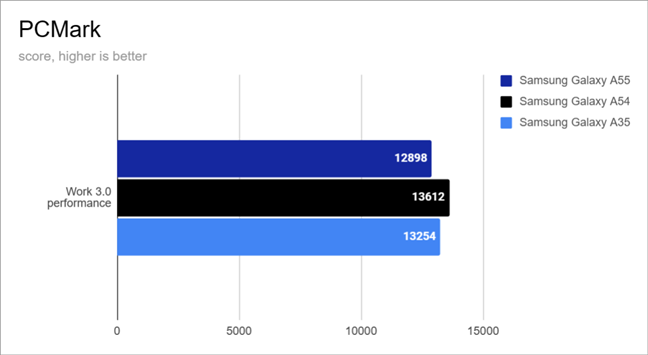 Benchmark results in PCMark
I didn’t measure the 5G mobile performance of the Samsung Galaxy A35. My mobile provider offers low speeds when it comes to 5G coverage. However, I did evaluate its internet speed on my Wi-Fi 6 network using Ookla’s Speedtest. The Galaxy A35 showcased impressive performance, achieving a download speed of 612 Mbps and an upload speed of 539 Mbps. While the download speed is slightly lower compared to other phones, the upload speed remains consistent across all three devices, with negligible variances within the error margin.
Benchmark results in PCMark
I didn’t measure the 5G mobile performance of the Samsung Galaxy A35. My mobile provider offers low speeds when it comes to 5G coverage. However, I did evaluate its internet speed on my Wi-Fi 6 network using Ookla’s Speedtest. The Galaxy A35 showcased impressive performance, achieving a download speed of 612 Mbps and an upload speed of 539 Mbps. While the download speed is slightly lower compared to other phones, the upload speed remains consistent across all three devices, with negligible variances within the error margin.
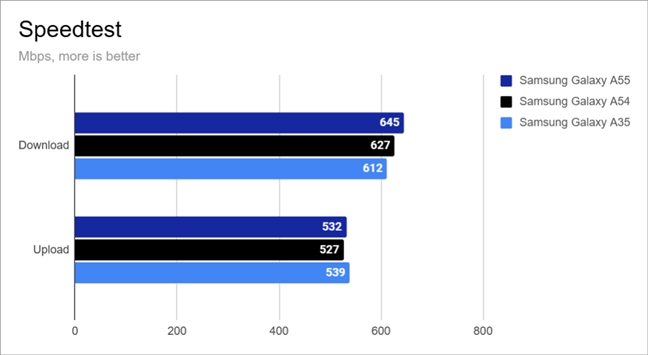 Benchmark results in Speedtest
In the end, I also used PCMark’s Work 3.0 battery life test to check Samsung’s Galaxy A35 autonomy on battery. Before the test, I adjusted the screen brightness to 50 percent. Impressively, the phone remained operational for slightly over 12 hours, surpassing the older Galaxy A54’s runtime by twenty-eight minutes. This proves that the phone can sustain at least a full day of usage, and with lighter usage patterns, you may even extend its battery life to two days.
Benchmark results in Speedtest
In the end, I also used PCMark’s Work 3.0 battery life test to check Samsung’s Galaxy A35 autonomy on battery. Before the test, I adjusted the screen brightness to 50 percent. Impressively, the phone remained operational for slightly over 12 hours, surpassing the older Galaxy A54’s runtime by twenty-eight minutes. This proves that the phone can sustain at least a full day of usage, and with lighter usage patterns, you may even extend its battery life to two days.
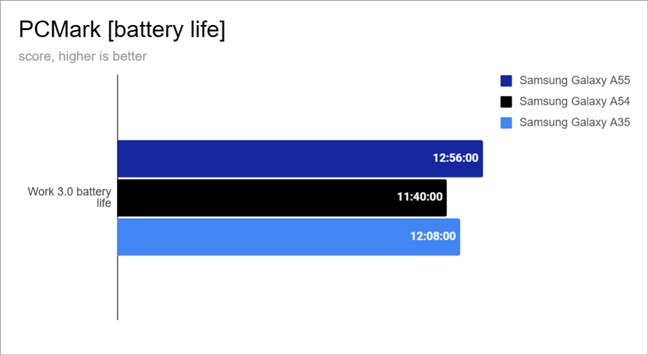 Battery life measured by PCMark
The Samsung Galaxy A35 stands as a sensible mid-range Android device, featuring a chipset that offers good performance for everyday tasks. However, it may not meet your expectations if what you want is an excellent gaming experience.
Battery life measured by PCMark
The Samsung Galaxy A35 stands as a sensible mid-range Android device, featuring a chipset that offers good performance for everyday tasks. However, it may not meet your expectations if what you want is an excellent gaming experience.
Samsung Galaxy A35: Who is it good for?
The Samsung Galaxy A35 is a good choice for:- Those who want an Android smartphone that looks good
- People who are looking for a well-built phone
- Anyone looking for an affordable midrange Android made by Samsung
Pros and cons
The best things about the Samsung Galaxy A35 are:
- Good performance in daily tasks
- Bright AMOLED screen with 120 Hz refresh rate
- Solid camera system
- Good build quality and Gorilla Glass Victus+
- Protected against dust and water with an IP67 certification
- It comes with the latest Android 14 and Samsung One UI 6.1
- Great battery life
- Expandable storage via microSD card
- No charger is included in the box
- Lots of bloatware
- Lack of HDR support
Verdict
The Samsung Galaxy A35 5G impresses with its battery life, appealing aesthetics, excellent display, and competent camera performance, particularly considering its midrange positioning on the Android market. The smartphone’s design is also quite pleasant, and its more youthful colors should attract many people. Nonetheless, there are many alternatives that compete with the Samsung Galaxy A35 within this price bracket, with potentially superior hardware specifications. One of its most important competitors is last year’s Samsung Galaxy A54, which has a slightly better screen and a better selfie camera at a very similar price. However, if you prefer a new device and you’re a Samsung Galaxy fan, the Galaxy A35 is a well-rounded choice.🙂Design and build quality
In terms of size and design, the Samsung Galaxy A35 is almost identical to its bigger brother, the Galaxy A55. It’s large and heavy, measuring 161.7 x 78 x 8.2 mm (or 6.37 x 3.07 x 0.32 inches) in length x width x thickness and weighing 209 grams (7.37 oz).Hardware specifications
Under the hood, the Samsung Galaxy A35 is powered by a Samsung Exynos 1380, which is the same chipset that last year’s Galaxy A54 had. This chipset comes with eight cores, four of which are designed for performance and run at 2.4 GHz, while the other four run at 2.0 GHz and are designed for energy efficiency. Inside the chipset, there’s also a Mali-G68 MP5 graphics unit. In terms of memory and storage, the Galaxy A35 model that I tested had 6 GB of RAM and 128 GB of internal flash storage space. Depending on your needs and budget, you can also get it with more (8 GB) memory or storage (256 GB).- A main wide camera with a 50-megapixel sensor, PDAF (phase detection autofocus), f/1.8 aperture, and OIS (optical stabilization system)
- A 123˚ ultrawide camera with 8 megapixels and an f/2.2 aperture
- A 5-megapixel macro camera with an f/2.4 aperture
- A selfie camera with a 13-megapixel sensor and an f2/2 aperture
The smartphone experience on the Samsung Galaxy A35
Regarding essential phone functions, for as long as I had the Samsung Galaxy A35, it maintained a stable connection to my mobile network, and the signal strength was good. Therefore, phone calls were of good quality, with high volume and clear audio for both me and the persons I talked to. When switching to the loudspeakers, the output was quite powerful, but lower frequencies, or bass tones if you prefer, were rather dull. When watching movies or clips on YouTube, I recommend headphones for a better audio experience.The camera experience on the Samsung Galaxy A35
The camera setup on the Samsung Galaxy A35 has changed a bit compared to the older Galaxy A34. The main camera switched from 48 to 50 megapixels. The others seem to be the same: a 8 MP ultrawide lens, a 5 MP macro, and 13 MP selfie camera on the front. The Camera app on the Samsung Galaxy A35 features the same interface you get on most if not all, Samsung smartphones. It’s simple and easy to use and features all the usual modes such as Photo, Video, Portrait, and Fun, plus additional options like Pro, Panorama, or Hyperlapse located in the More area.OneUI 6.1, Android 14, and bundled apps
Coming out with the One UI 6.1 interface on top of the Android 14 operating system, the Samsung Galaxy A35 offers a user-friendly experience with smooth performance and up-to-date security. However, just like the Galaxy A55, this smartphone lacks the advanced Galaxy AI capabilities seen in the premium Samsung Galaxy S24 series. And also just like the Galaxy A55, the Galaxy A35 will receive operating system updates for a span of four years and security patches for up to five years.- Calculator: A basic app for performing mathematical calculations.
- Facebook: The official app for the renowned social network.
- Find: A Samsung app designed for locating lost devices or sharing your location.
- Galaxy Shop: An application for purchasing new devices, trading old ones, and accessing exclusive deals and rewards from Samsung.
- Gallery: Samsung’s app for browsing and managing photos and videos.
- Gaming Hub: A gaming platform offering access to games and enabling customization of game performance settings.
- Galaxy Store: Samsung’s alternative to Google’s Play Store.
- Global Goals: An app for charitable donations.
- Health: Samsung’s health and fitness app optimized for Samsung wearables.
- Internet: Samsung’s web browser, though some users may prefer Google Chrome or Microsoft Edge.
- My Files: A file management app for organizing files on the device and in cloud storage.
- Netflix: The popular TV and movie streaming service’s app.
- Notes: Useful for quickly jotting down notes.
- Samsung Free: Samsung’s equivalent of Google Discover.
- Samsung Members: A platform for connecting with other Samsung Galaxy users and getting troubleshooting assistance.
- Samsung Shop: An app for purchasing Samsung products and devices, available in select countries.
- Smart Switch: A Samsung app facilitating data transfer from old to new Samsung devices.
- SmartThings: Samsung’s app for managing smart devices; particularly useful for users who own other Samsung devices.
- Spotify: The app for the popular music streaming service.
- TV: Allows access to free TV content on the smartphone in select regions.
- Voice Recorder: An app for recording sound or voice.
- Wallet: Samsung’s payment app; available in some countries.
- Wearable: Useful for pairing and setting up Samsung wearables.
Performance in benchmarks
To evaluate the performance of the Samsung Galaxy A35, I ran a series of benchmarks to see how it fares in multitasking and gaming and how it handles everyday tasks. Furthermore, I also compared its performance with last year’s Samsung Galaxy A54, which uses the same Exynos 1380 chipset, and the more expensive mid-ranger Galaxy A55, which features the newer Exynos 1480 chipset. Here are my findings: In Geekbench 6, the Samsung Galaxy A35 offers comparable performance to the older Galaxy A54 across all tests, with differences falling within negligible margins of error. These variances are unlikely to be noticeable in typical day-to-day usage. However, the results of the Galaxy A35 in the multi-core and GPU Vulkan tests notably lag behind those of the Galaxy A55.

Discussion (0)
Comments are closed.