



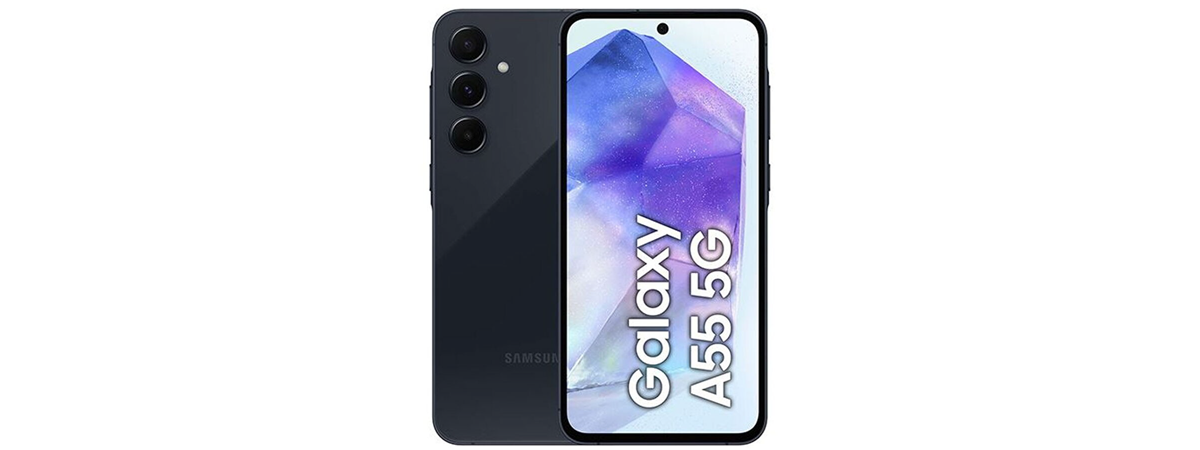
The smartphone mid-range sector has become very competitive in recent years, and Samsung managed to be one of the main players in this market too, with its Galaxy A5x line-up. However, in 2024, the competition is tougher than ever and the new Samsung Galaxy A55 has to outmatch not only phones from other brands but also last year’s Galaxy A54 and other Samsung smartphones with a relatively similar price. In this review, I evaluate the Samsung Galaxy A55 5G, the improvements that it brings, and the user experience it offers, and I also compare it with its predecessor. Read on to see whether the Galaxy A55 is a good choice for you:
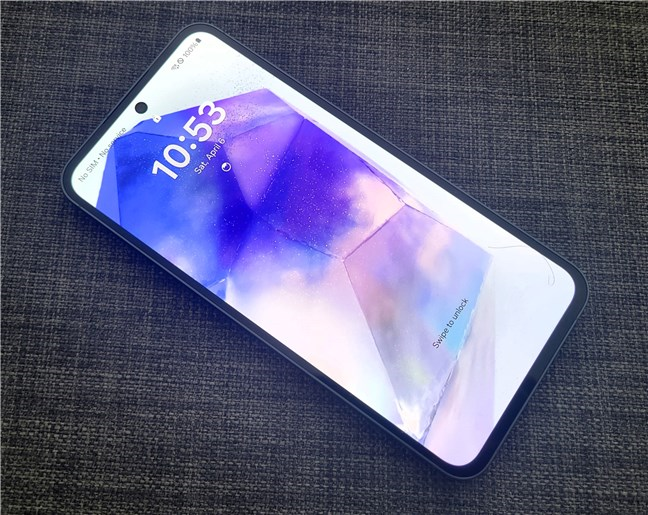
 The Samsung Galaxy A55 is a large phone
The back of the Samsung Galaxy A55 5G is covered with tough Gorilla Glass, although I’m not sure which version exactly because the company doesn’t specify. The phone only has the cameras and the Samsung logo on its back. Since it’s shiny, it reflects a lot of light and tends to gather many fingerprints and smudges. Oh, and the cameras stick out a bit, but the flash is level with the back of the phone.
The Samsung Galaxy A55 is a large phone
The back of the Samsung Galaxy A55 5G is covered with tough Gorilla Glass, although I’m not sure which version exactly because the company doesn’t specify. The phone only has the cameras and the Samsung logo on its back. Since it’s shiny, it reflects a lot of light and tends to gather many fingerprints and smudges. Oh, and the cameras stick out a bit, but the flash is level with the back of the phone.
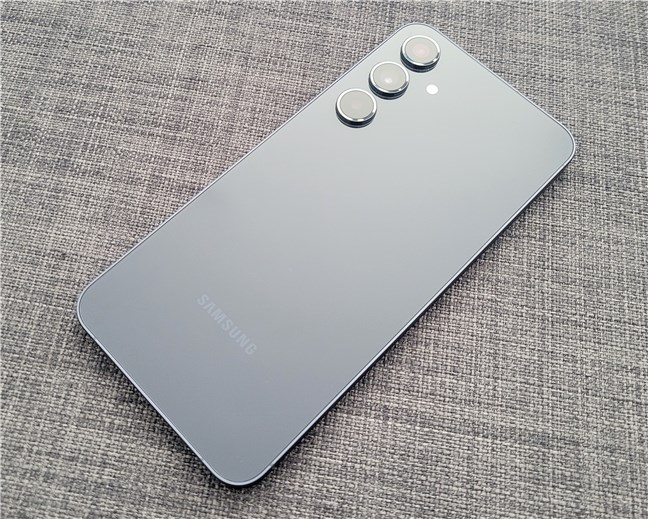
 The back looks similar to that of the Galaxy S24
The model I tested was the Awesome Navy color, which looks serious and elegant. However, if you prefer a more playful look, you can also get it in three other colors: Awesome Iceblue, Awesome Lilac, and Awesome Lemon.
The back looks similar to that of the Galaxy S24
The model I tested was the Awesome Navy color, which looks serious and elegant. However, if you prefer a more playful look, you can also get it in three other colors: Awesome Iceblue, Awesome Lilac, and Awesome Lemon.
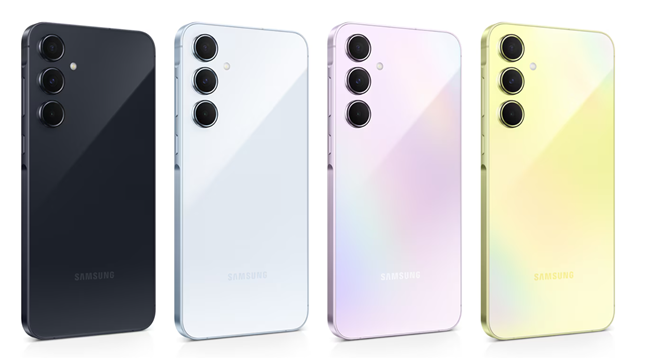
 Color options for the Samsung Galaxy A55 5G
On the front, the Galaxy A55 5G has a big 6.6-inch AMOLED screen protected by Corning Gorilla Glass Victus+.
The hole for the selfie camera is pretty small, and the top speaker is hidden under a long, thin cutout between the screen and the phone’s aluminum frame.
Color options for the Samsung Galaxy A55 5G
On the front, the Galaxy A55 5G has a big 6.6-inch AMOLED screen protected by Corning Gorilla Glass Victus+.
The hole for the selfie camera is pretty small, and the top speaker is hidden under a long, thin cutout between the screen and the phone’s aluminum frame.
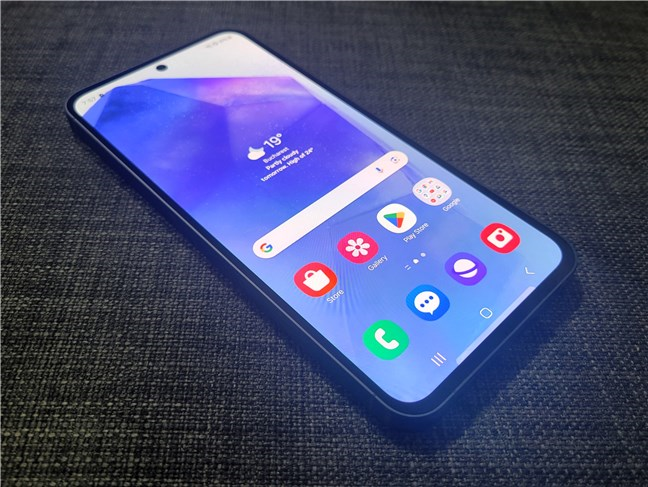
 The Samsung Galaxy A55 5G features a large screen
On the phone’s top edge is a tiny hole for a microphone and a slot for the SIM card tray.
The Samsung Galaxy A55 5G features a large screen
On the phone’s top edge is a tiny hole for a microphone and a slot for the SIM card tray.
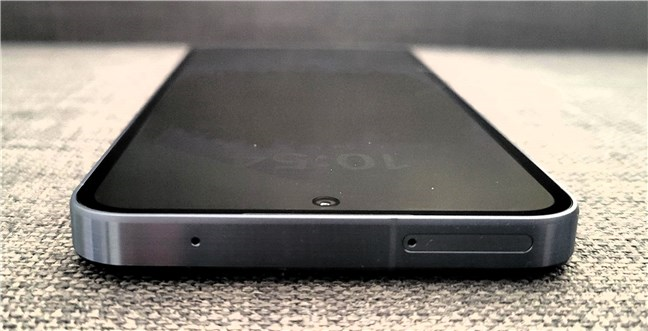
 The top edge of the Samsung Galaxy A55 5G
The left side lacks buttons, while the right side has the Volume rocker and the Power button.
The top edge of the Samsung Galaxy A55 5G
The left side lacks buttons, while the right side has the Volume rocker and the Power button.
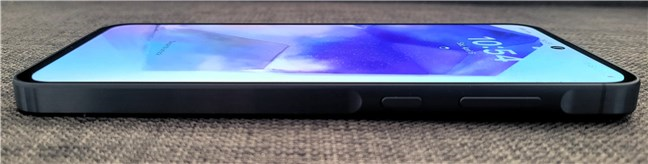
 The right edge of the Samsung Galaxy A55
At the bottom of the phone’s body, there’s the USB-C port, a loudspeaker, and two more small holes for microphones.
The right edge of the Samsung Galaxy A55
At the bottom of the phone’s body, there’s the USB-C port, a loudspeaker, and two more small holes for microphones.
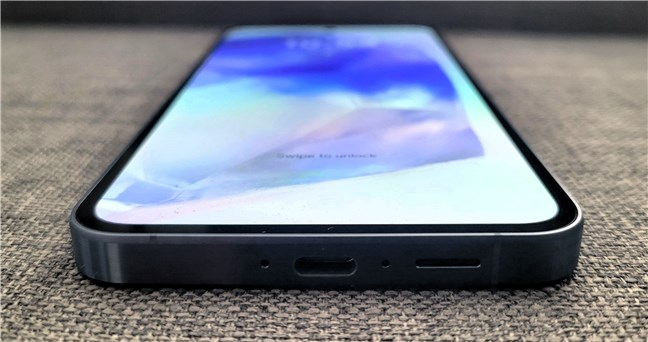
 Notice the design of the loudspeaker. Looks a microSD card slot, doesn't it?
Last but not least, it’s worth noting that, unlike many mid-range Android phones, this device is IP67 certified for protection against dust and water (up to 1 meter deep for a maximum of 30 minutes).
The Samsung Galaxy A55 is a large Android smartphone that feels solid despite being covered by glass on both sides. It has a classic, elegant Samsung-specific design, and except for its size, it is difficult to tell it apart from its predecessor, the Galaxy A54.
Notice the design of the loudspeaker. Looks a microSD card slot, doesn't it?
Last but not least, it’s worth noting that, unlike many mid-range Android phones, this device is IP67 certified for protection against dust and water (up to 1 meter deep for a maximum of 30 minutes).
The Samsung Galaxy A55 is a large Android smartphone that feels solid despite being covered by glass on both sides. It has a classic, elegant Samsung-specific design, and except for its size, it is difficult to tell it apart from its predecessor, the Galaxy A54.
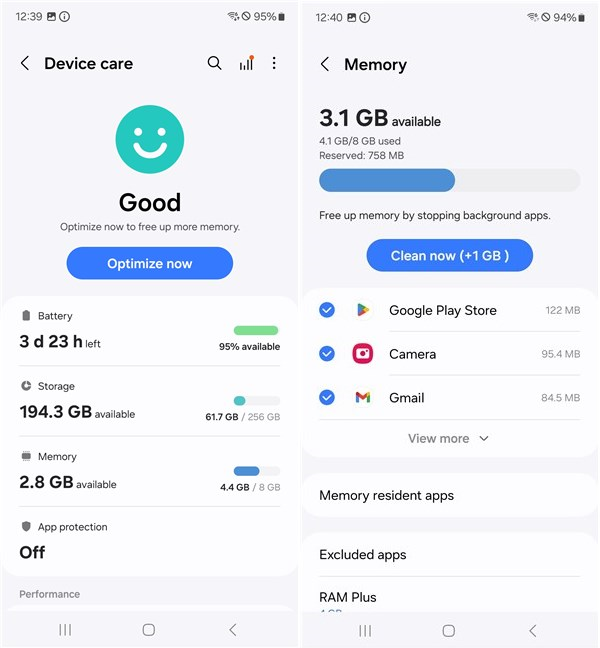
 Storage and battery details
The screen on the Samsung Galaxy A55 is pretty good. It uses a Super AMOLED panel with vibrant colors and a high 120 Hz refresh rate. It can also get really bright, up to 1000 nits, which is great when using it outdoors, in direct sunlight. The screen resolution of 1080 by 2340 pixels paired with the large 6.6 inches diagonal size translates into a 390 ppi density (pixels per inch). In layman’s words, this means that you can clearly see details in images and text.
Storage and battery details
The screen on the Samsung Galaxy A55 is pretty good. It uses a Super AMOLED panel with vibrant colors and a high 120 Hz refresh rate. It can also get really bright, up to 1000 nits, which is great when using it outdoors, in direct sunlight. The screen resolution of 1080 by 2340 pixels paired with the large 6.6 inches diagonal size translates into a 390 ppi density (pixels per inch). In layman’s words, this means that you can clearly see details in images and text.
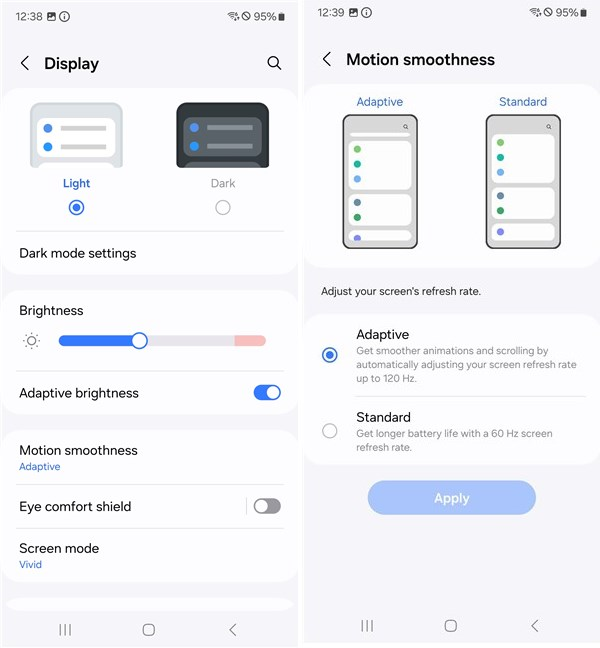 The display settings and refresh rate
There are three cameras on the back of the Samsung Galaxy A55 5G:
The display settings and refresh rate
There are three cameras on the back of the Samsung Galaxy A55 5G:
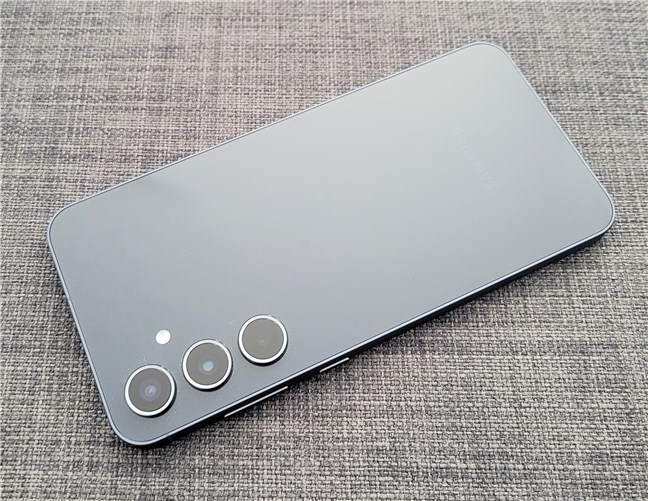
 The cameras on the Samsung Galaxy A55 5G
Behind the screen, towards the top of the phone, there’s also a selfie camera with a 32-megapixel sensor and an f2/2 aperture. The Samsung Galaxy A55 can shoot videos in up to 4K resolution at 30 frames per second or in 1080p resolution at a framerate of either 30 or 60.
The cameras on the Samsung Galaxy A55 5G
Behind the screen, towards the top of the phone, there’s also a selfie camera with a 32-megapixel sensor and an f2/2 aperture. The Samsung Galaxy A55 can shoot videos in up to 4K resolution at 30 frames per second or in 1080p resolution at a framerate of either 30 or 60.
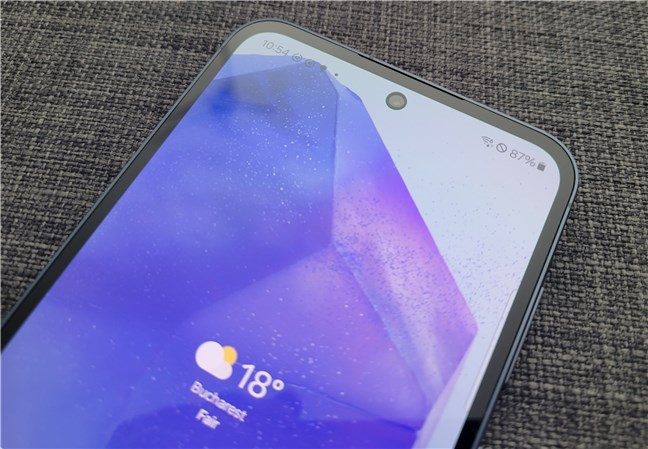
 The selfie camera on the Samsung Galaxy A55
In terms of connectivity and sensors, you should know that the Samsung Galaxy A55 5G comes, as its name suggests, with 5G support. It’s available either as a single-SIM or dual-SIM phone (nano-SIM plus eSIM) and has support for Wi-Fi 6 and Bluetooth 5.3.
The selfie camera on the Samsung Galaxy A55
In terms of connectivity and sensors, you should know that the Samsung Galaxy A55 5G comes, as its name suggests, with 5G support. It’s available either as a single-SIM or dual-SIM phone (nano-SIM plus eSIM) and has support for Wi-Fi 6 and Bluetooth 5.3.
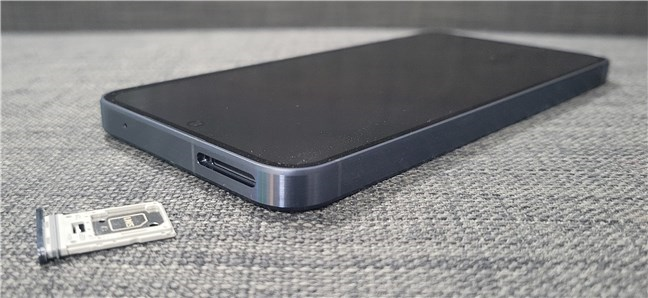
 The Samsung Galaxy A55 can use a micro SD card
Depending on the region you live in, the phone also includes an NFC chip (like in the European Union). On top of all that, the smartphone is equipped with many sensors: GPS, accelerometer, gyro, virtual proximity sensing, compass, and an under-display optical fingerprint scanner.
The battery inside the Galaxy A55 is generous, with a capacity of 5000 milliampere-hours (mAh), so it should last you for at least a day, if not two, before having to charge it. The smartphone also supports 25-watt wired fast charging. However, it doesn’t support wireless charging.
The Samsung Galaxy A55 can use a micro SD card
Depending on the region you live in, the phone also includes an NFC chip (like in the European Union). On top of all that, the smartphone is equipped with many sensors: GPS, accelerometer, gyro, virtual proximity sensing, compass, and an under-display optical fingerprint scanner.
The battery inside the Galaxy A55 is generous, with a capacity of 5000 milliampere-hours (mAh), so it should last you for at least a day, if not two, before having to charge it. The smartphone also supports 25-watt wired fast charging. However, it doesn’t support wireless charging.
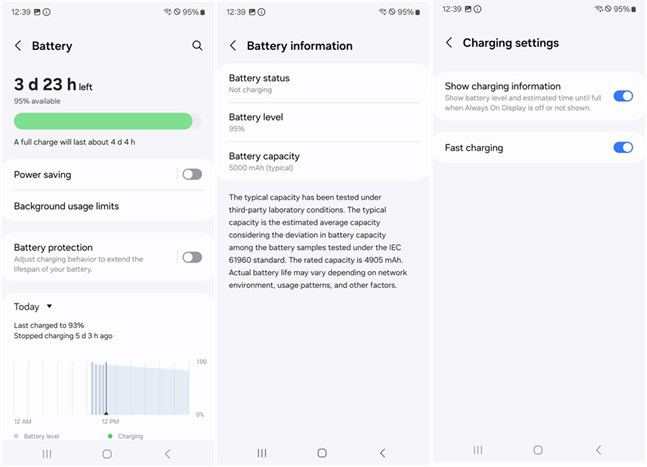
 Battery and charging details
For the complete list of technical specifications, check the official product page: Samsung Galaxy A55 5G.
Turn the page to see what my experience using the Samsung Galaxy A55 5G was like, what I found out about its cameras and the results the smartphone got in a couple of benchmarks.
Battery and charging details
For the complete list of technical specifications, check the official product page: Samsung Galaxy A55 5G.
Turn the page to see what my experience using the Samsung Galaxy A55 5G was like, what I found out about its cameras and the results the smartphone got in a couple of benchmarks.
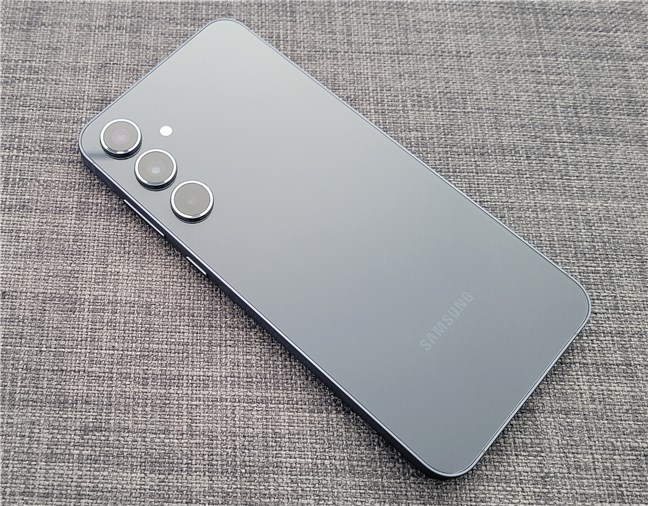
 The back of the Samsung Galaxy A55 5G is covered by glass
The screen on the Samsung Galaxy A55 is beautiful to look at. It has bright and vibrant colors, the animations look really smooth, and it’s bright enough to see clearly even when it’s sunny outside. From my experience, the chipset inside it is powerful enough to handle everyday tasks without any slowdowns or glitches.
The back of the Samsung Galaxy A55 5G is covered by glass
The screen on the Samsung Galaxy A55 is beautiful to look at. It has bright and vibrant colors, the animations look really smooth, and it’s bright enough to see clearly even when it’s sunny outside. From my experience, the chipset inside it is powerful enough to handle everyday tasks without any slowdowns or glitches.
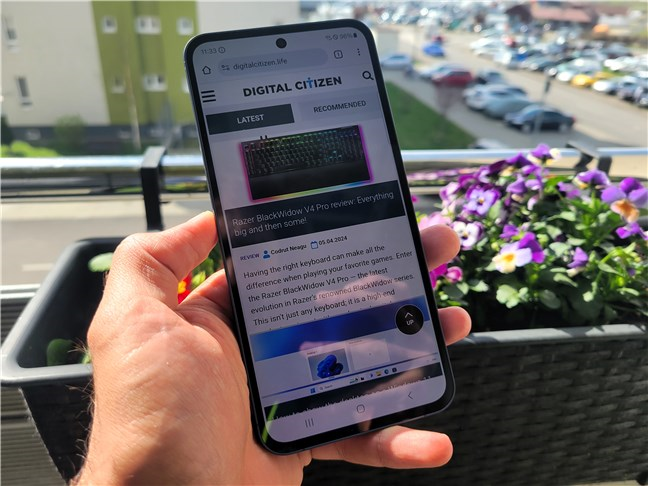
 The screen is bright
Playing demanding games on medium graphics quality was smooth sailing, too, at least for me. The CPU and graphics chip worked really well together, and I didn’t notice any lags or stuttering.
The screen is bright
Playing demanding games on medium graphics quality was smooth sailing, too, at least for me. The CPU and graphics chip worked really well together, and I didn’t notice any lags or stuttering.
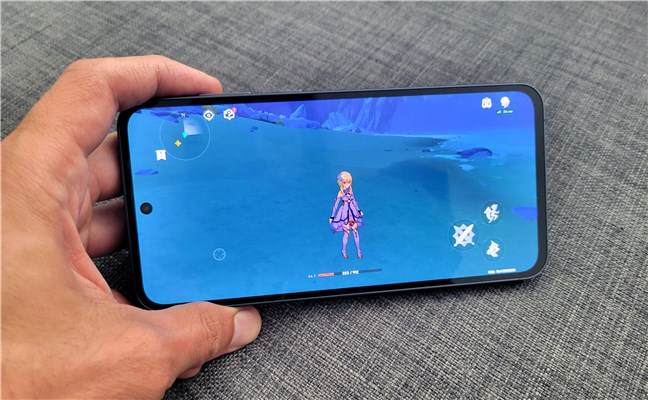
 Gaming on the Samsung Galaxy A55
When it comes to the basic phone features, I can say that I had a stable connection to my mobile network, and the signal strength was good. Phone calls sounded great - the speaker was loud enough, and voices were clear both for me and the person I was talking to. The loudspeakers are also pretty strong, but they don’t have much bass. I’d suggest using headphones for a better experience when watching movies or listening to music.
The phone’s fingerprint sensor and face recognition worked well. It always recognized my fingerprints correctly, although it wasn’t very fast. Face recognition usually works better when the lighting is good, but even in darker places, it doesn’t fail too often.
Gaming on the Samsung Galaxy A55
When it comes to the basic phone features, I can say that I had a stable connection to my mobile network, and the signal strength was good. Phone calls sounded great - the speaker was loud enough, and voices were clear both for me and the person I was talking to. The loudspeakers are also pretty strong, but they don’t have much bass. I’d suggest using headphones for a better experience when watching movies or listening to music.
The phone’s fingerprint sensor and face recognition worked well. It always recognized my fingerprints correctly, although it wasn’t very fast. Face recognition usually works better when the lighting is good, but even in darker places, it doesn’t fail too often.
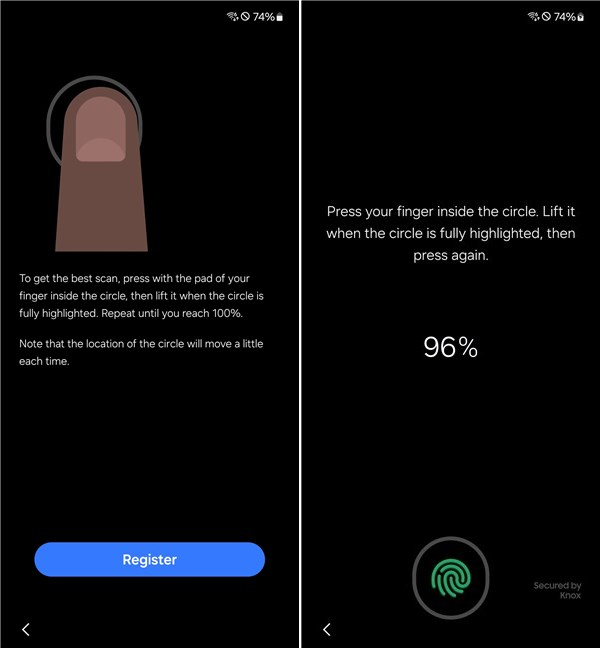 The Samsung Galaxy A55 5G has a fingerprint sensor under the display
The Samsung Galaxy A55’s battery life is good. It lasted for two days before I had to charge the smartphone. However, I mainly used it for regular stuff like browsing the internet, using social media, listening to music, and taking some photos now and then. If you’re gaming on the phone, its battery will last less. The smartphone supports fast charging at 25 watts, and in 30 minutes, it gets from 0 to 52% with an original Samsung charger (not included in the package). You get a complete battery charge in roughly 85 minutes. It’s not exactly “fast” compared to other mid-range smartphones from other brands, but it’s not bad either.
The Samsung Galaxy A55 5G has a fingerprint sensor under the display
The Samsung Galaxy A55’s battery life is good. It lasted for two days before I had to charge the smartphone. However, I mainly used it for regular stuff like browsing the internet, using social media, listening to music, and taking some photos now and then. If you’re gaming on the phone, its battery will last less. The smartphone supports fast charging at 25 watts, and in 30 minutes, it gets from 0 to 52% with an original Samsung charger (not included in the package). You get a complete battery charge in roughly 85 minutes. It’s not exactly “fast” compared to other mid-range smartphones from other brands, but it’s not bad either.
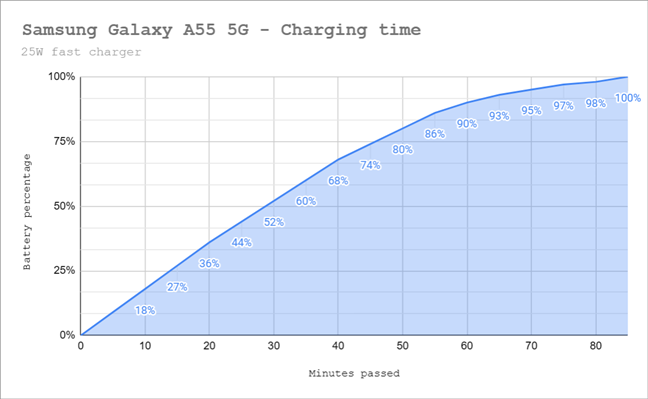
 Battery charging time
The Samsung Galaxy A55 5G is a solid Android phone for everyday use. It works really well for regular tasks and common apps, and it has good mobile signal reception. Gaming is okay, too, as long as you’re fine with not using the highest graphics settings in demanding titles.
Battery charging time
The Samsung Galaxy A55 5G is a solid Android phone for everyday use. It works really well for regular tasks and common apps, and it has good mobile signal reception. Gaming is okay, too, as long as you’re fine with not using the highest graphics settings in demanding titles.
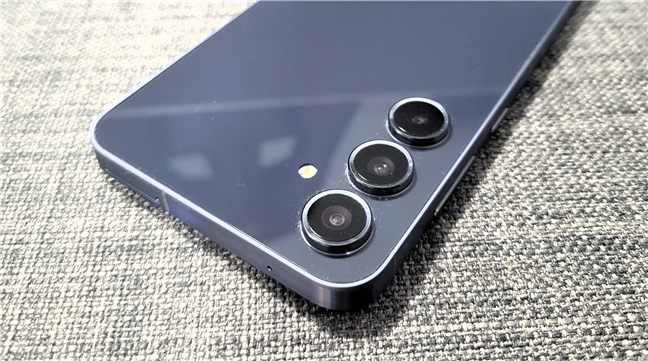
 The camera setup on the Samsung Galaxy A55 5G
The Camera app on the Samsung Galaxy A55 5G is easy to use, like it is on most Samsung Galaxy smartphones. You can switch between modes and settings by swiping or tapping the dedicated buttons in the interface. The main camera modes include Photo, Video, Portrait, and Fun. Going to More, you’ll find other modes like Pro, Pro Video, Slow Motion, Panorama, and Hyperlapse.
The camera setup on the Samsung Galaxy A55 5G
The Camera app on the Samsung Galaxy A55 5G is easy to use, like it is on most Samsung Galaxy smartphones. You can switch between modes and settings by swiping or tapping the dedicated buttons in the interface. The main camera modes include Photo, Video, Portrait, and Fun. Going to More, you’ll find other modes like Pro, Pro Video, Slow Motion, Panorama, and Hyperlapse.
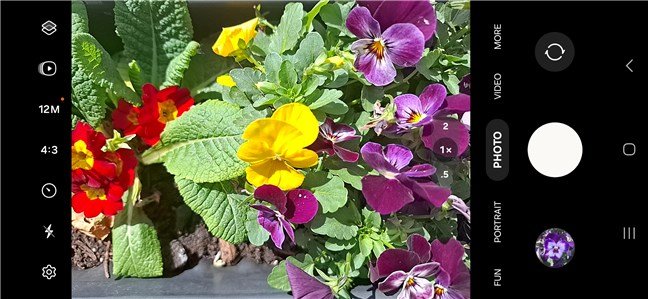
 The Camera app on the Samsung Galaxy A55 5G
The Samsung Galaxy A55 takes good pictures during the day, with sharp details and colors that look natural yet still vibrant. Unfortunately, the 2x zoom isn’t great. While the pictures are better than what you get on many mid-range Android devices with similar prices, they do tend to look a bit fuzzy and noisy - not as clear as the regular 1x mode.
The Camera app on the Samsung Galaxy A55 5G
The Samsung Galaxy A55 takes good pictures during the day, with sharp details and colors that look natural yet still vibrant. Unfortunately, the 2x zoom isn’t great. While the pictures are better than what you get on many mid-range Android devices with similar prices, they do tend to look a bit fuzzy and noisy - not as clear as the regular 1x mode.
 A photo shot in daylight with the main camera
The ultrawide camera is quite good, too: pictures are sharp and detailed, with accurate colors and good contrast. There’s a bit of color inconsistency between the main camera and the ultrawide one, but nothing bad enough to consider it a fault.
A photo shot in daylight with the main camera
The ultrawide camera is quite good, too: pictures are sharp and detailed, with accurate colors and good contrast. There’s a bit of color inconsistency between the main camera and the ultrawide one, but nothing bad enough to consider it a fault.
 An ultrawide photograph in daylight
Nighttime photos are mostly good, especially when using Night mode. Captures lack some contrast, and colors are a bit dim, but that’s to be expected in such conditions.
An ultrawide photograph in daylight
Nighttime photos are mostly good, especially when using Night mode. Captures lack some contrast, and colors are a bit dim, but that’s to be expected in such conditions.
 A photo shot at night while raining
The macro camera is a nice addition and useful if you like shooting close-ups. However, the photographs I took with it appeared a bit grainy sometimes and a bit too soft other times.
A photo shot at night while raining
The macro camera is a nice addition and useful if you like shooting close-ups. However, the photographs I took with it appeared a bit grainy sometimes and a bit too soft other times.
 Macro photo of a flower
Selfies with the front camera are great if the lighting is good. They’re detailed and look natural, with good brightness and accurate skin textures.
Macro photo of a flower
Selfies with the front camera are great if the lighting is good. They’re detailed and look natural, with good brightness and accurate skin textures.
 Selfie captured with the Samsung Galaxy A55
If you’d like to see more samples, browse this album. It includes photos I’ve shot with the Samsung Galaxy A55 5G both during daylight and at night, with and without zooming.
Selfie captured with the Samsung Galaxy A55
If you’d like to see more samples, browse this album. It includes photos I’ve shot with the Samsung Galaxy A55 5G both during daylight and at night, with and without zooming.
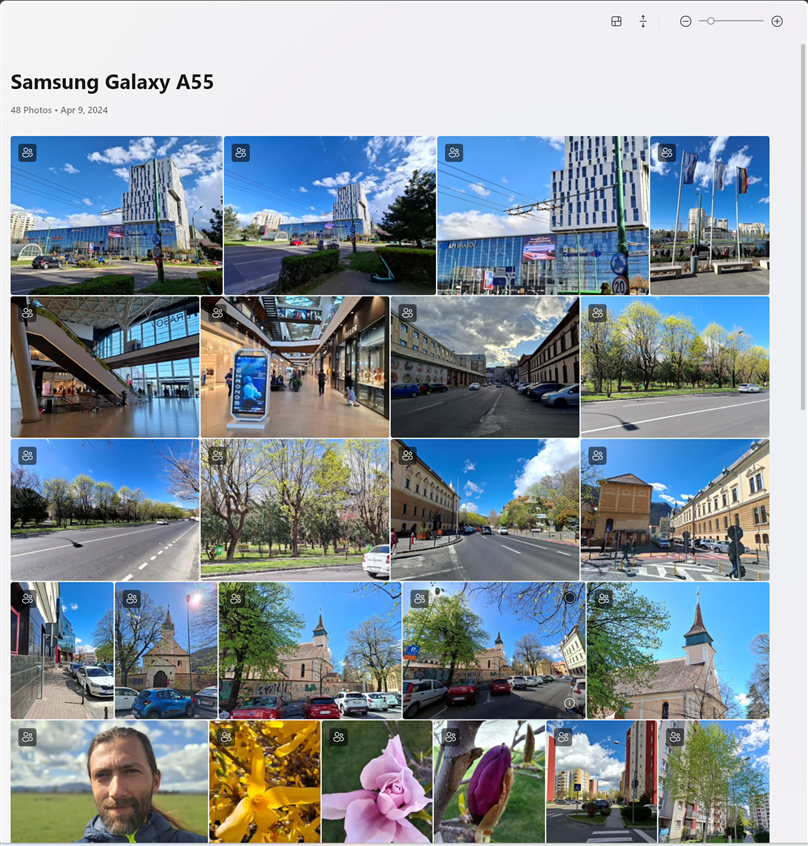
 Pictures taken with Samsung Galaxy A55
The Galaxy A55 5G can record 4K videos with the main and ultrawide cameras. The main camera videos are sharp and have vivid colors. For example, here’s a short video captured in 4K at 30 frames per second:
I think videos shot in 1080p at 60 frames per second look even better because they’re smoother, and Optical Image Stabilization (OIS) helps improve their quality and smoothness. Check out a sample below:
Overall, the Samsung Galaxy A55 5G takes good pictures and videos for everyday use. It is a solid mid-range device that will please most of its users in the camera department.
Pictures taken with Samsung Galaxy A55
The Galaxy A55 5G can record 4K videos with the main and ultrawide cameras. The main camera videos are sharp and have vivid colors. For example, here’s a short video captured in 4K at 30 frames per second:
I think videos shot in 1080p at 60 frames per second look even better because they’re smoother, and Optical Image Stabilization (OIS) helps improve their quality and smoothness. Check out a sample below:
Overall, the Samsung Galaxy A55 5G takes good pictures and videos for everyday use. It is a solid mid-range device that will please most of its users in the camera department.
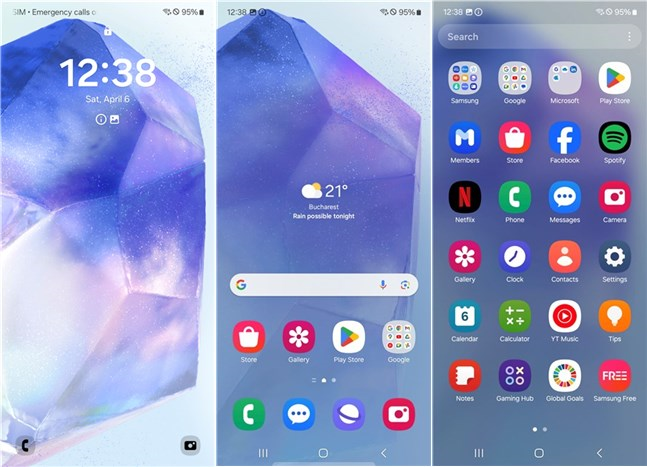 The Samsung Galaxy A55 5G comes with OneUI 6.1
Besides the standard Google apps that are built into Android and a couple of popular Microsoft apps (OneDrive, LinkedIn, Office, Outlook), you’ll also find all these other apps on the Galaxy A55:
The Samsung Galaxy A55 5G comes with OneUI 6.1
Besides the standard Google apps that are built into Android and a couple of popular Microsoft apps (OneDrive, LinkedIn, Office, Outlook), you’ll also find all these other apps on the Galaxy A55:
 Benchmark results in Geekbench 6
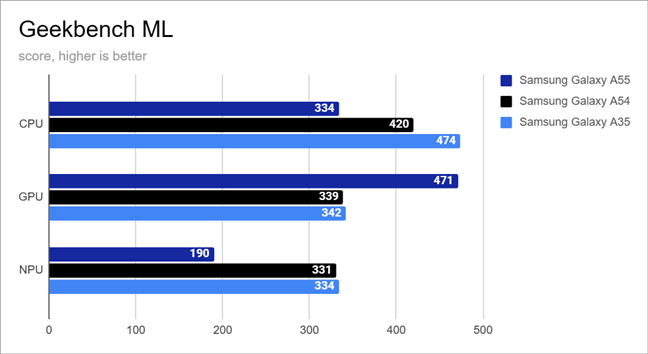
Geekbench ML is a tool that evaluates the performance of smartphones in machine learning tasks. On the Samsung Galaxy A55, it yielded mixed results. Typically, the GPU is the primary workhorse for Artificial Intelligence tasks. However, depending on how an app is developed and how the operating system is optimized, AI tasks may be handled by the CPU (processor), the GPU (graphics unit), or the NPU (neural processing unit) if available. In Geekbench ML, the Galaxy A55 5G scored 334 points for the CPU, 471 points for the GPU, and 190 points for the NPU. While I’m uncertain of the exact cause, the CPU and NPU scores of the Galaxy A55 were notably lower than those of the Galaxy A54 and A35. On the other hand, the GPU performance of the Galaxy A55 5G exceeds the other two.
Benchmark results in Geekbench 6
Geekbench ML is a tool that evaluates the performance of smartphones in machine learning tasks. On the Samsung Galaxy A55, it yielded mixed results. Typically, the GPU is the primary workhorse for Artificial Intelligence tasks. However, depending on how an app is developed and how the operating system is optimized, AI tasks may be handled by the CPU (processor), the GPU (graphics unit), or the NPU (neural processing unit) if available. In Geekbench ML, the Galaxy A55 5G scored 334 points for the CPU, 471 points for the GPU, and 190 points for the NPU. While I’m uncertain of the exact cause, the CPU and NPU scores of the Galaxy A55 were notably lower than those of the Galaxy A54 and A35. On the other hand, the GPU performance of the Galaxy A55 5G exceeds the other two.
 Benchmark results in Geekbench ML
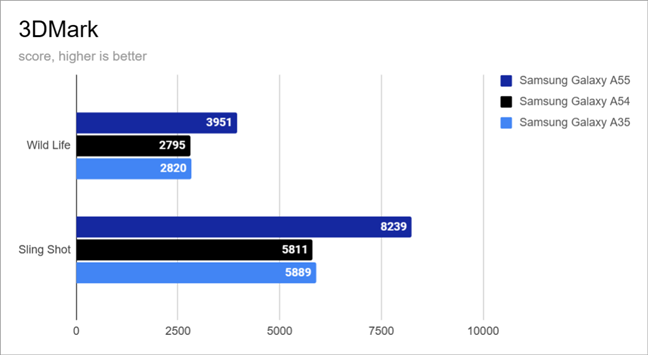
Next, I wanted to see the smartphone’s performance in gaming, and I used 3DMark for this. In both the Wild Life and Sling Shot tests, the Samsung Galaxy A55 5G showed a performance boost of over 40% compared to both the Galaxy A54 and Galaxy A35. These results prove my firsthand positive experience while playing on the Galaxy A55. Running games at medium visual settings should be a smooth experience on this smartphone.
Benchmark results in Geekbench ML
Next, I wanted to see the smartphone’s performance in gaming, and I used 3DMark for this. In both the Wild Life and Sling Shot tests, the Samsung Galaxy A55 5G showed a performance boost of over 40% compared to both the Galaxy A54 and Galaxy A35. These results prove my firsthand positive experience while playing on the Galaxy A55. Running games at medium visual settings should be a smooth experience on this smartphone.
 Benchmark results in 3DMark
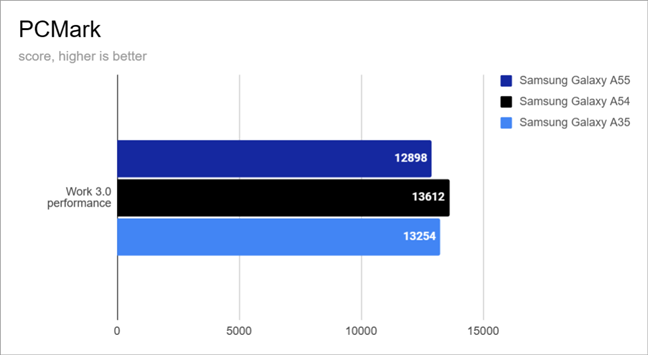
I also used PCMark for Android to check how well the phone handles everyday tasks. The Samsung Galaxy A55 5G scored 12898 points in the Work 3.0 performance test, which is just a bit lower than what I got with the other phones, the Galaxy A54 and the Galaxy A35. It seems like the lower score might be because of the web browsing performance, which isn’t as good as the ones on the other two devices.
Benchmark results in 3DMark
I also used PCMark for Android to check how well the phone handles everyday tasks. The Samsung Galaxy A55 5G scored 12898 points in the Work 3.0 performance test, which is just a bit lower than what I got with the other phones, the Galaxy A54 and the Galaxy A35. It seems like the lower score might be because of the web browsing performance, which isn’t as good as the ones on the other two devices.
 Benchmark results in PCMark
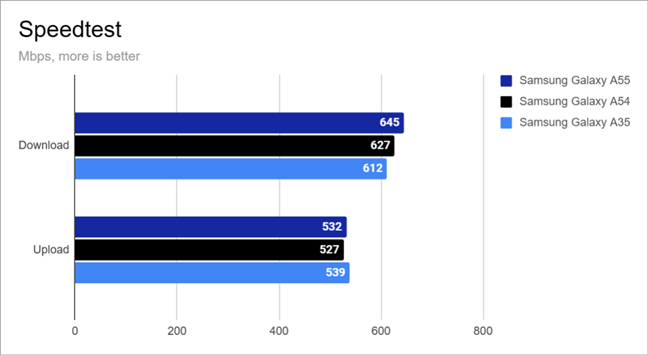
I didn’t try out the 5G mobile performance of the Samsung Galaxy A55 because my provider doesn’t have good 5G coverage. But I did check its internet speed on my Wi-Fi 6 network using Ookla’s Speedtest. The Galaxy A55 did really well, with a download speed of 645 Mbps and an upload speed of 532 Mbps. The download speed is a bit faster than the ones on the other two phones, while the upload speed is about the same on all three devices.
Benchmark results in PCMark
I didn’t try out the 5G mobile performance of the Samsung Galaxy A55 because my provider doesn’t have good 5G coverage. But I did check its internet speed on my Wi-Fi 6 network using Ookla’s Speedtest. The Galaxy A55 did really well, with a download speed of 645 Mbps and an upload speed of 532 Mbps. The download speed is a bit faster than the ones on the other two phones, while the upload speed is about the same on all three devices.
 Benchmark results in Speedtest
Finally, to check how long the battery lasts, I used PCMark’s Battery Life 3.0 test on the Galaxy A55. Before starting the test, I set the screen brightness to 50%. The phone stayed powered on for nearly 13 hours, which is one hour and twenty minutes longer than its older sibling, the Galaxy A54. It also outlasted the Galaxy A35 by 48 minutes. This phone can easily last you a whole day, and with light usage, it might even stretch to two days.
Benchmark results in Speedtest
Finally, to check how long the battery lasts, I used PCMark’s Battery Life 3.0 test on the Galaxy A55. Before starting the test, I set the screen brightness to 50%. The phone stayed powered on for nearly 13 hours, which is one hour and twenty minutes longer than its older sibling, the Galaxy A54. It also outlasted the Galaxy A35 by 48 minutes. This phone can easily last you a whole day, and with light usage, it might even stretch to two days.
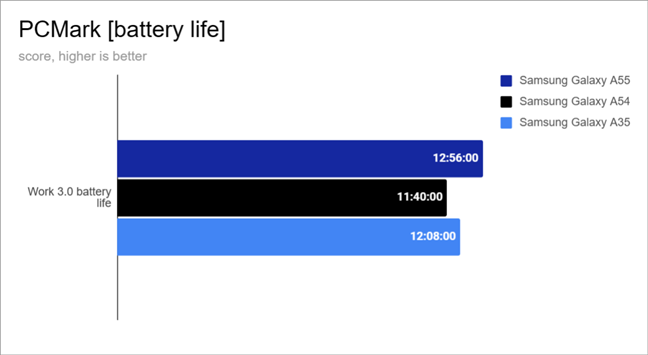 Battery life results in PCMark
The Samsung Galaxy A55 is a solid mid-range phone that runs apps smoothly, delivering good performance for both work and gaming.
Battery life results in PCMark
The Samsung Galaxy A55 is a solid mid-range phone that runs apps smoothly, delivering good performance for both work and gaming.
Samsung Galaxy A55 5G: Who is it good for?
The Samsung Galaxy A55 is a good choice for:- People who want a stylish Android smartphone
- Those who need a phone with good build quality
- Anyone looking for a mid-range option from Samsung
Pros and cons
The best things about the Samsung Galaxy A55 are:
- Good performance both in daily tasks and gaming
- It has a bright Super AMOLED screen with 120 Hz refresh rate
- The camera system is good for its price and has OIS (Optical Image Stabilization)
- Solid build and Gorilla Glass Victus+
- It’s protected against dust and water (IP67 certification)
- It comes with the latest Android 14 and Samsung One UI 6.1
- Good battery life
- You can add more storage with a microSD card
- There’s no charger included in the box
- Lots of preinstalled bloatware
- The launch price is a bit high
Verdict
The previous Samsung Galaxy A5x models were easy to recommend to anyone looking for a great mid-range smartphone. However, this year, people have many more great alternatives, and the Samsung Galaxy A55 feels like it has changed too little over its predecessor to stand out in this cut-throat market. Don’t get me wrong, the Samsung Galaxy A55 is a good smartphone with excellent battery life, a beautiful bright screen, and excellent gaming performance. However, its predecessor, the Galaxy A54, has a better price and offers a similar experience, while the competition charges less for similar devices. The Galaxy A55 is a good choice for people who want a Samsung Galaxy mid-range smartphone, and it will be an even better choice when Samsung lowers its price and aligns it with the rest of the market.Design and build quality
The Samsung Galaxy A55 is a big and heavy smartphone, about 6.34 inches long (161.1 mm), 3.05 inches (77.4 mm) wide, and 0.32 inches (8.2 mm) thick. It weighs 7.51 ounces (213 grams). This might be too heavy for some people, but it’s probably because Samsung put a big 5000 mAh battery in it. On the bright side, this weight also makes the phone feel strong and sturdy.Hardware specifications
When it comes to what’s on the inside, one of the essential things about the Samsung Galaxy A55 5G is that it runs on a Samsung-made Exynos 1480 chipset. It has eight cores - four are performance cores and run at a frequency of 2.75 GHz, and four are energy-efficient ones, ticking at a 2.0 GHz clock. The chipset also includes an Xclipse 530 graphics unit. The smartphone sample I tried had 8 GB of memory (RAM) and 256 GB of storage space. There are two other versions of this phone that come with 128 GB of space and 8 GB of memory, or 256 GB of space and 12 GB of memory.- The main camera has 50 megapixels, PDAF (phase detection autofocus), f/1.8 aperture, and OIS (optical stabilization system)
- An ultrawide (123˚) camera with a 12-megapixel sensor and an f/2.2 aperture
- A 5-megapixel macro camera with an f/2.4 aperture
The smartphone experience on the Samsung Galaxy A55
The Samsung Galaxy A55 5G is a large device, which is common for modern smartphones. It was easy for me to use and reach all the buttons, but if you have smaller hands or shorter fingers, you might want to check if it’s comfortable for you before you buy it. The phone is also heavy, which makes it seem sturdy and robust. However, the glass back might make you worry about it breaking easily. So, it’s a bit of give and take when it comes to how it feels to use this phone.The camera experience on the Samsung Galaxy A55
The camera setup on the Samsung Galaxy A55 5G seems to be the same as the one on the previous Galaxy A54. It has a main camera with 50 megapixels, along with a 12-megapixel ultrawide camera and a 5-megapixel macro camera. The selfie camera also has 32 megapixels, just like it did before.Android 14, OneUI 6.1, and bundled apps
The Samsung Galaxy A55 5G runs on the One UI 6.1 interface, which is based on Android 14. It’s user-friendly and runs smoothly, but it doesn’t have the advanced Galaxy AI features found on the premium Samsung Galaxy S24 models. On the bright side, this phone will receive operating system updates for up to four years and security patches for up to five.- Calculator: a basic app for doing math.
- Facebook: the app for the famous social network.
- Find: a Samsung app that assists in locating lost devices and sharing your location.
- Galaxy Shop: an app for purchasing new devices, trading old ones, or accessing exclusive deals and rewards from Samsung.
- Gallery: Samsung’s app for viewing and managing photos and videos.
- Gaming Hub: a platform for games, offering access to games without the need for downloads, and allowing you to tweak game performance settings.
- Galaxy Store: Samsung’s alternative to Google’s Play Store.
- Global Goals: an app enabling users to give money to charities.
- Health: Samsung’s health and fitness app, tailored for Samsung wearables.
- Internet: Samsung’s web browser. Some users may prefer Google Chrome or Microsoft Edge.
- My Files: a file management app for accessing and organizing files on your device and in cloud storage.
- Notes: handy for taking quick notes, with a straightforward interface.
- Samsung Free: Samsung’s counterpart to Google Discover.
- Samsung Members: helps you connect with other Samsung Galaxy device users and offers assistance with troubleshooting.
- Samsung Shop: an app for purchasing Samsung products and devices. Currently available in select countries.
- Smart Switch: an app made by Samsung that helps you transfer data (files, apps, contacts, settings) from your old device to your new Galaxy A55 5G.
- SmartThings: the company’s app for managing smart devices. Useful if you have other Samsung devices in your home.
- Spotify: the app of the widely-used music streaming service.
- Tips: provides advice and tips for your smartphone.
- TV: allows you to watch free TV on your smartphone, if you live in a supported region.
- Netflix: the app for the popular TV and movie streaming service.
- Voice Recorder: an app for recording sound or voice using your smartphone’s microphones.
- Wallet: a payment app developed by Samsung, available in specific countries.
- Wearable: useful for pairing and setting up your Samsung wearables.
Performance in benchmarks
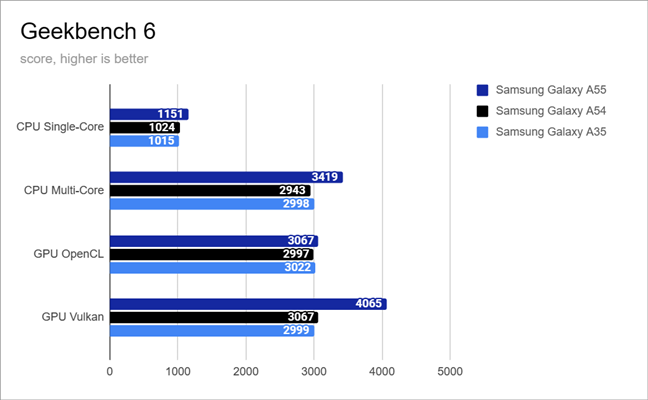
In an effort to assess the performance of Samsung’s Galaxy A55, I ran a series of benchmarks to check its ability to handle multitasking, gaming, and everyday tasks. Additionally, I compared it with last year’s Samsung Galaxy A54 and its more affordable brother, the Galaxy A35. Both are equipped with an Exynos 1380 chipset. Here’s what I discovered: In Geekbench 6, the Galaxy A55 shows significant to substantial improvements across the board. It reached better scores than the Galaxy A54 and Galaxy A35 in all tests, for both the CPU (processor) and the GPU (graphics unit). There was approximately a 13% increase in performance for CPU Single-Core, a 14 to16% improvement for CPU Multi-Core, and a 1.5 to 2.3% boost for GPU OpenCL. However, the most remarkable improvement was in the GPU Vulkan test, with a staggering 32 to 36% increase. This shows that the Galaxy A55 5G is a notable upgrade from the Samsung Galaxy A54, especially in terms of gaming performance.
Discussion (0)
Comments are closed.