



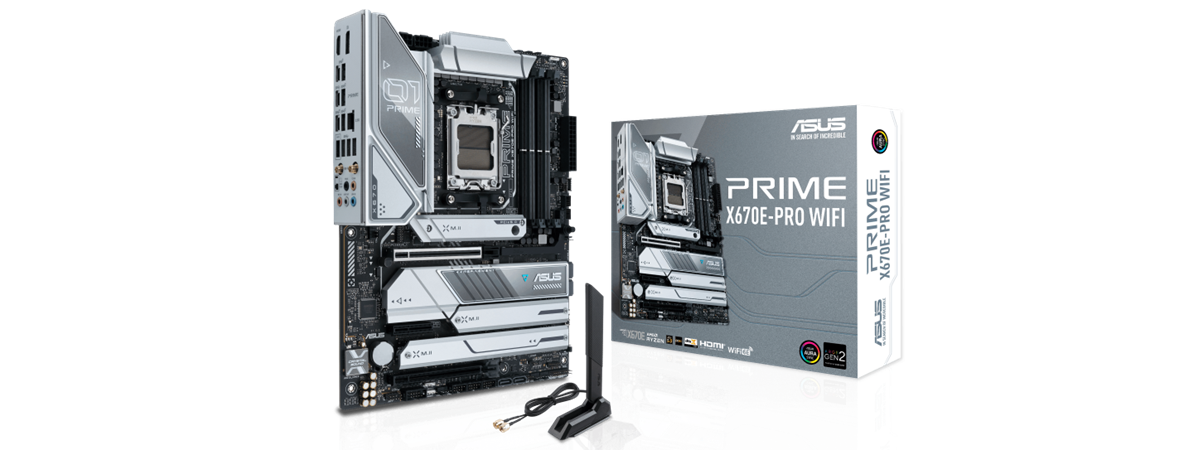
While any path to building a desktop computer based on a brand new AMD Ryzen 7000 processor is expensive, some choices are better than others. For instance, ASUS has a motherboard based on the high-end X670E chipset, called ASUS Prime X670E-Pro WiFi, which could be classified as mid to high-end. As you’ll find out from this review, it looks beautiful, and it offers extended PCI Express 5.0 support as well as other excellent features such as Wi-Fi 6E connectivity. Would you like to know what to expect from the ASUS Prime X670E-Pro WiFi? Then, by all means, read on:
![Verdict]()

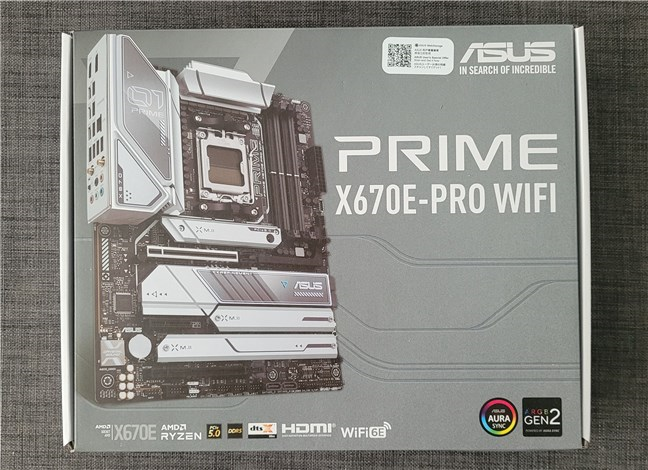
 The box of the ASUS Prime X670E-Pro WiFi
The contents of the box are generous: two SATA 6Gb/s cables, an ASUS Wi-Fi antenna kit, M.2 screws and rubber pads (for solid-state drives), a Q-Connector (helpful to connect the front panel of your PC case), a driver DVD, the warranty, and the user manual.
The box of the ASUS Prime X670E-Pro WiFi
The contents of the box are generous: two SATA 6Gb/s cables, an ASUS Wi-Fi antenna kit, M.2 screws and rubber pads (for solid-state drives), a Q-Connector (helpful to connect the front panel of your PC case), a driver DVD, the warranty, and the user manual.
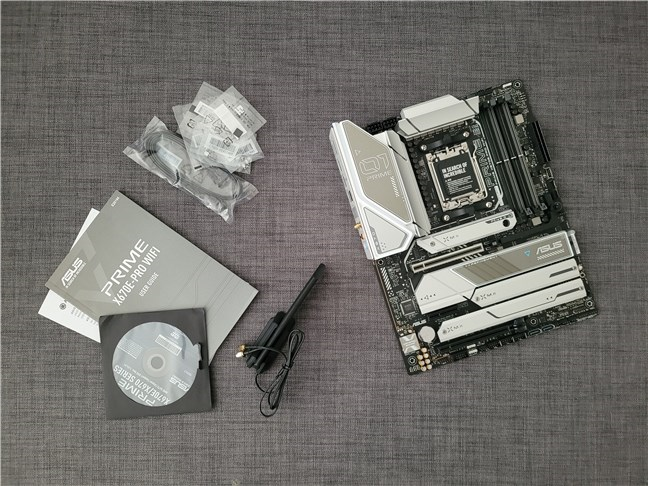
 ASUS Prime X670E-Pro WiFi: What's inside the box
Unboxing the ASUS Prime X670E-Pro WiFi is a satisfying experience: the package looks good, and the contents of the box are generous.
ASUS Prime X670E-Pro WiFi: What's inside the box
Unboxing the ASUS Prime X670E-Pro WiFi is a satisfying experience: the package looks good, and the contents of the box are generous.
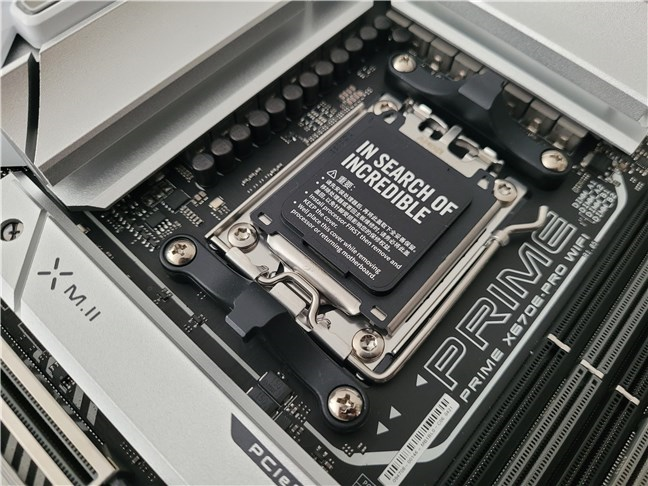 ASUS Prime X670E-Pro WiFi is based on the AMD X670E chipset
As is the case with all the motherboards in ASUS’ Prime series, the design of the ASUS Prime X670E-Pro WiFi is relatively conservative. This motherboard is colored in gray and white, and it looks professional and elegant. Everything on it appears to be high-quality, from capacitors to slots and heatsinks. Both the CPU VRM, the M.2 drives (solid-state drives), and the chipset are covered by massive heatsinks. Not only do they appear to be doing a very good job at thermoregulation, but they also look great with their white/light gray contrast on top of the darker motherboard PCB (Printed Circuit Board).
ASUS Prime X670E-Pro WiFi is based on the AMD X670E chipset
As is the case with all the motherboards in ASUS’ Prime series, the design of the ASUS Prime X670E-Pro WiFi is relatively conservative. This motherboard is colored in gray and white, and it looks professional and elegant. Everything on it appears to be high-quality, from capacitors to slots and heatsinks. Both the CPU VRM, the M.2 drives (solid-state drives), and the chipset are covered by massive heatsinks. Not only do they appear to be doing a very good job at thermoregulation, but they also look great with their white/light gray contrast on top of the darker motherboard PCB (Printed Circuit Board).
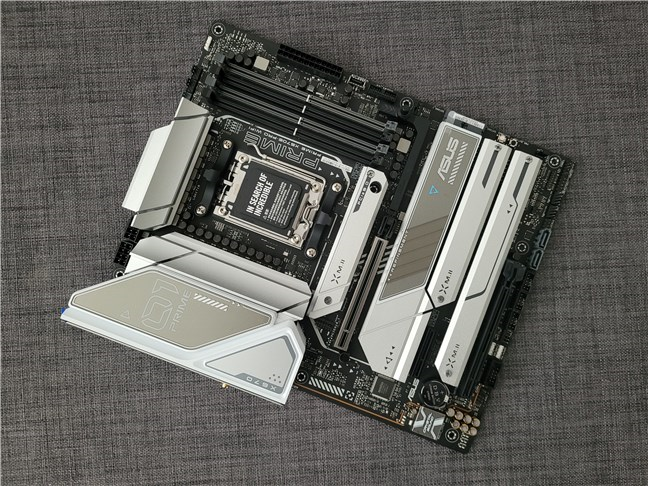 The ASUS Prime X670E-Pro WiFi features an elegant gray and white design
Considering the large heatsinks on the VRM and the fact that the ASUS Prime X670E-Pro WiFi has 14+2 power stages able to handle 70 amperes each, this motherboard should be great for overclocking. By the way, the electrical energy required by the CPU is delivered via two standard 8-pin (12 Volts) EPS power connectors.
The ASUS Prime X670E-Pro WiFi features an elegant gray and white design
Considering the large heatsinks on the VRM and the fact that the ASUS Prime X670E-Pro WiFi has 14+2 power stages able to handle 70 amperes each, this motherboard should be great for overclocking. By the way, the electrical energy required by the CPU is delivered via two standard 8-pin (12 Volts) EPS power connectors.
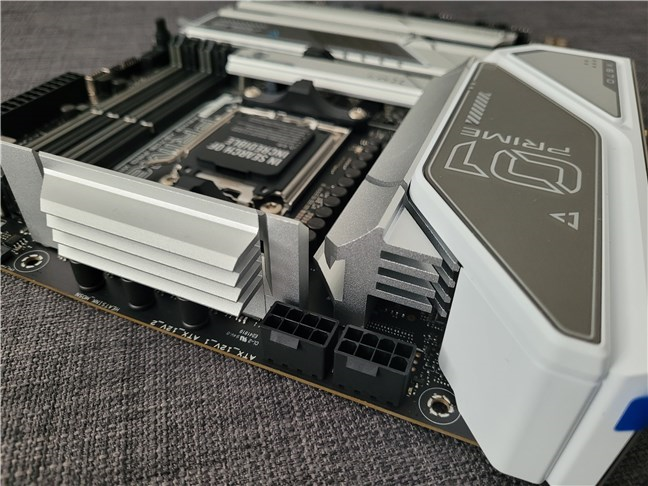 Large heatsinks cover the solid VRMs
The main 24-pin ATX power connector is found towards the top-right corner. Close by, there are four DIMM slots that can accommodate four DDR5 memory modules with a maximum capacity of 128 GB. The motherboard can work with DDR5 running at 4800 MT/s (mega transfers per second) and upwards. Although you could even get RAM with a speed of 6400 MT/s or even more (anything above 5200 MT/s will work in overclocking mode), the sweet spot for AMD Ryzen 7000 processors is 6000 MT/s. That offers the best price-per-performance ratio.
Large heatsinks cover the solid VRMs
The main 24-pin ATX power connector is found towards the top-right corner. Close by, there are four DIMM slots that can accommodate four DDR5 memory modules with a maximum capacity of 128 GB. The motherboard can work with DDR5 running at 4800 MT/s (mega transfers per second) and upwards. Although you could even get RAM with a speed of 6400 MT/s or even more (anything above 5200 MT/s will work in overclocking mode), the sweet spot for AMD Ryzen 7000 processors is 6000 MT/s. That offers the best price-per-performance ratio.
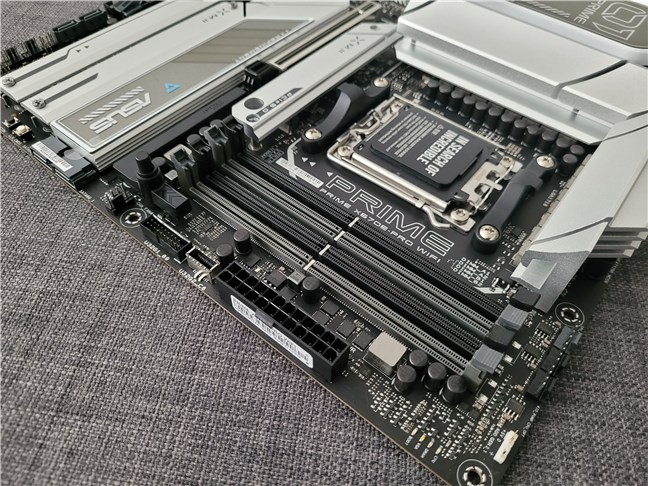 ASUS Prime X670E-Pro WiFi works with DDR5
In terms of expansion and storage slots, the motherboard is more than generous. Using the processor’s PCI Express lanes, you get:
ASUS Prime X670E-Pro WiFi works with DDR5
In terms of expansion and storage slots, the motherboard is more than generous. Using the processor’s PCI Express lanes, you get:
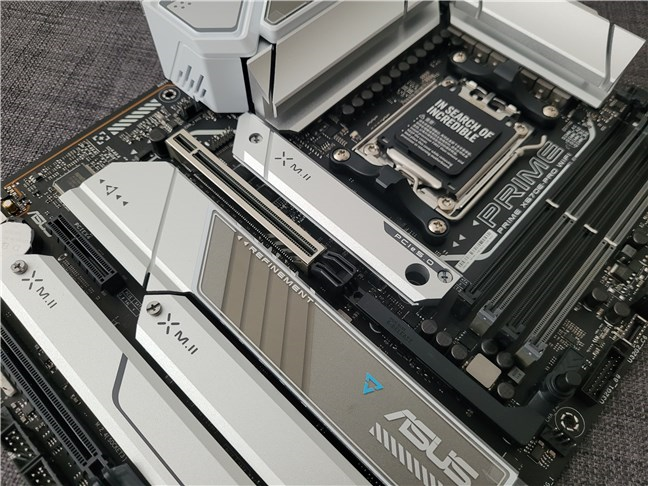 ASUS Prime X670E-Pro WiFi has extended PCI Express 5.0 support
The connectivity area is also high-end: the motherboard comes with a 2.5 Gbps Realtek Ethernet chip and a MediaTek RZ608 Wi-Fi 6E chip. The latter features 2x2 MIMO, support for 802.11 a/b/g/n/ac/ax standards on the 2.4, 5, and 6 GHz frequency bands, and Bluetooth 5.2. The audio part is covered by a Realtek S1220A 7.1 Surround Sound High Definition Audio CODEC that supports up to 32-Bit/192kHz playback.
ASUS Prime X670E-Pro WiFi has extended PCI Express 5.0 support
The connectivity area is also high-end: the motherboard comes with a 2.5 Gbps Realtek Ethernet chip and a MediaTek RZ608 Wi-Fi 6E chip. The latter features 2x2 MIMO, support for 802.11 a/b/g/n/ac/ax standards on the 2.4, 5, and 6 GHz frequency bands, and Bluetooth 5.2. The audio part is covered by a Realtek S1220A 7.1 Surround Sound High Definition Audio CODEC that supports up to 32-Bit/192kHz playback.
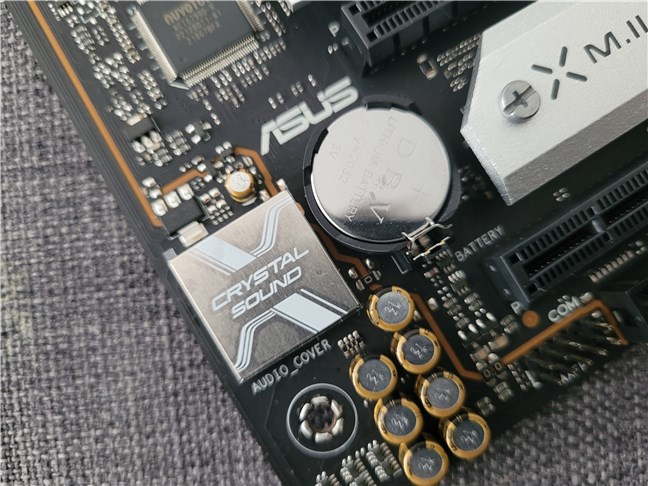 There's a high-quality audio codec on the ASUS Prime X670E-Pro WiFi
The I/O (input/output) panel that comes on the back of the computer case includes a USB 3.2 Gen 2x2 port (Type-C), four USB 3.2 Gen 2 ports (three are Type-A, one is Type-C), five USB 3.2 Gen 1 ports (four are Type-A, one is Type-C), a DisplayPort and an HDMI port, a Wi-Fi antenna module with two connectors, a 2.5 Gbps Ethernet port, five audio jacks, and one BIOS FlashBack button.
There's a high-quality audio codec on the ASUS Prime X670E-Pro WiFi
The I/O (input/output) panel that comes on the back of the computer case includes a USB 3.2 Gen 2x2 port (Type-C), four USB 3.2 Gen 2 ports (three are Type-A, one is Type-C), five USB 3.2 Gen 1 ports (four are Type-A, one is Type-C), a DisplayPort and an HDMI port, a Wi-Fi antenna module with two connectors, a 2.5 Gbps Ethernet port, five audio jacks, and one BIOS FlashBack button.
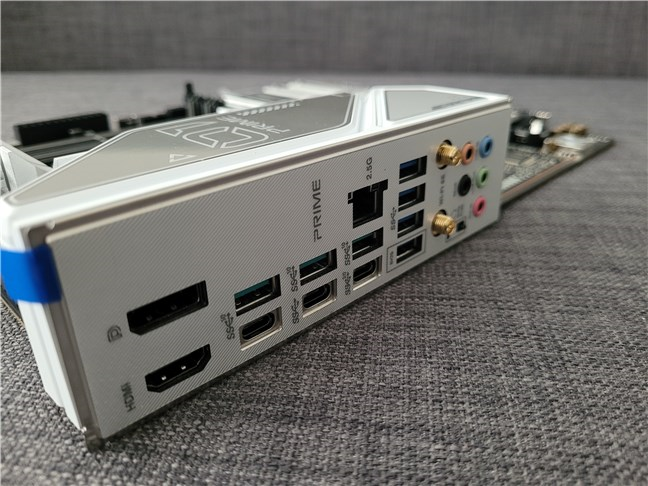 The I/O panel on the ASUS Prime X670E-Pro WiFi
The internal I/O connectors available on the motherboard include CPU and case fan headers, AIO and water pump headers, and RGB headers. You also get one USB 3.2 Gen 2 connector (supports USB Type-C) and USB 3.2 Gen 1 header that supports two additional USB 3.2 Gen 1 ports, and three USB 2.0 headers that you can use to add another six USB 2.0 ports. Moreover, there’s a COM Port header (useful for those who still use legacy devices), a front panel audio header, a power and a Clear CMOS button, and even a Thunderbolt header.
The I/O panel on the ASUS Prime X670E-Pro WiFi
The internal I/O connectors available on the motherboard include CPU and case fan headers, AIO and water pump headers, and RGB headers. You also get one USB 3.2 Gen 2 connector (supports USB Type-C) and USB 3.2 Gen 1 header that supports two additional USB 3.2 Gen 1 ports, and three USB 2.0 headers that you can use to add another six USB 2.0 ports. Moreover, there’s a COM Port header (useful for those who still use legacy devices), a front panel audio header, a power and a Clear CMOS button, and even a Thunderbolt header.
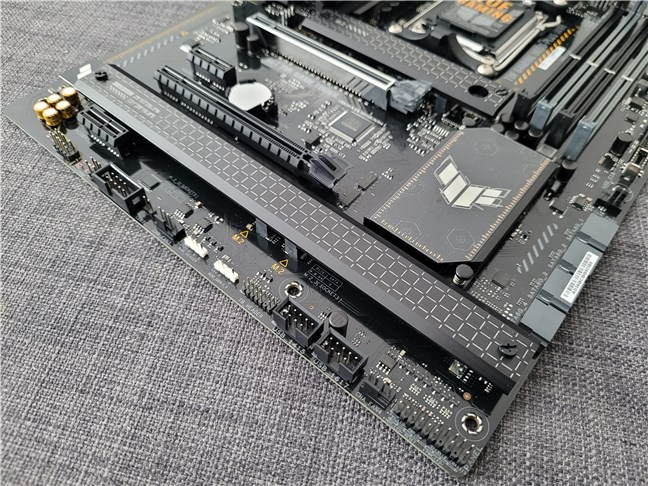 Internal headers and ports on the ASUS Prime X670E-Pro WiFi
I’ve only scratched the surface in terms of technical specs, so if you want to see everything this motherboard offers, you should get into details on its official webpage: ASUS Prime X670E-Pro WiFi Tech Specs.
The ASUS Prime X670E-Pro WiFi is a mid to high-end motherboard. Based on the feature-rich AMD X670E chipset, it offers everything you might want from a modern-day mainboard, and more. Together with PCI Express 5.0 drives, DDR5 memory, a fast graphics card, and an AMD Ryzen 7000 processor, you’ll get a very powerful computer.
Turn the page to see what a test computer based on the ASUS Prime X670E-Pro WiFi motherboard can do in benchmarks and games.
Internal headers and ports on the ASUS Prime X670E-Pro WiFi
I’ve only scratched the surface in terms of technical specs, so if you want to see everything this motherboard offers, you should get into details on its official webpage: ASUS Prime X670E-Pro WiFi Tech Specs.
The ASUS Prime X670E-Pro WiFi is a mid to high-end motherboard. Based on the feature-rich AMD X670E chipset, it offers everything you might want from a modern-day mainboard, and more. Together with PCI Express 5.0 drives, DDR5 memory, a fast graphics card, and an AMD Ryzen 7000 processor, you’ll get a very powerful computer.
Turn the page to see what a test computer based on the ASUS Prime X670E-Pro WiFi motherboard can do in benchmarks and games.
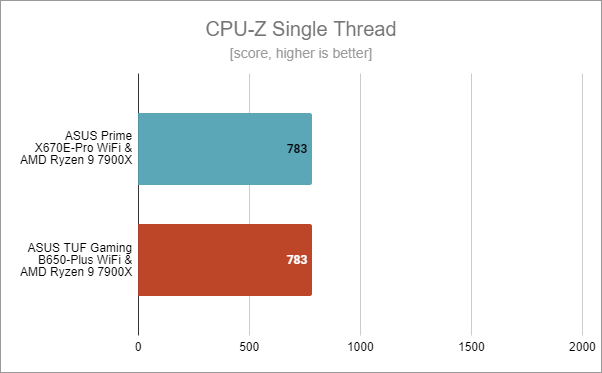
 ASUS Prime X670E-Pro WiFi: Benchmark results in CPU-Z Single Thread
In CPU-Z’s Multi-Thread test, which measures the all-core performance of the processor, the Ryzen 9 7900X got a (very) slightly higher score on the ASUS Prime X670E-Pro WiFi. However, this result is inside the margin error.
ASUS Prime X670E-Pro WiFi: Benchmark results in CPU-Z Single Thread
In CPU-Z’s Multi-Thread test, which measures the all-core performance of the processor, the Ryzen 9 7900X got a (very) slightly higher score on the ASUS Prime X670E-Pro WiFi. However, this result is inside the margin error.
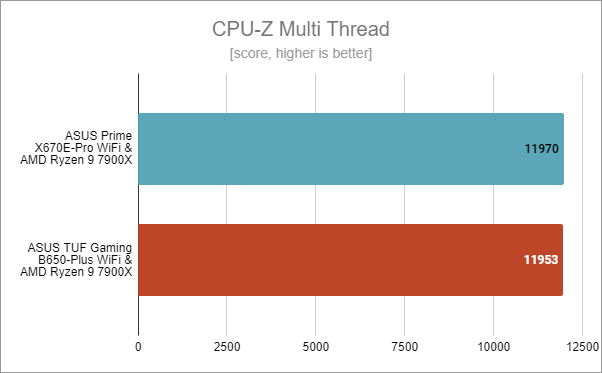 ASUS Prime X670E-Pro WiFi: Benchmark results in CPU-Z Multi Thread
I’ve had a similar result in Cinebench R23 too. The processor was a bit faster on the ASUS Prime X670E-Pro WiFi motherboard, but nothing significant. Both motherboards seem to make the Ryzen 9 7900X reach its maximum potential.
ASUS Prime X670E-Pro WiFi: Benchmark results in CPU-Z Multi Thread
I’ve had a similar result in Cinebench R23 too. The processor was a bit faster on the ASUS Prime X670E-Pro WiFi motherboard, but nothing significant. Both motherboards seem to make the Ryzen 9 7900X reach its maximum potential.
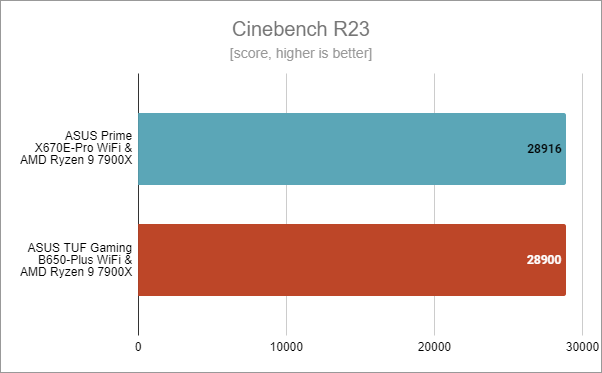 ASUS Prime X670E-Pro WiFi: Benchmark results in Cinebench R23
Blender is the other rendering benchmark I usually run when testing processors and motherboards. Here, the AMD Ryzen 9 7900X got the same exact score on the ASUS Prime X670E-Pro WiFi as it did on the AMD TUF Gaming B650-Plus WiFi.
ASUS Prime X670E-Pro WiFi: Benchmark results in Cinebench R23
Blender is the other rendering benchmark I usually run when testing processors and motherboards. Here, the AMD Ryzen 9 7900X got the same exact score on the ASUS Prime X670E-Pro WiFi as it did on the AMD TUF Gaming B650-Plus WiFi.
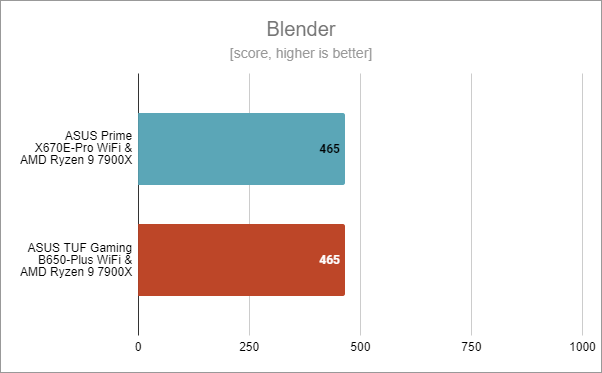 ASUS Prime X670E-Pro WiFi: Benchmark results in Blender
Next was PCMark 10, which runs a series of different tasks that, put together, give you insight into the performance of a computer in common daily situations. This includes web browsing, video conferencing, productivity tasks, and digital content creation. As expected after seeing the previous results, the Ryzen 9 7900X processor got an almost identical result with both motherboards, showing that both the ASUS Prime X670E-Pro WiFi and the ASUS TUF Gaming B650-Plus WiFi are great for standard activities.
ASUS Prime X670E-Pro WiFi: Benchmark results in Blender
Next was PCMark 10, which runs a series of different tasks that, put together, give you insight into the performance of a computer in common daily situations. This includes web browsing, video conferencing, productivity tasks, and digital content creation. As expected after seeing the previous results, the Ryzen 9 7900X processor got an almost identical result with both motherboards, showing that both the ASUS Prime X670E-Pro WiFi and the ASUS TUF Gaming B650-Plus WiFi are great for standard activities.
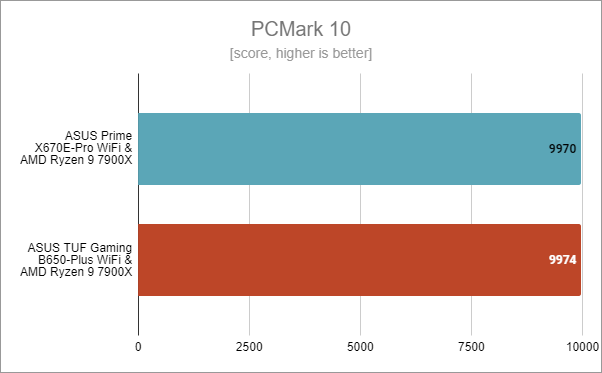 ASUS Prime X670E-Pro WiFi: Benchmark results in PCMark 10
In JetStream 2, using the ASUS Prime X670E-Pro WiFi motherboard, I got a slightly better score for the AMD Ryzen 9 7900X. However, the difference is within the margin of error.
ASUS Prime X670E-Pro WiFi: Benchmark results in PCMark 10
In JetStream 2, using the ASUS Prime X670E-Pro WiFi motherboard, I got a slightly better score for the AMD Ryzen 9 7900X. However, the difference is within the margin of error.
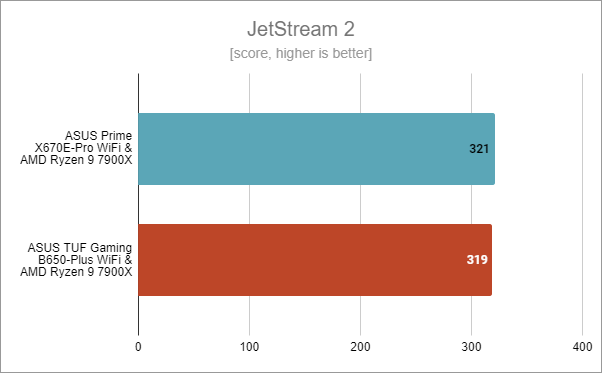 ASUS Prime X670E-Pro WiFi: Benchmark results in JetStream 2
In 7-Zip’s benchmark tool, we got mixed results, as the compression speed seemed a bit slower when using the ASUS Prime X670E-Pro WiFi than when using the ASUS TUF Gaming B650-Plus WiFi.
ASUS Prime X670E-Pro WiFi: Benchmark results in JetStream 2
In 7-Zip’s benchmark tool, we got mixed results, as the compression speed seemed a bit slower when using the ASUS Prime X670E-Pro WiFi than when using the ASUS TUF Gaming B650-Plus WiFi.
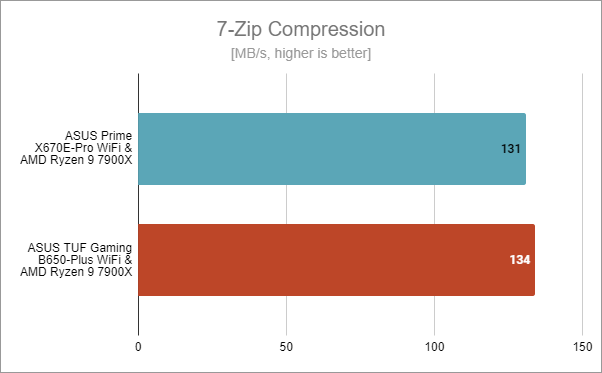 ASUS Prime X670E-Pro WiFi: Benchmark results in 7-Zip Compression
… and the decompression results were the opposite: the Ryzen 9 7900X was a bit faster on the ASUS Prime X670E-Pro WiFi than on the ASUS TUF Gaming B650-Plus WiFi.
ASUS Prime X670E-Pro WiFi: Benchmark results in 7-Zip Compression
… and the decompression results were the opposite: the Ryzen 9 7900X was a bit faster on the ASUS Prime X670E-Pro WiFi than on the ASUS TUF Gaming B650-Plus WiFi.
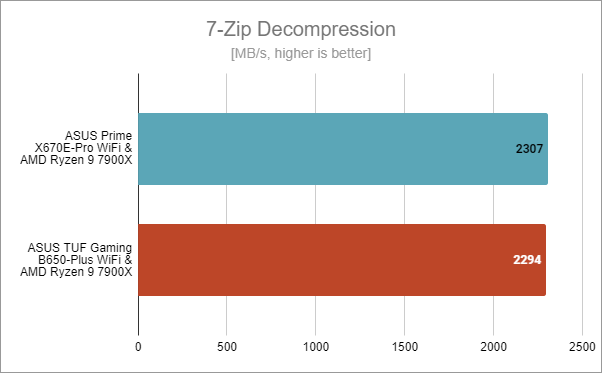 ASUS Prime X670E-Pro WiFi: Benchmark results in 7-Zip Decompression
Next, let’s see a couple of results in gaming:
In Shadow of the Tomb Raider, using the ASUS Prime X670E-Pro WiFi motherboard, I got 9 frames per second more than when using the ASUS TUF Gaming B650-Plus WiFi. However, we’re talking about a 300-plus framerate in both cases, so 9 fps are pretty much irrelevant.
ASUS Prime X670E-Pro WiFi: Benchmark results in 7-Zip Decompression
Next, let’s see a couple of results in gaming:
In Shadow of the Tomb Raider, using the ASUS Prime X670E-Pro WiFi motherboard, I got 9 frames per second more than when using the ASUS TUF Gaming B650-Plus WiFi. However, we’re talking about a 300-plus framerate in both cases, so 9 fps are pretty much irrelevant.
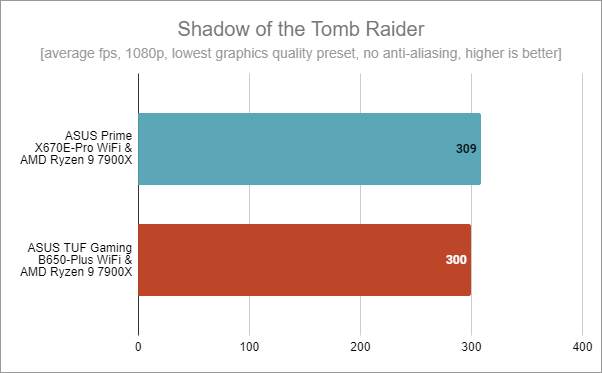 ASUS Prime X670E-Pro WiFi: Benchmark results in Shadow of the Tomb Raider
I’ve witnessed the same thing in Metro Exodus, one of the most demanding games ever made. The two CPU + motherboard pairs proved to offer almost the same results, although you could say that the Ryzen 9 7900X + ASUS Prime X670E-Pro WiFi was a bit faster.
ASUS Prime X670E-Pro WiFi: Benchmark results in Shadow of the Tomb Raider
I’ve witnessed the same thing in Metro Exodus, one of the most demanding games ever made. The two CPU + motherboard pairs proved to offer almost the same results, although you could say that the Ryzen 9 7900X + ASUS Prime X670E-Pro WiFi was a bit faster.
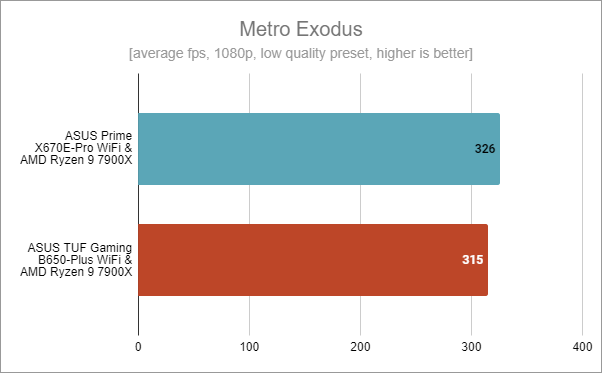 ASUS Prime X670E-Pro WiFi: Benchmark results in Metro Exodus
In Assassin’s Creed Valhalla, the average framerate I recorded was precisely the same on both motherboards. While the numbers were high, the fact that they were identical means that the graphics card was a bottleneck in both cases.
ASUS Prime X670E-Pro WiFi: Benchmark results in Metro Exodus
In Assassin’s Creed Valhalla, the average framerate I recorded was precisely the same on both motherboards. While the numbers were high, the fact that they were identical means that the graphics card was a bottleneck in both cases.
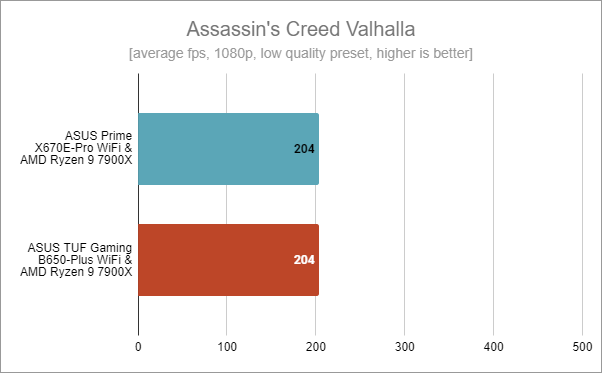 ASUS Prime X670E-Pro WiFi: Benchmark results in Assassin's Creed Valhalla
The benchmarks show that the ASUS Prime X670E-Pro WiFi is a top-notch motherboard. It’s stable and offers all the power the other components need. Paired with a capable processor, it can sustain any kind of workload, including digital content creation tasks or gaming. However, the benchmarks also show that the performance of the motherboard is similar to what you get from one based on a mid-range AMD chipset such as the B650. In other words, the ASUS Prime X670E-Pro WiFi is what you should aim for if you want things like more extensive PCI Express 5.0 support or overclocking, rather than just plain performance, which is more or less the same as what a B650 chipset will give you.
ASUS Prime X670E-Pro WiFi: Benchmark results in Assassin's Creed Valhalla
The benchmarks show that the ASUS Prime X670E-Pro WiFi is a top-notch motherboard. It’s stable and offers all the power the other components need. Paired with a capable processor, it can sustain any kind of workload, including digital content creation tasks or gaming. However, the benchmarks also show that the performance of the motherboard is similar to what you get from one based on a mid-range AMD chipset such as the B650. In other words, the ASUS Prime X670E-Pro WiFi is what you should aim for if you want things like more extensive PCI Express 5.0 support or overclocking, rather than just plain performance, which is more or less the same as what a B650 chipset will give you.
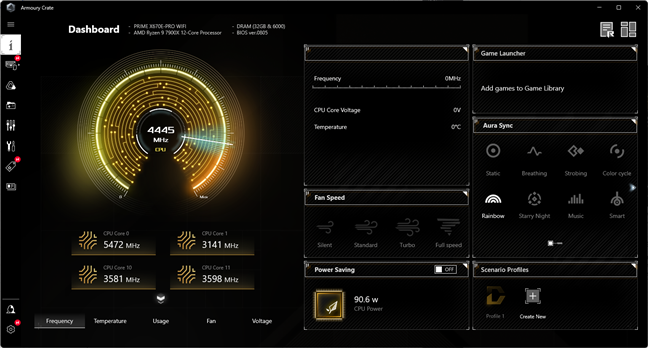
 The Armoury Crate app
Armoury Crate is a useful app that you should install and use in order to gain detailed control over the ASUS Prime X670E-Pro WiFi motherboard.
The Armoury Crate app
Armoury Crate is a useful app that you should install and use in order to gain detailed control over the ASUS Prime X670E-Pro WiFi motherboard.
ASUS Prime X670E-Pro WiFi: Who is it good for?
The ASUS Prime X670E-Pro WiFi is the motherboard you should get if:- You’re looking for an AM5 motherboard based on the X670E chipset
- You want as much PCI Express 5.0 support as you can get
- You’re a content creator or a gamer who needs a high-performance motherboard
Pros and cons
The most positive aspects of the ASUS Prime X670E-Pro WiFi are:
- Its price is more affordable than that of higher-end AM5 motherboards
- It looks beautiful with its gray and white design
- Extended PCI Express 5.0 support, including for the x16 GPU slot
- Includes a Wi-Fi 6E chip
- Prepared for overclocking thanks to its robust Voltage Regulator Modules (VRMs) and large heatsinks
- Includes USB Type-C connectors with extremely fast USB 3.2 Gen 2x2 (up to 20 Gbps)
Verdict
After testing a couple of different AM5 motherboards and checking the specs and details of more than just a few, I can say that the ASUS Prime X670E-Pro WiFi is my favorite one so far. It’s one of the most balanced motherboards you can get for AMD Ryzen 7000 processors. Based on the high-end AMD X670E chipset, it offers extended PCI Express 5.0 connectivity, including for the x16 graphics slot and solid-state drives, as well as 2.5 Gbps Ethernet and WiFi 6. While the performance you get for the processor is similar to what you’d get from a mid-range B650 chipset, the other features of the motherboard make all the difference. Overall, the ASUS Prime X670E-Pro WiFi is a fantastic mid to high-end motherboard that gets five stars with a warm recommendation from my part and our “Editor’s Pick” badge.Unboxing the ASUS Prime X670E-Pro WiFi motherboard
The Prime X670E-Pro WiFi motherboard comes in a good-looking box with a rather conservative design. It’s made of premium cardboard and uses mainly shades of gray. On the top cover, you get to see what the motherboard looks like, as well as some details about it. You can find additional (more technical) information on the back.Hardware specifications and design
The ASUS Prime X670E-Pro WiFi has a standard ATX form factor, measuring 30.5 cm (12 inches) in length and 24.4 cm (9.6 inches) in width. It’s based on the high-end AMD X670E chipset, which is designed to deliver not only high performance for AMD Ryzen 7000 processors but also as many PCI Express 5.0 lanes as possible. Obviously, the motherboard comes with an AM5 socket and supports only DDR5 memory, just like all the other motherboards based on AMD’s latest chipsets (X670, B650E, B650).- one PCIe 5.0 (x16 mode) slot for the graphics card
- one M.2 PCIe 5.0 (x4 mode) slot for a fast solid-state drive (type 2242/2260/2280)
- one M.2 PCIe 4.0 (x4 mode) slot for a fast solid-state drive (type 2242/2260/2280)
- one PCIe 4.0 x16 slot (x4 mode)
- one PCIe 4.0 x4 slot
- one PCIe 4.0 M.2 slot (x4 mode, type 2242/2260/2280)
- one PCIe 3.0 M.2 slot (x4 and SATA modes, type 2242/2260/2280/22110)
- four SATA 6Gb/s ports
ASUS Prime X670E-Pro WiFi - Benchmark results
I tested the ASUS Prime X670E-Pro WiFi motherboard on a desktop PC that had the following hardware and software:- Processor: AMD Ryzen 9 7900X
- CPU cooler: Cooler Master MasterLiquid ML360R RGB
- Memory: Kingston Fury Beast RGB DDR5-6000 32GB
- Graphics Card: AMD Radeon RX 6800 (16GB)
- Storage: Kingston KC3000 NVMe PCIe 4.0 SSD (2TB)
- Monitor: ASUS ROG Strix XG32VQ Curved Gaming Monitor (1440p, 144Hz)
- Power Supply Unit: ASUS ROG Thor 850W Platinum
- Operating System: Windows 11 Pro version 22H2
The software bundled with ASUS Prime X670E-Pro WiFi
Nowadays, I must say that I like ASUS’ approach when it comes to bundled software. That’s also true in regard to the ASUS Prime X670E-Pro WiFi motherboard, as there’s practically no bloatware bundled with it. The only additional software you get is the Armoury Crate app, which acts as a sort of dashboard for everything else available from ASUS. It shows you details about the system, including temperatures, fan speed, voltage, and frequencies, and it also lets you control and customize certain aspects of your computer. For instance, you can use the app to adjust lighting effects, set fan speed, enable power-saving mode, install drivers and additional software, and even download the latest version of UEFI BIOS available for the motherboard.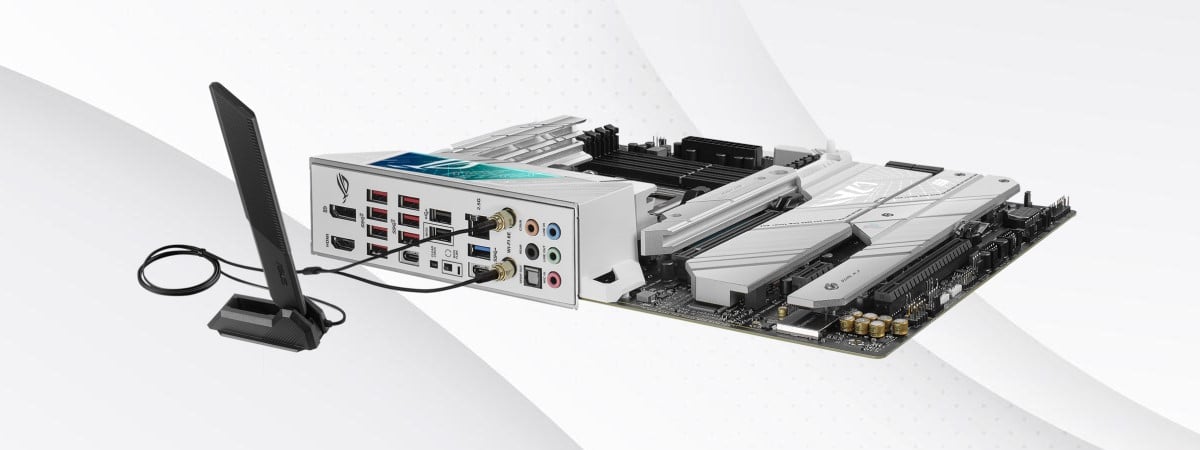

Discussion (0)
Comments are closed.