




The ASUS ROG Strix X870-A Gaming WiFi is a powerful and feature-rich motherboard created for gamers who want the best and the latest. It’s particularly targeted to those who intend to build high-performance systems with AMD Ryzen 7000, 8000, or 9000 series processors. In this review, I’m taking a closer look at the ASUS ROG Strix X870-A Gaming WiFi motherboard in order to tell you a bit about its design, performance, build quality, connectivity, cooling features, and so on. By the end, I hope you’ll be able to say you have a clear idea of whether this motherboard is a good choice for your next PC build. Let’s get started:
![Verdict]()

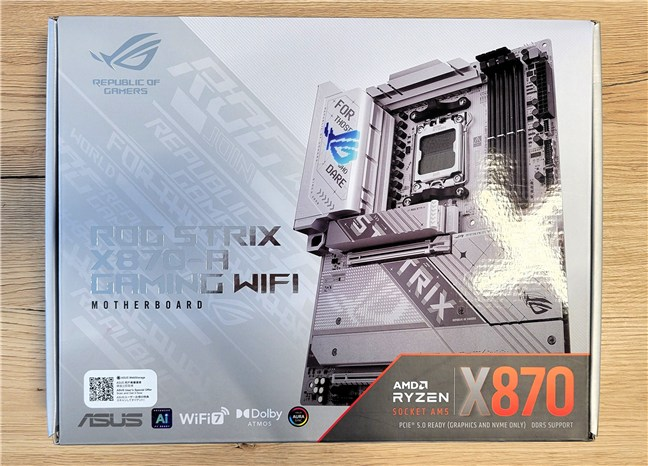
 The packaging for ASUS ROG Strix X870-A Gaming WiFi
Open the box and the first thing you see is the stunning motherboard itself. Under it, you find a generous bundle of accessories: two SATA 6Gb/s cables, a thermal pad for an M.2 22110 SSD, an ASUS Wi-Fi Q-Antenna, a pack of cable ties, M.2 Q-Latches and M.2 Q-Slide packages, four M.2 rubber packages, an ROG keychain, a ROG Strix stickers sheet, a thank you card, and the user guide.
The packaging for ASUS ROG Strix X870-A Gaming WiFi
Open the box and the first thing you see is the stunning motherboard itself. Under it, you find a generous bundle of accessories: two SATA 6Gb/s cables, a thermal pad for an M.2 22110 SSD, an ASUS Wi-Fi Q-Antenna, a pack of cable ties, M.2 Q-Latches and M.2 Q-Slide packages, four M.2 rubber packages, an ROG keychain, a ROG Strix stickers sheet, a thank you card, and the user guide.
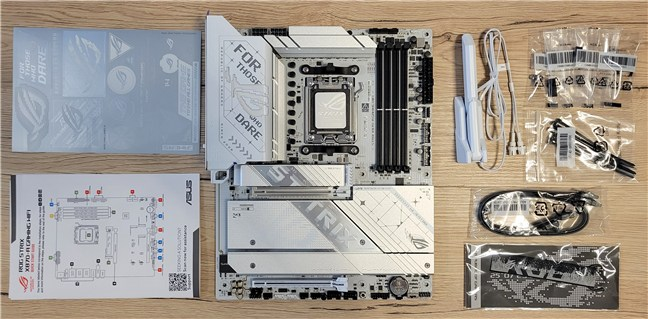
 The accessories bundled with ASUS ROG Strix X870-A Gaming WiFi
Unboxing the ASUS ROG Strix X870-A Gaming WiFi motherboard, you can immediately tell that you’re in for a high-end product experience. I like the manufacturer’s attention to detail and the generous bundle of accessories.
The accessories bundled with ASUS ROG Strix X870-A Gaming WiFi
Unboxing the ASUS ROG Strix X870-A Gaming WiFi motherboard, you can immediately tell that you’re in for a high-end product experience. I like the manufacturer’s attention to detail and the generous bundle of accessories.
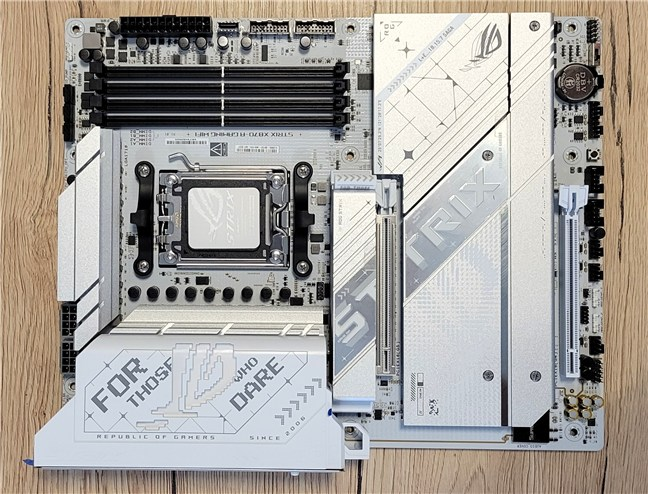
 This is a beautiful motherboard, don't you think?
The panel covering the input/output ports on the rear, left of the processor socket, also has RGB lighting. The illuminated accents there help in making the motherboard feel even more premium and futuristic.
This is a beautiful motherboard, don't you think?
The panel covering the input/output ports on the rear, left of the processor socket, also has RGB lighting. The illuminated accents there help in making the motherboard feel even more premium and futuristic.

 The motherboard mounted in my test PC
The critical areas where the VRM (Voltage Regulator Module) resides are covered by large heatsinks. These ensure efficient cooling and allow the motherboard to support high power loads from even the most demanding AMD processor.
The motherboard mounted in my test PC
The critical areas where the VRM (Voltage Regulator Module) resides are covered by large heatsinks. These ensure efficient cooling and allow the motherboard to support high power loads from even the most demanding AMD processor.
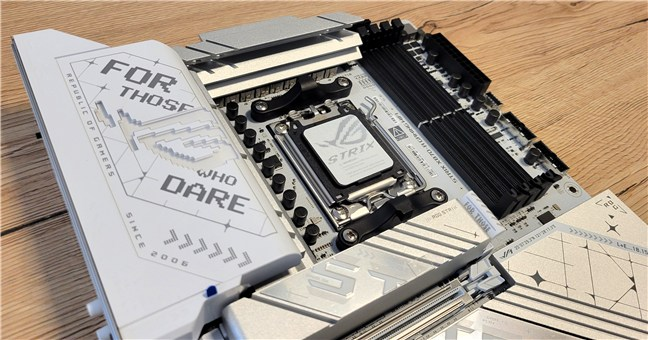
 The motherboard has large heatsinks
Speaking of which, one of the most essential aspects of any motherboard is its ability to deliver stable and reliable power to the processor. The ASUS ROG Strix X870-A Gaming WiFi does not disappoint in this regard, with 16+2+2 power stages, ensuring that the motherboard can keep up with sudden power demands from the processor.
The motherboard has large heatsinks
Speaking of which, one of the most essential aspects of any motherboard is its ability to deliver stable and reliable power to the processor. The ASUS ROG Strix X870-A Gaming WiFi does not disappoint in this regard, with 16+2+2 power stages, ensuring that the motherboard can keep up with sudden power demands from the processor.
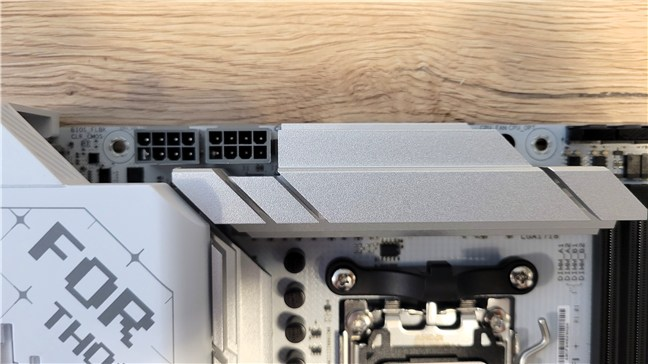 The motherboard has excellent power delivery
There are three EPS power connectors: one 24-pin ATX connector and two 8-pin connectors. They supply power to the processor and other components mounted on the motherboard.
The motherboard has excellent power delivery
There are three EPS power connectors: one 24-pin ATX connector and two 8-pin connectors. They supply power to the processor and other components mounted on the motherboard.
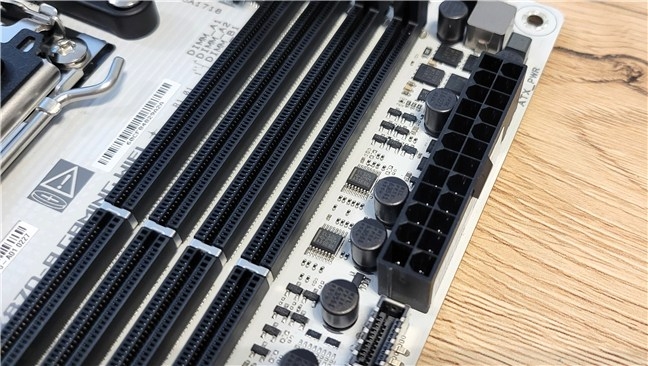
 The ATX power connector
The ROG Strix X870-A Gaming WiFi is built using one of AMD’s latest and most advanced chipsets, namely the X870. It is also equipped with an AM5 socket, which provides excellent compatibility with the latest Ryzen processors built on the Zen 4 and Zen 5 architectures. These technical aspects make it a future-proof option for those who want to be certain they’ll benefit from the best compatibility with current and future processors in the AMD Ryzen series.
The ATX power connector
The ROG Strix X870-A Gaming WiFi is built using one of AMD’s latest and most advanced chipsets, namely the X870. It is also equipped with an AM5 socket, which provides excellent compatibility with the latest Ryzen processors built on the Zen 4 and Zen 5 architectures. These technical aspects make it a future-proof option for those who want to be certain they’ll benefit from the best compatibility with current and future processors in the AMD Ryzen series.
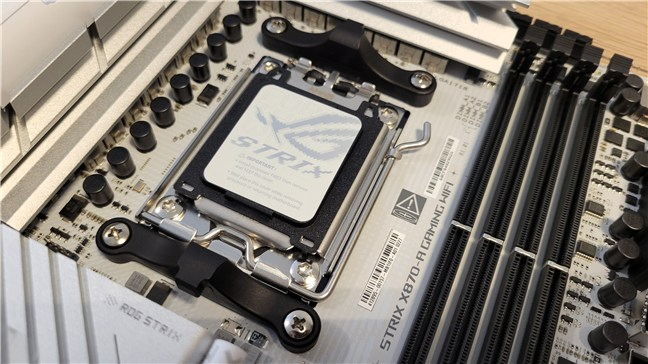 The motherboard uses the new X870 chipset from AMD
The X870 chipset also offers PCIe 5.0 support, making this motherboard a high-performance choice that can handle the fastest graphics cards and solid-state drives available today and in the foreseeable future. With PCIe 5.0 x16 slots for the GPU and M.2 slots for storage, the motherboard offers huge throughput. This means faster data transfers and lower latency, which is something you want not only if you’re a gamer but also if you’re a content creator who requires top-notch performance.
The motherboard uses the new X870 chipset from AMD
The X870 chipset also offers PCIe 5.0 support, making this motherboard a high-performance choice that can handle the fastest graphics cards and solid-state drives available today and in the foreseeable future. With PCIe 5.0 x16 slots for the GPU and M.2 slots for storage, the motherboard offers huge throughput. This means faster data transfers and lower latency, which is something you want not only if you’re a gamer but also if you’re a content creator who requires top-notch performance.
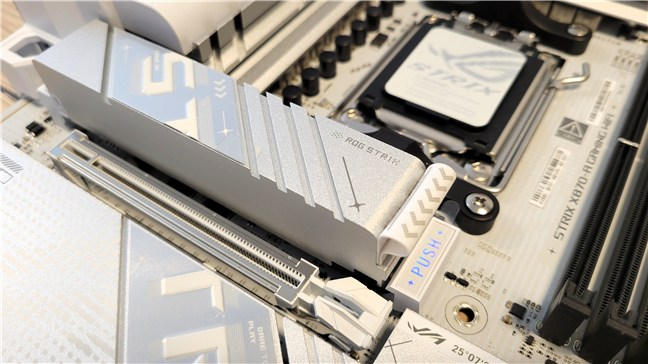 The motherboard supports PCIe 5
The ASUS ROG Strix X870-A Gaming WiFi works with DDR5 memory, the latest and fastest type of RAM available. The motherboard comes with four DIMM slots that support up to 192 GB of DDR5 RAM, with official memory speeds of 5600 MT/s and AMD EXPO overclocking support up to an impressive 8000 MT/s.
The motherboard supports PCIe 5
The ASUS ROG Strix X870-A Gaming WiFi works with DDR5 memory, the latest and fastest type of RAM available. The motherboard comes with four DIMM slots that support up to 192 GB of DDR5 RAM, with official memory speeds of 5600 MT/s and AMD EXPO overclocking support up to an impressive 8000 MT/s.
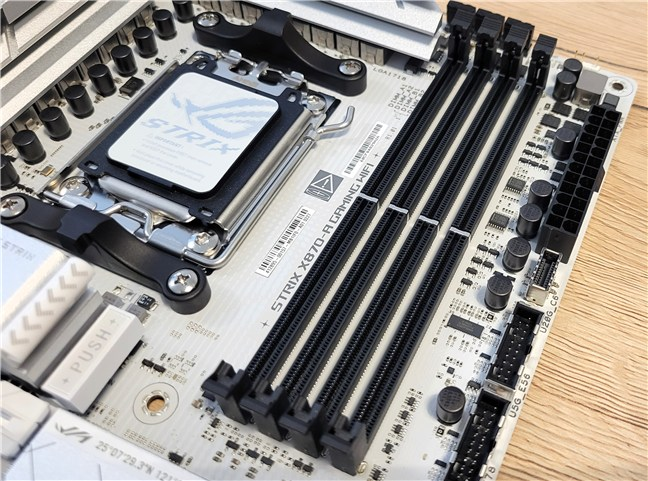
 You get AMD EXPO support for RAM speeds of 8000 MT/s
On the storage front, the motherboard features four M.2 slots, with two of these slots offering PCIe 5.0 support, ensuring compatibility with the latest NVMe SSDs for ultra-fast data transfer speeds. The additional two M.2 slots support PCIe 4.0, providing more than enough room for high-speed SSDs. In case you need them, there are also four SATA ports for traditional hard drives or SATA SSDs.
You get AMD EXPO support for RAM speeds of 8000 MT/s
On the storage front, the motherboard features four M.2 slots, with two of these slots offering PCIe 5.0 support, ensuring compatibility with the latest NVMe SSDs for ultra-fast data transfer speeds. The additional two M.2 slots support PCIe 4.0, providing more than enough room for high-speed SSDs. In case you need them, there are also four SATA ports for traditional hard drives or SATA SSDs.
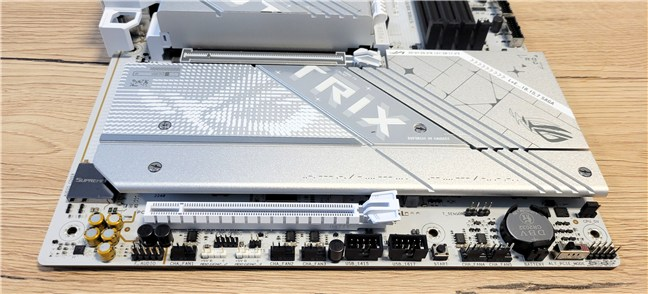
 There are many M.2 and SATA ports
As the name suggests, the ASUS ROG Strix X870-A Gaming WiFi comes equipped with wireless connectivity. It features the latest Wi-Fi 7 technology, which offers faster speeds, lower latency, and more stable connections compared to older Wi-Fi standards. In addition, the motherboard features a 2.5G Ethernet port, which provides reliable wired network connectivity with fast data transfer speeds.
There are many M.2 and SATA ports
As the name suggests, the ASUS ROG Strix X870-A Gaming WiFi comes equipped with wireless connectivity. It features the latest Wi-Fi 7 technology, which offers faster speeds, lower latency, and more stable connections compared to older Wi-Fi standards. In addition, the motherboard features a 2.5G Ethernet port, which provides reliable wired network connectivity with fast data transfer speeds.

 The motherboard comes with WiFi 7
The rear I/O panel of the ASUS ROG Strix X870-A Gaming WiFi is packed with connectivity options. The panel includes two USB4 Type-C ports (working at speeds up to 40 Gbps), six USB 10Gbps ports (five are Type-A and one is USB Type-C, with up to 30 Watt fast charging capabilities), four USB 5Gbps ports (Type-A), one DisplayPort, one HDMI port, one Wi-Fi module, one Intel 2.5Gb Ethernet port, two audio jacks, one optical S/PDIF out port, a BIOS Flashback button and a Clear CMOS button.
The motherboard comes with WiFi 7
The rear I/O panel of the ASUS ROG Strix X870-A Gaming WiFi is packed with connectivity options. The panel includes two USB4 Type-C ports (working at speeds up to 40 Gbps), six USB 10Gbps ports (five are Type-A and one is USB Type-C, with up to 30 Watt fast charging capabilities), four USB 5Gbps ports (Type-A), one DisplayPort, one HDMI port, one Wi-Fi module, one Intel 2.5Gb Ethernet port, two audio jacks, one optical S/PDIF out port, a BIOS Flashback button and a Clear CMOS button.
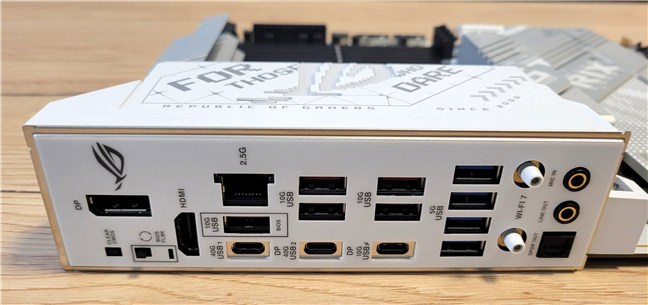
 A generous selection of ports, including USB 4
TIP: The BIOS Flashback feature lets you update the motherboard’s UEFI without booting into the operating system, while the Clear CMOS button allows you to reset the UEFI settings to default, which can be handy if overclocking or other settings cause boot issues.
Regarding cooling, which is an essential part of any high-performance motherboard, you’ve already seen that ASUS equipped the ROG Strix X870-A Gaming WiFi with a comprehensive array of heatsinks, including massive ones that cover the VRM, chipset, and M.2 slots. These heatsinks ensure that the motherboard can handle the heat generated by powerful components such as the PCIe 5.0 solid-state drives or graphics cards.
A generous selection of ports, including USB 4
TIP: The BIOS Flashback feature lets you update the motherboard’s UEFI without booting into the operating system, while the Clear CMOS button allows you to reset the UEFI settings to default, which can be handy if overclocking or other settings cause boot issues.
Regarding cooling, which is an essential part of any high-performance motherboard, you’ve already seen that ASUS equipped the ROG Strix X870-A Gaming WiFi with a comprehensive array of heatsinks, including massive ones that cover the VRM, chipset, and M.2 slots. These heatsinks ensure that the motherboard can handle the heat generated by powerful components such as the PCIe 5.0 solid-state drives or graphics cards.
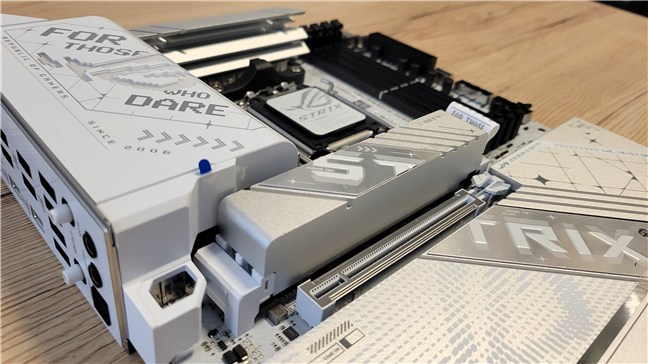 Cooling options are excellent
The motherboard also features multiple fan headers, including one 4-pin CPU Fan header, one 4-pin CPU OPT Fan header, one 4-pin AIO Pump header, and five 4-pin Chassis Fan headers. Additionally, there are also three addressable Gen 2 connectors for RGB lighting fans.
Cooling options are excellent
The motherboard also features multiple fan headers, including one 4-pin CPU Fan header, one 4-pin CPU OPT Fan header, one 4-pin AIO Pump header, and five 4-pin Chassis Fan headers. Additionally, there are also three addressable Gen 2 connectors for RGB lighting fans.
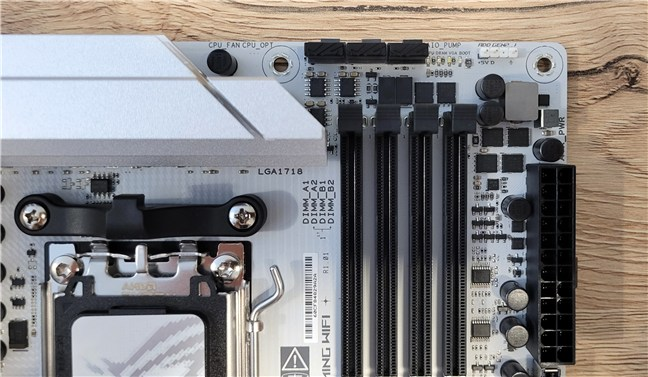
 You get multiple fan and RGB headers
ASUS has long been known for its premium audio solutions, and the ROG Strix X870-A is no exception. It features the ROG SupremeFX audio codec (ALC4080), which delivers 7.1-channel surround sound and supports up to 32-bit/384 kHz audio playback.
You get multiple fan and RGB headers
ASUS has long been known for its premium audio solutions, and the ROG Strix X870-A is no exception. It features the ROG SupremeFX audio codec (ALC4080), which delivers 7.1-channel surround sound and supports up to 32-bit/384 kHz audio playback.
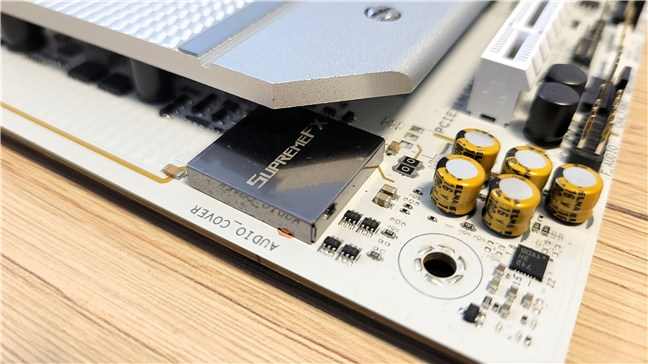 The audio chip is high-quality
For more detailed information, visit the official product page of the ASUS ROG Strix X870-A Gaming WiFi.
The ASUS ROG Strix X870-A Gaming WiFi is a top-tier motherboard, excellent for gamers and PC enthusiasts. With features like PCIe 5.0, WiFi 7, USB 4, and an attractive white-themed design, it’s clearly an excellent choice for building a high-performance, future-proof system.
The audio chip is high-quality
For more detailed information, visit the official product page of the ASUS ROG Strix X870-A Gaming WiFi.
The ASUS ROG Strix X870-A Gaming WiFi is a top-tier motherboard, excellent for gamers and PC enthusiasts. With features like PCIe 5.0, WiFi 7, USB 4, and an attractive white-themed design, it’s clearly an excellent choice for building a high-performance, future-proof system.
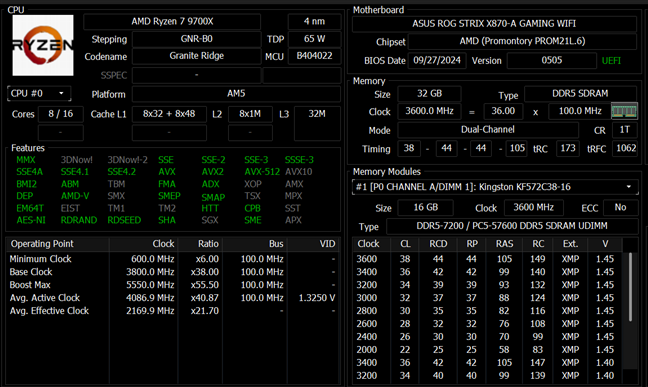
 Some details about the test computer
From the moment I unboxed it, the ASUS ROG Strix X870-A Gaming WiFi proved to be a high-quality product with a beautiful design and pleasant RGB lighting. Installing it was easy, including the part where I had to mount the AMD Ryzen 7 9700X processor and the relatively large ASUS ROG Ryuo III 240 cooler. The motherboard’s elements are well spaced. You won’t have space issues even if you’re going to mount a big graphics card, even if it’s larger than my AMD Radeon RX 7900 XT.
Some details about the test computer
From the moment I unboxed it, the ASUS ROG Strix X870-A Gaming WiFi proved to be a high-quality product with a beautiful design and pleasant RGB lighting. Installing it was easy, including the part where I had to mount the AMD Ryzen 7 9700X processor and the relatively large ASUS ROG Ryuo III 240 cooler. The motherboard’s elements are well spaced. You won’t have space issues even if you’re going to mount a big graphics card, even if it’s larger than my AMD Radeon RX 7900 XT.
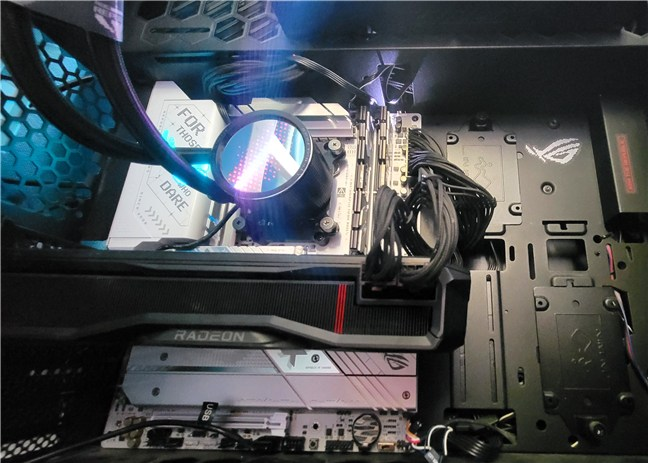
 ASUS ROG Strix X870-A Gaming WiFi provides excellent spacing between components
The real test of a gaming motherboard is how it handles games, and the ASUS ROG Strix X870-A Gaming WiFi didn’t disappoint me at all. I played some very demanding games, like Horizon Forbidden West, Assassin’s Creed Mirage, and Ghost of Tsushima. I played them at 4K resolution with max settings, and the performance was amazing.
ASUS ROG Strix X870-A Gaming WiFi provides excellent spacing between components
The real test of a gaming motherboard is how it handles games, and the ASUS ROG Strix X870-A Gaming WiFi didn’t disappoint me at all. I played some very demanding games, like Horizon Forbidden West, Assassin’s Creed Mirage, and Ghost of Tsushima. I played them at 4K resolution with max settings, and the performance was amazing.
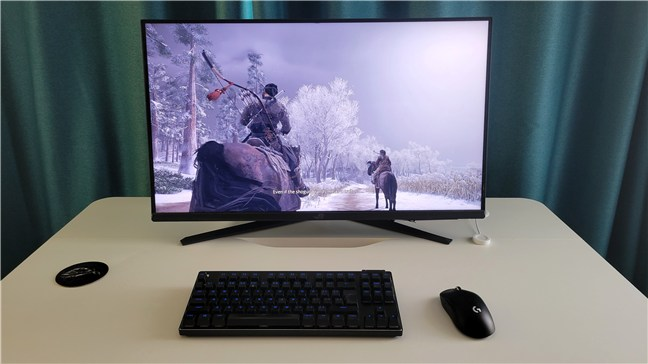 Playing Ghost of Tsushima
Using this motherboard has been a great experience. It’s designed for gamers, with features that improve performance, from faster load times to smooth graphics and strong wireless connections. Its support for the latest AMD processors and DDR5 memory makes it perfect for handling demanding games with no problem.
On the next page, I’ll compare how an AMD Ryzen 7 9700X performs on this ASUS ROG Strix X870-A Gaming WiFi motherboard versus two similar setups using the ASUS ROG Strix X670E-A Gaming WiFi and the ASUS Prime X670E-Pro WiFi motherboards. Both these motherboards have high-end chipsets, but the ROG Strix is more gamer-focused, while the Prime is aimed at a more professional audience and costs less. Compared to them, the ASUS ROG Strix X870-A Gaming WiFi motherboard uses a brand new chipset and has more modern features like USB 4 or WiFi 7.
Playing Ghost of Tsushima
Using this motherboard has been a great experience. It’s designed for gamers, with features that improve performance, from faster load times to smooth graphics and strong wireless connections. Its support for the latest AMD processors and DDR5 memory makes it perfect for handling demanding games with no problem.
On the next page, I’ll compare how an AMD Ryzen 7 9700X performs on this ASUS ROG Strix X870-A Gaming WiFi motherboard versus two similar setups using the ASUS ROG Strix X670E-A Gaming WiFi and the ASUS Prime X670E-Pro WiFi motherboards. Both these motherboards have high-end chipsets, but the ROG Strix is more gamer-focused, while the Prime is aimed at a more professional audience and costs less. Compared to them, the ASUS ROG Strix X870-A Gaming WiFi motherboard uses a brand new chipset and has more modern features like USB 4 or WiFi 7.
 Benchmark results in CPU-Z Single Thread
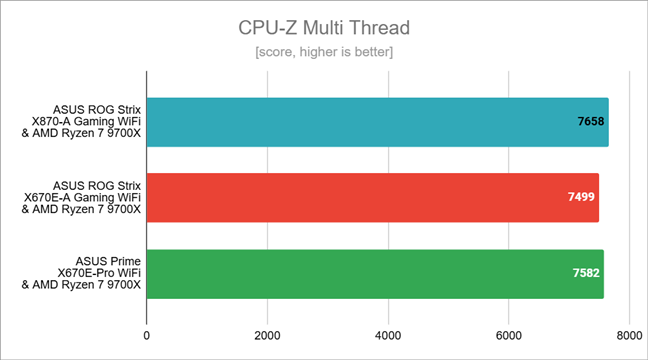
In CPU-Z’s Multi-Thread test, which measures the all-core performance of the processor, the Ryzen 9 7900X got a slightly higher score on the ASUS ROG Strix X870-A Gaming WiFi. However, the results were very close, with differences of 2.12% at most.
Benchmark results in CPU-Z Single Thread
In CPU-Z’s Multi-Thread test, which measures the all-core performance of the processor, the Ryzen 9 7900X got a slightly higher score on the ASUS ROG Strix X870-A Gaming WiFi. However, the results were very close, with differences of 2.12% at most.
 Benchmark results in CPU-Z Multi Thread
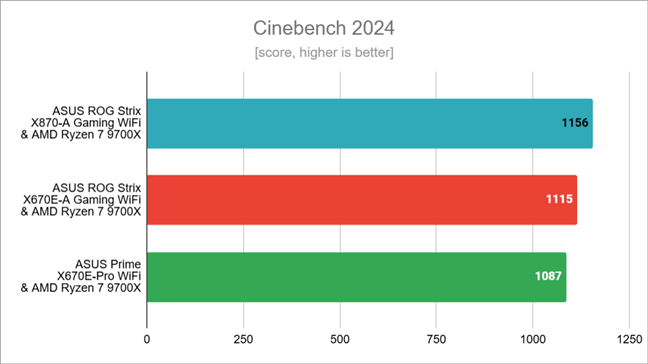
In Cinebench 2024, the processor delivered better results when paired with the ASUS ROG Strix X870-A Gaming WiFi compared to the other two motherboards. Compared to them, the CPU coupled with the motherboard I’m reviewing proved to be faster by up to 6.35%.
Benchmark results in CPU-Z Multi Thread
In Cinebench 2024, the processor delivered better results when paired with the ASUS ROG Strix X870-A Gaming WiFi compared to the other two motherboards. Compared to them, the CPU coupled with the motherboard I’m reviewing proved to be faster by up to 6.35%.
 Benchmark results in Cinebench 2024
Blender is usually the second rendering benchmark I run. Unfortunately, during the time I had the ASUS ROG Strix X870-A Gaming WiFi motherboard, Blender simply refused to run, issuing only errors. Thus, I must skip it this time…
Next up was the PCMark 10 benchmark, which evaluates a computer’s performance across various everyday tasks, such as web browsing, video conferencing, productivity work, and digital content creation. The Ryzen 7 9700X processor delivered nearly identical results, with differences of less than 0.32%, on all three motherboards.
Benchmark results in Cinebench 2024
Blender is usually the second rendering benchmark I run. Unfortunately, during the time I had the ASUS ROG Strix X870-A Gaming WiFi motherboard, Blender simply refused to run, issuing only errors. Thus, I must skip it this time…
Next up was the PCMark 10 benchmark, which evaluates a computer’s performance across various everyday tasks, such as web browsing, video conferencing, productivity work, and digital content creation. The Ryzen 7 9700X processor delivered nearly identical results, with differences of less than 0.32%, on all three motherboards.
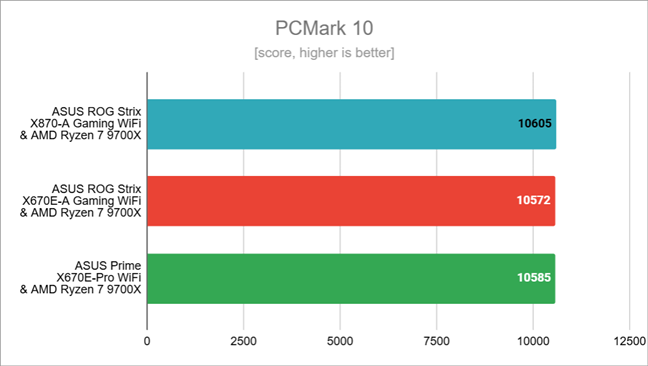 Benchmark results in PCMark 10
In JetStream 2.2, I got similar scores with all motherboards. The differences are again very low, under 2.28%.
Benchmark results in PCMark 10
In JetStream 2.2, I got similar scores with all motherboards. The differences are again very low, under 2.28%.
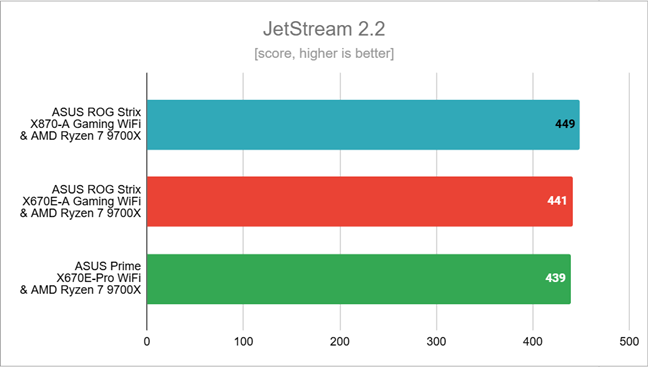
 Benchmark results in JetStream 2.2
Using 7-Zip’s benchmark tool, I noticed some unexpected results. The compression speed was up to 14.13% faster with the ASUS ROG Strix X870-A Gaming WiFi. I think this might be a result of the improvements in the UEFI of this motherboard, compared to the state of the UEFI on the other two boards I tested back in August. It could also be related to recent updates in Windows 11 and the drivers provided by AMD.
Benchmark results in JetStream 2.2
Using 7-Zip’s benchmark tool, I noticed some unexpected results. The compression speed was up to 14.13% faster with the ASUS ROG Strix X870-A Gaming WiFi. I think this might be a result of the improvements in the UEFI of this motherboard, compared to the state of the UEFI on the other two boards I tested back in August. It could also be related to recent updates in Windows 11 and the drivers provided by AMD.
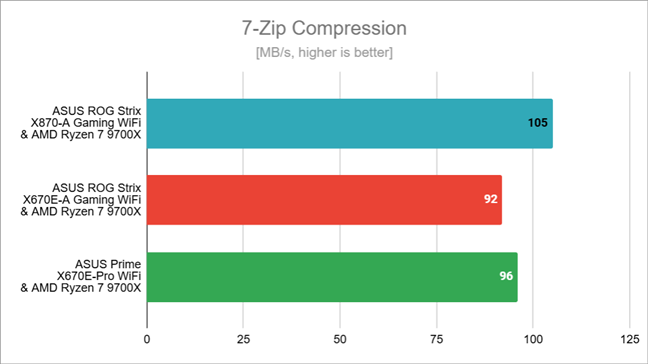 Compression speed in 7-Zip
Similarly, the decompression speed measured by 7-Zip was up to 5.82% faster with the ASUS ROG Strix X870-A Gaming WiFi, compared to the other two setups.
Compression speed in 7-Zip
Similarly, the decompression speed measured by 7-Zip was up to 5.82% faster with the ASUS ROG Strix X870-A Gaming WiFi, compared to the other two setups.
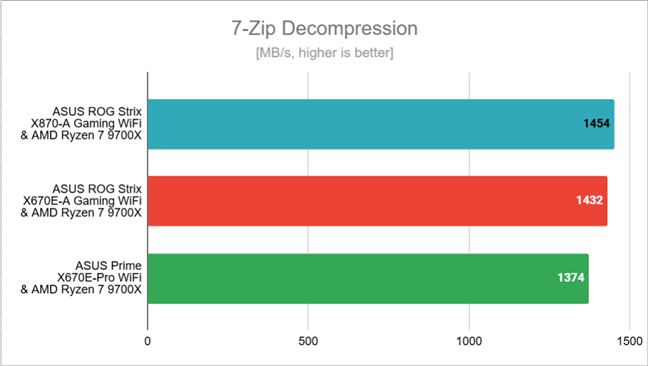 Decompression speed in 7-Zip
Next, I tested a few games at 1080p resolution with the graphics quality set to the lowest, to make sure the AMD Radeon RX 7900 XT graphics card wouldn’t cause any bottlenecks.
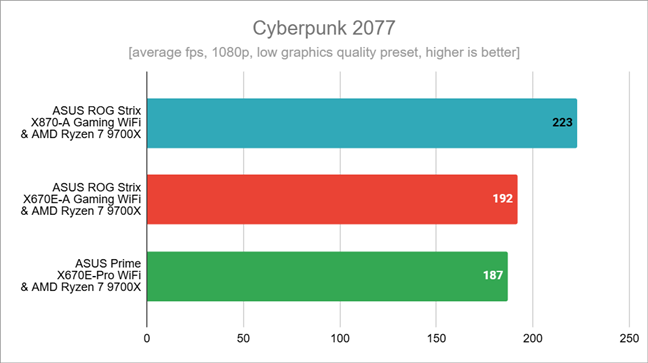
In Cyberpunk 2077, with the ASUS ROG Strix X870-A Gaming WiFi motherboard, I hit 223 frames per second, which is much higher (up to 19.25%) than what I got with the other two motherboards. I think this boost is likely due to recent updates in the graphics and chipset drivers, along with improvements in Windows 11 and the UEFI.
Decompression speed in 7-Zip
Next, I tested a few games at 1080p resolution with the graphics quality set to the lowest, to make sure the AMD Radeon RX 7900 XT graphics card wouldn’t cause any bottlenecks.
In Cyberpunk 2077, with the ASUS ROG Strix X870-A Gaming WiFi motherboard, I hit 223 frames per second, which is much higher (up to 19.25%) than what I got with the other two motherboards. I think this boost is likely due to recent updates in the graphics and chipset drivers, along with improvements in Windows 11 and the UEFI.
 Benchmark results in Cyberpunk 2077
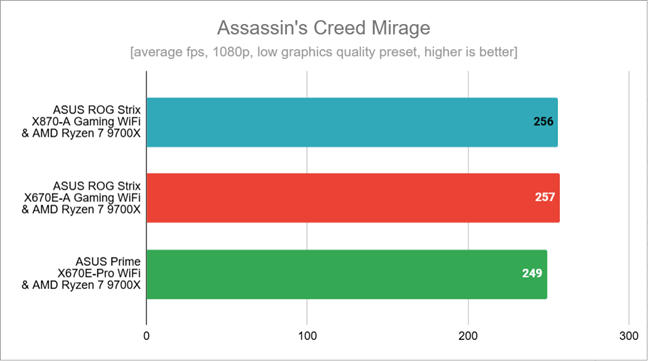
In Assassin’s Creed Mirage, however, the motherboards offered similar results. The setup using the ASUS ROG Strix X870-A Gaming WiFi was one frame per second slower (-0.40%) than the one using an ASUS ROG Strix X670E-A Gaming WiFi, yet seven frames per second faster (2.81%) than the computer with the ASUS Prime X670E-Pro WiFi.
Benchmark results in Cyberpunk 2077
In Assassin’s Creed Mirage, however, the motherboards offered similar results. The setup using the ASUS ROG Strix X870-A Gaming WiFi was one frame per second slower (-0.40%) than the one using an ASUS ROG Strix X670E-A Gaming WiFi, yet seven frames per second faster (2.81%) than the computer with the ASUS Prime X670E-Pro WiFi.
 Benchmark results in Assassin's Creed Mirage
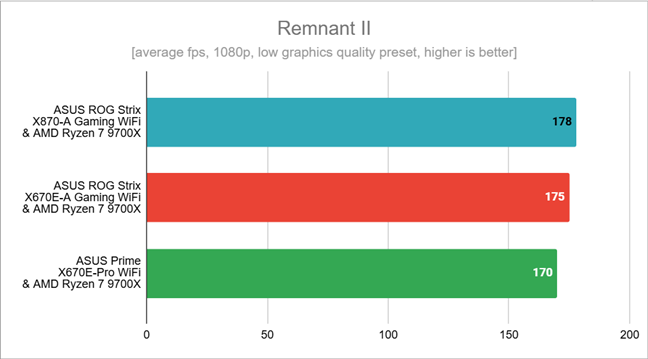
In Remnant II, the average framerate I recorded was much the same in all cases. However, with the ASUS ROG Strix X870-A Gaming WiFi, I got a slightly higher frame rate (by up to 4.71%) compared to the results of the other two motherboards.
Benchmark results in Assassin's Creed Mirage
In Remnant II, the average framerate I recorded was much the same in all cases. However, with the ASUS ROG Strix X870-A Gaming WiFi, I got a slightly higher frame rate (by up to 4.71%) compared to the results of the other two motherboards.
 Benchmark results in Remnant II
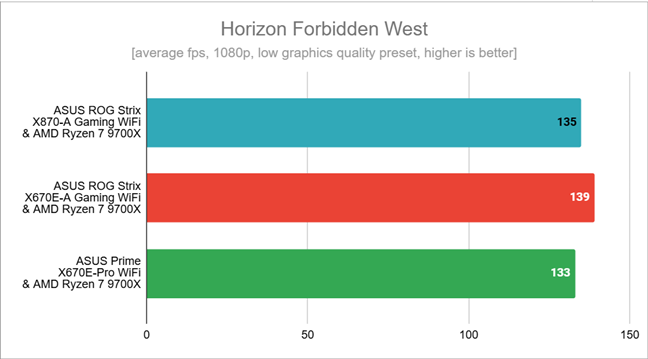
Finally, in Horizon Forbidden West, the results were mixed. With the ASUS ROG Strix X870-A Gaming WiFi, I had a frame rate of 135 fps, which is slightly more (1.51%) than the result achieved with the ASUS Prime X670E-Pro WiFi. However, the number of frames per second with the reviewed motherboard was also slightly lower (-2.88%) than the one I got using the ASUS ROG Strix X670E-A Gaming WiFi.
Benchmark results in Remnant II
Finally, in Horizon Forbidden West, the results were mixed. With the ASUS ROG Strix X870-A Gaming WiFi, I had a frame rate of 135 fps, which is slightly more (1.51%) than the result achieved with the ASUS Prime X670E-Pro WiFi. However, the number of frames per second with the reviewed motherboard was also slightly lower (-2.88%) than the one I got using the ASUS ROG Strix X670E-A Gaming WiFi.
 Benchmark results in Horizon Forbidden West
The benchmarks show that, with the right components, a computer built upon the ASUS ROG Strix X870-A Gaming WiFi motherboard is not only stable but also powerful.
Benchmark results in Horizon Forbidden West
The benchmarks show that, with the right components, a computer built upon the ASUS ROG Strix X870-A Gaming WiFi motherboard is not only stable but also powerful.

 ASUS DriverHub lets you download and install drivers easily
Armoury Crate is the other application you are suggested to install. It acts like a central hub for managing and controlling all ASUS devices and system settings. This tool allows you to easily customize RGB lighting effects with Aura Sync, adjust system performance, and download or update drivers and UEFI. It also provides real-time monitoring of CPU, GPU, RAM, and storage performance, and it offers custom game profiles that automatically apply preferred settings for different games, making it a comprehensive solution for optimizing your ASUS hardware.
ASUS DriverHub lets you download and install drivers easily
Armoury Crate is the other application you are suggested to install. It acts like a central hub for managing and controlling all ASUS devices and system settings. This tool allows you to easily customize RGB lighting effects with Aura Sync, adjust system performance, and download or update drivers and UEFI. It also provides real-time monitoring of CPU, GPU, RAM, and storage performance, and it offers custom game profiles that automatically apply preferred settings for different games, making it a comprehensive solution for optimizing your ASUS hardware.
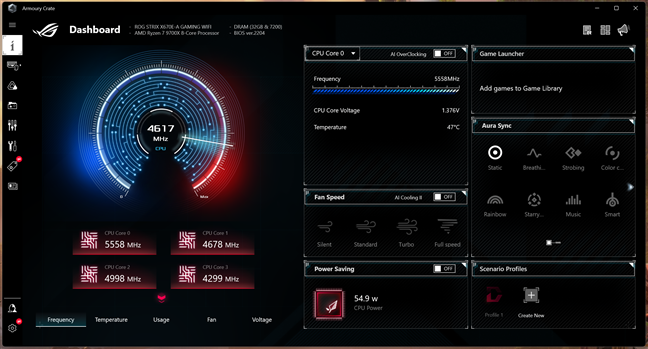
 Armoury Crate lets you personalize your ASUS devices
Both ASUS DriverHub and Armoury Crate are tools you’ll likely want on your computer. The first one simplifies the whole driver installation process, while the latter helps you manage your system and personalize it just the way you like it.
Armoury Crate lets you personalize your ASUS devices
Both ASUS DriverHub and Armoury Crate are tools you’ll likely want on your computer. The first one simplifies the whole driver installation process, while the latter helps you manage your system and personalize it just the way you like it.
ASUS ROG Strix X870-A Gaming WiFi: Who is it good for?
The ASUS ROG Strix X870-A Gaming WiFi is an excellent motherboard for:- Gamers and enthusiasts who want a high-performance motherboard
- Those building a white-themed computer
- Fans of ASUS’ Republic of Gamers brand
Pros and cons
These are the main pros for this motherboard:
- It uses the X870 chipset, designed for high-end performance and future-proofing
- Comes with USB 4.0, providing fast data transfers and improved connectivity
- Has PCI Express 5.0 support for both the graphics card and NVMe solid-state drives
- Includes AMD EXPO support for extremely high memory RAM speeds (up to 8000 MT/s)
- Wi-Fi 7 and 2.5 Gbps Ethernet connectivity
- Beautiful white aspect with RGB lighting and solid build quality
- The ASUS ROG Strix X870-A Gaming WiFi is quite pricey
Verdict
The ASUS ROG Strix X870-A Gaming WiFi motherboard is a great option for gamers, PC enthusiasts, and overclockers. It offers a solid platform with future-proof features like PCIe 5.0, Wi-Fi 7, and high-end VRMs for stable overclocking. It also stands out in terms of connectivity, cooling, and looks. However, its price is quite high, while the extensive features list might be more than what casual users need. If you’re looking for a top-tier motherboard for your new AMD Ryzen processor, the ASUS ROG Strix X870-A Gaming WiFi could be the right fit.Unboxing the ASUS ROG Strix X870-A Gaming WiFi
The ROG Strix X870-A Gaming WiFi is a high-end motherboard, and its packaging reflects that with a premium look and high-quality materials. The white box features a large image of the motherboard on the top cover.Hardware specifications and design
As soon as I unboxed it, the ASUS ROG Strix X870-A Gaming WiFi caught my eye with its white-themed design. The combination of black elements and metallic white/silver heatsinks and plates gives it a futuristic look that will appeal particularly to those who like white as one of the main colors inside their computers.Using the ASUS ROG Strix X870-A Gaming WiFi motherboard
If you’re a gamer, you’re likely accustomed to the idea that choosing the right motherboard is one of the most important parts of building a great gaming PC. After using the ASUS ROG Strix X870-A Gaming WiFi motherboard for a while, I can say it’s an excellent choice, as it manages to offer both top-notch performance and useful features. Here’s the setup I used for testing:- Processor: AMD Ryzen 7 9700X
- Cooler: ASUS ROG Ryuo III 240 ARGB
- Memory: Kingston FURY Renegade 32GB DDR5 7200MT/s
- Graphics Card: AMD Radeon RX 7900 XT
- Storage: Kingston KC3000 PCIe 4.0 NVMe M.2 SSD 2TB
- Monitor: ASUS ROG Strix XG32UQ (4K UHD)
- PSU: Seasonic Focus GX-1000
ASUS ROG Strix X870-A Gaming WiFi - Benchmark results
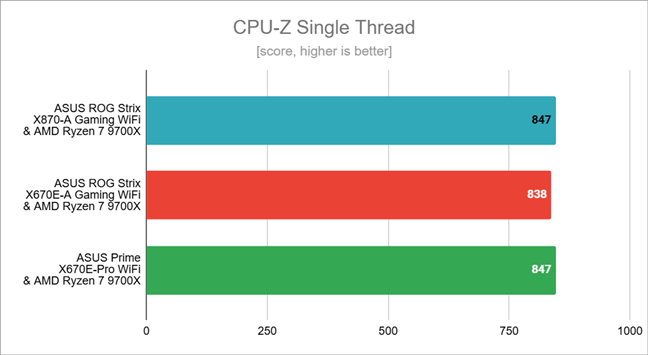
First, I ran the benchmark tool offered by CPU-Z. In the Single-Thread test, I got an identical average score for the AMD Ryzen 7 9700X with both the ASUS ROG Strix X870-A Gaming WiFi and the ASUS Prime X670E-Pro WiFi motherboards. The difference between these two setups and the one with the ASUS ROG Strix X670E-A Gaming WiFi was only 1%.Software bundled with the ASUS ROG Strix X870-A Gaming WiFi
Together with the ASUS ROG Strix X870-A Gaming WiFi motherboard, ASUS offers two apps by default: ASUS DriverHub and Armoury Crate. ASUS DriverHub is a tool that makes it easier to manage drivers for ASUS hardware, especially motherboards. It helps you find, download, and update the drivers you need for your system. It’s a convenient way to handle driver updates in one place. Unfortunately, it also suggests extra apps like Norton 360 and WinRAR. The good news is you can choose what to install, so just be sure to uncheck any apps you don’t want during the process.


Discussion (0)
Be the first to comment.