




Are you looking for a mid-range Android smartphone with 5G connectivity? One with a pleasant design, a beautiful display, a good camera, and a large battery? Then you might want to consider the Samsung Galaxy A34 5G. Launched in March 2024, this reasonably-priced 5G smartphone has more than just a few tricks up its sleeve. In this review, I’ll share my personal experience using it, look at its specs and design, and I’ll also show you how it fares in benchmarks. So, if you’d like to know more about the Samsung Galaxy A34 5G, read on:
![Verdict]()

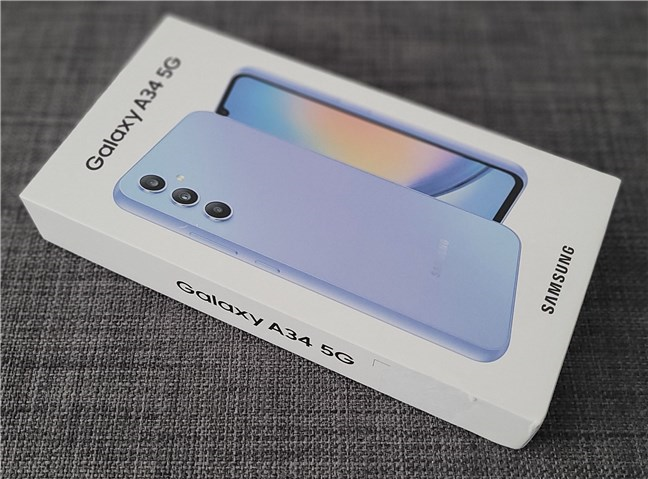
 The box of the Samsung Galaxy A34 5G
Inside the box, there’s the Samsung Galaxy A34 5G smartphone, a USB cable with Type-C connectors on both ends, a SIM tray ejection tool, and a series of documents (user manual, warranty details, safety information).
The box of the Samsung Galaxy A34 5G
Inside the box, there’s the Samsung Galaxy A34 5G smartphone, a USB cable with Type-C connectors on both ends, a SIM tray ejection tool, and a series of documents (user manual, warranty details, safety information).
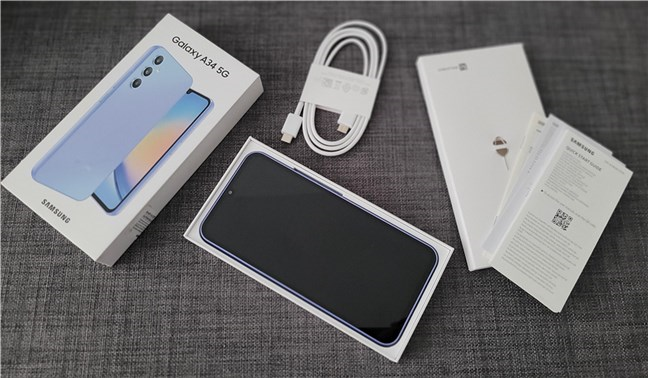
 Unboxing the Samsung Galaxy A34 5G
 smartphone is straightforward; all you get are the bare essentials. Unfortunately, while the box does contain a USB cable, Samsung doesn’t include a charger.
Unboxing the Samsung Galaxy A34 5G
Unboxing the Samsung Galaxy A34 5G smartphone is straightforward; all you get are the bare essentials. Unfortunately, while the box does contain a USB cable, Samsung doesn’t include a charger.
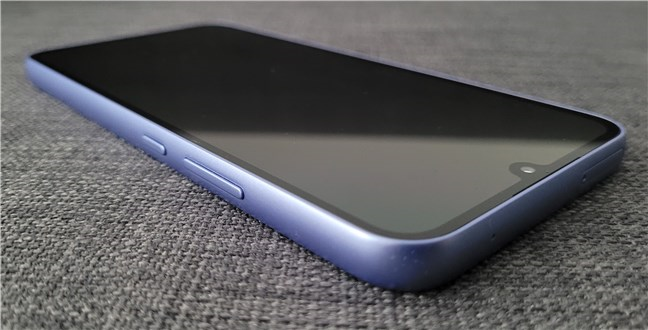
 Samsung Galaxy A34 5G is a large phone with a 6.6" screen
Featuring a simple and minimalistic design, the Samsung Galaxy A34 5G looks like it’s targeting younger audiences. The names chosen by the company for the available body colors are “fashionable” and quite clearly address the ones in the springtime of life: Awesome Lime, Awesome Silver, Awesome Violet, and Awesome Graphite.
Samsung Galaxy A34 5G is a large phone with a 6.6" screen
Featuring a simple and minimalistic design, the Samsung Galaxy A34 5G looks like it’s targeting younger audiences. The names chosen by the company for the available body colors are “fashionable” and quite clearly address the ones in the springtime of life: Awesome Lime, Awesome Silver, Awesome Violet, and Awesome Graphite.
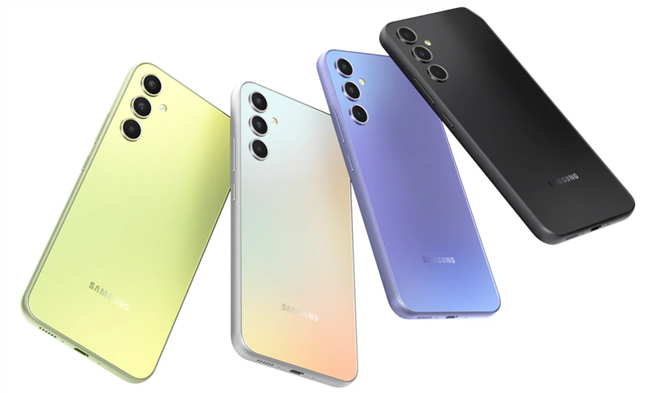
 Color options for the Samsung Galaxy A34 5G
The model I received in testing was the Awesome Violet version. Though the back of the smartphone might give a slight impression of glass, it’s actually not. It’s plastic, and so is the phone’s frame. The grip is good, and the plastic material looks pretty tough, but it’s also a magnet for fingerprints and smudges. Getting a protective case for the phone may be a good idea.
Color options for the Samsung Galaxy A34 5G
The model I received in testing was the Awesome Violet version. Though the back of the smartphone might give a slight impression of glass, it’s actually not. It’s plastic, and so is the phone’s frame. The grip is good, and the plastic material looks pretty tough, but it’s also a magnet for fingerprints and smudges. Getting a protective case for the phone may be a good idea.
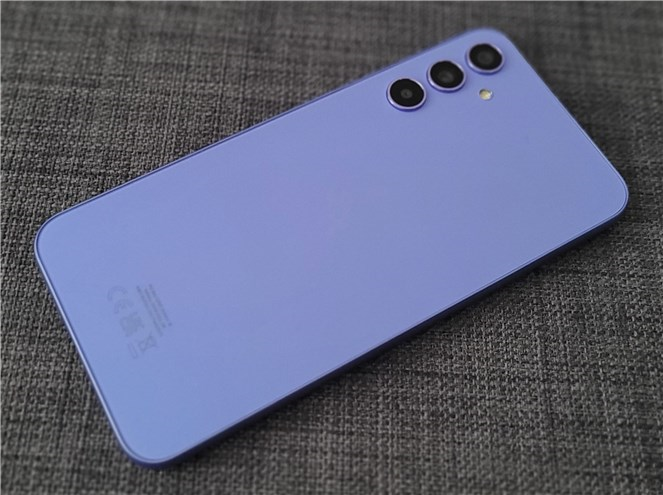
 The back of the smartphone is made of plastic
The large 6.6-inch display makes up for almost the entire front of the Samsung Galaxy A34 5G. Between the frame and the actual display, there are a few millimeters of dark unlit borders. The selfie camera sits inside a waterdrop notch in the top center. To cover and protect the display, Samsung used Gorilla Glass 5, which is something worth appreciating in a smartphone in this price range. And on top of everything else, the smartphone also holds an IP67 certification for dust and water resistance (it can withstand being submerged up to 1 meter for 30 minutes).
The back of the smartphone is made of plastic
The large 6.6-inch display makes up for almost the entire front of the Samsung Galaxy A34 5G. Between the frame and the actual display, there are a few millimeters of dark unlit borders. The selfie camera sits inside a waterdrop notch in the top center. To cover and protect the display, Samsung used Gorilla Glass 5, which is something worth appreciating in a smartphone in this price range. And on top of everything else, the smartphone also holds an IP67 certification for dust and water resistance (it can withstand being submerged up to 1 meter for 30 minutes).
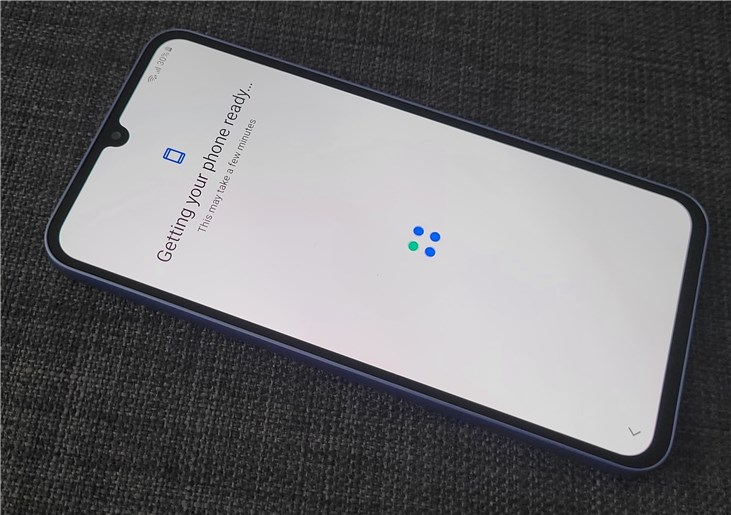
 Gorilla Glass 5 protects the screen
The bottom edge of the Samsung Galaxy A34 5G is home to the USB 2.0 Type-C port, a speaker, and the main microphone. There’s no 3.5 mm audio jack in sight, in case you were wondering.
Gorilla Glass 5 protects the screen
The bottom edge of the Samsung Galaxy A34 5G is home to the USB 2.0 Type-C port, a speaker, and the main microphone. There’s no 3.5 mm audio jack in sight, in case you were wondering.
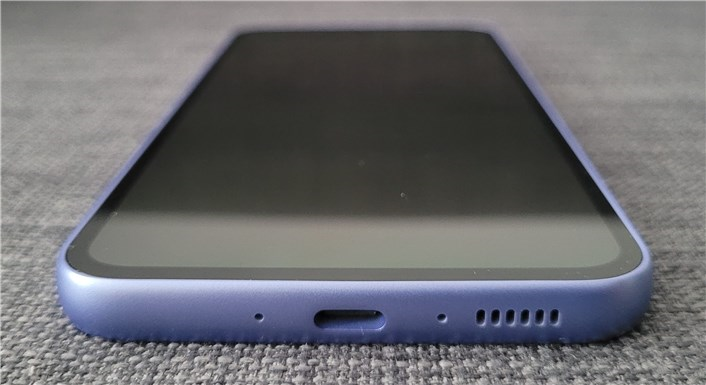
 The charging port is a USB 2.0 Type-C
On the left, the smartphone’s edge is just that: a completely blank, slightly curved, clean edge.
The charging port is a USB 2.0 Type-C
On the left, the smartphone’s edge is just that: a completely blank, slightly curved, clean edge.
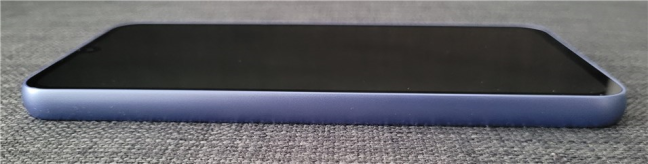
 Left side of the Samsung Galaxy A34 5G
The top edge is home to the secondary microphone and the nano-SIM/microSD card tray.
Left side of the Samsung Galaxy A34 5G
The top edge is home to the secondary microphone and the nano-SIM/microSD card tray.
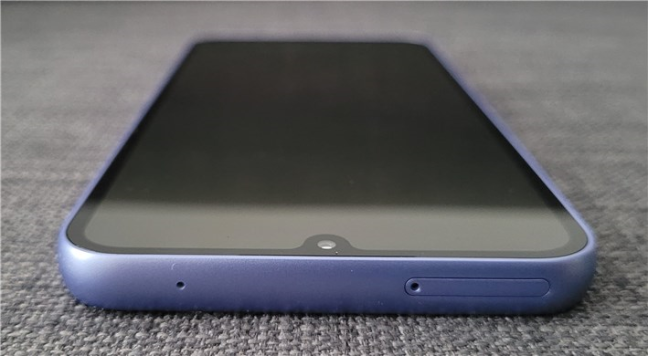
 Top side of the Samsung Galaxy A34 5G
Both the power button and the volume rocker are positioned on the right edge of the Samsung Galaxy A34 5G.
Top side of the Samsung Galaxy A34 5G
Both the power button and the volume rocker are positioned on the right edge of the Samsung Galaxy A34 5G.
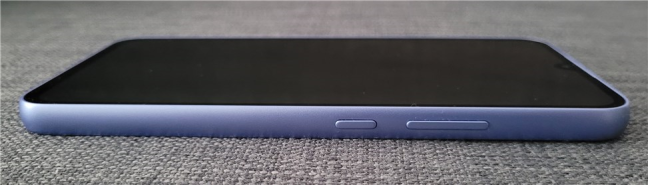
 The buttons are found on the right side
The Samsung Galaxy A34 5G features three main cameras on its backside. They’re aligned vertically in a straight line, and their rings are identical in shape and size. While not protruding significantly, due to the phone’s perfectly level back, the smartphone wobbles when you place it on any flat surface.
The buttons are found on the right side
The Samsung Galaxy A34 5G features three main cameras on its backside. They’re aligned vertically in a straight line, and their rings are identical in shape and size. While not protruding significantly, due to the phone’s perfectly level back, the smartphone wobbles when you place it on any flat surface.
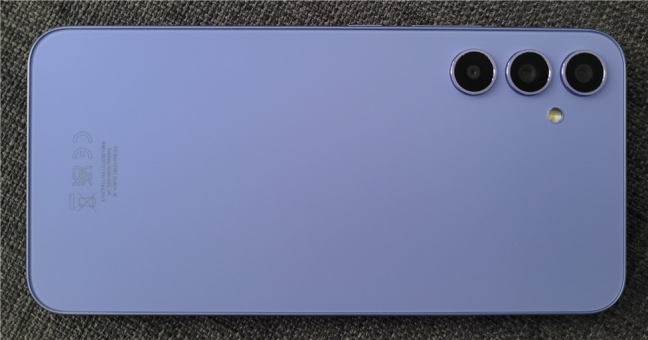
 The main cameras on the back of the Samsung Galaxy A34 5G
I like the lively colors, overall simplicity, and minimalistic design of the Samsung Galaxy A34 5G, and I believe many will do too. Despite being made mainly of plastic materials, the phone appears to be quite solid. The high-quality Gorilla Glass 5 and IP 67 rating also confirm this statement.
The main cameras on the back of the Samsung Galaxy A34 5G
I like the lively colors, overall simplicity, and minimalistic design of the Samsung Galaxy A34 5G, and I believe many will do too. Despite being made mainly of plastic materials, the phone appears to be quite solid. The high-quality Gorilla Glass 5 and IP 67 rating also confirm this statement.
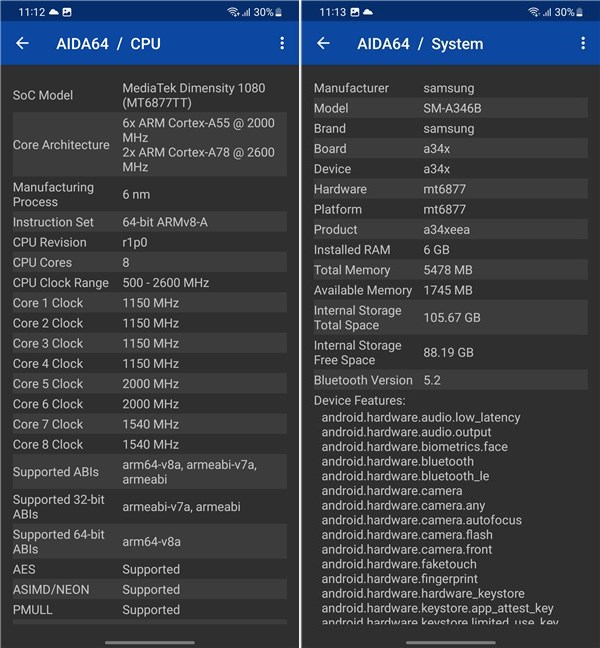
 The phone uses a MediaTek MT6877V Dimensity 1080 chipset
In terms of storage and memory, the Samsung Galaxy A34 5G smartphone is available in three different configurations:
The phone uses a MediaTek MT6877V Dimensity 1080 chipset
In terms of storage and memory, the Samsung Galaxy A34 5G smartphone is available in three different configurations:
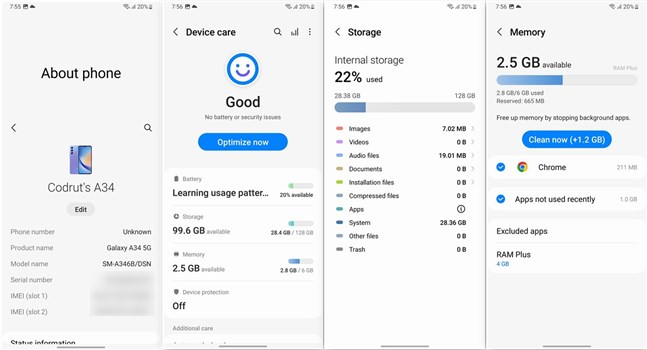
 Details about the storage and RAM
The good news is that the Samsung Galaxy S34 5G also allows you to add a micro SD card to increase storage capacity. Both the single SIM and dual SIM versions of the phone support SD cards. However, you should know that the dual SIM models use a hybrid approach. That means that should you choose to insert a micro SD card, you won’t be able to add a secondary nano SIM.
Details about the storage and RAM
The good news is that the Samsung Galaxy S34 5G also allows you to add a micro SD card to increase storage capacity. Both the single SIM and dual SIM versions of the phone support SD cards. However, you should know that the dual SIM models use a hybrid approach. That means that should you choose to insert a micro SD card, you won’t be able to add a secondary nano SIM.
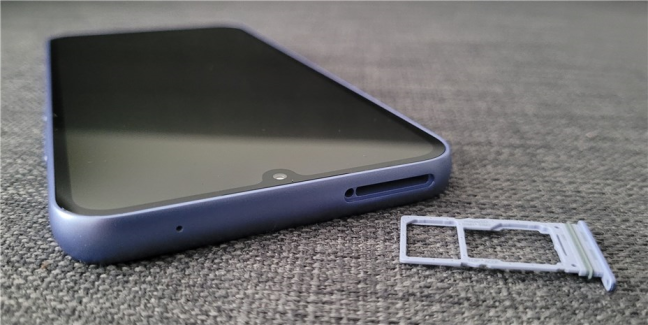
 Samsung Galaxy A34 5G comes with expandable storage
The 6.6-inch screen of the Samsung Galaxy A34 5G relies on a Super AMOLED panel with a maximum brightness of 1000 nits (candela per square meter) and a resolution of 1080 by 2340 pixels. Its aspect ratio is 19.5:9, and the ppi density is high, about 390 pixels per inch. On top of that, the display also supports a high refresh rate of 120 Hz. However, one thing I’ve noticed while using this smartphone is that you have to choose on your own whether to use the high 120 Hz refresh rate or the standard 60 Hz. The Samsung Galaxy A34 5G doesn’t offer an adaptive refresh rate option. The screen always uses the value you select, so you have to decide for yourself whether you’d like a smoother display experience (120 Hz) or a longer battery life (60 Hz).
Samsung Galaxy A34 5G comes with expandable storage
The 6.6-inch screen of the Samsung Galaxy A34 5G relies on a Super AMOLED panel with a maximum brightness of 1000 nits (candela per square meter) and a resolution of 1080 by 2340 pixels. Its aspect ratio is 19.5:9, and the ppi density is high, about 390 pixels per inch. On top of that, the display also supports a high refresh rate of 120 Hz. However, one thing I’ve noticed while using this smartphone is that you have to choose on your own whether to use the high 120 Hz refresh rate or the standard 60 Hz. The Samsung Galaxy A34 5G doesn’t offer an adaptive refresh rate option. The screen always uses the value you select, so you have to decide for yourself whether you’d like a smoother display experience (120 Hz) or a longer battery life (60 Hz).
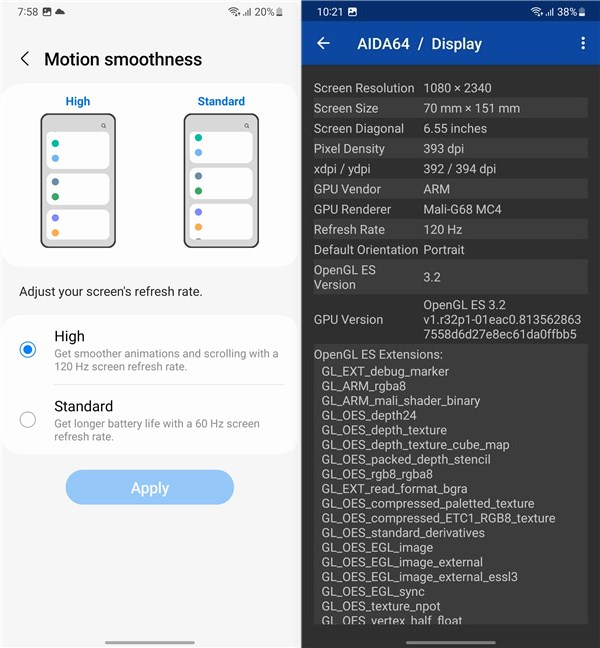 Refresh rate can be set to 120 Hz or 60 Hz
In terms of cameras, the Samsung Galaxy A34 5G offers a triple-camera setup on its rear and a single selfie camera on its front:
Refresh rate can be set to 120 Hz or 60 Hz
In terms of cameras, the Samsung Galaxy A34 5G offers a triple-camera setup on its rear and a single selfie camera on its front:
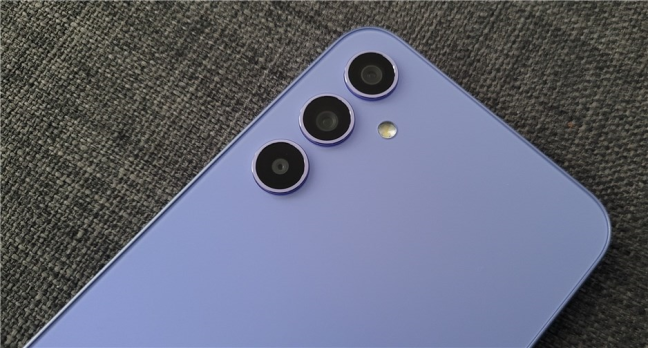
 The main camera system of the Samsung Galaxy A34 5G
Connectivity-wise, the Samsung Galaxy A34 5G offers support for Bluetooth 5.3 and Wi-Fi 5 (802.11 a/b/g/n/ac) on the 2.4 and 5 GHz frequencies. Depending on your region, there’s also NFC. And there are other sensors, too, like an optical fingerprint reader (under the display), an accelerometer, a (virtual) proximity sensor, a compass, and a gyroscope.
The main camera system of the Samsung Galaxy A34 5G
Connectivity-wise, the Samsung Galaxy A34 5G offers support for Bluetooth 5.3 and Wi-Fi 5 (802.11 a/b/g/n/ac) on the 2.4 and 5 GHz frequencies. Depending on your region, there’s also NFC. And there are other sensors, too, like an optical fingerprint reader (under the display), an accelerometer, a (virtual) proximity sensor, a compass, and a gyroscope.
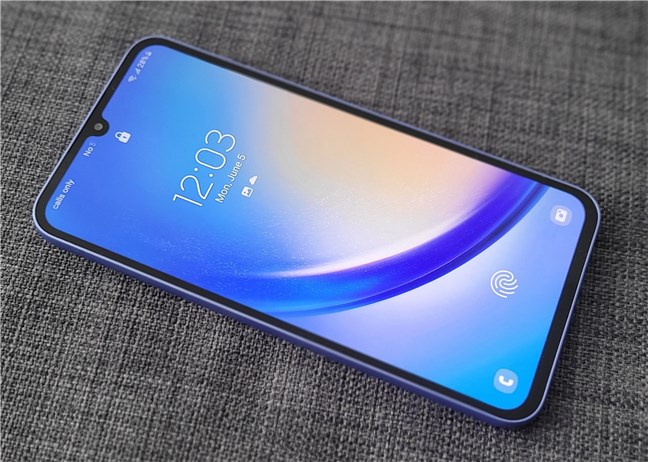
 The fingerprint sensor is under the display
Supplying the electrical energy of the Samsung Galaxy A34 5G is the job of a high-capacity 5000 mAh non-removable Li-Po accumulator. This generous battery should allow you to use the smartphone for at least a full day before having to charge it. While the phone is compatible with 25W fast charging, there’s no charger bundled with it, so you’ll have to buy one on your own.
The fingerprint sensor is under the display
Supplying the electrical energy of the Samsung Galaxy A34 5G is the job of a high-capacity 5000 mAh non-removable Li-Po accumulator. This generous battery should allow you to use the smartphone for at least a full day before having to charge it. While the phone is compatible with 25W fast charging, there’s no charger bundled with it, so you’ll have to buy one on your own.
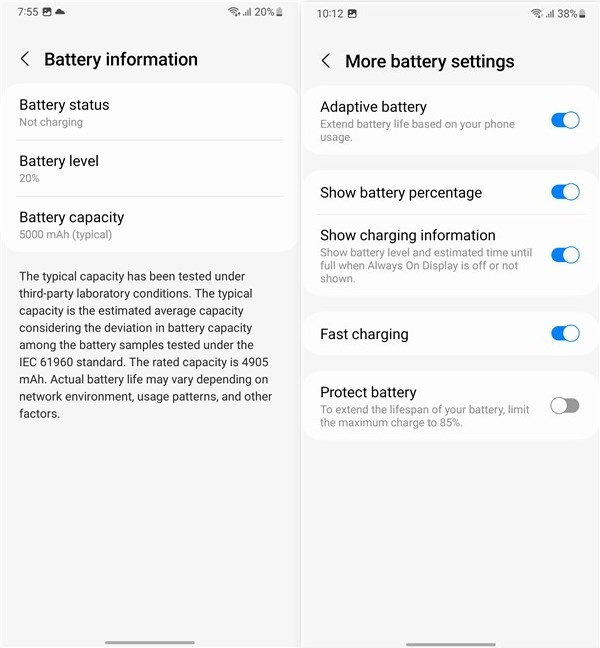 The Samsung Galaxy A34 5G has a large 5000 mAh battery
If you’d like to get into detail about all the features and technical specifications, check out Samsung Galaxy A34 5G’s official webpage.
Looking over the spec sheet, the Samsung Galaxy A34 5G looks like a mid-range Android device with a couple of features that make it stand out from the crowd. For instance, the large screen with its 120 Hz refresh rate, the big battery, and the good camera setup can set it apart from the competition.
On the next page of this review, let’s see how good the user experience offered by the smartphone is, check the real-life quality of the photographs and videos it takes, browse through its built-in apps, and finally, see how it performs in benchmarks.
The Samsung Galaxy A34 5G has a large 5000 mAh battery
If you’d like to get into detail about all the features and technical specifications, check out Samsung Galaxy A34 5G’s official webpage.
Looking over the spec sheet, the Samsung Galaxy A34 5G looks like a mid-range Android device with a couple of features that make it stand out from the crowd. For instance, the large screen with its 120 Hz refresh rate, the big battery, and the good camera setup can set it apart from the competition.
On the next page of this review, let’s see how good the user experience offered by the smartphone is, check the real-life quality of the photographs and videos it takes, browse through its built-in apps, and finally, see how it performs in benchmarks.
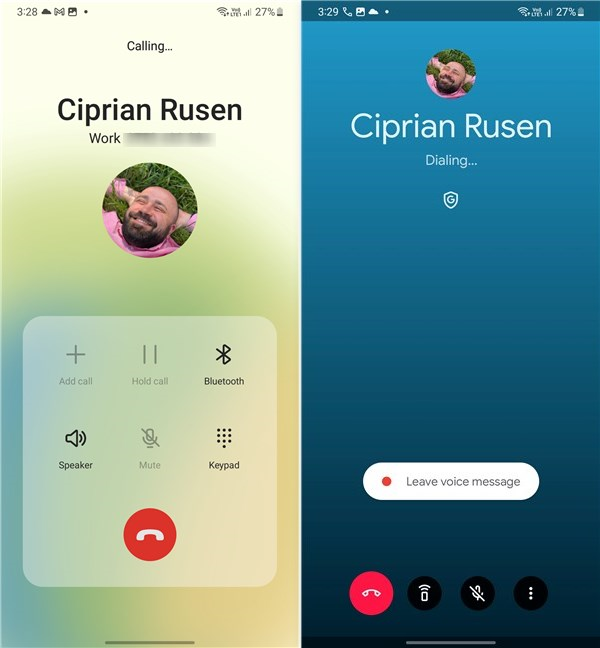 Phone calls are of good quality
The 6.6-inch Super AMOLED display is roomy and beautiful. The generous screen is excellent for reading and web browsing. Furthermore, although the Samsung Galaxy A34 5G doesn’t support HDR for the display, its vivid colors translate into an immersive experience while watching movies or playing games. Also, the display is quite bright, so you won’t have any issues when using it outside.
Phone calls are of good quality
The 6.6-inch Super AMOLED display is roomy and beautiful. The generous screen is excellent for reading and web browsing. Furthermore, although the Samsung Galaxy A34 5G doesn’t support HDR for the display, its vivid colors translate into an immersive experience while watching movies or playing games. Also, the display is quite bright, so you won’t have any issues when using it outside.
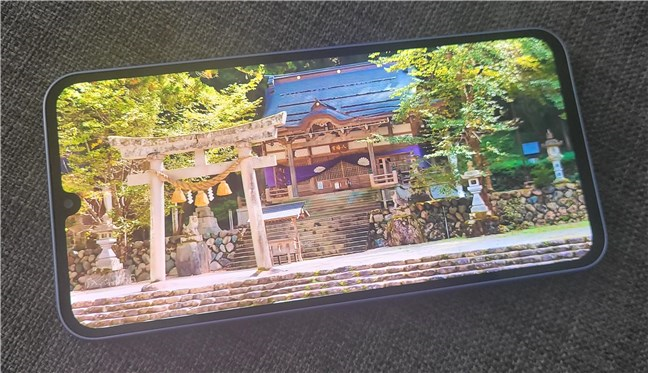
 The display is beautiful, large, and bright
The bottom speaker is powerful for a smartphone, with clear highs, good mids, and some low frequencies (bass) too. When consuming multimedia, the earpiece is amplified to act as a secondary stereo speaker, and it does quite a good job at that. I didn’t notice any distortion, even on maximum volume.
In terms of gaming experience, the Samsung Galaxy A34 5G is capable of running any casual game without issues. More demanding games, such as Diablo Immortal, can be played at acceptable framerates on medium (or low) graphics settings. A good thing is that the smartphone doesn’t seem to heat up. Even after dozens of minutes of gaming and benchmarking it, the phone was just warm to the touch, still comfortable to hold.
The display is beautiful, large, and bright
The bottom speaker is powerful for a smartphone, with clear highs, good mids, and some low frequencies (bass) too. When consuming multimedia, the earpiece is amplified to act as a secondary stereo speaker, and it does quite a good job at that. I didn’t notice any distortion, even on maximum volume.
In terms of gaming experience, the Samsung Galaxy A34 5G is capable of running any casual game without issues. More demanding games, such as Diablo Immortal, can be played at acceptable framerates on medium (or low) graphics settings. A good thing is that the smartphone doesn’t seem to heat up. Even after dozens of minutes of gaming and benchmarking it, the phone was just warm to the touch, still comfortable to hold.
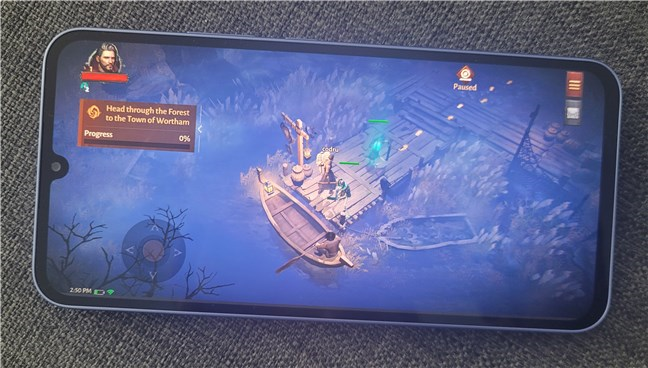
 Gaming at low or medium graphics settings is good
During regular use, the user interface responds promptly to commands, the animations and transitions are smooth, and the apps load fast. Unlocking the smartphone is usually swift, as the sensor under the display appears to be pretty accurate. There were times when it didn’t register my fingerprint correctly, but the number of times that happened was minimal.
Gaming at low or medium graphics settings is good
During regular use, the user interface responds promptly to commands, the animations and transitions are smooth, and the apps load fast. Unlocking the smartphone is usually swift, as the sensor under the display appears to be pretty accurate. There were times when it didn’t register my fingerprint correctly, but the number of times that happened was minimal.
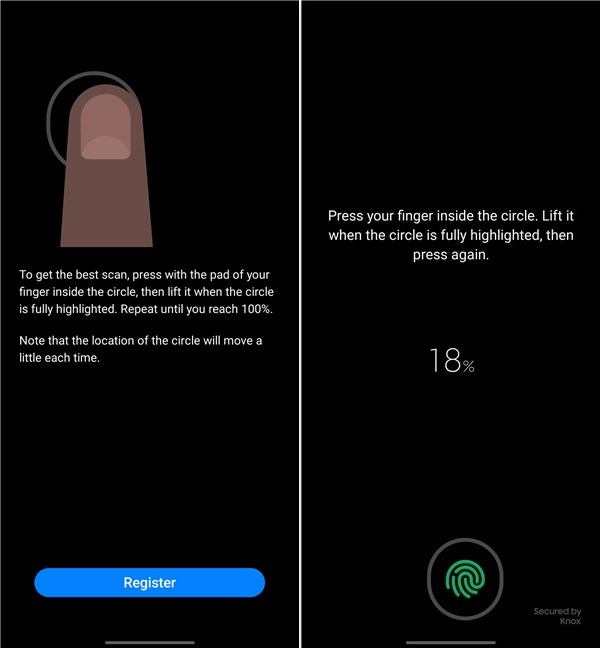 The fingerprint reader is quite accurate
Last but not least, the battery life offered by the Samsung Galaxy A34 5G is awesome. Unless you’re playing high-end games with a lot of demands in terms of system resources, the phone should keep on running on a single charge for at least a day, even two. Unfortunately, the fastest charger I had when testing this smartphone was an aftermarket model capable of supplying a maximum of just 18 Watts, while the Galaxy A34 5G supports up to 25W. It took two hours to get from 0 to 100% using my charger. With a Samsung 25W charger, the smartphone’s battery should fill up notably faster.
The fingerprint reader is quite accurate
Last but not least, the battery life offered by the Samsung Galaxy A34 5G is awesome. Unless you’re playing high-end games with a lot of demands in terms of system resources, the phone should keep on running on a single charge for at least a day, even two. Unfortunately, the fastest charger I had when testing this smartphone was an aftermarket model capable of supplying a maximum of just 18 Watts, while the Galaxy A34 5G supports up to 25W. It took two hours to get from 0 to 100% using my charger. With a Samsung 25W charger, the smartphone’s battery should fill up notably faster.
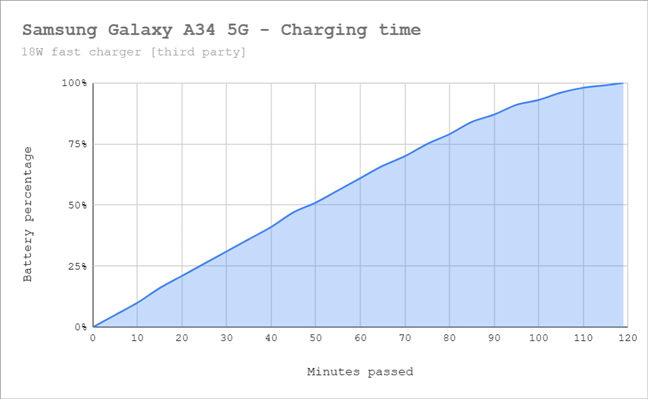
 Battery charging time with an aftermarket charger
The Samsung Galaxy A34 5G offers a fine user experience in day-to-day activities. The interaction with the user interface and apps is smooth, the battery life is excellent, and the display is beautiful.
Battery charging time with an aftermarket charger
The Samsung Galaxy A34 5G offers a fine user experience in day-to-day activities. The interaction with the user interface and apps is smooth, the battery life is excellent, and the display is beautiful.

 The Camera app is the same one you find on all modern Samsung Galaxy smartphones, with a simple user interface that’s easy to use and all the standard shooting modes you’d expect. Switching between modes is done either by tapping on their names or by swiping left or right on the viewfinder. Swiping up and down, or tapping the camera button in the bottom-left corner (when holding the phone vertically), switches between the main rear cameras and the front selfie one. The main camera profiles are Photo, Video, Portrait, and Fun. Accessing More, you get to the other more specialized shooting modes: Pro, Pro Video, Single Take, Night, Food, Panorama, Macro, Super Slow-Mo, Slow Motion, and Hyperlapse. It’s also worth mentioning that the cameras support Auto HDR and AI Scene detection. Though it is possible to zoom in, 2x is the standard option, as the smartphone doesn’t have a telephoto lens. Zooming to 2x is done by cropping, and anything above that is digital, not optical.
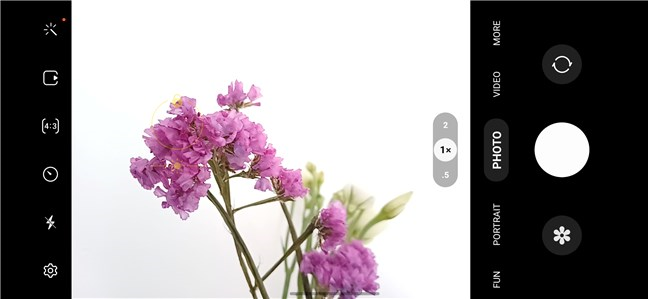
 The Camera app is the same as on all Samsung Galaxy phones
The photo quality in daylight is very good for a mid-range device: high contrast and good dynamic range, excellent details, and no visible noise. The colors are vivid, a bit too much if you ask me. Although I prefer more natural-looking images, slightly oversaturated images are a given on all Samsung smartphones, and most people like it that way. Here’s a sample day photograph shot with the main camera:
The Camera app is the same as on all Samsung Galaxy phones
The photo quality in daylight is very good for a mid-range device: high contrast and good dynamic range, excellent details, and no visible noise. The colors are vivid, a bit too much if you ask me. Although I prefer more natural-looking images, slightly oversaturated images are a given on all Samsung smartphones, and most people like it that way. Here’s a sample day photograph shot with the main camera:

 Daylight photographs are of high quality
The ultrawide camera offers similarly good results: plenty of detail and no noise, good contrast, and the same punchy colors. Unlike what I’ve seen on older mid-range Samsung Galaxy smartphones, the A34 5G offers color consistency between the main and the ultrawide cameras, which is great.
Daylight photographs are of high quality
The ultrawide camera offers similarly good results: plenty of detail and no noise, good contrast, and the same punchy colors. Unlike what I’ve seen on older mid-range Samsung Galaxy smartphones, the A34 5G offers color consistency between the main and the ultrawide cameras, which is great.
 A shot taken with the ultrawide camera
The Samsung Galaxy A53 5G also includes a macro camera, which is something you’ll appreciate if you like taking close-ups. However, know that this one has a fixed focus, so you’ll have to always be careful to position the smartphone at the right distance (about 4 cm) from the subject. Once you get used to it, you’ll notice that the macro photos you take are quite good too. Just like the other cameras of the phone, the photos you shoot with the macro camera have good contrast, bright colors, and plenty of detail.
A shot taken with the ultrawide camera
The Samsung Galaxy A53 5G also includes a macro camera, which is something you’ll appreciate if you like taking close-ups. However, know that this one has a fixed focus, so you’ll have to always be careful to position the smartphone at the right distance (about 4 cm) from the subject. Once you get used to it, you’ll notice that the macro photos you take are quite good too. Just like the other cameras of the phone, the photos you shoot with the macro camera have good contrast, bright colors, and plenty of detail.
 Macro photography with the Samsung Galaxy A34 5G
When it comes to low-light photography, the Samsung Galaxy A34 5G is decent. There’s some noise and a bit of softness on the edges, but the exposure seems appropriate. Enabling Night Mode helps a bit in getting more detail in darker areas with more shadow, but that’s pretty much all I noticed.
Macro photography with the Samsung Galaxy A34 5G
When it comes to low-light photography, the Samsung Galaxy A34 5G is decent. There’s some noise and a bit of softness on the edges, but the exposure seems appropriate. Enabling Night Mode helps a bit in getting more detail in darker areas with more shadow, but that’s pretty much all I noticed.
 Night photo shot with the Samsung Galaxy A34 5G
Despite lacking a depth camera, the Samsung Galaxy A34 5G takes good-quality portraits and selfies. Regardless of the camera you use, skin tones look quite natural, and the subject separation from the background looks nice.
Night photo shot with the Samsung Galaxy A34 5G
Despite lacking a depth camera, the Samsung Galaxy A34 5G takes good-quality portraits and selfies. Regardless of the camera you use, skin tones look quite natural, and the subject separation from the background looks nice.
 Portraits and selfies are good
The smartphone handles video recording quite well too. There are plenty of details in the videos, the contrast is high, and the OIS (Optical Image Stabilization) helps you get steady footage in most situations. To get an idea of what to expect, here’s a short video captured in 1080p at 60 frames per second:
And here’s another video sample, with less movement, that I shot at 4K resolution and 30 frames per second:
For a mid-ranger, the Samsung Galaxy A34 5G offers an excellent camera experience. The photos and videos you shoot with it are of good quality in most situations.
Portraits and selfies are good
The smartphone handles video recording quite well too. There are plenty of details in the videos, the contrast is high, and the OIS (Optical Image Stabilization) helps you get steady footage in most situations. To get an idea of what to expect, here’s a short video captured in 1080p at 60 frames per second:
And here’s another video sample, with less movement, that I shot at 4K resolution and 30 frames per second:
For a mid-ranger, the Samsung Galaxy A34 5G offers an excellent camera experience. The photos and videos you shoot with it are of good quality in most situations.
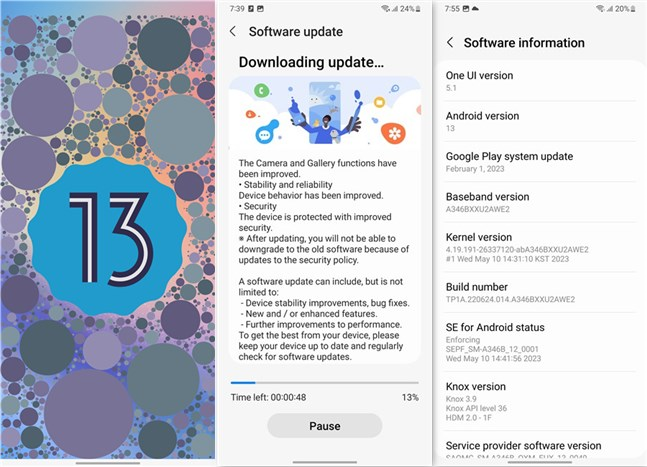
 Android 13 and OneUI 5.1
Samsung’s One UI user interface is one of the best ones you can get on Android devices, and that holds true for the Galaxy A34 5G. The relatively simple user interface offers a series of additional personalization options, including icons, fonts, and colors, as well as other useful elements, such as Edge Panels. It’s also nice to see that the phone comes with Google Discover as the default news feed, not Samsung Free.
Android 13 and OneUI 5.1
Samsung’s One UI user interface is one of the best ones you can get on Android devices, and that holds true for the Galaxy A34 5G. The relatively simple user interface offers a series of additional personalization options, including icons, fonts, and colors, as well as other useful elements, such as Edge Panels. It’s also nice to see that the phone comes with Google Discover as the default news feed, not Samsung Free.
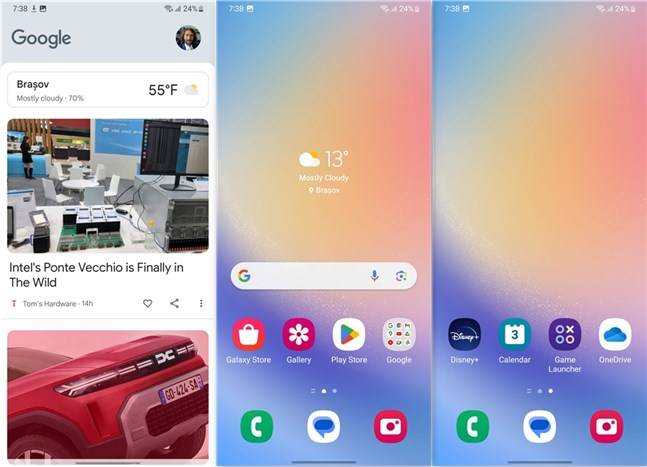 Google Discover and default Home screen
When configuring the Samsung Galaxy A34 5G for the first time, you can review and choose what additional apps are downloaded and installed. I prefer a lighter Android with just the apps I regularly use, so I declined to install any of the recommended apps. However, if you want any or all of them, you can get them right from the start. Worth mentioning: there was one app (just one) from a third party that I couldn’t exclude: Disney+. I don’t know why Samsung pushes it, but that’s that.
Google Discover and default Home screen
When configuring the Samsung Galaxy A34 5G for the first time, you can review and choose what additional apps are downloaded and installed. I prefer a lighter Android with just the apps I regularly use, so I declined to install any of the recommended apps. However, if you want any or all of them, you can get them right from the start. Worth mentioning: there was one app (just one) from a third party that I couldn’t exclude: Disney+. I don’t know why Samsung pushes it, but that’s that.
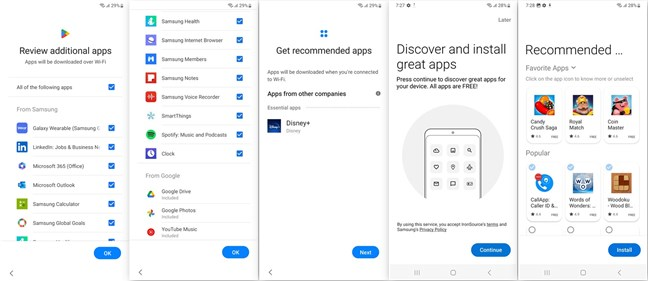
 Additional apps you can install on the Samsung Galaxy A34 5G
Aside from the regular Google apps that are built into Android and the optional apps that you can decide for yourself whether you want them or not, on the Samsung Galaxy A34 5G, you’ll also find:
Additional apps you can install on the Samsung Galaxy A34 5G
Aside from the regular Google apps that are built into Android and the optional apps that you can decide for yourself whether you want them or not, on the Samsung Galaxy A34 5G, you’ll also find:
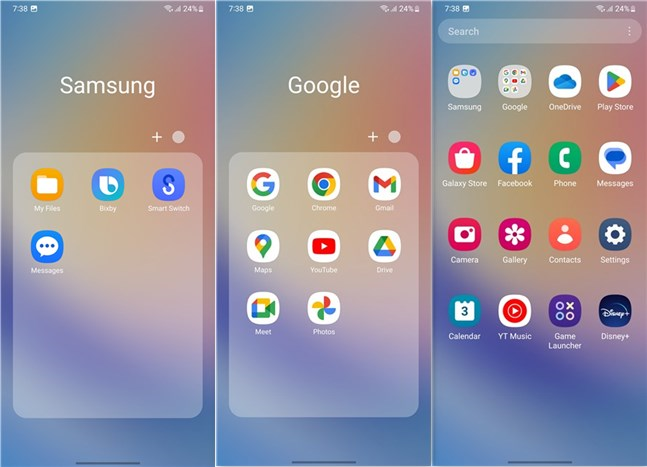 Essential apps that are preinstalled
I always liked Samsung’s One UI user interface, and I still do. It’s clean and well-organized, and the personalization options are useful. On the Samsung Galaxy A34 5G in particular, I also love the fact that the company lets the user choose what additional apps are to be installed, so you can start fresh with just the essentials, no bloatware in sight. 🙂
Essential apps that are preinstalled
I always liked Samsung’s One UI user interface, and I still do. It’s clean and well-organized, and the personalization options are useful. On the Samsung Galaxy A34 5G in particular, I also love the fact that the company lets the user choose what additional apps are to be installed, so you can start fresh with just the essentials, no bloatware in sight. 🙂
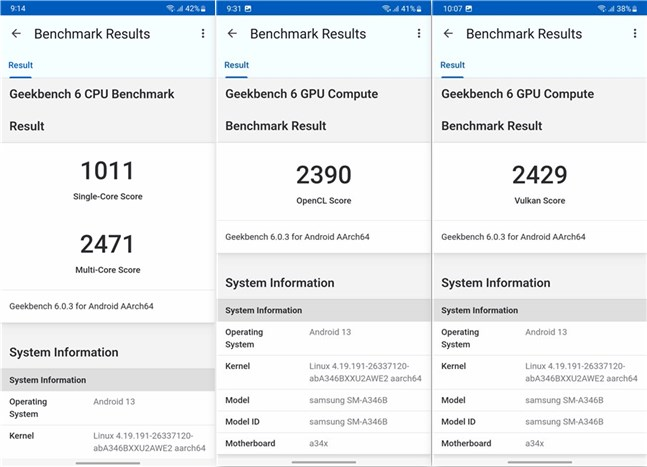 Benchmark results in Geekbench 6
Next, I installed and ran 3DMark. In this gaming benchmark app, the Samsung Galaxy A34 5G scored 2298 points in the Wild Life test and 5396 in Sling Shot. The results are not impressive but aren’t poor either. They show that the smartphone can run casual games smoothly and at good framerates. Furthermore, you can also play higher-end games, although at low or medium graphics quality, depending on their system requirements.
Benchmark results in Geekbench 6
Next, I installed and ran 3DMark. In this gaming benchmark app, the Samsung Galaxy A34 5G scored 2298 points in the Wild Life test and 5396 in Sling Shot. The results are not impressive but aren’t poor either. They show that the smartphone can run casual games smoothly and at good framerates. Furthermore, you can also play higher-end games, although at low or medium graphics quality, depending on their system requirements.
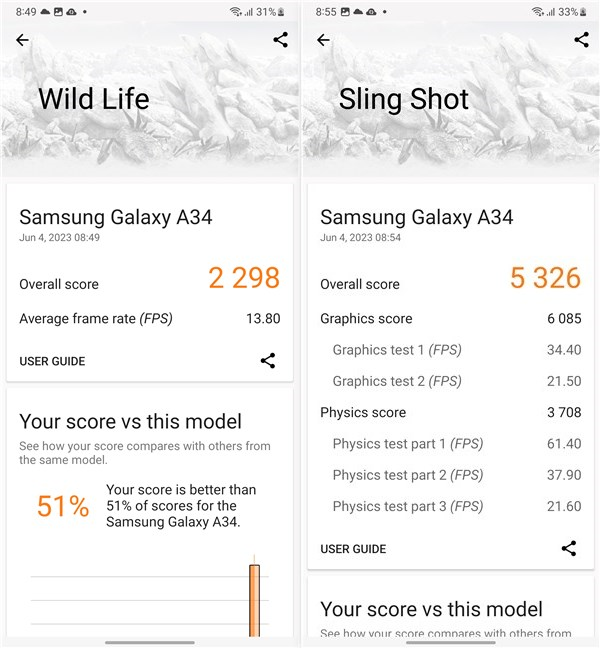 Benchmark results in 3DMark
The third benchmarking app I used was PCMark for Android, which measures the daily performance of the smartphone. In addition, it can also help us determine how long the phone will last on battery in real-world scenarios. The Work 3.0 performance score reached by the Samsung Galaxy A34 5G is a good one, confirming that this Android device can withstand any daily activities without any issues. In the Work 3.0 battery life test, the smartphone managed to keep on running for over 14 hours. It’s not just a good result, it’s above that: the Galaxy A34 5G will run for at least a day, a day and a half, on a full battery charge. For those who don’t spend a lot of time on their phone, I’d expect it to go on for two days.
Benchmark results in 3DMark
The third benchmarking app I used was PCMark for Android, which measures the daily performance of the smartphone. In addition, it can also help us determine how long the phone will last on battery in real-world scenarios. The Work 3.0 performance score reached by the Samsung Galaxy A34 5G is a good one, confirming that this Android device can withstand any daily activities without any issues. In the Work 3.0 battery life test, the smartphone managed to keep on running for over 14 hours. It’s not just a good result, it’s above that: the Galaxy A34 5G will run for at least a day, a day and a half, on a full battery charge. For those who don’t spend a lot of time on their phone, I’d expect it to go on for two days.
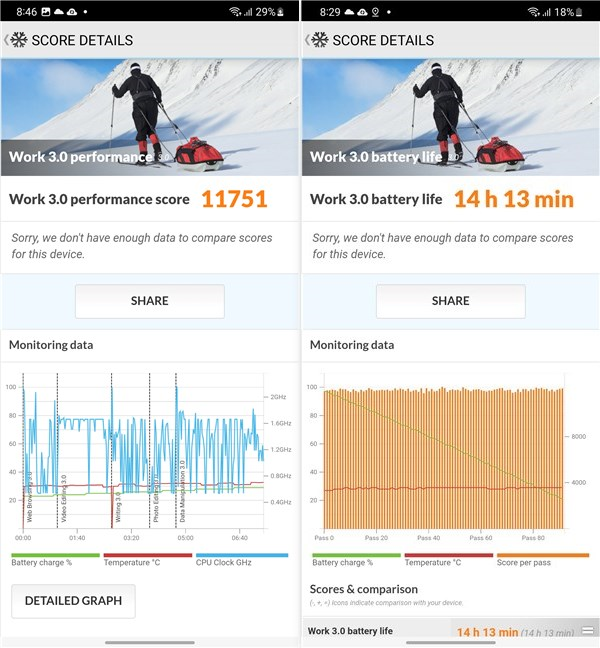 Benchmark results in PCMark
The last thing I looked over was the wireless performance offered by the Samsung Galaxy A34 5G. While it only supports Wi-Fi 5 (not Wi-Fi 6), its speed on my 1.0 Gbps internet connection was excellent. Ookla’s Speedtest app measured a download speed of 598 Mbps and an upload speed of 314 Mbps. Also, according to Speedtest, the smartphone can stream videos and movies in 4K resolution without any problems.
Benchmark results in PCMark
The last thing I looked over was the wireless performance offered by the Samsung Galaxy A34 5G. While it only supports Wi-Fi 5 (not Wi-Fi 6), its speed on my 1.0 Gbps internet connection was excellent. Ookla’s Speedtest app measured a download speed of 598 Mbps and an upload speed of 314 Mbps. Also, according to Speedtest, the smartphone can stream videos and movies in 4K resolution without any problems.
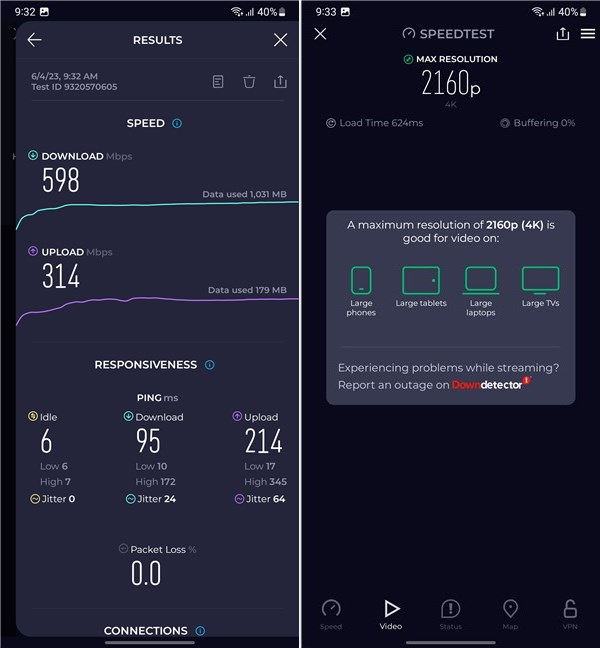 Internet speed benchmark results
The benchmarks confirm that the Samsung Galaxy A34 5G is a mid-range smartphone. Both the performance it offers in daily use and its battery life is good. It’s also capable of running games, although you’ll need to select the low or medium graphics quality settings in the more demanding ones.
Internet speed benchmark results
The benchmarks confirm that the Samsung Galaxy A34 5G is a mid-range smartphone. Both the performance it offers in daily use and its battery life is good. It’s also capable of running games, although you’ll need to select the low or medium graphics quality settings in the more demanding ones.
Samsung Galaxy A34 5G: Who is it good for?
The Samsung Galaxy A34 5G is the Android smartphone you should get if:- You need an affordable phone with good performance
- You want a beautiful smartphone
- You’re looking for a phone with great battery life and fast charging
Pros and cons
Here’s what I like about the Samsung Galaxy A34 5G:
- Large Super AMOLED screen and high 120 Hz refresh rate
- Great performance in daily use
- Excellent cameras for a mid-range Android device
- Well-built and rated IP67 for protection against water and dust
- Large 5000 mAh battery and support for fast charging
- Good for casual gaming
- Android 13, clean user interface, and no bloatware
- Will receive up to four OS updates and up to five years of security updates
- Reasonable price
- No depth or telephoto camera
- No charger bundled in the package
- No option for an adaptive refresh rate
Verdict
Samsung Galaxy A34 5G proves to be an excellent mid-range Android smartphone with a lot to offer. I like its design and beautiful large screen, as well as its cameras and battery life. It can handle any daily activity without any struggle, and its price point is just right. This device is not the best choice you can make if you want high-end gaming, but it’s OK for casual games, and you can even play more demanding titles if you’re OK with lowering the graphics quality. Overall, the Samsung Galaxy A34 5G is a smartphone you should take into account if what you want is an Android device that simply does its job and doesn’t cost a fortune.Unboxing the Samsung Galaxy A34 5G
The Samsung Galaxy A34 5G arrives in a relatively slim box made of white cardboard. Its top side features a large illustration of the smartphone, together with its name and brand. More details about the device are found on the bottom side of the box, where you can also see its serial and IMEI numbers.Design and build quality
Measuring 161.3 mm (6.35 in) by 78.1 mm (3.07 in) by 8.2 mm (0.32 in) and weighing 199 grams (7.02 oz), the Samsung Galaxy A34 5G is a large 6.6-inch smartphone. It’s larger than the previous model of the series (the Samsung Galaxy A33 5G), but the screen’s 19.5:9 aspect ratio helps keep the phone’s width to a usable size. Still, if you have short fingers, holding and using the phone with only one hand might be complicated. But there are also many benefits to having a large screen, like a better experience while watching videos or when reading articles.Hardware specifications
The Samsung Galaxy A34 5G is powered by a mid-range MediaTek MT6877V Dimensity 1080 chipset. Built on a 6-nanometer manufacturing process, this SoC (System on a Chip) includes an octa-core processor (two Cortex-A78 cores running at 2.6 GHz and six Cortex-A55 cores running at 2.0 GHz) and a Mali-G68 MC4 GPU (graphics processing unit).- 128 GB internal storage space and 6 GB of RAM,
- 128 GB internal storage space and 8 GB of RAM,
- 256 GB internal storage space and 8 GB of RAM.
- The primary wide camera has a 48-megapixel sensor, an aperture of f/1.8, and support for phase-detection autofocus (PDAF) and OIS (Optical Image Stabilization).
- The second ultrawide camera is based on an 8-megapixel sensor with an f/2.4 aperture.
- The third is a macro camera with a 5-megapixel sensor and an f/2.4 aperture.
- On the front, there’s a 13 MP selfie camera with an aperture of f/2.2.
The smartphone experience on the Samsung Galaxy A34 5G
Before anything else, a smartphone must first fulfill its basic function of being a phone. In this regard, the Samsung Galaxy A34 5G performs just as you’d expect. The signal reception and sound quality are good during calls. Both I and the people whom I’ve spoken to were able to understand each other well, even if some of the calls were made during bad weather with strong winds or in crowded and noisy places. The microphones are good at isolating voice, and the earpiece speaker does a fine job at amplifying sound.The camera experience on the Samsung Galaxy A34 5G
NOTE: For optimization purposes, the pictures in this review are resized. If you want to see the full-sized original photos and videos I shot with the Samsung Galaxy A34 5G, open this gallery:
The Camera app is the same one you find on all modern Samsung Galaxy smartphones, with a simple user interface that’s easy to use and all the standard shooting modes you’d expect. Switching between modes is done either by tapping on their names or by swiping left or right on the viewfinder. Swiping up and down, or tapping the camera button in the bottom-left corner (when holding the phone vertically), switches between the main rear cameras and the front selfie one. The main camera profiles are Photo, Video, Portrait, and Fun. Accessing More, you get to the other more specialized shooting modes: Pro, Pro Video, Single Take, Night, Food, Panorama, Macro, Super Slow-Mo, Slow Motion, and Hyperlapse. It’s also worth mentioning that the cameras support Auto HDR and AI Scene detection. Though it is possible to zoom in, 2x is the standard option, as the smartphone doesn’t have a telephoto lens. Zooming to 2x is done by cropping, and anything above that is digital, not optical.
Android 13, OneUI 5.1, and bundled apps
The Samsung Galaxy A34 5G comes with Android 13 out of the box and with the company’s One UI 5.1 user interface on top. When I got the phone in testing, one of the first things I did was check whether there were updates available for its software. And, as you can see in the next picture, the smartphone did receive an update that improved the Camera and Gallery apps, besides other stability and security tweaks. An interesting yet unclear detail is the timeframe in which the Samsung Galaxy A34 5G will receive updates: up to four operating system versions and up to five years of security patches.- Bixby: a digital assistant that works with Samsung devices and some third-party apps.
- Calendar: an app made by Samsung that allows you to schedule events and connect other calendars you maintain on other services (Google, Microsoft, etc.).
- Disney+: useful for watching movies and TV series from Disney, but only if you have a subscription to this streaming service.
- Facebook: the Android app of the popular social media network.
- Galaxy Store: an alternative app store to Google’s Play Store, with apps curated by Samsung.
- Gallery: Samsung’s app for browsing and managing your photos and videos.
- Game Launcher: is where all your games are listed. It also enables you to use a feature called Game Booster that limits notifications and boosts performance while playing, allows you to chat on Discord, and even play some games without installing them (Instant Plays).
- My Files: useful for managing the files and folders on your smartphone.
- OneDrive: Microsoft’s cloud storage app for Android devices.
- Smart Switch: allows you to transfer your data from your old device to your new Samsung Galaxy A34 5G.
- YT Music: Google’s music streaming service that’s integrated with YouTube.
Performance in benchmarks
Using the Samsung Galaxy A34 5G daily for two weeks or so, I’ve come to the conclusion that I like it quite a lot. From a subjective perspective, the overall experience I got with it is that it’s fast enough for regular activities (web browsing, social networks, multimedia, communication, etc.), and its hardware is well-suited even for casual gaming. However, to get a clearer picture of the performance you get from the phone’s MediaTek Dimensity 1080 chipset, I had to run a few benchmarks. These are the results that I got with the Samsung Galaxy A34 5G: I began with the well-known Geekbench benchmarking app. The Samsung Galaxy A34 5G got a score of 1011 points in the Single-Core tests and 2471 points in the Multi-Core tests. The GPU Compute tests finished with a score of 2390 for OpenCL and 2429 for Vulkan. All these results indicate a mid-range chipset that offers good performance in daily activities yet is modest when it comes to gaming. If you compare the Samsung Galaxy A34 5G with other mid-range Android devices, you’ll find out that its performance is similar yet a bit better than what you get from smartphones such as the Redmi Note 12 Pro, Xiaomi Mi 11 Lite, or Google Pixel 4.
Discussion (3)
The Is Samsung Galaxy a34 5g ..sucks I bought it brand new and is giving me nothing but trouble it won’t let me reset my mobile network
That’s weird. Try taking it to a Samsung repair shop. See what they have to say and whether they can help fix your problems.
Good mobile