




Building a high-performance PC can be both thrilling and challenging, especially if you’re aiming for the latest hardware innovations. One key component that often determines your system’s capabilities is the motherboard. In this review, the GIGABYTE X870E AORUS MASTER takes center stage, combining the advanced X870E chipset with robust power delivery, an abundance of expansion slots, and next-generation connectivity. If you’re a content creator or professional who needs high-end performance, this board might just be the perfect foundation for your PC. Want to learn more? Continue reading this review:
![Verdict]()


 The packaging features the GIGABYTE AORUS eagle
Inside, you find the motherboard together with a comprehensive set of accessories: a Wi-Fi 7 antenna, a DDR Wind Blade and a fan extension cable, two SATA cables, one noise detection cable, two thermistor cables, two Velcro cable ties, one G Connector for front panel cables, and four M.2 thermal pads. The package also includes documentation leaflets (user’s manual, quick installation guide, warranty), and AORUS-branded stickers or badges.
The packaging features the GIGABYTE AORUS eagle
Inside, you find the motherboard together with a comprehensive set of accessories: a Wi-Fi 7 antenna, a DDR Wind Blade and a fan extension cable, two SATA cables, one noise detection cable, two thermistor cables, two Velcro cable ties, one G Connector for front panel cables, and four M.2 thermal pads. The package also includes documentation leaflets (user’s manual, quick installation guide, warranty), and AORUS-branded stickers or badges.

 The motherboard comes with a generous bundle of accessories
Overall, the unboxing experience feels as high-end as the product itself, with everything neatly organized and protected.
The motherboard comes with a generous bundle of accessories
Overall, the unboxing experience feels as high-end as the product itself, with everything neatly organized and protected.

 The board has an ATX format
Supporting PCI Express 5.0, it promises future-proof expansion options for both graphics and storage. Memory-wise, it works with DDR5 RAM, allowing speeds from as low as 4400 MT/s up to 8600 MT/s. The board has four DIMM slots and can support a maximum of 256 GB.
The board has an ATX format
Supporting PCI Express 5.0, it promises future-proof expansion options for both graphics and storage. Memory-wise, it works with DDR5 RAM, allowing speeds from as low as 4400 MT/s up to 8600 MT/s. The board has four DIMM slots and can support a maximum of 256 GB.
 The motherboard supports high-speed DDR5 RAM
In terms of aesthetics, the motherboard combines a sleek black PCB with rugged metal heatsinks, emblazoned with the AORUS logo. It also includes RGB lighting on top of the back panel, though not too flashy.
The motherboard supports high-speed DDR5 RAM
In terms of aesthetics, the motherboard combines a sleek black PCB with rugged metal heatsinks, emblazoned with the AORUS logo. It also includes RGB lighting on top of the back panel, though not too flashy.

 The GIGABYTE X870E AORUS MASTER looks beautiful
Cooling is excellent, the motherboard being fitted with large heatsinks on both the VRMs and M.2 slots. The one on the top M.2 solid-state drive slot is especially large, helping maintain your main PCIe 5.0 SSD at optimal temperatures even under heavy load.
The GIGABYTE X870E AORUS MASTER looks beautiful
Cooling is excellent, the motherboard being fitted with large heatsinks on both the VRMs and M.2 slots. The one on the top M.2 solid-state drive slot is especially large, helping maintain your main PCIe 5.0 SSD at optimal temperatures even under heavy load.

 The VRMs are covered by large heatspreaders
Power delivery is also robust, employing a 16+2+2 twin digital VRM design rated up to 110 Amperes per phase. Two 8-pin EPS connectors feed your Ryzen processor.
The VRMs are covered by large heatspreaders
Power delivery is also robust, employing a 16+2+2 twin digital VRM design rated up to 110 Amperes per phase. Two 8-pin EPS connectors feed your Ryzen processor.
 Two 8-pin power connectors feed electricity to the CPU
There are several slots for SSDs on the motherboard. The first slot supports very fast SSDs (PCIe 5.0 x4 for Ryzen 9000 and Ryzen 7000 series processors, and PCIe 4.0 x4 for Ryzen 8000 series processors). The second and third slots also support fast SSDs (PCIe 5.0 x4 with Ryzen 9000 and Ryzen 7000 series), but they are not compatible with AMD Ryzen 8000 processors. The fourth slot is connected to the motherboard’s chipset, and it’s a little slower than the others (PCIe 4.0 x4) but supports all current AMD Ryzen CPUs: 9000, 7000, and 8000 series. In addition to these, there are four regular SATA 6Gb/s connectors available for other storage drives.
Two 8-pin power connectors feed electricity to the CPU
There are several slots for SSDs on the motherboard. The first slot supports very fast SSDs (PCIe 5.0 x4 for Ryzen 9000 and Ryzen 7000 series processors, and PCIe 4.0 x4 for Ryzen 8000 series processors). The second and third slots also support fast SSDs (PCIe 5.0 x4 with Ryzen 9000 and Ryzen 7000 series), but they are not compatible with AMD Ryzen 8000 processors. The fourth slot is connected to the motherboard’s chipset, and it’s a little slower than the others (PCIe 4.0 x4) but supports all current AMD Ryzen CPUs: 9000, 7000, and 8000 series. In addition to these, there are four regular SATA 6Gb/s connectors available for other storage drives.
 The board comes with 3 PCIe 5 M.2 slots and 1 PCIe 4 M.2 slot
While the wired networking is handled by a Realtek 5GbE LAN chip, for wireless networking, you get Qualcomm Wi-Fi 7 QCNCM865 module supporting ultra-fast speeds on the 6 GHz band, plus Bluetooth 5.3 for peripherals.
The onboard Realtek ALC1220 audio codec delivers 7.1-channel surround sound, with isolation and premium capacitors ensuring clear audio output.
The board comes with 3 PCIe 5 M.2 slots and 1 PCIe 4 M.2 slot
While the wired networking is handled by a Realtek 5GbE LAN chip, for wireless networking, you get Qualcomm Wi-Fi 7 QCNCM865 module supporting ultra-fast speeds on the 6 GHz band, plus Bluetooth 5.3 for peripherals.
The onboard Realtek ALC1220 audio codec delivers 7.1-channel surround sound, with isolation and premium capacitors ensuring clear audio output.

 You also get Wi-Fi 7, Bluetooth 5.3, and 7.1 sound
On the back panel, there’s an HDMI port for integrated graphics (potentially useful if your CPU supports it), two USB 2.0 ports, four USB 3.2 Gen 1 ports, two USB4 Type-C (up to 40Gb/s with DP-Alt), four USB 3.2 Gen 2, the Wi-Fi 7 Antenna connector, the 5 GbE LAN RJ45 port, a Clear CMOS button to reset the UEFI when needed, and a Q-Flash Plus button for easy BIOS updates, even without a CPU or RAM installed. At the bottom of the panel, there are also the audio jacks, including an S/PDIF (optical) out for high-quality digital sound systems.
You also get Wi-Fi 7, Bluetooth 5.3, and 7.1 sound
On the back panel, there’s an HDMI port for integrated graphics (potentially useful if your CPU supports it), two USB 2.0 ports, four USB 3.2 Gen 1 ports, two USB4 Type-C (up to 40Gb/s with DP-Alt), four USB 3.2 Gen 2, the Wi-Fi 7 Antenna connector, the 5 GbE LAN RJ45 port, a Clear CMOS button to reset the UEFI when needed, and a Q-Flash Plus button for easy BIOS updates, even without a CPU or RAM installed. At the bottom of the panel, there are also the audio jacks, including an S/PDIF (optical) out for high-quality digital sound systems.
 The back panel hosts a high number of ports
Last but not least, it’s worth noting that, on the motherboard, you’ll also find a plethora of additional connectors for cooling, power, and peripherals, including headers for fans, AIO pumps, USB, RGB lighting, chassis intrusion, front panel, and thermal sensors.
The back panel hosts a high number of ports
Last but not least, it’s worth noting that, on the motherboard, you’ll also find a plethora of additional connectors for cooling, power, and peripherals, including headers for fans, AIO pumps, USB, RGB lighting, chassis intrusion, front panel, and thermal sensors.

 There are many, many headers and sensors on the motherboard
If you want even more details, check out the official webpage of the GIGABYTE X870E AORUS MASTER motherboard.
As a conclusion, this motherboard appears to be an excellent choice for enthusiasts and gamers who are looking to maximize performance and connectivity. It’s packed full of features and is very well prepared for the future.
There are many, many headers and sensors on the motherboard
If you want even more details, check out the official webpage of the GIGABYTE X870E AORUS MASTER motherboard.
As a conclusion, this motherboard appears to be an excellent choice for enthusiasts and gamers who are looking to maximize performance and connectivity. It’s packed full of features and is very well prepared for the future.

 The hardware specs on my test computer
Once my system was up and running with the GIGABYTE X870E AORUS MASTER, I immediately noticed how responsive everything felt. Thanks to the DDR5 RAM and fast PCIe 5.0 SSD, boot times were short, and Windows 11 loaded almost instantly. Everyday activities like web browsing, watching videos, emailing, and writing in multiple office apps ran smoothly, without any lag or slowdowns, no matter how many browser tabs I had open or how many background apps were active.
The hardware specs on my test computer
Once my system was up and running with the GIGABYTE X870E AORUS MASTER, I immediately noticed how responsive everything felt. Thanks to the DDR5 RAM and fast PCIe 5.0 SSD, boot times were short, and Windows 11 loaded almost instantly. Everyday activities like web browsing, watching videos, emailing, and writing in multiple office apps ran smoothly, without any lag or slowdowns, no matter how many browser tabs I had open or how many background apps were active.

 Working on this system was a great experience
When it came to gaming, the motherboard showed its strength by delivering stable current to the processor, graphics card, and other hardware components, which all translated into high frame rates. I tested a couple of modern titles like Star Wars Outlaws, Starfield, and Indiana Jones and The Great Circle at 4K, with AMD FSR, and on the highest graphics quality presets. In all cases, the experience was smooth, with no stutters. The temperatures stayed in check even during long gaming sessions, thanks to the board’s large heatsinks and efficient VRM cooling. Worth noting, I didn’t encounter any crashes or freezes throughout my tests.
Working on this system was a great experience
When it came to gaming, the motherboard showed its strength by delivering stable current to the processor, graphics card, and other hardware components, which all translated into high frame rates. I tested a couple of modern titles like Star Wars Outlaws, Starfield, and Indiana Jones and The Great Circle at 4K, with AMD FSR, and on the highest graphics quality presets. In all cases, the experience was smooth, with no stutters. The temperatures stayed in check even during long gaming sessions, thanks to the board’s large heatsinks and efficient VRM cooling. Worth noting, I didn’t encounter any crashes or freezes throughout my tests.

 Playing a game on the computer using the GYGABYTE motherboard
Overall, using the GIGABYTE X870E AORUS MASTER in a day-to-day setting felt great. It’s a premium motherboard that pairs powerful hardware support with top-notch performance, and that shows whether you’re primarily a gamer, a content creator, or someone who just wants a snappy Windows experience.
On the next page, I’ll go over benchmark results to see how the GIGABYTE X870E AORUS MASTER compares to other motherboards made for the latest AMD Ryzen processors: the ASUS ProArt X870E-CREATOR WIFI, the ASRock X870E Taichi, the ASUS ROG Strix X870-A Gaming WiFi, and the more affordable ASUS ROG Strix B850-F Gaming WIFI.
Playing a game on the computer using the GYGABYTE motherboard
Overall, using the GIGABYTE X870E AORUS MASTER in a day-to-day setting felt great. It’s a premium motherboard that pairs powerful hardware support with top-notch performance, and that shows whether you’re primarily a gamer, a content creator, or someone who just wants a snappy Windows experience.
On the next page, I’ll go over benchmark results to see how the GIGABYTE X870E AORUS MASTER compares to other motherboards made for the latest AMD Ryzen processors: the ASUS ProArt X870E-CREATOR WIFI, the ASRock X870E Taichi, the ASUS ROG Strix X870-A Gaming WiFi, and the more affordable ASUS ROG Strix B850-F Gaming WIFI.
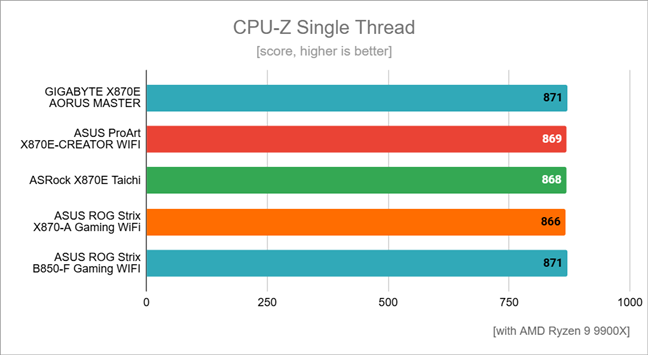
 Benchmark results in CPU-Z Single Thread
In CPU-Z’s Multi Thread test, which measures performance in heavy workloads, the motherboard trailed slightly (about 2.6%) behind the top-performing competitor, the ASUS ROG Strix X870-A Gaming WiFi. However, the difference is small and all the boards in my list offer similarly strong, reliable performance.
Benchmark results in CPU-Z Single Thread
In CPU-Z’s Multi Thread test, which measures performance in heavy workloads, the motherboard trailed slightly (about 2.6%) behind the top-performing competitor, the ASUS ROG Strix X870-A Gaming WiFi. However, the difference is small and all the boards in my list offer similarly strong, reliable performance.
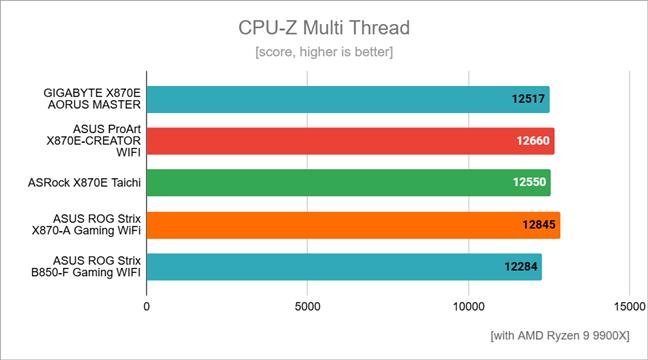
 Benchmark results in CPU-Z Multi Thread
In Cinebench, GIGABYTE X870E AORUS MASTER ranked as the best, being a bit faster (up to about 4.5%) than its competitors. This means good performance in tasks like video rendering or other heavy workloads where multiple CPU cores are used intensively, like 3D rendering and content creation.
Benchmark results in CPU-Z Multi Thread
In Cinebench, GIGABYTE X870E AORUS MASTER ranked as the best, being a bit faster (up to about 4.5%) than its competitors. This means good performance in tasks like video rendering or other heavy workloads where multiple CPU cores are used intensively, like 3D rendering and content creation.
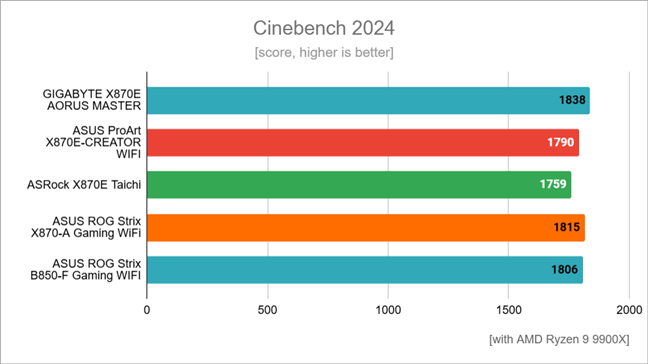
 Benchmark results in Cinebench 2024
In Blender, a popular 3D-rendering software, this motherboard achieved the highest score, outperforming the nearest competitor by approximately 1.3% and the slowest competitor by around 2.2%.
If you often work with 3D modeling or video rendering, this may mean you’ll complete projects a little quicker, saving a bit of time when creating content.
Benchmark results in Cinebench 2024
In Blender, a popular 3D-rendering software, this motherboard achieved the highest score, outperforming the nearest competitor by approximately 1.3% and the slowest competitor by around 2.2%.
If you often work with 3D modeling or video rendering, this may mean you’ll complete projects a little quicker, saving a bit of time when creating content.
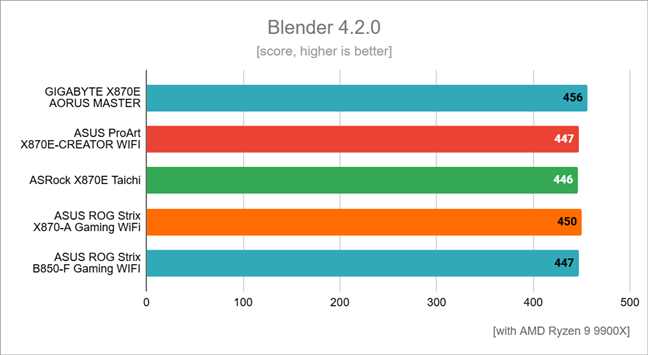 Benchmark results in Blender
In PCMark 10, which measures overall system performance, GIGABYTE X870E AORUS MASTER performed slightly lower, less than 1% behind the top performer, the ASUS ProArt X870E-CREATOR WIFI. Still, this minor gap won’t be noticeable day to day. Everyday tasks like office work, browsing, or media playback will be fast and smooth.
Benchmark results in Blender
In PCMark 10, which measures overall system performance, GIGABYTE X870E AORUS MASTER performed slightly lower, less than 1% behind the top performer, the ASUS ProArt X870E-CREATOR WIFI. Still, this minor gap won’t be noticeable day to day. Everyday tasks like office work, browsing, or media playback will be fast and smooth.
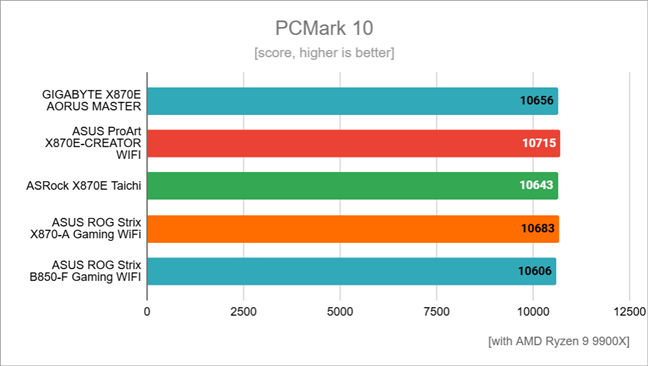
 Benchmark results in PCMark 10
In JetStream 2.2, which measures how fast and responsive your internet browsing is, the GIGABYTE X870E AORUS MASTER was clearly ahead, approximately 10% better than other tested motherboards. This higher percentage implies noticeably snappier browsing, with quicker page loading, smoother scrolling, and more responsive web apps. However, seeing such a major difference, I can’t help but wonder if Google Chrome or Windows 11 itself received some meaningful improvements (updates) since my previous tests.
Benchmark results in PCMark 10
In JetStream 2.2, which measures how fast and responsive your internet browsing is, the GIGABYTE X870E AORUS MASTER was clearly ahead, approximately 10% better than other tested motherboards. This higher percentage implies noticeably snappier browsing, with quicker page loading, smoother scrolling, and more responsive web apps. However, seeing such a major difference, I can’t help but wonder if Google Chrome or Windows 11 itself received some meaningful improvements (updates) since my previous tests.
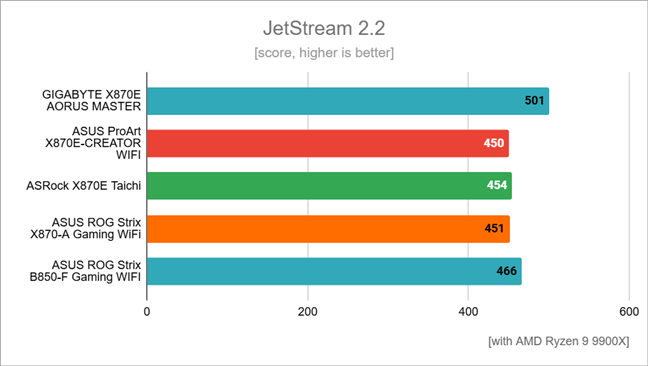 Benchmark results in JetStream
In 7-Zip’s file compression tests, the GIGABYTE X870E AORUS MASTER motherboard had the second-best score, slightly behind the top performer (the ASUS ROG Strix B850-F Gaming WiFi) by about 0.6%, but also slightly ahead of the next competitor (the ASUS ProArt X870E-CREATOR WIFI) by around 0.6%. Moreover, it proved about 6% better than the lowest-performing competitor, the ASRock X870E Taichi. Practically speaking, this means fast performance when creating archives, like when you’re backing up files.
Benchmark results in JetStream
In 7-Zip’s file compression tests, the GIGABYTE X870E AORUS MASTER motherboard had the second-best score, slightly behind the top performer (the ASUS ROG Strix B850-F Gaming WiFi) by about 0.6%, but also slightly ahead of the next competitor (the ASUS ProArt X870E-CREATOR WIFI) by around 0.6%. Moreover, it proved about 6% better than the lowest-performing competitor, the ASRock X870E Taichi. Practically speaking, this means fast performance when creating archives, like when you’re backing up files.
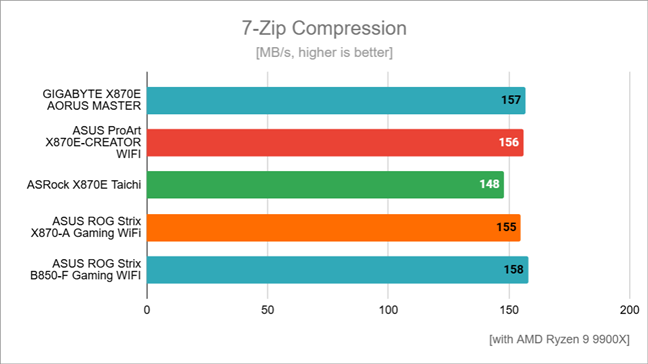 Compression speed measured by 7-Zip
For decompressing (unpacking) files, the motherboard led the competition, outperforming the other setups by roughly 1.4% to 3.8%. This shows the board is highly effective at tasks that involve unpacking large archives or installing large games and software quickly, meaning you may save some time during installations or large file transfers.
Compression speed measured by 7-Zip
For decompressing (unpacking) files, the motherboard led the competition, outperforming the other setups by roughly 1.4% to 3.8%. This shows the board is highly effective at tasks that involve unpacking large archives or installing large games and software quickly, meaning you may save some time during installations or large file transfers.
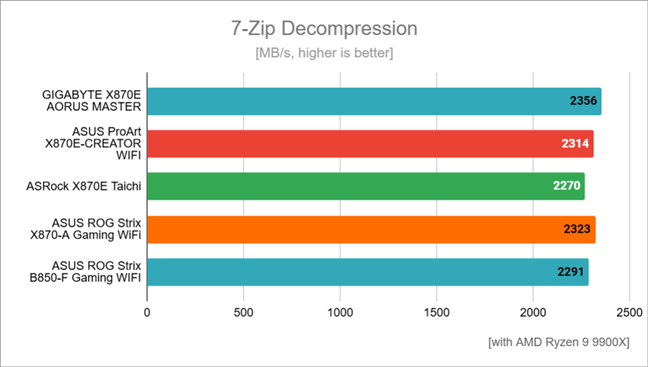
 Decompression speed measured by 7-Zip
Next, I ran some games at 1080p resolution with the graphics set to the lowest settings to ensure my AMD Radeon RX 7900 XT video card wouldn’t become a major limiting factor for the computer’s performance.
When running Cyberpunk 2077, the PC I built upon the GIGABYTE X870E AORUS MASTER motherboard delivered performance very close to the best result, being just about 1% slower than the one using an ASUS ROG Strix B850-F Gaming WiFi. This shows its very capable of running demanding modern games smoothly, giving you high frame rates. In real-world use, it translates to a smooth gaming experience without noticeable stutters or lags.
Decompression speed measured by 7-Zip
Next, I ran some games at 1080p resolution with the graphics set to the lowest settings to ensure my AMD Radeon RX 7900 XT video card wouldn’t become a major limiting factor for the computer’s performance.
When running Cyberpunk 2077, the PC I built upon the GIGABYTE X870E AORUS MASTER motherboard delivered performance very close to the best result, being just about 1% slower than the one using an ASUS ROG Strix B850-F Gaming WiFi. This shows its very capable of running demanding modern games smoothly, giving you high frame rates. In real-world use, it translates to a smooth gaming experience without noticeable stutters or lags.
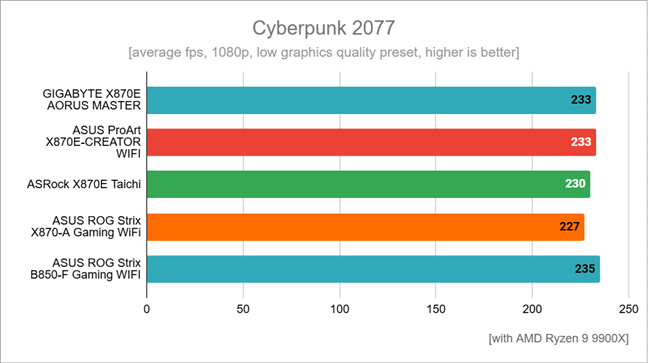
 Benchmark results in Cyberpunk 2077
In Assassin’s Creed Mirage, the motherboard’s performance was around 1% lower than the best-performing competitor’s, the ASUS ProArt X870E-CREATOR WIFI. This small difference is not noticeable in actual gaming. It means gameplay will feel smooth and responsive, and players will enjoy a great experience, especially if the motherboard is paired with a powerful graphics card.
Benchmark results in Cyberpunk 2077
In Assassin’s Creed Mirage, the motherboard’s performance was around 1% lower than the best-performing competitor’s, the ASUS ProArt X870E-CREATOR WIFI. This small difference is not noticeable in actual gaming. It means gameplay will feel smooth and responsive, and players will enjoy a great experience, especially if the motherboard is paired with a powerful graphics card.
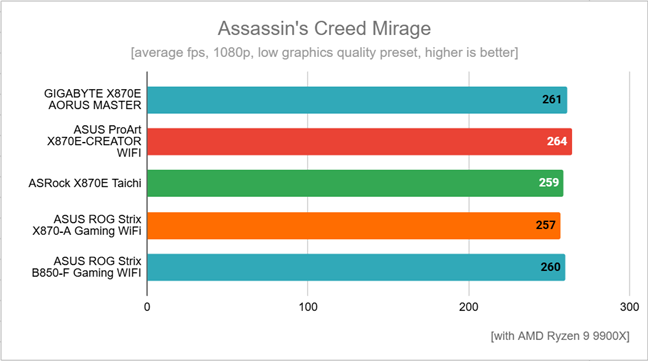
 Benchmark results in Assassin's Creed Mirage
In Remnant II, the GIGABYTE X870E AORUS MASTER scored about 1.5% behind the leading motherboard in this test, the ASRock X870E Taichi. On the other hand, it was 1% faster than the ASUS ProArt X870E-CREATOR WIFI and had identical results as the other three boards left on the list. In practical terms, the differences are tiny and impossible to notice during gaming. The motherboard will provide a smooth gameplay experience, and you’ll comfortably enjoy high levels of performance even in the most action-packed scenes.
Benchmark results in Assassin's Creed Mirage
In Remnant II, the GIGABYTE X870E AORUS MASTER scored about 1.5% behind the leading motherboard in this test, the ASRock X870E Taichi. On the other hand, it was 1% faster than the ASUS ProArt X870E-CREATOR WIFI and had identical results as the other three boards left on the list. In practical terms, the differences are tiny and impossible to notice during gaming. The motherboard will provide a smooth gameplay experience, and you’ll comfortably enjoy high levels of performance even in the most action-packed scenes.
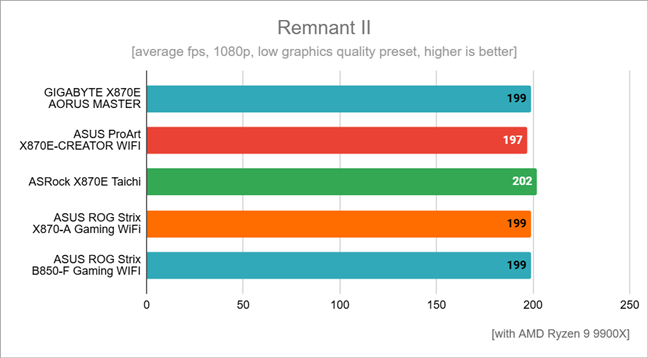
 Benchmark results in Remnant II
When testing Horizon Forbidden West, the GIGABYTE X870E AORUS MASTER motherboard performed about 4% lower than the highest-performing competitor, the ASUS ProArt X870E-CREATOR WIFI. However, the other motherboards went toe-to-toe with it in terms of average number of frames per second. Truth be told, the differences are barely noticeable in day-to-day gaming.
Benchmark results in Remnant II
When testing Horizon Forbidden West, the GIGABYTE X870E AORUS MASTER motherboard performed about 4% lower than the highest-performing competitor, the ASUS ProArt X870E-CREATOR WIFI. However, the other motherboards went toe-to-toe with it in terms of average number of frames per second. Truth be told, the differences are barely noticeable in day-to-day gaming.
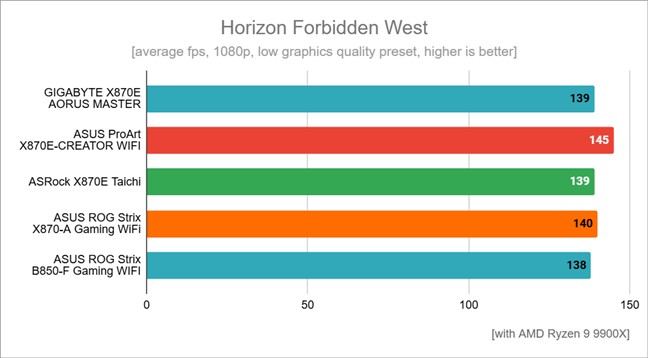 Benchmark results in Horizon Forbidden West
Overall, the benchmarks show the GIGABYTE X870E AORUS MASTER delivers consistently excellent performance, placing it among the top motherboards for everyday use and tasks which require a lot of processing power.
Benchmark results in Horizon Forbidden West
Overall, the benchmarks show the GIGABYTE X870E AORUS MASTER delivers consistently excellent performance, placing it among the top motherboards for everyday use and tasks which require a lot of processing power.
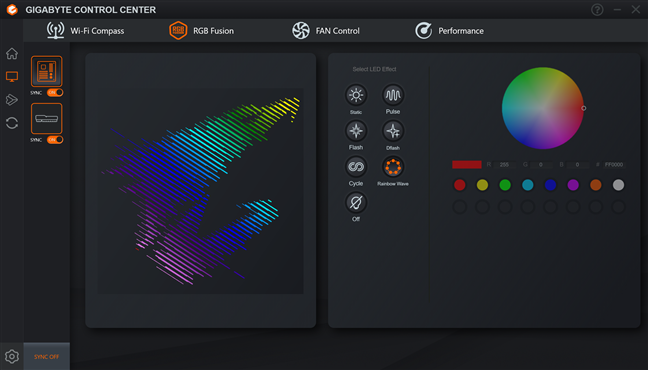
 GYGABYTE Control Center
AORUS AI Snatch is an intelligent tool designed specifically to optimize RAM performance on GIGABYTE’s AORUS motherboards. It uses artificial intelligence, trained on thousands of different memory setups, to analyze your computer’s memory in real-time. In practice, it automatically creates personalized profiles to maximize both speed and stability for your DDR5 RAM. With just a single click, this software can boost your memory performance by up to 20%, making your system noticeably faster without the complexity of manual overclocking.
GYGABYTE Control Center
AORUS AI Snatch is an intelligent tool designed specifically to optimize RAM performance on GIGABYTE’s AORUS motherboards. It uses artificial intelligence, trained on thousands of different memory setups, to analyze your computer’s memory in real-time. In practice, it automatically creates personalized profiles to maximize both speed and stability for your DDR5 RAM. With just a single click, this software can boost your memory performance by up to 20%, making your system noticeably faster without the complexity of manual overclocking.
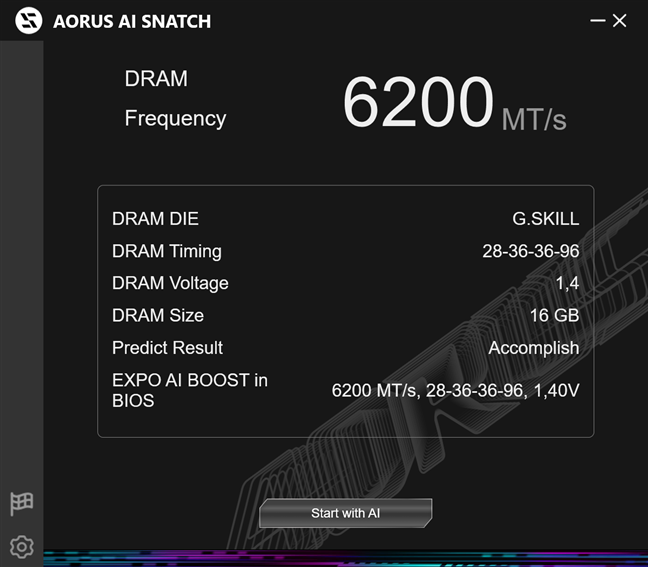
 AORUS AI Snatch overclocks your RAM
cFosSpeed is a tool that should help you manage and optimize your internet connection. In theory, it prioritizes important data, such as online gaming, video streaming, or VoIP calls, over other less critical tasks. In my experience, however, it doesn’t work properly, and I don’t recommend installing it.
AORUS AI Snatch overclocks your RAM
cFosSpeed is a tool that should help you manage and optimize your internet connection. In theory, it prioritizes important data, such as online gaming, video streaming, or VoIP calls, over other less critical tasks. In my experience, however, it doesn’t work properly, and I don’t recommend installing it.
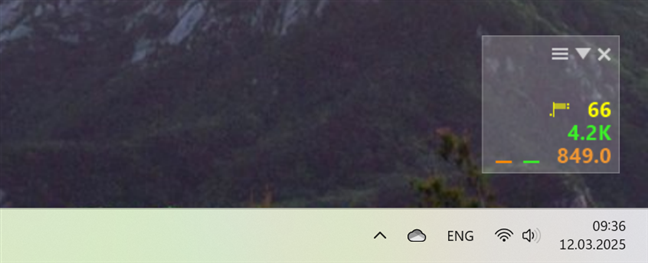
 cFosSpeed should optimize network connections
Smart Backup provides an easy way to protect your important files by automatically creating backup copies. It offers quick options to back up files either locally or to external storage.
cFosSpeed should optimize network connections
Smart Backup provides an easy way to protect your important files by automatically creating backup copies. It offers quick options to back up files either locally or to external storage.
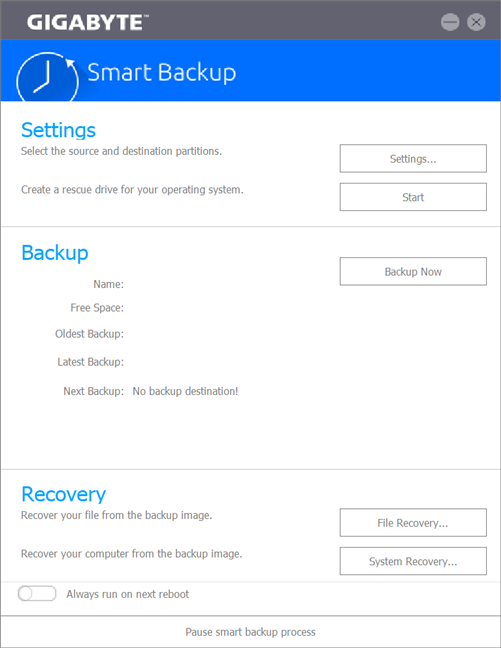
 GYGABYTE Smart Backup can be useful
Last but not least, you can also download and install Norton Internet Security, an antivirus software included with this motherboard. You get a trial (evaluation) version that provides you with protection against malware, viruses, phishing attacks, and other online threats for a limited time.
GIGABYTE offers a couple of tools that may or may not be useful. I recommend getting the Control Center and AORUS AI Snatch, as they can improve your experience. However, I don’t find the others particularly good or useful. Still, the best part is that you can pick and choose only what you need. If you’re not a fan of extra software, you can keep your system clean by installing nothing but drivers.
GYGABYTE Smart Backup can be useful
Last but not least, you can also download and install Norton Internet Security, an antivirus software included with this motherboard. You get a trial (evaluation) version that provides you with protection against malware, viruses, phishing attacks, and other online threats for a limited time.
GIGABYTE offers a couple of tools that may or may not be useful. I recommend getting the Control Center and AORUS AI Snatch, as they can improve your experience. However, I don’t find the others particularly good or useful. Still, the best part is that you can pick and choose only what you need. If you’re not a fan of extra software, you can keep your system clean by installing nothing but drivers.
GIGABYTE X870E AORUS MASTER: Who is it good for?
This is the motherboard you should get if you are:- A professional or an enthusiast who relies on heavy multitasking or resource-intensive applications
- A creator who needs fast and reliable connectivity (especially multiple M.2 and PCI Express x16 slots, plus Wi-Fi 7)
- Looking for a high-end AMD X870E-based motherboard that supports PCI Express 5.0 and DDR5 memory
Pros and cons
Here are the main positive aspects of this motherboard:- Eye-catching design with robust thermal solutions and high-quality components
- Three x16 slots (one PCIe 5.0, one PCIe 4.0, one PCIe 3.0)
- Compatible with ultra-fast DDR5 memory (up to 8600 MT/s)
- Four onboard M.2 slots (three PCIe 5.0, one PCIe 4.0)
- 5 GbE LAN port and Wi-Fi 7 wireless connectivity
- Advanced cooling features, with large heatsinks
- Multiple USB 4 and 3.2 Gen 2 ports
- Its high price tag
- No 10 GbE LAN, which might disappoint a few potential buyers
Verdict
The GIGABYTE X870E AORUS MASTER is an excellent motherboard, ideal for gamers, enthusiasts, and content creators who want top-end performance, extensive connectivity, and robust features. Its main strengths include impressive memory and CPU performance, effective cooling solutions, reliable power delivery, and plenty of high-speed USB and storage options. However, its premium features come at a higher cost, and casual users or those on a tighter budget might not benefit fully from all it offers. Furthermore, while it delivers enough value to justify the cost, the lack of a built-in 10GbE port might disappoint some users. In short, if you’re looking for high-end features, strong gaming performance, future-proof connectivity, and easy customization, the GIGABYTE X870E AORUS MASTER is a great choice. On the other hand, it may be too much for those seeking simplicity or looking to spend less money.Unboxing the GIGABYTE X870E AORUS MASTER
GIGABYTE packages the X870E AORUS MASTER in a premium cardboard box featuring the iconic AORUS eagle logo.Hardware specifications and design
With a width of 24.4 cm (9.61 in) and a length of 30.5 cm (12 in), the GIGABYTE X870E AORUS MASTER is an ATX motherboard. Based on the AMD X870E chipset, it’s designed to maximize performance for AMD Ryzen 9000, 8000, and 7000 Series processors.Using the GIGABYTE X870E AORUS MASTER motherboard
Building a system around this board is straightforward. The socket area leaves enough space for large CPU coolers, and the clear labels help you quickly identify headers and connectors. These are the components I used for my test system:- Processor: AMD Ryzen 9 9900X
- Cooler: ASUS ROG Ryuo III 240 ARGB
- Memory: G.Skill Trident Z5 Neo RGB DDR5-6000
- Graphics Card: AMD Radeon RX 7900 XT
- Storage: Samsung 990 PRO PCIe 4.0 NVMe SSD 1TB
- Monitor: ASUS ROG Strix XG32UQ (4K UHD)
- PSU: Seasonic Focus GX-1000
GIGABYTE X870E AORUS MASTER - Benchmark results
In CPU-Z Single Thread, the GIGABYTE X870E AORUS MASTER motherboard achieved the highest score, surpassing some competitors by roughly 0.2% to 0.6%. In simpler terms, it means the motherboard makes excellent use of the CPU’s power when performing tasks that rely on one core, such as quickly loading a webpage or opening a program.Software bundled with the GIGABYTE X870E AORUS MASTER
GIGABYTE doesn’t force any particular software on you, but you do get a few tools, some helpful, some not so much: The GIGABYTE Control Center is the main software for managing the motherboard’s settings and features. A simple and clean interface allows you to easily adjust fan speeds, control RGB lighting, and monitor system temperatures and voltages. You can also use it to download and install drivers and additional utilities.

Discussion (0)
Be the first to comment.