



Hello, fellow Windows users! In today’s article, I will rant about Windows 11 and what I hate about it. Yes, that’s right. Because while Windows 11 aims to be a great operating system, it’s definitely not a masterpiece. There are many reasons why you may like it, but there are also reasons why Windows 11 sucks. Things that are missing and we had in Windows 10, things that were better designed in earlier Windows operating systems, and things that are hard to do. Why is Windows 11 so bad that it makes some people wonder if they should switch to using Linux or macOS? Here are some reasons why I and probably many others feel let down by Microsoft and why Windows 11 sucks, at least in some respects:
 Windows 11 design shortcomings and flaws
 The system requirements are prohibitive
 Entry-level PCs struggle to run Windows 11
 Less customizable taskbar
 Simplified Start Menu
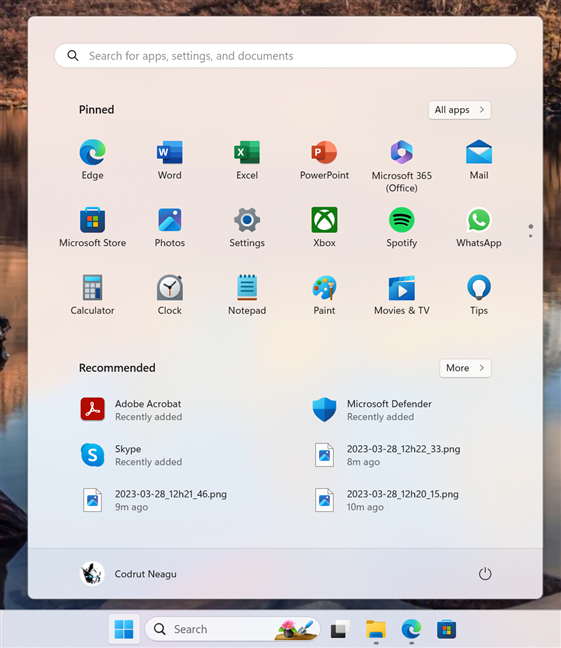
Another issue is that if you configure the Recommended section not to show anything, it doesn’t disappear to leave room for other sections, and you get a Start Menu that’s partly empty. Is that a good design choice? After all, in Microsoft’s own Feedback Hub, the user request to remove the Recommended section is one of the most upvoted by people.
Simplified Start Menu
Another issue is that if you configure the Recommended section not to show anything, it doesn’t disappear to leave room for other sections, and you get a Start Menu that’s partly empty. Is that a good design choice? After all, in Microsoft’s own Feedback Hub, the user request to remove the Recommended section is one of the most upvoted by people.
 Wi-Fi in Windows 10
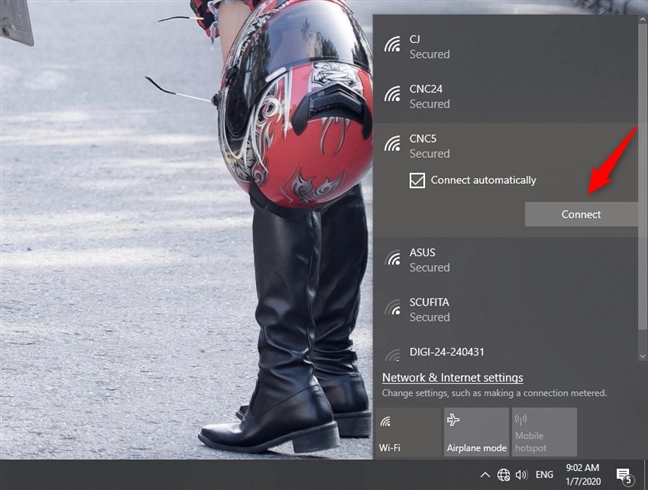
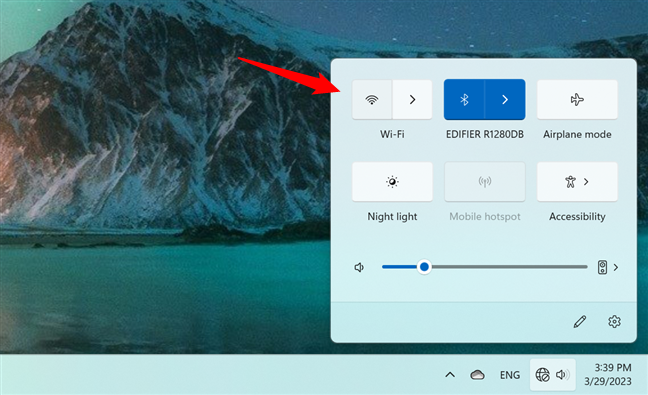
In Windows 11, you use the same network button from the system tray, but to get to the Wi-Fi list, you must additionally press the small arrow button next to the Wi-Fi entry.
Wi-Fi in Windows 10
In Windows 11, you use the same network button from the system tray, but to get to the Wi-Fi list, you must additionally press the small arrow button next to the Wi-Fi entry.
 Wi-Fi in Windows 11
Or, as another example, in Windows 10, if you right-click on the desktop or on a file/folder, you get a contextual menu with options to choose from. But no, in Windows 11, doing the same thing only shows you a few options, and to see them all, you have to make another click/tap on Show more options. So instead of one click, you have to click twice, and that’s another reason why Windows 11 is irritating to use, compared to Windows 10.
Wi-Fi in Windows 11
Or, as another example, in Windows 10, if you right-click on the desktop or on a file/folder, you get a contextual menu with options to choose from. But no, in Windows 11, doing the same thing only shows you a few options, and to see them all, you have to make another click/tap on Show more options. So instead of one click, you have to click twice, and that’s another reason why Windows 11 is irritating to use, compared to Windows 10.
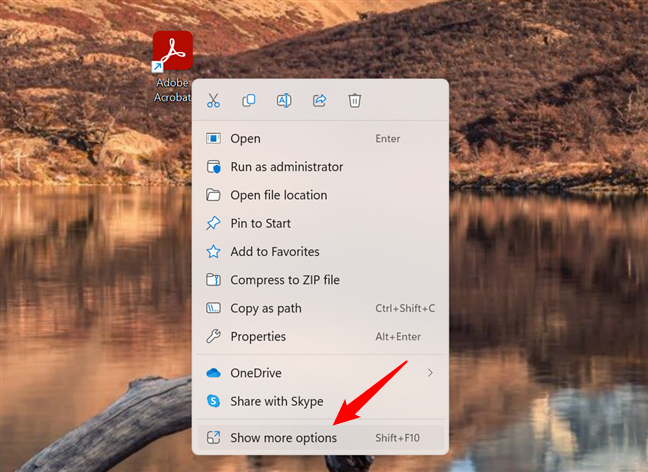
 Two clicks to do what Windows 10 allowed with just one click
TIP: If you want to fix this issue, luckily, you can use the fix from this tutorial: How to access and restore the old right-click menu in Windows 11.
Two clicks to do what Windows 10 allowed with just one click
TIP: If you want to fix this issue, luckily, you can use the fix from this tutorial: How to access and restore the old right-click menu in Windows 11.
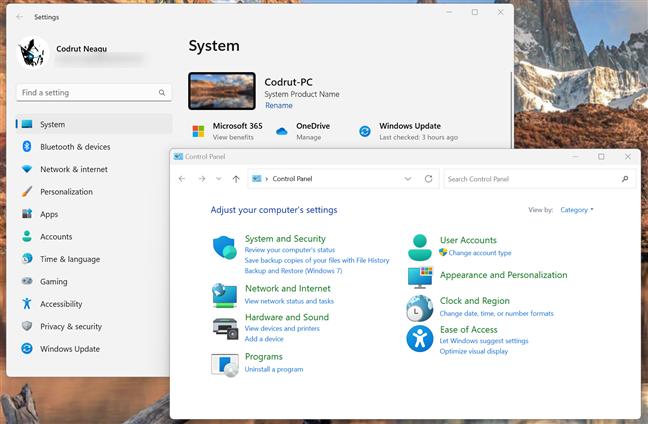
 Control Panel is still a thing
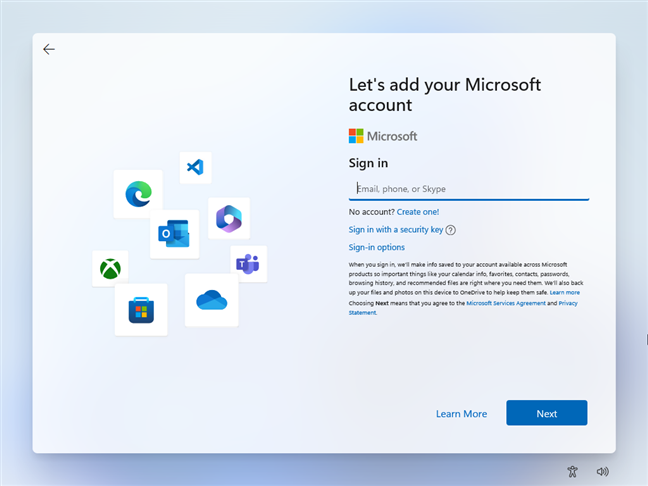
 Windows 11 Home requires Microsoft accounts
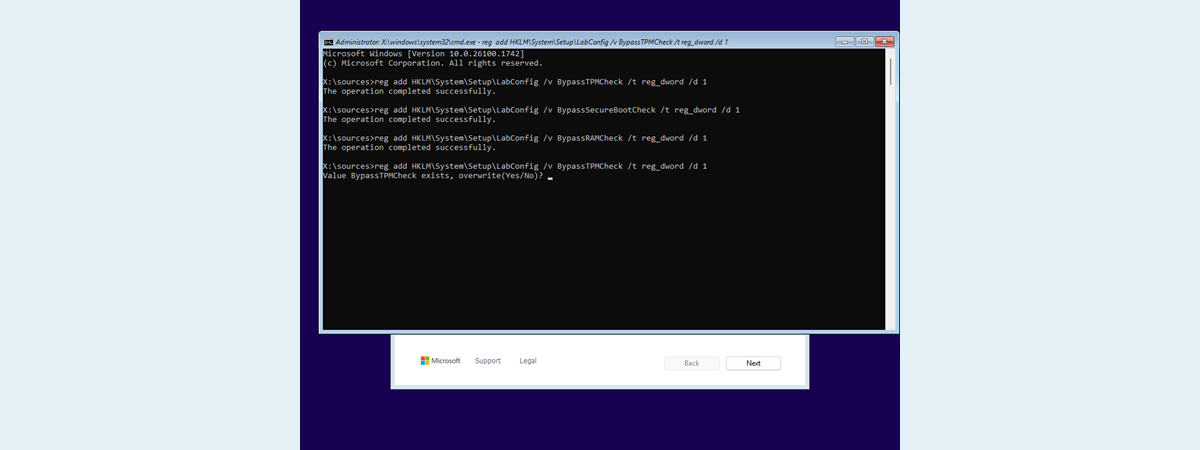
Only Windows 11 Pro can be used with local offline accounts, and even that requires workarounds. That’s a bummer and an unnecessary restriction on Microsoft’s part, one that I presume the company imposes only to force people to create Microsoft accounts and use more of its services.
Windows 11 Home requires Microsoft accounts
Only Windows 11 Pro can be used with local offline accounts, and even that requires workarounds. That’s a bummer and an unnecessary restriction on Microsoft’s part, one that I presume the company imposes only to force people to create Microsoft accounts and use more of its services.
Design flaws and changes that nobody asked for
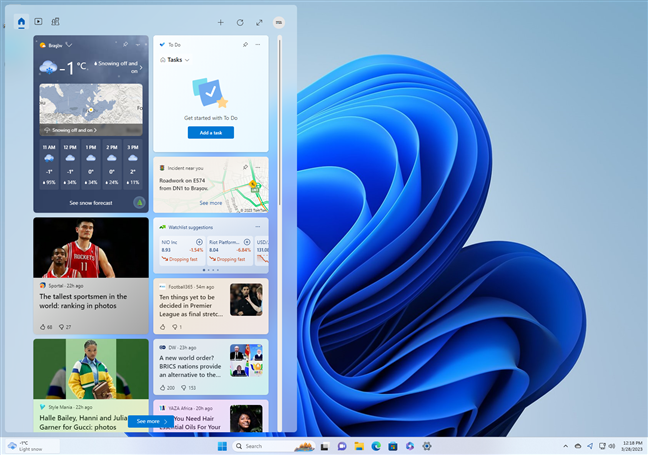
Sometimes, Windows 11 feels like an operating system that nobody wanted, nobody asked for, and nobody needs. Windows 10, even with all its mishaps and issues, looks better than Windows 11, and in most cases, it feels faster. The design of Windows 11 makes me wonder whether Microsoft hired a team of preschoolers to draw its interface and expected a bunch of machines to use it. I don’t know about you, but having used each and every version of Windows since Windows 3.1 to Windows 11, I find the design of the latter to be quite inconsistent, confusing, and often annoying. It’s like they took many things that were good and already polished in previous versions and threw them away. The rounded corners, the translucent windows, the centered taskbar, the Widgets that are confined in their own popup window, the new yet boring icons… should I continue?Hardware requirements are prohibitive, especially TPM
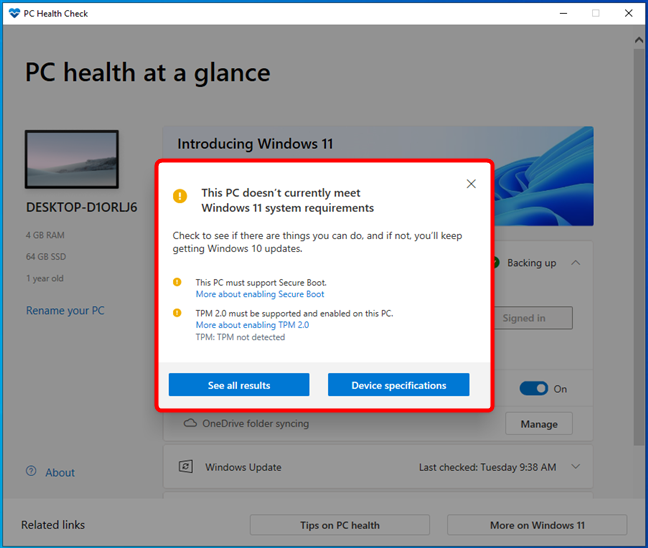
Though I don’t necessarily hold this against Microsoft, a reason why many people hate Windows 11 is its hardware demands. The company imposes strict system requirements for Windows 11, meaning many can’t install it or upgrade their computers. Besides what we’d call normal requirements for an operating system, such as processor speed, RAM, or storage amount, Windows 11 also has a series of prohibitive requests. Among them, the most disconcerting is the fact that your PC needs to have a TPM 2.0 (Trusted Platform Module version 2.0) chip. Add the fact that its processor must be at least a 2nd Generation AMD Ryzen or an 8th Generation Intel (or one of a few select Intel Core 7th Gen processors). It’s easy to call all of that mandatory on paper, but in the real world, there are lots of slightly older computers that have enough power to run Windows 11, but they simply don’t have TPM 2.0 or one of the supported processors. For example, I had an older laptop with an Intel Core i7 7700HQ processor that ran great and even had a TPM 2.0 chip on it. It would have had no problem running Windows 11, but Microsoft didn’t let me, so I had to make the tough decision of selling it. I’m pretty sure that many people are in the exact same situation, and that sucks!Low performance on entry-level PCs
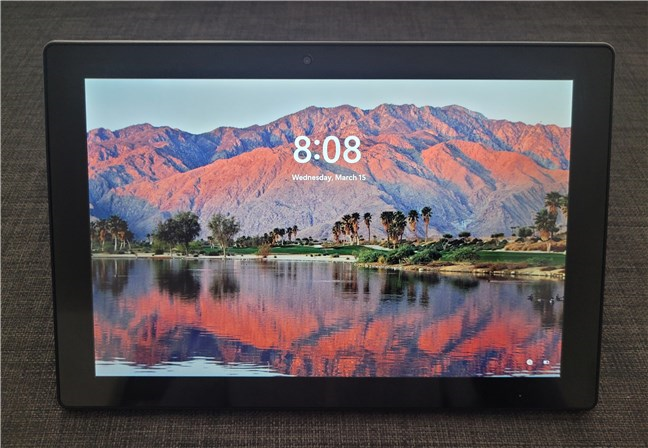
On the same note, there are many entry-level computers, laptops, and tablets that theoretically comply with all the system requirements of Windows 11. But even if they do, the operating system’s performance is disappointing, as on many of them, Windows 11 is slow, buggy, and unstable. I’ve seen it firsthand on some devices. Long story short, and if you allow me a joke, on entry-level PCs, Windows 11 freezes more than my wife when I turn on the air conditioning. Is it okay for an operating system to lag more often than a dial-up connection when all you’re trying to do is open its Settings app? Does it make sense for Windows 11 to consume more resources than a black hole just to keep Microsoft Edge running? I’d say no to all that and more: if you value speed, reliability, and efficiency, it’s a nightmare to stare at your PC while it’s taking forever to load apps, boot, install things, and, last but not least, update itself!Key usability features have been downgraded
There are a couple of specific areas where I feel Microsoft did a poor job when designing Windows 11. Even if, over time, some have been improved a bit, they still lack in terms of usability and customization options. These are the things I think of quite often when I say Windows 11 sucks:Windows 11’s taskbar is less personalizable
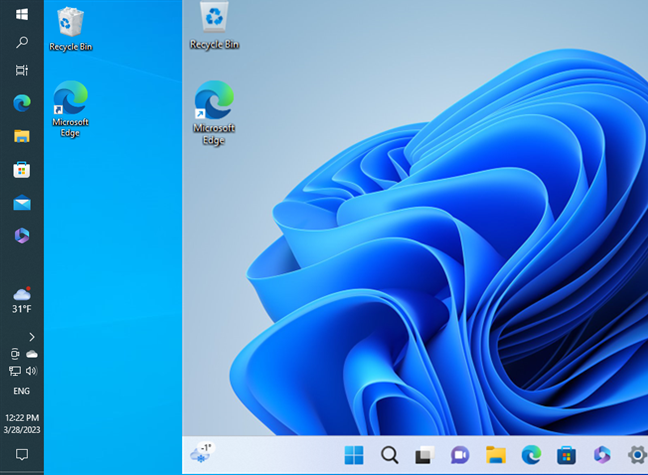
Windows 11’s taskbar looks nice with its centered icons and Start Menu, but it feels like a downgrade from Windows 10 in every other way. Windows 11’s taskbar can’t be moved or resized, it can’t be set to show smaller icons, and you can’t ungroup the buttons on it. These are things that you can do with the taskbar from Windows 10, but you can’t do in Windows 11. Who would’ve thought such a flaw would be present in Microsoft’s newest “most modern” operating system?Windows 11’s Start Menu is oversimplified and lacks features
Likewise, Windows 11’s Start Menu feels like a downgrade from previous Windows versions. Microsoft tried to make it simpler and more focused on what people really use. Unfortunately, they kind of failed. The Windows 11 Start Menu looks a bit more like a smartphone’s home screen, but it’s nowhere near as useful. The live tiles are gone and replaced with simple icons, which is OK except for the fact that I actually liked the live tiles of some Windows 10 apps, like Weather, Mail, or Calendar. Don’t you miss them too? Furthermore, instead of having something useful in its bottom section, Windows 11’s Start Menu only gives you a few apps and files you recently used. In theory, it might be a good thing, but in practice, I have yet to find how this could be useful to me in any way. I’ve never found the documents I wanted to edit in this recommendations list. The apps I regularly use are already in the Pinned section, which makes the Recommended area of the Start Menu pointless.Windows 11’s user interface requires too many clicks
Some things are not as straightforward in Windows 11 as they are in Windows 10. It might not be a big issue, but it’s an annoying one for many. Take, for example, the way you connect to a Wi-Fi network: in Windows 10, you click/tap on the Wi-Fi button from the system tray, and you get to see the list of available wireless networks. Then, you simply choose the one you want to connect to.Settings still don’t include everything in the old Control Panel
Do you remember when Windows 10 was launched? It was on July 29, 2015. That was the starting date for the touch-friendly Settings app that was and is still struggling to replace the old Control Panel. Until now, Microsoft still hasn’t managed to finish migrating all the tools and settings in Windows 10’s Settings app. And the bad news is that Windows 11 is just as far behind. While the Settings app in Windows 11 is more streamlined and better in many aspects than the one in Windows 10, it still doesn’t have all the things found in the Control Panel. In other words, the Control Panel is still a thing in Windows 11, an operating system that’s as new and modern as it gets! Not something I expected from it, and definitely not something that I thought I’d be saying almost 8 years after first seeing the Settings app.Offline local accounts are not available for Windows 11 Home
Are you a fan of cloud services, online accounts, and syncing everything you can on your Windows devices? If you are, then you probably don’t mind using a Microsoft account on each and every Windows 11 computer or device you own. However, if you’re not, or if you intend to use Windows 11 on a PC that’s not connected to the internet, here’s a reason why Windows 11 sucks: you can’t install its Home edition without a Microsoft account or an internet connection. Isn’t that great?Final words: If Windows 11 sucks too much for you, you can go back to Windows 10
If you’ve installed Windows 11 on your computer but found that you can’t stand it, you should know that you can go back to Windows 10. There are two ways to do it, depending on how long ago you upgraded your PC from Windows 10 to Windows 11:- If you upgraded to Windows 11 less than 10 days before, you could simply roll back to Windows 10. For guidance on this process, check out: How to downgrade Windows 11 and roll back to Windows 10.
- If more than 10 days have passed since you upgraded to Windows 11, or if you clean-installed Windows 11, there’s only one way to go back to Windows 10. And that’s to install Windows 10 from scratch, using the same product key. In case you need help with that, follow this guide: How to install Windows 10 from DVD, ISO, or USB.
Discussion (52)
NOT A BIT OF WONDER MS CHOOSE TO UPGRADE FROM WINDOWS 10 FOR FREE. WINDOWS 11 IS EASILY THE WORST SO CALLED UPGRADE EVER – FAR WORSE THAN WINDOWS Me, WINDOWS 3.1 & WINDOWS 8 PUT TOGETHER. I’M OF THE OPINION IS WAS DESIGNED BY A BUCH OF 12 YEAR OLDS WHO HAVE NEVER WORKED IN THE REAL WORLD. FOR THE FIRST TIME IN MY LIFE I’M SEARCHING FOR AN ALTERNATIVE TO MICROSOFT WINDOWS AND MICROSOFT OFFICE ET AL, (BTW IF NOT DESIGNED BY 12 YEAR OLDS THEN THE BRAINS OF THOSE WHO DESIGNED WINDOWS 11 HAVE MICRO INTELLIGENCE, MICRO EXPERIENCE, MICRO ABILITY AND MICRO SENSE).
Without going into details, I will be simple and focused. Win 11 is:
* Glitchy
* Confusing
* Annoying to use
Windows 11 doesn’t suck,it stinks all round.
There’s a simple solution to this never-ending MS nonsense…
It’s called Apple, or Linux
Pick one, either will be better.
Apple is not a solution, with their closed ecosystem which is full of even more walls and limitations.
I am just a basic home user and have comfortably used every Windows version since 3.1 (except 8 and 8.1). Windows 11 is driving me nuts. Why does Windows 11 have such miniscule windows in things like Word and Excel? They can’t be made bigger and the text in them is almost impossible to read.
What do you mean? Can you please explain in more detail? Maybe your issue can be easily fixed, but I can’t understand it.
The purpose of SecureBoot and TPM and Windows 11 is to make sure you are never allowed to use anything except Windows. Microsoft conspired with all PC makers to become the gatekeeper into hardware, exacting a $99 fee from any OS maker who wants their OS to run in a PC without being blocked by SecureBoot. That is its only purpose. If you can definitively prove any other purpose for SecureBoot, you probably work for Microsoft.
Oh and which pillock QA’ed the change that All Apps start menu items must be grouped by a letter at the beginning – anything beginning with A under a title called A, etc I know my alphabet, I can read the first character.
Oh dear, so many things wrong in Windows 11, the cut, copy, paste menu options with no labels and the show more options to run the shortcut that I use everyday.
The worst was signing in on my very first day with a new PC with Windows 11 and new LAN, I couldnt connect to my LAN – hadnt got past the setup step. But it wouldnt let me continue past setup without sending something to the Internet! But there was no Internet setup and no bypass. Luckily I was able to use my old W10 PC to add a new LAN, and then use the new machine to select that new LAN. Without the old machine I would have been stuffed.
My second favourite gripe was my computer shop was installing a larger M2 disk as a replica of my existing M2 disk. I gave them my PIN, but TPMS wanted them to change my hotmail password as the setup machine they were using to copy the 2 M2 disks was not the same as the original machine the M2 drive had been on. I needed to come back in the shop and sign into their build machine in order to authorise the disk copy.
Pretty much nailed it. Windows 11 is slow. My office computer is old so that my be a factor nonetheless I hate windows 11. It always hangs for a few seconds runs sluggishly. Also I have been unable to get the search in the start bar to operate. It always suspends.
Reducing productivity. It’s my time, and Win 11 is making me less productive. Changing things that worked well, eliminating features that were useful and well-liked. Having to find out how to do something that was easy before, now requiring a search, discovery, and using more clicks just to continue my work. Yes, MY WORK. For chrissake, it’s an operating system. Why should we go through these changes every few years? What was the last real functionality introduced by a G.D. operating system? And, it looks old — already dated. Where is the productivity improvement to my programs (yes, I still use programs) and apps? It’s all about money — keep the revenue stream going by forcing a change in operating systems on the customer. Linux is looking better and better all the time.
As normal people say, “If it ain’t f**ed, don’t fix it.”
As Microsoft says, “It’s not f**ed ’til we’ve fixed it!!”
Just bought a new all-in-one to replace the old desktop and W11 was the only choice.
Absolute nightmare!
Also subscribed to 365, which is also a load of s**te. Cancelled after 3 days and installed Office 2007 Pro, which although is getting on a bit is still completely satisfactory.
Totally agree. Hate w11. Came installed on new acer that I bought. Uuuugh!!
Agree with you Ciprian
Windows 11 has other issues as well:
– it is still incompatible with 16-bit applications
– it lacks a proper NTVDM to run MS-DOS programs in energy/power efficient native and easy way (emulation costs power and in many cases requires users to understand the full system instead of just knowing how memory management works)
– some features needed for running some 32-bit programs are hard to enable, or have been removed from the operating system
– it does not have hardware accelerated audio and requires an additional tool for enabling it.
It is sad to say that by features and compatibility, Windows 98 SE is still the best version of Windows. By balancing between features and security, Windows XP is still the way to go. We do not need to pay to get a very safe operating system for connecting to the Internet. If we couple an older Windows operating system with a side-be-side installed free Linux/Unix distro, we can have both: great application compatibility and very secure online use.
Do you know what i think of windows 11…combine a knife with a crocodile to get your answer.Mark my words, i am NEVER EVER going to upgrade to windows 11. You cant customize a single fliping thing i dont care if its flipping slow but i flipping want windows 7 back – it looked incredible. But with windows 11 i might as well be operating the f***ing operating system with a cucumber and a card board box. windows 11 is the marrage of windows and macOS and they need to divorce pretty soon or they are going right down mount etna. The worst windows upgrade in a flipping billion years i’d rather go back to windows 1.01 you bet.
Win11 is embarrassing. Open-shell, OO shut-up and WUT make it semi usable.
They call Bill Gates smart. He was only smart in one aspect. He got out of Microsoft before the mess continues to get worse. They hired people in other counties that are not trained on how to write
quality software – no objection to these people but they don’t know how to write good requirements so they
can be properly translated to all the components of a good software system.
What Mr. Bill does not understand is that I have only one life and I don’t need to spend it on fighting poorly designed operating systems.
Because its sh** and M$ know it!
Sure you could throw it in winreducer and cut out the slack, but you could more easily do it with Windows 10. Rather than bother wasting your time with something essentially designed for, security paranoid locked down environments.
Your list covers everything I have come across so far. But, for me the reason it sucks is that Microsoft screws up the easy things because they don’t care about the wider user base: if you are not a developer, you are just a money trough. And on the developer pages, developers tell users that, “you should just get used to it”.
It’s only going to get worse, because the list of things to hate is not a list of bugs in Microsoft’s eyes…those are all features.
I want to be able to get up a blank word sheet to create a new document more easily. I want then to be able to go to ‘Save as’ and save it directly into my filing system, oh! just like Windows 10. Well, I wonder why they thought making thins more difficult was better. I am trying to be sarcastic but I don’t think my literary skills will allow me to reach the level of sarcasm that I really intend.
I DON’T WANTMY STUFF TO BE SAVED TO ANY STUPID CLOUD SOMEWHERE IN THE UNIVERSE. WHATEVER HAPPENED TO SECURITY?
And on top of all this, it seems that I have to take out a loan to buy a subscription for Office 365.
And a load of other stuff! Rant over.
Are they really trying to get rid of customers?
Number 5 is incorrect, you “can” setup Windows Home with a local account, at least for now. During setup press shift F10, this will bring up CMD window, type OOBE\BYPASSNRO. This will restart the setup process and when you get to section to connect to internet you will have the old option to say you don’t have internet access. This will allow for a local account setup.
Anyways…I’m encountering other reasons why Win11 sucks, to start, I can’t easily create icons on the desktop! The send to desktop option seems to be gone. Also agree with the missing taskbar options. Just seems a lot of menu options have been removed making customization more difficult.
Technically, you are correct about number 5 but our point is a different one. If you are a non-technical user, what we say is correct. Unless you read tutorials on the internet, to find the solution, Windows 11 Home will block you from using a local account using only the options shown on the screen.
Absolutely agree. Windows 11 is awful. Hard to believe a company like Microsoft would release such a substandard product.
The Windows 11 initial setup requires so much more knowledge of terms that should not matter. Back in the earlier days of Windows, ex: Windows 98 was considered by some as one of the most user-friendly versions ever. Now this Windows 11, which was not supposed to be installed on my new Laptop. But as soon as it was able to connect to my Wi-fi, it automatically upgraded to without my approval. Unless you are a Computer Nerd or studied to be a Computer Technician you probably will not know all of the terminology required to do the initial setup. With so many of the people 55 or older buying computers to keep up with their family. Then as people get older and do not learn as easily as when they were younger, they are screwed. Does Microsoft Care??? I suspect not! After Microsoft Buys out their competitors and absorbs their technology into Windows programs, they start to forget that their competitor’s product was usually “User Friendly”. I believe that it is time for a Microsoft Competitor. – – Don
They keep moving stuff around? Where I once thought I new what I was doing. I haven’t a darn clue? Which seems to be their goal? I’m almost positive. This is were they’re trying to get to. Intern makes the users spend more money. Take this thing somewhere or sale it. I don’t want widgets. You cant uninstall widgets from apps or programs? Even after disabling them in settings. They’re still running in processes? You have to go to the terminal to uninstall them? I never installed and would never. They were not useful. The last time. They were on Windows. I’m willing to bet. They’re not useful for me. Maybe someone else. However they can install them. I like my computer to be simple and you’ve made exactly opposite. 2 places to do updates. I cant even figure out how to uninstall app at times. I’m pretty sure I removed a couple of them. Only to find out they have reinstalled themselves? I started on Windows 95 and Windows 7. Id like to stay. Microsoft keeps making more complicated. I have nothing positive to say about this OS at all. Leave my start menu on left. Don’t install any apps “widgets” without asking me. Don’t make any exemptions in my firewall without asking me. Then explaining why this exemption is needed. I’m customer but what sucks is you know. There is no other OS to go to. So keep you just keep doing whatever you want. Let ole karma come back.
This isn’t what I wrote either. I went over this several times. I know for a fact. Your trying to make me look incompetent. “So keep you just keep doing whatever you want”. This sentence right here. I know for fact. I didn’t write it this way.
Incompetent or not I know one thing. I dang sure can’t go back to the 150 dollar installation disk I purchased. Without a very frustrating 3 or 4 OS updates. Which in my opinion just makes Windows PC’s annoying to use! I’m real excited about this! :/
I totally agree with 3 and 4. I’ve been using taskbar on top for years, maybe for a decade and now, it is stuck at the bottom. There are ways to take it back to the top but it needs registry-editing and even then, there’d be several bugs. I wonder why? Why cannot I move the taskbar to the top? How primitive is that for an OS???
And number 4, the start menu. It is a great disappointment. I liked the metro-style start menu of Windows 10. I’m a heavy PC user, so I use numerous programs and I used to order them in Windows 10 Metro, especially in folders. Win 11’s start menu’s quick access area LACKS FOLDER. AND I CANNOT EVEN RE-ORDER ICON ALPHABETICALLY. Everything is so random there that it feels… it give headache.
I’m sad.
I went back to 10 because they dropped the ability to run slideshow from file explorer. Yes I know Photos has o e but it’s a lot more difficult to set up and run it there. Why not just leave that feature there for those that want it? Clearly MS will never learn that taking away functionality is not a good representation of progress or evolution.
I agree with all of the above and want to add my hatred for the “new and improved” Slim pen 2. There are no options for softer tips, and the hard plastic tip feels like writing on glass with a ball point pen. Ridiculous not to have a range of softer tips available to customize the feel of the pen. That is the main reason artist type pay so much for the Surface line, and they take away the Tablet mode and pen tip options. NICE IMPROVEMENTS! What happened to our right to choose? It’s my computer / freedom of choice and all the other buzz phrases they preach but don’t practice.
1) TPM 2.0 and processor selection : obligation to spend a lot of money for new PC and a lot of electronic garbage by dumping your older PC .
2) Discrimination between Win Home users and Win Pro concernig the account choice (local or microsoft) !
I hate Microsoft for this !!!!
One thing – always this one thing – microsoft – PLESE leave the options we had before …and stop forcing your (mostly stupid) new ideas…. after every new version we have LESS CONTROL, LESS OPTIONS, LESS PLEASANT UX – and fighting YOU to leave us in peace with older versions :/
I 100% agree with everything in this article. I got here trying to figure out how to get the time to show on my second monitor.
There are so many additional reasons why W11 is garbage. For example, I use dark mode on everything, but some menus (even within the same program) still show up white for no reason.
Excuse my typos, I can not use moible keyboards very well.
All the reasons listed above correlated with my own experience but, in addition I noted a couple of other issues that just peed me off:
a) Performance was notably slower on my system which is a AMD Ryzen 7 laptop with 8 cores and 16GB of RAM
b) I change my screensaver settings multiple times a day (hey, it’s my person workflow quirk and I’m entitle to it) and in Windows 10 this was a quick and seamless process. In Windows 11 however it is slower to make the change but in addition when I do the whole taskbar disappears and refreshes (quite slowly) and a few times my computer has frozen for a period of time.
c) Not only does the taskbar lack customisability (as mentioned above) but apps which don’t fit on the taskbar simply fall off with no way to access them. Fortunately I have large external monitors and so could still see some of these but on my laptop screen which is smaller I lost access to key program. I tried setting the taskbar icons to their smallest size using registry settings but this didn’t help because although the icons did become smaller the space between them remained the same and so in effect I couldn’t squeeze any more program icons onto the taskbar.
Seriously, its the XP-Vista fiasco all over again. How could they get it so wrong. I really wanted to like it but is sucks.
Tom.
Thanks for sharing your experience. Did you receive the latest updates that fix some of the performance issues on AMD Ryzen processors?
Awful OS, performance robber and a way oversimplified GUI. My computer felt slower, lags when I would a program that never lagged in 10 … I just felt like my 11th GEN Intel i7 was performing more like a 6th GEN i3 under Win 11. The GUI? Not fun to use. Hate it. Start menu is useless, difficult to use effectively, frustrating, loss of control and customization, terrible looking GUI command graphics even down to the copy and paste commands are now simplified unlabeled generic icons and they’re not even good looking icons at that. Reinstalled Win 10 and my laptop is better looking and is fast again.
MS leadership slaps the user in the face as nitwits by controlling what they think we want to see as we pay for their product. It’s backward. I reverted back to 10 since I liked it much better than 11. If 11 isn’t replaced by a true upgrade to 10 by keeping its features while making it more appealing and customizable, then when 10’s service life ends, we need to seek an alternative OS again to force a business to concede to the wants of its paying customers.
So bad I barely know what to say. Can Bill come out of retirement, fck the planet just fix Windows for us please!
Ditto to all the above. It took forever to install and it took me 5 minutes to return my computer to Windows 10. Microsoft designers are asleep at the wheel. They didn’t learn the last time that you can’t keep moving our cheese. I will not be changing to Windows 11. Basically Windows 11 sucks.
Reason I don’t like is all in the above.
More to mention, clock on taskbar shows ONLY in main display. When main display shows fullscreen applications, games as example, I cannot see clock even as I am using multiple monitors.
Start menu is too small and cannot increase size of it, like on the Windows 10.
There become some odd visual effect when reading web sites – suddenly during reading web sites the screen gets darker and when I move cursor it becomes back to normal. Some moment later it happens again. I guess it’s meaned to make reader easier but that is very annoy visual effect.
Windows 11 SUCKS! My WIFI keeps dropping out and my blue tooth headphones drop frequently, had none of these problems with W10.
agreed if i wanted an Apple i bought one. I liked live tiles, even click Microsoft news only because its a LIVE TILE, i’m sorry people didnt like Window Phone but they MFST don’t have to completely kill themselves because of it. was looking forward to implementing Live Tile nicely as an app developer i guess its depressingly suicided already. I had recently Bought a surface laptop Studio for big $$$ to debug android apps ..but find emulator with hardware Accel is totally broken out of the box, and everyone experiences it. unbelievable for a company with such resources.. im sure it will be fixed but um theres some big decision makers should shush in there, always the a*holes get their way.
It literally took 30 clicks to set my default browser to Chrome that used to take 1.
I hate the centered task bar. That was the first thing I changed.
Then I got to the Start Menu. It is so bad it’s almost 100% useless. Just when Windows 10 Start Menu allowed me to neatly organize all my apps and remove every single shortcut from my desktop, Windows 11 is going to force me to put a shortcut to every app I have back on the desktop cluttering it all up again like it was with all the Windows before 10.
That is a huge deal for the way I setup all the users computers in the company I work.
Just trying to setup my new computer is a major pain due to the lack of customizing for pretty much everything.
I don’t care for the rounded corners. I’ve had it crash on me several times already. No blue screen, just black. The settings icon is in the Start menu just like any app that can move all over the place. That will be huge pain in the ass whenever I’m trying to talk someone through getting to a specific setting when doing tech support over the phone. What’s worse is it can be removed from the Start Menu altogether. It’s 100% guaranteed, some user will delete it and dig themselves into a deep hole and can’t find it and won’t know how to search for it. It’s really setup for you to search for pretty much anything you want to use. Want to open Word, type it in first, then click, Want open Chrome, type it in first, then click, what a colossal waste of time. I mean the
Start Menu only allows you to see 18 icons at one time, with little to no organizing to them at all. Heck the entire Settings windows is just effed up.
The more I talk about it, the more I want to dump Windows 11 and go back to 10 and wait for Windows 12.
I hate Windows 11 because Microsoft.
Remember when Microsoft promised that there would be no new operating system after Windows 10? Now W 11 is being foisted on us.
Windows 11 is the last straw; I’m switching to Linux!
Also, try to change the password to your Microsoft account…it’s virtually impossible to do!
F*** Microsoft! F*** Windows!
Valentin-Gabriel Radu should get the Nobel Prize (restores Windows 10 taskbar and Quick Launch to Windows 11):
https://github.com/valinet/ExplorerPatcher
That stuff is superficial. I’m having real issues with Windows 11 like the Bluetooth dropping and “system” randomly keeping the CPU usage at 25%.
From our experience, Windows 11 seems like a rushed product with diverse bugs. It is a wise decision to wait for a couple of months until you make an upgrade.
Has it ever occurred to Microsoft that not everyone wants to “upgrade” and completely change the way they operate a computer every few years? I haven’t installed Windows 11 yet, and may not for some time as I’m finally getting rid of the Edge and One Drive defaults for everything. It seems every time I change a default area, Microsoft changes it all back again.
Fusion: Windows Vista + Windows 8
Windows 11 !!
Is MS on the way to creating a Win 8 or Vista scenario, where most folk thought they were both rubbish or are they going to listen to early adopters’ messages?