





Do you want to know how to connect and access the settings of your ASUS wireless router? You don’t know the default login details for your ASUS router? Then you are in the right place. In this guide, we share four ways to login to any ASUS router or mesh Wi-Fi system, as well as troubleshooting instructions for what to do when you can’t login to your ASUS router:
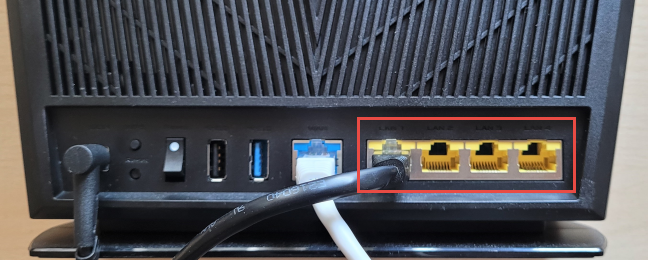
 Connect to your ASUS router using an Ethernet cable
If you don’t have a network cable around, connect to the Wi-Fi emitted by your ASUS router. If you don’t know the network name and details, on the router’s back or bottom, look for a sticker that shares the default Wi-Fi network name (the technical term is SSID), as seen in the picture below.
Connect to your ASUS router using an Ethernet cable
If you don’t have a network cable around, connect to the Wi-Fi emitted by your ASUS router. If you don’t know the network name and details, on the router’s back or bottom, look for a sticker that shares the default Wi-Fi network name (the technical term is SSID), as seen in the picture below.
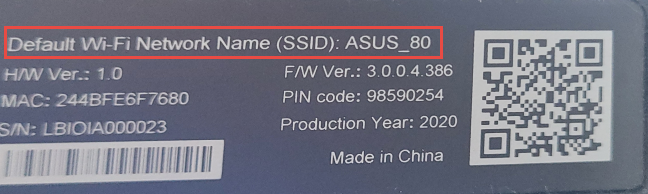
 The default Wi-Fi name is written on a sticker on your ASUS router
Then, connect to the Wi-Fi emitted by the ASUS router. Here are some guides to help you out:
After your computer or mobile device is connected to the network, continue reading and following this guide.
The default Wi-Fi name is written on a sticker on your ASUS router
Then, connect to the Wi-Fi emitted by the ASUS router. Here are some guides to help you out:
After your computer or mobile device is connected to the network, continue reading and following this guide.
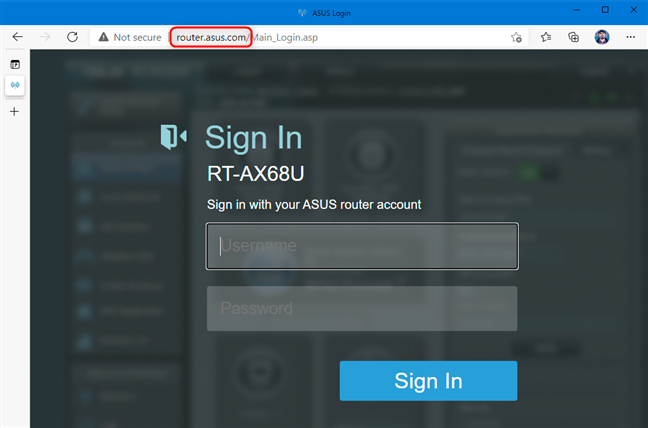
 Navigate to router.asus.com and sign in
Now, you should see all the configuration options available on your ASUS router.
Navigate to router.asus.com and sign in
Now, you should see all the configuration options available on your ASUS router.
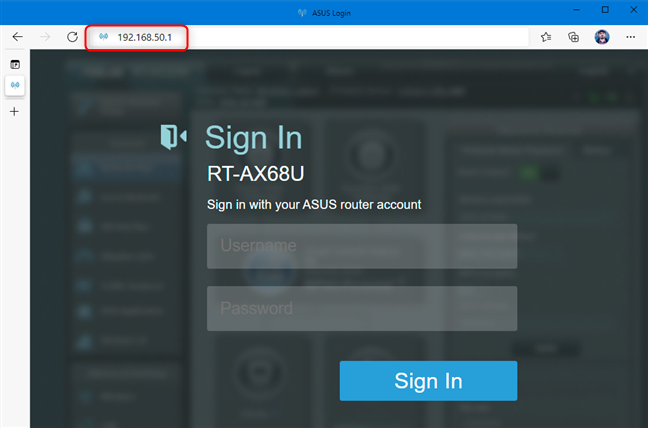 Wi-Fi 6 ASUS routers use the IP address 192.168.50.1
Older ASUS routers with Wi-Fi 5 or earlier generally use 192.168.1.1 as their IP address. If neither address works, see How do I find my router’s IP address? The complete guide. One of the many methods we detail in that guide should work for you.
Wi-Fi 6 ASUS routers use the IP address 192.168.50.1
Older ASUS routers with Wi-Fi 5 or earlier generally use 192.168.1.1 as their IP address. If neither address works, see How do I find my router’s IP address? The complete guide. One of the many methods we detail in that guide should work for you.
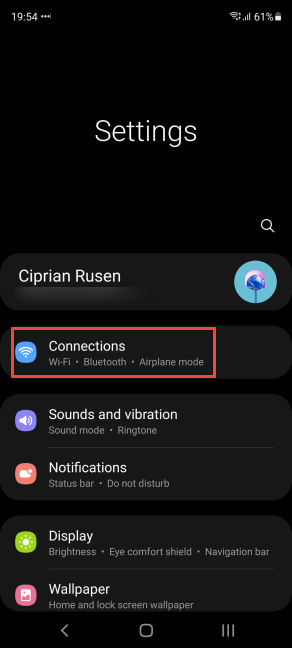
 On a Samsung Galaxy, go to Settings -> Connections
On the Connections screen, tap the Wi-Fi text (but not the switch - it only disables Wi-Fi).
On a Samsung Galaxy, go to Settings -> Connections
On the Connections screen, tap the Wi-Fi text (but not the switch - it only disables Wi-Fi).
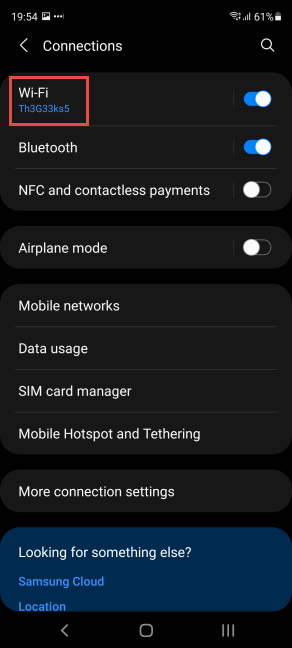 Tap the Wi-Fi text
You see the network you are connected to, and other wireless networks in your area. Tap the gear icon next to your network’s name.
Tap the Wi-Fi text
You see the network you are connected to, and other wireless networks in your area. Tap the gear icon next to your network’s name.
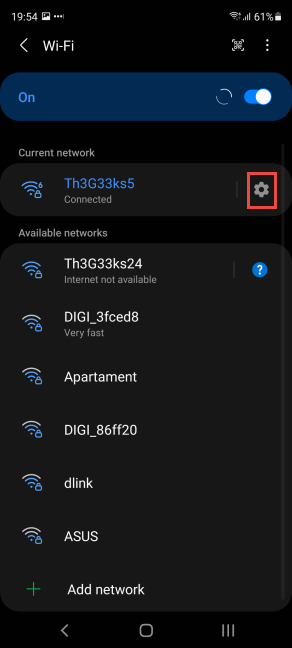 Tap the gear icon next to your Wi-Fi connection
You see details about the network, its speed, and security. To access your ASUS router, tap Manage router.
Tap the gear icon next to your Wi-Fi connection
You see details about the network, its speed, and security. To access your ASUS router, tap Manage router.
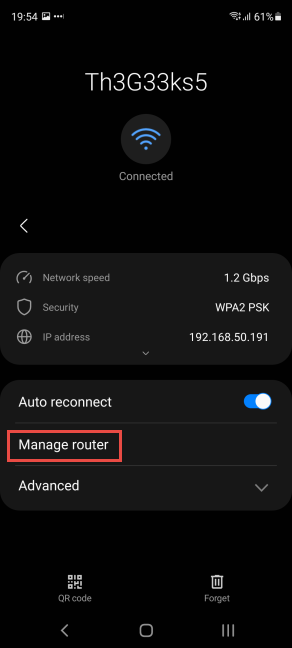 Tap Manage router
This action opens the default browser on your Samsung Galaxy device (most probably it is Google Chrome or Samsung Internet), which loads the Sign In screen for your ASUS router. Enter the username and password for your ASUS router, and press Sign In.
Tap Manage router
This action opens the default browser on your Samsung Galaxy device (most probably it is Google Chrome or Samsung Internet), which loads the Sign In screen for your ASUS router. Enter the username and password for your ASUS router, and press Sign In.
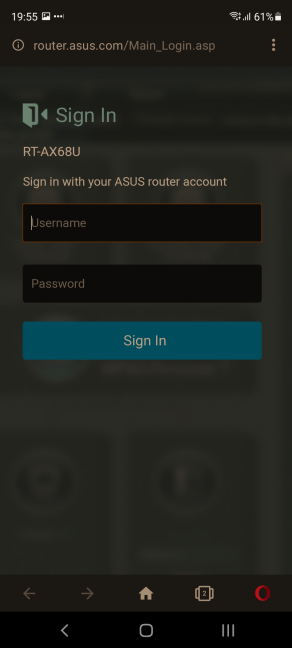 Sign in to your ASUS router from Samsung Galaxy
Now you can configure your ASUS router and all its settings, from your Samsung Galaxy device.
Sign in to your ASUS router from Samsung Galaxy
Now you can configure your ASUS router and all its settings, from your Samsung Galaxy device.
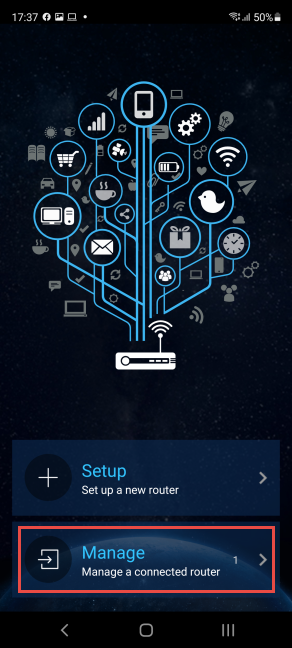 Choose Manage in the ASUS Router app
The app spends a couple of seconds discovering your ASUS router. When you see it displayed, tap on its name.
Choose Manage in the ASUS Router app
The app spends a couple of seconds discovering your ASUS router. When you see it displayed, tap on its name.
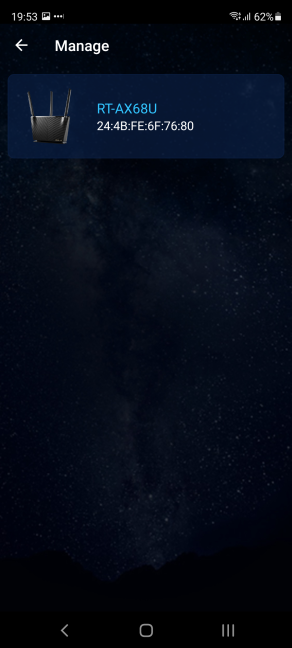 Tap the name of your ASUS router
You are asked to enter the sign in credentials. Type the admin username and password in the appropriate fields, and then tap Sign in.
Tap the name of your ASUS router
You are asked to enter the sign in credentials. Type the admin username and password in the appropriate fields, and then tap Sign in.
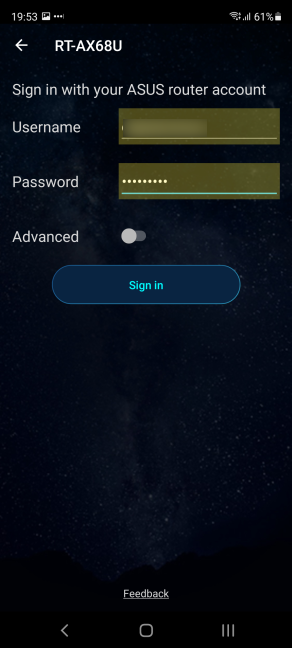 Enter the username and password
You may receive a notice about notifications and the data collected by the ASUS Router app. Tap Agree to continue. Then, you are asked whether you want to Enable Remote Connection, which helps you remote control your ASUS router from anywhere on the internet. Choose OK or Cancel, depending on what you want.
Enter the username and password
You may receive a notice about notifications and the data collected by the ASUS Router app. Tap Agree to continue. Then, you are asked whether you want to Enable Remote Connection, which helps you remote control your ASUS router from anywhere on the internet. Choose OK or Cancel, depending on what you want.
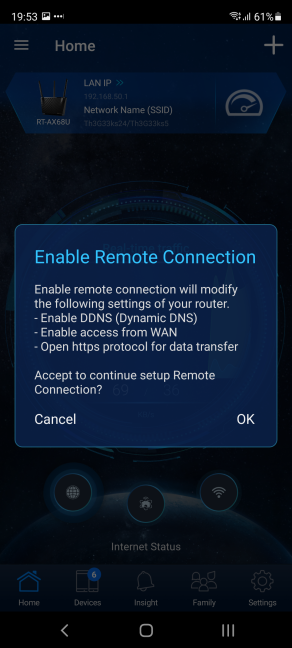 Do you want to Enable Remote Connection?
Now you can use the ASUS Router app to configure your router and the network.
Do you want to Enable Remote Connection?
Now you can use the ASUS Router app to configure your router and the network.
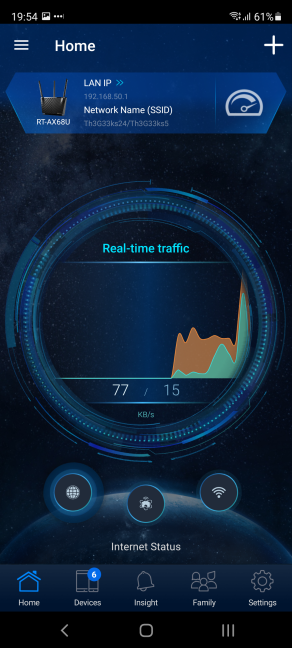 Manage your router from the ASUS Router app
NOTE: This app works with ASUS routers, as well as mesh Wi-Fi systems like ASUS ZenWiFi AC.
Manage your router from the ASUS Router app
NOTE: This app works with ASUS routers, as well as mesh Wi-Fi systems like ASUS ZenWiFi AC.
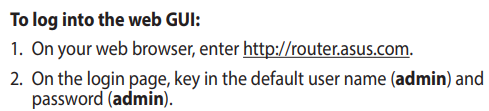
 The default username and password are admin/admin
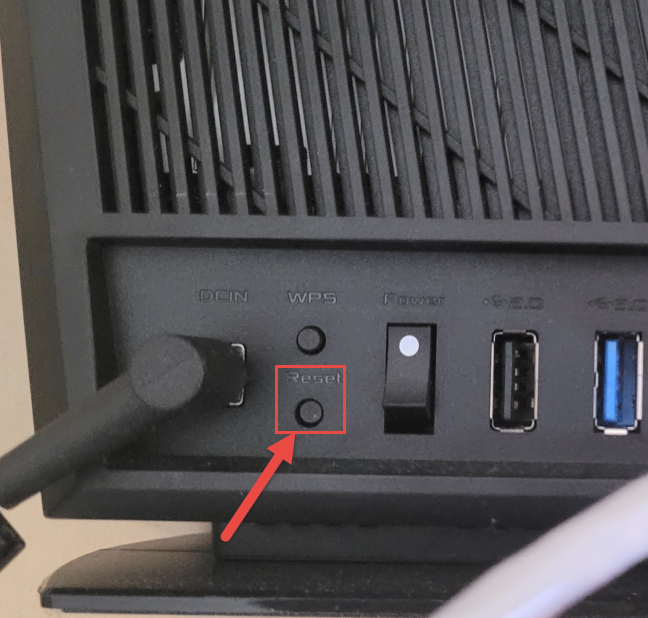
 Reset your ASUS router
Press and hold the Reset button for 5 to 10 seconds until the power LED starts to flash on your ASUS router. Wait a while for the router to restart and reset its settings to the factory defaults. Then you can log in using the default username and password: admin/admin. But, this action also resets the network name to the factory default, and you have to reconfigure your ASUS router anew, so that it can use your internet connection and broadcast Wi-Fi as you want to.
TIP: For more information and other methods of resetting any ASUS router, read: How do I reset my ASUS router to its factory settings? (4 ways).
Reset your ASUS router
Press and hold the Reset button for 5 to 10 seconds until the power LED starts to flash on your ASUS router. Wait a while for the router to restart and reset its settings to the factory defaults. Then you can log in using the default username and password: admin/admin. But, this action also resets the network name to the factory default, and you have to reconfigure your ASUS router anew, so that it can use your internet connection and broadcast Wi-Fi as you want to.
TIP: For more information and other methods of resetting any ASUS router, read: How do I reset my ASUS router to its factory settings? (4 ways).
Before you attempt to login into your ASUS router, connect your PC or mobile device to the network
If you want to access your ASUS wireless router settings and log in, you must be connected to the router’s network from a computer or mobile device. One way to do this is to use a network cable on your desktop PC, laptop, or Mac. Take one end of the cable and plug it into the network card of your PC. Take the other end and plug it into one of the Ethernet ports on the back of your router, as shown in the picture below.1. The default way to login to your ASUS router
Make sure that your computer or mobile is connected to the router’s network, as shown earlier. Then, open your favorite web browser, navigate to router.asus.com, and press Enter. This should load the “Sign In” window of your ASUS router. Enter the username and password of your specific router, and press Sign In.2. If router.asus.com doesn’t work, log in using the IP address of your ASUS router
If going to router.asus.com is not working, another method is to enter your router’s IP address and press Enter. Newer ASUS routers and mesh Wi-Fi systems with Wi-Fi 6 use 192.168.50.1 as their default IP address.3. How to login to an ASUS router from a Samsung Galaxy smartphone or tablet
If you have a Samsung Galaxy smartphone or tablet with Android 11 or newer, you can use it to log in to your ASUS router, and the Android operating system will detect the router’s IP for you. First, connect to the Wi-Fi emitted by the ASUS router on your Samsung Galaxy. Then, open Settings, and tap on Connections.4. How to log in using the ASUS Router app for Android or iPhone
If you have an iPhone or an Android smartphone, you can download and install the ASUS Router app. Here’s the direct link for Google Play and the one for the Apple Store. After you install the app, make sure that you are connected to the Wi-Fi emitted by your ASUS router. Then, open the ASUS Router app, and confirm that you agree with its terms and conditions. Then, when asked what you want to do, choose “Manage.”How do I find my ASUS router username and password?
Ideally, when you first set up your ASUS router, you choose to use a custom username and password that you remember. This way, you ensure that your router and your network are not easily hackable by outsiders. However, many users don’t do that, and they stick to the defaults provided by their router. If that is the case for you, then try to login to your ASUS router using the default username and password: admin and admin.How to reset your ASUS router login
If you can’t log in to your ASUS router using admin/admin as the username and password, and you don’t know the details of the admin account, then your only solution is to reset the router. To do that, look for the Reset button on the back of your wireless router.
Discussion (1)
I had a new router whose WAN (Globe) light was red, indicating that it could not connect (through my cable modem) to the Internet. I connected my laptop through an e-net cable to a LAN port on the router. ASUS support had me enter 192.168.50.1 and I was able to configure the router and the red WAN light went away. My “broken” router started working right away.