





Wi-Fi 6 technology has been on the market for quite some time, and many of us have at least one compatible device in our homes. There are many reasons to switch to a router or mesh Wi-Fi system that supports this standard. But to enjoy all the benefits, like faster speeds, lower latency, and higher bandwidth, you also need laptops, smartphones, and other devices that can connect to Wi-Fi 6 networks. ASUS is very well positioned in the Wi-Fi 6 ecosystem and offers many types of compatible devices. Here's how ASUS helps you enjoy everything a Wi-Fi 6 network has to offer:
TIP: If you don’t know how to choose the next router you’re getting, here are 10 things to consider and how to choose an ASUS wireless router for your home.
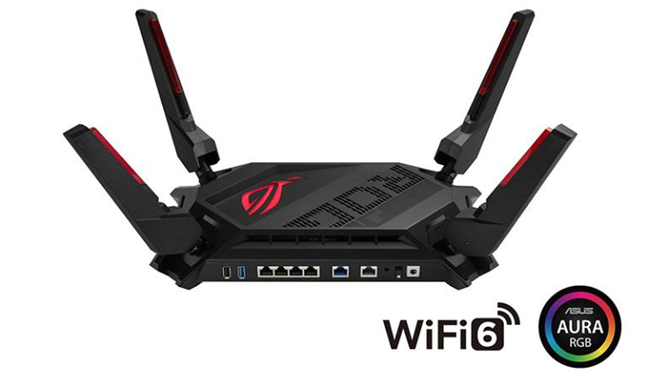
 ASUS ROG Rapture GT-AX6000 can deliver the fastest Wi-Fi speeds you've ever seen
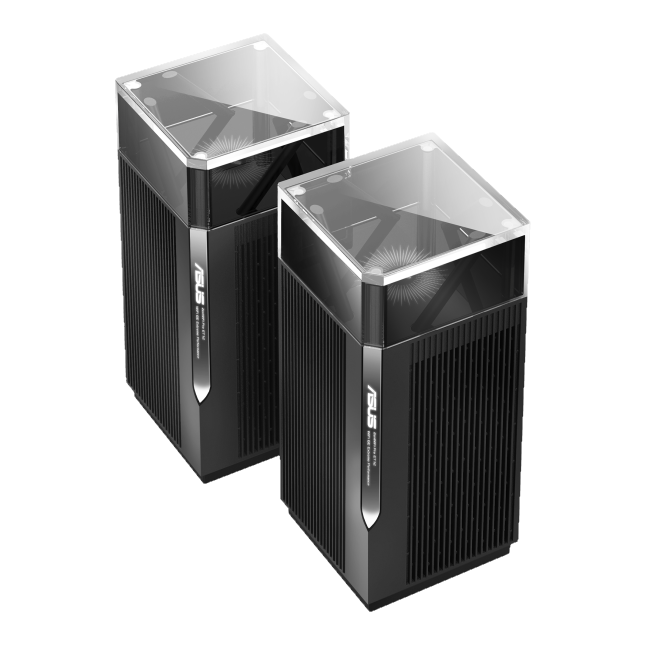
 ASUS ZenWiFi Pro ET12 offers both Wi-Fi 6 and Wi-Fi 6E
The ASUS ZenWiFi Pro ET12 is an option worth considering for users who want the fastest Wi-Fi over a very wide coverage area.
ASUS ZenWiFi Pro ET12 offers both Wi-Fi 6 and Wi-Fi 6E
The ASUS ZenWiFi Pro ET12 is an option worth considering for users who want the fastest Wi-Fi over a very wide coverage area.
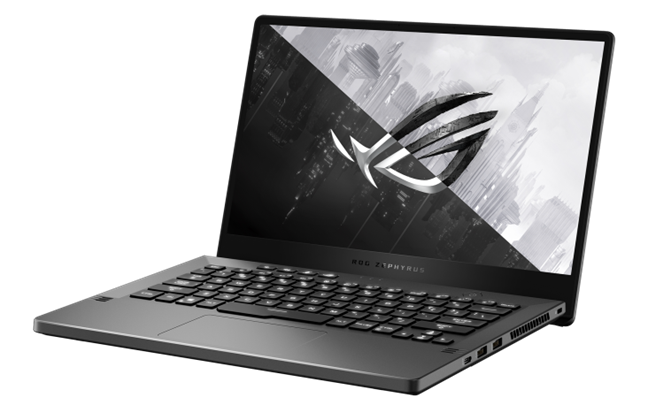
 ASUS ROG Zephyrus G14 (2022) - a very powerful portable laptop
When it comes to both gaming and productivity, a fast internet connection is critical. Thanks to its compatibility with the Wi-Fi 6 standard, the download and upload speeds we reached on the ASUS ROG Zephyrus G14 were comparable to an Ethernet connection.
ASUS ROG Zephyrus G14 (2022) - a very powerful portable laptop
When it comes to both gaming and productivity, a fast internet connection is critical. Thanks to its compatibility with the Wi-Fi 6 standard, the download and upload speeds we reached on the ASUS ROG Zephyrus G14 were comparable to an Ethernet connection.
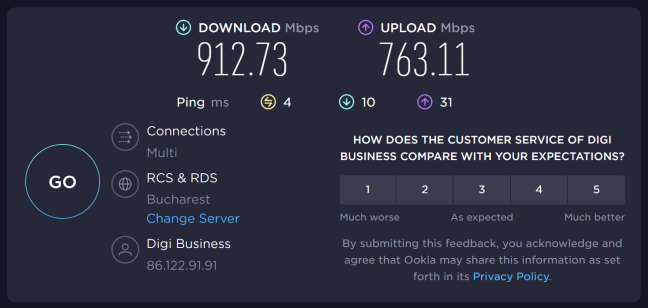
 Wi-Fi 6 speeds on an ASUS ROG Zephyrus G14 (2022)
Who needs network cables when you can get such speeds on Wi-Fi 6?
Wi-Fi 6 speeds on an ASUS ROG Zephyrus G14 (2022)
Who needs network cables when you can get such speeds on Wi-Fi 6?
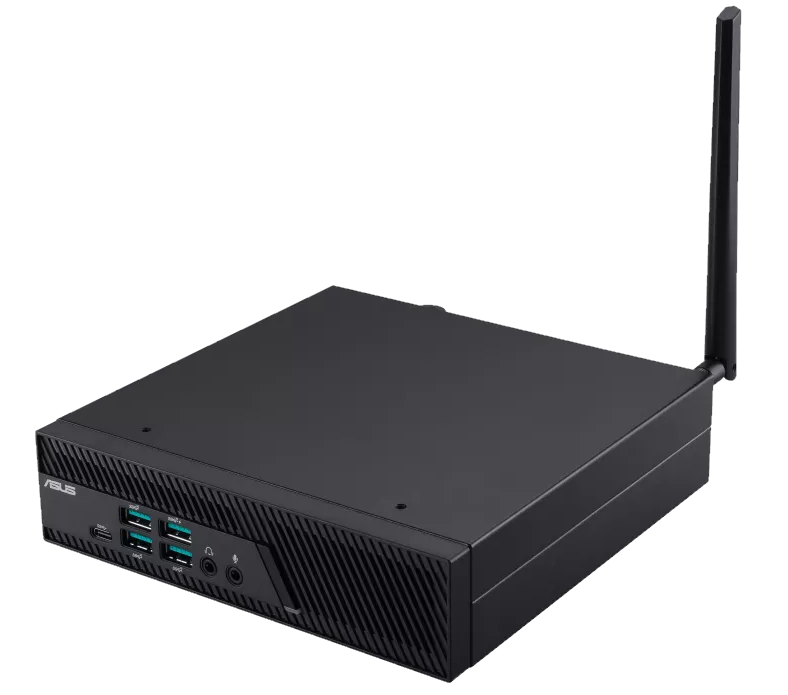
 Wi-Fi 6 connectivity is very useful for a mini PC
This mini PC is also very robust, complying with the MIL-STD-810H military standard, which certifies that it can withstand harsh working conditions: high and low temperatures, vibrations, shocks, etc.
Wi-Fi 6 connectivity is very useful for a mini PC
This mini PC is also very robust, complying with the MIL-STD-810H military standard, which certifies that it can withstand harsh working conditions: high and low temperatures, vibrations, shocks, etc.
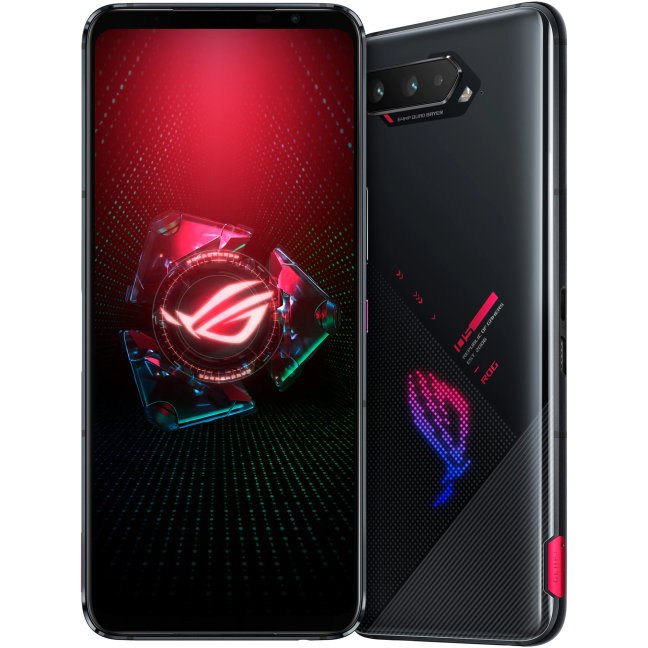 The ASUS ROG Phone 5 family offers support for Wi-Fi 6E
Furthermore, the ASUS ROG Phone 6, launching in just a few days, will continue this tradition and bring new innovative features for gaming enthusiasts.
The ASUS ROG Phone 5 family offers support for Wi-Fi 6E
Furthermore, the ASUS ROG Phone 6, launching in just a few days, will continue this tradition and bring new innovative features for gaming enthusiasts.
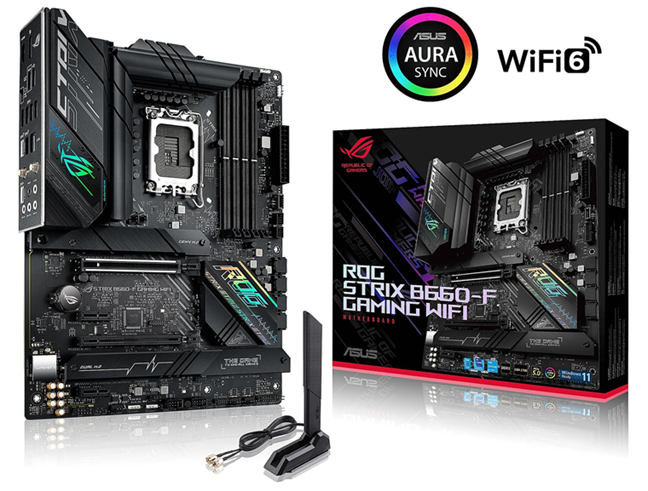
 ASUS ROG Strix B660-F Gaming WiFi offers Wi-Fi 6 connectivity
If you're an AMD enthusiast and want a PC with a Ryzen processor, we tested the best motherboard for these CPUs - the ASUS ROG Crosshair VIII Hero - and guess what? It also includes Wi-Fi 6 support, so you don't need an Ethernet cable connection to enjoy low latency when playing online or great download speeds on Steam and other platforms.
ASUS ROG Strix B660-F Gaming WiFi offers Wi-Fi 6 connectivity
If you're an AMD enthusiast and want a PC with a Ryzen processor, we tested the best motherboard for these CPUs - the ASUS ROG Crosshair VIII Hero - and guess what? It also includes Wi-Fi 6 support, so you don't need an Ethernet cable connection to enjoy low latency when playing online or great download speeds on Steam and other platforms.
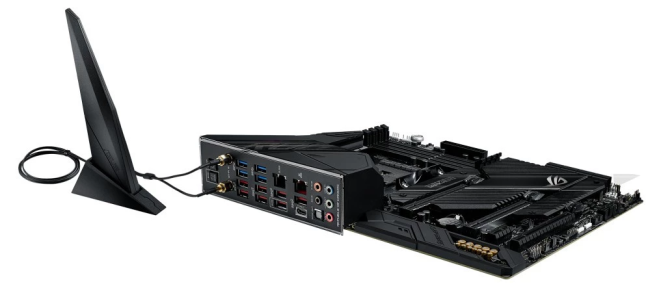
 ASUS ROG Crosshair VIII Hero includes a chip and an antenna for Wi-Fi 6
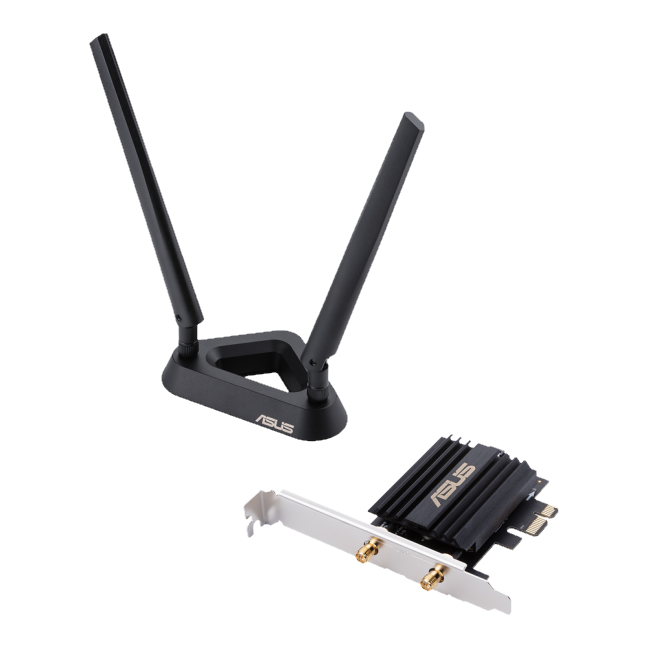 ASUS PCE-AX58BT lets you connect to Wi-Fi 6 networks
On our 1 Gbps connection, we reached an internet download speed of 908.04 Mbps. And for local network traffic, we easily exceeded the 1 Gbps threshold.
ASUS PCE-AX58BT lets you connect to Wi-Fi 6 networks
On our 1 Gbps connection, we reached an internet download speed of 908.04 Mbps. And for local network traffic, we easily exceeded the 1 Gbps threshold.
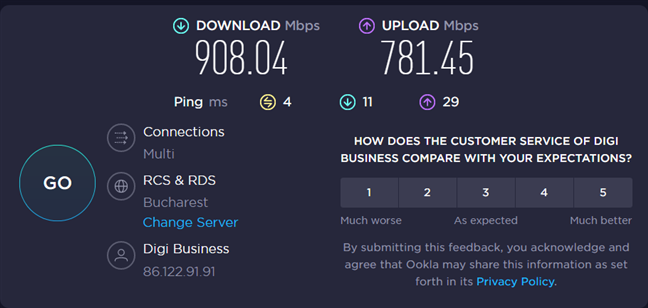 With the ASUS PCE-AX58BT, you can easily reach 900+ Mbps over Wi-Fi
1. Wi-Fi 6 routers
ASUS ROG Rapture GT-AX6000 is one of the most interesting routers of the year, boasting not only an imposing and aggressive look but also very powerful hardware, as well as the ability to work with 2.5 Gbps internet connections. Using the Wi-Fi 6 standard to broadcast its wireless signal, you can enjoy the fastest internet connections available anywhere in the world.2. Mesh systems with Wi-Fi 6
When it comes to mesh Wi-Fi systems, ASUS ZenWiFi Pro ET12 is a beast that can provide coverage over a huge area at top speeds. This system is among the first on the market to handle 2.5 Gbps internet connections. In addition, it also offers wireless transmission via both Wi-Fi 6 and Wi-Fi 6E, the latter being the newest generation of this standard, which includes a new high-speed wireless band.3. Laptops with Wi-Fi 6
We all want a good laptop. If it can be good for both work and gaming, all the better. The ASUS ROG Zephyrus G14 (2022) is precisely one such laptop. A hardware beast, but small in size and light in weight, it's one of the most portable and powerful laptops on the market.4. Mini PCs with Wi-Fi 6
All ASUS mini PC series feature support for Wi-Fi 6 networks. For example, we recently tested an ASUS Mini PC PB62. It’s an ultra-compact computer equipped with Intel processors, that takes up very little space and offers very generous connectivity options, including Wi-Fi 6.5. Wi-Fi 6 smartphones
Premium smartphones were among the first devices on the market to offer support for Wi-Fi 6 networks. They have evolved in recent years to include support for this standard at increasingly lower prices. Now, the hottest gaming phones on the market, like those in the ASUS ROG Phone 5 family (5, 5s, and Ultimate), offer support not only for Wi-Fi 6 but also for Wi-Fi 6E, the newest standard, which is an evolved version of Wi-Fi 6 that brings a new, interference-free band and even faster speeds.6. Motherboards with Wi-Fi 6
Are you looking to build a desktop PC using a 12th-generation Intel processor and want a reasonably priced motherboard? The ASUS ROG Strix B660-F Gaming WiFi is one of the best B660 chipset boards on the market, and in addition to a well-thought-out design and features for gaming enthusiasts, it also offers Wi-Fi 6 connectivity.7. Wi-Fi 6 network cards
If your desktop computer or mini PC doesn't have a Wi-Fi 6 motherboard, you can get a dedicated network card. We recommend the ASUS PCE-AX58BT, a high-quality network card that reaches very high speeds. It helps you get rid of cables and enjoy fast Wi-Fi on your computer. Furthermore, the installation process is quick and only requires one free PCI Express slot. It also offers a Bluetooth chip to quickly connect wireless headsets, Bluetooth speakers, and other devices.

Discussion (2)
I have an ASUS RT-AX86U wfi 6 router. I have a home built desktop PC with an MSI Z590M mainboard with an Intel AX210 wifi 6E. My Intel NUC has an Intel AX201 wifi 6. One of my laptops (ASUS Zenbook) has an Intel AC8265 and the other laptop (Lenovo) has a Qualcom 9377 with dual band wifi. Add in a couple of iPads with AC dual band wifi and a couple of phones. I forgot the 3 TVs all with AC dual band wifi and the two Google Nest mini devices.. There are also a couple of Brother printers which can work wifi. The 2.4GHz radio in the router is permanently turned off. I only ever use the 5GHz radio.
All devices get a wifi connection at 877 megabits except the Qualcom which only gets 433 megabits. However, all devices except the two laptops, the two iPads, and the two Google devices are on a gigabit wired network which is configured with 3 gigabit ether switches. The Asus router is a peripheral on one of the switches. Not all of the cabled devices get to gigabit speeds.
The laptops and the iPads are rarely used simultaneously. Given all of this wifi 6 is rarely used. When I first got the router I did some wifi 6 speed tests and the results were underwhelming. I ended up turning off MU-MIMO in the router because it appeared to add variable amounts of latency (subjective evaluation) even when only a single wifi 6 device was running. That was a while back. I will check on that again as the router firmware has been updated multiple times since. Asus router support is superb.
My thoughts are that wifi 6 and 6E are still a work in progress and we may see the full benefits in several years when the device firmware matures and some of the older devices are obsoleted. However, that may take a while for me. One of my iPads is a year old and the other is still going after 7 years and still getting updates. Both are wifi 5.
Excellent feedback. Thanks for sharing it Bob. 🙂 I agree that Wi-Fi 6 and especially Wi-Fi 6E ar work in progress. However, they will mature much faster than we think. 🙂