Wi-Fi 6 or 802.11ax is the new standard that aims to change wireless networks, both for consumers and for businesses. This standard aims to offer significantly improved speeds, especially in crowded places such as airports, train stations, restaurants, or coffee shops. Wi-Fi 6 wireless routers are now launched regularly, and their prices are going to get more affordable as time passes. If you want to have on your PC a wireless network card that can take full advantage of Wi-Fi 6, you should consider ASUS PCE-AX58BT. Read this review and find out why:
ASUS PCE-AX58BT: Who is it good for?
The ASUS PCE-AX58BT network card is an excellent choice for:
Users who have wireless routers with the new Wi-Fi 6 (802.11ax) standard
People who no longer want to use network cables for connecting their desktop PCs to the network
It is easy to mount both in standard desktop PCs and small factor PCs
Its Windows 10 drivers receive regular updates and improvements
There are a few downsides too:
More expensive than other PCI-Express wireless network cards
No drivers for Linux or macOS
Product rating5/5
Verdict
If you want to enjoy the benefits of a wireless network card with support for the latest Wi-Fi 6 standard, ASUS PCE-AX58BT is a great choice. The performance you get is excellent, and the driver support for Windows 10 is great. You can also use it to connect Bluetooth devices to your PC. ASUS PCE-AX58BT is a small innovative product, that's perfect for anyone switching their wireless network to the Wi-Fi 6 standard.
Unboxing the ASUS PCE-AX58BT Wi-Fi 6 adapter
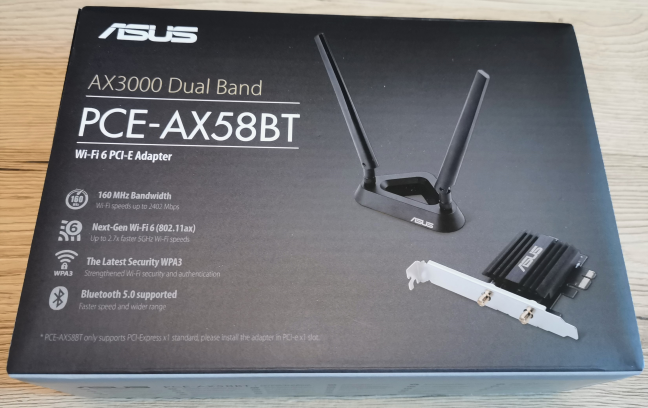
The ASUS PCE-AX58BT AX3000 dual-band wireless adapter comes in a little black box with a picture of the device on top, and a list of its most important characteristics.
The packaging used for the ASUS PCE-AX58BT
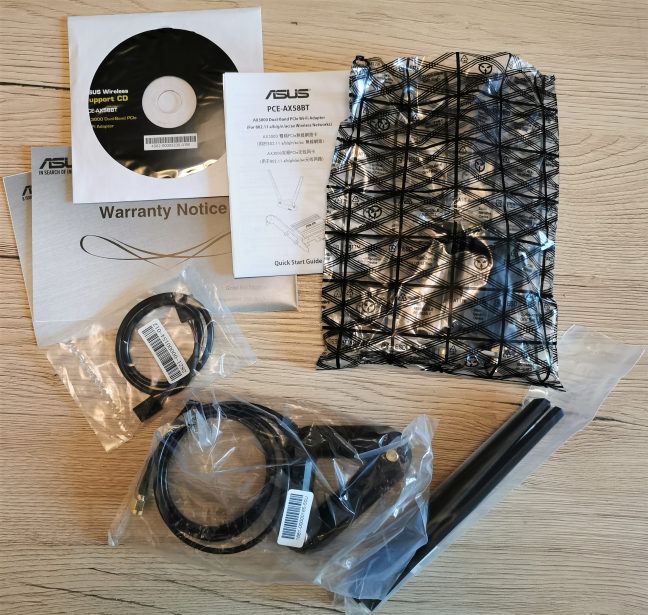
On the back and on the sides of the box, you find more technical details about the product that you just bought. When you open the box and unpack everything, you find the following items: the network card, one USB cable for the motherboard, the antenna base, two antennas, the quick start guide, the support CD, and the warranty.
Unboxing ASUS PCE-AX58BT
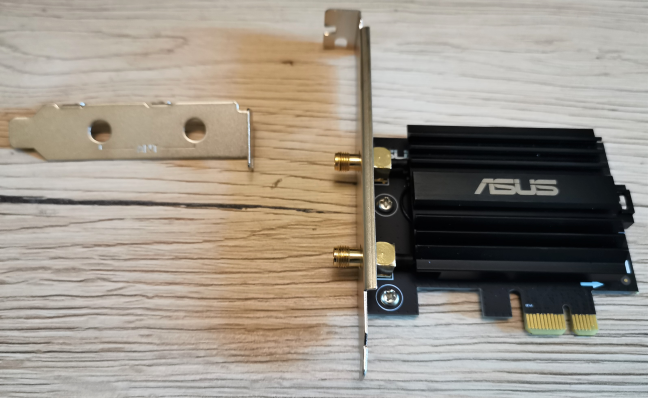
There is also a low profile bracket that you can use for mounting the network card inside a small form factor PC.
The ASUS PCE-AX58BT network card
Unboxing the ASUS PCE-AX58BT WiFi 6 network card is a quick and pleasant experience. Inside the box you find everything you need to install it and use it right away.
Design and hardware specifications
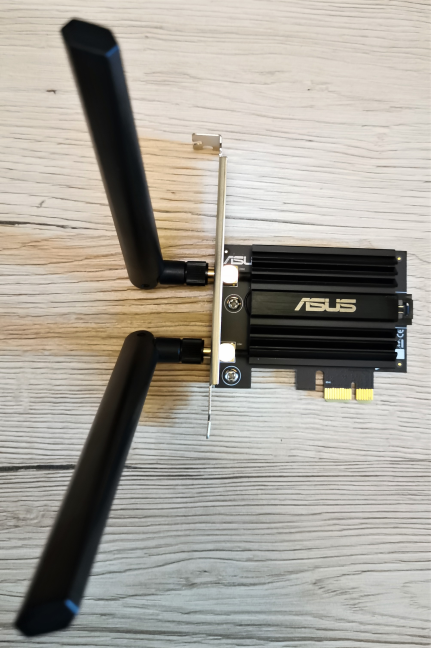
ASUS PCE-AX58BT is a small and good looking network card that gets plugged into the PCI-Express port of your PC. As you can see in the picture below, it has a large heatsink for passive cooling that ensures optimal performance.
The external antennas mounted directly on the ASUS PCE-AX58BT
Inside this network card you find an Intel Wi-Fi 6 AX200 chip, that features support the Wi-Fi 6 (802.11ax) standard, 2x2 MU-MIMO wireless transfers, and the latest WPA3 Wi-Fi security standard. To top things off, we also get Bluetooth version 5, for connecting all kinds of devices. It is a modern chip that offers support for everything that's new in the Wi-Fi space.
The total theoretical maximum bandwidth is of 2402 Mbps on the 5 GHz band and of 574 Mbps on the 2.4 GHz band, when using the Wi-Fi 6 standard for both bands. Obviously, the maximum bandwidth lowers when using older standards like Wi-Fi 5 or Wi-Fi 4. In terms of software, ASUS PCE-AX58BT has official support only for Windows 10.
To find out more about this network card, visit its product page: ASUS PCE-AX58BT Specifications.
The ASUS PCE-AX58BT is a beautiful Wi-Fi card that promises excellent performance.
Installing and using the ASUS PCE-AX58BT Wi-Fi 6 adapter
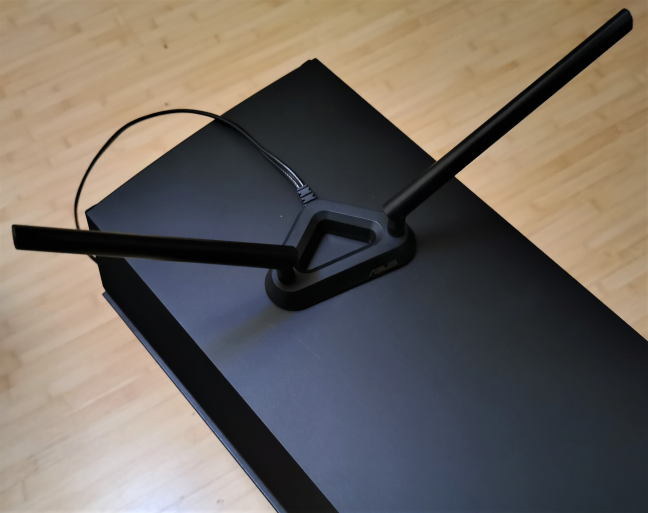
Adding the ASUS PCE-AX58BT into your PC is easy: plug it into the PCI-Express slot, connect the antennas or the external transceiver that allows you to position the antennas outside of your PC chassis, and adjust their angle for less interference and optimal signal reception.
The external transceiver used by ASUS PCE-AX58BT
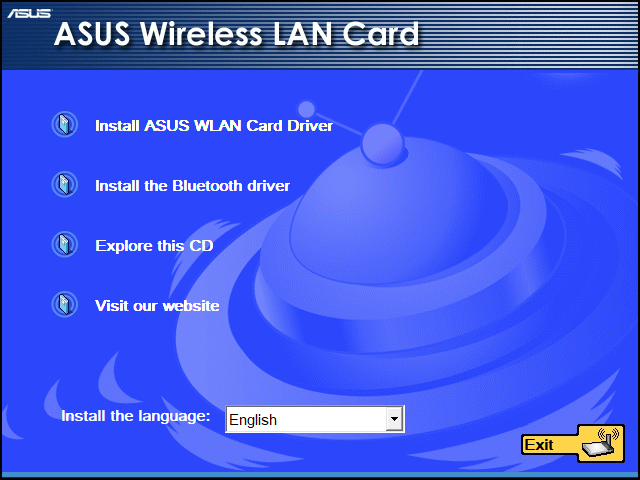
You can find the drivers on the setup disc found inside the box. However, it is a better idea to download the latest version from ASUS support (search for ASUS PCE-AX58BT) or Intel Support (search for Intel Wi-Fi 6 AX200). Keep in mind that in order to fully utilize this network card, you need to install both the wireless card driver and the Bluetooth driver.
The drivers for ASUS PCE-AX58BT
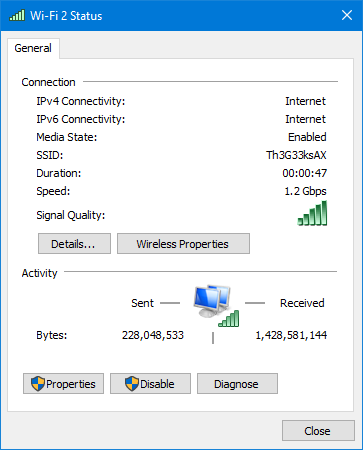
Once the drivers are installed, use the ASUS PCE-AX58BT network card to connect to your Wi-Fi. Our wireless network is using the new Wi-Fi 6 (802.11ax) standard. When we connected to it, Windows 10 reported excellent signal quality and a network speed of 1.2 Gbps. I repeat: 1.2 Gbps for a Wi-Fi connection, not a wired one.
The Wi-Fi connection with ASUS PCE-AX58BT on Windows 10
Imagine streaming a 4K version of the popular movie Joker, at 1.2 Gbps, in about 6 minutes. That's fast for everybody's standards. However, that wouldn't be possible, unless you have an internet connection that works at this speed.
With ASUS PCE-AX58BT, it would take about 6 minutes to stream the movie Joker in 4K
While using the ASUS PCE-AX58BT network card, we had no issues in connecting to the network and our connections were both fast and stable. We transferred files over the network, did media streaming, online gaming, and web browsing. All activities were performed without stability issues, and we enjoyed excellent performance. Another upside that we noticed is that Windows 10's drivers for this card and its Intel Wi-Fi 6 AX200 chip seem to be updated on a regular basis, making it a good investment for a PC that you want to use for a long time.
If you are curious about the real-life speed we measured, read the next section of this review.
The Wi-Fi speed you get from ASUS PCE-AX58BT
To see the speeds you can get when using the ASUS PCE-AX58BT network card, we took one of the most powerful routers on the market - ASUS ROG Rapture GT-AX11000 - and ran some measurements with SpeedTest. Our internet connection has a maximum of 1 Gbps for the download speed, and 500 Mbps for the upload speed.
First, we wanted to see the maximum speed that can be achieved on the 2.4 GHz band. When we used the Wi-Fi 4 (802.11n) wireless standard, the maximum download speed reached by ASUS PCE-AX58BT was 219.29 Mbps, while the upload speed was 178.94 Mbps.
ASUS PCE-AX58BT - The speed on the 2.4 GHz band with Wi-Fi 4
When we switched to the Wi-Fi 6 (802.11ax) wireless standard, on the same 2.4 GHz band, we reached 359.32 Mbps for the download, and 361.93 Mbps for the upload. This is a considerable difference: a 64% increase for the download speed, and 102% for the upload speed.
ASUS PCE-AX58BT - The speed on the 2.4 GHz band with Wi-Fi 6
We switched to the 5 GHz band, and first used the Wi-Fi 5 (802.11ac) wireless standard. We measured a maximum download speed of 614.25 Mbps for the download, and 459.56 Mbps for upload.
ASUS PCE-AX58BT - The speed on the 5 GHz band with Wi-Fi 5
When we switched to the Wi-Fi 6 (802.11ax) wireless standard, we measured 750.79 Mbps for the download, and 496.23 Mbps for upload. This is a 22% increase for the download speed when switching from Wi-Fi 5 to Wi-Fi 6. The positive impact on the upload speed was very small because our internet connection is capped at 500 Mbps.
ASUS PCE-AX58BT - The speed on the 5 GHz band with Wi-Fi 6
As you can see, ASUS PCE-AX58BT can offer stunningly fast wireless transfers, if you have a wireless router that can use the new Wi-Fi 6 (802.11ax) standard.
What is your opinion about the ASUS PCE-AX58BT Wi-Fi 6 adapter?
Now you know the real-life speed we enjoyed while using the ASUS PCE-AX58BT network card, and that we were satisfied with the whole user experience. Before closing this review, tell us whether you have any questions about this product, and if you consider buying it. Comment below, and let's discuss.
Hello ! What was the distance between the router and the PC ? It was in the same room?
Anonymous ·
Yes. It was in the same room, with no walls between them.
Rick Martin ·
Recently bought the Asus PCE-AX58BT…won’t get it til May 10th but am
looking forward to installing it and seeing if it can deliver the kind of speeds I’ve been reading about.
I also just bought the Asus AC2900 and Asus AC1900 to set up an AiMesh network in tandem with the Asus PCE-AX58BT….
Hoping to realize a noticeable difference in speed…..
Anonymous ·
Looking forward to your experience.
Dennis ·
Hello, how do you switch manually to different bands? Is it in the router set-up?
Anonymous ·
The router needs to be set up properly.
Valerio ·
Hi, why the connection speed of windows only reports 1.2 Gbps, and not the 2402 of maximum speed even using a GT-AX11000 router
Anonymous ·
Because 2402 Mbps is a THEORETICAL bandwidth estimation, not a real-life one. 2402 Mbps are reached only in labs, with specialized equipment. Those theoretical numbers are always much higher than what you get in real life, with everyday technology people use.
Photo-Craig ·
I had the exact question. My previous AC USB I was getting high signal strength and 1.3Gbs in WiFi status. I have the new ASUS AX3000 PCE-AX58BT, it is great but again signal strength is excellent but only see 1.0Gbs speed in WiFi status. I wonder if it is anyway faster behind the scenes. I was expecting to see 2.x Gbs. I am running the new Orbi Wifi 6
Paul Weston ·
You didn’t describe how you got on setting up Bluetooth, which has proved to be impossible for many buyers of this product?
Anonymous ·
In the box you find a Bluetooth header cable. That cable is used to connect both the card, and your motherboard, using a F_USB connector. If your motherboard doesn’t have one available, you cannot utilize the Bluetooth functionality. Your solution is to use a J_USB connector (if available) or an Internal USB Hub for your motherboard.
Hugo ·
Great review! Just searched for
I am going to put down 400 kr more (about 40€) on this card then tp-links Wi-Fi 6 card, the TP-Link AX3000 because of this review. Read that the connection on the WiFi 5 band was unstable on that one.
Today I have a WiFi 5 router and a 100/100 connection put I want to be future proof with WiFi 6 and when the rest of the family has upgraded to devices with WiFi 6 I am going to convince them to upgrade.























Discussion (15)
Can you easily use this card to set up a wifi 6 hotspot? Or 5ghz hotspot?
Assuming your pc is connected to the internet via ethernet?
This tutorial should help: https://www.digitalcitizen.life/how-to-turn-your-windows-laptop-wifi-access-point/
Hello ! What was the distance between the router and the PC ? It was in the same room?
Yes. It was in the same room, with no walls between them.
Recently bought the Asus PCE-AX58BT…won’t get it til May 10th but am
looking forward to installing it and seeing if it can deliver the kind of speeds I’ve been reading about.
I also just bought the Asus AC2900 and Asus AC1900 to set up an AiMesh network in tandem with the Asus PCE-AX58BT….
Hoping to realize a noticeable difference in speed…..
Looking forward to your experience.
Hello, how do you switch manually to different bands? Is it in the router set-up?
The router needs to be set up properly.
Hi, why the connection speed of windows only reports 1.2 Gbps, and not the 2402 of maximum speed even using a GT-AX11000 router
Because 2402 Mbps is a THEORETICAL bandwidth estimation, not a real-life one. 2402 Mbps are reached only in labs, with specialized equipment. Those theoretical numbers are always much higher than what you get in real life, with everyday technology people use.
I had the exact question. My previous AC USB I was getting high signal strength and 1.3Gbs in WiFi status. I have the new ASUS AX3000 PCE-AX58BT, it is great but again signal strength is excellent but only see 1.0Gbs speed in WiFi status. I wonder if it is anyway faster behind the scenes. I was expecting to see 2.x Gbs. I am running the new Orbi Wifi 6
You didn’t describe how you got on setting up Bluetooth, which has proved to be impossible for many buyers of this product?
In the box you find a Bluetooth header cable. That cable is used to connect both the card, and your motherboard, using a F_USB connector. If your motherboard doesn’t have one available, you cannot utilize the Bluetooth functionality. Your solution is to use a J_USB connector (if available) or an Internal USB Hub for your motherboard.
Great review! Just searched for
I am going to put down 400 kr more (about 40€) on this card then tp-links Wi-Fi 6 card, the TP-Link AX3000 because of this review. Read that the connection on the WiFi 5 band was unstable on that one.
Today I have a WiFi 5 router and a 100/100 connection put I want to be future proof with WiFi 6 and when the rest of the family has upgraded to devices with WiFi 6 I am going to convince them to upgrade.
I’m glad that you found our review useful.