UP

Windows

Tutorials, how-to guides, and blog posts about using Windows. How to use laptops, tablets, PCs, and other gadgets with Windows.

How to Remove a Trusted Windows 8 PC From Your Microsoft Account

Having a trusted PC is a great asset to a Microsoft account holder. It allows you to synchronize passwords between trusted Windows 8 PCs and also makes managing your account easier. Rather than having to prove your identity by accessing an email or phone, Microsoft simply accepts that you are who you say your are because you're using your trusted system. While this is very useful, it can also be

Introducing Windows 8: How to Trust a PC Using Your Microsoft Account

If you are a Microsoft account holder, one of the first things you should do after creating the user account is to add your PC as trusted. From an account security standpoint, having a trusted computer gives you a secure place from which you can reset your password or confirm alterations to your account, without having to prove your identity. If you are also a Windows 8 user, trusting your

The Geek's Way of Managing Printers - The Print Management Console

Have you heard about the Print Management console in Windows 7 and Windows 8? I did but I ignored it blissfully for years. Until recently when, by chance, it stirred up my attention. I began to use it and I loved it. Therefore I decided to share what I have learned with our readers and show a better way to manage your installed printers and drivers. [DC-SUMMARY-BREAK] Where to Find

Introducing Windows 8: 7 Tips for Working with Apps

Windows 8 apps are applications that run in full screen mode in Windows 8. They can provide both basic and advanced functionality, depending on how they were designed. But, at least so far, they provide basic functionality just like apps you'd use on your iOS or Android tablet. While using them on a mobile device feels comfortable and familiar, their inclusion on the desktop OS will be a bit of
tutorial How to Manage Wireless Network Connections & Profiles in Windows 8

How to Manage Wireless Network Connections & Profiles in Windows 8

When you connect to a wireless network, the network's security information, settings and password are automatically stored on your computer in the form of a network profile. This profile allows Windows to connect automatically the next time this network is in range. In previous versions of Windows you could open a list of available profiles for management purposes. From this list you could easily

Download the Windows 8 Logo & Other Windows 8 Icons

Do you want to use the Windows 8 logo as an icon on your computer? Are you interested in using other icons found in the final version of Windows 8? We extracted, converted and packaged together some of the Windows 8 specific icons, in a way that works on all versions of Windows and other non-Microsoft operating systems. Check them out! [DC-SUMMARY-BREAK] Here is how the icon with the Windows

Evaluate How the Apps & Drivers Installed Weaken the Security of a PC

Everybody knows that installing lots of drivers and software on a computer increases its vulnerability from a security standpoint. As you install stuff, the complexity increases as well as the likelihood of encountering security issues. I always wanted a tool to evaluate how the security of a system evolves while installing software that you plan to use and so far I haven't found one. Luckily, Microsoft released a free evaluation
tutorial How to Install Windows 8 RTM on Your Computer

How to Install Windows 8 RTM on Your Computer

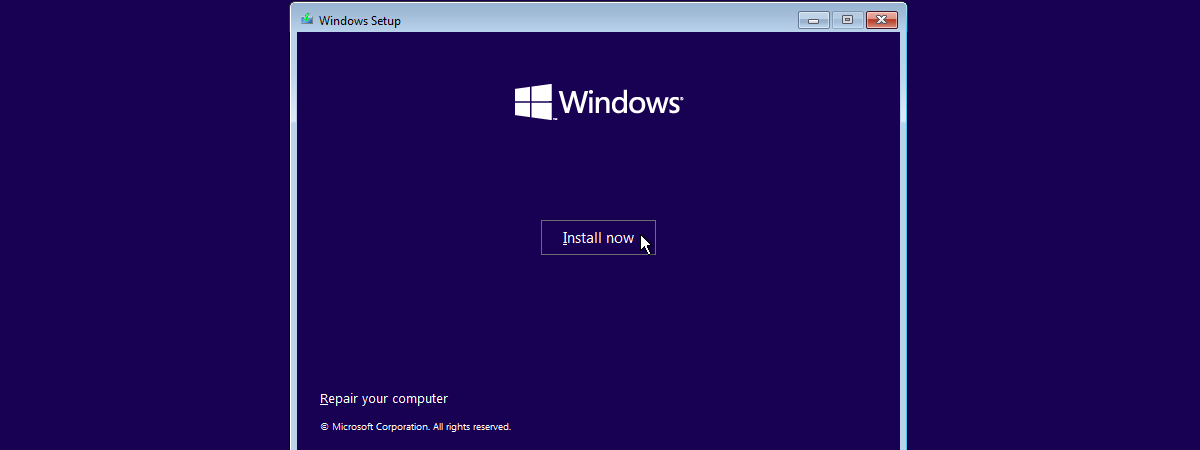
Windows 8 has been finalized and it is made available gradually through different channels. For those who are new to Windows 8 and would like a detailed step by step tutorial on how to install it on their computers and devices, we have created this guide. We will cover the following: how to burn your Windows 8 image to a disc or create a

How to Sync Offline Files & Network Folders on a Set Schedule

Did you know that you can set the Offline Files feature in Windows 7 to synchronize network folders on a schedule set by you? I didn't know either, until very recently. Therefore, in this tutorial I will share how to schedule your sync partnerships and have network folders synced when you want to. [DC-SUMMARY-BREAK] Viewing Sync Partnerships First, you need to access the network folders synchronized by Offline Files and
tutorial The Layman's Guide to Solving Wireless Network Interference Problems

The Layman's Guide to Solving Wireless Network Interference Problems

One of the most common root causes for having slow and unstable wireless network connections is interference. Many things interfere with a wireless network: everything from walls to the microwaves you use in the kitchen to other wireless networks. That's why I decided to learn more on the subject, experiment with my own wireless network and share what I have learned. In this article,

Use Network Files While Offline with Sync Center & Offline Files

Even though Sync Center and Offline Files are features present in older versions of Windows, few people know about them, let alone use them. That's why I decided to cover these tools in a mini-series of articles. In this first episode you will learn what Sync Center and Offline Files are, how to access them and the basics about working with them. [DC-SUMMARY-BREAK] What's Changed About the Sync Center in

Download the Desktop Shortcut to the Windows 8 Start Screen

I've noticed a growing complaint with Windows 8: the fact that, on the Desktop there is no visible shortcut to take you to the Start screen. Something like "Show Start", just like we had Show Desktop in Windows XP. For a novice user, there is no clue shown on how to get back to the Start screen. That's why I decided to investigate and found a hack that gets this

What Windows 8 Haters Don’t Understand About Windows 8

Lately, I notice a strong debate about Windows 8. People tend to either hate it or love it. There are no moderate verdicts being shared. Those who hate it share mostly the same complaints, many of which I think are wrong. That's why I decided to share my view on those arguments and what I believe is the main thing people don't understand about Windows 8. [DC-SUMMARY-BREAK] The Most Common

Is the Windows 8 Start Screen an Improvement vs. the Start Menu?

One of the biggest changes in Windows 8 is the fact that the Start Menu has been replaced by the Start Screen and now you have a very different way of launching applications. While the Start Screen is great for making instant searches and launching applications with a few keystrokes, it is not that friendly to users who love using the mouse instead of the keyboard. Therefore, I decided to

How to Change the Metadata Stored in Executable Files in Windows

In another article about the metadata included in files, we showed how to view a file's metadata and how to change it for common files such as documents or images. But what about the metadata included with executable files (.exe,.dll or.ocx)? With the help of third party tools, their metadata too can be changed. This tutorial will show how. [DC-SUMMARY-BREAK] Resource Editors for Windows Programs If you want to change

Dual-Monitor Annoyance: Mouse Pointer Drifting to The Other Screen

Having a dual-monitor configuration gives you a pretty good productivity improvement but introduces a few annoyances you don't have when working on a single monitor. For example, it is more likely for your mouse cursor to slip to the second screen when all you want to do is close the active application window or press the Show Desktop button on the taskbar. How do you fix this? We've got a

How to Burn Labels on the Back of your DVDs with LabelFlash

In our previous disc-labeling tutorial, Ciprian mentioned the two types of label-burning technologies: LightScribe and LabelFlash. He covered only LightScribe as such drives are much more widely available. I happen to have a LabelFlash drive and I was able to use this technology a couple of times. Are there major differences between the two types of disc labelers? Is burning labels easier with one than the other? I was also

How to Burn Labels on the Back of Your Discs (CDs & DVDs)

Have you wondered if it is possible to burn a label on the back of your discs? Due to technologies such as LightScribe and LabelFlash, it is not only possible but it is also very easy. In this tutorial, I will show how to burn a custom label on the back of a DVD, using a LightScribe capable disc burning drive. The steps involved are the same also for CDs.
tutorial Windows 8 Apps Don’t Connect to Your Google/Gmail Account?

Windows 8 Apps Don’t Connect to Your Google/Gmail Account?

Do you have troubles with any of these Windows 8 apps: People, Messaging, Calendar or Mail? You can't get them to connect to your Google account and access your contacts, email or calendar? This tutorial will help you solve this problem. IMPORTANT NOTE: As of January 30, 2013, Google decided to drop Google Sync support for their free Gmail accounts. This means that

How to Stop the Shut Down Procedure from Completing

Does it happen that sometimes, you remember that you need to do one more thing, just as soon as you hit the shut down button? Would you like to find a way to stop the shutdown procedure from completing? Luckily, we have some solutions that can help. Here are the ways you can stop a Windows shut down from completing. [DC-SUMMARY-BREAK] Stop the Shut Down From a Shortcut If you