Do you have troubles with any of these Windows 8 apps: People, Messaging, Calendar or Mail? You can't get them to connect to your Google account and access your contacts, email or calendar? This tutorial will help you solve this problem.
IMPORTANT NOTE: As of January 30, 2013, Google decided to drop Google Sync support for their free Gmail accounts. This means that you will be able to use the Mail app to sync your email only via IMAP and you won't be able to sync your calendar and contacts at all. Not unless Microsoft decides to update these apps and provide support for other protocols that could allow this synchronization. More details about Google's decision and impact can be fond here: Gmail loses Google Sync: How Windows 8, RT, Office are affected.
Problem Description
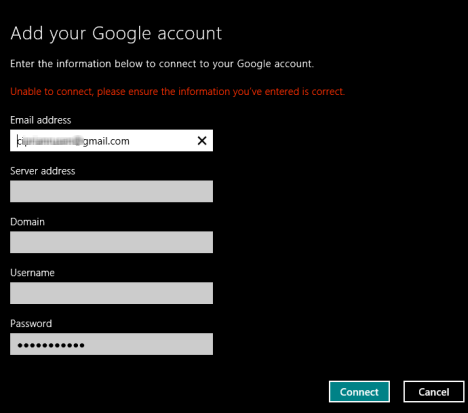
After you enter your Google account login details, you are taken to a screen similar to the one below, where it says: "Unable to connect, please ensure the information you've entered is correct."
Then, you are asked to complete the following details: e-mail address, server address, domain, username and password.
Windows 8 Mail
NOTE: If you want to know the correct details for these fields, they are the following:
Email address - your Google e-mail address.
Server address - should be m.google.com.
Domain - this field should be empty.
Username - your Google e-mail address.
Password - your Google account password.
Possible Root-Causes for the Problem
There are two possible sources for your problem:
You have not correctly completed the login details. Make sure you use the correct e-mail address. If you have a @googlemail.com address instead of @gmail.com , use that. Make sure you provide the correct country extension, if you use local Google services in your language, instead of the global ones in English. Then, double check that you have entered the correct password.
If this doesn't solve your problems, then this might: Do you use Google Authenticator with its 2-step verification, so that your Google account isn't easily accessed by hackers?
Most probably you are using this service and the next section will show how to fix your problem.
Authorizing Windows 8 Apps to Access Your Google Account
To solve this problem, follow these simple steps:
Login to your Google Account in your favorite browser.
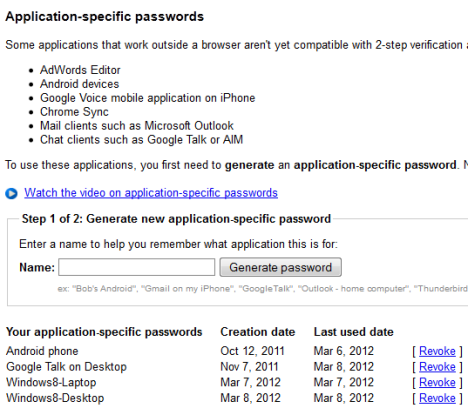
At the bottom of the page, there is a section for generating new application-specific passwords. Type a suggestive name for the application you want to authorize (e.g. Mail on Windows 8) and click Generate password.
Google Authenticator
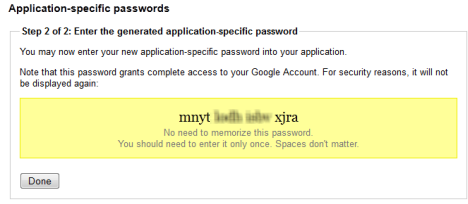
Note the password that was generated and type it in the password field in the Windows 8 application you want to use.
Google Authenticator
The Windows 8 app you are using will now be able to access your Google account.
Do You Need to do This for All Apps?
The answer depends on what Windows 8 apps you want to integrate with your Google account. I noticed that, once I authorize Mail, the Calendar uses the same account details to access my Google Calendar. However, the People app was still not authorized to access my Google Contacts, so I had to generate a separate application-specific password for it.
plz . suggest ………
nothing happen when i am going for to connect google to my lumia 540 , take your to google to authorize window phone to access your account
Osama ·
This post has become outdated, Google has changed, please update or delete this post to save our and your time.
Valerie ·
I just purchased a windows 8, and upon starting everything up, for some reason all the pictures sent to me on my gmail that I downloaded onto my phone and my tablet, both galaxys, vanished …. any idea what happened, and where they may be
Been struggling for this so long.. thank you, it works now!
Soheil ·
Thank you, this worked!
Linda ·
I had gmail working fine in the mail app along with my hotmail and outlook accounts, then after a password reset it wouldn’t open and the account says ‘needs attention’ When I select it I get the following message ‘There was a problem with connecting to gmail. Do you want to try again?’. I have opened mail settings/accounts and the gmail account says ‘needs attention’. On selecting gmail I am taken to the same screen as when I try to open my gmail. I can’t open the google app or the nook app either, just a timer and cuts out. I have searched the web and can find no solution, uninstalling google and nook make no difference and I can’t get into the gmail settings at all. Thanks
harlley ·
Hey dude, tks for the help! works perfectly here w/ my WP
Chace ·
Unfortunately this isn’t working for my People app in Windows 8. I noticed you said it was working. Must not be for everyone. =(
sam ·
I tried generating an application specific password and typing it in but it still doesn’t work.
I just tried to use the work around and gmail will not allow me to make any changes to my account via a second password request that is denied and re-routes to a spanish only page for help that is unhelpful. (I can only log on from my old computer to access anything, and then only into the gmail account itself.) I’m resorting to going through each message (thousands of them) and forwarding to my outlook account. I have tutorial videos on youtube that will be lost even if I don’t close my account (google link announces ‘inactive’ status changes will be implemented upon thirty days of no login from date of last login – super!). It’s a shame because those videos seem to have helped some people – oh well. When I finish transferring messages, I’ll have to redo my website – shouldn’t take too long, right? ha.
I hate it that I’ve been so loyal to google over the years, but what can you do. I have to use my computer and I’m not buying the google computer version – even a GeekSquad guy was shopping for a new computer at Best Buy with me because he got one and is so frustrated he can’t use it. But I digress.
Thank you so much for explaining the reason behind the issue I’m having. If I hadn’t found your sight I would likely have lost years of information without so much as an email notification from google.
I hope you have a wonderful day.
Amy ·
I just got a new windows 8 computer and couldn’t access my gmail (switched me to an entirely different language when I clicked the trouble logging in link). You are awesome to provide this work around, but now I’m wondering if I should even bother keeping my gmail. Any thoughts on keeping a free account that’s becoming disfunctional as technology and business demands are advancing? Again, thank you so much for the helpful information!
Ciprian Adrian Rusen ·
Hi Amy. In the end I switched from Gmail to Outlook.com
Lately, I don’t like Google that much. First there was this issue, then they decided to close Google Reader. Next, they changed their search ranking algorithms and smaller websites like ours got penalized without any information being shared by Google, etc.
The more time goes by, the more they act like the monopolist Microsoft did more than a decade ago. Making a switch to other email solutions is worth at least trying. 😉
Mamalicious ·
You can add a read only Google Calendar feed as a workaround and update it on Google Calendar itself still:
1. Open Google Calendar
2. Go to Settings and copy/paste the Private ICAL feed link
3. Open Hotmail/Outlook.com and open your Calendar
4. Click Subscribe and choose “Subscribe to a public calendar”
5. Paste in the Google Calendar Private ICAL feed link
6. Click “Subscribe to Calendar”
This will then appear in the Windows 8 Calendar within minutes, as said it is read only so you cannot change it using Windows 8 Calendar but at least it displays as it did before.
Personally I update my Google Calendar in Outlook (using gSyncit) so only need a read only feed in Windows 8 Calendar anyway.
This is perfect if I ever lose connection to my Google Calendar using Google Sync EAS.
Thanks so much for giving this clear advice. I purchased a new laptop and pulling my hair out trying to get the apps in windows 8 configured. Most difficult is the calander app. I just cant seem to find a way to extract my iphone calander into it without going through a 3rd party. More advice would be greatfully received!
Jessi ·
I have the same problem as William, I had synced my iPhone contacts to my google account in order to add them to my windows 8 people app and am unable to do so now since the google sync no longer works. Is there any other way to sync my iPhone contacts with the windows 8 people app? thanks
William ·
Unfortunately I am certain I am entering my correct login credentials and I do NOT have 2 step verification enabled but I cannot add my google account to People anyway
I will also update this article to mention this important change.
ismail ·
thank you, this worked perfectly and was the only website i could track down that helped
Aji ·
Wonderful, I’ve been looking for this everywhere, thanks for your instruction. I can connect my GMail to Maill App now, thanks a lot 😀
Yasitha ·
Thank you very much for your powerful instructions. It worked for me. I couldn’t find these details anywhere else. Please publish other useful stuff as well. Thank you.
Ciprian Adrian Rusen ·
Do you have other problems where you need help? Don’t hesitate to describe them in the comments.
Celena ·
My Gmail account won’t stop syncing on my Windows phone. I can’t make any changes to or delete the account while it’s syncing. I can’t access Settings+Email&Accounts when I turn off internet & WiFi as it keeps defaulting back to the main screen. My phone is possessed. What can I do?
Sudip ·
Thanks…….
It worked for me……
Rob ·
I’ve been trying to figure this out for weeks. I am REALLY grateful for this.
zimon ·
THANK A LOT FOR SHARING THIS, I JUST ENTERED THE SPECIFIC PASSWORD INSTEAD OF MY ACCOUNT PASSWORD AND IT WORKED!! THANKS AGaIN!
Wez ·
Thanks for pointing me in the right direction and the clear advice.
Pavel ·
Thanks for this post. I almost break my laptop trying to connect Windows 8 Mail and gmail account.
kguth ·
I’ve been trying this and it hasn’t been working. I’ve been using application specific passwords for a while now and haven’t had this problem before.
Necronomicron ·
Thank you very much to your simple and clear instruction on how to connect my gmail account to Windows 8 Mail apps. More power to your site.
Ciprian Adrian Rusen ·
I’m glad we helped. 😀 I hope you’ll find other useful stuff on our site and visit us again and again… 🙂







Discussion (34)
plz . suggest ………
nothing happen when i am going for to connect google to my lumia 540 , take your to google to authorize window phone to access your account
This post has become outdated, Google has changed, please update or delete this post to save our and your time.
I just purchased a windows 8, and upon starting everything up, for some reason all the pictures sent to me on my gmail that I downloaded onto my phone and my tablet, both galaxys, vanished …. any idea what happened, and where they may be
Been struggling for this so long.. thank you, it works now!
Thank you, this worked!
I had gmail working fine in the mail app along with my hotmail and outlook accounts, then after a password reset it wouldn’t open and the account says ‘needs attention’ When I select it I get the following message ‘There was a problem with connecting to gmail. Do you want to try again?’. I have opened mail settings/accounts and the gmail account says ‘needs attention’. On selecting gmail I am taken to the same screen as when I try to open my gmail. I can’t open the google app or the nook app either, just a timer and cuts out. I have searched the web and can find no solution, uninstalling google and nook make no difference and I can’t get into the gmail settings at all. Thanks
Hey dude, tks for the help! works perfectly here w/ my WP
Unfortunately this isn’t working for my People app in Windows 8. I noticed you said it was working. Must not be for everyone. =(
I tried generating an application specific password and typing it in but it still doesn’t work.
Download Google Talk from here: https://download.cnet.com/Google-Talk/3000-12565_4-10738775.html
is there a way to get google chat on windows 8?
Thank you very much!
I just tried to use the work around and gmail will not allow me to make any changes to my account via a second password request that is denied and re-routes to a spanish only page for help that is unhelpful. (I can only log on from my old computer to access anything, and then only into the gmail account itself.) I’m resorting to going through each message (thousands of them) and forwarding to my outlook account. I have tutorial videos on youtube that will be lost even if I don’t close my account (google link announces ‘inactive’ status changes will be implemented upon thirty days of no login from date of last login – super!). It’s a shame because those videos seem to have helped some people – oh well. When I finish transferring messages, I’ll have to redo my website – shouldn’t take too long, right? ha.
I hate it that I’ve been so loyal to google over the years, but what can you do. I have to use my computer and I’m not buying the google computer version – even a GeekSquad guy was shopping for a new computer at Best Buy with me because he got one and is so frustrated he can’t use it. But I digress.
Thank you so much for explaining the reason behind the issue I’m having. If I hadn’t found your sight I would likely have lost years of information without so much as an email notification from google.
I hope you have a wonderful day.
I just got a new windows 8 computer and couldn’t access my gmail (switched me to an entirely different language when I clicked the trouble logging in link). You are awesome to provide this work around, but now I’m wondering if I should even bother keeping my gmail. Any thoughts on keeping a free account that’s becoming disfunctional as technology and business demands are advancing? Again, thank you so much for the helpful information!
Hi Amy. In the end I switched from Gmail to Outlook.com
Lately, I don’t like Google that much. First there was this issue, then they decided to close Google Reader. Next, they changed their search ranking algorithms and smaller websites like ours got penalized without any information being shared by Google, etc.
The more time goes by, the more they act like the monopolist Microsoft did more than a decade ago. Making a switch to other email solutions is worth at least trying. 😉
You can add a read only Google Calendar feed as a workaround and update it on Google Calendar itself still:
1. Open Google Calendar
2. Go to Settings and copy/paste the Private ICAL feed link
3. Open Hotmail/Outlook.com and open your Calendar
4. Click Subscribe and choose “Subscribe to a public calendar”
5. Paste in the Google Calendar Private ICAL feed link
6. Click “Subscribe to Calendar”
This will then appear in the Windows 8 Calendar within minutes, as said it is read only so you cannot change it using Windows 8 Calendar but at least it displays as it did before.
Personally I update my Google Calendar in Outlook (using gSyncit) so only need a read only feed in Windows 8 Calendar anyway.
This is perfect if I ever lose connection to my Google Calendar using Google Sync EAS.
Original link: https://www.zdnet.com/microsofts-windows-phone-to-add-support-for-google-sync-protocols-7000010575/
Good workaround. Thanks for sharing it.
Thanks so much for giving this clear advice. I purchased a new laptop and pulling my hair out trying to get the apps in windows 8 configured. Most difficult is the calander app. I just cant seem to find a way to extract my iphone calander into it without going through a 3rd party. More advice would be greatfully received!
I have the same problem as William, I had synced my iPhone contacts to my google account in order to add them to my windows 8 people app and am unable to do so now since the google sync no longer works. Is there any other way to sync my iPhone contacts with the windows 8 people app? thanks
Unfortunately I am certain I am entering my correct login credentials and I do NOT have 2 step verification enabled but I cannot add my google account to People anyway
This is because Google decided to drop Google Sync support for their free accounts, as of January 30. More details can be found here: https://www.zdnet.com/gmail-loses-google-sync-how-windows-8-rt-office-are-affected-7000008846/
I will also update this article to mention this important change.
thank you, this worked perfectly and was the only website i could track down that helped
Wonderful, I’ve been looking for this everywhere, thanks for your instruction. I can connect my GMail to Maill App now, thanks a lot 😀
Thank you very much for your powerful instructions. It worked for me. I couldn’t find these details anywhere else. Please publish other useful stuff as well. Thank you.
Do you have other problems where you need help? Don’t hesitate to describe them in the comments.
My Gmail account won’t stop syncing on my Windows phone. I can’t make any changes to or delete the account while it’s syncing. I can’t access Settings+Email&Accounts when I turn off internet & WiFi as it keeps defaulting back to the main screen. My phone is possessed. What can I do?
Thanks…….
It worked for me……
I’ve been trying to figure this out for weeks. I am REALLY grateful for this.
THANK A LOT FOR SHARING THIS, I JUST ENTERED THE SPECIFIC PASSWORD INSTEAD OF MY ACCOUNT PASSWORD AND IT WORKED!! THANKS AGaIN!
Thanks for pointing me in the right direction and the clear advice.
Thanks for this post. I almost break my laptop trying to connect Windows 8 Mail and gmail account.
I’ve been trying this and it hasn’t been working. I’ve been using application specific passwords for a while now and haven’t had this problem before.
Thank you very much to your simple and clear instruction on how to connect my gmail account to Windows 8 Mail apps. More power to your site.
I’m glad we helped. 😀 I hope you’ll find other useful stuff on our site and visit us again and again… 🙂