




Telegram does not notify users when they are blocked, but the app leaves behind several reliable indicators. By checking a combination of status changes, message behavior, and interaction limits, you can usually determine whether a contact has blocked you.
This guide explains the most accurate ways to know if someone blocked you on Telegram, based on how the platform currently behaves at the time of writing.
Check Their Last Seen Status
One of the earliest signs appears in the contact’s last seen status. When someone blocks you, Telegram often replaces their activity timestamp with a vague message.
- Open the chat with the contact
- Look below their name at the top of the screen
- If it says Last seen a long time ago, blocking may have occurred
This change becomes more meaningful if the person previously showed exact timestamps or “Last seen recently.”
See If Their Profile Picture Disappeared
Another common indicator is the removal of the contact’s profile picture. When blocked, the photo may disappear and revert to a default avatar with initials.
Profile photo removal alone does not confirm a block, but paired with other signs, it strengthens the conclusion.
Send A Message And Check Delivery Status
Telegram uses checkmarks to show message delivery. If someone blocks you, messages you send typically remain stuck with a single checkmark.
- Send a short message to the contact
- Watch for a second checkmark
- If it never appears, the message was not delivered
Consistent single checkmarks while other chats work normally strongly suggest blocking.
Try Starting A Secret Chat
Telegram allows users to create secret chats for end-to-end encrypted conversations. When someone blocks you, attempting to start a secret chat with that contact fails.
- Open the contact’s profile from an existing chat
- Tap More
- Select Start Secret Chat
- Watch for an error message.

If a pop-up appears saying “An error occurred, please try again later”, it usually indicates that the contact has blocked you.
Attempt To Add The Contact To A Group
When blocked, Telegram prevents you from adding that contact to new groups you create.
- Create a new group
- Try adding the suspected contact
- If Telegram blocks the action, it may indicate a block
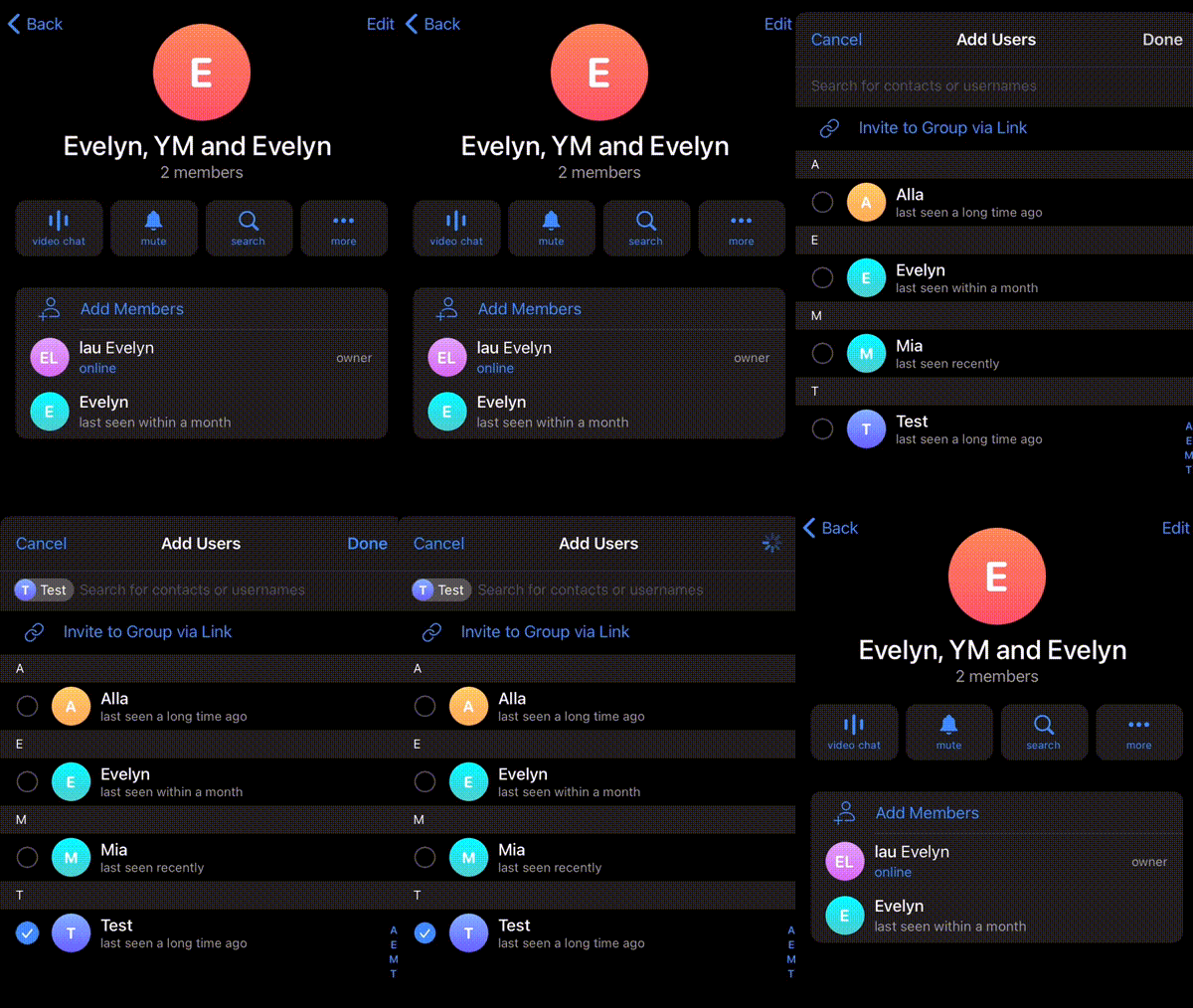
Some users restrict group invites through privacy settings, so this method works best alongside other checks.
Try Making A Voice Or Video Call
Calls offer one of the clearest confirmations. If someone blocks you, calls placed to them will consistently fail.
- Start a voice or video call
- If it immediately shows Call failed, blocking is likely
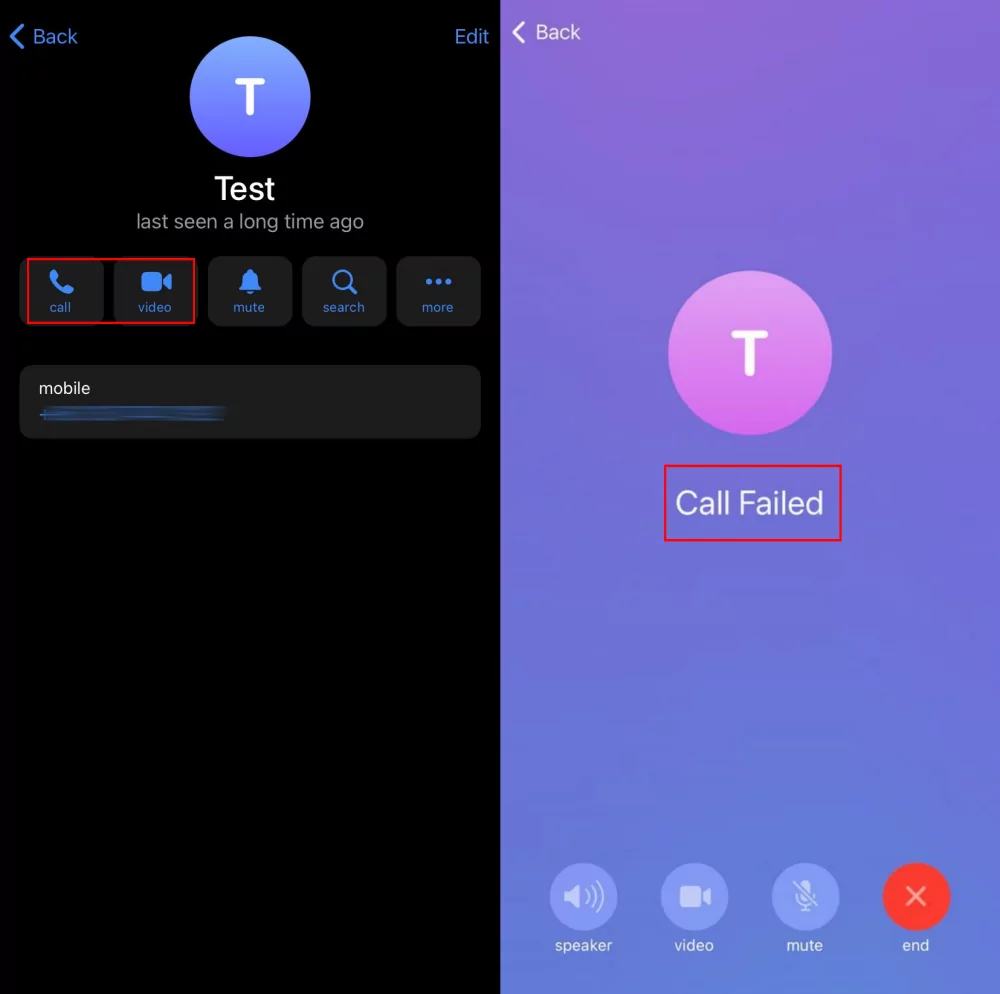
- Test another contact to rule out connection issues
Troubleshooting Common Problems
Telegram privacy settings can sometimes resemble blocking behavior. Users can hide last seen status, remove profile photos, or restrict group invites without blocking you.
Do not rely on a single sign. A combination of multiple indicators provides the most accurate answer.
Tips
- Confirm blocking using at least two different methods
- Allow time between message checks
- Test calls with another contact first
- Use Secret Chat as a confirmation step, not a sole indicator
FAQ
Can you see someone’s last seen if they blocked you on Telegram?
No. Telegram replaces the timestamp with “Last seen a long time ago.”
Does one checkmark always mean you are blocked?
No. It can also mean the user is offline. Persistent undelivered messages alongside other signs are more reliable.
Will messages deliver if someone unblocks you later?
No. Messages sent while blocked remain undelivered permanently.
Can a blocked contact still see your messages in groups?
Yes. Blocking only affects direct chats, not shared group conversations.
Summary
- Check last seen status changes
- Look for missing profile photos
- Watch message delivery checkmarks
- Attempt a Secret Chat
- Test calls and group invites
Conclusion
Telegram does not openly reveal when someone blocks you, but its behavior makes it possible to figure out. When several signs appear together, blocking becomes the most likely explanation.
If only one indicator appears, it may be a privacy setting. Always confirm using multiple checks before reaching a conclusion.


Discussion (0)
Be the first to comment.