



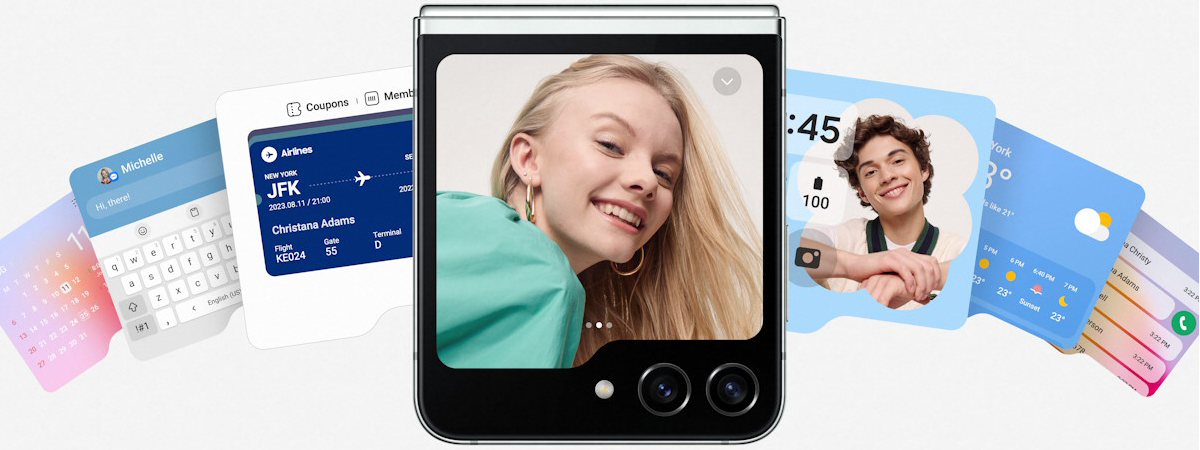
The market for good quality foldable smartphones has become more competitive than ever, with people getting all kinds of options, including at prices that are more affordable than ever. This is a positive trend, and I hope it continues. This year’s Samsung Galaxy Z Flip5 brings some interesting novelties, like a much larger cover screen and a different hinge design. But are they enough to make you want to buy the Galaxy Z Flip5? Read this review and find out:
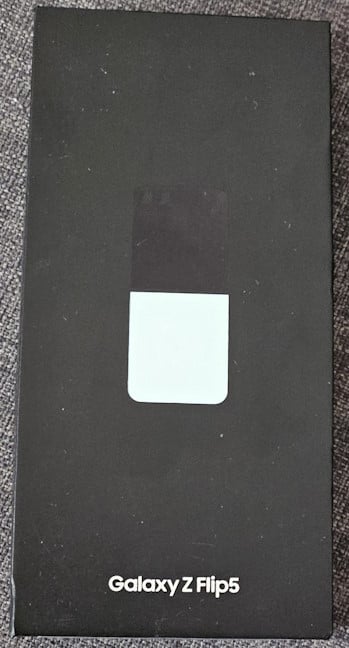
 The box for Samsung Galaxy Z Flip5
Open the box, and you see the Galaxy Z Flip5 packaged in a protective coating and another smaller cardboard box with the Samsung logo printed on it.
When you unpack everything, you find the following items: the Galaxy Z Flip5, its USB-Type C cable, the tool for ejecting the SIM card, the quick start guide, the warranty, and other leaflets. Unfortunately, there’s no charger bundled with this phone, and neither is a protective case.
The box for Samsung Galaxy Z Flip5
Open the box, and you see the Galaxy Z Flip5 packaged in a protective coating and another smaller cardboard box with the Samsung logo printed on it.
When you unpack everything, you find the following items: the Galaxy Z Flip5, its USB-Type C cable, the tool for ejecting the SIM card, the quick start guide, the warranty, and other leaflets. Unfortunately, there’s no charger bundled with this phone, and neither is a protective case.
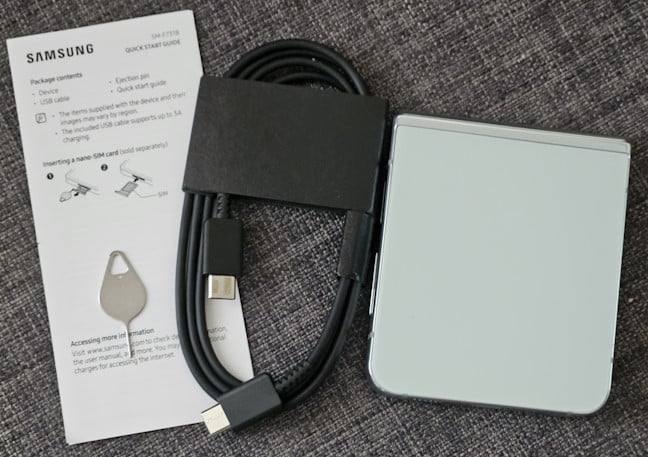
 Everything you find inside the box
Samsung’s use of recycled materials for packaging is to be appreciated. While the company’s approach is practical and the packaging looks good, the unboxing experience is underwhelming, as you don’t find a charger or other accessories inside the box.
Everything you find inside the box
Samsung’s use of recycled materials for packaging is to be appreciated. While the company’s approach is practical and the packaging looks good, the unboxing experience is underwhelming, as you don’t find a charger or other accessories inside the box.
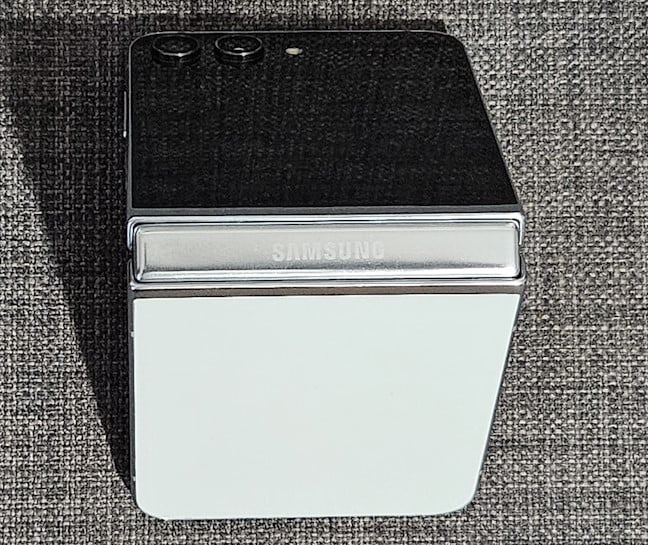
 The hinge is different on the Flip5
The folding mechanism was also changed, and it is now gapless. Many people will like this, even though it doesn’t necessarily help increase the durability of the folding screen. However, the new armor aluminum frame has increased drop and scratch resistance, and the Flip5 is IPX8-certified for water resistance. This means the device can be submerged in 1.5 meters of water for up to 30 minutes.
The new folding mechanism also makes the phone thinner by 2 mm compared to its predecessor. When folded, the Samsung Galaxy Z Flip5 is 85.1 x 71.9 x 15.1 mm or 3.35 x 2.83 x 0.59 inches in size.
The hinge is different on the Flip5
The folding mechanism was also changed, and it is now gapless. Many people will like this, even though it doesn’t necessarily help increase the durability of the folding screen. However, the new armor aluminum frame has increased drop and scratch resistance, and the Flip5 is IPX8-certified for water resistance. This means the device can be submerged in 1.5 meters of water for up to 30 minutes.
The new folding mechanism also makes the phone thinner by 2 mm compared to its predecessor. When folded, the Samsung Galaxy Z Flip5 is 85.1 x 71.9 x 15.1 mm or 3.35 x 2.83 x 0.59 inches in size.
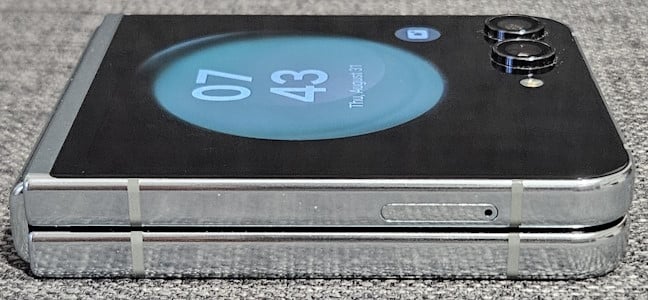
 The gap is gone!
When unfolded, the Flip5 is 165.1 x 71.9 x 6.9 mm or 6.5 x 2.83 x 0.27 inches in size. It also weighs just 187 grams or 6.60 oz. As you can see in the picture below, the back cover (the one without a screen) can come in different colors, and it is also protected by Gorilla Glass Victus 2.
The gap is gone!
When unfolded, the Flip5 is 165.1 x 71.9 x 6.9 mm or 6.5 x 2.83 x 0.27 inches in size. It also weighs just 187 grams or 6.60 oz. As you can see in the picture below, the back cover (the one without a screen) can come in different colors, and it is also protected by Gorilla Glass Victus 2.
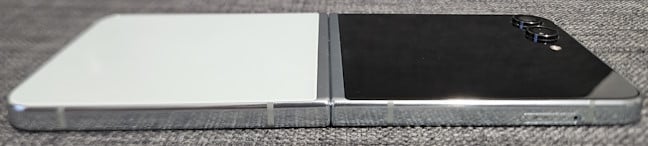
 The back is protected by Gorilla Glass Victus 2
The Samsung Galaxy Z Flip5 is available in the following colors: Mint, Graphite, Lavender, and Cream. You can see them pictured below. There are also some Samsung-exclusive colors, which you can get only when purchasing the phone from their website: Gray, Blue, Green, and Yellow.
The back is protected by Gorilla Glass Victus 2
The Samsung Galaxy Z Flip5 is available in the following colors: Mint, Graphite, Lavender, and Cream. You can see them pictured below. There are also some Samsung-exclusive colors, which you can get only when purchasing the phone from their website: Gray, Blue, Green, and Yellow.
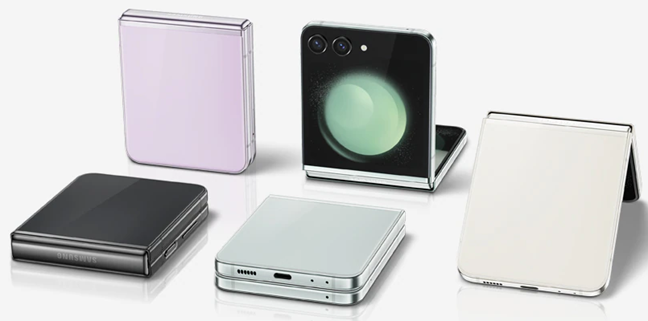
 The color versions for Samsung Galaxy Z Flip5
The bottom of the Galaxy Z Flip5 holds the USB-Type C port, the primary speaker, and two microphones. On the top, you find a third microphone. One small annoyance visible in the picture below is that the phone gathers dust and dirt quite easily between the rear cameras. Put it in your pocket and take it out a couple of times, and you’ll notice the dirt. This means you have to clean the device regularly.
The color versions for Samsung Galaxy Z Flip5
The bottom of the Galaxy Z Flip5 holds the USB-Type C port, the primary speaker, and two microphones. On the top, you find a third microphone. One small annoyance visible in the picture below is that the phone gathers dust and dirt quite easily between the rear cameras. Put it in your pocket and take it out a couple of times, and you’ll notice the dirt. This means you have to clean the device regularly.
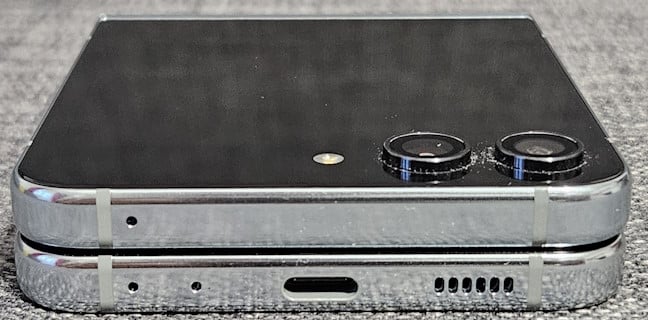
 Dirt quickly gathers between the cameras
You have the Power button and the Volume rocker on the right side of the phone. The Power button doubles as a fingerprint reader, and it’s useful when you want to unlock the Galaxy Z Flip5 as fast as possible.
Dirt quickly gathers between the cameras
You have the Power button and the Volume rocker on the right side of the phone. The Power button doubles as a fingerprint reader, and it’s useful when you want to unlock the Galaxy Z Flip5 as fast as possible.

 I like to flip this phone 🙂
On the left side, you will find only the SIM tray. The phone offers dual SIM connectivity, but the second SIM must be an eSIM. Unfortunately, you don’t get a microSD card slot and can’t extend the available storage space.
I like to flip this phone 🙂
On the left side, you will find only the SIM tray. The phone offers dual SIM connectivity, but the second SIM must be an eSIM. Unfortunately, you don’t get a microSD card slot and can’t extend the available storage space.

 On the left side, you find the SIM tray
When you unfold the phone, you notice the earpiece, which acts as a stereo speaker on the top of the screen. There’s also a small perforation at the top, right under the earpiece, where you find the selfie camera.
On the left side, you find the SIM tray
When you unfold the phone, you notice the earpiece, which acts as a stereo speaker on the top of the screen. There’s also a small perforation at the top, right under the earpiece, where you find the selfie camera.
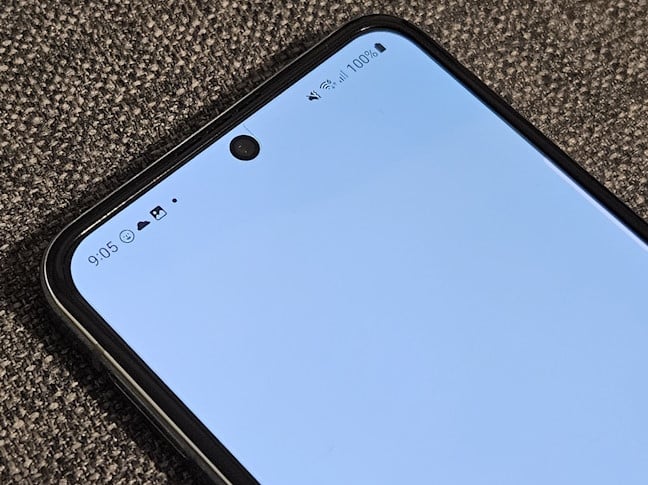
 Notice the selfie camera at the top
I like how the Samsung Galaxy Z Flip5 looks and how it feels when you hold it in your hands. Its form factor makes it easy to use with one hand, and its pocketability is great.
Notice the selfie camera at the top
I like how the Samsung Galaxy Z Flip5 looks and how it feels when you hold it in your hands. Its form factor makes it easy to use with one hand, and its pocketability is great.
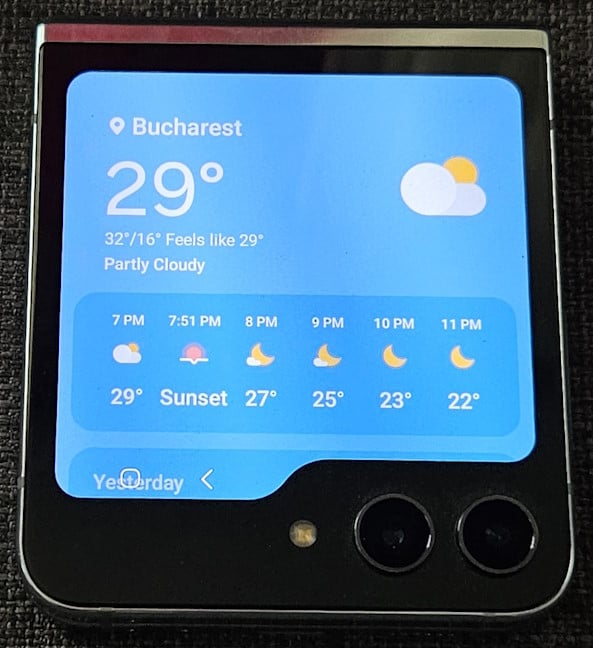
 Samsung Galaxy Z Flip5 has a beautiful cover screen
The foldable display has a size of 6.7 inches, and it uses a Dynamic AMOLED 2x panel, HDR10+ certified, with an adaptive refresh rate of up to 120 Hz, a resolution of 1080 x 2640 pixels, and a maximum brightness of 1750 nits. While the cover screen has a PPI of 306, the main display has a pixel density of 425 ppi. If this term is too technical, here’s what PPI means and why it matters.
Samsung Galaxy Z Flip5 has a beautiful cover screen
The foldable display has a size of 6.7 inches, and it uses a Dynamic AMOLED 2x panel, HDR10+ certified, with an adaptive refresh rate of up to 120 Hz, a resolution of 1080 x 2640 pixels, and a maximum brightness of 1750 nits. While the cover screen has a PPI of 306, the main display has a pixel density of 425 ppi. If this term is too technical, here’s what PPI means and why it matters.
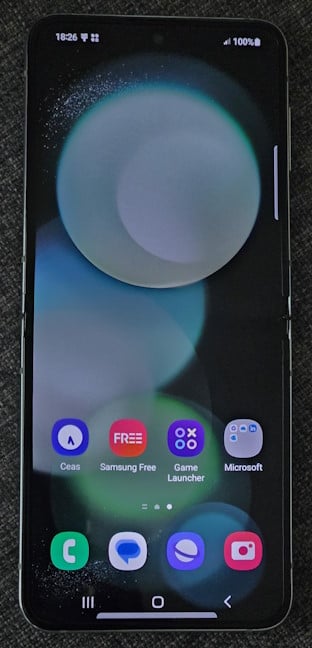
 Unfolding the Samsung Galaxy Z Flip5
The camera system hasn’t changed from last year’s model. We have the same 10-megapixel front camera, with an f/2.2 aperture, capable of recording video at a maximum resolution of 4K and 30 frames per second.
Unfolding the Samsung Galaxy Z Flip5
The camera system hasn’t changed from last year’s model. We have the same 10-megapixel front camera, with an f/2.2 aperture, capable of recording video at a maximum resolution of 4K and 30 frames per second.
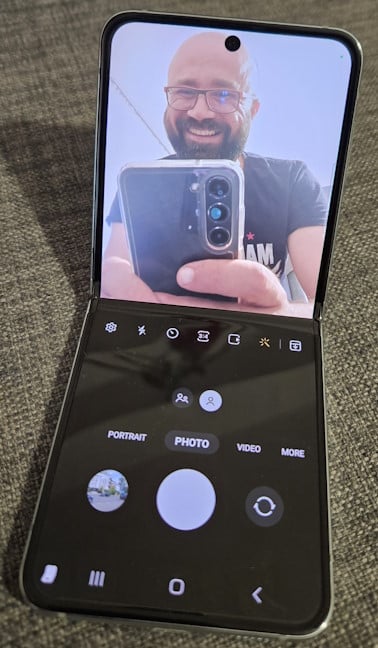
 Using the front camera
Both main cameras have 12 Megapixels. One is a wide lens with an aperture of f/1.8 and optical image stabilization, while the second is an ultrawide lens with an aperture of f/2.2. Unfortunately, there’s no telephoto lens; we get only digital zoom up to 10x. Optical zoom is missing from the Samsung Galaxy Z Flip5, and that’s quite disappointing for a smartphone in its price range.
Using the front camera
Both main cameras have 12 Megapixels. One is a wide lens with an aperture of f/1.8 and optical image stabilization, while the second is an ultrawide lens with an aperture of f/2.2. Unfortunately, there’s no telephoto lens; we get only digital zoom up to 10x. Optical zoom is missing from the Samsung Galaxy Z Flip5, and that’s quite disappointing for a smartphone in its price range.
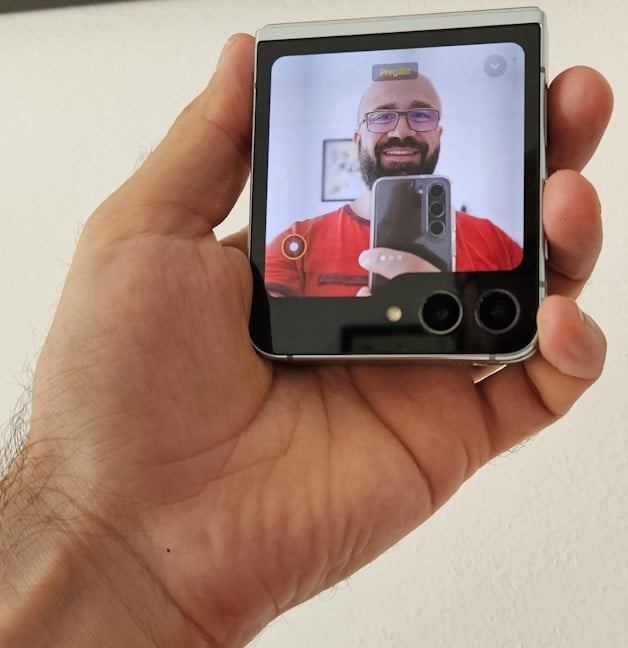
 Taking pictures from the cover screen
Regarding connectivity, we get Wi-Fi 6E, which is great, Bluetooth 5.3, GPS, and NFC. The battery has a small capacity of only 3700 mAh, and the phone requires a 25W Samsung fast charger, meaning that it is quite slow to charge compared to many other smartphones. On the upside, you also get 15W wireless charging, and you can reverse wireless charge accessories, like your Galaxy Buds2 Pro. For more technical information about this smartphone, visit its official page: Galaxy Z Flip5.
Now that you know the basics about how the phone looks and what’s inside it, go to the next page of this review to see my experience using the Samsung Galaxy Z Flip5, what I’ve found about its cameras, and the results the smartphone got in a couple of benchmarks.
Taking pictures from the cover screen
Regarding connectivity, we get Wi-Fi 6E, which is great, Bluetooth 5.3, GPS, and NFC. The battery has a small capacity of only 3700 mAh, and the phone requires a 25W Samsung fast charger, meaning that it is quite slow to charge compared to many other smartphones. On the upside, you also get 15W wireless charging, and you can reverse wireless charge accessories, like your Galaxy Buds2 Pro. For more technical information about this smartphone, visit its official page: Galaxy Z Flip5.
Now that you know the basics about how the phone looks and what’s inside it, go to the next page of this review to see my experience using the Samsung Galaxy Z Flip5, what I’ve found about its cameras, and the results the smartphone got in a couple of benchmarks.
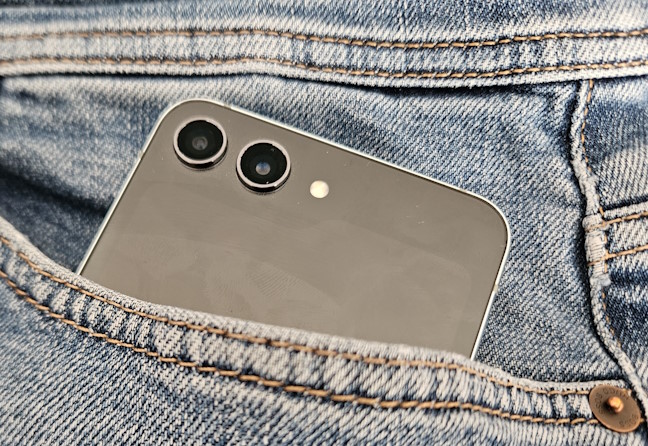
 Samsung Galaxy Z Flip5 easily fits into your pocket
As expected, the Samsung Galaxy Z Flip5 works great and is very responsive. Apps load quickly and respond to your commands without lag. High-resolution content looks great on the screen. You get good color accuracy, and watching HDR content works great. However, because of its unusual form factor and the screen’s aspect ratio, video content tends not to be displayed from one edge to another. You get quite a lot of black space on the left and right sides. Traditional smartphones tend to offer a better experience in this regard.
Samsung Galaxy Z Flip5 easily fits into your pocket
As expected, the Samsung Galaxy Z Flip5 works great and is very responsive. Apps load quickly and respond to your commands without lag. High-resolution content looks great on the screen. You get good color accuracy, and watching HDR content works great. However, because of its unusual form factor and the screen’s aspect ratio, video content tends not to be displayed from one edge to another. You get quite a lot of black space on the left and right sides. Traditional smartphones tend to offer a better experience in this regard.
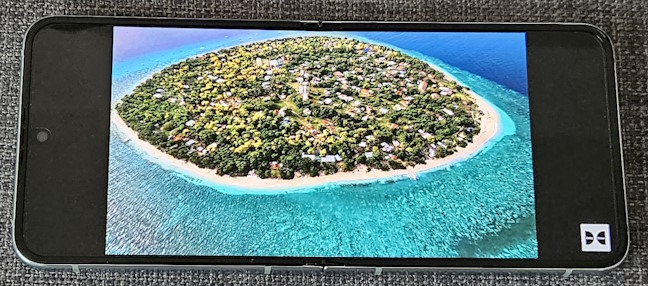
 You may get a lot of black space when watching movies
Sound quality is good too, both in calls and when listening to music on the Samsung Galaxy Z Flip5. You get clean vocals, decent loudness, and bass. I enjoyed listening to music on the Galaxy Z Flip5 just as much as I did on my Galaxy S23. One aspect that’s very useful when using this phone is that the hinge can remain stable at arbitrary angles. Therefore, you can use the phone at the exact angle you want, depending on what you’re doing, which is great. One downside is the crease in the middle of the main screen, which is more visible than on other folding smartphones. However, you get used to it and start to ignore it after a couple of days.
You may get a lot of black space when watching movies
Sound quality is good too, both in calls and when listening to music on the Samsung Galaxy Z Flip5. You get clean vocals, decent loudness, and bass. I enjoyed listening to music on the Galaxy Z Flip5 just as much as I did on my Galaxy S23. One aspect that’s very useful when using this phone is that the hinge can remain stable at arbitrary angles. Therefore, you can use the phone at the exact angle you want, depending on what you’re doing, which is great. One downside is the crease in the middle of the main screen, which is more visible than on other folding smartphones. However, you get used to it and start to ignore it after a couple of days.
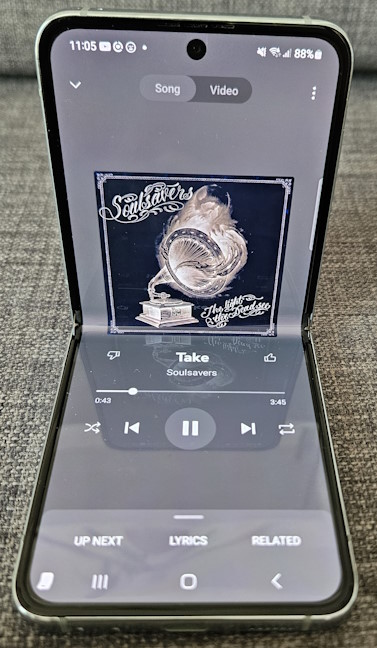
 Listening to music on the Flip5 is a pleasant experience
Gaming also works well, and the adaptive refresh rate makes the experience pleasant. However, not all games are optimized to use the whole screen, and for some, you may notice some unused space on the top or bottom of the screen. Luckily, that is not the case with the most popular gaming titles.
Listening to music on the Flip5 is a pleasant experience
Gaming also works well, and the adaptive refresh rate makes the experience pleasant. However, not all games are optimized to use the whole screen, and for some, you may notice some unused space on the top or bottom of the screen. Luckily, that is not the case with the most popular gaming titles.
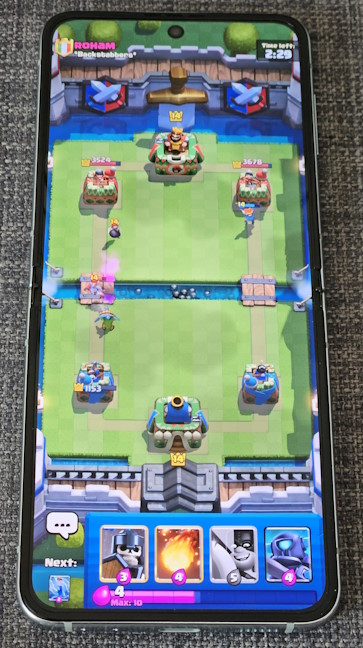
 Gaming works well
Battery life is decent, as the Galaxy Z Flip5 doesn’t have a problem lasting for a full day. However, because of the battery’s limited capacity, you shouldn’t expect to use it for two days on a single charge, like you can use many traditional smartphones. To make matters worse, Samsung hasn’t upgraded its battery-charging tech. Therefore, this phone charges at a maximum of 25W, meaning that in 30 minutes, it goes from 0% to around 47-50%. A full charge is done around 85 minutes, slower than the Flip4. For a person regularly testing many gadgets, Samsung’s slow charging has become frustrating, and I hope the company will improve its technology soon.
Gaming works well
Battery life is decent, as the Galaxy Z Flip5 doesn’t have a problem lasting for a full day. However, because of the battery’s limited capacity, you shouldn’t expect to use it for two days on a single charge, like you can use many traditional smartphones. To make matters worse, Samsung hasn’t upgraded its battery-charging tech. Therefore, this phone charges at a maximum of 25W, meaning that in 30 minutes, it goes from 0% to around 47-50%. A full charge is done around 85 minutes, slower than the Flip4. For a person regularly testing many gadgets, Samsung’s slow charging has become frustrating, and I hope the company will improve its technology soon.
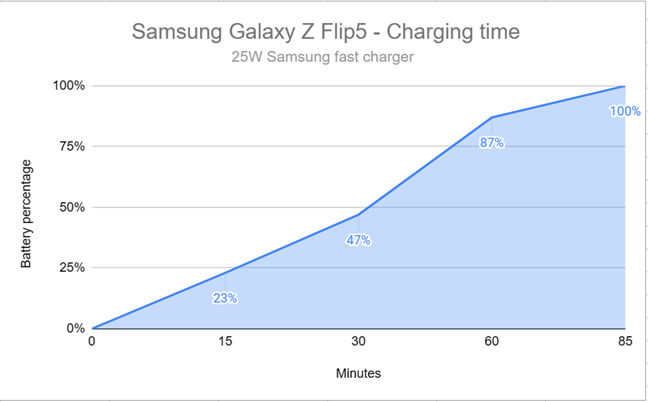
 This is how long it takes the Samsung Galaxy Z Flip5 to charge
Another frustrating limitation of the Galaxy Z Flip5 is that it doesn’t work with Samsung Dex. Its hardware can handle it, but Samsung has removed this feature from the Flip line-up. I don’t understand why, as this choice contradicts this phone’s focus on flexibility and new ways to use a smartphone.
Regarding basics like 5G mobile connectivity, signal reception, and Wi-Fi connectivity, everything works great on the Samsung Galaxy Z Flip5. I didn’t encounter any issues, and the Wi-Fi was fast, as expected from a premium smartphone. Locking and unlocking the phone is also fast when using face recognition and the optical fingerprint sensor.
This is how long it takes the Samsung Galaxy Z Flip5 to charge
Another frustrating limitation of the Galaxy Z Flip5 is that it doesn’t work with Samsung Dex. Its hardware can handle it, but Samsung has removed this feature from the Flip line-up. I don’t understand why, as this choice contradicts this phone’s focus on flexibility and new ways to use a smartphone.
Regarding basics like 5G mobile connectivity, signal reception, and Wi-Fi connectivity, everything works great on the Samsung Galaxy Z Flip5. I didn’t encounter any issues, and the Wi-Fi was fast, as expected from a premium smartphone. Locking and unlocking the phone is also fast when using face recognition and the optical fingerprint sensor.
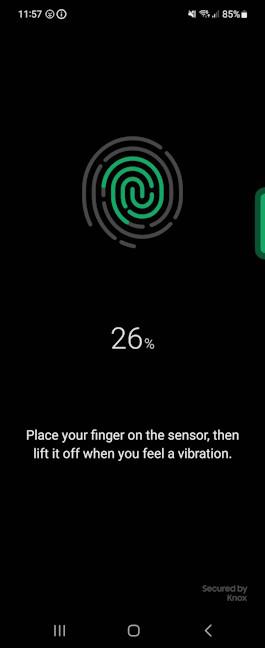
 The fingerprint sensor is fast and precise
Overall, I’m happy with my experience in using this phone. Even though it has a few annoying limitations like slow “fast” charging, the Samsung Galaxy Z Flip5 is a great Android smartphone for everyday use. It offers excellent performance, and its flexible form factor enables new ways to use your phone.
The fingerprint sensor is fast and precise
Overall, I’m happy with my experience in using this phone. Even though it has a few annoying limitations like slow “fast” charging, the Samsung Galaxy Z Flip5 is a great Android smartphone for everyday use. It offers excellent performance, and its flexible form factor enables new ways to use your phone.
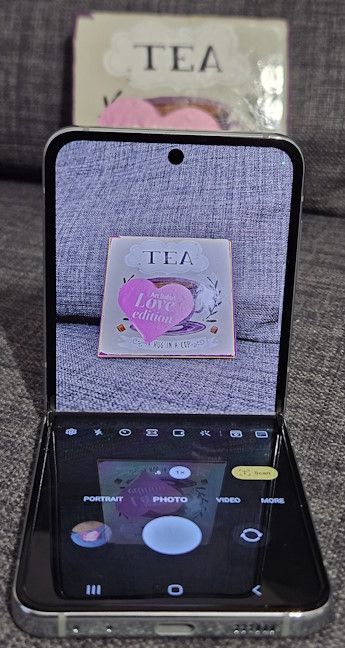
 Feel free to set the phone down in an L shape
Having an optical zoom feature would have made the whole experience even better. Another issue is that you get optical image stabilization only on the wide lens but not on the others. For a premium smartphone like this one, this is a disappointing omission. On the upside, though, the phone is a lot of fun because of the new ways you can take photos due to its flexible form factor.
The Camera app is the same as on other Samsung smartphones, meaning it works great and is easy to use. You get all the options you need, including a Pro mode for people knowledgeable about photography.
Feel free to set the phone down in an L shape
Having an optical zoom feature would have made the whole experience even better. Another issue is that you get optical image stabilization only on the wide lens but not on the others. For a premium smartphone like this one, this is a disappointing omission. On the upside, though, the phone is a lot of fun because of the new ways you can take photos due to its flexible form factor.
The Camera app is the same as on other Samsung smartphones, meaning it works great and is easy to use. You get all the options you need, including a Pro mode for people knowledgeable about photography.
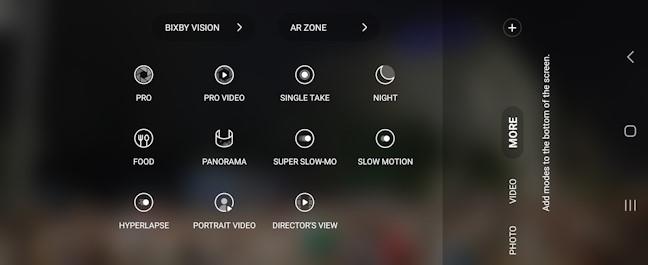
 The options found on the Camera app
The results are top-notch in good lighting conditions, no matter which lens you use. The exposure is excellent, the sharp contrast is not overdone, and the colors look natural. However, as is always the case with Samsung devices, you get the impression that colors are more vivid than in real life.
The options found on the Camera app
The results are top-notch in good lighting conditions, no matter which lens you use. The exposure is excellent, the sharp contrast is not overdone, and the colors look natural. However, as is always the case with Samsung devices, you get the impression that colors are more vivid than in real life.
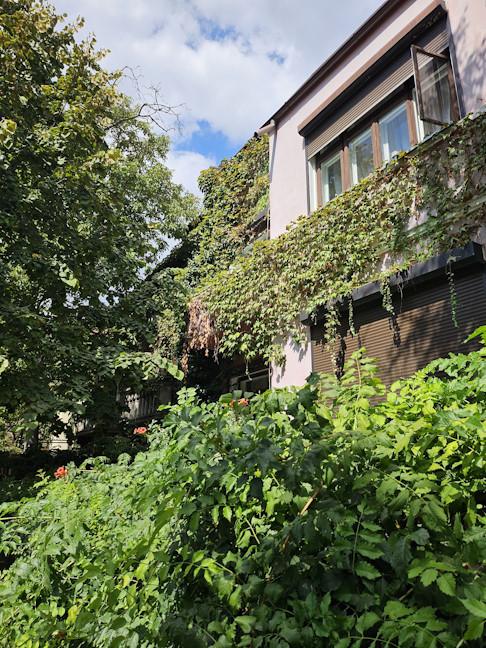
 Daylight pictures look good
I saw good color consistency between the wide and ultrawide lenses. Even images taken with 2x digital zoom offer similar colors to regular shots. However, when you zoom in, you notice a bit of softness. Again, I wish we had optical zoom on the Samsung Galaxy Z Flip5.
Daylight pictures look good
I saw good color consistency between the wide and ultrawide lenses. Even images taken with 2x digital zoom offer similar colors to regular shots. However, when you zoom in, you notice a bit of softness. Again, I wish we had optical zoom on the Samsung Galaxy Z Flip5.
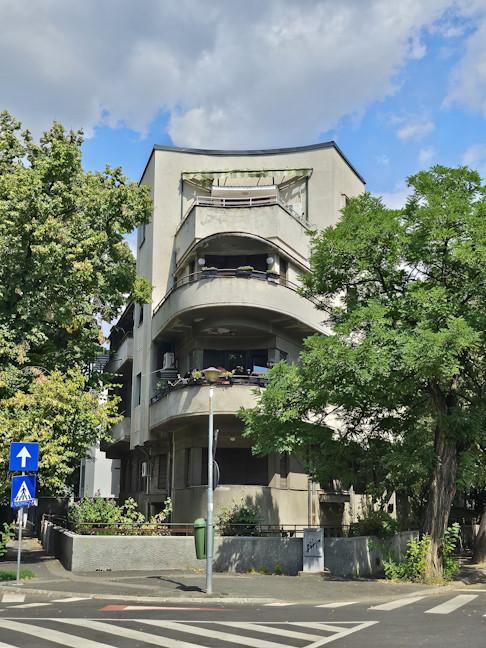 A picture with 2x digital zoom
Night photos look great if you have steady hands or place the Flip5 on a flat surface. You get plenty of details, even in the darker areas. However, if your subject is moving, expect some loss of detail. Also, zooming in low light is not something I recommend, as the result is likely to suffer from softness and visible over-processing.
A picture with 2x digital zoom
Night photos look great if you have steady hands or place the Flip5 on a flat surface. You get plenty of details, even in the darker areas. However, if your subject is moving, expect some loss of detail. Also, zooming in low light is not something I recommend, as the result is likely to suffer from softness and visible over-processing.
 A night picture taken with Samsung Galaxy Z Flip5
The selfie camera does a great job of taking portraits in good lighting. However, night shots don’t have as much detail as when using the main cameras, and the skin tones don’t look as great.
A night picture taken with Samsung Galaxy Z Flip5
The selfie camera does a great job of taking portraits in good lighting. However, night shots don’t have as much detail as when using the main cameras, and the skin tones don’t look as great.

 The selfie camera is competent
If you want to take a look, I have created the gallery below with dozens of pictures taken with the Samsung Galaxy Z Flip5 using all kinds of settings. Browse through it to get a better idea of the photo experience offered by this phone.
The selfie camera is competent
If you want to take a look, I have created the gallery below with dozens of pictures taken with the Samsung Galaxy Z Flip5 using all kinds of settings. Browse through it to get a better idea of the photo experience offered by this phone.

 Video recording can be done on the Samsung Galaxy Z Flip5 up to a resolution of 4K and 60 frames per second. Remember that you get optical image stabilization only on the wide lens. On the others, you get electronic image stabilization. The videos recorded with this phone look good and have a high dynamic range. Interestingly, I didn’t notice any difference in quality when recording at 30 frames per second vs. 60. The sample below is recorded in 4K and 60 frames per second.
Image stabilization works well when available, and the cameras keep the focus even when dealing with moving subjects. Here’s another sample recorded in 4K and 60 frames per second:
Even though the camera hardware is the same on the Galaxy Z Flip5 as on the Flip4, this phone does take better pictures and offers a better experience thanks to the much larger cover screen and improved post-processing. Its camera system remains competent and delivers a positive experience for most people, especially in good lighting conditions.
Video recording can be done on the Samsung Galaxy Z Flip5 up to a resolution of 4K and 60 frames per second. Remember that you get optical image stabilization only on the wide lens. On the others, you get electronic image stabilization. The videos recorded with this phone look good and have a high dynamic range. Interestingly, I didn’t notice any difference in quality when recording at 30 frames per second vs. 60. The sample below is recorded in 4K and 60 frames per second.
Image stabilization works well when available, and the cameras keep the focus even when dealing with moving subjects. Here’s another sample recorded in 4K and 60 frames per second:
Even though the camera hardware is the same on the Galaxy Z Flip5 as on the Flip4, this phone does take better pictures and offers a better experience thanks to the much larger cover screen and improved post-processing. Its camera system remains competent and delivers a positive experience for most people, especially in good lighting conditions.
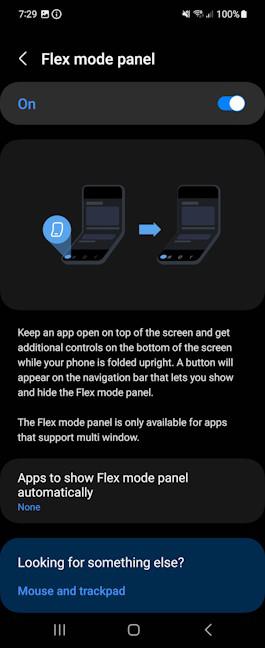 Don't hesitate to experiment with the Flex mode panel
Another upside is that Samsung provides five years of security updates and four generations of Android version updates for the Galaxy Z Flip5 and many other phones. As soon as I started using this phone, I received its first update, which improved the stability and performance of the device and fixed several bugs. I wish more vendors would copy Samsung’s approach to software updates.
Don't hesitate to experiment with the Flex mode panel
Another upside is that Samsung provides five years of security updates and four generations of Android version updates for the Galaxy Z Flip5 and many other phones. As soon as I started using this phone, I received its first update, which improved the stability and performance of the device and fixed several bugs. I wish more vendors would copy Samsung’s approach to software updates.
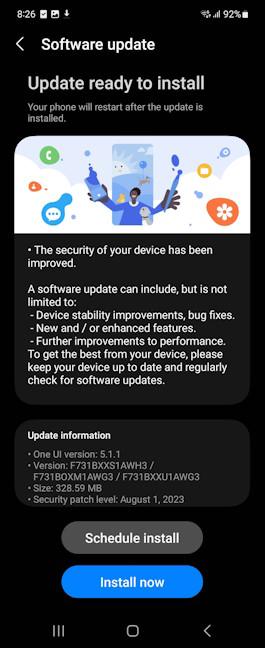 You want to install the updates offered by Samsung
Unfortunately, Samsung bundles many apps on their smartphones, and that includes the Galaxy Z Flip5. Even if you can turn off some of them during the initial setup process, the list of Samsung’s apps is quite long. You also get all the standard apps from Google and some Microsoft apps, like OneDrive, Outlook, Office, and LinkedIn. If you’re curious what Samsung installs on your phone, here’s the list of apps:
You want to install the updates offered by Samsung
Unfortunately, Samsung bundles many apps on their smartphones, and that includes the Galaxy Z Flip5. Even if you can turn off some of them during the initial setup process, the list of Samsung’s apps is quite long. You also get all the standard apps from Google and some Microsoft apps, like OneDrive, Outlook, Office, and LinkedIn. If you’re curious what Samsung installs on your phone, here’s the list of apps:
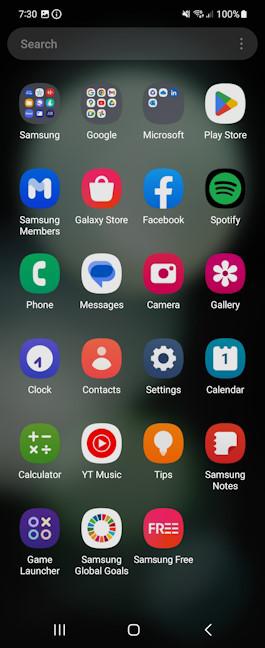 The apps preinstalled on Samsung Galaxy Z Flip5
I appreciate that Samsung Galaxy Z Flip5 benefits from the best software support in the industry and doesn’t force you to use apps you might not want. However, its list of bloatware is quite long, and I wish Samsung trimmed down some of it.
The apps preinstalled on Samsung Galaxy Z Flip5
I appreciate that Samsung Galaxy Z Flip5 benefits from the best software support in the industry and doesn’t force you to use apps you might not want. However, its list of bloatware is quite long, and I wish Samsung trimmed down some of it.
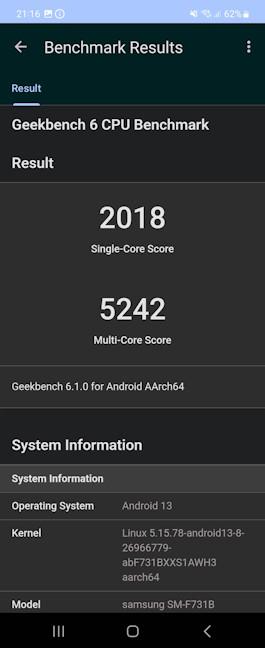 Results in Geekbench 6
Next, I wanted to see the power of the Samsung Galaxy Z Flip5 in the graphics department, and I ran 3DMark’s Wild Life and Wild Life Extreme. Here too, I noticed a significant improvement over last year’s model: the Wild Life test was now maxed out, while in Wild Life Extreme, the phone reported a score of 2686 points and an average framerate of 16.09.
Results in Geekbench 6
Next, I wanted to see the power of the Samsung Galaxy Z Flip5 in the graphics department, and I ran 3DMark’s Wild Life and Wild Life Extreme. Here too, I noticed a significant improvement over last year’s model: the Wild Life test was now maxed out, while in Wild Life Extreme, the phone reported a score of 2686 points and an average framerate of 16.09.
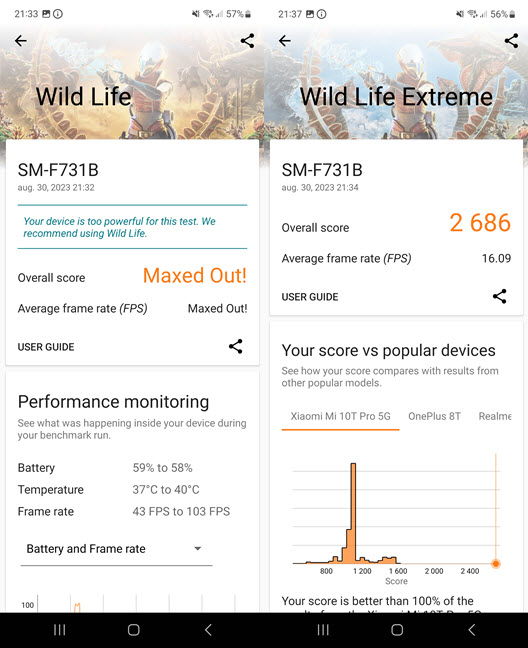
 Results in 3DMark
I also ran GFXBench 5.0 and chose the Car Chase and 1080p Car Chase Offscreen tests. The number of fps (frames per second) rendered by the Samsung Galaxy Z Flip5 was impressive, providing about 28% more frames per second than the Flip4.
Results in 3DMark
I also ran GFXBench 5.0 and chose the Car Chase and 1080p Car Chase Offscreen tests. The number of fps (frames per second) rendered by the Samsung Galaxy Z Flip5 was impressive, providing about 28% more frames per second than the Flip4.
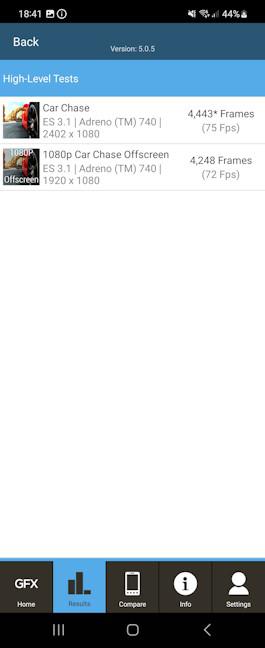 Results in GFXBench 5
Next, I turned to PCMark for Android to test general performance in productivity tasks and the battery life you get when using the phone without interruption doing normal things like browsing the web, watching videos, opening all kinds of documents, etc. Samsung Galaxy Z Flip5 lasted for about 11 hours and 35 minutes of continuous use in the Work 3.0 battery life test, and it scored 15106 points in the Work 3.0 performance test. These results confirm that the Galaxy Z Flip5 performs great in all tasks. PCMark also shows that this phone’s battery life is large enough to last a full day of normal usage, but not more, similar to my experience in real life.
Results in GFXBench 5
Next, I turned to PCMark for Android to test general performance in productivity tasks and the battery life you get when using the phone without interruption doing normal things like browsing the web, watching videos, opening all kinds of documents, etc. Samsung Galaxy Z Flip5 lasted for about 11 hours and 35 minutes of continuous use in the Work 3.0 battery life test, and it scored 15106 points in the Work 3.0 performance test. These results confirm that the Galaxy Z Flip5 performs great in all tasks. PCMark also shows that this phone’s battery life is large enough to last a full day of normal usage, but not more, similar to my experience in real life.
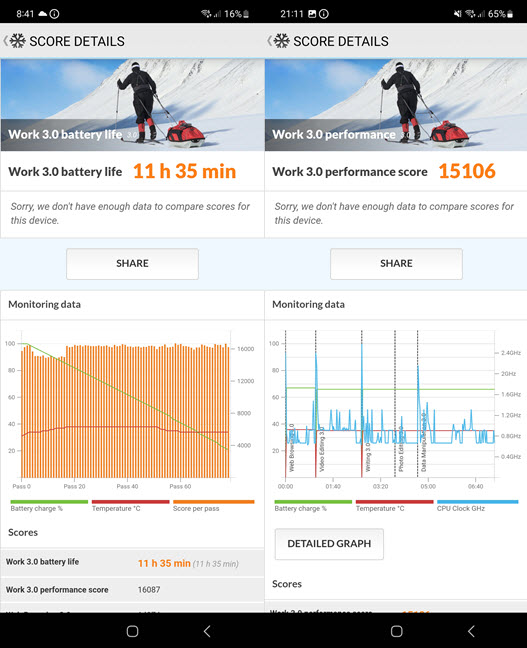
 The scores obtained in PCMark
For the last benchmark, I chose SpeedTest, which shows how fast Wi-Fi connectivity can be on this smartphone. My mobile provider doesn’t have 5G connectivity, so testing how fast Wi-Fi 6 works on this smartphone is the next best thing. As you can see, I reached a respectable download speed of 762 Mbps.
The scores obtained in PCMark
For the last benchmark, I chose SpeedTest, which shows how fast Wi-Fi connectivity can be on this smartphone. My mobile provider doesn’t have 5G connectivity, so testing how fast Wi-Fi 6 works on this smartphone is the next best thing. As you can see, I reached a respectable download speed of 762 Mbps.
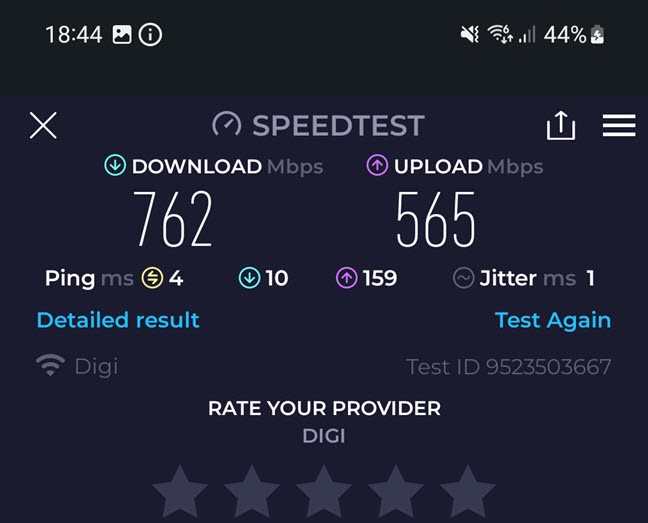
 The speed you get on Wi-Fi
The benchmarks I’ve run confirm that Samsung Galaxy Z Flip5 offers excellent performance, in line with other flagship smartphones in 2023. This phone is fast and can run any game or app with excellent performance.
The speed you get on Wi-Fi
The benchmarks I’ve run confirm that Samsung Galaxy Z Flip5 offers excellent performance, in line with other flagship smartphones in 2023. This phone is fast and can run any game or app with excellent performance.
Samsung Galaxy Z Flip5: Who is it good for?
This smartphone is a good choice for:- Those who appreciate its pocketability and foldable design
- People who are interested in fashionable devices that stand out
- Users who want new ways to take pictures and videos
- Those looking for a smartphone with excellent performance
Pros and cons
The best things about the Samsung Galaxy Z Flip5 are:
- Flexible design that looks good
- Excellent cover screen, which allows for new ways of using the phone
- Outstanding long-term software support
- Top-notch performance
- IPX8-certified water resistance
- Slow “fast” charging
- No telephoto lens, optical image stabilization only on the main camera
- Incompatible with Samsung Dex
Verdict
The Galaxy Z Flip line-up is steadily evolving from one generation to the next, and the Flip5 makes no exception to this rule. While the new model doesn’t change many things over its predecessor, it does improve in some key areas, which make it a better phone and keep it competitive in a market that’s getting busier. Samsung Galaxy Z Flip5 is one of the best phones in the foldable market, and if you want to make the jump, you’ll get the most fine-tuned experience available today. If you’re willing to try a new way of using a smartphone, the Samsung Galaxy Z Flip5 is the device for you.Unboxing the Samsung Galaxy Z Flip5
Just like its predecessor and most other Samsung smartphones these days, Galaxy Z Flip5 comes in a simple black box made of recycled cardboard. You see a picture of the device and its name on the top cover. There’s little information on the sides of the box, except for details like the model number, IMEI code, and your phone’s serial number.Design and build quality
Samsung Galaxy Z Flip5 is a relatively ambitious upgrade over its predecessor. While its general design has remained the same, the cover screen has been thoroughly extended from 1.9 inches on the Flip4 to 3.4 inches and is protected by Gorilla Glass Victus 2. The positioning of the rear camera system has also been changed from vertical to horizontal.Hardware specifications
Samsung Galaxy Z Flip5 packs all the latest flagship hardware: it has an octa-core Qualcomm Snapdragon 8 Gen2 for Galaxy processor and an Adreno 740 graphics chip, as well as 8 GB of RAM and 256 or 512 GB of storage space for the firmware. The 3.4-inch cover display uses a Super AMOLED panel with a resolution of 720 x 748 pixels, a 60 Hz refresh rate, and a maximum brightness of 1600 nits.The smartphone experience on the Samsung Galaxy Z Flip5
Like its predecessors, Samsung Galaxy Z Flip5 shines through its flexible form factor, making it easy to put in your pocket, where many modern smartphones have trouble fitting in. Even though it’s not a small phone, folding it makes it so. One thing I noticed is that due to the new hinge design, dust and lint no longer accumulate in the middle of the phone, where the hinge is, as it did with the Flip4. The only place where dust accumulates easily is between the two main cameras, which need regular cleaning.The camera experience on the Samsung Galaxy Z Flip5
During my testing for this review, I took the Samsung Galaxy Z Flip5 with me on different occasions, including for an event dedicated to dancing in the street. If you’re curious about my experience, read this article: Samsung Galaxy Z Flip5: Expressions of FLEXibility. While the general photo/video experience is positive due to the flexible form factor, which allows you to use the phone from all angles, I missed having a telephoto camera.
Video recording can be done on the Samsung Galaxy Z Flip5 up to a resolution of 4K and 60 frames per second. Remember that you get optical image stabilization only on the wide lens. On the others, you get electronic image stabilization. The videos recorded with this phone look good and have a high dynamic range. Interestingly, I didn’t notice any difference in quality when recording at 30 frames per second vs. 60. The sample below is recorded in 4K and 60 frames per second.
Image stabilization works well when available, and the cameras keep the focus even when dealing with moving subjects. Here’s another sample recorded in 4K and 60 frames per second:
Even though the camera hardware is the same on the Galaxy Z Flip5 as on the Flip4, this phone does take better pictures and offers a better experience thanks to the much larger cover screen and improved post-processing. Its camera system remains competent and delivers a positive experience for most people, especially in good lighting conditions.
Android 13, OneUI 5.1, and bundled apps
Samsung Galaxy Z Flip5 has Android 13 preinstalled and OneUI version 5.1.1. If you’re a long-time Samsung user, you won’t have any issues adapting to the user interface available for this phone. You’ll be happy that Samsung has added personalization options for this foldable phone. For example, you can set which apps are allowed on the cover screen, enable or disable the widgets you want, and turn on the Flex mode panel for apps that support multi-window (the ability to open and use two apps simultaneously by splitting the screen).- Galaxy Store - Samsung’s app store aims to be an alternative to the Play Store. I don’t enjoy it, and the only thing I use it for is downloading Samsung apps for the devices in my home. However, they can be downloaded from the Play Store too.
- AR Zone - an app for creating personalized emojis you can use in your chats.
- Bixby - Samsung’s virtual assistant, which most people don’t like to use. Luckily, replacing it with the more useful Google Assistant is easy.
- Calculator - a simple app that does math calculus. We all need that now and then, right?
- Samsung Internet - the default browser promoted by Samsung. I recommend Google Chrome or Microsoft Edge instead.
- SmartThings - the company’s app for managing Samsung smart devices like vacuum cleaners, washing machines, ovens, etc. It’s useful if you have other Samsung smart devices in your home.
- Samsung Health - Samsung’s health & fitness app, designed for collecting data from your Samsung wearables like the Samsung Galaxy Watch5.
- Galaxy Wearable - useful for pairing and configuring your Samsung wearables like the Galaxy Buds2 Pro.
- Voice Recorder - an app for recording sound/voice using the smartphone’s microphones.
- Samsung Members - helps you connect with other Samsung Galaxy device owners and get help when facing problems.
- Spotify - the popular music streaming service millions of people use, including most of our team.
- Facebook - the popular social networking app we love to hate. Luckily, it is easy to remove if you don’t want to use it.
- Netflix - if you’re not a subscriber, you’ll want to skip installing this app or remove it after your phone is set up.
- Gallery - Samsung’s app for browsing and managing your photos and videos. Some people like it. However, I prefer Google Photos. What about you?
- My Files - a useful file manager for your smartphone, which you should keep and use when necessary.
- Samsung Notes - useful for taking notes. If you want your notes synchronized across many devices, you may want to use Microsoft’s OneNote instead.
- Game Launcher - allows you to enable Game Booster (blocks notifications and optimizes performance during games), use Discord to chat with your friends while playing, and even play some games without installing them on the device through the Instant Plays feature.
- Samsung Global Goals - this app lets users donate money to charities or turn on ads whose revenue is then used to fund charity programs worldwide.
- Samsung Free - Samsung’s annoying alternative to Google Discover. Luckily, now it’s easy to switch to Google Discover.
- Samsung Wallet - this app helps you store passwords, addresses, and credit card details for easier online browsing and shopping. You can have your bank accounts, credit cards, keys, and boarding passes in one app, where they’re kept safe.
- Smart Switch - helps you transfer your data from another phone to your Galaxy Z Flip5.
- Tips - a useful app that teaches you how to use the unique features of your phone. I recommend using it, especially if this is your first Galaxy Z Flip phone.
Performance in benchmarks
While everyone using the Samsung Galaxy Z Flip5 can state that it performs great, responds quickly to the user’s commands, and doesn’t lag, it’s always a good idea to put things into a more objective perspective by running some benchmarks. I started with Geekbench 6, where the phone scored 2018 points in the single-core test and 5242 in the multi-core one. These scores represent a significant improvement over last year’s Flip4 and are similar to those from other flagship models like the Samsung Galaxy S23.
Discussion (1)
My tech guy has a flip & it looked very cool. He insisted on taking time out (whilst we had a cigar break) in a very busy day. I’m happy with my new Nokia G22 but would not refuse a free trial (upgrade) to this Galaxy flip – LOL.