



Google is integrating Gemini into Chrome’s Vertical Tabs through a dedicated toolbar entry that activates only in that layout. The change links AI access directly to the browser’s tab workspace instead of keeping it inside separate panels or menus.
A fresh Chromium commit, introduces a new "ToolbarGlicButton" in the browser toolbar. The control becomes visible only when Vertical Tabs are in use. This layout-specific behavior prepares a dedicated Gemini surface for the Vertical Tabs interface rather than relying only on existing entry points.
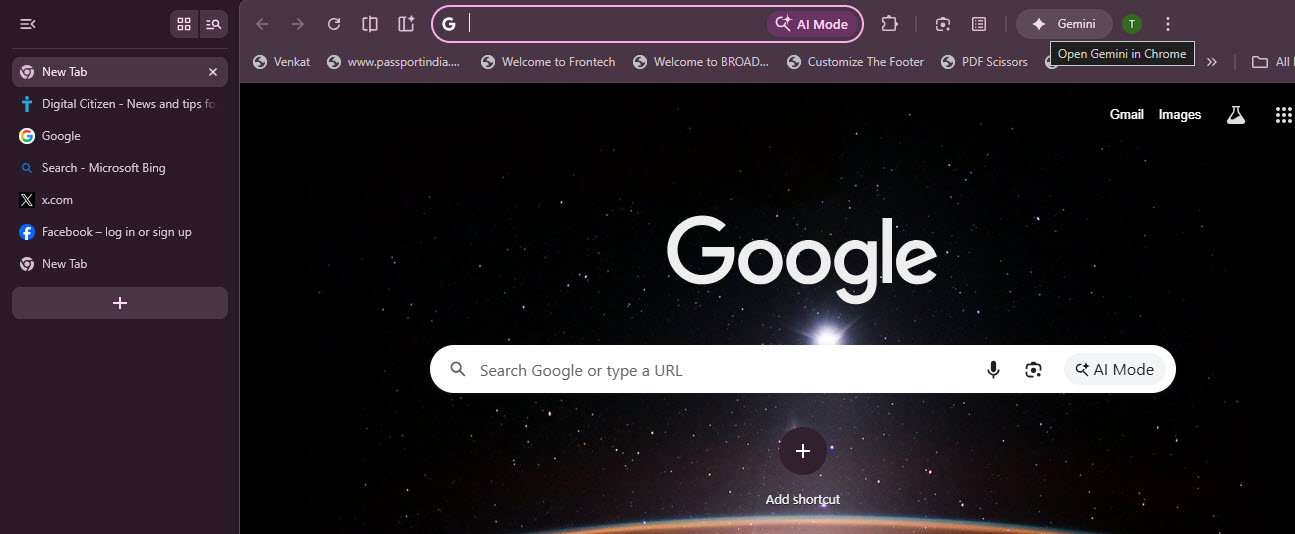
Recently, we reported that the Projects panel in Vertical Tabs connects AI chats with tab groups inside a single workspace view. The new toolbar entry makes Gemini available from the browser toolbar when Vertical Tabs are active and removes the need to open separate panels while working across multiple tabs.
Gemini is already accessible in Chrome through entry points such as the toolbar and side panel. Vertical Tabs uses a different interface structure. That structure requires separate placement for controls that must appear in the correct position within the layout. The new button ties Gemini visibility directly to the Vertical Tabs interface.
The change does not confirm full functionality or release timing of Gemini in Vertical Tabs. Alongside the Projects panel work, it ties Gemini access to Chrome’s tab workspace rather than separate panels.
Discussion (0)
Be the first to comment.