




Google continues work on Immersive Reading mode in Chrome, with a new experiment that shows how the feature is progressing.
Immersive Reading mode in Chrome gives readers more control over how text appears on screen by presenting articles in a consistent format with predictable spacing and text flow. The mode also removes the side panel and places all reading options inside the three-dot menu.
Line focus in Chrome's Immersive Reading Mode
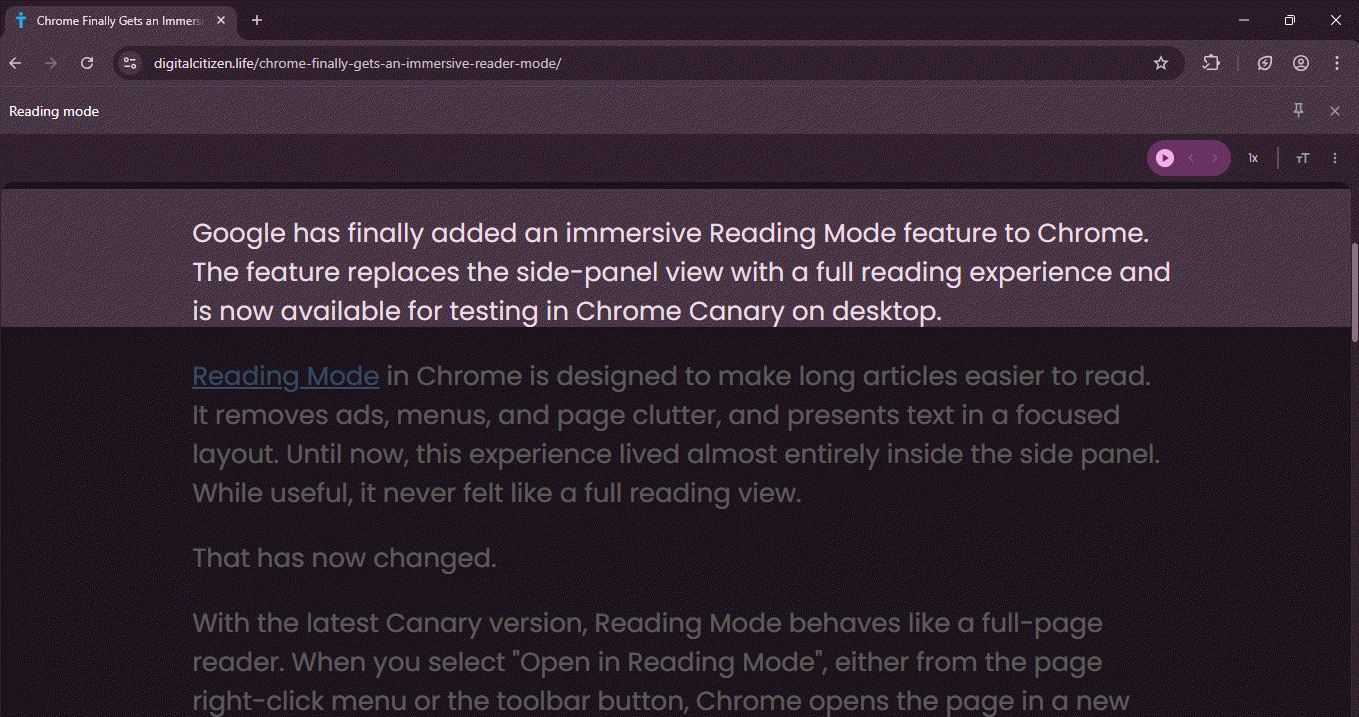
In the latest Chrome Canary version, Google is testing a "line focus" feature. The feature highlights a small section of text at a time and keeps the rest of the page dimmed. It is hidden behind a flag and only appears inside Immersive Reading mode.
The new option adds a Line focus submenu to the Immersive Reader toolbar. Once turned on, it lets users highlight:
- One line
- Three lines
- Five lines

The selected lines remain clearly visible, while the rest of the text fades into the background. Readers can move through long pages without losing their place.
Line focus is not new. Microsoft Edge already offers the same feature in its Immersive Reader, with options to focus on one, three, or five lines while reading.
Chrome’s test looks similar in purpose. It shows Google is bringing its reading feature closer to what Edge already provides.

For now, the feature is limited to Canary. Google has not confirmed if or when it will reach stable versions of Chrome.
That's not all. Chrome is testing a new Chrome Updater Page and improving Xbox Controller detection on Windows.



Discussion (0)
Be the first to comment.