




Living in a spacious home with a yard, an outdoor garage, and a pool has its perks. However, these homes need reliable Wi-Fi, both indoors and outdoors. After all, you don’t want to check your backyard security cameras only to see a buffering screen. Some people try to solve this problem by installing range extenders or using indoor routers outdoors. Unfortunately, these solutions often fail in very hot or cold weather, which is why we have Wi-Fi products designed to handle the elements on top of your network connectivity. One such product is the ASUS ZenWiFi BD4 Outdoor. In this review, I’ll explore whether this weather-resistant mesh unit delivers reliable Wi-Fi 7 connectivity and just how easy it is to set up and use. Let’s get started:
ASUS ZenWiFi BD4 Outdoor: Who is it good for?
This mesh unit is a good choice for:
- Homes with outdoor areas requiring Wi-Fi connectivity
- Smart homes with lots of IoT devices
- Those already using extendable ASUS routers or ZenWiFi mesh systems
Pros and cons
Here are the things I like about the ASUS ZenWiFi BD4 Outdoor:
Rugged build quality with IP65 water and dust resistance
- Functions in temperatures that vary between -30°C to 60°C (–22°F to 140°F)
- Includes electrostatic discharge (ESD) and surge protection
- Two high-speed 2.5 Gbps ports with Power over Ethernet capabilities
- Flexible mounting options for outdoor use (with the necessary accessories included)
- Good performance on the 2.4 GHz band, excellent for IoT devices
As for downsides:
- Performance on the 5 GHz band deserves some improvement
- A longer power cable would have been useful
Verdict
The ASUS ZenWiFi BD4 Outdoor is a specialized mesh unit designed to provide Wi-Fi 7 connectivity for outdoor spaces with security cameras, smart locks, charging stations, irrigation systems, and other IoT devices. It excels in this area by delivering good performance on the 2.4 GHz wireless band, which is exactly what these devices need. However, its underwhelming 5 GHz wireless performance makes it a poor choice for bandwidth-intensive activities like 4K video streaming or online gaming on the patio. The unit’s rugged, IP65-rated build and wide temperature tolerance enable it to withstand everything from heavy rain and snow to scorching summer heat. Additionally, the generous selection of included mounting accessories allows for flexible installation on various surfaces (walls, poles, or other structures). If you're already invested in the ASUS AiMesh ecosystem and need reliable outdoor Wi-Fi to keep your smart devices connected year-round, the ASUS ZenWiFi BD4 Outdoor is a smart addition to your home network.
Unboxing the ASUS ZenWiFi BD4 Outdoor
The ASUS ZenWiFi BD4 Outdoor arrives in a blue cardboard box with a picture of the mesh unit on the front cover. As you can see below, this is a dual-band networking device designed for outdoor use. It supports the new Wi-Fi 7 standard, and can be mounted on walls, poles, tables, and all kinds of flat surfaces.

When you unbox it, you find another box designed to protect everything, with some leaflets and a few accessories.

Taking everything out reveals the following items: the ZenWiFi BD4 Outdoor unit, a short network cable, power cables with plugs for the standard EU electrical networks and the UK ones (if you buy it from a European country). You also get a mounting kit with all kinds of accessories for installing it anywhere you want, the quick start guide, the warranty card, and other leaflets.

The packaging for the ASUS ZenWiFi BD4 Outdoor not only looks great but also highlights the key features of this mesh unit. ASUS has been generous with the bundled accessories, making it easy to install this unit wherever you need it: in your garage, your yard, by the pool, or any other outdoor location. I was really excited to set it up and get it running.
Hardware specifications and design
The design of the ASUS ZenWiFi BD4 Outdoor is quite minimalistic. You can only see the company logo on the front of the mesh unit. There are no LEDs or ventilation grids, and the entire unit is covered in rugged plastic that’s also heat resistant. It measures 106 x 106 x 200 mm (4.17 x 4.17 x 7.87 inches) with a weight of 1040 grams (36.68 ounces).

Inside each mesh unit, there are graphite sheets for efficient cooling and a heatsink that should protect all the hardware from overheating. This networking device has an IP65 certification for water and dust resistance and is able to operate in temperatures ranging from -30°C to 60°C (or –22°F to 140°F).
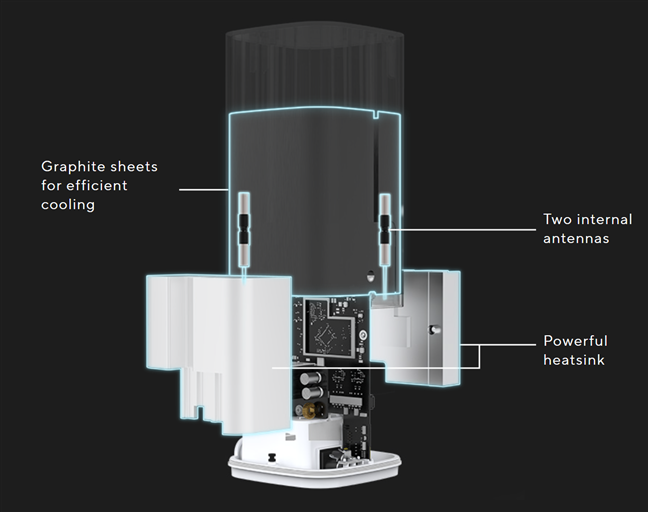
Image source: ASUS
It also offers electrostatic discharge (ESD) and surge protection. That means it can handle small, high-voltage discharges from static electricity and function without issues even in heavy rain or lightning storms.
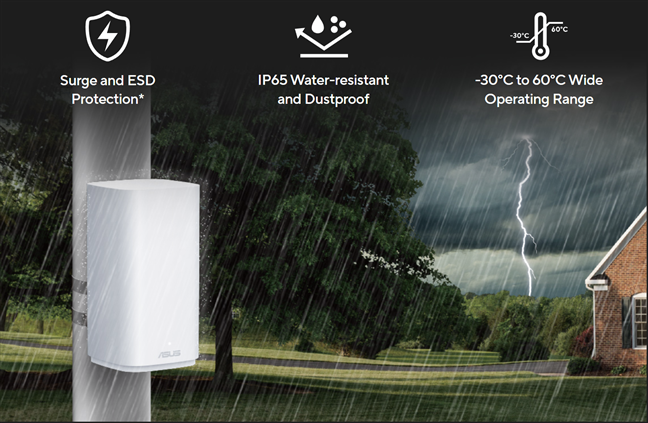
Image source: ASUS
At the bottom of the ASUS ZenWiFi BD4 Outdoor, you find two Power Over Ethernet (PoE) ports, each with a speed of 2.5 Gbps, alongside a power jack. These two Ethernet ports are useful if you have a switch that provides PoE, as they allow you to connect the mesh unit to your network using a single cable, which simultaneously delivers the necessary power. Unfortunately, the included power cable is quite short, so you need a power outlet nearby if you don’t have a switch with PoE capabilities.

The ASUS ZenWiFi BD4 Outdoor is powered by a quad-core Qualcomm IPQ5322 chip operating at 1.5 GHz, optimized for managing IoT devices like surveillance cameras, sensors, alarms, and charging stations. Additionally, this mesh unit features 512 MB of RAM and 128 MB of storage space for its firmware. It offers Wi-Fi 7 connectivity on both the 2.4 GHz and 5 GHz bands. Unfortunately, it lacks a third 6 GHz band, which would enable it to better utilize Wi-Fi 7 features like Multi-Link Operation (MLO). Its total theoretical maximum bandwidth is divided as follows: 688 Mbps on the 2.4 GHz band and 2882 Mbps on the 5 GHz band. The ZenWiFi BD4 Outdoor has two internal antennas and supports wireless transfers using 2x2 MU-MIMO. If you don’t know what that means, I highly recommend reading this article, which explains everything in simple terms: What is MU-MIMO? Why is it essential for your next wireless router?
The hardware specifications of the ASUS ZenWiFi BD4 Outdoor make it an appealing mesh unit that should provide users with a good outdoor Wi-Fi experience. However, specifications don’t tell the whole story; the actual user experience is what matters. Before moving forward, if you want to learn more about this mesh unit’s specifications and features, visit this page: ASUS ZenWiFi BD4 Outdoor. Otherwise, continue reading to learn about my actual experience.
Setting up the ASUS ZenWiFi BD4 Outdoor
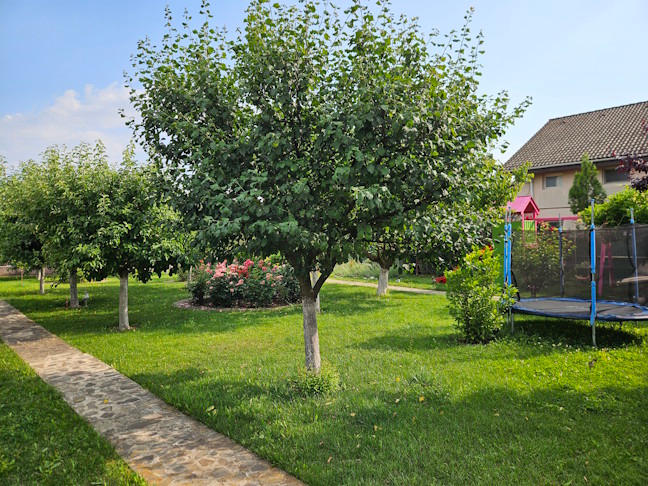
As its name implies, the ASUS ZenWiFi BD4 Outdoor is designed for outdoor use, so I couldn’t properly review it in my apartment. I needed access to a large home with a yard where this mesh unit could be installed and tested. Fortunately, I found someone who had a suitable living space and needed outdoor Wi-Fi for their family. The house where I installed the ASUS ZenWiFi BD4 Outdoor is located near Bucharest, Romania, in a small town characterized by quiet streets with spacious yards and gardens. My goal was to set up the ASUS ZenWiFi BD4 Outdoor to provide a reliable Wi-Fi connection in the front yard (pictured below), which includes an outdoor surveillance system and a smart lock system for several doors, including the front yard entrance.
The ASUS ZenWiFi BD4 Outdoor isn’t designed to work as a standalone router. It’s meant to function together with an ASUS extendable router (preferably with Wi-Fi 7) or an ASUS ZenWiFi mesh system, as a secondary unit. The house I’m using for this project is quite large, with many rooms, distributed on three floors, so I decided to first install the ASUS ZenWiFi BQ16 that I reviewed a couple of months ago. It’s a powerful mesh system with two units, delivering excellent Wi-Fi 7 connectivity across large living spaces.

Below, you can see the house where I’ve installed the mesh system. It has three floors, two terraces, and more than a dozen rooms. Luckily, the walls aren’t very thick, and the house’s wood-heavy construction is friendly to Wi-Fi signals. I installed the primary ASUS ZenWiFi BQ16 unit in a spacious room located at the center of the first floor, and the second unit in the central area of the second floor. This setup provides excellent Wi-Fi connectivity throughout the house, even in a remote corner on the third floor where one of the residents has set up their work desk.

Once I was happy with the setup I’d created for the ASUS ZenWiFi BQ16 and the speed I had throughout the house, I installed the ASUS ZenWiFi BD4 Outdoor on the terrace on the first floor, facing the yard.

Adding the ASUS ZenWiFi BD4 Outdoor was straightforward. I logged into the firmware of the main unit, navigated to the AiMesh section, and clicked on Add AiMesh Node. The setup wizard detected the unit instantly and allowed me to connect and add it to the network. While this process isn’t technically complicated, it does take longer than adding other ZenWiFi units designed for indoor use, so be prepared to invest some extra time.
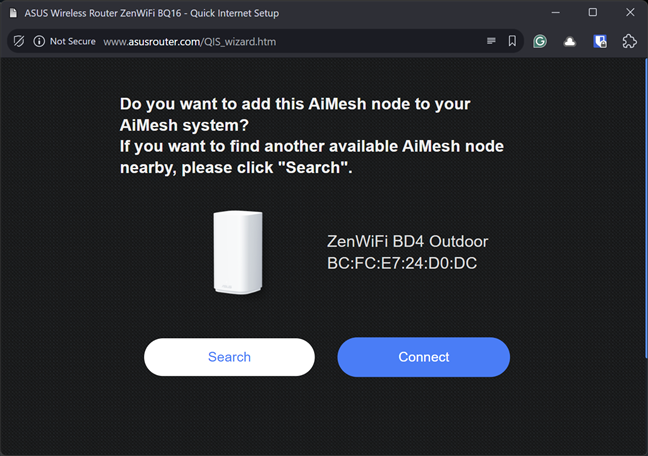
After the ASUS ZenWiFi BD4 Outdoor is added to your network, you see it in the AiMesh section. Next, it’s time to set up its backhaul. As I said earlier, the house where I installed it doesn’t have many thick walls to absorb the wireless signal. So I could use a Wi-Fi backhaul to connect the ZenWiFi BD4 Outdoor to the rest of the network. If you can do the same, try to use the 5 GHz band for the backhaul. If it doesn’t work well, switch to 2.4 GHz.

If your home has many thick walls, and setting up a Wi-Fi backhaul doesn’t get you good results, consider setting up an Ethernet backhaul instead. This will allow you to get the maximum speed possible from the ASUS ZenWiFi BD4 Outdoor. However, you have to go through the hassle of setting up the necessary cabling in your home. Luckily, this wasn’t necessary for me. The ZenWiFi BD4 Outdoor reported receiving data at a speed of 309.7 Mbps and transmitting data at 229.4 Mbps.
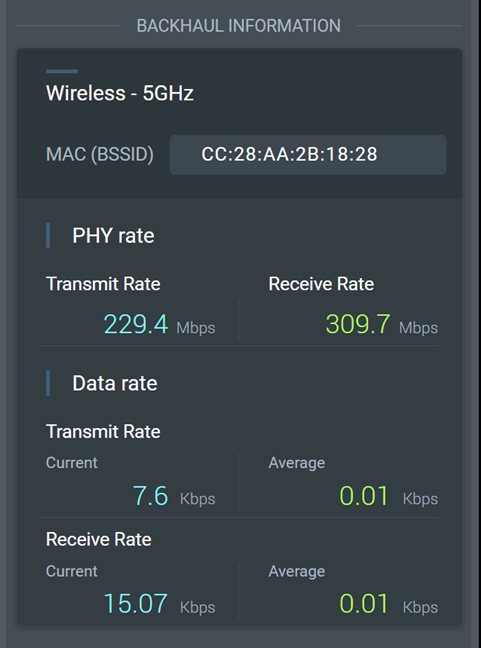
The ZenWiFi BD4 Outdoor uses the same firmware as all other ASUS Wi-Fi 7 mesh systems. Since I was using the ASUS ZenWiFi BQ16 as the primary unit, all its features also worked on the ZenWiFi BD4 Outdoor. I was able to configure AiProtection and utilize all the VPN functions, network tools, and so on. The only aspect I found lacking was the inability to use the 6 GHz band. While the two ASUS ZenWiFi BQ16 units I set up could leverage an MLO backhaul that operated on three different wireless bands (2.4 GHz, 5 GHz, and 6 GHz), the ZenWiFi BD4 Outdoor can only use the 2.4 GHz and 5 GHz bands. Consequently, the Wi-Fi backhaul I employed for the ZenWiFi BD4 Outdoor was not as fast as the one used for the two ZenWiFi BQ16 units.
Overall, I was satisfied with the process of installing the ZenWiFi BD4 Outdoor and integrating it into an existing AiMesh network. Now, it was time to measure its performance.
Wireless network performance
The home where I ran this project has a rather slow internet connection: 500 Mbps for the download speed, and just 50 Mbps for the upload speed. The ASUS ZenWiFi BQ16 and the ASUS ZenWiFi BD4 Outdoor are a bit overkill for such an internet connection. They can both use 2.5 Gbps internet connections, while the ZenWiFi BQ16 can go as far as 10 Gbps internet. While those internet options aren’t available in the area, 1 Gbps is, so I encouraged the owners to upgrade their internet plan as soon as possible.
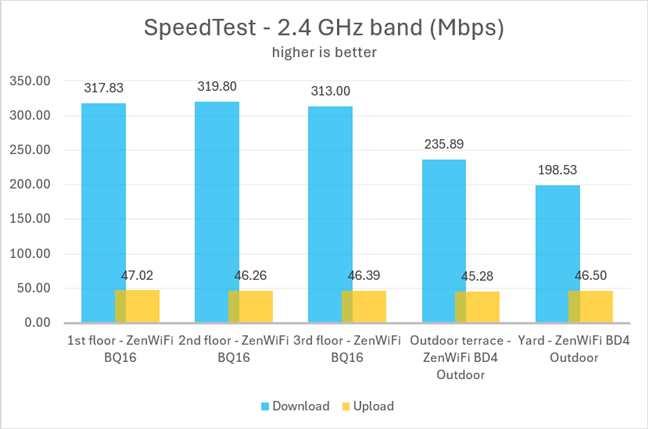
When I was done setting everything up, I wanted to see if the home network was able to reach the maximum offered by their internet connection. I took a laptop with a Wi-Fi 7 network card and ran several SpeedTest measurements. The first three were done inside the house, on each floor, from one to three. For these measurements, the laptop was connected to the Wi-Fi emitted by the ASUS ZenWiFi BQ16. As you can see, on the 2.4 GHz band, I reached download speeds that varied between 313 Mbps and 319.8 Mbps. The upload speed was close to the maximum offered by their internet connection. Then, I moved outdoors and connected the laptop to the Wi-Fi emitted by the ZenWiFi BD4 Outdoor. I made one measurement on the terrace where the ZenWiFi BD4 Outdoor was placed, and another in the yard, 15 meters (49 feet) away from it. As you can see below, the download speed was pretty good, reaching 198.53 Mbps when the laptop was placed 15 meters (49 feet) away from the ZenWiFi BD4 Outdoor, while the upload speed remained similar to what I measured indoors.
I repeated the same measurements on the 5 GHz band, both indoors and outdoors. This time, the download speed indoors reached the maximum possible for their internet connection: 506.25 Mbps. The upload speed was also the maximum allowed by the internet connection: 50.76 Mbps.
When moving outdoors, I noticed that the ASUS ZenWiFi BD4 Outdoor offered download speeds that were surprisingly low, with a maximum of 76.01 Mbps when I was 15 meters (49 feet) away from it. It’s quite a bit lower than I expected. This goes to show that the Qualcomm IPQ5322 chip powering the ZenWiFi BD4 Outdoor is optimized to provide good performance on the 2.4 GHz band used by IoT devices, and less so on the 5 GHz band.
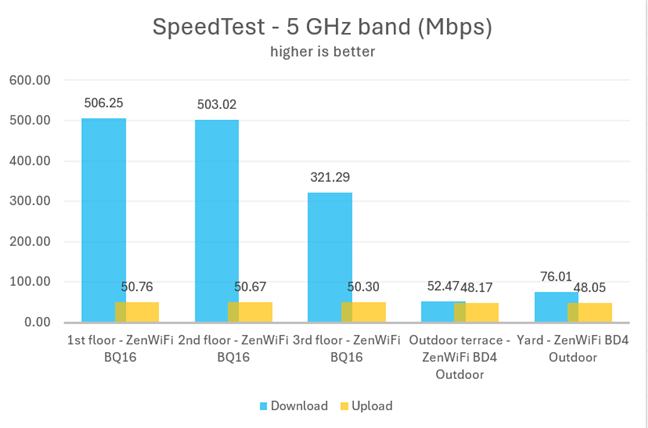
My measurements indicate that the ASUS ZenWiFi BD4 Outdoor is optimized to deliver good performance on the 2.4 GHz band, which is used by IoT devices in homes with large outdoor areas. Unfortunately, its performance on the 5 GHz band is somewhat disappointing, and I hope it will receive improvements in future firmware updates.
Join a giveaway with prizes totalling 4800$
Until November 2nd, 2025, ASUS is organizing a global campaign with prizes worth $4,800, including seven ASUS ZenWiFi BD4 Outdoor units, other ZenWiFi mesh products, and a top-tier ASUS Zenbook 14 OLED laptop.

If you want to participate and have a chance to win, go to the promotion page and sign up. ASUS offers a long list of activities that earn you more points and increase your chances of winning in the final raffle. Read the campaign details carefully and complete as many of the suggested activities as possible.
What is your opinion about the ASUS ZenWiFi BD4 Outdoor?
You have arrived at the end of this review, and I hope that you now have a good understanding of the ASUS ZenWiFi BD4 Outdoor and what it offers. As you have seen, this product is not for everyone. It’s designed to fill a specific niche: those who need reliable Wi-Fi coverage in outdoor spaces for their IoT devices. If you have any questions about the ZenWiFi BD4 Outdoor, don’t hesitate to leave a comment using the options below.


Discussion (0)
Be the first to comment.