Intel's 10th generation processors came out this year, and they require a different type of socket than previous processors. They also work on newer chipsets, with the Z490 being the best of them. Unfortunately, many motherboards based on this chipset have high prices that are not for everyone. The good news is that more affordable motherboards are also being launched, one of them being the ASUS TUF GAMING Z490-PLUS (WI-FI). For a mid-range price, it promises to deliver top performance and excellent build quality. We've tested it, we've formed an opinion about it, and we're now ready to share our findings with you. If you're curious to learn more about the ASUS TUF GAMING Z490-PLUS (WI-FI) motherboard, read on:
ASUS TUF GAMING Z490-PLUS (WI-FI): Who is it good for?
This motherboard is an exceptional choice for you if:
You're a gamer, and you want to build a desktop PC using a new 10th Gen Intel processor
You want a powerful Z490 motherboard that can handle overclocking
You want to pay a reasonable price for a motherboard that delivers everything you need
Pros and cons
Here are the best things about the ASUS TUF GAMING Z490-PLUS (WI-FI):
Large Voltage Regulator Modules (VRMs) and heatsinks
Generous amount of fan headers (connectors)
Headers for connecting fans or LED strips with RGB lighting
It comes with USB 3.2 Gen2 and Gen1 ports, and additional headers on the motherboard
Wireless connectivity featuring the ultrafast Wi-Fi 6 standard
On the other side of things:
Intel's 10th Gen processors that work on the Z490 chipset don't support PCI Express 4.0, only PCIe 3
The motherboard has fewer USB ports than others and only two M.2 slots for solid-state drives (pricier motherboards have more USB ports and three M.2 slots)
Product rating5/5
Verdict
The ASUS TUF GAMING Z490-PLUS (WI-FI) is one of the best mid-range motherboards based on the Intel Z490 chipset, both in terms of price and features. For about 200 USD, you get large heatsinks that cooldown the motherboard under stress, VRMs (Voltage Regulator Modules) that let you overclock your 10th Gen Intel processor, plenty of headers for adding fans and coolers, and even RGB headers for connecting RGB-enabled hardware components. This motherboard can deliver first-rate performance, and the benchmarks we ran also showed that it's great for high-end gaming if paired with a fast Intel processor. Unless you need or want a lot of USB ports or more than two M.2 SSDs, the ASUS TUF GAMING Z490-PLUS (WI-FI) is an excellent choice.
Hardware specifications and design
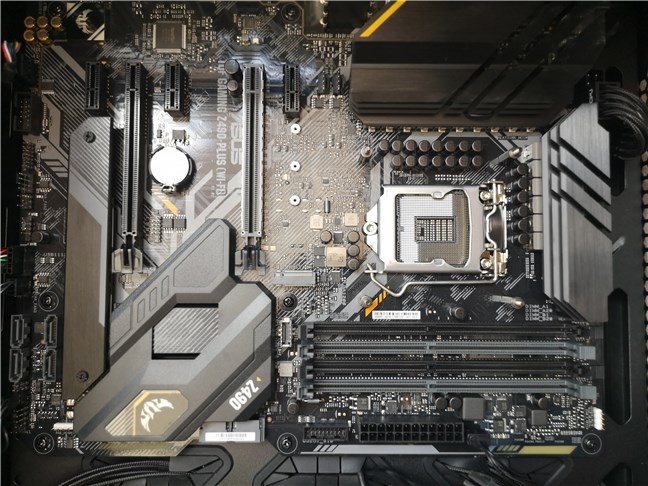
ASUS TUF GAMING Z490-PLUS (WI-FI) is an ATX motherboard with a size of 12 x 9.6 inches or 30.5 x 24.4 cm. It looks beautiful and has a good design. Unlike entry-level or even many mid-range motherboards, this one doesn't expose all its integrated circuits and capacitors. Instead, ASUS uses quite a few metal covers and heatsinks on top of certain areas of the board, like the CPU VRMs, ports section, chipset, or the M.2 slot used by one of the SSDs that you can mount.
The ASUS TUF GAMING Z490-PLUS (WI-FI) motherboard
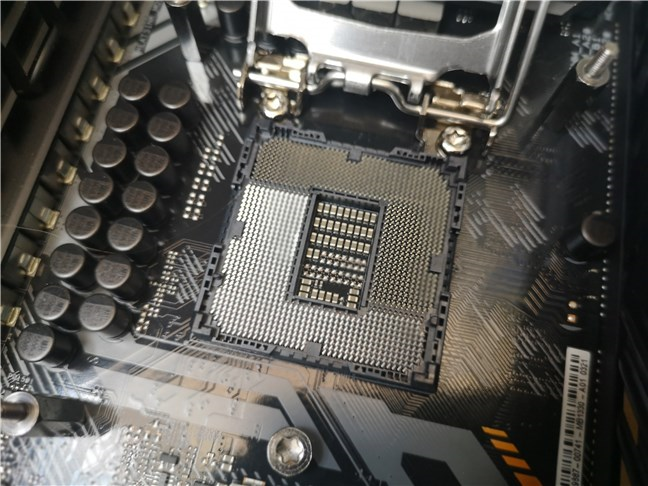
The ASUS TUF GAMING Z490-PLUS (WI-FI) is a motherboard designed for Intel processors from the 10th generation. As such, it features an LGA 1200 socket and the top Z490 chipset. This chipset is the best you can get for Intel's 10th generation processors, and it's also the one you should look for if you intend to overclock your CPU.
The LGA 1200 socket from the ASUS TUF GAMING Z490-PLUS (WI-FI)
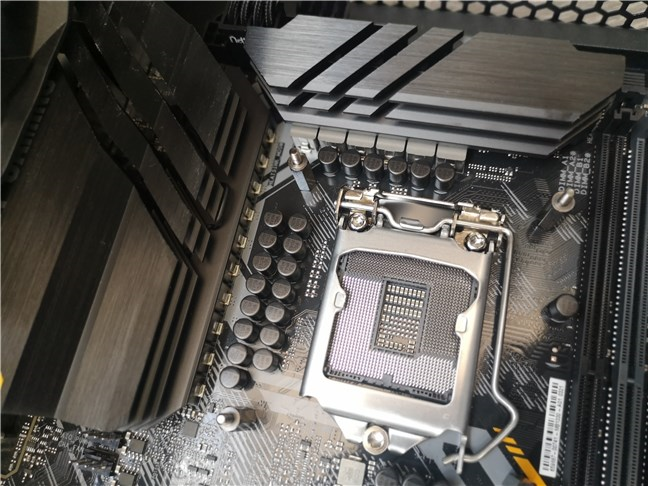
Speaking of overclocking, the large VRM (Voltage Regulator Module) and its heatsinks should provide plenty of headroom for increasing your CPU's frequency and voltages. The electrical power required by the CPU and the rest of the motherboard is delivered via two EPS connectors.
There's a regular 24-pin ATX connector on the motherboard's right side and another 4-pin/8-pin connector on the top-left. According to ASUS, the latter is an enhanced version of the EATX 8-pin socket that's 25% better than a traditional one. They call it a ProCool socket and say that it can deliver up to 480 Watts instead of the 384 Watts offered by regular 8-pin sockets.
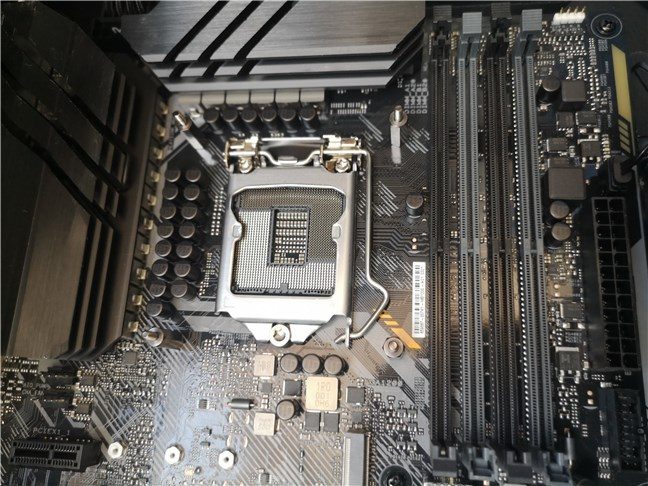
The large VRMs and heatsinks around the CPU socket
ASUS TUF GAMING Z490-PLUS (WI-FI) has four DDR4 DIMM slots that support a maximum of 128 GB. The RAM's maximum speed can go up to 4800 MHz in overclocking mode, but the compatible 10th Gen Intel processors can only use RAM that runs at up to 2933 MHz, natively.
ASUS TUF GAMING Z490-PLUS (WI-FI) has 4 DDR4 DIMM slots
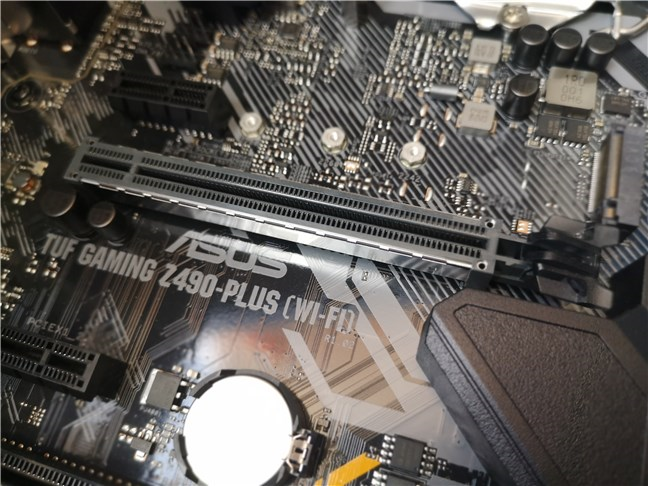
On this motherboard you get all the essentials you need today: one metal-reinforced PCIe 3.0 x16 slot for connecting a dedicated graphics card, one PCIe 3.0 x4 slot, and three PCIe 3.0 x1 slots for other cards you might want to mount. Additionally, the motherboard also comes with six SATA 6Gbps ports and two M.2 slots for PCI Express 3.0 solid-state drives. Both of them support the 2242/2260/2280 form factors, and one of them can also fit 22110 storage devices.
As for dedicated graphics, there's good news but also bad news: the motherboard offers support for AMD 2-Way CrossFireX Technology, but it doesn't support NVIDIA 2-Way SLI Technology.
The PCI Express 3.0 x16 slot used for the graphics card
When it comes to connectivity, the ASUS TUF GAMING Z490-PLUS (WI-FI) motherboard has both wired and wireless chipsets on it, and they're both great ones. The Ethernet part is handled by an Intel I219-V 1Gb chipset, and the Wi-Fi is managed by an Intel Wi-Fi 6 AX201 chipset. The latter comes with 2x2 MIMO, support for all the Wi-Fi standards including Wi-Fi 6, and Bluetooth 5.1.
Audio is delivered by a high definition Realtek ALC S1200A codec with 7.1 surround sound that supports playback at up to 24-Bit/192kHz.
On the input/output back panel, you get five USB 3.2 Type-A ports (1 x Gen 2 and 4 x Gen 1), and one USB 3.2 Gen 2 Type-C port. On the computer case front panel, you can connect another USB 3.2 Gen 2 Type-C port, two USB 3.2 Gen 1 Type-A ports, and three USB 2.0 Type-A ports.
Regarding the cooling system options, the motherboard has ports for both air fans and liquid cooling systems: one processor fan connector, one CPU OPT fan connector, three chassis fan connectors, and one AIO_PUMP connector. Furthermore, if you're a fan of RGB lighting, you also get two Aura RGB strip headers and one addressable Gen 2 header.
For all the technical details about this motherboard, you should visit its official webpage, here: ASUS TUF GAMING Z490-PLUS (WI-FI) Specifications.
The ASUS TUF GAMING Z490-PLUS (WI-FI) is a motherboard that supports the latest 10th Gen Intel Core processors, using the excellent Z490 chipset. It looks great and it should offer high-end performance.
On the next page of this review, you get to see the benchmark results we got from the ASUS TUF GAMING Z490-PLUS (WI-FI).
ASUS TUF GAMING Z490-PLUS (WI-FI) - Benchmark results
We tested ASUS TUF GAMING Z490-PLUS (WI-FI) motherboard together with the following hardware and software:
We also compared the results we got on the ASUS TUF GAMING Z490-PLUS (WI-FI) using the Intel Core i5-10600K CPU with the ones we got on an ASUS ROG Crosshair VIII Hero (Wi-Fi) paired with an AMD Ryzen 7 3700X. The prices of the processors are close, but the prices of the two motherboards are not. Unfortunately, they were the only ones we had, so we couldn't compare the Intel motherboard with a similarly priced AMD model.
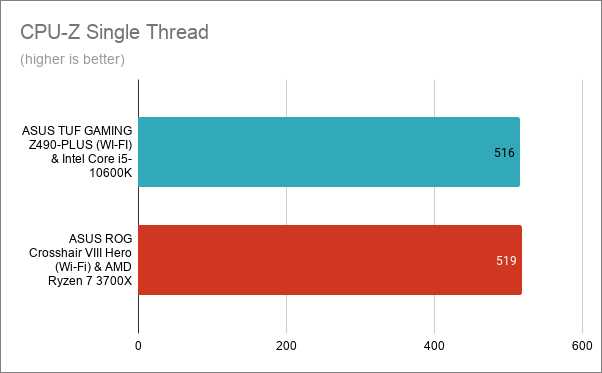
We started by running the benchmark offered by CPU-Z. In the Single-Thread test, using the ASUS TUF GAMING Z490-PLUS (WI-FI) motherboard, the Intel Core i5-10600K processor scored 516 points, while on the ASUS ROG Crosshair VIII Hero (Wi-Fi), the AMD Ryzen 7 3700X scored 519 points. The results are almost identical within the testing variability zone.
CPU-Z Single-Thread - ASUS TUF GAMING Z490-PLUS (WI-FI) with Intel Core i5-10600K
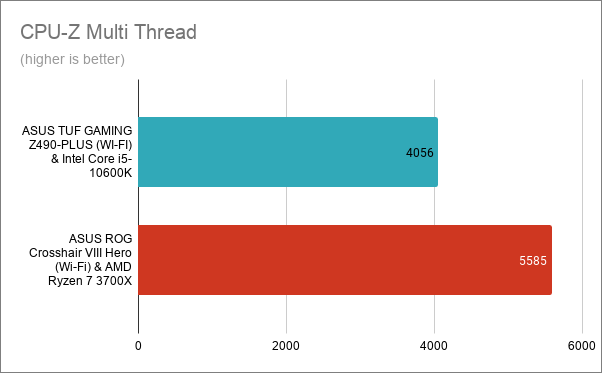
In CPU-Z's Multi-Thread test, which measures the multi-core performance of the processor, we got 4056 points on the ASUS TUF GAMING Z490-PLUS (WI-FI) and 5585 on the Crosshair Hero (Wi-Fi) motherboard. The significant discrepancy here is due to the fact that the Ryzen 7 3700X processor has more cores than the Intel Core i5-10600K.
CPU-Z Multi-Thread - ASUS TUF GAMING Z490-PLUS (WI-FI) with Intel Core i5-10600K
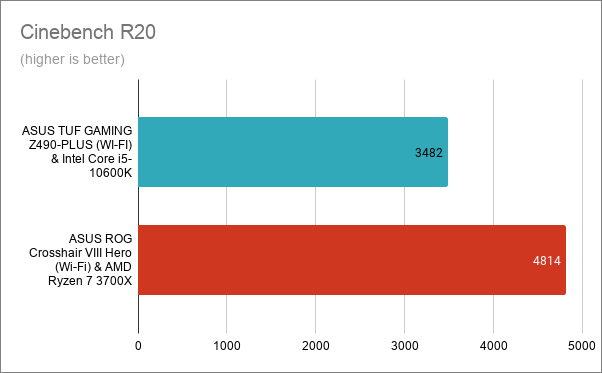
Next, we ran Cinebench R20, a benchmark that measures the computer's rendering speed. On the ASUS TUF GAMING Z490-PLUS (WI-FI), we got a score of 3482 points, while on the ASUS ROG Crosshair VIII Hero (Wi-Fi), we got 4814 points.
Cinebench R20 - ASUS TUF GAMING Z490-PLUS (WI-FI) with Intel Core i5-10600K
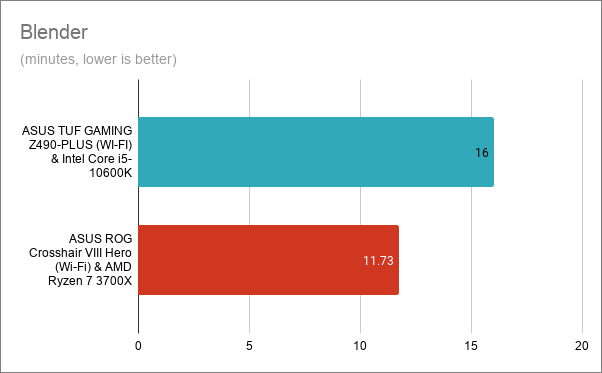
In Blender, a benchmark in which we rendered the classroom and bmw scenes, using the ASUS TUF GAMING Z490-PLUS (WI-FI) and the Intel Core i5-10600K CPU, the tests finished in exactly 16 minutes. On the ASUS ROG Crosshair VIII Hero (Wi-Fi), the AMD Ryzen 7 3700X finished in 11.73 minutes.
Blender - ASUS TUF GAMING Z490-PLUS (WI-FI) with Intel Core i5-10600K
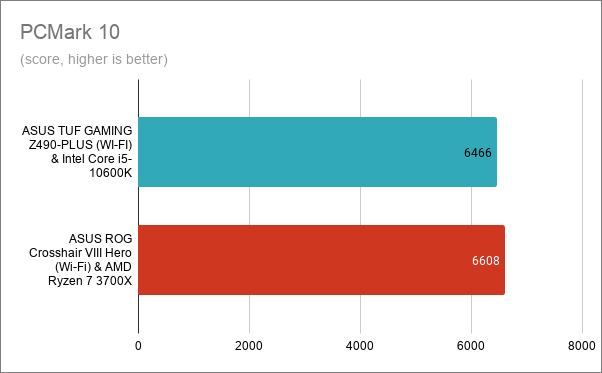
We also ran PCMark 10, a benchmark that measures the computer's performance in daily activities (web browsing, video conferencing, app start-up times, productivity, and digital content creation), and we got fairly similar results on both motherboards. With the ASUS TUF GAMING Z490-PLUS (WI-FI), we got a score of 6466, while on the ASUS ROG Crosshair VIII Hero (Wi-Fi) we got 6608 points.
PCMark 10 - ASUS TUF GAMING Z490-PLUS (WI-FI) with Intel Core i5-10600K
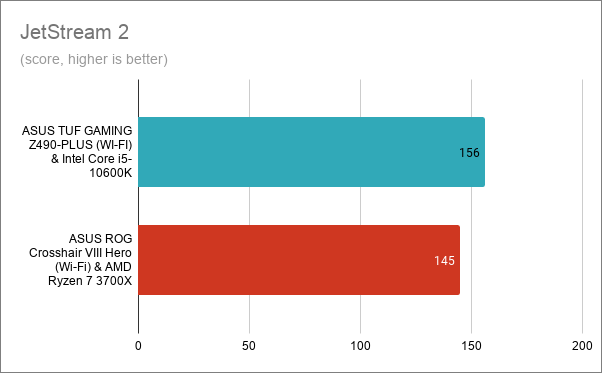
In the JetStream 2 browser benchmark, which we ran in Google Chrome, the ASUS TUF GAMING Z-490-PLUS (WI-FI) motherboard and the Intel Core i5-10600K processor proved to be even faster than the AMD based computer. We got a score of 156 on the Intel pair, and 145 points on the AMD pair.
JetStream 2 - ASUS TUF GAMING Z490-PLUS (WI-FI) with Intel Core i5-10600K
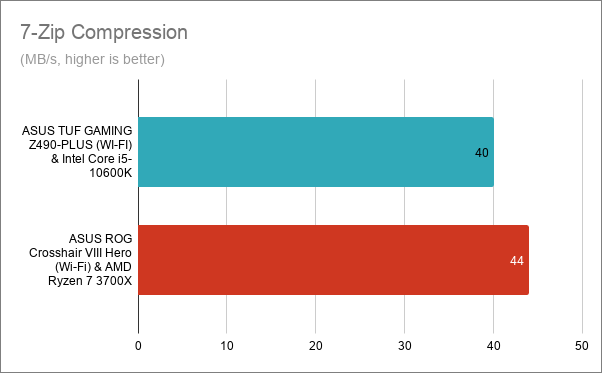
7-Zip, the popular file archiving app, includes an excellent benchmarking tool. In the compression test, the Intel Core i5-10600K and the ASUS TUF GAMING Z490-PLUS (WI-FI) were only a bit slower than the AMD Ryzen 7 3700X paired with the ASUS ROG Crosshair VIII Hero (Wi-Fi).
7-Zip Compression - ASUS TUF GAMING Z490-PLUS (WI-FI) with Intel Core i5-10600K
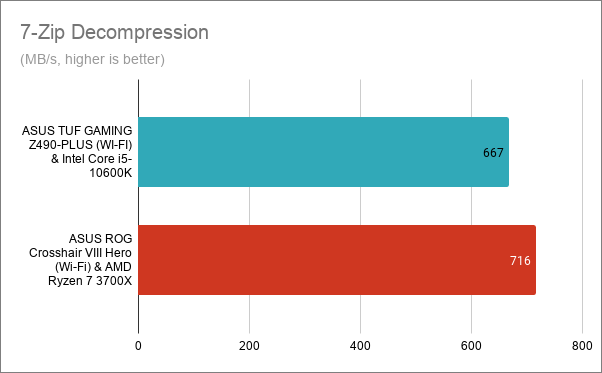
In 7-Zip's decompression test, we saw the same thing: the Intel Core i5-10600K was just slower, but the difference was not as significant as you'd expect.
7-Zip Decompression - ASUS TUF GAMING Z490-PLUS (WI-FI) with Intel Core i5-10600K
Next, we moved on to the gaming benchmarks, and we tested Shadow of the Tomb Raider, Metro Exodus, World War Z, and Assassin's Creed Odyssey.
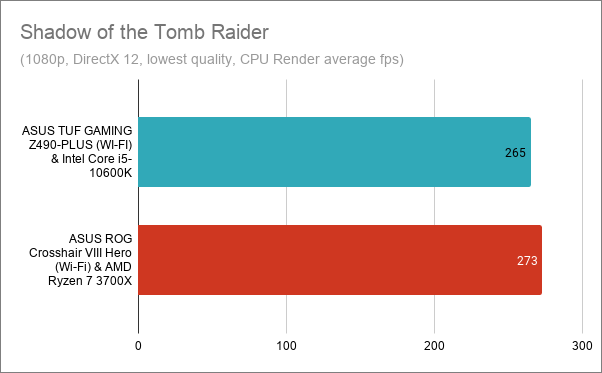
In Shadow of the Tomb Raider, the CPU Render benchmark result showed that the Intel Core i5-10600K and the ASUS TUF GAMING Z490-PLUS (WI-FI) motherboard were able to render 265 fps. On the ASUS ROG Crosshair VIII Hero (Wi-Fi) motherboard, we got 273 frames per second. The Intel pair offers outstanding results!
Shadow of the Tomb Raider - ASUS TUF GAMING Z490-PLUS (WI-FI) with Intel Core i5-10600K
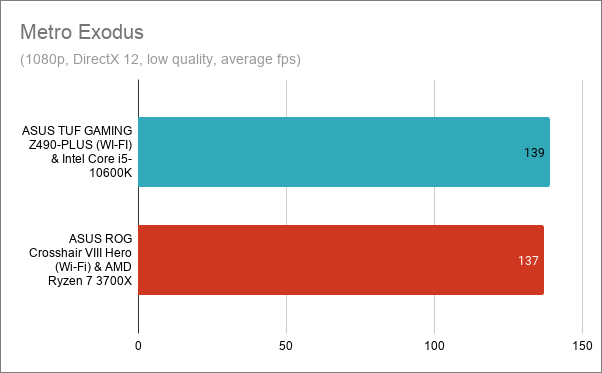
In Metro Exodus, the ASUS TUF GAMING Z490-PLUS (WI-FI) motherboard managed to deliver a slightly better number of frames per second compared to the ASUS ROG Crosshair VIII Hero (Wi-Fi). That, even if the Intel CPU we used has two cores less than its AMD counterpart.
Metro Exodus - ASUS TUF GAMING Z490-PLUS (WI-FI) with Intel Core i5-10600K
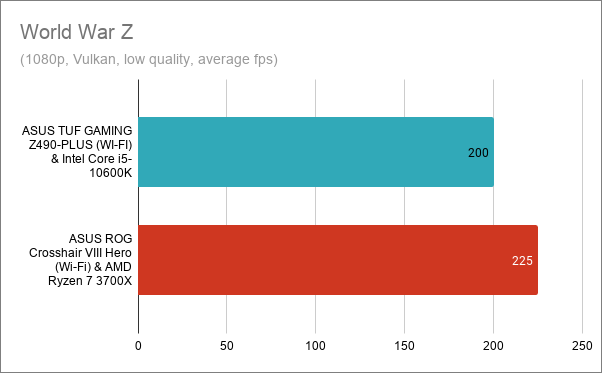
In World War Z, the ASUS TUF GAMING Z490-PLUS (WI-FI) and the Intel Core i5-10600K were not far behind the ASUS ROG Crosshair VIII Hero (Wi-Fi) motherboard and the AMD Ryzen 7 3700X (200 vs. 225 fps). That's because this game is optimized for multi-threading, and the AMD processor has more cores than the Intel one.
World War Z - ASUS TUF GAMING Z490-PLUS (WI-FI) with Intel Core i5-10600K
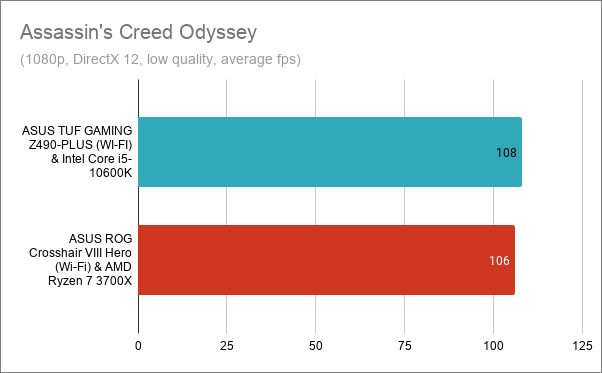
The last game we tested was Assassin's Creed Odyssey. On the ASUS TUF GAMING Z490-PLUS (WI-FI) motherboard, the Intel Core i5-10600K managed to render two frames more than the AMD-based computer. That's a remarkable achievement!
Assassin's Creed Odyssey - ASUS TUF GAMING Z490-PLUS (WI-FI) with Intel Core i5-10600K
The benchmarks results show us that the ASUS TUF GAMING Z490-PLUS (WI-FI) is an excellent motherboard. It offers great performance and, paired with a capable Intel processor, it can match better and pricier alternatives. The ASUS' TUF GAMING Z490-PLUS (WI-FI) motherboard is an excellent choice for gaming and for anyone who wants to upgrade to an Intel processor from the 10th generation.
The software bundled with the ASUS TUF GAMING Z490-PLUS (WI-FI)
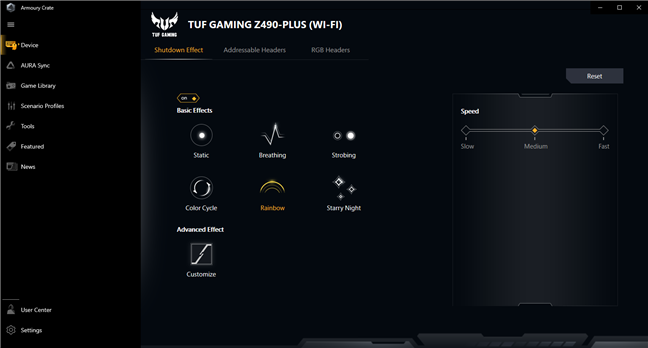
The main software bundled by ASUS with the TUF GAMING Z490-PLUS (WI-FI) motherboard is Armoury Crate. We've seen it on all the motherboards released by the company during the last few years, and it looks like it's getting better and more stable as time passes by. Armoury Crate is an app that lets you configure all your ASUS hardware components and devices, as well as install drivers and additional apps from ASUS, update BIOS, and also manage RGB lighting effects.
The Armoury Crate app
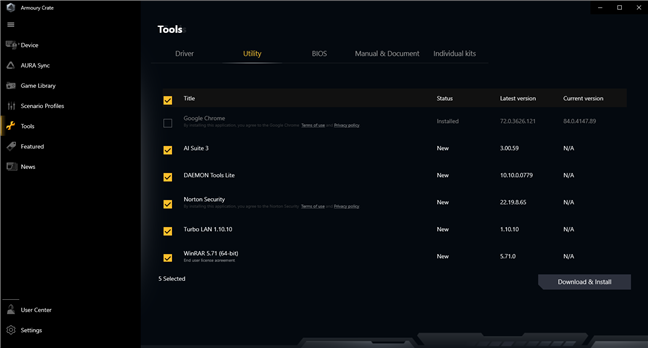
Although they're not installed automatically by ASUS, besides Armoury Crate, the company offers other apps and utilities that you can download and install:
Google Chrome: the world's most popular web browser.
AI Suite 3: a program that analyzes and shows data about your device and helps you automate things such as power consumption or fan speed.
Daemon Tools: an app that lets you mount virtual images of CDs and DVDs.
Norton Security: a security solution that includes an antivirus, a firewall, and other protection tools. It comes with a 60-days trial.
CPUID ROG CPU-Z: a small tool that displays information about the processor and also allows you to quickly benchmark it.
Turbo LAN: an app that lets you manage the network traffic on your computer using priorities.
WinRAR: a popular file compression tool.
The utility apps offered by ASUS
In our opinion, Armoury Crate is a useful app that lets you manage many aspects of how your ASUS hardware components work and look. It's the only bundled software that we recommend that you install for your ASUS TUF GAMING Z490-PLUS (WI-FI). The other apps available are not preinstalled, and that's a good thing because you might not want all of them. We appreciate ASUS' approach, as you're the one who chooses what gets installed and what doesn't.
What is your opinion about the ASUS TUF GAMING Z490-PLUS (WI-FI)?
As you know now, we like the ASUS TUF GAMING Z490-PLUS (WI-FI) motherboard quite a lot, and we believe it's an excellent choice for gamers who want to go the Intel way. What's your opinion about it? Are you considering buying it, or are you looking for something else? Let us know in the comments section below.








Discussion (0)
Comments are closed.