One of the features that increases the performance of AMD Ryzen processors is Precision Boost, which raises the frequency of the processor's cores when the workload increases, while keeping both the energy consumption and the temperature in check. If you look into the BIOS of your motherboard, you can also see other terms like PBO (Precision Boost Overdrive) and AutoOC (Auto OverClocking). You may be confused by what they mean, what they do, and whether they can truly enhance the performance you get. To check whether PBO and AutoOC do make a difference, we decided to test them on an AMD Ryzen 7 3700X processor. Read on and see the impact of these features on the overall performance you get:
What are AMD's PBO (Precision Boost Overdrive), and AutoOC (Auto OverClocking)?
The 3rd generation Ryzen processors offer both PBO and AutoOC. PBO comes from Precision Boost Overdrive and enables your AMD 3rd Gen Ryzen processor to maintain higher voltages for longer times, if the motherboard's Voltage Regulator Modules (VRM) can handle them, and if the temperature of the processor does not get too high. Precision Boost Overdrive is not the same thing as Precision Boost, which already handles the stock boost clock of the processor. PBO means more electrical power going through your Ryzen processor, but only if it can handle it. A consequence of PBO is that it might allow for higher CPU boost clocks if the power and thermal conditions that we mentioned are all met.
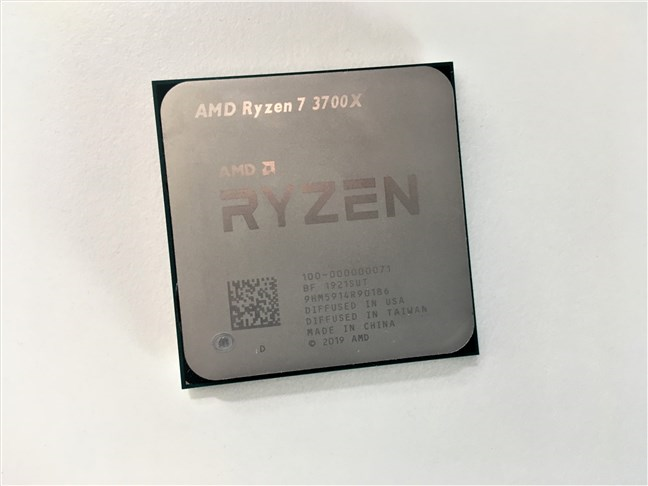
The AMD Ryzen 7 3700X processor
AutoOC or Auto OverClocking is an offset for the processor's boost behaviour, which you can set at a maximum of up to 200 MHz more than the default maximum boost clock of the CPU. Thus, AutoOC lets AMD Ryzen processors automatically push past their maximum boost clocks. If the maximum voltage allowed is not exceeded, AutoOC should be able to increase the single-core performance of a Ryzen processor. Furthermore, although it is not part of PBO, AutoOC can be used in conjunction with it to allow higher boost clocks for your processor. However, enabling it does not mean that the processor truly reaches a higher boost clock than the one specified by its manufacturer. In theory, it allows the processor to do that, only if voltages and thermal limits are not overstepped.
Enabling PBO and AutoOC on an AMD Ryzen 7 3700X processor
The Ryzen 7 3700X is a fast processor that comes with 8 physical cores and 16 threads. It runs at a stock frequency of 3600 MHz and can boost up to 4.4 GHz. AMD built the Ryzen 7 3700X using the company's new Zen 2 CPU architecture, on a 7-nanometer manufacturing process. It's not just fast, but it also comes with a low TDP of just 65 Watts.
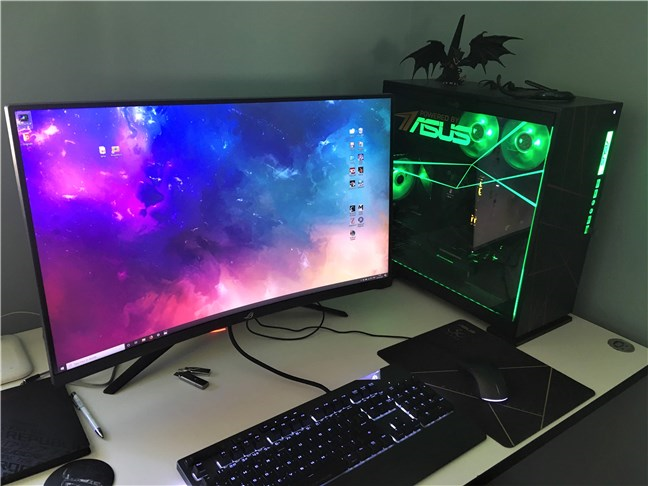
Because we wanted to see whether turning PBO and AutoOC on would make a difference on our AMD Ryzen 7 3700X, we decided to run some benchmarks. But first, here is the hardware platform on which we tested it:
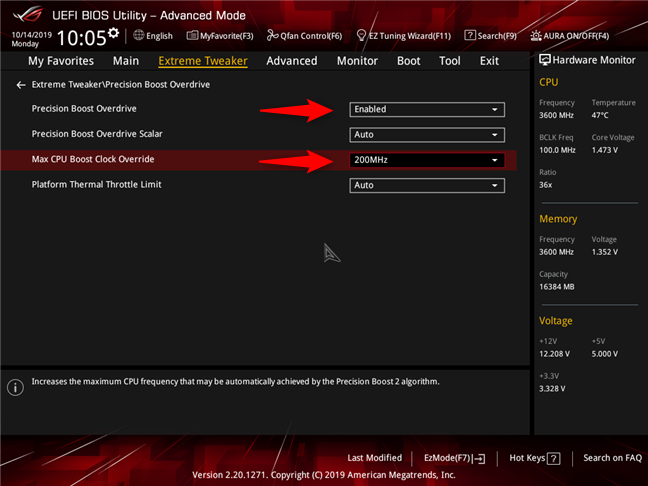
Our ASUS ROG Crosshair VIII Hero (Wi-Fi) motherboard is based on the X570 chipset and offers an excellent UEFI BIOS. The settings that we were interested in are available on its Extreme Tweaker page, where you can enable "Precision Boost Overdrive", as well as set the AutoOC Offset value (on our motherboard, it's called "Max CPU Boost Clock Override") to a maximum of 200 MHz. Theoretically, that means that the processor is allowed to overclock its boost clock from stock 4.4 GHz up to 4.6 GHz.
To see whether the processor performance is better or worse, we ran the same benchmarks three times: once with the CPU running at stock settings, once with PBO enabled, and once with PBO enabled and AutoOC set at an offset of plus 200 MHz.
AMD Ryzen 7 3700X: PBO enabled, and AutoOC Offset set to 200 MHz
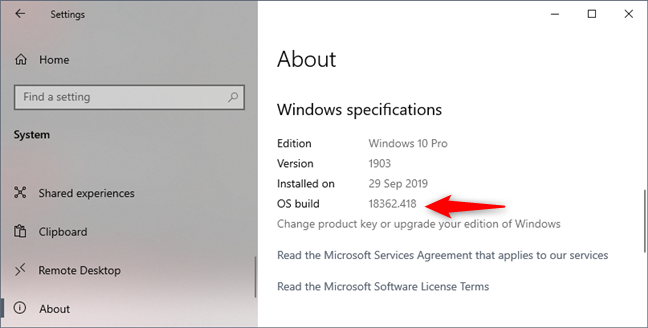
All the benchmarks were run on Windows 10 Pro, version 1903, build 18362.418, and the latest drivers available.
Windows 10 Pro, version 1903, build 18362.418
Let's see what results we have had in games and benchmarks, while running our AMD Ryzen 7 3700X on stock settings, with PBO enabled, and when set to use PBO & AutoOC +200 MHz:
Do PBO and AutoOC give you a performance boost?
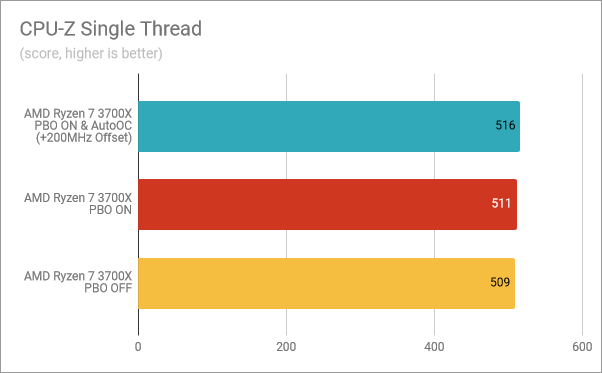
The first benchmark that we ran was the one in CPU-Z. The Single-Thread, which analyzes the single-core performance of the processor, showed a small improvement in speed both when turning "Precision Boost Overdrive" on and when enabling PBO + AutoOC. However, the speed increased only by a little: 0.39% with PBO, and 1.37% with PBO and AutoOC. These are scores within the testing variability zone, so we do not find them conclusive.
CPU-Z Single Thread: PBO & AutoOC enabled, PBO on, PBO off
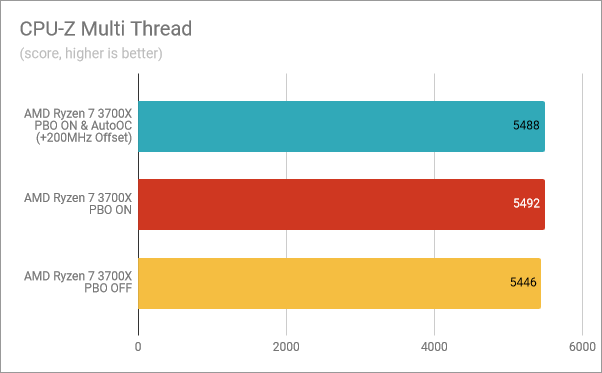
In CPU-Z Multi-Thread, which tests the multi-core performance, setting "Precision Boost Overdrive" on for the AMD Ryzen 7 3700X seemed to offer a tiny performance improvement, compared to both running the CPU at stock settings (0.84% better), and turning on AutoOC (0.77% better). Although it looks odd, these results are also within the testing variability margin.
CPU-Z Multi-Thread: PBO & AutoOC enabled, PBO on, PBO off
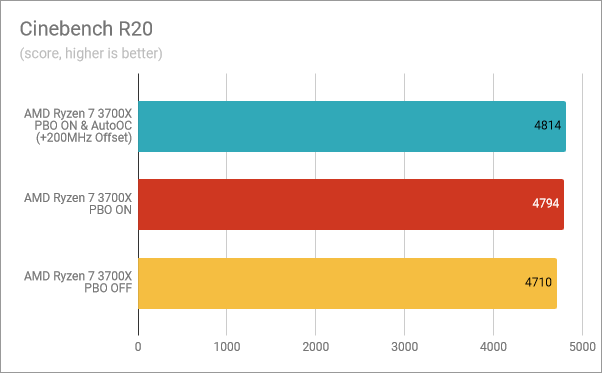
In Cinebench R20, which evaluates the processor's speed when rendering images, enabling PBO resulted in a 1.78% improvement, and turning AutoOC on resulted in a 2.20% improvement over stock settings. Although it is not much, we can say that there is a small boost from running the processor at its factory defaults.
Cinebench R20: PBO & AutoOC enabled, PBO on, PBO off
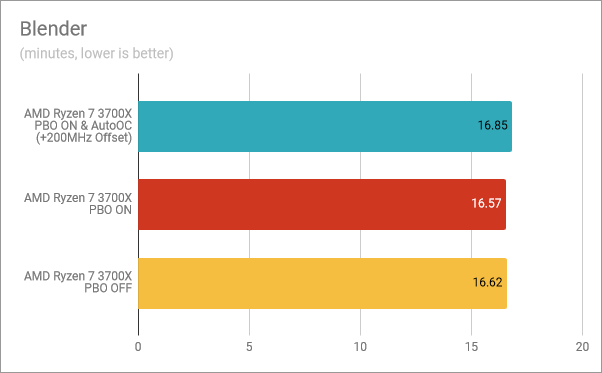
In Blender, another rendering benchmark, the AMD Ryzen 7 3700X performed marginally better when we enabled "Precision Boost Overdrive", but when we also turned on auto-overclocking, it was worse than running stock.
Blender: PBO & AutoOC enabled, PBO on, PBO off
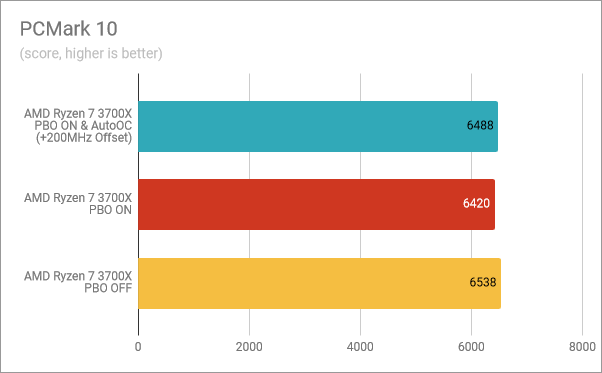
PCMark 10 tells us how capable a processor is in daily computing tasks, such as web browsing, video conferencing, apps start-up times, productivity, and digital content creation. In this benchmark, the 3700X got a better score when running at default settings than it did when "Precision Boost Overdrive" and PBO + AutoOC were enabled.
PCMark 10: PBO & AutoOC enabled, PBO on, PBO off
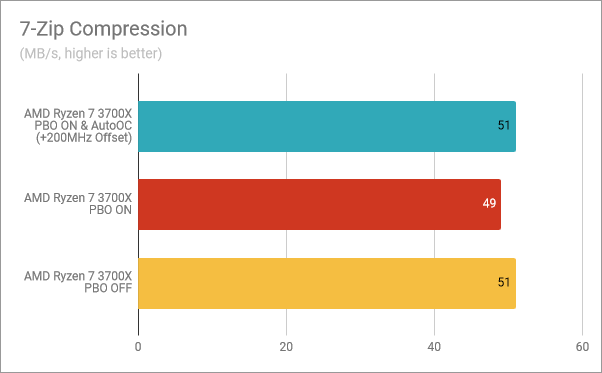
Oddly, in 7-Zip's compression test, turning PBO on meant slightly less speed (4%) than when running the processor at default settings or when enabling "Precision Boost Overdrive" and AutoOC.
7-Zip Compression: PBO & AutoOC enabled, PBO on, PBO off
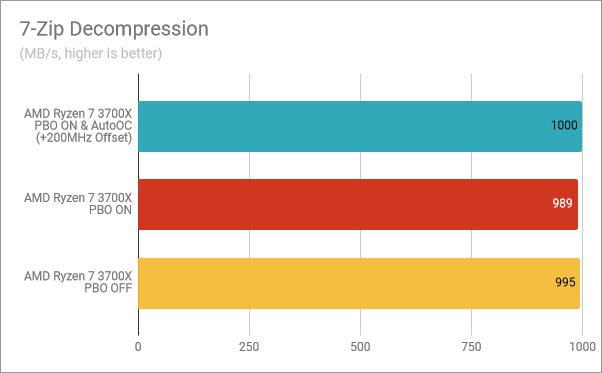
In the decompression test, we saw the same thing: enabling just the PBO meant a small decrease in performance. With PBO enabled, the Ryzen 7 3700X was 0.30% slower than when running at factory settings, and 1.11% slower than when also turning AutoOC on. Enabling both "Precision Boost Overdrive" and AutoOC, the processor was 0.50% faster than without them turned on.
7-Zip Decompression: PBO & AutoOC enabled, PBO on, PBO off
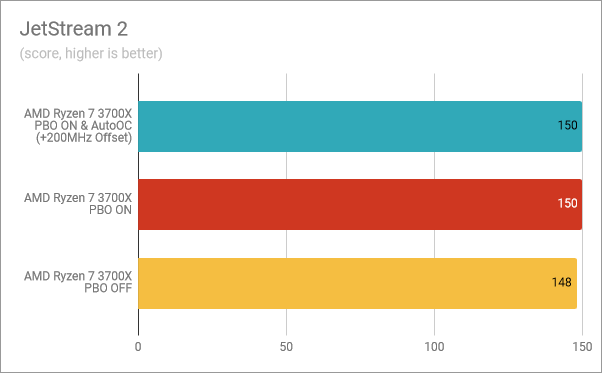
In JetStream 2, a web browser benchmark that we ran in Google Chrome, enabling PBO and PBO + AutoOC meant the same thing: a small 1.35% increase in performance.
JetStream 2: PBO & AutoOC enabled, PBO on, PBO off
For gamers, we also tested a few games: Shadow of the Tomb Raider, Metro Exodus, and World War Z. We set them to run at a resolution of 1920 x 1080 pixels and with the lowest graphics details available, so that our graphics card did not bottleneck the Ryzen 7 3700X.
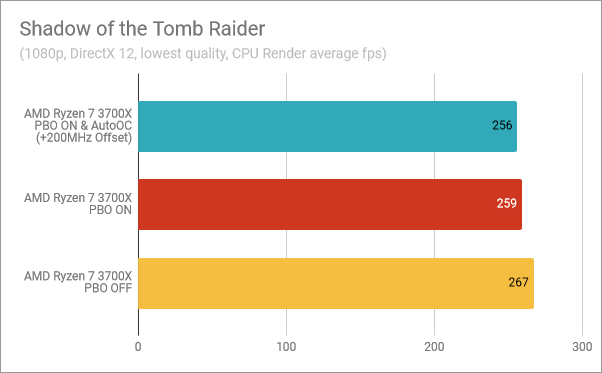
In Shadow of the Tomb Raider, the CPU Render measurement showed that neither enabling PBO or PBO + AutoOC, had any benefits. We got more frames per second without "Precision Boost Overdrive" and auto-overclocking.
Shadow of the Tomb Raider: PBO & AutoOC enabled, PBO on, PBO off
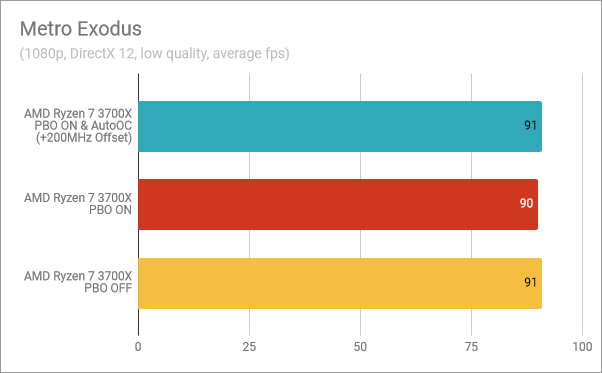
In Metro Exodus, the number of frames per second was almost the same regardless of how we configured the AMD Ryzen 7 3700X, although enabling 'Precision Boost Overdrive" meant one frame less.
Metro Exodus: PBO & AutoOC enabled, PBO on, PBO off
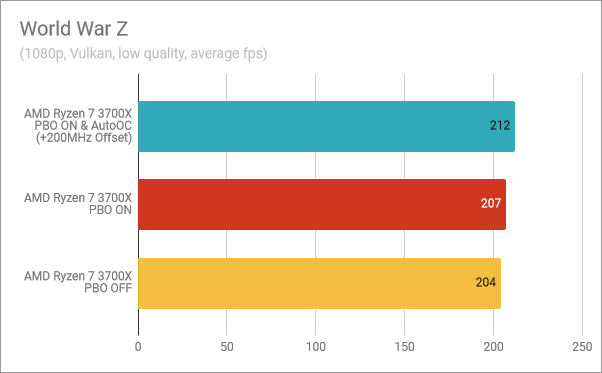
World War Z was the only game in which we saw better performance when turning PBO on (3 frames more), as well as when enabling AutoOC (8 frames more).
World War Z: PBO & AutoOC enabled, PBO on, PBO off
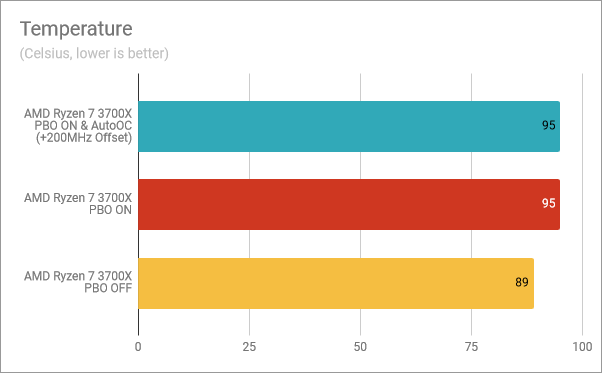
To get an idea of how much the temperature of the processor is affected by enabling "Precision Boost Overdrive," we did some logging using HWiNFO while running Prime95. While running at factory settings, the processor did not get hotter than 89 degrees Celsius. However, with PBO and PBO + AutoOC enabled, the processor reached 95 degrees Celsius, which is its maximum official temperature.
Temperatures: PBO & AutoOC enabled, PBO on, PBO off
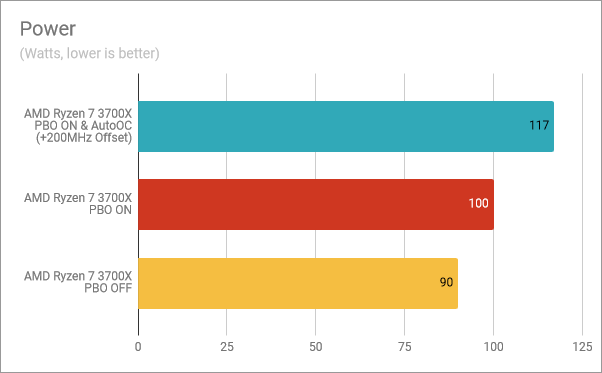
As expected, enabling PBO and AutoOC also means higher power consumption. Our processor went from 90 Watts at factory settings, to 100 Watts with "Precision Boost Overdrive" turned on, and up to 117 Watts when AutoOC was also enabled.
Power consumption: PBO & AutoOC enabled, PBO on, PBO off
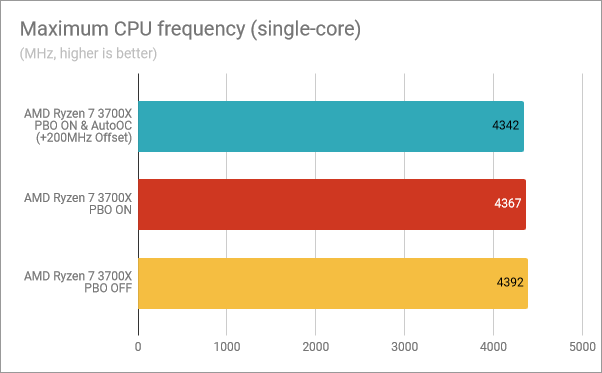
We also logged the maximum boost frequency on a single core. What we found was quite surprising: the Ryzen 7 3700X reached 4392 MHz on a single core when running with its stock settings, which is very close to its advertised 4.4 GHz maximum boost clock. However, when we enabled "Precision Boost Overdrive," the maximum boost frequency was lower at 4367 MHz, and when also turning AutoOC on, it was even lower, at 4342 MHz. It is definitely not what we expected.
Maximum CPU frequency (single-core): PBO & AutoOC enabled, PBO on, PBO off
Conclusion: There is no reason to use Precision Boost Overdrive and AutoOC
Our conclusion is that neither "Precision Boost Overdrive" nor PBO + AutoOC are worth enabling if you are using an AMD Ryzen 7 3700X:
The performance gains in benchmarks are mixed. Although you can get a one percent speed boost, more often than not, you're getting less performance
In some games you get a few more frames per second, but in others you get fewer frames per second
Both the processor's temperature and its power consumption increase, because of the higher voltages used
Hence our mixed results, we decided to keep our AMD Ryzen 7 3700X with "Precision Boost Overdrive" off, as we see no real benefit from enabling it. In our opinion, and at least at this point, PBO and AutoOC do more harm than good. There is no real-life performance gain to see here, just higher temperatures and power consumption, which in our minds translates only to a decreased longevity for the processor and a higher electricity bill. However, things might change in the future, as AMD releases new AGESA firmware, and new BIOSes are also released by motherboard manufacturers. We'll have to wait and see.
Why hasnt this article been deleted? You literally wrote another one 3 days later PRAISING PBO as one of the best things ever.
diego ·
You are not getting better performance because your cpu is overheating.
To get advantage of this feature you need to have a much better cooling solution.
Pönopp ·
If you don’t understand PBO and how to use it proberly then erase this article.
I use it and tuned it and got 5149 points in CB R20 and if I push my watercooling to the max I’ll have 5303 in CB R20 and in CPU-Z 6009Multi/547,8Singlecore.
And if you don’t know how good cooling increases Clockspeed on AMD then study more before you release such halfassed article.
pupu ·
Perhaps if you’d cooled your processor properly, it wouldn’t be throttling itself at the temperature junction of 95C and making your results useless …
BCme ·
While I don’t know if proper cooling would change the results, I have to agree that the results here aren’t useful as something is wrong/significantly inadequate with the cooling setup if the CPU is getting that hot.








Discussion (5)
Why hasnt this article been deleted? You literally wrote another one 3 days later PRAISING PBO as one of the best things ever.
You are not getting better performance because your cpu is overheating.
To get advantage of this feature you need to have a much better cooling solution.
If you don’t understand PBO and how to use it proberly then erase this article.
I use it and tuned it and got 5149 points in CB R20 and if I push my watercooling to the max I’ll have 5303 in CB R20 and in CPU-Z 6009Multi/547,8Singlecore.
And if you don’t know how good cooling increases Clockspeed on AMD then study more before you release such halfassed article.
Perhaps if you’d cooled your processor properly, it wouldn’t be throttling itself at the temperature junction of 95C and making your results useless …
While I don’t know if proper cooling would change the results, I have to agree that the results here aren’t useful as something is wrong/significantly inadequate with the cooling setup if the CPU is getting that hot.