




Venmo sometimes rejects a phone number during signup or verification for reasons that usually relate to account ownership, carrier restrictions, or security flags. This guide explains the most common causes and shows you how to fix each one.
A rejected number often ties back to a previously registered account, SMS short-code issues, or an unsupported number type. Understanding which category your issue fits into helps you resolve it faster.
Table of contents
- Common reasons Venmo rejects your phone number
- The number is already registered to another Venmo account
- Your phone number was recently recycled by your carrier
- Venmo does not support VoIP or virtual numbers
- SMS verification codes are being blocked by your carrier
- You reached the verification attempt limit
- Venmo flagged unusual activity or location mismatches
- How to fix a phone number already registered on Venmo
- How to fix SMS code and verification issues
- How to check if your phone number is a VoIP or recycled number
- Fix account locks and security blocks related to your phone number
- When and how to contact Venmo support
- FAQs
- Summary
Common reasons Venmo rejects your phone number
These problems appear often for new users and returning users who update their information. Each scenario requires a different fix, so identifying the cause saves you time.
The number is already registered to another Venmo account
Venmo blocks numbers that belong to an existing account. This happens when you created an account years ago or when the number belonged to someone else before you received it.
Your phone number was recently recycled by your carrier
Carriers reassign old numbers, and Venmo may still link the number to its former owner. This prevents verification because Venmo expects the previous account holder to manage that number.
Venmo does not support VoIP or virtual numbers
Venmo requires a US mobile carrier number. Services like Google Voice or TextNow often fail because Venmo cannot validate virtual lines.
SMS verification codes are being blocked by your carrier
Carriers sometimes block short-code messages that apps use for verification. If these messages never arrive, Venmo cannot complete the process.
You reached the verification attempt limit
Multiple failed attempts temporarily lock the number for security reasons. Venmo usually resets the limit after one day.
Venmo flagged unusual activity or location mismatches
If your sign-in attempt does not match your device history or location pattern, Venmo may block verification until additional checks occur.
How to fix a phone number already registered on Venmo
These steps help when Venmo says your number is already in use.
Recover the old account tied to your phone number
Try signing in with your email or previous login details. Use the password reset option to regain access. This works when you created an older account and forgot about it.

Request removal of the number from the old account
If you cannot access the older account, you can request number removal through Venmo support. Proof of number ownership usually resolves this.

How to fix SMS code and verification issues
If Venmo accepts the number but never sends a code, the issue is usually with your carrier or device.
Confirm your carrier supports short-code messages
Ask your carrier representative to verify that short-code SMS is enabled. Some accounts block these messages by default.
Turn off spam filters, VPNs, and call protection apps
Security apps sometimes block verification texts. Turn off call blockers, spam filters, or VPN connections before retrying.
Restart the phone and try switching networks
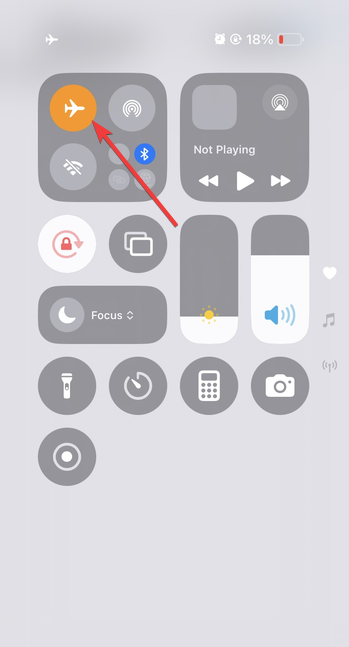
Restart your device, toggle Airplane mode, and test whether the code arrives over cellular or WiFi calling. These quick resets often fix stalled SMS delivery.
How to check if your phone number is a VoIP or recycled number
These checks help you understand whether your number type is causing the block.
Look up your number type using a carrier lookup tool
Carrier lookup services reveal whether your line is mobile, VoIP, or landline. Only mobile carrier numbers consistently work on Venmo.

Check if the number was recently reassigned by your carrier
Your provider can confirm whether the number belonged to a different customer within the last few months. Recycled numbers often trigger unexpected verification errors.
Fix account locks and security blocks related to your phone number
- Wait for the 24 hour reset when too many attempts occur: Venmo automatically unlocks verification after the daily limit expires. Waiting allows you to retry with a clean slate.
- Verify your identity if Venmo flags risk: Venmo may request ID or additional information to confirm ownership. Completing identity checks often resolves blocked verification.
When and how to contact Venmo support
If none of the fixes above work, escalation becomes the fastest solution.
Provide proof of ownership of your phone number
Support may ask for a phone bill, an account screenshot, or carrier documentation. These items confirm that the number belongs to you.
Use in app chat or email for faster resolution
In-app chat usually responds faster, especially during US business hours. You can also contact Venmo via phone support. Just prepare your ID and carrier information before starting the conversation.
FAQs
Why does Venmo say my phone number is invalid? This often appears when Venmo detects a VoIP number or a formatting issue. It also appears when the system cannot verify your carrier information.
Can I use Google Voice or similar services on Venmo? Most virtual numbers fail because Venmo only supports US mobile carrier lines.
Why isn’t Venmo sending me a verification code? Carrier short-code blocking, spam filters, or prior verification attempts often prevent delivery.
What do I do if my number changed and Venmo blocks it? You may need to recover or close the old account holding that number, then provide proof to support.
Summary
- Venmo rejects phone numbers when they are already registered, recycled, unsupported, or blocked by carriers.
- Verification codes may fail because of SMS blocking, VPNs, or incorrect number types.
- A limit on verification attempts may temporarily restrict your ability to retry.
- Carrier checks and simple device resets usually restore SMS delivery.
- Venmo support can remove old accounts or clear verification blocks when you present proof of ownership.
Most Venmo phone number issues relate to ownership conflicts or SMS verification problems. Once you identify which scenario applies, the fix usually takes only a few minutes. If your number remains blocked after these steps, support agents can manually clear it after confirming your identity and phone number ownership.


Discussion (1)
Multiple times in the article you tease by saying “use email…” and you do not provide an email. Do better