



In the old days of technology, screen resolution was not much of an issue. Windows came with a few preset options, and to get higher resolution, more colors, or both, you would install a driver for your graphics card. As time passed, you could also choose better video cards and monitors. Today, we have many options regarding displays, their quality, and the supported resolutions. In this article, I’ll take you through a bit of history and explain all the essential concepts, including common acronyms for screen resolution sizes, like 1080p, 2K, QHD, or 4K. You’ll also learn about other important elements like the aspect ratio and the screen’s orientation. Let’s get started:

 What an image rendered on a CGA display looked like
Image source: Wikipedia
With the advent of high-definition video and the increased popularity of the 16:9 aspect ratio (I’ll explain aspect ratios in a bit), selecting a screen resolution is no longer the simple affair it once was. However, this also means that there are many more options to choose from, with something to suit almost everyone’s preferences. Let’s look at today’s terminology and what it means:
What an image rendered on a CGA display looked like
Image source: Wikipedia
With the advent of high-definition video and the increased popularity of the 16:9 aspect ratio (I’ll explain aspect ratios in a bit), selecting a screen resolution is no longer the simple affair it once was. However, this also means that there are many more options to choose from, with something to suit almost everyone’s preferences. Let’s look at today’s terminology and what it means:
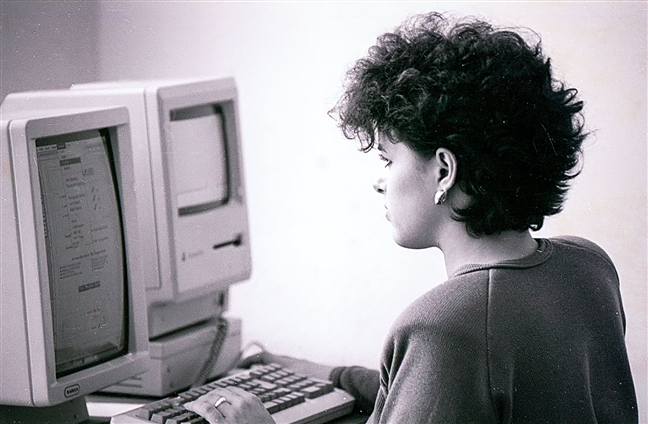
 Using an old computer with a low-resolution CRT monitor
The resolutions built into Windows were limited, so if you didn’t have the driver for your graphics card, you would be stuck with the lower-resolution screen that Windows provided. If you’ve watched the old Windows Setup or installed a newer video driver version, you may have seen the 640 x 480 low-resolution screen for a moment or two. It was ugly, but that was the Windows default.
Using an old computer with a low-resolution CRT monitor
The resolutions built into Windows were limited, so if you didn’t have the driver for your graphics card, you would be stuck with the lower-resolution screen that Windows provided. If you’ve watched the old Windows Setup or installed a newer video driver version, you may have seen the 640 x 480 low-resolution screen for a moment or two. It was ugly, but that was the Windows default.
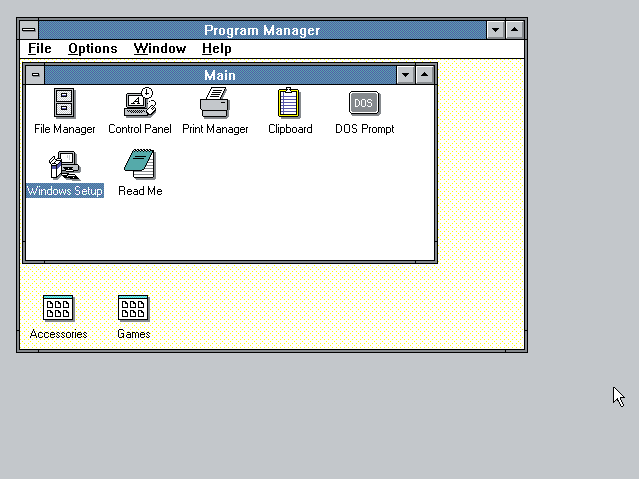
 What Windows 3 looked like in the old days
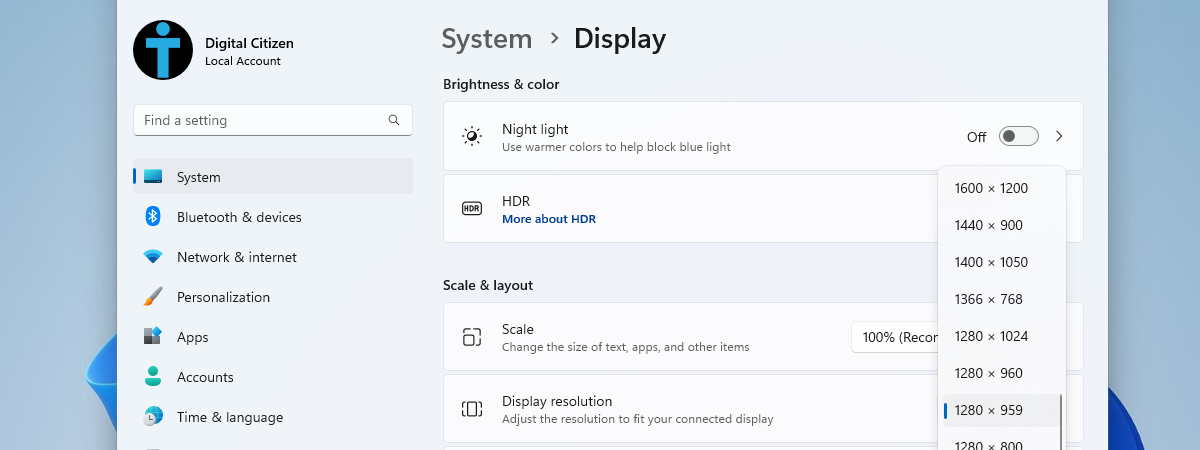
As monitor quality improved, Windows began offering a few more built-in options, but the burden was still mostly on the graphics card manufacturers, especially if you wanted a really high-resolution display. The more recent versions of Windows can detect the default screen resolution for your monitor and graphics card and adjust it accordingly. This doesn’t mean that what Windows chooses is always the best option, but it works, and you can change it after seeing what it looks like, if that’s what you want. For guidance, here’s how to change the screen resolution in Windows 10 and how to modify it in Windows 11.
What Windows 3 looked like in the old days
As monitor quality improved, Windows began offering a few more built-in options, but the burden was still mostly on the graphics card manufacturers, especially if you wanted a really high-resolution display. The more recent versions of Windows can detect the default screen resolution for your monitor and graphics card and adjust it accordingly. This doesn’t mean that what Windows chooses is always the best option, but it works, and you can change it after seeing what it looks like, if that’s what you want. For guidance, here’s how to change the screen resolution in Windows 10 and how to modify it in Windows 11.
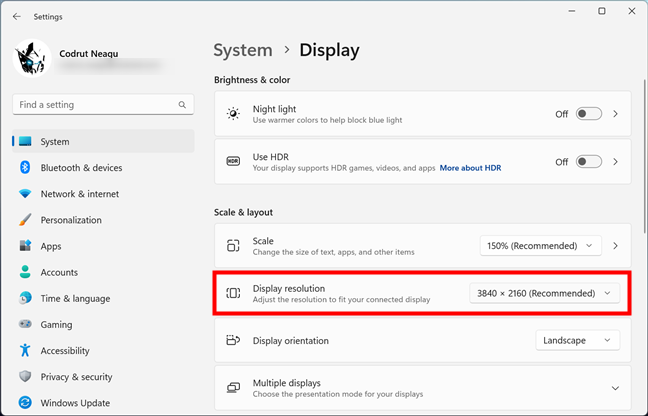
 How to change the display resolution in Windows 11
Furthermore, if you are curious to find out the resolution of your screen, you should take a look at the methods shown here: How to check the screen resolution in Windows.
How to change the display resolution in Windows 11
Furthermore, if you are curious to find out the resolution of your screen, you should take a look at the methods shown here: How to check the screen resolution in Windows.
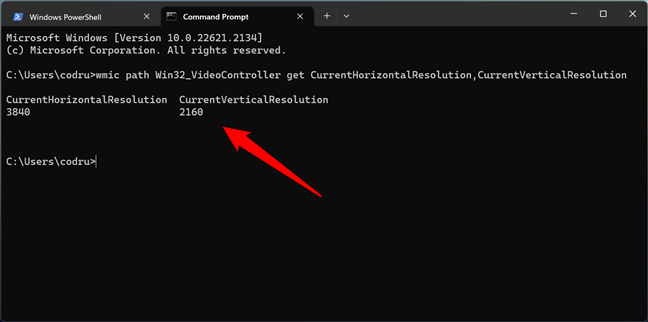
 How to use CMD to get the screen resolution
TIP: Do you have a smartphone or tablet made by Apple? You can check your iPad or iPhone resolution too.
How to use CMD to get the screen resolution
TIP: Do you have a smartphone or tablet made by Apple? You can check your iPad or iPhone resolution too.
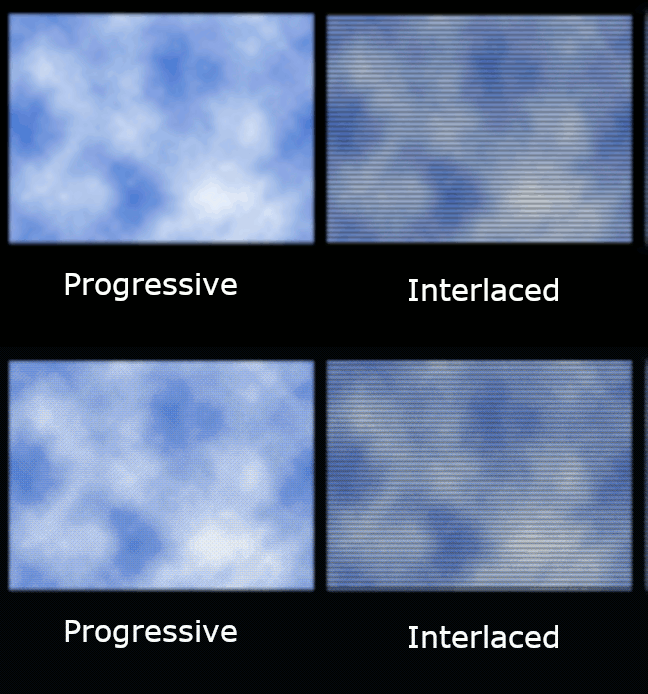
 How an image is rendered on a progressive display vs. an interlaced display
As people moved away from the older CRT displays, the system changed from interlaced to progressive scan because the new digital displays are much faster. In a progressive scan, the lines are painted on the screen in sequence rather than first the odd lines and then the even lines. If you want to translate, 1080p, for example, is used for displays characterized by 1080 horizontal lines of vertical resolution and a progressive scan. There’s a rather eye-boggling illustration of the differences between progressive and interlaced scans in this Wikipedia article: Progressive scan. For another fascinating history lesson, you can also read about the Interlaced video.
Furthermore, while on CRT displays, content with lower or higher frame rates didn’t matter that much in terms of perceived image quality, on LED screens, the frame rate is even more important. The relation between frame rate and refresh rate is relevant for both gaming performance, video content rendering, and daily user experience. While the refresh rate (Hz) is the number of times an image is updated by the display panel every second, the frame rate (FPS) is the number of times an image is rendered by the graphics card every second.
A higher frame rate paired with a higher refresh rate can improve visual quality and make everything look more responsive. However, the frame rate depends on the performance offered by your computer, smartphone, TV, or similar device, while the refresh rate depends on the monitor’s capability. Ideally, the frame rate shouldn’t exceed the refresh rate; otherwise, screen tearing may occur.
How an image is rendered on a progressive display vs. an interlaced display
As people moved away from the older CRT displays, the system changed from interlaced to progressive scan because the new digital displays are much faster. In a progressive scan, the lines are painted on the screen in sequence rather than first the odd lines and then the even lines. If you want to translate, 1080p, for example, is used for displays characterized by 1080 horizontal lines of vertical resolution and a progressive scan. There’s a rather eye-boggling illustration of the differences between progressive and interlaced scans in this Wikipedia article: Progressive scan. For another fascinating history lesson, you can also read about the Interlaced video.
Furthermore, while on CRT displays, content with lower or higher frame rates didn’t matter that much in terms of perceived image quality, on LED screens, the frame rate is even more important. The relation between frame rate and refresh rate is relevant for both gaming performance, video content rendering, and daily user experience. While the refresh rate (Hz) is the number of times an image is updated by the display panel every second, the frame rate (FPS) is the number of times an image is rendered by the graphics card every second.
A higher frame rate paired with a higher refresh rate can improve visual quality and make everything look more responsive. However, the frame rate depends on the performance offered by your computer, smartphone, TV, or similar device, while the refresh rate depends on the monitor’s capability. Ideally, the frame rate shouldn’t exceed the refresh rate; otherwise, screen tearing may occur.

 Do you notice the screen tearing effect?
Image source: Wikipedia
Thanks to the advancements made in graphics cards and processors, the display panels we find nowadays on computer monitors, laptops, smartphones, tablets, and even TVs are offering increased refresh rates. Because the performance of our devices allows them to deliver more frames per second, screens have to keep up with them. And that’s why today, we have displays with refresh rates that go from standard 60 Hz up to much higher ones, like 120 Hz, 144 Hz, 240 Hz, and even 360 Hz.
Do you notice the screen tearing effect?
Image source: Wikipedia
Thanks to the advancements made in graphics cards and processors, the display panels we find nowadays on computer monitors, laptops, smartphones, tablets, and even TVs are offering increased refresh rates. Because the performance of our devices allows them to deliver more frames per second, screens have to keep up with them. And that’s why today, we have displays with refresh rates that go from standard 60 Hz up to much higher ones, like 120 Hz, 144 Hz, 240 Hz, and even 360 Hz.
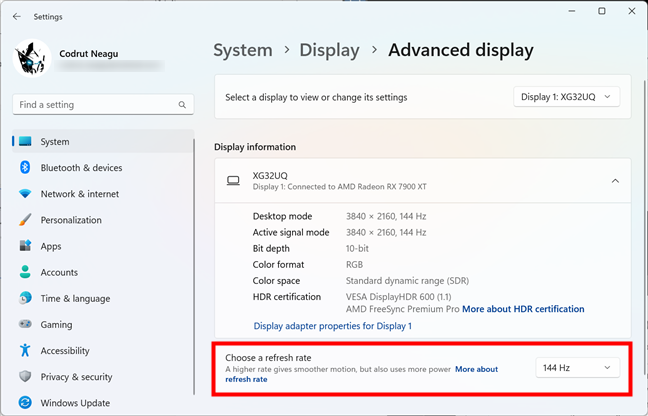 A gaming monitor with a refresh rate of 144 Hz
TIP: If you want to see or set the refresh rate on your PC, check these guides, depending on your Windows version: Where to find the Windows 10 refresh rate. How to change it or How to change the refresh rate in Windows 11.
A gaming monitor with a refresh rate of 144 Hz
TIP: If you want to see or set the refresh rate on your PC, check these guides, depending on your Windows version: Where to find the Windows 10 refresh rate. How to change it or How to change the refresh rate in Windows 11.
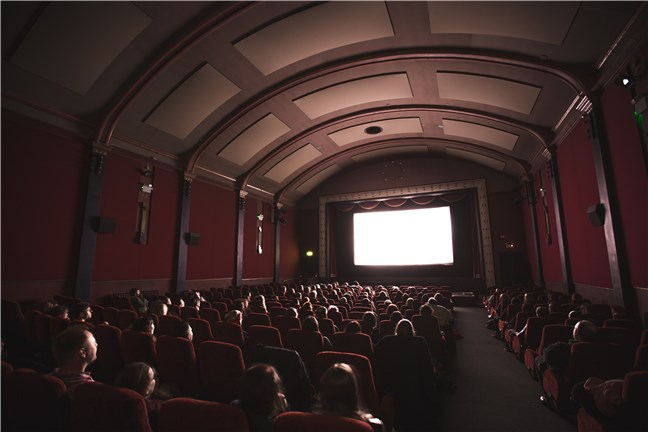
 A cinema screen with a 2K resolution
Therefore, when you hear about a TV, computer monitor, smartphone, or tablet having a 2K resolution, you should research the display further. Its real resolution is likely to be 1440p or Quad HD.
A cinema screen with a 2K resolution
Therefore, when you hear about a TV, computer monitor, smartphone, or tablet having a 2K resolution, you should research the display further. Its real resolution is likely to be 1440p or Quad HD.
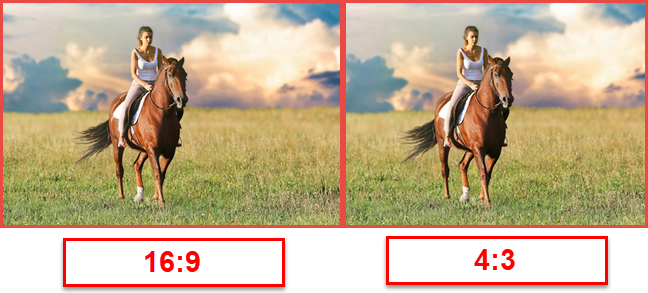
 The same picture in 16:9 vs 4:3 aspect ratio
As display technology improved, TV and monitor manufacturers also began to move toward widescreen displays. Originally “widescreen” referred to anything wider than the typical 4:3 display, but it quickly came to mean a 16:10 ratio and later 16:9. Nowadays, nearly all computer monitors and TVs are only available in widescreen, and TV broadcasts and web pages have adapted to match.
Until 2010, 16:10 was the most popular aspect ratio for widescreen computer displays. However, with the rise in popularity of high-definition televisions, which used resolutions such as 720p and 1080p and made these terms synonyms with high definition, 16:9 has become the high-definition standard aspect ratio.
Depending on the aspect ratio of your display, you can use only resolutions specific to its width and height. Some of the most common resolutions that can be used for each aspect ratio are the following:
The same picture in 16:9 vs 4:3 aspect ratio
As display technology improved, TV and monitor manufacturers also began to move toward widescreen displays. Originally “widescreen” referred to anything wider than the typical 4:3 display, but it quickly came to mean a 16:10 ratio and later 16:9. Nowadays, nearly all computer monitors and TVs are only available in widescreen, and TV broadcasts and web pages have adapted to match.
Until 2010, 16:10 was the most popular aspect ratio for widescreen computer displays. However, with the rise in popularity of high-definition televisions, which used resolutions such as 720p and 1080p and made these terms synonyms with high definition, 16:9 has become the high-definition standard aspect ratio.
Depending on the aspect ratio of your display, you can use only resolutions specific to its width and height. Some of the most common resolutions that can be used for each aspect ratio are the following:
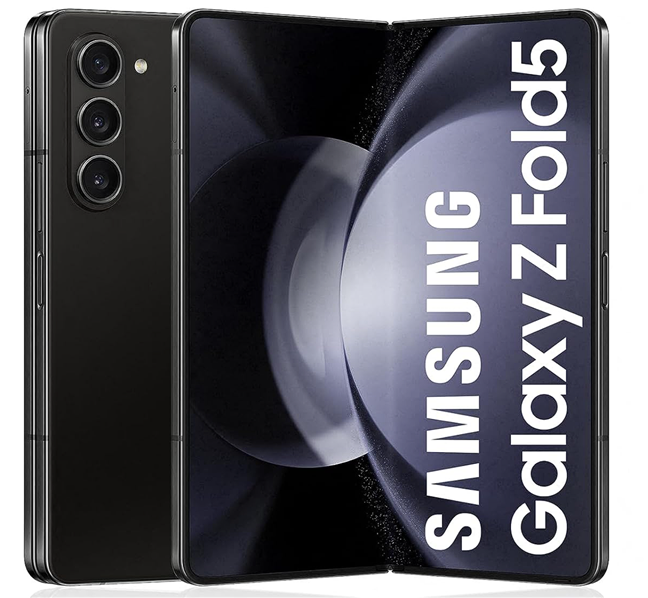
 The SAMSUNG Galaxy Z Fold 5 has an aspect ratio of 10.81:9
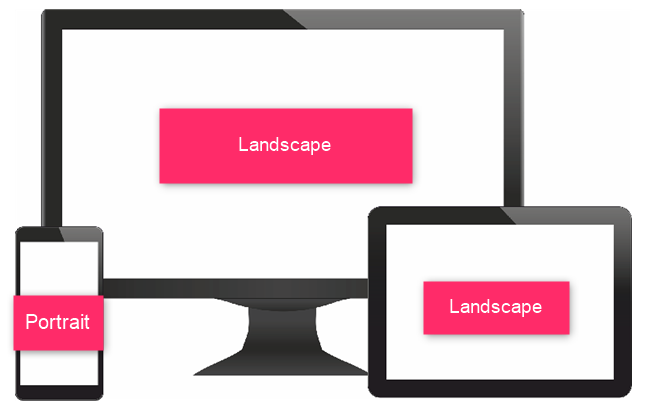
 Different screens with different display orientations
In other words, you could say that an aspect ratio of 16:9 is the same as 9:16, but the latter is not an accepted form of referring to aspect ratio. However, you can refer to the screen resolution in both ways. For example, a resolution of 1920 x 1080 pixels is the same as 1080 x 1920 pixels; it is just that the orientation differs.
Different screens with different display orientations
In other words, you could say that an aspect ratio of 16:9 is the same as 9:16, but the latter is not an accepted form of referring to aspect ratio. However, you can refer to the screen resolution in both ways. For example, a resolution of 1920 x 1080 pixels is the same as 1080 x 1920 pixels; it is just that the orientation differs.
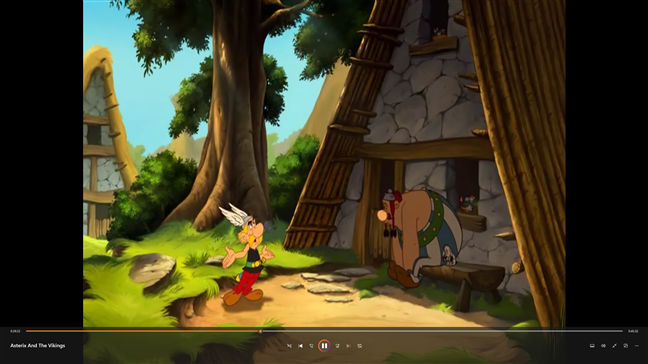
 A 4:3 aspect ratio movie on a 16:9 display
The most important thing is not the monitor size but its ability to display higher-resolution images. The higher you set the resolution, the smaller the images on the screen are, and there comes a point when the text on the screen becomes too small to read. On a larger monitor, it is possible to push the resolution very high indeed, but if that monitor’s pixel density is not up to par, you won’t get the maximum possible resolution before the image text becomes unreadable. In many cases, the screen does not display anything at all if you tell Windows to use a resolution that the monitor cannot handle. In other words, do not expect miracles out of a cheap monitor. When it comes to high-definition displays, you definitely get what you pay for.
A 4:3 aspect ratio movie on a 16:9 display
The most important thing is not the monitor size but its ability to display higher-resolution images. The higher you set the resolution, the smaller the images on the screen are, and there comes a point when the text on the screen becomes too small to read. On a larger monitor, it is possible to push the resolution very high indeed, but if that monitor’s pixel density is not up to par, you won’t get the maximum possible resolution before the image text becomes unreadable. In many cases, the screen does not display anything at all if you tell Windows to use a resolution that the monitor cannot handle. In other words, do not expect miracles out of a cheap monitor. When it comes to high-definition displays, you definitely get what you pay for.
It all started with IBM and CGA
IBM was the company that developed color graphics technology. First came CGA (Color Graphics Adapter), followed by EGA (Enhanced Graphics Adapter) and VGA (Video Graphics Array). Regardless of the capability of your monitor, you would still have to choose from one of the few options available through your graphics card’s drivers. For nostalgia’s sake, here’s how things looked on a once well-known CGA display.The screen is what by what?
The term “resolution” is incorrect when referring to the number of pixels on a screen. That says nothing about how densely the pixels are clustered. That is covered by another metric called PPI (Pixels Per Inch). The “resolution” is technically the number of pixels per area unit rather than the total number of pixels. In this article, I’m using the term as commonly understood rather than the absolutely technologically correct usage. Since the beginning, the resolution has been described (accurately or not) by the number of pixels arranged horizontally and vertically on a display. For example, 640 x 480 = 307200 pixels. The graphics card’s capability determined the choices available, which differed from manufacturer to manufacturer.Mind your P’s and I’s when it comes to screen resolutions: 720p, 1080i, 1080p, and so on
You may have seen the screen resolution described as something like 720p, 1080i, or 1080p. What does that mean? To begin with, the letters tell you how the picture is “painted” on the monitor. A “p” stands for progressive, and an “i” stands for interlaced. The interlaced scan is a holdover from television and early CRT monitors. The monitor or TV screen has lines of pixels arranged horizontally across it. The lines were relatively easy to see if you got close to an older monitor or TV, but nowadays, the pixels on the screen are so small that they are hard to see even with magnification. The monitor’s electronics “paint” each screen line by line at a speed faster than the eye can see. An interlaced display paints all the odd lines first, then all the even lines. Since the screen is being painted in alternate lines, flicker has always been a problem with interlaced screens. Manufacturers have tried to overcome this problem in various ways. The most common way is to increase the number of times an entire screen is painted in a second. This is called the refresh rate. The most common refresh rate was 60 times per second, which is acceptable for most people, but it could be pushed a bit higher to eliminate the flicker that some people still perceived.What about the numbers? Understanding what screen resolution sizes mean (720p, 1080p, 1440p, 2K, 4K, 8K)
Manufacturers developed a shorthand to explain display resolution sizes when high-definition TVs became the norm. The most common numbers you see today are 1080p resolution (1920 x 1080), 1440p resolution (sometimes also referred to as 2K resolution), 720p resolution (HD), 4K, and 8K. As we have seen, the “p” and the “i” tell you whether it’s a progressive or interlaced scan display. Moreover, this shorthand is sometimes used to describe computer monitors as well, even though, in general, a monitor is capable of a higher definition display than a TV. The number always refers to the number of horizontal lines on the display. Here’s how the shorthand translates:- 720p resolution is known as HD or HD Ready resolution and usually means that the display has 1280 x 720 pixels.
- 1080p resolution is also known as FHD or Full HD resolution and typically refers to displays with 1920 x 1080 pixels.
- 1440p resolution is commonly referred to as QHD or Quad HD resolution, and it is typically seen on gaming monitors and high-end smartphones. 1440p (usually 2560 x 1440 pixels) is four times the resolution of 720p HD or HD ready. To make things even more confusing, many premium smartphones feature a so-called 2960 x 1440 Quad HD+ resolution, which still fits into 1440p.
- 4K or 2160p resolution (regularly 3840 x 2160 pixels) is also known as UHD or Ultra HD resolution. It is a huge display resolution, found on premium Smart TVs and computer monitors. 2160p is called 4K because the width is close to 4000 pixels. In other words, it offers four times the number of pixels in a 1080p FHD or Full HD screen.
- 8K or 4320p (generally 7680 x 4320 pixels) offers 16 times more pixels than the standard 1080p FHD or Full HD resolution. For now, you get 8K only on expensive TVs like the ones made by Samsung or LG. However, you can test whether your computer can render such a large amount of data using this 8K video sample:
The problem with 2K is that it doesn’t exist for consumer devices
In cinematography, the 2K resolution exists, and it refers to 2048 x 1080. However, in the consumer market, it would be considered 1080p. To make things worse, some display manufacturers use the term 2K for resolutions like 2560 x 1440 because their displays have a horizontal resolution of 2000 pixels or more. Unfortunately, that is incorrect, as this resolution is 1440p or Quad HD, but not 2K.Can you see high-resolution videos on lower-resolution screens?
You might wonder whether you can watch a high-resolution video on a smaller-resolution screen. For example, is it possible to use a 720p TV to watch a 1080p video? The answer is yes! Regardless of your screen resolution, you can use it to watch any video with any resolution (higher or lower). However, if the video you want to watch has a higher resolution than your display, your device converts the video’s resolution to one that fits the resolution of your display. This is called downsampling. For example, if you want to watch a video with a 4K resolution on a 720p screen, that video is shown at a 720p resolution because that is all your screen can offer.What is the Aspect Ratio?
The aspect ratio term was initially used in motion pictures, indicating how wide the picture was in relation to its height. Movies were initially recorded in a 4:3 aspect ratio; this carried over into television and early computer displays. The motion picture aspect ratio changed much more quickly to a wider screen, which meant that when movies were shown on TV, they had to be cropped, or the image had to be manipulated in other ways to fit the TV screen.- 4:3 aspect ratio resolutions: 640x480, 800x600, 960x720, 1024x768, 1280x960, 1400x1050, 1440x1080, 1600x1200, 1856x1392, 1920x1440, and 2048x1536.
- 16:10 aspect ratio resolutions: 1280x800, 1440x900, 1680x1050, 1920x1200, and 2560x1600.
- 16:9 aspect ratio resolutions: 1024x576, 1152x648, 1280x720 (HD), 1366x768, 1600x900, 1920x1080 (FHD), 2560x1440 (QHD), 3840x2160 (4K), and 7680 x 4320 (8K).
Is there a relation between aspect ratio and display orientation?
The display orientation refers to how you look at a screen: landscape and portrait are the most common screen orientations. Landscape orientation means the screen’s width is larger than its height, while portrait orientation means the opposite. Most large screens, such as those on our computers, laptops, or TVs, use landscape orientation. Smaller screens, such as the ones on our smartphones, are normally used in portrait mode, but because their size allows you to rotate them easily, they can also be used in landscape mode. The screen’s aspect ratio defines the ratio of its longer side to its shorter side. Consequently, that means that the screen’s aspect ratio tells you the ratio of the width to height when you look at it in landscape mode. The aspect ratio is not used to describe screens (or any rectangular shapes) in portrait mode.How does the size of the screen affect resolution?
Although a 4:3 TV display can be adjusted to show black bars at the top and bottom of the screen while a widescreen movie or show is being displayed, this does not make sense with a monitor, so Windows does not even offer you the widescreen display as a choice. You can watch movies with black bars like on a TV screen, but your media player or web browser is the one that does this automatically.


Discussion (112)
I believe that your logic (or the logic in general) about what is 8K is wrong. You explain that 1080p is 1K (it has ~2K pixels horizontally), and that 2160p is 4K (it has ~4K pixels horizontally), and that 8K is 4320p (because it quadruples the pixels horizontally ~8K). However, logically and mathematically speaking, 4320p must be 16K, and that’s obvious directly by entering the resolutions in Excel and do a simple multiplication. 1440p using the same calculation is ~2K, and 1440p Ultra Wide is ~2.5K.
Width Heigth Pixels Calc base Logic (broken) Logic (mine)
1,920 1,080 2,073,600 1.00 1K 1K
2,560 1,440 3,686,400 1.78 ? 2K
3,440 1,440 4,953,600 2.39 ? 2,5K
4,096 2,160 8,847,360 4.27 4K 4K
8,192 4,320 35,389,440 17.07 8K ?!? 16K
my laptop displays 1920 x 1080 resolution.
so, unfortunately, I broke my screen, and a new one was fixed but it’s displaying 1366 x 768 as the highest resolution…. please how do I get back the former resolution?
Hi folks,
I have an interesting issue around what should be the better “watch” for want of a better word.
I have 2 MP4 copies of the same film. One is resolution 1280 x 720 at 50 FPS and the other is 1920 x 1080 at 25 FPS. Unfortunately I do not have the means to play them simultaneously.
Any offers?
Peter
Someone has asked me to create a video and also some collage of photos for them which needs to be displayed on a Massive screen like the one shown on this youtube video: https://youtu.be/WIze8mRFdg4
When I save the video what resolution should I be setting for it to be displayed on this size of the screen?
YOur prompt response would be much appreciated.
Raj
You should set 2160p (4K) as the resolution for that video.
Thanks very much for this article. I am looking for a new external monitor and realised that I needed to consider my Graphics Processor before selecting one. I am using a motherboard mounted NVidea GeForce RTX 2060. I looked for reviews on this on line and found a few but only the gaming aspects were considered and reviewed. I do not play games but need the computer for office type work or hobbies which include photography and some CAD work. There are lots of monitors available but they will only be suitable ifkthe graphics card is capable. Where can I find aa review with a broader st of topics covered – something akin to reviews of monitors?
Your graphics card is powerful enough to work with just about any monitor, no matter how large.
As part of a promotional action for my photography business I want to offer somne free downloads of images to use as wallpapers for computers, laptops, mobile devices etc. If I take one image and offer it in the most common resolutions for different devices, would that be the best approach to take or should I be consider some other way to approach this?
Your approach sounds great.
Well i`m definitely thick when it comes to this type of thing but i certainly learnt more than i knew before so thanks for the article.
I have a problem and no matter how many sellers of monitors or on line questions i ask i still do not understand what HD monitor i need to buy for my newly installed cctv 2 camera system with a dvr via hdmi cable. My cheap system (dvr) has written that i must use a tv (monitor) in HD and capable of displaying 720p or 1080p video. The 2 cameras are at the moment displaying on my sony bravo (older)tv on 1080 and the picture is just what we wanted, perfect for watching our front driveway and gate. The confusing thing for me is all these different numbers of monitors i am looking to purchase on line, i just need a cheap monitor around 12″ in Hd and to display 1080p via hdmi, Can anybody give me simple recommendations please, preferably via amazon uk or ebay uk or uk on line store, thanks people for any help and advice, martintheveg, Beckenham, Kent UK.
Hi,
Its good to see so much information about display in one place.
I am a software tester for a windows based application, we faced High DPI issue for our application in windows 10 machine, also we are not satisfied with solution provided by Microsoft.
Our developer fixed this High DPI issue for our application. I am searching for suggestions to optimize the testing time.
How to test this with all the resolution and scaling optimally?
Can we skip some resolutions for testing?
Is it possible to ensure just by testing in few resolution and scaling? or all the combination needs to be tested?
What does this mean and which one is better?
My monitor spec:
Computer inputs on HDMI1 – up to 4K UHD 3840x 2160 @30Hz
Computer inputs on HDMI2/3 – up to 4K UHD 3840x 2160 @60Hz
Hi, i am going to shoot an animation for a short movie. The director told me, We are using 1920 X1080 pixels. i plan to shoot the animation with a still camera, horizontal of course and i wonder what will people see from the paper after it is cut to the right proportions by the editor? It will be edited to 1920 X 1080…. if on my paper i use 20″ as an horizontal bar, how high need the image go? Thank you I hope my question is not too confusing and english is not my first language, i hope it is not too bad.
11″25
I got the answer I needed. thank you for the article!
Sorry i clicked three times, it kept saying i did not answer the security questions right. too many cars, crossing paths etc…. with blurry images. i thought it did not go through.
No problem. We deleted the duplicate comments.
Great write-up
i loved it thanks mate:)
Just letting you know that this article was INCREDIBLY helpful. Thanks for explaining everything in a way that I can understand. And going into enough detail that I learned a lot.
Very helpful article for someone who knows nothing about computers!! This really helped me determine what I would like in a laptop!
Apple II had colour as far back as 1977, 4 years before CGI was introduced. Also there were other colour computers and arcade games of the era that had a better colour palette which wasn’t a complete eye-sore as CGA graphics HAHA :-).
Kudos to Apple. 🙂
Does the large sized monitors (28/29 inches) or tvs have high resolution only or we can have low resolutions large size monitors like 720p or 1080p.
Very much thankful for the info for which I’ve looking for.
I am very grateful for such a broad and clear explanation, I am a new fan of the video, and with your lesson, I clarified many things I did not know.
Thank you so much!
Hi. I am huge into emulation and im currently emulating my sega dreamcast but since it was a 90s system and im using a 16:9 screen 768p. im not sure what resolution i should put my emulator on because all the scaling options are 4:3 options. It allows me to ” fit to screen” so the games i play covers the whole screen but idk what the 4:3 equivalent 1080p, 900p, 768p, or 720p are.
article’s discussion of resolution and larger screens comes up short. Is a large screen with 1280×1024 look less sharp than a smaller screen with 1280×1024. The pixel area is the same therefore spreading it over a larger screen would make it less sharp. Yes or no Explain
Will a video shot with a 1920 x 1080 camera produce a better picture than a video shot with a 1280 x 720 camera when it all gets reduced down to a DVD with a 1280 x 720 format? I think I saw the difference, but do not know if it is a fact.
I would like to buy a large monitor (27 – 30″) that can match my great new LG GRAM 17″ laptop display which has a resolution of 2560X1600 (WQXGA). I thought I could easily select a 2560X1600 monitor. However, a monitor with this resolution costs over $1,000. I do see monitors in the $600 range with resolutions of 3840X2160 16:09, but can I connect one of these to my PC? I suppose I will keep the PC at it’s recommended resolution (2560X166, which is the highest I can select), but I have no idea what the external monitor will look like if I do.
Yes! I have solved this puzzle with the help of a chat with CDW computers. In fact, I consider myself now to be a subject matter expert. I will give details if anyone is interested.
How come I can’t view a 1080p video on my 720p Motorola g6 play?
I have a FHD monitor (1920x1080p) with 16:9 Pixel Aspect Ratio (PAR),
But I like to play an old game and I’m used to playing it in 4:3 PAR.
So I changed my standard monitor settings from Full Screen(16:9) to 4:3 by TV’s remote control and it worked.
After that I checked my desktop settings and it stayed at 1920x1080p,
After that I even checked my ingame settings and it also stayed at 1920x1080p, so it works right??
I also tried to change my ingame settings from 1920x1080p to 1440x1080p, PAR stayed the same but I think there is a difference in the quality of resolution BUT I AM NOT SURE!
So my question here is: Is it really possible to play in 1920x1080p resolution on a 4:3 PAR monitor settings or my eyes are just tricking my into thinking it is the same but my game really changes the resolution to 1440x1080p without my knowing??
To simplify my question:Is it possible to pair 1920x1080p resolution with 4:3 Pixel Aspect Ratio?
Thanks in forward!
This is very insteresting. Thx!
I’m looking for a new small TV about 24 or 28″. Some say Picture Quality 50hz, others say 200ppi. Which is better?
If a customer is asking for 1280 x 1020 resolution (as its only avaible in square shape )in computer LED
Then how can we justify if we quote LED resolution with 1366 x 786 (wide screen) ….please help
Can someone upgrade his/her screen resolution?
Does 8k have a nickname yet like others do with Full, Quad, and Ultimate?
Ultra*
Thanks for the great article! I really appreciated all the information.
One question that I was hoping to be answered was “What Television resolution would be best used for a large monitor?” 1080p or 4K, or what?
For most people 1080p is enough.
Thank you!
Wow, this explanation was quite great and complete.
this really impressed me.
thank you very much
What happens when you connect a Full HD video card to a monitor that handles higher resolution (1440p or 4K)? Does it render the FHD image full screen?
Actually I’ve been 40 years in Enterprise IT. My first PC (pc’s were a hobby ran parallel to my career) was a Tandy Mod I with a green phosphor screen 60 x 24 lines.
I appreciated your overview all the more because it didn’t boggle my mind. It helped me put a more coherent picture (no pun) together.
A lot of CRT monitors had 2K (2048z1536) back in the day (see name).
2K refers to a few things:
4:3 ratio is 2048×1536, usually crt
Cinema is 2048×1080
16:9 ratio is 2048×1152, usually lcd
sometimes refer to Full High Definition 1920×1080
I have 1366*768 monitor should i download 720p or 1080p movies
No need. If you have to pick between the two, pick 720p. It is enough to provide you with great clarity. 😉
How many “k” can the human eye see? 16k?
Not K’s. Around 2M, or 2048K.
I’m surely not the first to point this out, but all your information about CGA is wrong in this article!!!!!
Your image of parrots is EGA, which is WAY better then CGA. CGA could only do 4 colors, while EGA went up to 16 colors. There was no green or blue or Red in CGA, only Cyan, Yellow, Magenta, White, and Black.
The max resolution for CGA was 320 x 200. So the statement that the old Windows Loading screen at 640 x 480 would look ugly even on a CGA monitor is wrong too. It wouldn’t even run on a CGA monitor because CGA doesn’t support 640 x 480.
In fact, i’m pretty sure Windows 3.1 required VGA (though its possible it worked under EGA as well). But back when people used CGA monitors there was no such thing as Windows.
Thank you for the feedback Gabriel. In the coming weeks, we are going to work on improving the accuracy of this article. Appreciate!
i am trying to fix the color on computer
What do you mean? Give more context, please. How is the color on your computer?
thanks for article -well documented and clear.
is it possible to upgrade a DVI /hdmi output from one computer windows 7 of lower resolution to a higher resolution
eg 1280×1024 to 1920×1080
I have a dvi output from a windows based ultrasound and trying to copy on usb recorder which accepts input 1080 60 hz
steve sonneveld
I want to thank you. This article is easy to read, highly informative and written with excellent language skills.
There is no comparison with most of the info on Internet, you easily won. When someone will ask me my recommendation for website with info about all things digital, digitalcitizen.life is going to be my answer.
Thank you again.
Thank you very much for appreciating our work. It keeps us motivated to continue doing it. 😉
That must be the simplest and best technical explanation around!!
I currently have a 17 inch laptop with resolution 1600 X 900.
Is a 15 inch screen with resolution 1366 x 768 about equal?
No it is not.
Your explanation has been very helpful. However, Please give more in depth explanation about how the pixel density is related with the screen resolution, especially how it becomes relevant with screen resolution when making a choice of a display
I’ve been in the industry a long time, and unfortunately the current colloquial usage of “2K” has morphed into what FHD is (or the 1/4 “4K”).
We can blame this cluster-F on the TV industry who simply will not listen to what’s been hammered out over time for terminology.
You list “2K” as two different resolutions (2048×1080, and 2048×1536). Neither is used, particularly the former.
Where the TV and monitor industry YET AGAIN locked horns was this concept of identifying a monitor first by vertical resolutions and then switching to horizontal resolutions. Oy, did that confuse the public. What they first knew of as 1080 (vertical) was now called colloquially being called 2K (it’s 1920 across) because 4K now meant 3840 across (instead of the original 4096, just shoot me). So “2K” no longer means (it rarely did anyway) 2048 across.
Ugh. Ugh. Ugh. What a mess!
So at the very least, I’d suggest one of three things:
1. Punt the 2048×1080 reference. I’ve never seen it used in practice, and I don’t think it’s used unless it’s a half-driven 4096x monitor.
2. Put a strong reference in there that 2K resolutions are a source of confusion—-people are viewing it has the FHD (full HD, or just now HD) resolution of 1920×1080.
3. Pull all reference to 2K out all together and stick to 1080p. It would be like referring to the 5K monitors that show up. Oye.
Otherwise people might end up having entirely the wrong conversation with the grunts at Best Buy.
Otherwise, thanks for the article.
Thanks for sharing your feedback. We will definitely take it into consideration for future updates to this article. Appreciate!
If i have an Image of Different size or Ratio and Try to display on a screen with Different Ratio but i want it to be use Full screen rather showing Black Space what needs to be done ?
My laptop is 1920 x 1080. The new Surface Go is 3 x 2 aspect ratio, so 1800 x 1200. How will a remote connection to my laptop from a Surface go display? Will I be able to view the entire laptop screen without scrolling in any direction?
And what happens on the 2018 iPad ($329 model), which has a higher resolution than my laptop?
You can set the remote connection app to use a display resolution that looks good on your laptop.
Heartfelt thanks. Abstruse things simply explained.
Very nice article
This was superb! Thank you for making it so clear.
In a video is can we give both 4:3 & 16:9 Aspect ratio
What is recommended screen dimension for 4k?
hi gentle men I was read your description given on kiosk resolutions.Thanks But I have question on resolution and orientation(landscape and portrait)
1.is there relation between resolution and orientation?
2.is there different between resolution 1920*1080 and 1080*1920?
3.please give me brief relation about resolution and orientation?
The 1920×1080 resolution is the same as 1080×1920; you just orient the screen differently. The first is for a horizontal screen, while the second is for a vertical display.
Hi there I was reading this article cuz I was curious about different resolutions in this display properties the reason I’m asking this is because a friend of mine a girlfriend ex seem like she has tweaked out my displays on my television and my devices so the people on the screen can see me such as like on YouTube and different programs I guess a lot of programs maybe on the TV and is that even possible but it sure seems like it is the way that the people react to me would like on YouTube whenever I’m watching if I do something make a certain movement or something make them laugh and different things and I just don’t know if I’m going crazy or is this if so how can I prevent this all of my devices are smart devices I have a Panasonic TV Samsung and Samsung devices so I don’t really understand what’s going on with this I would like to get it soft if it is possible for someone to do that curious to hear what you had to say on that subjectc
Thank you so much. The article is very useful.
Woo hoo
You are saying the number always refers to the number of HORIZONTAL lines on the display. If so 1920×1080 defines 1920 horizontal lines and 1080 VERTICAL lines. so how we can called as 1080p?
Is it right to claim that 1920*1080 system is the most common type in broadcasting in these days,I.e. year 2018????
Great article! Can you update it to include information on 21:9 / Ultra-Wide displays?
It’s not called 4K because it’s “4 times the resolution of FHD”, it’s called 4K because DCI 4K resolution is near 4000 pixels wide, 4096 to be exact. UHD isn’t “real” 4K because it’s not quite as wide as cinema 4K, but it’s so close that TV and monitor manufactures picked up the nomenclature “4K UHD”.
Pretty basic stuff, kind of shocked a site that dubs itself “Digital Citizen” doesn’t know this…
That statements should have said “four times the pixels of FHD,” not resolution. Thanks for pointing out this mistake. We fixed it.
My church projector is set at a 16:9 ratio. How do I make my presentations so that they will show full screen without the black bars on side or bottom?
According to what I read in the post your computer is set to a 16:9 ratio but your projectors are 16:10. I found this post while researching a solution to the same situation. Projector native resolution is 4:3 but shows a max resolution of 1920 X 1200 which is a 16:10 ratio. Projectors are Panasonic PT – EX610
Does Monitor resolution affect the recording ?
I am try record my game play on my monitor. the graphic look fine on when i play and record it down with high quality. but when upload it to youtube i only get a 720p quality. is it because my monitor is a 1366×768?
Yes. Your recording will have the resolution of your monitor. If your monitor is not 1080p, you cannot record a gaming session at 1080p.
what is the maximum and usual resolution of lcd .led and plasma screen
This was SO helpful! I am working with images on a BrightSign player and this really helped me understand how I need to configure my widgets and zones.
Thank you for this tutorial! It cleared all my questions about displays.
You’re insinuating that the Windows startup screen looked bad “even in CGA” after describing a resolution that CGA did not support. CGA is 320x200x4 – I’ve only ever once seen Windows in CGA mode, and it was by way of Windows 3.0. While it did look awful, it was not VGA at all. Hell, I’d settle for EGA in terms of GUI usability.
I wanna know what is the cause that the video can’t play on higher resolution than 1080HD? The streaming is moving and the sound is out but the picture is not moving? is it related to my system? anyway I’m watching this from my pc.
You forgot to mention one more confusing issue – pixel aspect ratio. For example, the mp4 videos from my Sony Alpha camera come in resolution 1440×1080, but they are still FullHD because the frame ratio is still 16:9. It’s just a special tag in video file that tells the player that the frames should be stretched to match 1920 horizontal pixels. This is called anamorphic pixel ratio and 1.3333 is often used in many video files. Essentially, pixels are stretched horizontally which leads to less pixels = less file or stream size = easier encoding/decoding = slightly worse quality but most people don’t really notice that they are being cheated.
It makes things confusing but clears up the cases when you see that your file information shows 1440×1080 but you see that it is played back as 1920×1080.
Well, after seeing the minor typo corrections suggested above, I am still impressed by the clarity of the overall writing, and the lack of common spelling and grammatical errors that are so common on so many sites nowadays. It was a relief to read clear, technically-oriented material that not once confused plural/possessives, misused (or abused) apostrophes, or screwed up acronyms and less-commonly-used terms. Kudos for your writing skills.
And the rest of the article had the details & technical info I was looking for.
Oh, except for one thing… you might want to add the total pixel count for each of the 5 resolutions you listed… for instance: “720p = 1280 x 720 [921,600 pixels] – is usually known as… “. I added the total pixel count (TPC) for each one, and it was interesting to note that although the resolutions step up by significant fractions, the TPC counts roughly double, and eventually quadruple, as screens get ever finer resolutions.
I notice at the opening of the article you’re using a screen grab of a Commodore 64, and saying that it’s a CGA display. That’s incorrect. CGA was developed by IBM for PCs, whilst the C64 uses a video signal generated by the VIC-II chip.
Your review is limited to the current market of LCD monitors.
10 years back, I had a high end 4:3 19″ CRT that was running at 25?? x ???? resolution. Frankly, I was seriously annoyed when I “upgraded” to a LCD monitor after the “magic smoke escaped” from the CRT. The LCD was such a huge step down in image quality and resolution from the CRT. I really wish I could go back …
Good morning everyone,
I have a question. If I watch a 1080p movie on 1080p TV (Or 4K movie on 4K TV), on my computer that has a 720p display, so is it run as 1080p (Or 4K) or just as 720p?
Thank You 🙂
It is processed by the media player at the original resolution and then rendered using your screen's resolution.
That’s good, thank you sir.
This has absolutely no affect on color at all, right? If I render out a video in both 1080p and 1080i, the only difference is how the lines come across the screen?
Yes, you are right.
Could somebody watch 1080p videos on an iPhone 6 that has a resolution of 1334 x 750? If so, how is this possible? Is it the phone that has to be 1080p or the video recorded in 1080p? Sorry for the confusion and thank you in advance.
Sorry, but I do not know the answer. After reading your question, however, I am intrigued to know the answer as well. I imagine Ciprian Adrian Rusen would know the answer?
The 1080 video is downscaled to the resolution of your phone screen.
You can watch 1080p videos on a smaller resolution. But, the video will be scaled down at the resolution supported by the display. You won’t see 1080p, you will see the resolution that your display offers.
Both have to be 1080p. You can stream 1080p video on a lower resolution device but you see the clip at the resolution of the device.
I’m glad you liked the article.
Great article. Thanks.
Another typo. The sentence “In a progressive scan, the lines are painted on the screen in sequence rather than first the odd lines and first the even lines.” should read: “In a progressive scan, the lines are painted on the screen in sequence rather than first the odd lines and THEN the even lines.”
Thank you.
Typo:
“A progressive display paints all the odd lines first, then all the even lines.”
Btw, I appreciate the site
Thanks Chris but I still don’t see the typo. Maybe I’m too sleepy right now. Can you point out where is the mistake?
It should read:
“An INTERLACED display paints all the odd lines first, then all the even lines.”
Thank you Chris. I updated that line. Not sure how we missed it.
You left out Ultra Wide aspect ratio 32:9