




If you are wondering what the difference is between Cat 5 and Cat 6 Ethernet cable, think speed, noise rejection, and headroom. Both use an RJ45 connector and twisted copper pairs, but Cat6 tightens specs for higher frequencies and cleaner signals.
Quick Answer
Cat5e supports up to 1 Gbps at typical home runs. Cat6 supports up to 10 Gbps on shorter runs with higher Cat6 bandwidth and better crosstalk control. If you plan multi-gig internet or a fast LAN, Cat6 makes the smarter upgrade path.
Cat5e vs Cat6: The Core Differences
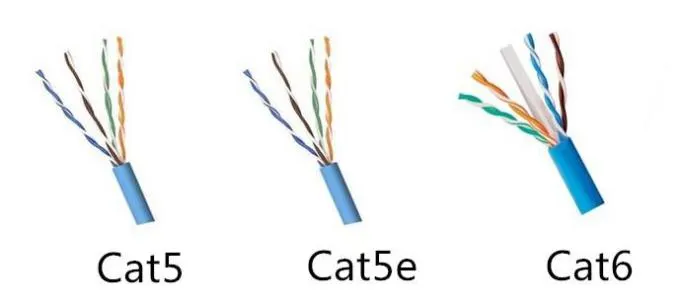
Speed and bandwidth. Cat5e speed tops out at 1 Gbps with 100–350 MHz signaling depending on cable quality. Cat6 speed reaches 10 Gbps on suitable hardware with 250 MHz signaling that moves more data per second.
Crosstalk control. Cat6 pairs use tighter twists and often a central spline to separate pairs. That design cuts alien crosstalk and improves signal-to-noise for cleaner links.
Wire gauge. Many Cat6 cables use AWG 23 conductors. Cat5e often uses AWG 24. Thicker copper can reduce attenuation and improve margin.
Distance and rate. Typical runs allow 1 Gbps up to 100 m on both. For 10 Gbps, Cat6 distance holds to about 55 m under standard conditions, while Cat5e does not target 10 Gbps links. Cat5 distance for gigabit still targets 100 m.
Flex and size. Cat6 adds diameter thanks to separators and thicker conductors. Tight bundles and sharp bends get harder, especially behind racks and in conduits.
Shielding Options: UTP vs STP

You can buy both categories in unshielded and shielded variants. UTP vs STP depends on your environment. Quiet residential runs work well with UTP. Noisy spaces with fluorescent ballasts or parallel power runs benefit from STP. Always bond shielded cable to grounded hardware or you risk worse noise.
Cat6 vs Cat5: Which Should You Install?

Pick Cat6 if you want headroom for multi-gig internet, faster file copies, or 4K NAS editing. Choose Cat5e only when budget rules and 1 Gbps suffices across the entire life of the run.
How To Choose The Right Cable
Use this simple checklist before you buy or pull a run.
- Confirm port speeds on routers, switches, and NICs. Verify 2.5/5/10G support if you plan Cat6.
- Measure the longest path. Keep 10G Cat6 links under 55 m for best results.
- Check the space. Plan for bend radius and the slightly thicker jacket.
- Pick jacket and rating for the route. Use riser or plenum where code requires.
- Decide on shielded vs unshielded based on nearby power and EMI sources.
- Match the RJ45 connector to the wire gauge and conductor type (solid vs stranded).
Installation Tips For Reliable Links
- Keep data runs at least 6 inches from AC power lines. Cross power at 90 degrees when needed.
- Avoid tight staples and kinks. Respect the bend radius to prevent pair damage.
- Terminate with quality keystones and pass-through plugs that match AWG 23 or AWG 24.
- Use a cable tester. Validate wire map and certify performance when possible.
- Label both ends. Future upgrades go faster when you know each path.
What About Cat6a?
Cat6a raises bandwidth to 500 MHz and targets 10 Gbps up to 100 m. You trade flexibility and size for guaranteed 10G distance. Large bundles and long backbones often justify it.
Gaming And Streaming: Do You Need Cat6?
Cat6 for gaming reduces local bottlenecks when you run multi-gig LAN or copy large titles across a NAS. For typical 1 Gbps internet, Cat5e performs fine, but Cat6 buys quiet, future headroom.
FAQ
Will Cat6 make my internet faster? It removes local cable limits. Your ISP plan still caps download and upload, but Cat6 keeps your LAN from becoming the choke point.
Can I mix Cat5e and Cat6? Yes. The slowest segment sets the link. A single Cat5e patch in a Cat6 path drops the chain to that capability.
Do I need special tools for Cat6? Use a ratcheting crimper rated for your plugs, a punchdown for keystones, and a tester that validates performance.
Are all RJ45 connectors the same? No. Choose plugs for solid or stranded conductors and match size to AWG 23 or AWG 24. Wrong plugs cause opens and return loss.
Summary
Cat5e vs Cat6 comes down to speed targets and noise control. Cat5e nails 1 Gbps to 100 m. Cat6 handles 10 Gbps on shorter runs with stronger crosstalk suppression and higher Cat6 bandwidth. For new pulls, Cat6 delivers better long-term value at a small price premium.
Conclusion
You now understand Cat6 vs Cat5 on speed, distance, shielding, and install trade-offs. If you plan multi-gig upgrades, pull Cat6 or step up to Cat6a for 10G at 100 m. If your needs stay at gigabit, Cat5e saves money without hurting performance at the time of writing.

Discussion (0)
Be the first to comment.