




If you plug a network cable into your router or PC, you probably use Gigabit Ethernet already. In simple terms, Gigabit Ethernet is wired networking that supports speeds up to 1 gigabit per second, or 1000 megabits per second. That makes it roughly ten times faster than older Fast Ethernet and far more stable than many Wi-Fi connections in real homes and offices.
This 1 Gbps wired standard powers most modern home networks, office switches, and small servers. When you copy large files, stream 4K video from a media server, or back up to a NAS, Gigabit Ethernet keeps everything moving smoothly.
How Gigabit Ethernet Works
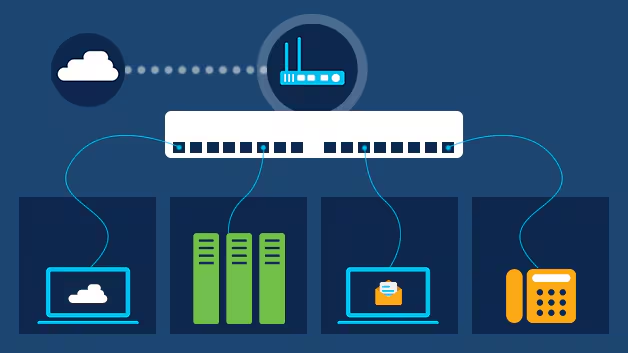
Most Gigabit Ethernet ports follow the 1000BASE-T standard, which runs 1 Gbps over standard copper cabling. The port uses all four wire pairs inside a Cat5e or Cat6 Ethernet cable to send and receive data in both directions at the same time.
Devices like PCs, consoles, smart TVs, and access points plug into a Gigabit Ethernet switch or router. Each port gets its own full 1 Gbps link, so heavy use on one device does not slow the others as long as the rest of the network and internet connection can keep up.
Gigabit Ethernet Vs Fast Ethernet

Fast Ethernet tops out at 100 megabits per second, while Gigabit Ethernet reaches 1000 megabits per second. That tenfold jump lets you move big files far more quickly and removes many local network bottlenecks.
If you still use 10/100 switches or older routers, upgrading to a Gigabit Ethernet switch and a Gigabit Ethernet router often gives you an instant speed boost inside the network, even if your internet plan stays the same.
Gigabit Ethernet Vs Wi-Fi
Modern Wi-Fi standards advertise high speeds, but that bandwidth is shared between devices and can drop because of walls, interference, or crowded airwaves. A wired Gigabit Ethernet connection delivers a dedicated 1 Gbps link to one device, which usually feels faster and more consistent in real use.
For gaming PCs, desktop workstations, media servers, and office desktops that rarely move, a Gigabit Ethernet cable still offers the most reliable connection at the time of writing.
Where You Use Gigabit Ethernet Today

Gigabit Ethernet shows up anywhere you need fast, predictable access to data. You see it at home, in small businesses, and in data-heavy environments such as studios and labs.
- Home networks that link PCs, smart TVs, consoles, and network-attached storage.
- Small offices that rely on shared drives, VoIP phones, and cloud backups.
- Media and content creation setups that move large project files all day.
- Gaming and streaming rigs that need low latency and steady bandwidth.
- Edge devices and switches that connect to faster 10G uplinks in the server room.
Troubleshooting Common Problems
Even though Gigabit Ethernet is straightforward, a few common issues stop users from seeing full speed. These quick checks usually reveal the cause.
- If your link speed shows 100 Mbps instead of 1 Gbps, confirm both devices support Gigabit Ethernet and use at least Cat5e cabling.
- When file transfers feel slow, plug both devices into the same Gigabit Ethernet switch and test again to rule out the router or internet line.
- If the connection drops randomly, reseat the connectors until they click, then try another cable or port on the switch.
- When only one device negotiates at 1 Gbps, update its network adapter driver and disable any forced 10/100 settings in the adapter options.
- If you use powerline adapters between rooms, remember they rarely reach full 1 Gbps and can limit overall throughput.
Tips
- Use Cat5e or Cat6 cables for all new runs to keep your Gigabit Ethernet network ready for faster multi-gig upgrades later.
- Place high-traffic devices, such as NAS units and office PCs, on the same Gigabit Ethernet switch for faster local transfers.
- Check your router and switch labels for “10/100/1000” to confirm they support full Gigabit Ethernet speed.
- Reserve Wi-Fi for mobile devices and keep stationary hardware on wired Gigabit Ethernet links whenever possible.
- Label both ends of long cables so you can trace runs quickly when you add or replace network gear.
FAQ
What Is Gigabit Ethernet?
Gigabit Ethernet is a wired networking standard that provides speeds up to 1 gigabit per second over copper or fiber, often using 1000BASE-T on Cat5e or Cat6 cables in homes and offices.
Do I Need New Cables For Gigabit Ethernet?
Most of the time Cat5e cables work fine for 1 Gbps links, but Cat6 gives you more headroom and better performance on longer runs, especially in noisy electrical environments.
Will Gigabit Ethernet Make My Internet Faster?
Gigabit Ethernet removes local network limits. You only see faster internet if your service plan and modem also support higher speeds than your old 10/100 hardware allowed.
How Is Gigabit Ethernet Different From Fast Ethernet?
Fast Ethernet runs at 100 Mbps, while Gigabit Ethernet runs at 1000 Mbps and uses all four wire pairs in the cable for full-duplex transmission, which greatly improves throughput.
Is Gigabit Ethernet Better Than Wi-Fi?
For stationary devices, Gigabit Ethernet usually provides lower latency, more consistent speeds, and fewer dropouts than Wi-Fi, especially in crowded apartments or busy offices.
Summary
- Gigabit Ethernet delivers up to 1 Gbps over copper or fiber and powers most modern wired networks.
- It runs mainly over 1000BASE-T ports using Cat5e or Cat6 cabling for full-duplex data transfer.
- Compared with Fast Ethernet, it offers ten times the speed and far better performance for large files.
- Compared with Wi-Fi, it gives each device a dedicated, stable link that avoids wireless interference.
- Simple checks on hardware, cabling, and drivers usually resolve most Gigabit Ethernet speed issues.
Conclusion
Gigabit Ethernet has become the default wired standard for homes and businesses because it combines high speed, low latency, and simple setup. By pairing 1000BASE-T ports with quality Cat5e or Cat6 cables, you create a Gigabit Ethernet network that handles streaming, backups, cloud apps, and gaming without constant slowdowns. When you plan new wiring or replace old switches, choosing Gigabit Ethernet keeps your network ready for current demands and makes future upgrades much easier.


Discussion (0)
Be the first to comment.