




Over the last couple of years, I’ve mostly used high-end gaming peripherals from brands like Logitech and Razer. It’s been a long time since I tested any budget options. So, when Trust asked me to review its most advanced wireless gaming mouse to date, I said yes. I’m talking about the Trust GXT927 Redex+, which aims to meet the needs of most gamers at a reasonably lower cost. Looking at its specs, this mouse should please many gamers, and its price is hard to beat. Is it a good gaming mouse for everyday use, though? Read this review and find out:

 I like the packaging for Trust GXT927 Redex+. Do you?
When you open the box, you find the following items inside: the Trust GXT927 Redex+ mouse, its USB-A to USB-C charge cable (which is 1.6 meters long), a wireless dongle, the user guide, and other leaflets.
I like the packaging for Trust GXT927 Redex+. Do you?
When you open the box, you find the following items inside: the Trust GXT927 Redex+ mouse, its USB-A to USB-C charge cable (which is 1.6 meters long), a wireless dongle, the user guide, and other leaflets.

 The items you find inside the box
One thing to remember is that the wireless dongle is inside the mouse, so you need to remove the top cover to access and use it. Its placement is convenient for users who travel often and don’t want to lose the dongle.
The items you find inside the box
One thing to remember is that the wireless dongle is inside the mouse, so you need to remove the top cover to access and use it. Its placement is convenient for users who travel often and don’t want to lose the dongle.
 The wireless dongle is inside the mouse
The unboxing experience for the Trust GXT927 Redex+ is enjoyable and makes you feel like you've purchased an exciting, high-quality product. Next, let’s explore its design and hardware specifications.
The wireless dongle is inside the mouse
The unboxing experience for the Trust GXT927 Redex+ is enjoyable and makes you feel like you've purchased an exciting, high-quality product. Next, let’s explore its design and hardware specifications.

 There are two buttons on the left side
You also have the left and right mouse click buttons, with a small button between them that functions as a DPI switch, and a scroll wheel that can be used as a middle button. All of these can be programmed using Trust’s software on any Windows computer. There are no buttons on the right side of the mouse - just a grooved area designed to provide a better grip when your hands are sweating.
There are two buttons on the left side
You also have the left and right mouse click buttons, with a small button between them that functions as a DPI switch, and a scroll wheel that can be used as a middle button. All of these can be programmed using Trust’s software on any Windows computer. There are no buttons on the right side of the mouse - just a grooved area designed to provide a better grip when your hands are sweating.

 No buttons on the right side
As shown in my pictures, the mouse is designed solely for right-handed users, with no version available for left-handed users. The GXTrust logo is RGB-lit and located toward the bottom of the mouse.
No buttons on the right side
As shown in my pictures, the mouse is designed solely for right-handed users, with no version available for left-handed users. The GXTrust logo is RGB-lit and located toward the bottom of the mouse.

 The GXTrust logo has RGB lighting
On the front side, you have the USB-C port for charging the mouse and connecting it to a computer. Trust is using Kailh switches for the left and right click buttons, which are supposed to last up to 80 million clicks. If you’re curious to know how much this means in years of use, read this article: How long are millions of keystrokes and clicks in years?.
The GXTrust logo has RGB lighting
On the front side, you have the USB-C port for charging the mouse and connecting it to a computer. Trust is using Kailh switches for the left and right click buttons, which are supposed to last up to 80 million clicks. If you’re curious to know how much this means in years of use, read this article: How long are millions of keystrokes and clicks in years?.

 Trust GXT927 Redex+ uses Kailh switches
On the bottom of the Trust GXT927 Redex+, there’s a PixArt PAW3370 optical mouse sensor, along with a button for switching between different RGB lighting modes, and another for turning the RGB lighting on for all areas or only for the top side of the mouse. Of course, you can also use this button to turn off the lights completely. The two rubber glides reduce friction between the mouse and the surface you use it on.
Trust GXT927 Redex+ uses Kailh switches
On the bottom of the Trust GXT927 Redex+, there’s a PixArt PAW3370 optical mouse sensor, along with a button for switching between different RGB lighting modes, and another for turning the RGB lighting on for all areas or only for the top side of the mouse. Of course, you can also use this button to turn off the lights completely. The two rubber glides reduce friction between the mouse and the surface you use it on.
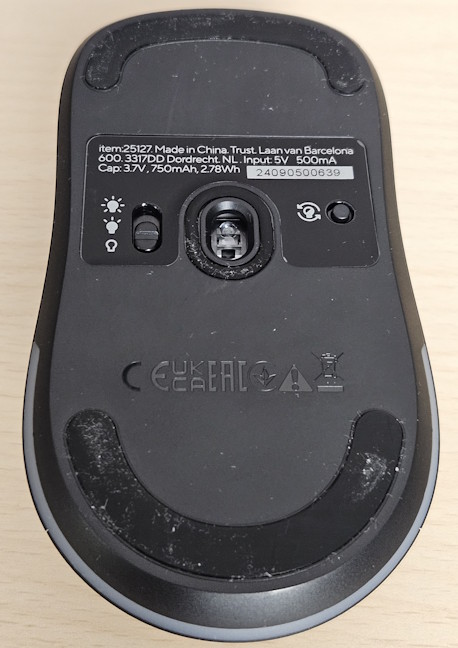
 You can control the RGB lighting using the buttons on the bottom
Trust GXT927 Redex+ offers wireless and cable connectivity, but lacks Bluetooth. Its wireless range is 10 meters. The mouse has onboard memory to store your settings, making it easy to switch between profiles, and it provides a tracking speed of 400 IPS. The DPI (Dots per Inch) is adjustable, ranging from 100 to 25600. Its polling rate can be set to 125, 250, 500, or 1000Hz, and it can handle up to 50G of acceleration.
You can control the RGB lighting using the buttons on the bottom
Trust GXT927 Redex+ offers wireless and cable connectivity, but lacks Bluetooth. Its wireless range is 10 meters. The mouse has onboard memory to store your settings, making it easy to switch between profiles, and it provides a tracking speed of 400 IPS. The DPI (Dots per Inch) is adjustable, ranging from 100 to 25600. Its polling rate can be set to 125, 250, 500, or 1000Hz, and it can handle up to 50G of acceleration.
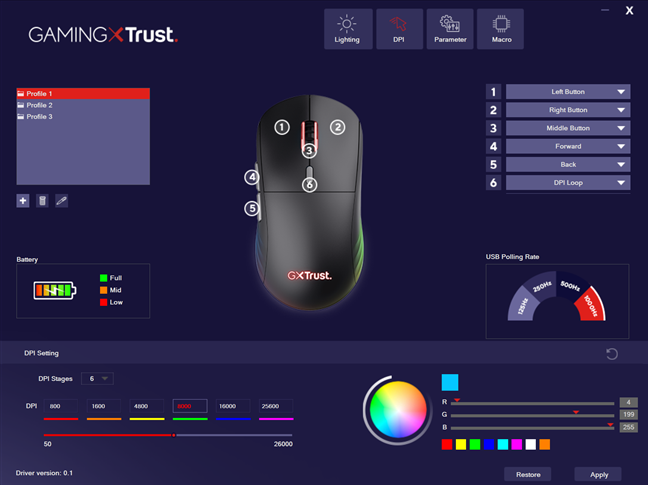
 Setting the DPI is easy
When used as a wireless mouse, Trust claims that it can offer up to 94 hours of continuous use. The battery can be easily recharged using the bundled cable.
The specs of the Trust GXT927 Redex+ are what you'd expect from an entry-level gaming mouse. They aren’t spectacular, but they’re not bad either. If you’re looking for a budget option, this mouse meets many of the specifications gamers want, except for being lightweight.
Setting the DPI is easy
When used as a wireless mouse, Trust claims that it can offer up to 94 hours of continuous use. The battery can be easily recharged using the bundled cable.
The specs of the Trust GXT927 Redex+ are what you'd expect from an entry-level gaming mouse. They aren’t spectacular, but they’re not bad either. If you’re looking for a budget option, this mouse meets many of the specifications gamers want, except for being lightweight.
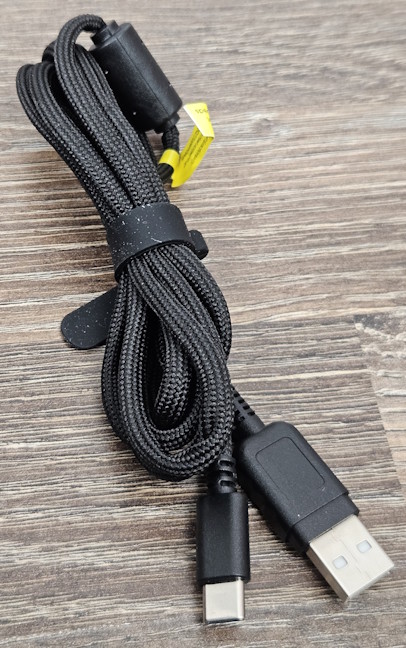
 The charging cable is covered in a soft textile material
The mouse itself looks good, and its RGB lighting can be customized using its dedicated software. While it works on any non-reflective flat surface, I noticed that its movement is smoother and more precise when used with a mouse pad. It doesn’t matter if you buy it from Trust or another vendor - any mouse pad will do.
The charging cable is covered in a soft textile material
The mouse itself looks good, and its RGB lighting can be customized using its dedicated software. While it works on any non-reflective flat surface, I noticed that its movement is smoother and more precise when used with a mouse pad. It doesn’t matter if you buy it from Trust or another vendor - any mouse pad will do.
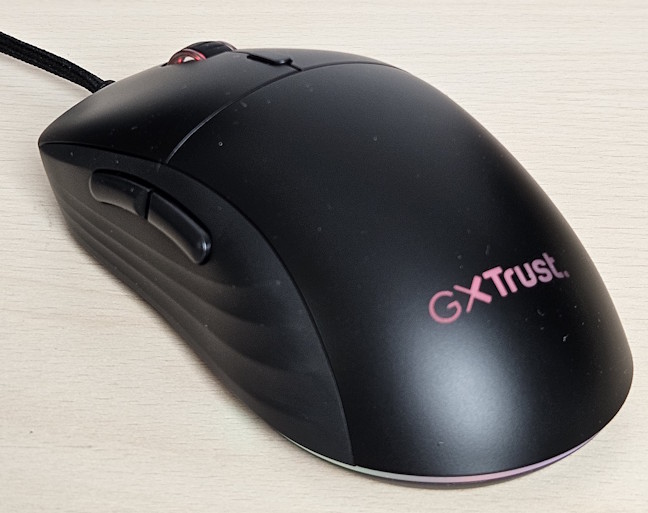
 The RGB lighting looks good
The wireless connection is reliable and doesn’t noticeably affect performance. However, be careful where you position the small USB dongle to make sure it’s not at an odd angle and you don't lose Wi-Fi connectivity with your PC. One minor issue is that waking up the mouse from its standby mode requires that you click it. It doesn’t turn on if you just move it around.
The Trust GXT927 Redex+ is a gaming mouse that performs well for almost any type of game. However, its heavier than I’d like. While the mouse worked well in a role-playing game like Kingdom Come: Deliverance II, I wouldn’t recommend it for a fast-paced action game like DOOM: The Dark Ages. Your hand is likely to tire quickly, especially if you've spent a decade in front of a computer, like I did. The Trust GXT927 Redex+ is suitable for grips like palm, claw, and finger, and in my experience with it, was precise and responsive enough for most tasks: browsing the web, scrolling through documents (it can’t be used for horizontal scrolling, only vertical), editing data in spreadsheets, doing a bit of graphic design in Canva, or editing videos.
The RGB lighting looks good
The wireless connection is reliable and doesn’t noticeably affect performance. However, be careful where you position the small USB dongle to make sure it’s not at an odd angle and you don't lose Wi-Fi connectivity with your PC. One minor issue is that waking up the mouse from its standby mode requires that you click it. It doesn’t turn on if you just move it around.
The Trust GXT927 Redex+ is a gaming mouse that performs well for almost any type of game. However, its heavier than I’d like. While the mouse worked well in a role-playing game like Kingdom Come: Deliverance II, I wouldn’t recommend it for a fast-paced action game like DOOM: The Dark Ages. Your hand is likely to tire quickly, especially if you've spent a decade in front of a computer, like I did. The Trust GXT927 Redex+ is suitable for grips like palm, claw, and finger, and in my experience with it, was precise and responsive enough for most tasks: browsing the web, scrolling through documents (it can’t be used for horizontal scrolling, only vertical), editing data in spreadsheets, doing a bit of graphic design in Canva, or editing videos.
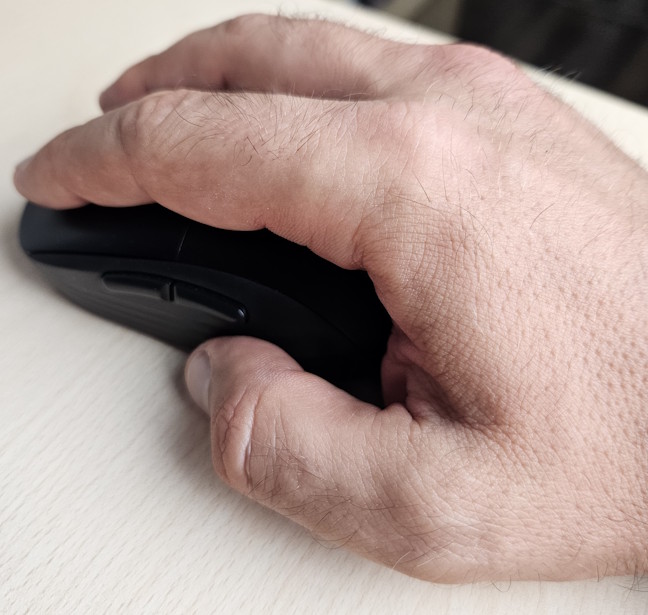
 A claw grip works just fine on the Trust GXT927 Redex+
I prefer using a simple mouse and dislike having too many buttons. Fortunately, the Trust GXT927 Redex+ delivers enough simplicity so I can feel productive. I only customized its side buttons for tasks like navigating back and forth while browsing the web.
A claw grip works just fine on the Trust GXT927 Redex+
I prefer using a simple mouse and dislike having too many buttons. Fortunately, the Trust GXT927 Redex+ delivers enough simplicity so I can feel productive. I only customized its side buttons for tasks like navigating back and forth while browsing the web.
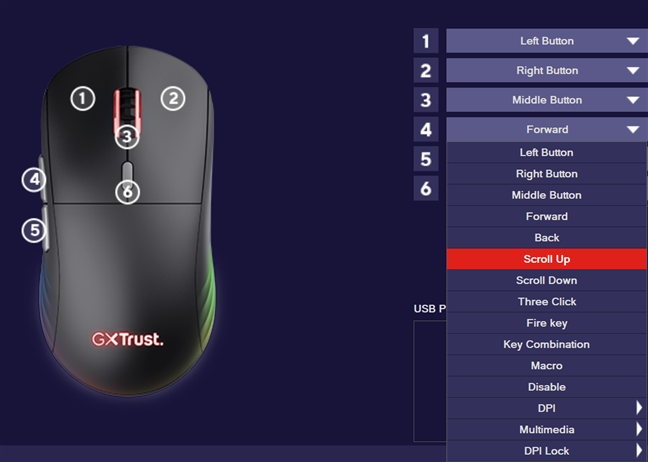
 Personalizing the buttons on the Trust GXT927 Redex+
The materials used for this wireless gaming mouse are decent, and its plastic surface provides a good grip. However, during hot summer days when temperatures reach 36 degrees Celsius (96.8°F) or higher, my hands start to sweat, and I need to take breaks occasionally.
Although I haven't tested its battery life, the 94 hours promised by Trust aren’t impressive. Some gaming mice from other brands can last three times longer, but they also tend to be pricier.
My experience with the Trust GXT927 Redex+ was okay as long as I didn’t use it for extended periods. Unfortunately, its heavy weight puts strain on my wrist, so I have to take breaks from using the computer more often than when I use lighter, more premium gaming mice. While its specs meet most requirements for a good gaming experience, its weight may discourage professional gamers who need to move their hands quickly and without tiring, for maximum performance.
Personalizing the buttons on the Trust GXT927 Redex+
The materials used for this wireless gaming mouse are decent, and its plastic surface provides a good grip. However, during hot summer days when temperatures reach 36 degrees Celsius (96.8°F) or higher, my hands start to sweat, and I need to take breaks occasionally.
Although I haven't tested its battery life, the 94 hours promised by Trust aren’t impressive. Some gaming mice from other brands can last three times longer, but they also tend to be pricier.
My experience with the Trust GXT927 Redex+ was okay as long as I didn’t use it for extended periods. Unfortunately, its heavy weight puts strain on my wrist, so I have to take breaks from using the computer more often than when I use lighter, more premium gaming mice. While its specs meet most requirements for a good gaming experience, its weight may discourage professional gamers who need to move their hands quickly and without tiring, for maximum performance.
 The REDEX+ V2 Wireless Mouse app
The mouse can store three profiles with their unique settings, and you can switch between them without the software by pressing a button. However, Trust doesn’t support features like Windows 11’s Dynamic Lighting, nor does it offer a universal app for all Trust peripherals, which would allow you to configure RGB lighting uniformly and transfer settings between devices.
Trust GXT927 Redex+ is an affordable wireless gaming mouse, and to keep costs low, its manufacturer offers only a basic app for customization. You don’t get an app that connects to the entire Trust ecosystem, like you do with more expensive brands like Logitech and Razer.
The REDEX+ V2 Wireless Mouse app
The mouse can store three profiles with their unique settings, and you can switch between them without the software by pressing a button. However, Trust doesn’t support features like Windows 11’s Dynamic Lighting, nor does it offer a universal app for all Trust peripherals, which would allow you to configure RGB lighting uniformly and transfer settings between devices.
Trust GXT927 Redex+ is an affordable wireless gaming mouse, and to keep costs low, its manufacturer offers only a basic app for customization. You don’t get an app that connects to the entire Trust ecosystem, like you do with more expensive brands like Logitech and Razer.
Trust GXT927 Redex+: Who is it good for?
This mouse is a suitable choice for:- Gamers on a budget
- People who don’t spend a lot of time in front of their computer
- Users who want a wireless mouse with decent specs
Pros and cons
There are many positives about the Trust GXT927 Redex+:- Affordable pricing
- Good specs for gaming
- Beautiful RGB lighting
- Wired and Wi-Fi connectivity
- It’s heavy and can tire your wrist
- No support for Dynamic Lighting
- Lower battery life than more expensive options
Verdict
The Trust GXT927 Redex+ tries to fit into a tricky middle ground where it does most things right without excelling at any of them, while costing a lot less than its competitors. If you're gaming on a budget, this mouse gives you the essentials: good precision and low latency, RGB lighting, plus wired and wireless connectivity. Unfortunately, its weight is noticeable during longer gaming sessions, especially in fast-paced shooters. Its battery life sounds decent until you realize more expensive models can last three times longer. Trust GXT927 Redex+ is a good choice for casual gamers who play a few hours at a time and budget-conscious users seeking a fast wireless mouse at a reasonable price.Unboxing the Trust GXT927 Redex+ gaming mouse
The Trust GXT927 Redex+ arrives in an attractive cardboard box featuring a large picture of the device on the front. The box includes plenty of details about this product and its key features, such as its battery life when used as a wireless mouse, its precision, latency, and durability.Design and hardware specifications
Trust GXT927 Redex+ is an RGB-lit gaming mouse made from plastic materials, with 55% of those plastics being recycled. Its dimensions are 125 x 41 x 64 mm, or 4.92 x 1.61 x 2.52 inches in height, depth, and width. Unfortunately, it weighs 129 grams (4.55 oz), which is heavier than many modern gaming mice. It is a wireless gaming mouse that can also connect to Windows computers and consoles using its USB-A to USB-C cable. In total, there are six programmable buttons on the Trust GXT927 Redex+. Two of them are on the left side of the mouse.Using the Trust GXT927 Redex+ gaming mouse
I used the Trust GXT927 Redex+ mostly as a wired mouse because I prefer to ensure that I get the best performance. When installing it, I noticed that its cable is relatively short (1.6 meters). I would have preferred a longer cable of 2 meters to make it easier to use on my standing desk. Another issue with the cable is that it’s covered in a soft textile material, which makes it difficult to install the mouse if you start by plugging it into the USB port of a computer that’s under your desk. You need first to place the mouse on your desk, connect its cable, and then lower it down - a small annoyance to consider.The software experience
Customizing the mouse is done through the REDEX+ V2 Wireless Mouse app, which can be downloaded from the product’s page. The app provides all the customization options you need: from setting lighting profiles to adjusting the DPI, polling rate, mouse sensitivity, and scrolling speed. It also supports macros.


Discussion (0)
Be the first to comment.