When you look at the technical specifications for modern gaming keyboards and mice, you notice that manufacturers provide lifespan estimations like "this keyboard will last 80 million keypresses" or "this mouse will last 30 million clicks." What do these metrics mean? Can you use them to estimate how many years these products last? I wanted to answer these questions, and I have performed some experiments, using software that tracks my day-to-day computer usage patterns. Here's what I have learned:
What kind of computer user are you? Learn with WhatPulse!
I am the kind of computer user who writes a lot and regularly plays on his computer. I do lots of work in Microsoft Office, just like any other business user, lots of web browsing and I also play games like League of Legends, Fortnite, Diablo 3, The Witcher, Pillars of Eternity or Transistor.
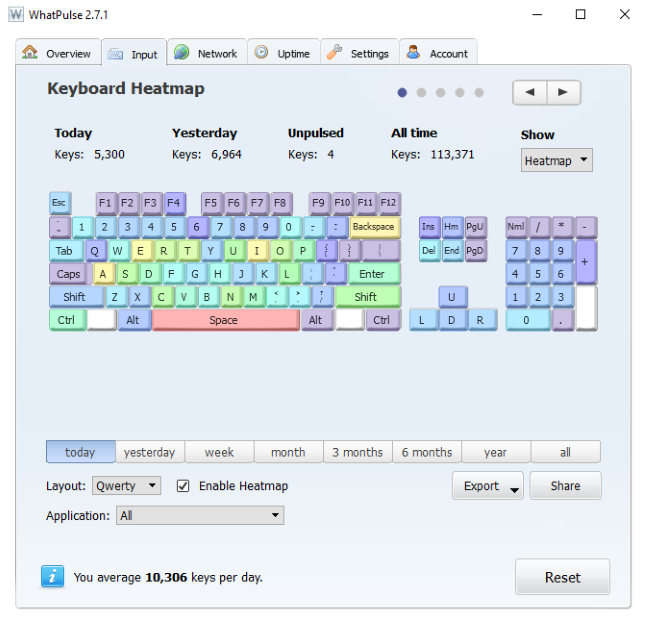
During working hours, I tend to use the keyboard a lot more than the mouse, and I press many keys on the keyboard. However, the most used keys are Space and Backspace, which makes sense, if you think about it. When I play games, I press just a few keys on the keyboard that allow me to control my in-game character. For example, in League of Legends, I often press the following keys: Q, W, E, R, D, and F. When I play shooters or role-playing games, I press a lot the following keys: W, A, S, D.
To know how much you type and you click, on average, per day and what keys you tend to press more often and which mouse buttons, you need to install a specialized app and monitor yourself for at least a week, if not several weeks. We recommend that you try WhatPulse and use it to understand more about your typing and clicking habits. Then, based on this data, you can try to estimate how much your next keyboard or mouse will last. If you need some help learning how it works and how to use it, read this guide: How many key presses and mouse clicks do you perform in a day?.
How long are 50 million keypresses in years?
After using WhatPulse for a month, it has revealed that I press on average, 11698 keys per day or 4.2 million keypresses per year. I don't press the same key 11.000 times a day, and you need to look at the key that you press most often. In my case, it's Space, and it represents 12% of the key presses that I make on average, in a day. This means 1404 key presses per day.
switches, presses, clicks
How much is this in years, if I were to buy one of the best gaming keyboards on the market? Let's find out:
Razer Hunstman Elite promises a 100 million keystroke lifespan. This would mean 195 years. That is a lot of time, and the keyboard will stop working much earlier than that.
Many mechanical gaming keyboards like the SteelSeries APEX M750 or HyperX Alloy Elite, promise a lifespan of 50 million keystrokes. This means 97 years. Again, that is a lot of time.
How long are 20 million clicks in years?
When it comes to mice, and especially gaming mice, some manufacturers communicate the expected lifespan of the mouse in how many clicks it was created to resist. After a month of usage, WhatPulse has revealed that I make 7985 mouse clicks per day or 2.9 million clicks a year. 95% of those clicks are left clicks, and it means that I press the left click button 7586 times a day.
switches, presses, clicks
How much is this in years, if I were to buy one of the best gaming mice on the market? Let's find out:
SteelSeries promises a lifespan of 30 million clicks for their Rival 700 gaming mouse. This means an expected lifespan of 10.5 years.
Most companies promise a lifespan of 20 million clicks for their mice. Examples of such mice are ASUS ROG Spatha or Logitech G303 Daedalus Apex. This means 2636 days or 7.2 years.
The problem: How manufacturers make lifespan estimations!
Manufacturers do not openly talk about how they make their lifespan estimations. You find little information on this topic, and generally only after digging through technical forums where people share bits of useful information.
First of all, lifespan estimations are made in specialized labs, and they are performed only for the switches beneath the keys on your keyboard and the buttons on your mouse. In those labs, you do not find elements that are found in abundance in our homes and offices: dust, moisture, and dirt. You can see how such labs look in the video below, made by Omron, a corporation that supplies switches for many of the gaming mice found on the market today.
No matter how clean you are, dust always accumulates on your keyboard and mouse and lowers their lifespan. If you never clean your keyboard and mouse, and you also get some dirt on them, they can start to malfunction relatively quickly. Also, moisture damages the electronic circuits that make up your keyboard and mouse. When exposed to high humidity, water droplets can enter the switches that are used in your mouse or keyboard, which gets carbonized on the switch, lowering its lifespan.
In testing labs, they use a standardized ambient temperature, which is ideal for the functioning of the switches, with an optimal humidity, and atmospheric pressure. It is in no way similar to the environment in your home and office.
Another difference is that they apply the same force and overtravel when making lifespan estimations. They have robots pressing those switches millions of times, always in the same way. Let's explain the concepts of force and overtravel:
The force is how hard the switch is pressed. People press the keys on their keyboards with different forces, based on they typing style, how old they are, their strength, mood, and so on. You press keys with different forces during a day, based on how tired or angry you are, how far a key is on the keyboard, and so on. The same with the buttons on your mouse. When you press a key or a switch hard, with a lot of force, you lower its lifespan more than when you press it with the ideal force chosen by its manufacturer.
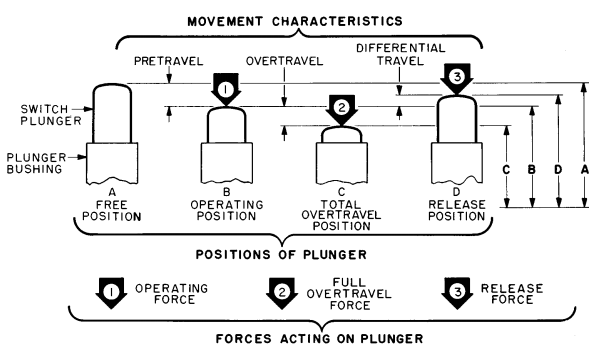
Another important concept is overtravel. To make it easier to understand, look at the diagram below. It represents a standard electromechanical switch, shared by Honeywell. While the switches found in keyboards and mice look different, the operating principles are similar.
When not used, the switch has a "free position" where nothing happens (position A). The switch is designed to be set into its "operating position" (position B) when you turn it on. When it reaches that position, it does what it is supposed to do (send a keystroke or a mouse click). However, when you press it with a different force than the ideal, it gets into its "overtravel position" (position C). This position is lower than its ideal "operating position" and it represents how much you can safely press the switch beyond the operating position before it starts to malfunction. When you release the switch, it does not immediately get back to its "free position." it first gets to a "release position" which is lower than the "free position." After some time (milliseconds or seconds) it gets back to its initial "free position."
switches, presses, clicks
The distance from the free position to the overtravel limit position represents the total travel. The overtravel position varies based on the force that you use to press the switch. For increased lifespan, you want the total travel to be as low as possible. Therefore, the harder you press the switch, the more often it reaches its overtravel position limit, the higher the total travel, and lower the lifespan. When making their lifespan estimations, manufacturers use a low or no overtravel because they want their switches to last longer, and offer more impressive numbers to their customers. Also, different switches have different safe overtravel positions and can sustain smaller or higher forces when pushed.
What should we learn from this?
After doing this experiment on my own, understanding how much I type and click on average, and looking at the technical specs of many keyboards and mice, I would like to draw several conclusions:
The lifespan of the switches used in modern keyboards and mice is measured in key presses and clicks because a time-based measure would not apply to all users. Different users have different usage patterns.
Depending on how much you type and click, the same mouse and the same keyboard lasts a different time than for other people. Sometimes, these differences can be significant, based on usage patterns.
If you want to increase the lifespan of your keyboard and mouse, you should clean them regularly, avoid liquid spiling, and avoid using them in humid environments. Also, you should not type or click with a lot of force, as this directly lowers their lifespan.
The switches used in gaming accessories tend to be more durable than other parts and most probably they won't be the cause of your keyboard or mouse failing. Drivers are a lot more likely to fail than the hardware, while the electronics used in a keyboard and a mouse last less than the switches, especially in environments with lots of dust or humidity.
Lifespan estimations in keystrokes and clicks are just marketing buzz with no real value in estimating the real lifespan of what you are about to buy. These estimations only try to impress users and differentiate the different accessories between them, in an artificial manner. The lifespan of the keyboard (or that of the mouse) is as long as that of its weakest component. For example, you can buy a keyboard with high-quality switches, with poor design and low-quality plastic protecting them, and get a short-lived keyboard.
Manufacturers should provide other metrics for estimating the durability of their devices that take into consideration real-life usage situations and environments, as well as the other components inside a keyboard or mouse, which are likely to fail faster than the switches that are used.
What do you think?
Now that you know my view on this subject and what I have learned while trying to estimate how much my keyboard and mouse are going to last, I would like you to share your view on the subject. What do you think about the lifespan metrics used by manufacturers for their keyboards and mice? Are they useful to you? Do you consider them when buying such products? Let us know in the comments below.
I had to replace 2 Microsoft Mice 1850 after *one* year of use, because clicking on their left button ended up in a double-click, making life impossible. So, I believe they lasted 100,000 clicks each. Should I send them back to Microsoft and get reimbursed?
Aaron ·
I played a game that made me click very fast for long periods of time. My mouse is probably about 2 years old now and I clicked probably 20,000+ times per day on average. Should the switch in my mouse be dead? This is the only thread I could find on this topic. I have the glorious model O.
Phil ·
Your math on the keystroke years is incorrect. If you are averaging around 4.2 – 4.3 million keystrokes in a year then it will take around 22-23 years to hit 100 million. You put down 195 years, would would be about 819 million keystrokes.
Tonette ·
Actually, not really a comment but a question. So, what these manufacturers are really saying when they claim that a keyboard will last 50,000,000 key presses is 50,000,000 key presses for all keys combined, not 50,000,000 key presses for each key? Then that means that for a heavy typist like me who can type 1M characters in less than 15 days (alphanumeric and symbols only, not including miscellaneous keys with no printed form), my keyboard is supposed to last only for approximately 20 months? If this were true, then I should have expected my Ducky to last really less than 2 years. And I was blaming Ducky for producing low-quality keyboards. Apparently, I purchased the keyboard not really understanding what the 50M key presses meant.
J Foley ·
I’m a transcriber, and easily type 10,000 words on a daily basis. If the average word is six letters long, then that’s 60,000 keystrokes, probably a lot more. Some days I type 20,000 words, and that’s excluding emails, comments, browsing etc. If you say that you use only 20 letters or so for 85% of all words (so excluding q, z, x, j, v, k mostly) then it works out at about 3,000 key strokes on an average day, for commonly pressed letter keys. (This is a conservative underestimate though, and the truer figure is probably closer 4,000 for common letters). As you say, based on your analysis the space bar takes heavy abuse, being pressed 12% of the time. So if my mechanical keyboard is rated for 50,000,000 key presses, then 50mil divided by 3,000 works out at 16,666 days, which in years works out as about 45. However, the true figure could quite conceivably higher than this, and it’s entirely possible that if I worked twice as hard as I do now, then I could wear out even a mechanical keyboard in about 20 years. I have no plans of doing that though, seeing as I’ve been transcribing for the last nine years, and do not wish to continue much past a decade. As a side note though, one huge upside of this work, is that you get incredibly quick at typing; I mean I can easily type at 100 words/min without any formal training. When I started I could maybe manage 30 comfortably, at best. So I could say it’s more than tripled my productivity since when I began. I do think, again on a side note, that formal keyboard touch typing training is actually a negative, and I would encourage people to shy away from it. Lots of my contemporaries have carpal tunnel syndrome and other ailments, and they all invariably have been formally trained. Keeping your hands frozen in one place is unhealthy in my opinion, I pivot both hands, which is a much more natural motion. I’ve never had any injuries, including repetitive strain injury for example, and if anything I do more typing than most other transcribers. So formal training is definitely a cause of most injuries, based on people I know. But it would be interesting to investigate this scientifically. Anyhow, thanks for you article though, it was very illuminating, and I agree that most casual users, who aren’t doing industrial quantities of typing will probably never wear out a keyboard, probably even most gamers, with the exception of a few of the most hardcore.
Anonymous ·
Excellent perspective. Thanks for commenting. 😉
James Guest ·
Hi, thanks for your comment. Have you ever worn out the characters printed on your keyboard – is that not the first thing to go and how long did they last?
Thanks
Marte ·
I don’t look at keystroke metrics because I don’t think they really apply to me. I’m not a gamer but I type all day long and I type very fast. I have worn out four Microsoft Natural keyboards over the past 20 years. I love the ergonomic shape and the quiet keys, but even the best keyboard eventually gives up the ghost. 🙂
Adrian Putu ·
What type of SteelSeries mouse that u said got 30 million clicks lifepan?







Discussion (10)
I had to replace 2 Microsoft Mice 1850 after *one* year of use, because clicking on their left button ended up in a double-click, making life impossible. So, I believe they lasted 100,000 clicks each. Should I send them back to Microsoft and get reimbursed?
I played a game that made me click very fast for long periods of time. My mouse is probably about 2 years old now and I clicked probably 20,000+ times per day on average. Should the switch in my mouse be dead? This is the only thread I could find on this topic. I have the glorious model O.
Your math on the keystroke years is incorrect. If you are averaging around 4.2 – 4.3 million keystrokes in a year then it will take around 22-23 years to hit 100 million. You put down 195 years, would would be about 819 million keystrokes.
Actually, not really a comment but a question. So, what these manufacturers are really saying when they claim that a keyboard will last 50,000,000 key presses is 50,000,000 key presses for all keys combined, not 50,000,000 key presses for each key? Then that means that for a heavy typist like me who can type 1M characters in less than 15 days (alphanumeric and symbols only, not including miscellaneous keys with no printed form), my keyboard is supposed to last only for approximately 20 months? If this were true, then I should have expected my Ducky to last really less than 2 years. And I was blaming Ducky for producing low-quality keyboards. Apparently, I purchased the keyboard not really understanding what the 50M key presses meant.
I’m a transcriber, and easily type 10,000 words on a daily basis. If the average word is six letters long, then that’s 60,000 keystrokes, probably a lot more. Some days I type 20,000 words, and that’s excluding emails, comments, browsing etc. If you say that you use only 20 letters or so for 85% of all words (so excluding q, z, x, j, v, k mostly) then it works out at about 3,000 key strokes on an average day, for commonly pressed letter keys. (This is a conservative underestimate though, and the truer figure is probably closer 4,000 for common letters). As you say, based on your analysis the space bar takes heavy abuse, being pressed 12% of the time. So if my mechanical keyboard is rated for 50,000,000 key presses, then 50mil divided by 3,000 works out at 16,666 days, which in years works out as about 45. However, the true figure could quite conceivably higher than this, and it’s entirely possible that if I worked twice as hard as I do now, then I could wear out even a mechanical keyboard in about 20 years. I have no plans of doing that though, seeing as I’ve been transcribing for the last nine years, and do not wish to continue much past a decade. As a side note though, one huge upside of this work, is that you get incredibly quick at typing; I mean I can easily type at 100 words/min without any formal training. When I started I could maybe manage 30 comfortably, at best. So I could say it’s more than tripled my productivity since when I began. I do think, again on a side note, that formal keyboard touch typing training is actually a negative, and I would encourage people to shy away from it. Lots of my contemporaries have carpal tunnel syndrome and other ailments, and they all invariably have been formally trained. Keeping your hands frozen in one place is unhealthy in my opinion, I pivot both hands, which is a much more natural motion. I’ve never had any injuries, including repetitive strain injury for example, and if anything I do more typing than most other transcribers. So formal training is definitely a cause of most injuries, based on people I know. But it would be interesting to investigate this scientifically. Anyhow, thanks for you article though, it was very illuminating, and I agree that most casual users, who aren’t doing industrial quantities of typing will probably never wear out a keyboard, probably even most gamers, with the exception of a few of the most hardcore.
Excellent perspective. Thanks for commenting. 😉
Hi, thanks for your comment. Have you ever worn out the characters printed on your keyboard – is that not the first thing to go and how long did they last?
Thanks
I don’t look at keystroke metrics because I don’t think they really apply to me. I’m not a gamer but I type all day long and I type very fast. I have worn out four Microsoft Natural keyboards over the past 20 years. I love the ergonomic shape and the quiet keys, but even the best keyboard eventually gives up the ghost. 🙂
What type of SteelSeries mouse that u said got 30 million clicks lifepan?
The Rival series.