TP-Link Archer C5 is an old and classic wireless router, that is popular in the market of affordable routers. Its success in sales has convinced the company to create a new revision of this model, so they just launched TP-Link Archer C5 v4. We received this new version for testing, and we took it through all our usual tests and benchmarks. If you want to know whether TP-Link Archer C5 v4 is a good fit for your needs and whether it is worth buying, read this review:
TP-Link Archer C5 v4: Who is it good for?
This wireless router is a suitable choice for:
People with small or medium-sized apartments
Users who have newer devices that can connect to faster 5GHz WiFi networks, using the 802.11ac wireless standard
People on a budget, who do not need advanced features
The speed you get on the 5GHz wireless band is excellent for a router in its price range
It packs most of the basics people need
It can use a 3G/4G USB modem as a backup for your main internet connection
It can be mounted on walls
The Help documentation is easily accessible
There are also a few downsides:
It does not have smartphone app, even though older versions of the same router do. This should be fixed with future software and firmware updates
The firmware is available only in English
Its performance on the 2.4 GHz band is a bit inconsistent
Product rating4/5
Verdict
TP-Link Archer C5 v4 is a welcome refresh of a popular wireless router. It has support for the latest 802.11ac Wave 2 standard, newer firmware with some interesting features, and it offers a satisfying user experience on the 5GHz wireless band. Its price is affordable, and it offers most of the basics people need for networking their apartments. As long as you do not have a large home or apartment and many devices, TP-Link Archer C5 v4 is a good choice for your next wireless router.
Unboxing the TP-Link Archer C5 wireless router
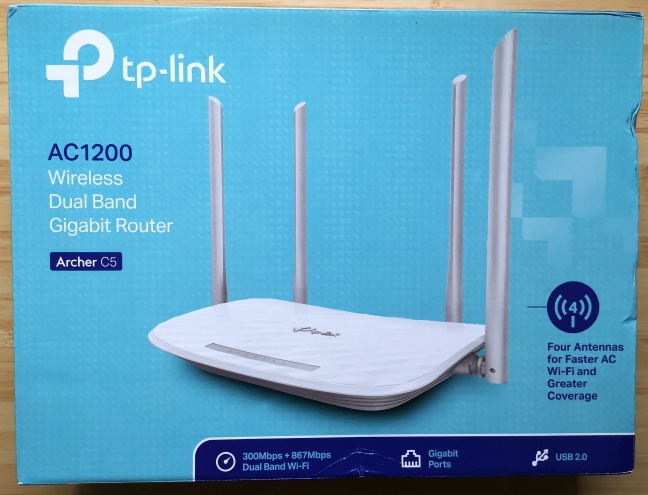
The TP-Link Archer C5 v4 comes in a calming cyan box, with a big picture of the device on the top. You see listed only a few of this device's main characteristics.
TP-Link Archer C5 v4
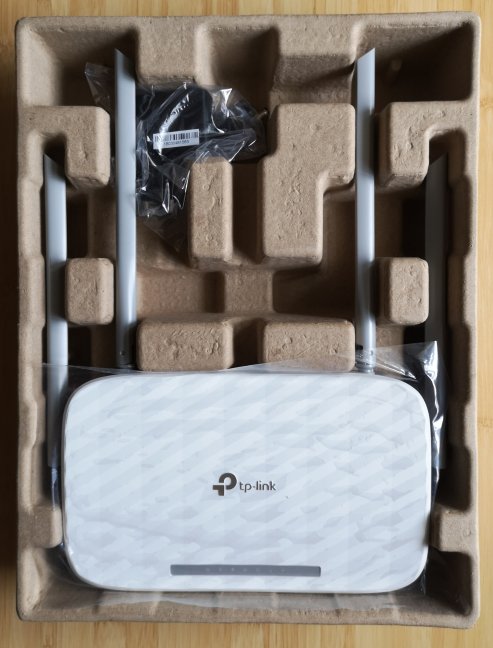
On the back, you see some marketing information about this product and a little technical information. When you open the box, you immediately see the wireless router, just like in the picture below.
TP-Link Archer C5 v4
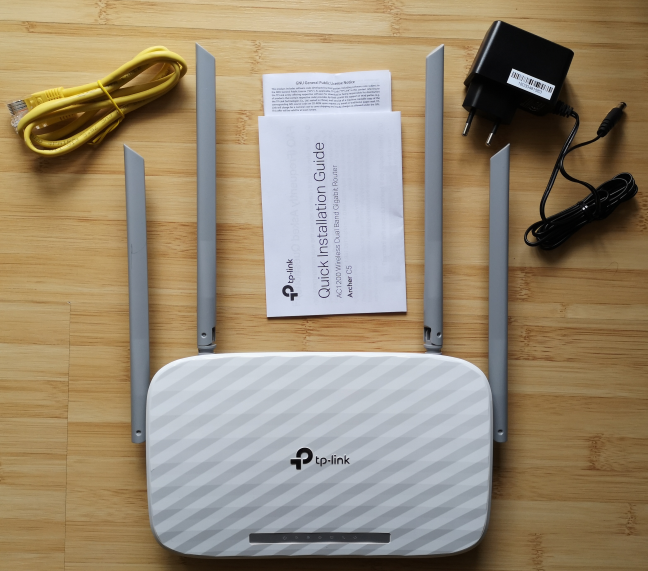
When you unpack everything, you find the following elements: the router, the power adapter, an Ethernet cable, the quick installation guide, the license for its firmware, and the warranty.
TP-Link Archer C5 v4
The unboxing experience offered by TP-Link Archer C5 v4 is quick and painless. Since this is an affordable router, it offers all the basics you need to get it working, without any unique accessories.
Hardware specifications and design
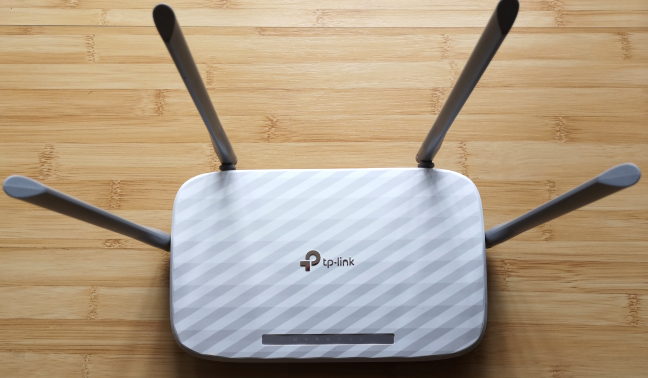
TP-Link Archer C5 v4 is a refresh of an older and popular model. The new version is white, light, and glossy. It is a dual-band wireless router with a maximum theoretical bandwidth of 1200 Mbps, split as follows: 300Mbps for the 2.4GHz band, and 867Mbps for the 5GHz band. As you can see below, it has four external antennas. They are rather tall, and not detachable.
TP-Link Archer C5 v4
TP-Link Archer C5 v4 has a modest single-core MediaTek MT7620A processor, running at 600 MHz, 64 MB of RAM, and only 8 MB of storage for the firmware. This being a new model, it offers support for the 802.11ac Wave 2 standard and 2x2 MU-MIMO transfers. It also supports the older 802.11 b/g/n standards which offer lower speeds and compatibility with older devices.
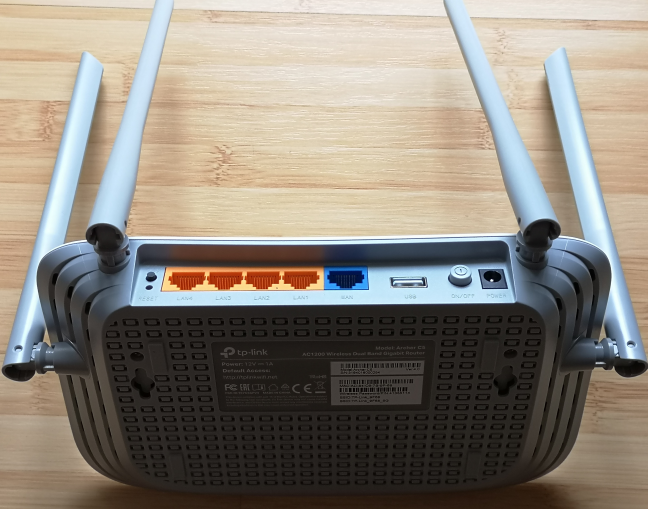
On the back of the TP-Link Archer C5 v4, you can find four Ethernet ports working at 1 Gbps, one WAN port (at 1 Gbps), a USB 2.0 port, the Power button, the power jack, the WPS button, and the Reset jack. On its bottom, you have two holes for mounting the router on walls, a feature that will be appreciated by some users.
TP-Link Archer C5 v4
The router is not large -- 9 x 5.6 x 1.4 inches or 230 x 144 x 37 mm in width x depth x height. It is also rather light, weighing 25 ounces or 719 grams.
If you would like to read all the official specifications of this product, go to this page: TP-Link Archer C5 v4 Specifications.
Setting up and using the TP-Link Archer C5 v4 wireless router
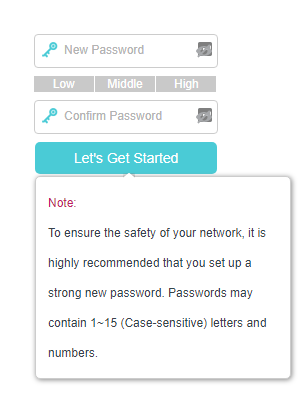
Setting up the TP-Link Archer C5 v4 wireless router works just like any other WiFi router. When you start the quick setup wizard, you are first asked to create a password for your router. It is a welcome security precaution, and you should not use one that is easy to guess. It would have been even better if TP-Link allowed us to also personalize also the username used for administering the router.
TP-Link Archer C5 v4
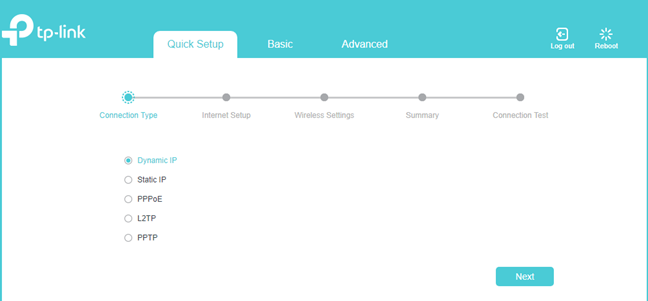
After setting up the password for your router, the quick setup wizard asks you to choose the type of your internet connection. It was surprising to see that TP-Link Archer C5 v4 does not auto-detect the internet's connection type like other TP-Link routers do.
TP-Link Archer C5 v4
Once you choose the type of internet connection that you are using, you may need to enter the appropriate connection details. Then you set the name and the password for the WiFi frequencies that are broadcast by the router. At the end of the quick setup wizard, you are shown a summary of your initial settings, and you can test whether your internet connection is working or not.
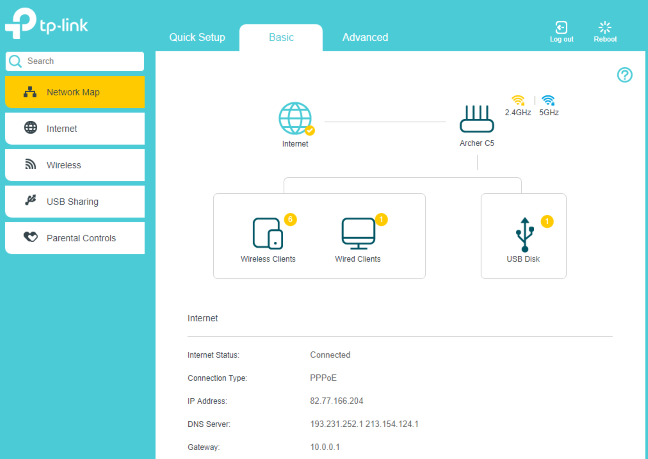
Now it is time to access the administration user interface. As you can see below, it looks good, and it uses calming colors. The settings are split into two tabs:
Basic - it displays a network map, basic internet and wireless settings, some sharing options for the USB ports and the device(s) that you plug into it, and the parental controls.
Advanced - this is the place to go when you want complete control and personalization.
TP-Link Archer C5 v4
The basic settings are incredibly easy to set, and many users will be satisfied with them. However, we recommend that you delve into the Advanced tab if you want to improve the way the router works, and get the maximum performance, and security.
One negative aspect that we noticed about the TP-Link Archer C5 v4 is that the initial firmware has no multilingual support. Everything is available only in English. Previous AC1200 wireless routers from the same company offered the firmware in 7 languages or more. We hope that future firmware versions will improve this situation.
A positive that remained the same as on older models from TP-Link is the Help documentation. It is easy to access and offers detailed explanations about all the settings you see on the current screen. Less experienced users will appreciate it.
TP-Link Archer C5 v4
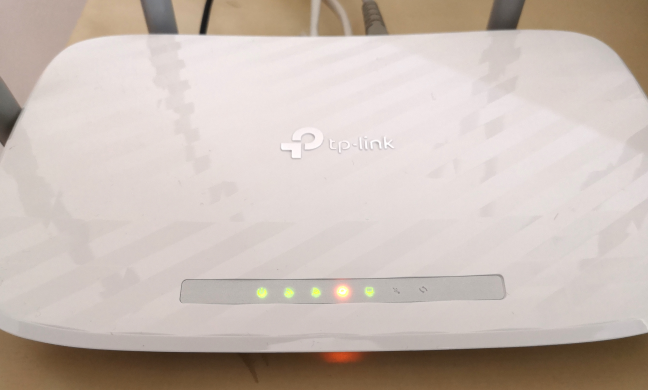
The router has a flashy white surface that is a magnet for dust. If you place the router somewhere visible, you will need to dust it from time to time. The LEDs on the top are relatively discreet, and will not annoy users.
TP-Link Archer C5 v4
Once we were done setting up the TP-Link Archer C5 v4 router, we connected several devices to the network: two desktop PCs, two laptops, one tablet, several smartphones, an Xbox One console, several smart plugs, one smart bulb, and a wireless printer. They all connected with ease, and we had no problems in streaming media over the network, or in sharing files and folders.
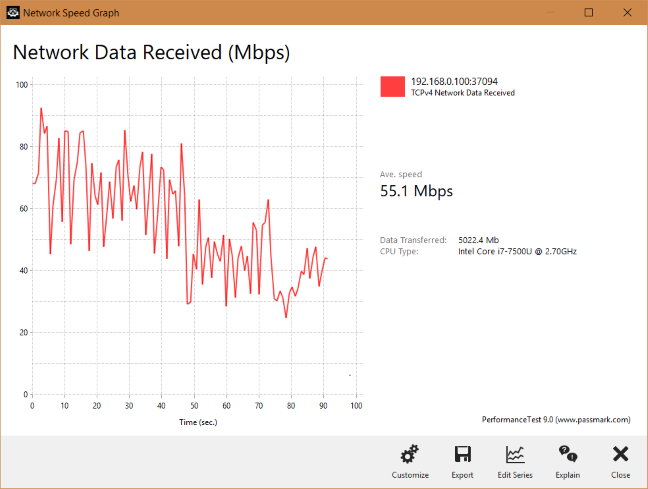
We noticed that the performance of the TP-Link Archer C5 v4 wireless router was a bit inconsistent on the 2.4 GHz wireless band. You can see below the graphical representation of a network transfer made on the 2.4 GHz frequency, in a room that was separated from the router by just one wall. You can see that the speed varied quite a lot during the transfer, with some significant differences between maximum speed and the lowest.
TP-Link Archer C5 v4
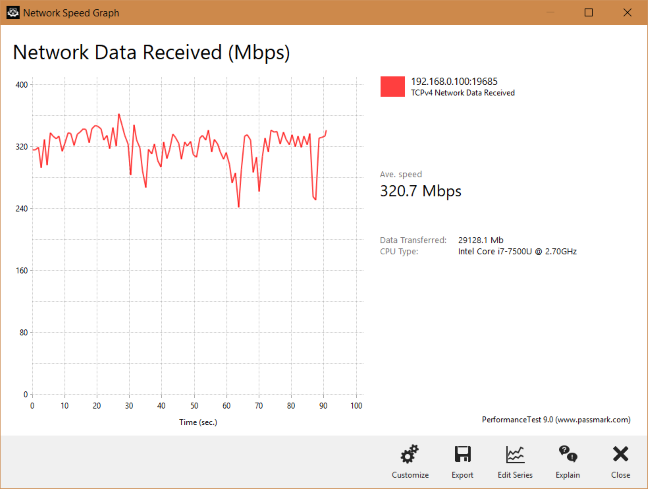
However, the performance of the TP-Link Archer C5 v4 router on the 5 GHz band was quite the opposite. We enjoyed fast transfers, with a fewer variations than on the 2.4 GHz band. The user experience on the 5 GHz frequency was much better.
TP-Link Archer C5 v4
The user experience offered by TP-Link Archer C5 v4 is generally good. Users get all the basics they need, and its performance on the 5 GHz wireless band is surprisingly good. However, there are a few downsides too, like some inconsistent speeds on the 2.4 GHz band, no multilingual firmware, and the setup wizard that is a bit less smart than on other wireless routers of the same company.
If you want to know exact details about the wireless performance of this router, go to the next page of this review.
Wireless network performance
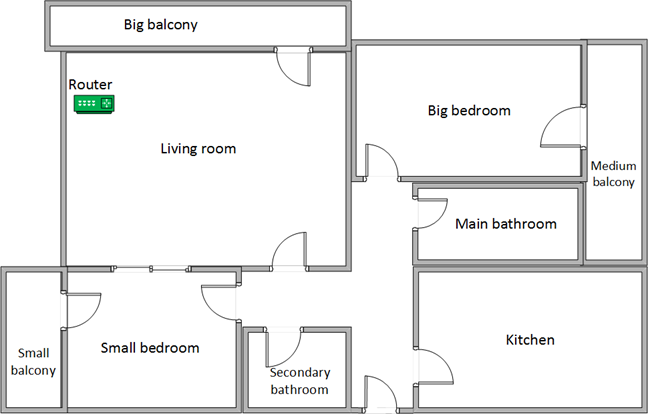
First, let's take a look at the apartment that was used in our testing and how it is set up. You can see that the router is placed in the living room. With most wireless routers, the signal strength is not that high in places like the Kitchen and the Medium balcony.
TP-Link Archer C5 v4
Our testing was done using a fast 1 Gigabit Internet connection that is capable of uploads on the internet of up to 500 Mbps. We used an HP Spectre 13 laptop for all our measurements and several software tools.
To get a better idea of the performance offered by TP-Link Archer C5 v4, we compared it with TP-Link Archer C1200 (a model we enjoyed a lot) and Tenda AC9 (an AC1200 router from the competition).
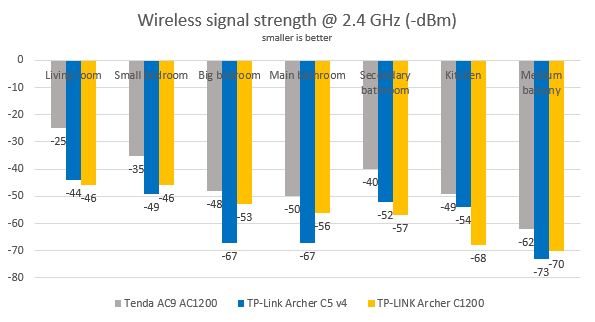
We first evaluated the wireless network that is broadcast on the 2.4 GHz frequency, and we looked at the signal strength, with a tool named inSSIDer. The signal strength offered by TP-Link Archer C5 v4 on the 2.4 GHz wireless band was rather unimpressive.
TP-Link Archer C5 v4
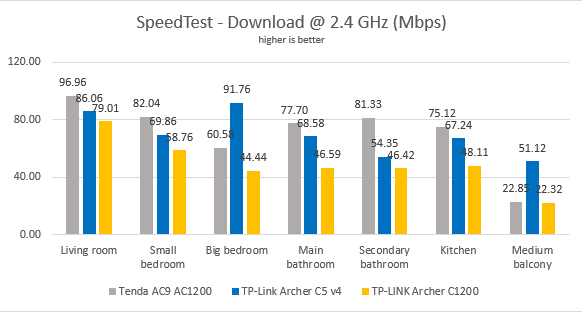
Then, we used SpeedTest to measure how fast the internet connection provided by this router is. In the download test, TP-Link Archer C5 v4 fared well, and it outperformed its brother TP-Link Archer C1200.
TP-Link Archer C5 v4
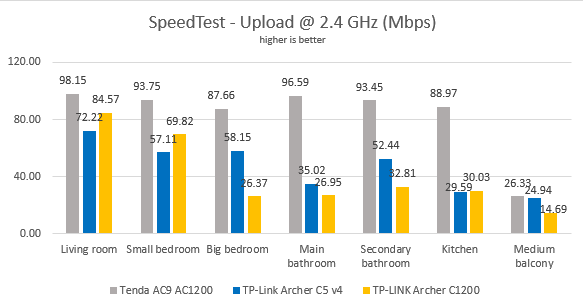
In the upload test, the fight got closer between TP-Link Archer C5 v4 and TP-Link Archer C1200.
TP-Link Archer C5 v4
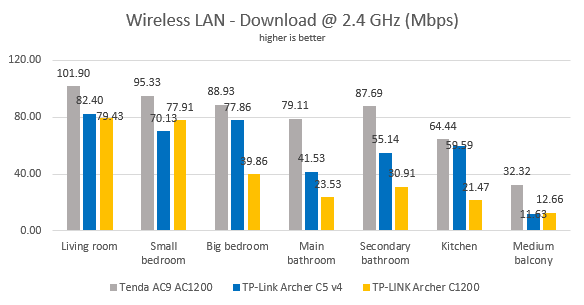
We then used the PassMark Performance test to transfer data between two computers connected to the network, on the 2.4 GHz band. TP-Link Archer C5 v4 performed well when downloading data, but it struggled in the Medium balcony, just like many other affordable routers do.
TP-Link Archer C5 v4
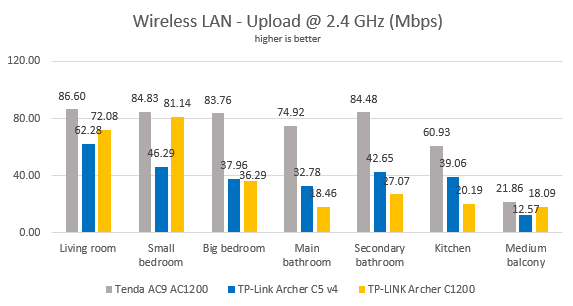
In the upload test, the speed differences between TP-Link Archer C5 v4 and TP-Link Archer C1200 reversed in a few rooms.
TP-Link Archer C5 v4
On the 2.4 GHz WiFi band, TP-Link Archer C5 v4 performs reasonably well, without being a speed champion.
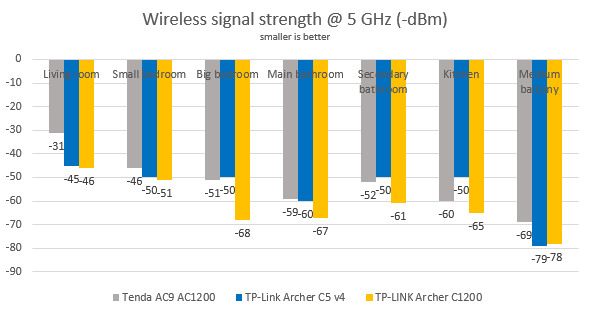
We moved on to the wireless network that is broadcast on the 5GHz frequency, and we looked at the signal strength, using inSSIDer. As you can see, the signal strength offered by TP-Link Archer C5 v4 on this frequency was better than on the 2.4 GHz frequency.
TP-Link Archer C5 v4
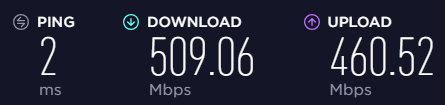
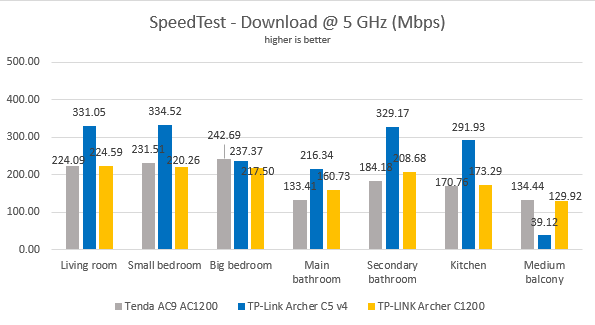
Then, we took SpeedTest, to measure the speed of the internet connection on the 5GHz wireless network. To see the maximum potential of this router, we used the world's only PCI-E network card with support for 4x4 MU-MIMO. When we used this network card, we obtained a maximum speed of 509.06 Mbps for the download, and of 460.52 Mbps for the upload. This is an excellent result for an AC1200 wireless router.
TP-Link Archer C5 v4
We also measured the download speed with SpeedTest, in every room of our test apartment, using our test laptop. When looking at the download speed, TP-Link Archer C5 v4 was a speed champion.
TP-Link Archer C5 v4
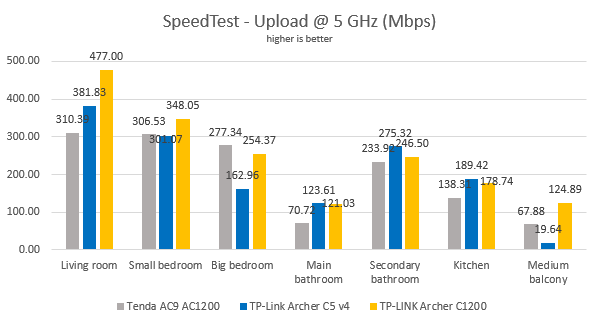
When evaluating the upload speed, TP-Link Archer C5 v4 was very fast, but its brother TP-Link Archer C1200 managed to outperform it in most rooms.
TP-Link Archer C5 v4
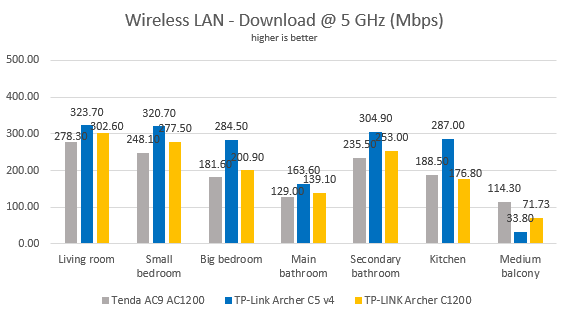
For the last measurements on the 5GHz wireless network, we used the PassMark Performance test to transfer data between two computers connected to the network. This test too confirmed that TP-Link Archer C5 v4 is capable of delivering speedy downloads. However, the router struggled in the Medium balcony, like many other AC1200 tend to do.
TP-Link Archer C5 v4
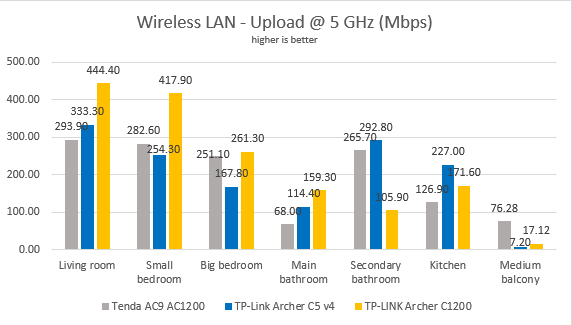
When we evaluated the upload speed, the champion was again, TP-Link Archer C1200, with TP-Link Archer C5 v4 being behind.
TP-Link Archer C5 v4
Our tests have shown that TP-Link Archer C5 v4 is a high-speed router on the 5GHz wireless band, capable of delivering impressive speeds for downloading data.
Wired network performance
To test the quality of the wired Ethernet connection, we used a desktop PC equipped with an AMD Ryzen 5 1600 processor, running at 3.20GHz, 16GB of RAM and a very fast Samsung 850 Pro 512GB SSD, and a Lenovo IdeaCentre 610s mini PC.
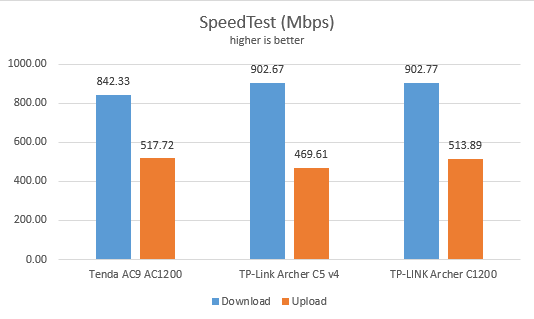
We measured the speed of the internet connection when using a 1 Gbps Ethernet cable, using SpeedTest. TP-Link Archer C5 v4 has performed very well and delivered speeds which are close to the maximum possible on our internet connection.
TP-Link Archer C5 v4
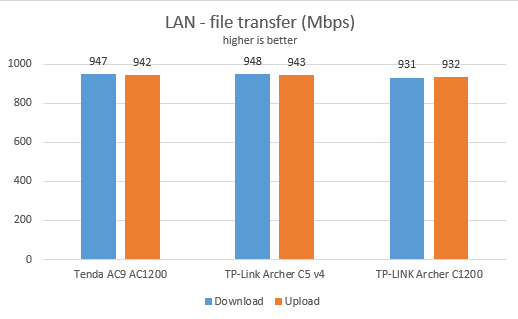
Then, we ran a network transfer between the two computers, using the PassMark Performance test. Again, TP-Link Archer C5 v4 was a top performer.
TP-Link Archer C5 v4
TP-Link Archer C5 v4 delivers true 1 Gbps Ethernet connections, as promised in its specifications.
USB performance
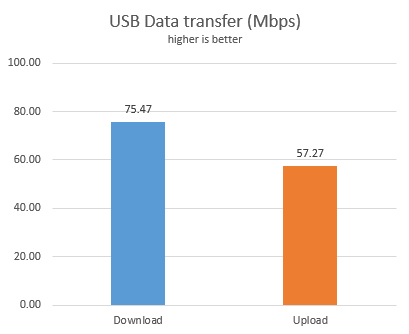
We plugged in a fast SSD drive to the USB 2.0 port of the TP-Link Archer C5 v4. Then we ran a few transfers from a network computer to this drive and back. We measured a download speed of 75.47 Mbps, and an upload speed of 57.27 Mbps.
TP-Link Archer C5 v4
The USB 2.0 port on the TP-Link Archer C5 v4 wireless router works well, without being impressive. The transfer speeds you get on it are reasonable, but other AC1200 wireless routers can do better.
Extra features
Even though previous revisions of TP-Link Archer C5 wireless router can be managed using the TP-Link Tether app for Android and iOS, the new version 4 cannot. At least not when we reviewed it. TP-Link has said that they will fix this issue in future updates. Until they fix it, this might be a significant negative for users who desire to remote control their wireless router from their smartphone or tablet.
There are also positives on this front, as TP-Link Archer C5 v4 does bundle a few useful extras:
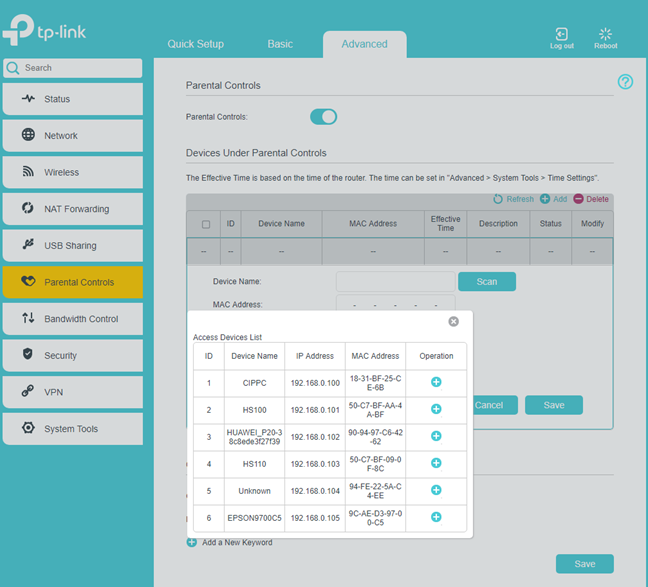
Parental Controls - allows you to control the internet access to devices on your network as well as block access to websites based on keywords. It is a rather basic parental controls feature which has limited usefulness and needs manual maintenance.
Guest network - you can enable up to six additional WiFi networks, three for each band. However, visitors cannot be blocked from access to your network, for increased security and privacy. This is a negative compared to other AC1200 wireless routers from TP-Link which offer network isolation for guests.
USB Sharing - allows you to connect USB storage devices like an external hard disk or a printer and share them with the network. An important novelty is that you can also connect a 3G/4G USB modem and use it as a backup for when your primary internet connection fails. This feature is rarely seen on AC1200 wireless routers.
Bandwidth Control - a basic Quality of Service feature that helps you control how the total bandwidth is split between devices and applications.
Dynamic DNS - allows you to assign a fixed host and domain name to a dynamic IP address. It can work with the No-IP and DynDNS service providers.
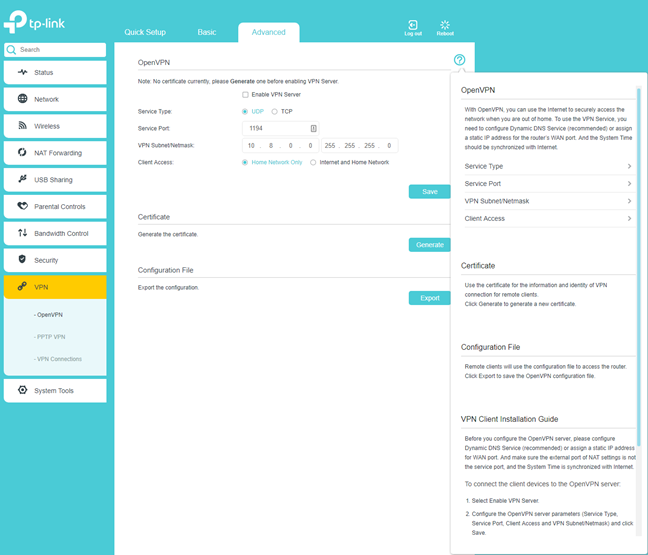
VPN server - you can set the router to work as a VPN server using OpenVPN and PPTP VPN protocols. The router also allows VPN pass-through for clients that are connecting to external VPN services.
System Tools - a collection of logs, statistics and diagnostic tools that allow you to troubleshoot problems.
TP-Link Archer C5 v4 bundles what most users need, without being too advanced. There are some handy extras like being able to use a 3G/4G USB modem as a backup for your primary internet connection. However, mobile remote management was lacking when we reviewed this model.
What is your opinion about TP-Link Archer C5 v4 wireless router?
Now you know our opinion about the TP-Link Archer C5 v4 wireless router, and how it has fared in our testing. Before closing this review, share with us your views about this device. Do you like what it has to offer? Would you consider buying it? Share in the comments below.
The VPN and the USB with a hard drive attached are the worst options that came with the Archer C5 V4. You have a maximum 7 mbps transfer speed due to the poor processor
Anonymous ·
That is slow indeed.
Will ·
I recently bought this router but i cannot use the access control features. Somehow it doesn’t matter what i do, either blacklist or whitelist does not work. Any one had similar issues?
Aureo ·
Just bought this one, waiting for its arrival.
Its worse than C6 v2?
Anonymous ·
They are similar wireless routers. 🙂
Vinay ·
Which router is the best router TP-LINK C5 or C1200
Anonymous ·
We prefer TP-Link Archer C1200.
Vinay ·
Thank you
Ramakrishna ·
Good description, my fibrenet provider supplied modem in which 3g/4g setting bin file is deleted. If i want to connect through 3g/4g modem for internet i need this file for upload in this modem. Unfortunate bin is not available on web. Do you have firmware (full) and if so please link in this article. Thanks in advance
Jan Novák ·
Hello,
I have this router and I am completely satisfied with it. However, I am surprised that does not support application TP-LINK Tether, which is a great disappointment to me.
Anonymous ·
Yup. We were also surprised. Hopefully, this will be added in the coming months.
































Discussion (12)
I wanna a print server =/
The VPN and the USB with a hard drive attached are the worst options that came with the Archer C5 V4. You have a maximum 7 mbps transfer speed due to the poor processor
That is slow indeed.
I recently bought this router but i cannot use the access control features. Somehow it doesn’t matter what i do, either blacklist or whitelist does not work. Any one had similar issues?
Just bought this one, waiting for its arrival.
Its worse than C6 v2?
They are similar wireless routers. 🙂
Which router is the best router TP-LINK C5 or C1200
We prefer TP-Link Archer C1200.
Thank you
Good description, my fibrenet provider supplied modem in which 3g/4g setting bin file is deleted. If i want to connect through 3g/4g modem for internet i need this file for upload in this modem. Unfortunate bin is not available on web. Do you have firmware (full) and if so please link in this article. Thanks in advance
Hello,
I have this router and I am completely satisfied with it. However, I am surprised that does not support application TP-LINK Tether, which is a great disappointment to me.
Yup. We were also surprised. Hopefully, this will be added in the coming months.