TP-Link has launched another affordable wireless router: TP-Link Archer C6. It is the second hardware revision of this model, with support for the 802.11ac Wave 2 WiFi networking standard, and 2x2 MU-MIMO transfers. It also has surprisingly good hardware inside, which should be able to offer a solid wireless networking experience, at a low price. We are the first team in the world to test the new TP-Link Archer C6 v2. If you want to know what it has to offer, and whether it is worth buying, read this review:
TP-Link Archer C6 AC1200: Who is it good for?
This wireless router is a suitable choice for:
People with small or medium-sized apartments
Users who desire fast WiFi with support for modern wireless networking standards
People with a low budget
Pros and cons
Here are the things we like about TP-Link Archer C6 v2:
It can be administered from a mobile app on your smartphone (but not from anywhere on the internet)
It can be mounted on walls
There are a few downsides to consider as well:
The firmware is available only in English, while the mobile app has good multi-lingual support
It does not automatically check for new firmware versions like other TP-Link routers do
It does not have a USB port
Product rating4/5
Verdict
The market for AC1200 wireless routers is very crowded. All the manufacturers offer routers that promise to deliver excellent performance at a low price. However, only a few manufacturers can keep this promise and TP-Link is one of them. If you are looking for a low-price router, that is dual-band, with support for the latest wireless standards, and that offers a user experience above the average of other AC1200 wireless routers, you should consider buying the new TP-Link Archer C6 v2.
Unboxing the TP-Link Archer C6 AC1200 wireless router
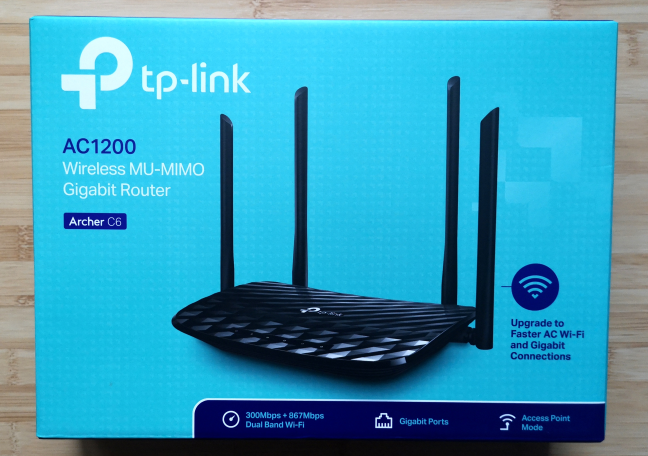
TP-Link Archer C6 v2 comes in a cyan box with a big picture of the wireless router on the top. On the sides, you have a detailed description of the features and specifications of this router.
The packaging of the TP-Link Archer C6 wireless router
The unboxing experience is summarized in the video below:
Inside the packaging, you find the following: the router, the power adapter, an Ethernet cable, the Quick Setup guide, the warranty, the license for the firmware used by TP-Link, and other legal information.
Hardware specifications and design
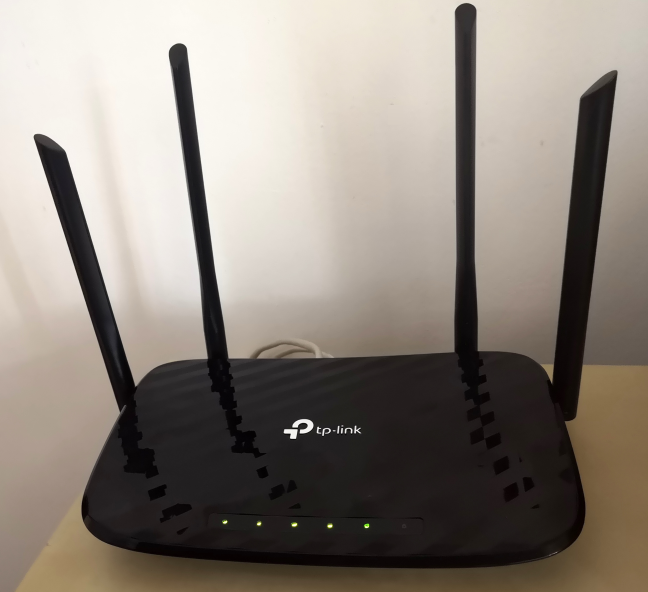
TP-Link Archer C6 is a shiny wireless router, made of plastic, with a few LED lights on the top for things like Power, the two wireless bands broadcast by the router (2.4 and 5 GHz), the Ethernet ports, the status of the connection to the internet, and for WPS. Also, it has four external antennas which are non-detachable.
The TP-Link Archer C6 AC1200 wireless router
TP-Link Archer C6 has a single-core Qualcomm Atheros QCA9563 processor running at 775 MHz, 128 MB of RAM (quite a lot for an affordable wireless router), and 8 MB of storage space for the firmware. This model offers support for the 802.11ac Wave 2 standard, and 2x2 MU-MIMO transfers. It can also work using the older 802.11n/b/g wireless standards. The total theoretical maximum bandwidth is 1167 Mbps, split as follows: 300 Mbps for the 2.4 GHz band, and 867 Mbps for the 5 GHz band.
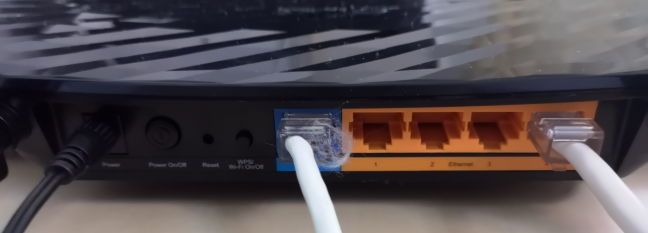
On the back side of TP-Link Archer C6, you can find five Gigabit Ethernet ports, one of which is used for the connection to the internet. You also have the Power jack and the Power button, the Reset jack, and the WPS button. Unfortunately, there is no USB port on this model.
The ports on the back of the TP-Link Archer C6 wireless router
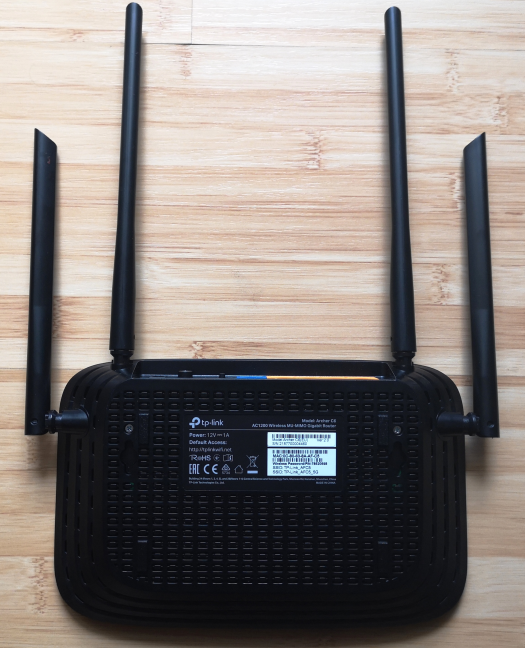
On the bottom of TP-Link Archer C6 v2, you have two holes for mounting the router on walls, a feature that is going to be appreciated by some users.
The bottom of the TP-Link Archer C6 AC1200 wireless router
The router is not large: it is 9.1 × 5.7 × 1.4 inches or 230 x 144 x 35 mm in width, depth, and height. It is also rather light, weighing 27 ounces or 767 grams.
If you would like to read all the official specifications of this product, go to this page: TP-Link Archer C6 Specifications.
Setting up and using the TP-Link Archer C6 AC1200 wireless router
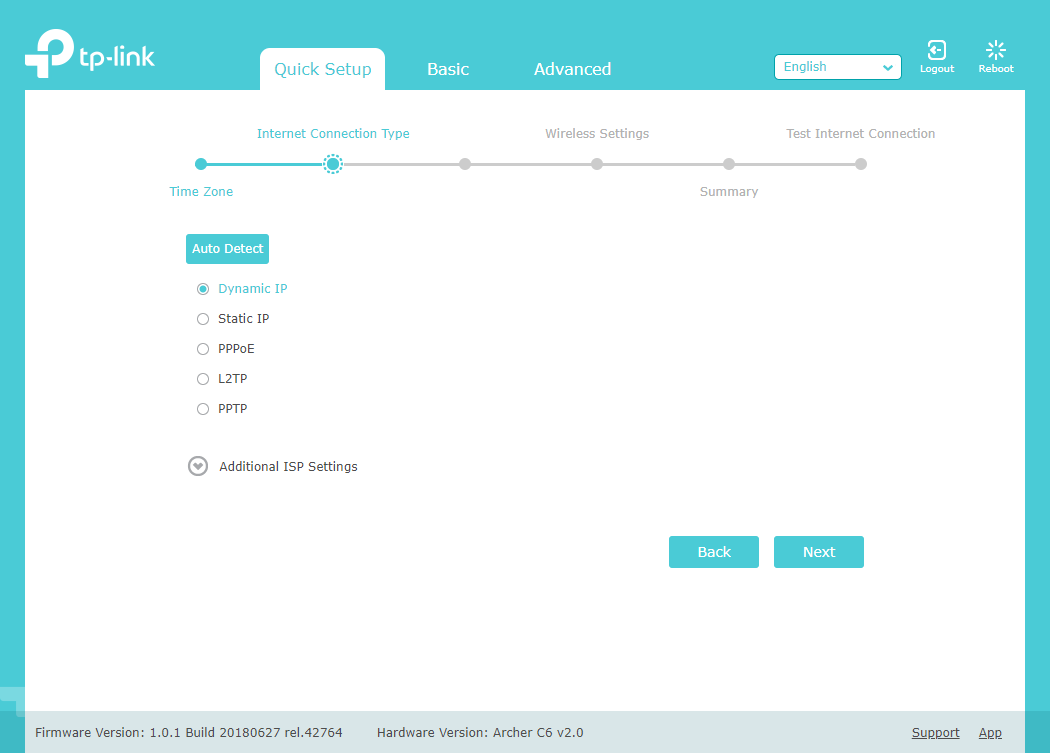
The setup of the TP-Link Archer C6 is similar to that of many other wireless routers. The quick setup wizard first asks you to create a password for your router. It is a welcome security precaution, and you should not use a password that is easy to guess. It would have been even better if TP-Link allowed us to personalize the username used for administering the router. Then, the quick setup wizard asks you to choose the type of your internet connection, and provide the necessary connection details. It was surprising to see that it does not auto-detect the internet's connection type like other TP-Link routers do.
Setting up the TP-Link Archer C6
During the next step, you set the name and the password for the WiFi frequencies that are broadcast by the router. At the end of the quick setup wizard, you are shown a summary of your initial settings, and you can test whether the internet connection is working or not.
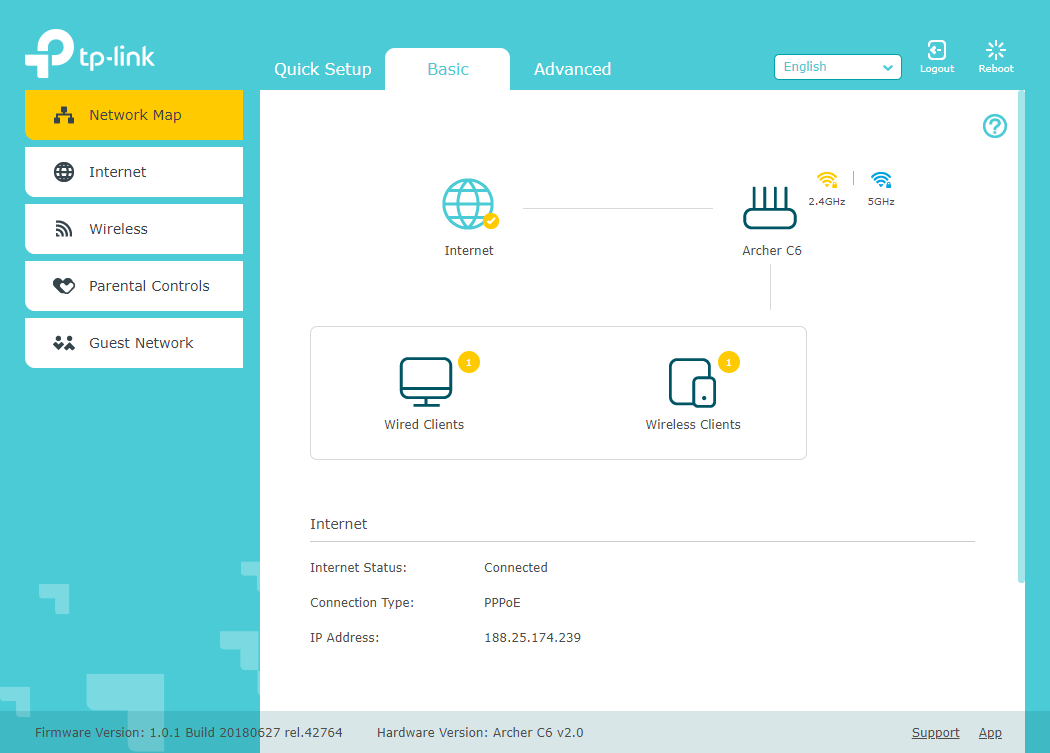
After you are done with the initial setup, you can load the administration user interface. As you can see below, it looks good, and it uses calming colors. The settings are split into two tabs:
Basic - it displays a network map, basic internet and wireless settings, the parental controls, and the guest network settings.
Advanced - this is the place to go when you want complete control and personalization over your wireless router.
The basic settings offered by TP-Link Archer C6
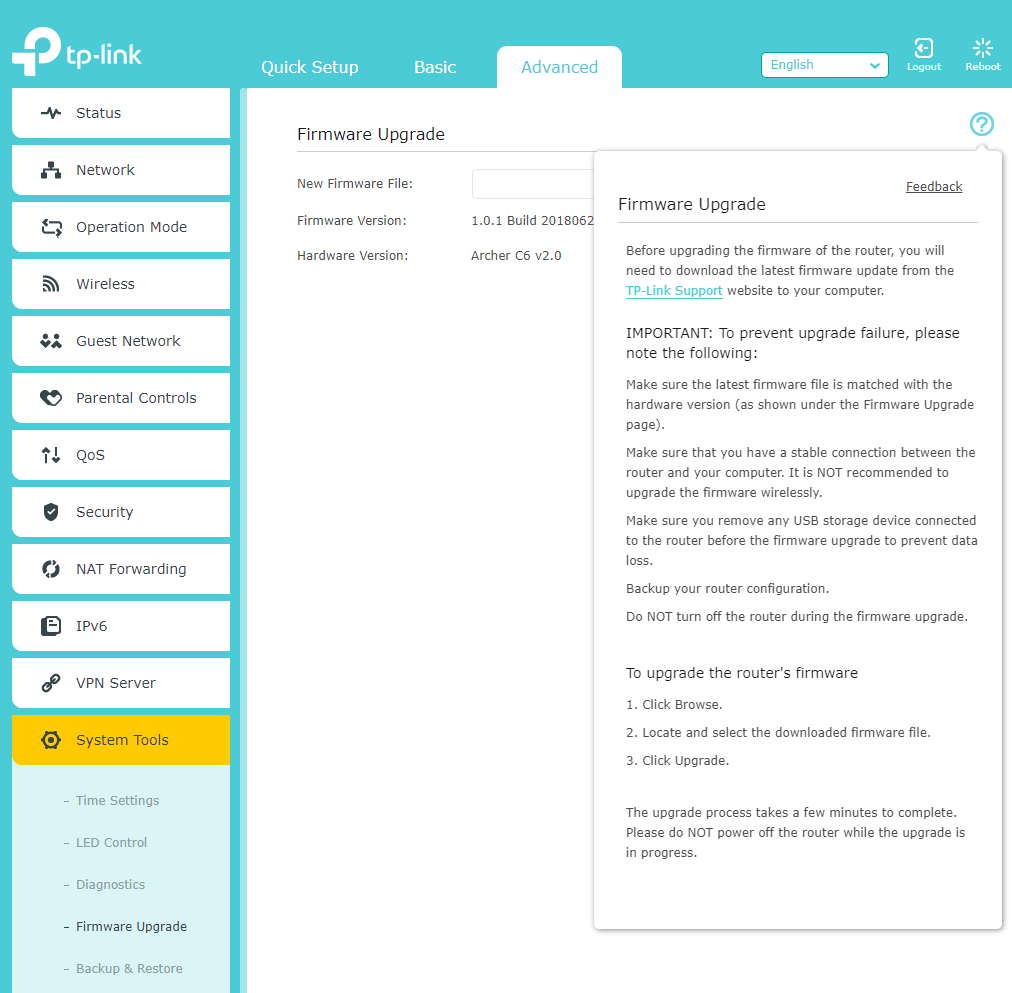
The basic settings are easy to set, even for beginners, and we recommend that you delve into the Advanced tab. It helps you improve the way Archer C6 works, and get the best user experience and performance. One negative aspect that we noticed is that the initial firmware has no multilingual support. Everything is available only in English. Previous AC1200 wireless routers from the same company offered the firmware in seven languages or more. We hope that future firmware for Archer C6 improves this situation. A positive is the Help documentation. It is easy to access and offers detailed explanations about all the settings you see on the current screen.
The Help documentation for TP-Link Archer C6
Another downside that we noticed is that the initial firmware for Archer C6 does not automatically check for new firmware versions, and as a result, the user receives no notifications on this subject. Unfortunately, all you can do is manually check for firmware updates, and perform them yourself. This is not a great approach, considering how few users regularly perform firmware updates for their devices.
The router has a flashy surface that is a magnet for dust and fingerprints. If you place the router somewhere visible, you should dust it from time to time. The LEDs on the top are relatively discreet and do not annoy users. Also, they can be turned off from the firmware.
After we were done setting up the TP-Link Archer C6 v2 router, we connected several devices to the network: two desktop PCs, two laptops, one tablet, several smartphones, an Xbox One console, several smart plugs, one smart bulb, and a wireless printer. They all connected with ease, and we had no problems in streaming media over the network, or in sharing files and folders.
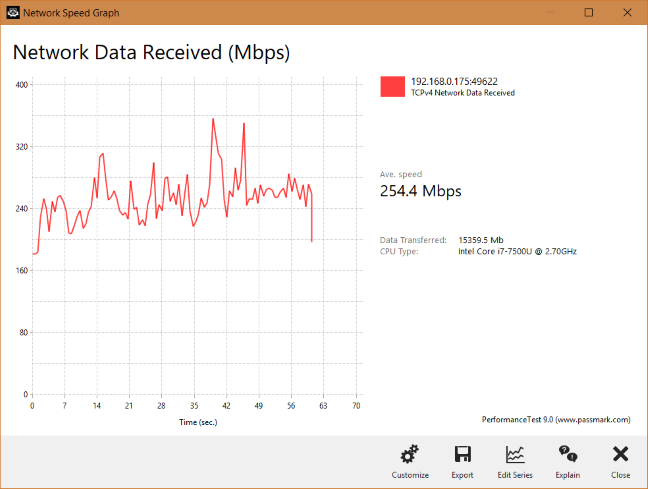
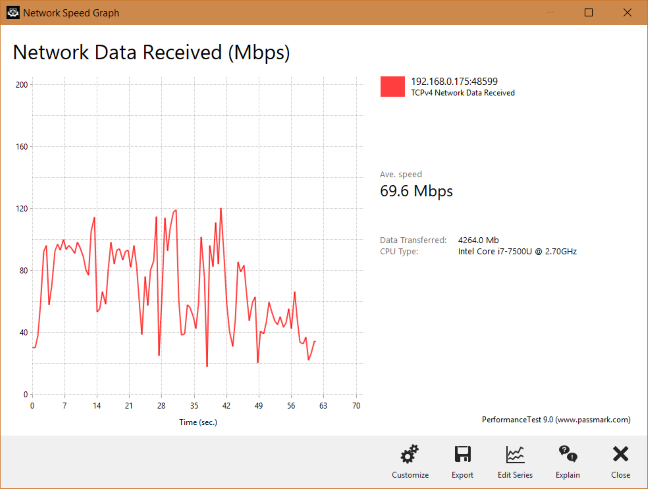
When transferring data through the network, we also looked at the variability of network transfers. Below you can see how a network transfer was performed when we used the 5 GHz wireless network, on a laptop, in a room that was separated from the router by just one wall. We had both a fast average speed and reasonable variability, without any negative drops.
How data is transferred wirelessly by TP-Link Archer C6
When we moved to a room separated by two walls from the wireless router, the average speed dropped, and the variability increased, but the speed never fell to 0, as sometimes happens with lower quality routers.
How data is transferred wirelessly by TP-Link Archer C6
Similar trends were noticed when transferring data on the 2.4 GHz wireless band too.
The user experience offered by TP-Link Archer C6 v2 is generally good. Users get most of the basics they need, and its performance is reliable for most apartments and home networks. However, there are a few downsides too, like the lack of multilingual firmware, the lack of automated checks for new firmware versions, and the setup wizard that is a bit less smart than on other wireless routers of the same company.
If you want to see the details about the wireless performance of this router, go to the next page of this review, for detailed measurements and comparisons.
Wireless network performance
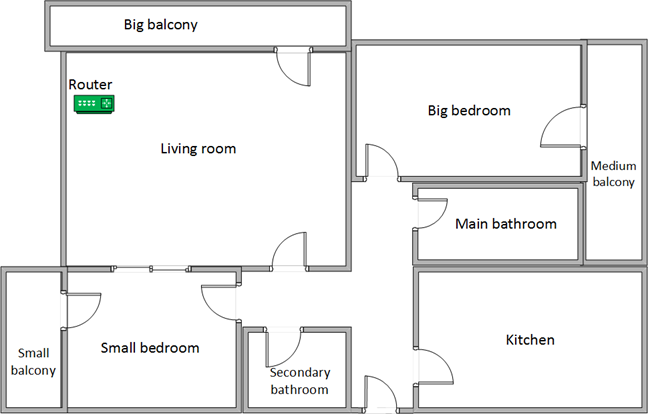
First, let's look at the apartment that was used in our testing and how it is set up. You can see that the router is placed in the living room. With most wireless routers, the signal strength is not that high in places like the Kitchen and the Medium balcony.
The apartment in which we tested the TP-Link Archer C6
Our testing was done using a fast 1 Gigabit Internet connection that is capable of uploads on the internet of up to 500 Mbps. We used an HP Spectre 13 laptop for all our measurements and several software tools.
To get a better idea of the performance offered by TP-Link Archer C6 v2, we compared it with its brother TP-Link Archer C5 v4, as well as one of its main competitors: Tenda AC10.
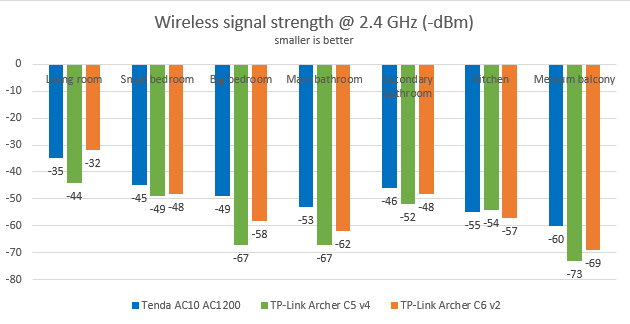
We started by evaluating the 2.4 GHz wireless network and measured the signal strength offered in each room, using a tool named NetSpot Pro. TP-Link Archer C6 v2 was slightly better than TP-Link Archer C5 v4, and slightly behind Tenda AC10.
The wireless signal strength offered by TP-Link Archer C6 on 2.4 GHz
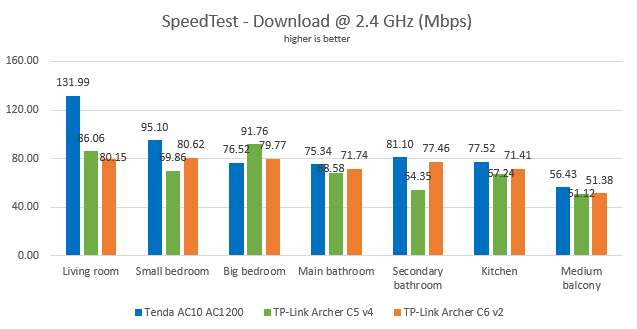
Then, we used SpeedTest to see how fast the internet connection is when using the 2.4 GHz wireless frequency. TP-Link Archer C6 delivered fast downloads without being the fastest router in this test.
TP-Link Archer C6: SpeedTest results on the 2.4 GHz WiFi network
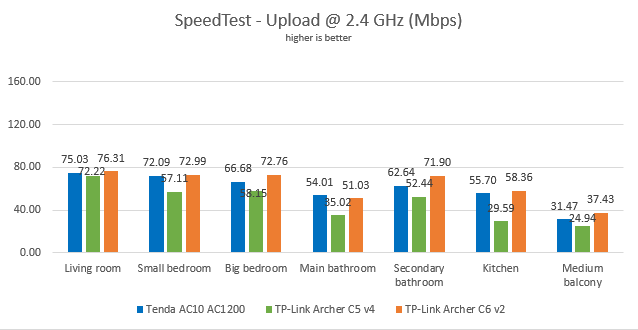
When it comes to the upload speed, TP-Link Archer C6 was the fastest wireless router in our comparison.
TP-Link Archer C6: SpeedTest results on the 2.4 GHz WiFi network
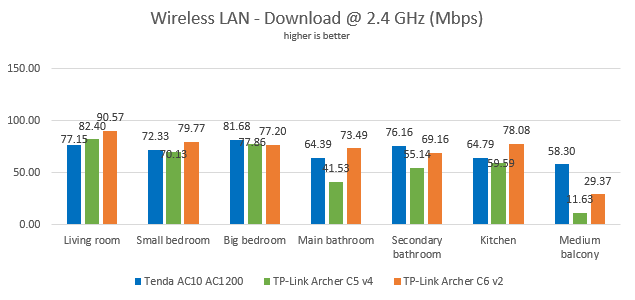
For the next measurements, we used the PassMark Performance test to transfer data between two computers connected to the network, using the 2.4 GHz wireless frequency. This time, TP-Link Archer C6 was the speed king.
TP-Link Archer C6: Wireless transfers on the 2.4 GHz WiFi
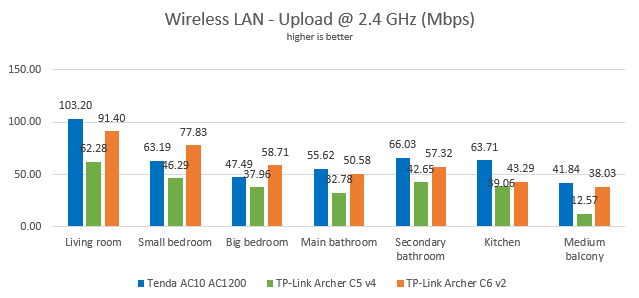
When looking at the upload speed, TP-Link Archer C6 was outperformed by Tenda AC10.
TP-Link Archer C6: Wireless transfers on the 2.4 GHz WiFi
When using the 2.4 GHz wireless frequency, TP-Link Archer C6 delivers reliable performance, in line with that of other AC1200 wireless routers.
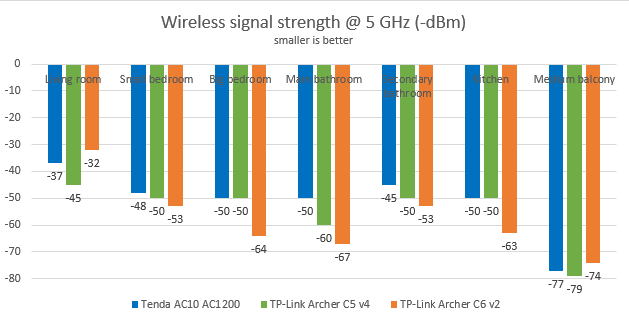
Next, we analyzed the performance offered by the 5GHz wireless network. First, we looked at the evolution of the signal strength, from room to room. TP-Link Archer C6 had an uneven signal strength with more variability than that of other AC1200 wireless routers.
The wireless signal strength offered by TP-Link Archer C6 on 5 GHz
We then ran SpeedTest to see how fast the internet connection is on the 5GHz band. To see the maximum potential of TP-Link Archer C6, we used the world's only PCI-E network card with support for 4x4 MU-MIMO. When we used this network card, we obtained a maximum speed of 533.61 Mbps for the download and 470.85 Mbps for the upload. These are excellent speeds for an affordable wireless router.
The maximum speed on WiFi achieved by TP-Link Archer C6
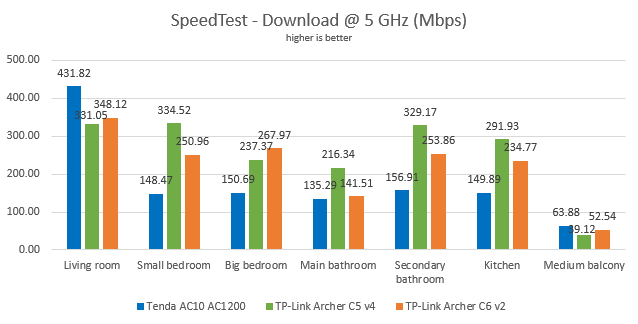
For more down-to-earth results, we also measured the download speed with SpeedTest, in every room of our test apartment, using our HP Spectre 13 test laptop. TP-Link Archer C6 v2 delivered fast downloads, but its brother TP-Link Archer C5 v4 outperformed it.
TP-Link Archer C6: SpeedTest results on the 5 GHz WiFi network
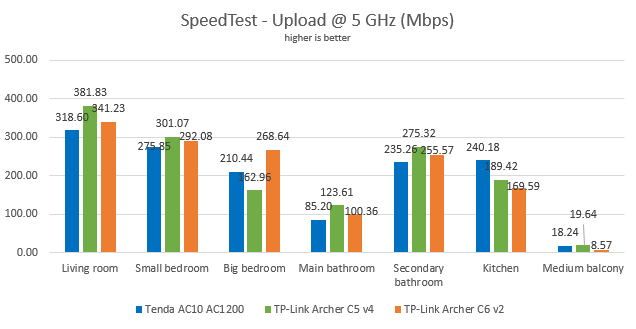
The same was true when looking at the upload speed offered by TP-Link Archer C6 on the 5 GHz wireless network.
TP-Link Archer C6: SpeedTest results on the 5 GHz WiFi network
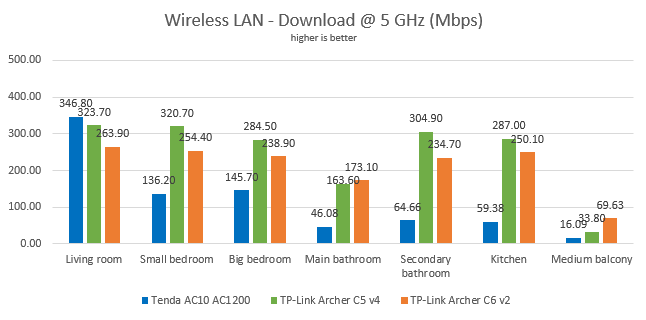
For the last measurements on the 5GHz wireless network, we used the PassMark Performance test to transfer data between two computers connected to the network. Again, TP-Link Archer C6 v2 delivered fast downloads, without being the fastest in our comparison.
TP-Link Archer C6: Wireless transfers on the 5 GHz WiFi
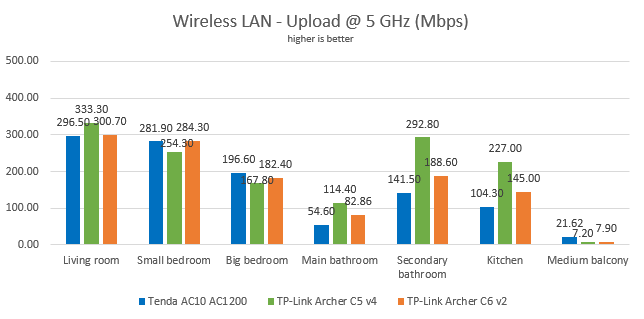
The upload speed measurements revealed a similar story.
TP-Link Archer C6: Wireless transfers on the 5 GHz WiFi
When using the 5 GHz wireless frequency, TP-Link Archer C6 delivers reliable performance, without being the fastest AC1200 router.
Wired network performance
To test the quality of the wired Ethernet connection, we used a desktop PC, equipped with an Intel Core i5 4460 processor, running at 3.20GHz, 16GB of RAM and a very fast Samsung 850 Pro 512GB SSD, and a Lenovo IdeaCentre 610s mini PC.
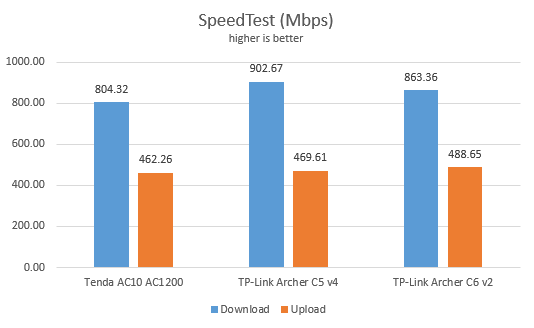
We measured the speed of the internet connection when using a 1 Gbps Ethernet cable, using SpeedTest. TP-Link Archer C6 v2 delivered fast downloads, but TP-Link Archer C5 v4 outperformed it.
TP-Link Archer C6: SpeedTest results when using Ethernet connections
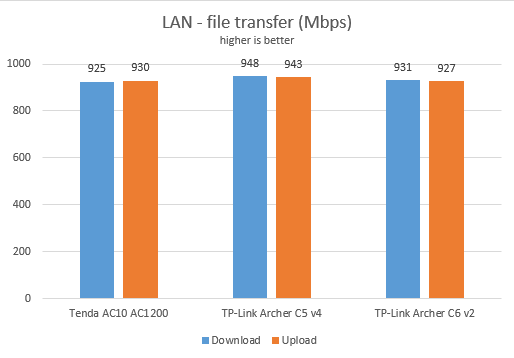
Then, we ran a network transfer between the two computers, using the PassMark Performance test. TP-Link Archer C6 v2 was outperformed again by TP-Link Archer C5 v4.
TP-Link Archer C6: Network transfers when using Ethernet connections
TP-Link Archer C6 delivers real 1 Gbps Ethernet connections, as promised in its specifications.
Extra features
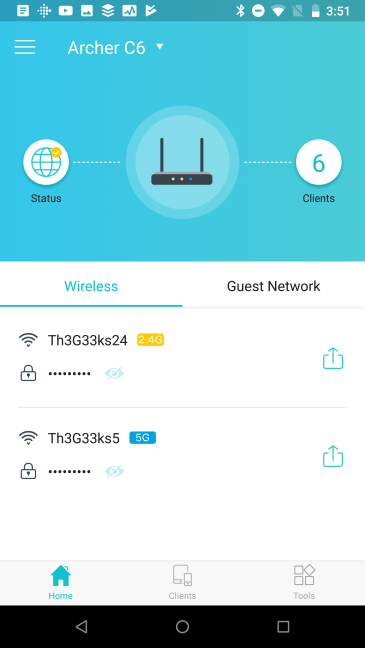
The most interesting additional feature offered by TP-Link Archer C6 v2 is the ability to remote control it using the TP-Link Tether app for iOS and Android. Unlike the firmware on the router, the mobile app is available in many languages. With it, you can configure all the essential features of your router: the wireless network, the internet connection, parental controls, network diagnostics, the guest network, the LEDs, or the operation mode.
The TP-Link Tether mobile app
The TP-Link Tether app is useful even though it has one downside: you can use it to remote control the TP-Link Archer C6 v2 only locally when your smartphone is connected to the same network. You cannot use this app to remote control the router from anywhere on the internet. This feature is offered by TP-Link only for more expensive wireless routers.
Other features that you can find on the TP-Link Archer C6 v2 are the following:
Parental Controls - allows you to control the internet access to devices on your network as well as block access to websites based on keywords. It is a rather basic parental controls feature which has limited usefulness and needs manual maintenance.
Guest network - you can enable up to two additional WiFi networks, one for each band, and separate guests from your local network, which is excellent.
QoS - a basic Quality of Service feature that helps you control how the total bandwidth is split between devices.
Dynamic DNS - allows you to assign a fixed host and domain name to a dynamic IP address. It can work with the No-IP and DynDNS service providers.
VPN server - you can set the router to work as a VPN server using OpenVPN and PPTP VPN protocols. The router also allows VPN pass-through for clients that are connecting to external VPN services.
System Tools - a collection of logs, statistics, and diagnostic tools that allow you to troubleshoot problems.
TP-Link covers all the basics people need on the Archer C6 v2 wireless router. The only important feature we would have liked to have is the possibility to remote control the router from anywhere on the internet.
What is your opinion about TP-Link Archer C6 AC1200 wireless router?
Now you know our opinion about the TP-Link Archer C6 v2 AC1200 wireless router and how it performed in our testing. Before closing this review, tell us your opinion about this device. Is it worth buying? If you have it already, what is your experience so far? Comment below and let's discuss.
My Archer C6 router displays “Weak Security”. What security type does this have? Recommended security type is WPA2(AES) or WPA3.
Suresh ·
Superb reviews and detailed reviews…. Thank you????????????????
Anonymous ·
Glad to help. Thanks for appreciating our work. Don’t hesitate to subscribe to our newsletter, for more useful reviews.
Madan ·
Hi sir, if u had given an option to choose b/w tp link archer c6 n tenda ac 10 then which one would u choose. kindly reply
rahul ·
Hi I am confused between 3 router tplink archer c1200, tplink archer c6 and tenda ac10 any suggestion
PrzemeG ·
Take the Archer C6 v.2 , I have netgear R7800 and Archer C6 v.2 as a back up, C6 v.2 has MU MIMO and beamforming, it costs much cheaper, I dont see much difference beside the price and 2xUSB in R7800, I use Dlink usb wifi adapter DWA 182 ver D1 with MU MIMO. The best price for what U get.
Per Kofoed ·
Great review. I buy the router, thanks.
batvanio ·
Very weak router. The old one of the same company was so comfortable to use and with so many trims, and this one is hard to adjust and works slowly. There is no description of extending an existing network wirelessly. It is regularly hammered at certain settings.
Nicolae ·
From the tests you performed the Tenda AC10 seems a little better(both in internet speed and coverage).
Considering you have both which one would you recommend? Prices are similar right now.
Thank you in advance.
Anonymous ·
TP-Link has much better firmware.
Soutrik Sengupta ·
Can it be paired with Tp-Link RE 200 Wifi N 300Mbps Dual Band AC750 Range Extender? Does this router has the option setup range extender from the settings panel.
My Internet fiber speed is 300Mbps, and with CAT5e cable I can achieve 300Mbps BUT with Access Point mode’s Archer C6 AC1200 5GHz WiFi, I can only obtain 150Mbps to 240Mbps range most of the time; although the link speed shown in Windows’ “Network and Sharing Center” is 867Mbps; is this normal? How can I achieve 300Mbps for the 5GHz WiFi? Thank you.
Michael ·
Typo error. It should be Archer A6 AC1200 in Access Point mode. NOT “C6”.
My Internet fiber speed is 300Mbps, and with CAT5e cable I can achieve 300Mbps BUT with Access Point mode’s Archer A6 AC1200 5GHz WiFi, I can only obtain 150Mbps to 240Mbps range most of the time; although the link speed shown in Windows’ “Network and Sharing Center” is 867Mbps; is this normal? How can I achieve 300Mbps for the 5GHz WiFi? Thank you.
Frank ·
The Archer C6 v2 has only 8MB Flash and not 64MB !!!
Anonymous ·
You are correct. The error was fixed. Thank you!
Rakesh ·
can anyone tell me the channel number of archer c6 v2 router in 5ghz????
vasudev ·
sir which is better to buy at same price…. archer c6 or ac1200 ? is the usb port on ac1200 makes a difference or mu-mimo on archer c6 ? and what is your pick ?
Anonymous ·
Read my comments above. Other people had the same question.
Razvan ·
Thank you for this review! It convinced me to purchase this router and it was a great choice. Impeccable performance for my needs that I was expecting to get from a router that would cost 3x more. On cable (Fiberlink 1000) i must say I got better performance than the one highlighted in your tests. Download speed goes beyond 900 Mbps. These honest and thorough reviews helped me decide what is the best product for me.
Anonymous ·
Happy to help. 😉
Mike ·
Should I buy an Archer C1200 or Archer C6? I currently have a TL-WR1043ND and a weak wifi signal in the second room separated by a hallway and two walls, at a distance of about 7 meters. I want to stream the signal to the SteamLink or Android Box.
Anonymous ·
I personally enjoyed the Archer C1200 better.
Eddie Ng ·
Hi Mr. Ciprian Adrian Rusen, can you please kindly elaborate more why you prefer Archer C1200 more than C6? Thanks!
Maria ·
Even if the C1200 doesn’t have MIMO?
Suhail ·
Plzz reply
“Why ac1200 was better for u..? ” I don’t need usb. But I need it for coverage and speed
Eugene ·
This router is a gem for its price. Full Gigabit and dual band for 40 EUR. Wifi speed is 2 times faster than with older WDR3600 from 2011, and coverage is better. For 50 m2 apartment like mine it is more than enough.
I’m only missing USB port, and I’d gladly pay +10 EUR for it. There are other TP-Link models with USB port in 50 EUR prive range, but their specs are inferior to C6. Even latest C7 V5 has only 16 MB of Flash and same 128 MB of RAM – but it is almost 2x expensive!





























Discussion (27)
My Archer C6 router displays “Weak Security”. What security type does this have? Recommended security type is WPA2(AES) or WPA3.
Superb reviews and detailed reviews…. Thank you????????????????
Glad to help. Thanks for appreciating our work. Don’t hesitate to subscribe to our newsletter, for more useful reviews.
Hi sir, if u had given an option to choose b/w tp link archer c6 n tenda ac 10 then which one would u choose. kindly reply
Hi I am confused between 3 router tplink archer c1200, tplink archer c6 and tenda ac10 any suggestion
Take the Archer C6 v.2 , I have netgear R7800 and Archer C6 v.2 as a back up, C6 v.2 has MU MIMO and beamforming, it costs much cheaper, I dont see much difference beside the price and 2xUSB in R7800, I use Dlink usb wifi adapter DWA 182 ver D1 with MU MIMO. The best price for what U get.
Great review. I buy the router, thanks.
Very weak router. The old one of the same company was so comfortable to use and with so many trims, and this one is hard to adjust and works slowly. There is no description of extending an existing network wirelessly. It is regularly hammered at certain settings.
From the tests you performed the Tenda AC10 seems a little better(both in internet speed and coverage).
Considering you have both which one would you recommend? Prices are similar right now.
Thank you in advance.
TP-Link has much better firmware.
Can it be paired with Tp-Link RE 200 Wifi N 300Mbps Dual Band AC750 Range Extender? Does this router has the option setup range extender from the settings panel.
You can check the menu yourself->
https://emulator.tp-link.com/c6-eu-v2/index.html
My Internet fiber speed is 300Mbps, and with CAT5e cable I can achieve 300Mbps BUT with Access Point mode’s Archer C6 AC1200 5GHz WiFi, I can only obtain 150Mbps to 240Mbps range most of the time; although the link speed shown in Windows’ “Network and Sharing Center” is 867Mbps; is this normal? How can I achieve 300Mbps for the 5GHz WiFi? Thank you.
Typo error. It should be Archer A6 AC1200 in Access Point mode. NOT “C6”.
My Internet fiber speed is 300Mbps, and with CAT5e cable I can achieve 300Mbps BUT with Access Point mode’s Archer A6 AC1200 5GHz WiFi, I can only obtain 150Mbps to 240Mbps range most of the time; although the link speed shown in Windows’ “Network and Sharing Center” is 867Mbps; is this normal? How can I achieve 300Mbps for the 5GHz WiFi? Thank you.
The Archer C6 v2 has only 8MB Flash and not 64MB !!!
You are correct. The error was fixed. Thank you!
can anyone tell me the channel number of archer c6 v2 router in 5ghz????
sir which is better to buy at same price…. archer c6 or ac1200 ? is the usb port on ac1200 makes a difference or mu-mimo on archer c6 ? and what is your pick ?
Read my comments above. Other people had the same question.
Thank you for this review! It convinced me to purchase this router and it was a great choice. Impeccable performance for my needs that I was expecting to get from a router that would cost 3x more. On cable (Fiberlink 1000) i must say I got better performance than the one highlighted in your tests. Download speed goes beyond 900 Mbps. These honest and thorough reviews helped me decide what is the best product for me.
Happy to help. 😉
Should I buy an Archer C1200 or Archer C6? I currently have a TL-WR1043ND and a weak wifi signal in the second room separated by a hallway and two walls, at a distance of about 7 meters. I want to stream the signal to the SteamLink or Android Box.
I personally enjoyed the Archer C1200 better.
Hi Mr. Ciprian Adrian Rusen, can you please kindly elaborate more why you prefer Archer C1200 more than C6? Thanks!
Even if the C1200 doesn’t have MIMO?
Plzz reply
“Why ac1200 was better for u..? ” I don’t need usb. But I need it for coverage and speed
This router is a gem for its price. Full Gigabit and dual band for 40 EUR. Wifi speed is 2 times faster than with older WDR3600 from 2011, and coverage is better. For 50 m2 apartment like mine it is more than enough.
I’m only missing USB port, and I’d gladly pay +10 EUR for it. There are other TP-Link models with USB port in 50 EUR prive range, but their specs are inferior to C6. Even latest C7 V5 has only 16 MB of Flash and same 128 MB of RAM – but it is almost 2x expensive!