Gamers worldwide purchase SSD drives for their gaming computers, instead of traditional hard disk drives (HDD). SSD drives are proven to be much faster for writing and reading data, but do they also help you get more frames per second when gaming? To answer this question, we experimented using a desktop computer with a popular video card and switched between using an SSD drive and an HDD drive for gaming. This is what we have learned:
The hardware specs of the desktop PC that we used for testing
We performed our tests on a desktop PC with the following hardware:
AMD Ryzen 5 1600 six-core processor, running at 3.2 GHz
ASUS ROG STRIX X370-F GAMING motherboard
16 GB of RAM DDR4, running at 1600 MHz, made by Corsair
MSI NVIDIA GeForce GTX 1060 OC 6GB video card
KINGSTON A400 SSD drive with a capacity of 240 GB of storage space
Western Digital Blue 1TB hard disk drive, at 7200 rotations per minute (rpm)
The desktop PC had Windows 10 Pro installed, with all the latest updates. We also used the latest NVIDIA drivers: version 398.82. All our tests were run on the Kingston SSD drive, and then on the Western Digital Blue hard disk drive, using the same settings. Let's see the tests that we ran, and the results we got, one by one:
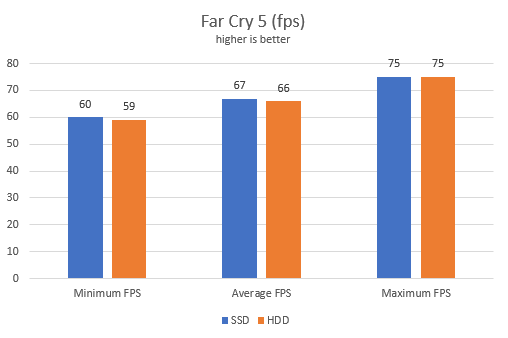
Far Cry 5: an average difference of just 1 frame per second
We ran the Far Cry 5 benchmark, using the following settings:
1920x1080 display resolution
Ultra graphics quality settings
V-Sync and Framerate Lock set to Off
First, we ran the benchmark on the KINGSTON A400 SSD drive, and then on the Western Digital Blue hard disk. As you can see below, the differences were minor. When using the SSD drive, we had only 1 frame extra for the minimum and average frame rate.
fps, frames per second, games
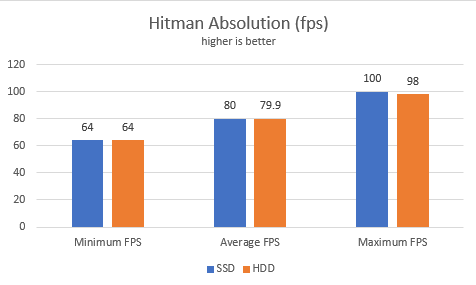
Hitman Absolution: no meaningful difference
We ran the benchmark offered by Hitman Absolution, with the following settings:
1920x1080 display resolution
Ultra graphics quality settings
V-Sync set to Off
The only metric where we had a difference was the maximum frame rate. When using the SSD drive, the maximum frame rate went to 100 fps, while when using the HDD it went to 98 fps.
fps, frames per second, games
The other two metrics had no meaningful differences. The average frame rate was only 0.1 frames higher when using an SSD drive. No gamer notices such small differences when playing games.
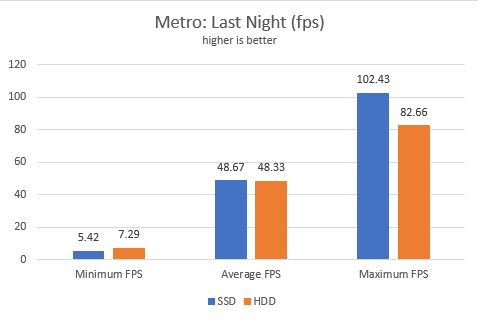
Metro Last Night: higher maximum frame rate when using an SSD drive
The last game we chose was Metro: Last Night. We used the following settings:
1920x1080 display resolution
Very High graphics quality settings
Texture Filtering set to AF 16X, Motion blur set to Normal, Tessellation set to Very High, and Advanced PhysX enabled.
This time we noticed some differences. First of all, it was funny that the minimum frames per second were higher when using the HDD drive. However, the average and the maximum frame rate were higher when using the SSD drive. The difference for the average frame rate was too small to notice, but the maximum frame rate was sensibly higher when using the SSD drive.
fps, frames per second, games
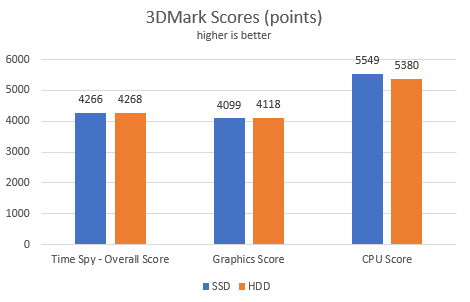
3DMark: no meaningful difference
For the last test, we ran the 3DMark benchmark, using the Time Spy test, with the default settings proposed by 3DMark for our desktop computer. The results were mixed, with few and tiny differences. When looking at the frame rates generated by 3DMark, the differences were smaller than 1 frame per second. Below you see the average scores.
fps, frames per second, games
Using an SSD drive does not mean more frames per second in games
The only conclusion we can draw from this comparison is that an SSD drive does not increase the maximum number of frames per second that you get in games. If you want more frames per second, you should first invest in a better video card, and then into a better processor, and more RAM.
Using an SSD drive gives you faster game downloads, installations, and loading times
The SSD drive does improve many other aspects of your gaming experience. For example, Windows is going to load many times faster. The Windows startup procedure takes seconds instead of minutes. Then, downloading games, and their installation is going to finish faster than when using a traditional hard disk drive. You will notice the most significant improvement when loading massive games with many gigabytes of data. If you want your games to load as fast as possible, then an SSD drive is going to make a positive difference.
What is your experience with gaming on SSD drives?
Now you know the real-life impact you should get when switching from an HDD drive to an SSD drive and playing games. We are curious to know whether you expected these results, and what your experience is with gaming on fast SSD drives. Did they improve the quality of your gaming experience? How? Comment below and let's discuss.
I’m not a gamer, but I did replace the HDD in my Mac Mini with an SSD. It wasn’t difficult. Replacing a drive in a PC would be even easier. I would highly recommend the iFixit web site for detailed (and free) instructions
Anonymous ·
Yes, the iFixt website has really good instructions. A good place to read for such tasks.









Discussion (2)
I’m not a gamer, but I did replace the HDD in my Mac Mini with an SSD. It wasn’t difficult. Replacing a drive in a PC would be even easier. I would highly recommend the iFixit web site for detailed (and free) instructions
Yes, the iFixt website has really good instructions. A good place to read for such tasks.