



It’s a good time for Samsung: they recently released the excellent Samsung Galaxy S22 smartphone lineup and the Tab S8 tablet series; they enjoy a comfortable lead in the Android market and constantly push the boundaries of technology with their products. Now, I’m not really a fan of tablets, I think they occupy a precarious space between laptops and smartphones. But I got to test the top-of-the-range Samsung Galaxy Tab S8 Ultra tablet for a few weeks, and it made me reconsider my assumptions. If they evolve at this pace, tablets have a future. Read this review to see my conclusions:
![Verdict]()

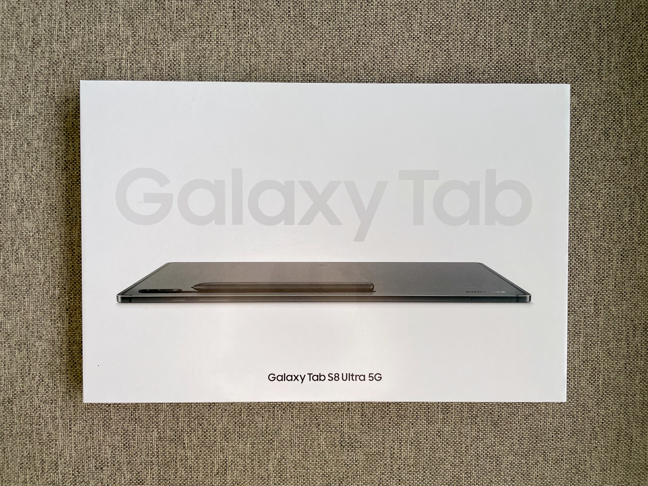
 The box that the Samsung Galaxy Tab S8 Ultra comes in
Inside, you find the tablet, packed in a soft, protective pouch, and the accessories: a USB-C to USB-C cable, an S-Pen, a SIM tray tool, and the manuals. Sadly, there is no charger included, but it’s assumed that you already have a smartphone that has a charger. Unless that smartphone is a Samsung Galaxy S21 FE or any of the newer Galaxy smartphones, which don’t include one either.
The box that the Samsung Galaxy Tab S8 Ultra comes in
Inside, you find the tablet, packed in a soft, protective pouch, and the accessories: a USB-C to USB-C cable, an S-Pen, a SIM tray tool, and the manuals. Sadly, there is no charger included, but it’s assumed that you already have a smartphone that has a charger. Unless that smartphone is a Samsung Galaxy S21 FE or any of the newer Galaxy smartphones, which don’t include one either.
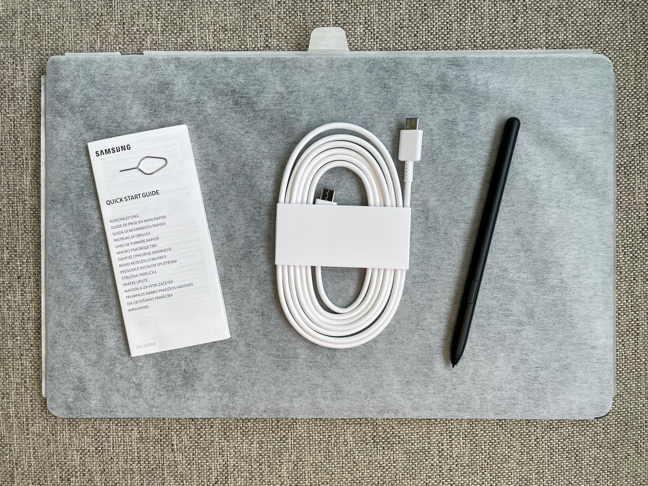 Samsung Galaxy Tab S8 Ultra: what's in the box
The unboxing experience of the Samsung Galaxy Tab S8 Ultra is in line with many Samsung premium devices: few accessories, premium packaging, monochromatic box design. Once in a blue moon, it would be nice if Samsung would include a fast charger with its premium devices.
Samsung Galaxy Tab S8 Ultra: what's in the box
The unboxing experience of the Samsung Galaxy Tab S8 Ultra is in line with many Samsung premium devices: few accessories, premium packaging, monochromatic box design. Once in a blue moon, it would be nice if Samsung would include a fast charger with its premium devices.
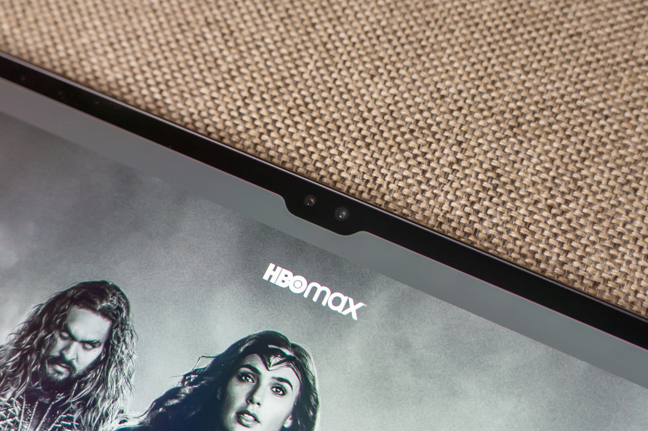
 The notch for the front-facing cameras is tiny compared to the size of the device
The back of the device has a similar lack of features: the only thing you’ll see here is the dual-camera assembly, which is raised a few millimeters and continues with a black plastic strip. The strip is not there just for show, it’s also the “parking space” for the S-Pen. That is the only location where the S-Pen can charge (wirelessly), and its orientation is essential. The magnetic retention only works if the S-Pen is positioned with the tip facing the cameras.
The notch for the front-facing cameras is tiny compared to the size of the device
The back of the device has a similar lack of features: the only thing you’ll see here is the dual-camera assembly, which is raised a few millimeters and continues with a black plastic strip. The strip is not there just for show, it’s also the “parking space” for the S-Pen. That is the only location where the S-Pen can charge (wirelessly), and its orientation is essential. The magnetic retention only works if the S-Pen is positioned with the tip facing the cameras.
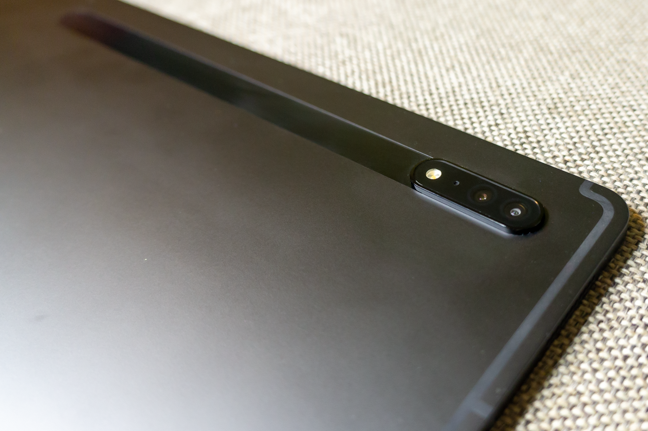 The back cameras of the Samsung Galaxy Tab S8 Ultra
The top and the bottom of the Samsung Galaxy Tab S8 Ultra (or the left and right sides, if you hold it in landscape mode) house four speakers, two on each side. The bottom also contains a USB-C port, while on the top you will find a microphone.
The back cameras of the Samsung Galaxy Tab S8 Ultra
The top and the bottom of the Samsung Galaxy Tab S8 Ultra (or the left and right sides, if you hold it in landscape mode) house four speakers, two on each side. The bottom also contains a USB-C port, while on the top you will find a microphone.
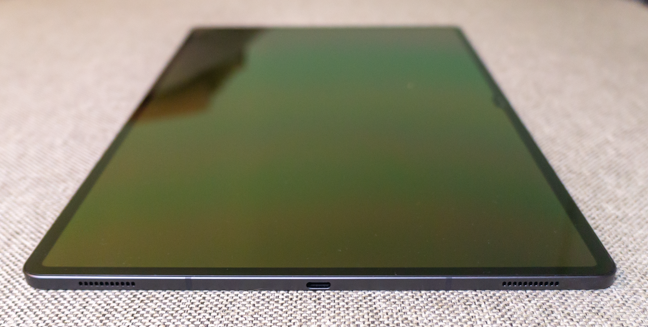
 The USB-C port is flanked by two speakers
The buttons (volume rocker and power) are located on the right side of the Samsung Galaxy Tab S8 Ultra. Also on the right side, there is a microphone and a SIM tray (for the 5G model). The tray also holds an SD card. Expandable storage, yay!
The USB-C port is flanked by two speakers
The buttons (volume rocker and power) are located on the right side of the Samsung Galaxy Tab S8 Ultra. Also on the right side, there is a microphone and a SIM tray (for the 5G model). The tray also holds an SD card. Expandable storage, yay!
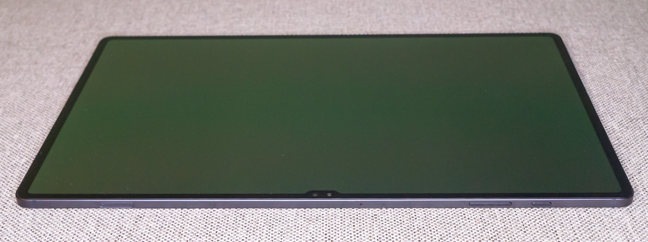
 The right side (portrait) or the top (landscape) of the Samsung Galaxy Tab S8 Ultra
The left side houses the metallic contacts for the Book Cover Keyboard, which we also received with the product. You should note that the keyboard, together with the back cover, is sold separately at the steep price of $350.
The right side (portrait) or the top (landscape) of the Samsung Galaxy Tab S8 Ultra
The left side houses the metallic contacts for the Book Cover Keyboard, which we also received with the product. You should note that the keyboard, together with the back cover, is sold separately at the steep price of $350.
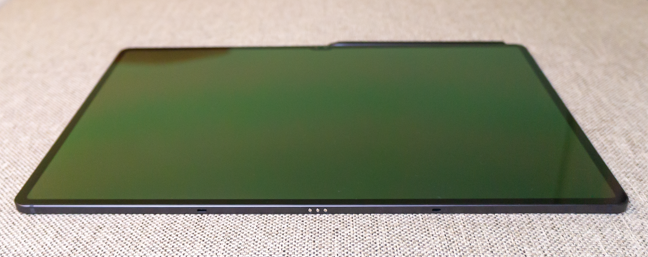
 The left side (portrait) or bottom (landscape) of the Samsung Galaxy Tab S8 Ultra
The Samsung Galaxy Tab S8 Ultra is powered by the very latest Snapdragon 8 Gen 1 chipset - an octa-core CPU coupled with an Adreno 730 GPU. It has between 8 and 16 GB of RAM, depending on the model, and 128, 256, or 512 GB of storage. I tested the 8GB/128GB model.
The left side (portrait) or bottom (landscape) of the Samsung Galaxy Tab S8 Ultra
The Samsung Galaxy Tab S8 Ultra is powered by the very latest Snapdragon 8 Gen 1 chipset - an octa-core CPU coupled with an Adreno 730 GPU. It has between 8 and 16 GB of RAM, depending on the model, and 128, 256, or 512 GB of storage. I tested the 8GB/128GB model.
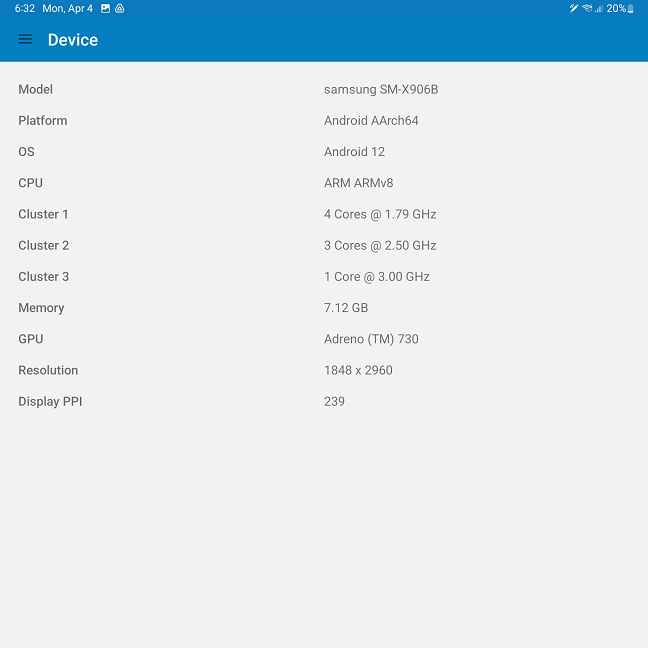
 The technical specs of the Samsung Galaxy Tab S8 Ultra
The battery is massive as well: it has a capacity of 11200 mAh. I suspect that with such a large screen, it needs it. Its advertised charging time with a 45W fast charger is 82 minutes.
Since I mentioned the cameras before, here are a few details about them:
The technical specs of the Samsung Galaxy Tab S8 Ultra
The battery is massive as well: it has a capacity of 11200 mAh. I suspect that with such a large screen, it needs it. Its advertised charging time with a 45W fast charger is 82 minutes.
Since I mentioned the cameras before, here are a few details about them:
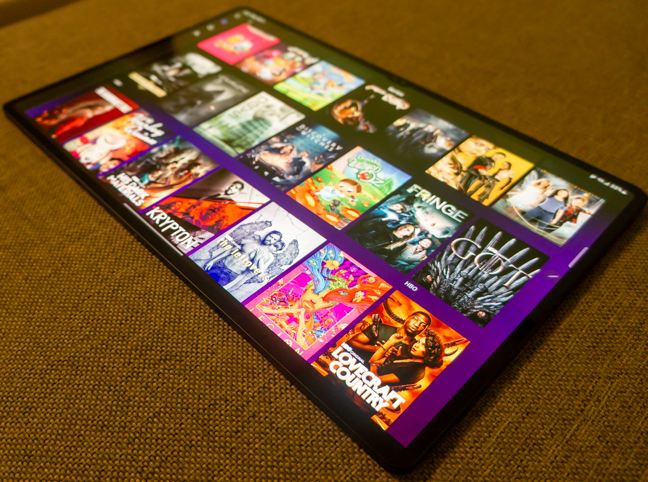
 The Samsung Galaxy Tab S8 Ultra is excellent for media playback
It’s not just the screen, though. The speakers are excellent as well, loud and with sufficient bass. Turn on Dolby Atmos, and you will be truly surprised by what the four speakers can deliver. The Samsung Galaxy Tab S8 Ultra performs flawlessly in games too. I played PUBG Mobile for hours with all the settings cranked up, and I had zero issues. The frame rate was good, the device never got more than a little warm, and the responsiveness of the touchscreen was perfect for competitive gaming.
The Samsung Galaxy Tab S8 Ultra is excellent for media playback
It’s not just the screen, though. The speakers are excellent as well, loud and with sufficient bass. Turn on Dolby Atmos, and you will be truly surprised by what the four speakers can deliver. The Samsung Galaxy Tab S8 Ultra performs flawlessly in games too. I played PUBG Mobile for hours with all the settings cranked up, and I had zero issues. The frame rate was good, the device never got more than a little warm, and the responsiveness of the touchscreen was perfect for competitive gaming.
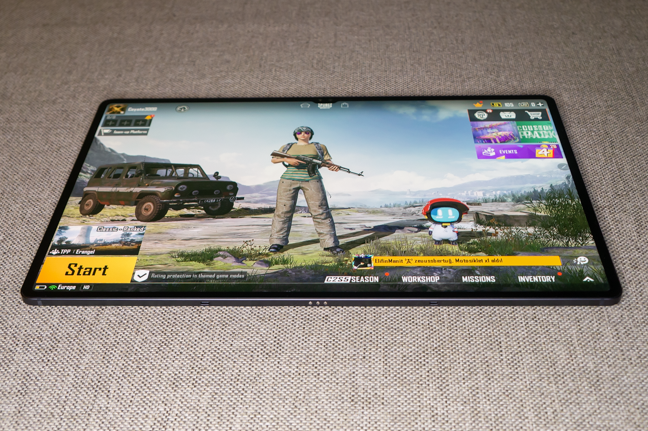 The powerful chipset handles most games at maximum settings
I also tried drawing on the tablet. I am not an expert in this field, but I’m pretty sure graphic designers will love using the Samsung Galaxy Tab S8 Ultra. The S-Pen is very accurate, its low latency (2.8 ms) makes it visually similar to drawing with a real pen, and the palm rejection from the screen is excellent (so you can rest your hand on the screen without issues when drawing).
The powerful chipset handles most games at maximum settings
I also tried drawing on the tablet. I am not an expert in this field, but I’m pretty sure graphic designers will love using the Samsung Galaxy Tab S8 Ultra. The S-Pen is very accurate, its low latency (2.8 ms) makes it visually similar to drawing with a real pen, and the palm rejection from the screen is excellent (so you can rest your hand on the screen without issues when drawing).
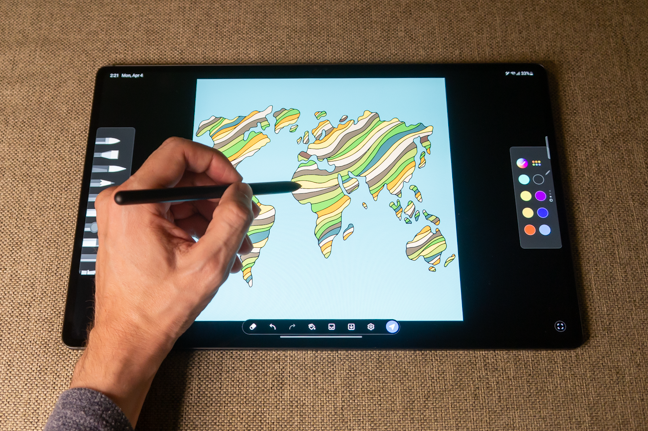 Hand drawing on the Samsung Galaxy Tab S8 Ultra
If you enjoy writing by hand, you can also take notes with handwriting. Most of the time, the Samsung Galaxy Tab S8 Ultra is able to recognize the writing and convert it to editable text. It struggles with some characters and writing styles (for example, I’m left-handed, so my handwriting doesn’t have the same “flow”), but overall the OCR does a pretty good job.
Hand drawing on the Samsung Galaxy Tab S8 Ultra
If you enjoy writing by hand, you can also take notes with handwriting. Most of the time, the Samsung Galaxy Tab S8 Ultra is able to recognize the writing and convert it to editable text. It struggles with some characters and writing styles (for example, I’m left-handed, so my handwriting doesn’t have the same “flow”), but overall the OCR does a pretty good job.
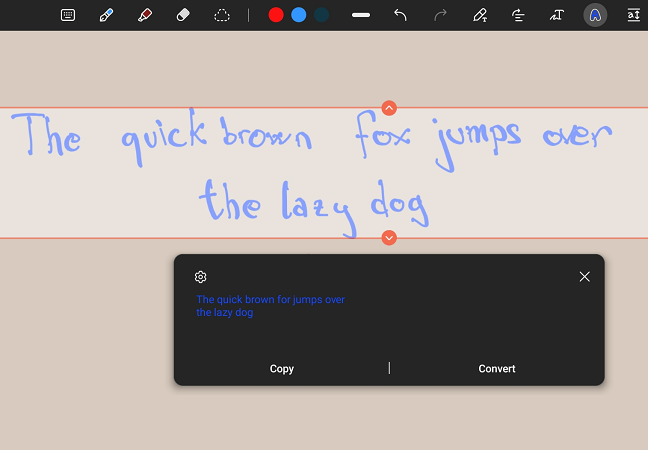
 Text recognition is generally good
Let’s talk about the S-Pen some more. As I mentioned before, it has a few sensors that aren’t usually present on a stylus: a gyroscope and an accelerometer. Here’s why: in several applications (like media players or browsers), you can use the S-Pen as a remote by making gestures. No, not on the screen, in the air. Like a wand. For example, you can skip to the next song or video by pressing the button on the S-Pen while simultaneously swiping right with it. Or you can increase the volume by keeping the button pressed and swiping up. Wingardium Leviosa, anyone? Pressing the S-Pen button for more than two seconds starts the Camera app, then pressing the button again takes a picture.
While the S-Pen only charges when it’s placed on the back of the tablet, you can place it on other parts of the tablet, and it will stick to it. It’s an excellent design choice that compensates somewhat for the fact that the S-Pen doesn’t sit flush somewhere on the tablet and can be easily displaced when it’s charging. If you want to make sure that the stylus stays put when charging, you’ll have to dish out more money for the back cover (which includes a compartment for securing the S-Pen to its charging location). More on that in the last chapter of the review.
Text recognition is generally good
Let’s talk about the S-Pen some more. As I mentioned before, it has a few sensors that aren’t usually present on a stylus: a gyroscope and an accelerometer. Here’s why: in several applications (like media players or browsers), you can use the S-Pen as a remote by making gestures. No, not on the screen, in the air. Like a wand. For example, you can skip to the next song or video by pressing the button on the S-Pen while simultaneously swiping right with it. Or you can increase the volume by keeping the button pressed and swiping up. Wingardium Leviosa, anyone? Pressing the S-Pen button for more than two seconds starts the Camera app, then pressing the button again takes a picture.
While the S-Pen only charges when it’s placed on the back of the tablet, you can place it on other parts of the tablet, and it will stick to it. It’s an excellent design choice that compensates somewhat for the fact that the S-Pen doesn’t sit flush somewhere on the tablet and can be easily displaced when it’s charging. If you want to make sure that the stylus stays put when charging, you’ll have to dish out more money for the back cover (which includes a compartment for securing the S-Pen to its charging location). More on that in the last chapter of the review.
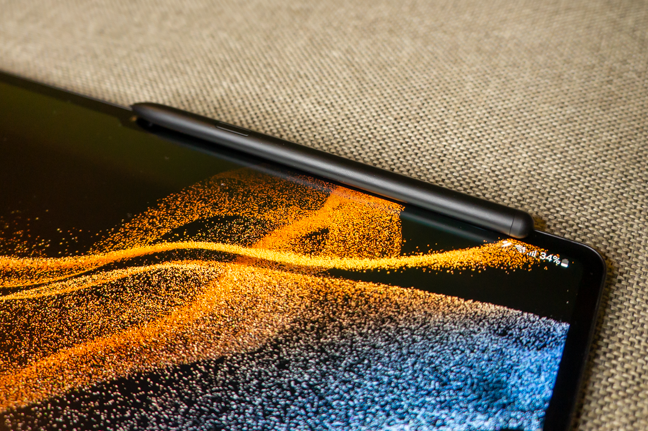 The S-Pen locks in place on the bezels and on the top of the screen
Phone calls worked great, and the front-facing cameras are more than enough for video calling when there is enough light. A nice feature: the camera system has Auto Framing - it automatically zooms and adjusts to keep you in the frame.
I do not recommend using the Samsung Galaxy Tab S8 Ultra for taking pictures, as its main camera performance is mediocre at best. Also, you’ll look really funny trying to take a picture with a laptop-sized tablet. That being said, selfies are passable for social media or sending a portrait to your loved ones.
The S-Pen locks in place on the bezels and on the top of the screen
Phone calls worked great, and the front-facing cameras are more than enough for video calling when there is enough light. A nice feature: the camera system has Auto Framing - it automatically zooms and adjusts to keep you in the frame.
I do not recommend using the Samsung Galaxy Tab S8 Ultra for taking pictures, as its main camera performance is mediocre at best. Also, you’ll look really funny trying to take a picture with a laptop-sized tablet. That being said, selfies are passable for social media or sending a portrait to your loved ones.
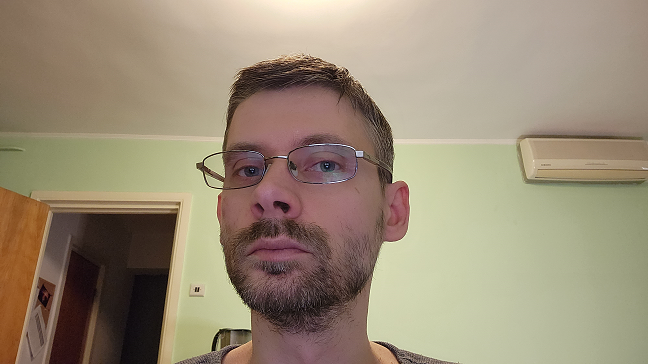
 The cameras are only as good as the lighting
The battery life is just average. I managed about 8 hours of continuous video playback or heavy gaming, and using the tablet for about 2 hours per day gave me an easy three days of battery life. I wasn’t able to test the fast charging time, unfortunately, but I did notice that with a generic 18 Watt charger, it takes quite a long time to recharge (more than three hours).
Overall, my experience with using the Samsung Galaxy Tab S8 Ultra was great. I enjoyed every minute of it - from gaming to media playback, doodling and productivity tasks. I didn’t really find anything to criticize about the tablet, and if you read my reviews, you know that I really complain a lot.
On the next page, I analyze the Samsung Galaxy Tab S8 Ultra software environment, use our usual benchmarks to test its raw performance and battery life and finally tell you about some of its optional accessories - a backlit keyboard and a very useful back cover. Let's go!
The cameras are only as good as the lighting
The battery life is just average. I managed about 8 hours of continuous video playback or heavy gaming, and using the tablet for about 2 hours per day gave me an easy three days of battery life. I wasn’t able to test the fast charging time, unfortunately, but I did notice that with a generic 18 Watt charger, it takes quite a long time to recharge (more than three hours).
Overall, my experience with using the Samsung Galaxy Tab S8 Ultra was great. I enjoyed every minute of it - from gaming to media playback, doodling and productivity tasks. I didn’t really find anything to criticize about the tablet, and if you read my reviews, you know that I really complain a lot.
On the next page, I analyze the Samsung Galaxy Tab S8 Ultra software environment, use our usual benchmarks to test its raw performance and battery life and finally tell you about some of its optional accessories - a backlit keyboard and a very useful back cover. Let's go!
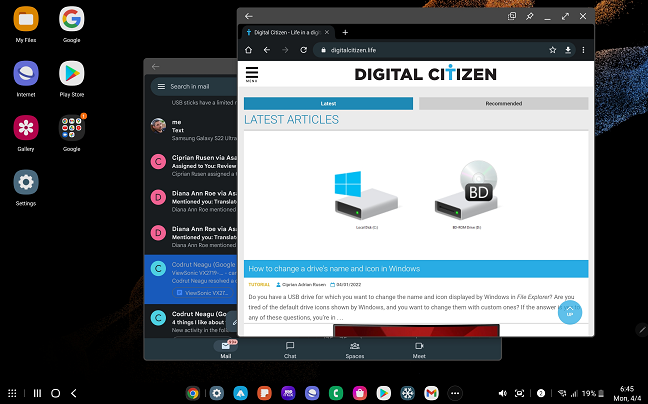
 Samsung DeX is really useful if you need to work from your tablet
As for preinstalled apps, Samsung gives you an option to skip installing most of them during the initial setup. If you choose to install them, you get the following (on top of the usual Google apps):
Samsung DeX is really useful if you need to work from your tablet
As for preinstalled apps, Samsung gives you an option to skip installing most of them during the initial setup. If you choose to install them, you get the following (on top of the usual Google apps):
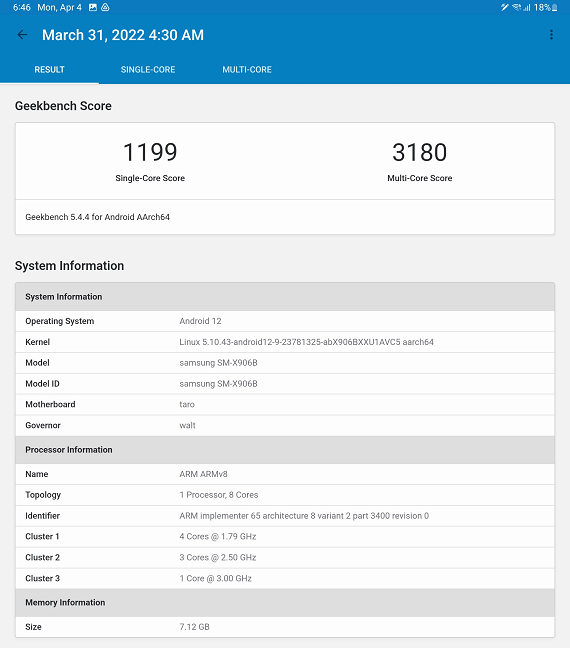
 There are very few Android devices that can top the score of the Samsung Galaxy Tab S8 Ultra
Next was PCMark for Android, where I saw a bit of an odd behavior: the results weren’t consistent. The score ranged between 13875 and 14431. The CPU wasn’t thermal throttling, so I suspect there are some other optimizations at play here.
There are very few Android devices that can top the score of the Samsung Galaxy Tab S8 Ultra
Next was PCMark for Android, where I saw a bit of an odd behavior: the results weren’t consistent. The score ranged between 13875 and 14431. The CPU wasn’t thermal throttling, so I suspect there are some other optimizations at play here.
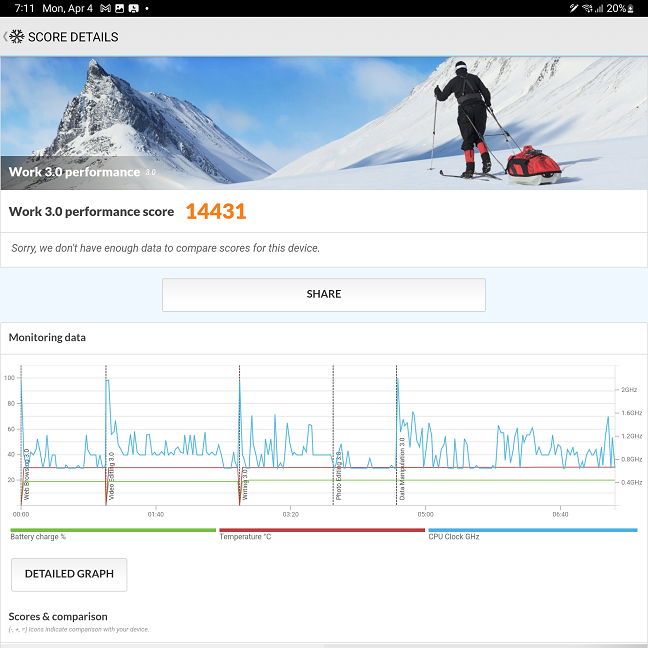 The PCMark Work 3.0 test results fluctuate
I then ran 3DMark to test the Adreno 730 GPU. I used the Wild Life and the Wild Life Extreme tests, and the Samsung Galaxy Tab S8 Ultra again performed well. It scored 8444 in Wild Life and 2055 in Wild Life Extreme.
The PCMark Work 3.0 test results fluctuate
I then ran 3DMark to test the Adreno 730 GPU. I used the Wild Life and the Wild Life Extreme tests, and the Samsung Galaxy Tab S8 Ultra again performed well. It scored 8444 in Wild Life and 2055 in Wild Life Extreme.
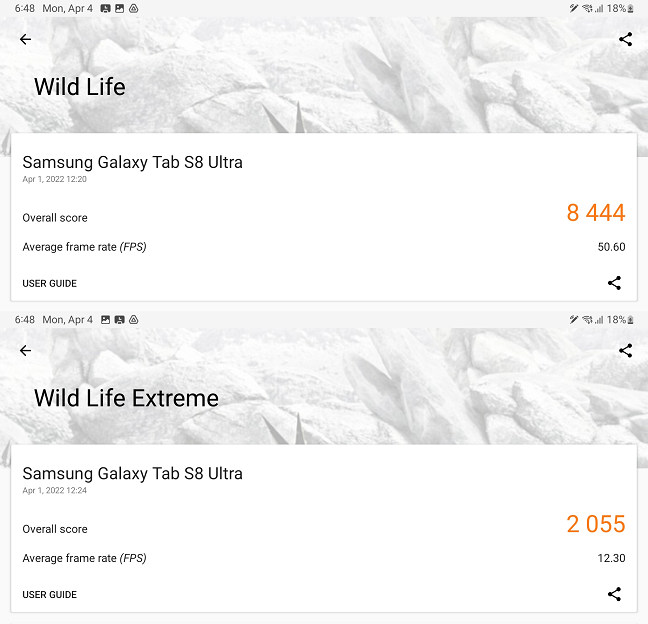
 The test results in 3DMark Wild Life and Wild Life Extreme
The second benchmark suite for the GPU subsystem is, as usual, GFXBench. The Samsung Galaxy Tab S8 Ultra cruised through the Car Chase and 1080p Car Chase Offscreen tests, with 27 fps for the former (1602 frames rendered) and 77 fps for the latter (4528 frames rendered).
The test results in 3DMark Wild Life and Wild Life Extreme
The second benchmark suite for the GPU subsystem is, as usual, GFXBench. The Samsung Galaxy Tab S8 Ultra cruised through the Car Chase and 1080p Car Chase Offscreen tests, with 27 fps for the former (1602 frames rendered) and 77 fps for the latter (4528 frames rendered).
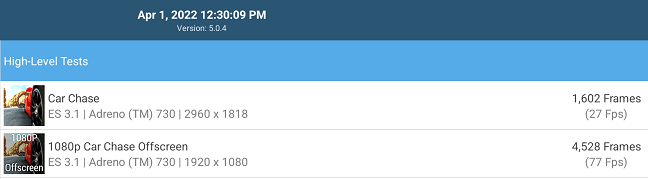
 GFXBench confirms the power of the Adreno 730 GPU
I returned to the PCMark suite, this time for the Battery Life 3.0 test. With the screen brightness on auto, the Samsung Galaxy Tab S8 Ultra managed to run the test for 6 hours and 55 minutes. It’s not a bad result, but it’s nowhere near the best for tablets. Nevertheless, the result confirmed my runtimes in real-life scenarios - roughly 8 hours of screen time.
GFXBench confirms the power of the Adreno 730 GPU
I returned to the PCMark suite, this time for the Battery Life 3.0 test. With the screen brightness on auto, the Samsung Galaxy Tab S8 Ultra managed to run the test for 6 hours and 55 minutes. It’s not a bad result, but it’s nowhere near the best for tablets. Nevertheless, the result confirmed my runtimes in real-life scenarios - roughly 8 hours of screen time.
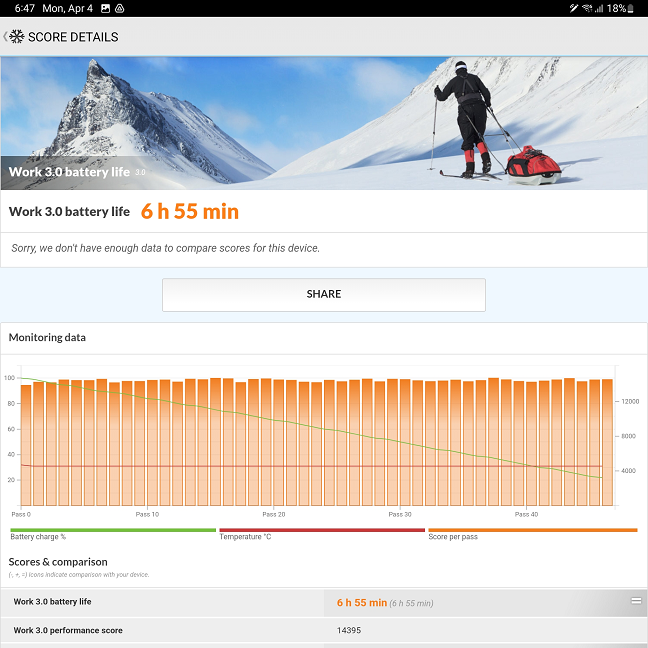 The battery test from PCMark
The last test I performed, since I had no 5G coverage, was Ookla’s Speedtest for Wi-Fi. The Samsung Galaxy Tab S8 Ultra achieved 609 Mbps for download and 571 Mbps for upload, an average result for Wi-Fi 6 networks.
The battery test from PCMark
The last test I performed, since I had no 5G coverage, was Ookla’s Speedtest for Wi-Fi. The Samsung Galaxy Tab S8 Ultra achieved 609 Mbps for download and 571 Mbps for upload, an average result for Wi-Fi 6 networks.
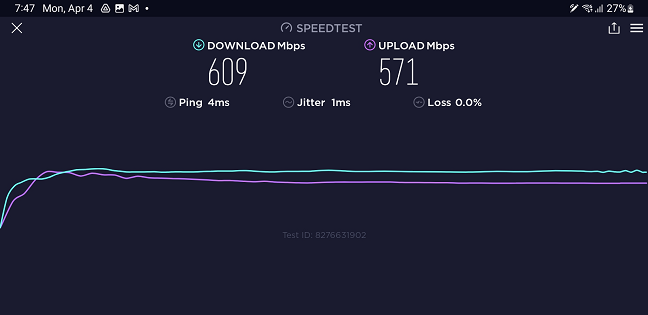
 Wi-Fi speeds obtained by the Samsung Galaxy Tab S8 over Wi-Fi 6 in a 1Gbps network
The Samsung Galaxy Tab S8 Ultra is a very powerful tablet, and the benchmarks confirm this. The tablet achieved top scores and didn’t get hot during testing.
Wi-Fi speeds obtained by the Samsung Galaxy Tab S8 over Wi-Fi 6 in a 1Gbps network
The Samsung Galaxy Tab S8 Ultra is a very powerful tablet, and the benchmarks confirm this. The tablet achieved top scores and didn’t get hot during testing.
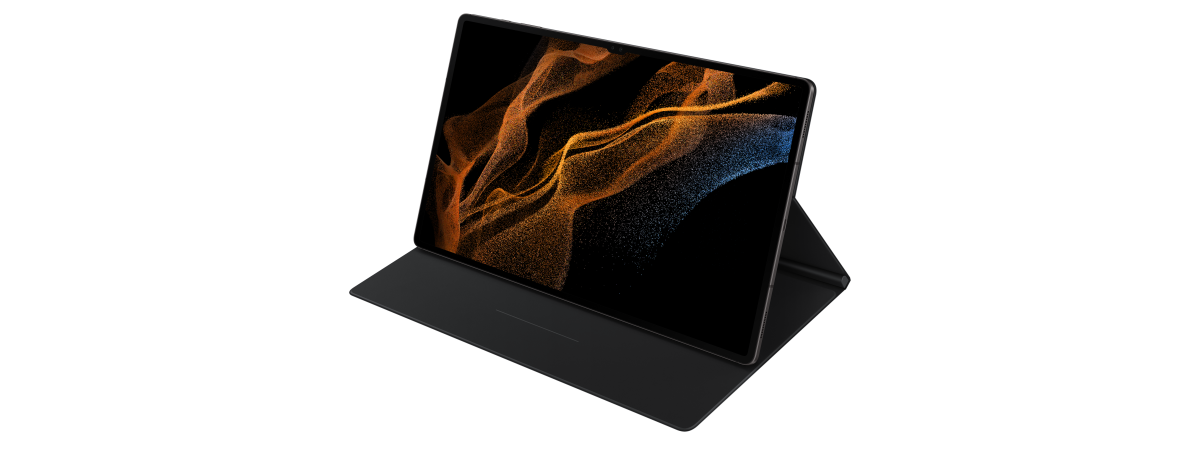
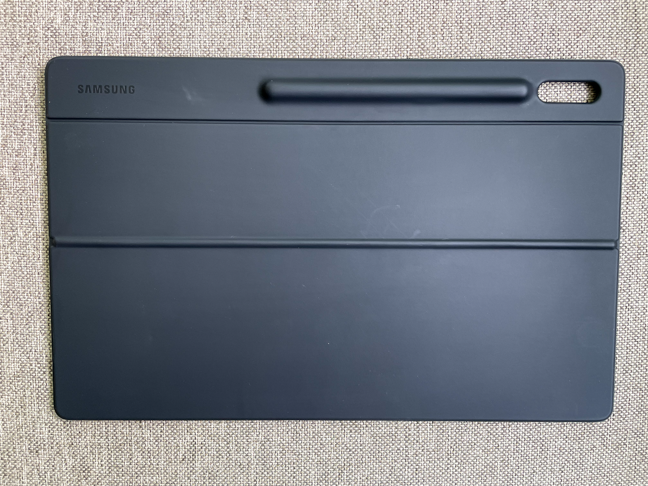 The back cover includes a stand and is very useful
The keyboard is more problematic. Yes, it is a full QWERTY keyboard with backlight, magnetic locking, and integrated trackpad, but it’s flimsy. When used in your lap, it flexes and bends in all sorts of ways, and one significant side effect of this is the fact that when you rest your hands on the palmrest, the keyboard bends down the center and causes the trackpad to click (both audibly and by registering a mouse click). Then again, from the design of both the cover and the keyboard, it’s clear that these accessories are not for using the tablet on your lap, but rather on a desk or a similarly flat surface.
The back cover includes a stand and is very useful
The keyboard is more problematic. Yes, it is a full QWERTY keyboard with backlight, magnetic locking, and integrated trackpad, but it’s flimsy. When used in your lap, it flexes and bends in all sorts of ways, and one significant side effect of this is the fact that when you rest your hands on the palmrest, the keyboard bends down the center and causes the trackpad to click (both audibly and by registering a mouse click). Then again, from the design of both the cover and the keyboard, it’s clear that these accessories are not for using the tablet on your lap, but rather on a desk or a similarly flat surface.
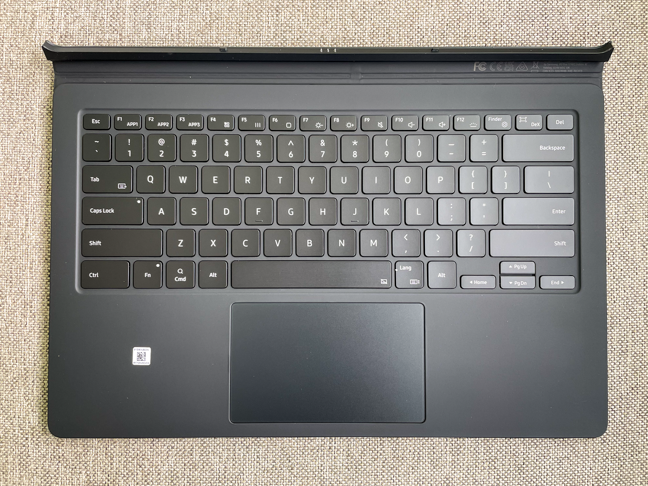 The Galaxy Tab S8 Ultra Book Cover Keyboard
While the package is very useful, you can also buy a stand separately, for example the Galaxy Tab S8 Ultra Protective Standing Cover, and get a good quality Bluetooth keyboard/mouse combo. It’s not as sleek and compact, but it’s most certainly cheaper.
The Galaxy Tab S8 Ultra Book Cover Keyboard
While the package is very useful, you can also buy a stand separately, for example the Galaxy Tab S8 Ultra Protective Standing Cover, and get a good quality Bluetooth keyboard/mouse combo. It’s not as sleek and compact, but it’s most certainly cheaper.
Samsung Galaxy Tab S8 Ultra: who is it good for?
The Samsung Galaxy Tab S8 Ultra is an excellent choice for:- Graphic designers, painters, or sketchers who want the best tools for their trade
- Users in search of the best Android tablet
- People who enjoy watching videos or listening to music while they are traveling and can afford this fantastic tablet
- Travelers who want to pack lightly and don’t want to carry a laptop but still need to work while on the road
Pros and cons
After testing the Samsung Galaxy Tab S8 Ultra, there are lots of things that I liked:
- The design of the tablet is breathtaking, with a thickness of under 6 mm and a giant 14.6-inch screen
- Its build quality is second to none
- The AMOLED screen is very good and has wide viewing angles
- The S-Pen is useful not just for drawing and taking notes, it also functions as a remote control
- The performance of the tablet is up there with the best
- The tablet has expandable storage (microSD card slot)
- Samsung DeX simulates a desktop environment and thus cancels many drawbacks of working on an Android tablet
- The package doesn’t include a charger. Considering the long charge times with generic chargers, this can be a real problem
- The price of the tablet takes it dangerously close to some ultraportable laptops or 2-in-1s
- The Book Cover Keyboard is also very expensive, and it’s not as rigid as it should be.
Verdict
The Samsung Galaxy Tab S8 Ultra is, hands down, the best Android tablet there is, at least for the time being. It’s quite expensive, but you get the best of the best: the fastest chipset, a beautiful (and large) screen, great sound, the excellent S-Pen, and a refined user interface. It’s a useful tool for productivity tasks (especially with the optional accessories) and for graphic designers and artists. Of course, it’s also excellent for media playback, thanks to its AMOLED screen and top-notch speakers. If you have the budget for it, do not hesitate to buy it.Unboxing the Samsung Galaxy Tab S8 Ultra
The Samsung Galaxy Tab S8 Ultra's box is very slim. Its dimensions are 13.58 x 8.93 x 0.78 inches (345 x 227 x 20 mm). The white background emphasizes the picture of the tablet and the name on the front of the box. There are very few other features on the sides and back of the box.Design and hardware specifications
Once you get the tablet out of its package, you cannot help but be amazed by how far tablet design has come. The tablet looks simply stunning, with a thickness of just 0.21 inches (5.5 millimeters). It’s way thinner than any modern smartphone and as thin as a tablet gets these days. Not only is it thin, but it’s also huge: the width and height of the tablet are 8.23 x 12.83 inches (209 x 326 mm). Its weight is 1.60 lb or 728 grams. Despite the dimensions, the beautiful brushed aluminum chassis is solid and doesn’t flex at all. The screen is naturally huge as well, with a diagonal of 14.6 inches and a resolution of 2960x1848 pixels. This equates to a pixel density of roughly 240 pixels per inch. The panel is a Super AMOLED capable of a 120 Hz refresh rate and HDR10+. It’s protected by Corning Gorilla Glass 5. Apart from the impressive screen and the small camera notch, there are no features on the front of the Samsung Galaxy Tab S8 Ultra.- The front (selfie) cameras both have 12 MP sensors, but one is behind an f/2.2, 26mm (wide) lens, while the other uses an f/2.4 ultrawide lens with a 120-degree field of view.
- The cameras on the back have different sensors: one is a 13 MP and has an f/2.0, 26mm wide-angle lens, while the other is a 6 MP, f/2.2 ultrawide.
Using the Samsung Galaxy Tab S8 Ultra
After looking at the technical specifications, I expected the Samsung Galaxy Tab S8 Ultra to perform very well, whatever I threw at it. Sure enough, the experience was really special. The fast chipset is definitely helped by the good user interface and animations, which make everything look smooth and blazing fast. But what I wasn’t expecting was the brilliant multimedia experience. The screen is almost perfect, with rich colors and solid contrast. The viewing angles are amazing, and you don’t see any color shift even when viewing at extreme angles. The only place where it doesn’t excel is the brightness, but the screen remains usable in bright light.Android 12 and bundled apps
The Samsung Galaxy Tab S8 Ultra uses a heavily modified version of Android 12, as usual. It comes with One UI 4.1, the most refined user interface that Samsung has ever made. It has smooth animations, great performance, and it looks good. You should have no trouble using it if you’ve ever owned an Android smartphone. I’ve covered One UI 4.0 in my review of the Samsung Galaxy S21 FE, and the interface on the S8 Ultra is very similar. One thing to note is the Samsung DeX mode. What is Samsung DeX? Well, to put it simply, it’s a heavy modification of the normal Android interface that can (and should) be activated when you attach peripherals like the Book Cover Keyboard, turning your Samsung Galaxy Tab S8 Ultra into a pseudo-laptop. You get a taskbar, a Start button, desktop icons, and a look that’s similar to other operating systems (cough, cough, Microsoft Windows). You also get windows and tabs that act similarly to those in Windows, with the X in the upper-right corner, with window resizing and free placement, etc. Samsung DeX really helps with productivity tasks, although the actual apps that you use are still Android versions, so there are many things that won’t be the same as using a Windows laptop.- Samsung Browser - it’s a fast browser and has the advantage of being fully tested on Samsung devices
- SmartThings - Samsung’s app for the management and automation of smart devices
- Samsung Flow - an app that facilitates the connection between the tablet and a smartphone or a computer
- PENUP - a simple drawing and coloring app with gamification features
- Samsung Health - a health & fitness app that needs a Samsung account and Samsung wearables
- AR Zone - allows you to play with augmented reality emoji, doodles, and other items
- Galaxy Store - Samsung’s own mobile app store
- Samsung Voice Recorder - a simple voice recording app that does what you expect it to do
- Samsung Members - helps you connect with other Samsung Galaxy device owners and get help when running into problems
- Gallery - Samsung’s alternative to Google Photos
- Samsung Notes - a good and easy-to-use app for note-taking. Many users might enjoy it
- Game Launcher - a mix between a game store and a gaming platform allowing the user to play games without installing them on the device
- Samsung Global Goals - an app that enables users to donate money to charity by viewing ads or donating directly
- Samsung Free - Samsung’s alternative to Google Discover
- Smart Switch - an app that makes it easy to transfer your data to other devices
- Clip Studio Paint - a paid drawing app (you get six months free when signing up)
- Noteshelf - a digital notebook
Performance in benchmarks
I tested the Samsung Galaxy Tab S8 Ultra with our usual benchmarks, and the results were unsurprisingly excellent. I started with Geekbench 5, and the scores were in line with other devices with the Snapdragon 8 Gen 1 chipset: 3180 for Single-Core, 1199 for Multi-Core.Samsung Galaxy Tab S8 Ultra accessories
I received the Samsung Galaxy Tab S8 Ultra with the Book Cover Keyboard. As I mentioned earlier, it’s a very expensive accessory, but it’s also useful if you want to use your tablet for productivity tasks. The package consists of two items: a back cover with an adjustable stand and a backlit keyboard with a trackpad. The back cover is very well thought out: its upper half locks itself to the tablet (magnetically) and the lower half pivots, acting as an adjustable stand for the tablet in landscape mode. Additionally, the cover also has a compartment that protects the S-Pen in its charging position. When you need to access the S-Pen, the upper part of the cover flips open.
Discussion (0)
Comments are closed.