



When you read the product page of the D-Link DIR-822 AC1200 wireless router, you find terms like "extreme coverage," "dual-band with a kick" or "intelligent QoS." It is funny and pompous when you consider that these words describe a very cheap router that costs a bit less than 50 US dollars. The market of AC1200 wireless routers is filled with many affordable devices, and many people buy them because of their price, and sometimes, because of their features. We took the D-Link DIR-822 wireless router for testing, to see whether D-Link's description matches the real-life performance of this product. To see what we found, read this review:
D-Link DIR-822 AC1200: Who is it good for?
D-Link DIR-822 is a suitable choice for:
- Small-sized apartments and networks with a small number of devices
- People with a very low budget
- Users who do not need a USB port on their router and advanced networking features
NOTE: We received the D-Link DIR-822 AC1200 wireless router for testing, from Gearbest.com. It is an online shop that offers excellent prices and international free shipping. You can buy this router at a discount price, from here.
Pros and cons
D-Link DIR-822 has the following positives:
- It is very affordable
- It can be mounted on walls
- It offers support for the modern 802.11ac standard and 2x2 MU-MIMO transfers
- Its performance is good on the 2.4 GHz band
There are also downsides to consider:
- There is no USB port
- The WiFi has sudden drops in performance that lower the quality of your networking experience
- WiFi performance on the 5 GHz band is much lower than that of its competitors
- It is incapable of using internet connections which are faster than 100 Mbps
- The Ethernet ports work at a maximum of 100 Mbps
- It is difficult to configure when compared to routers from other brands
- D-Link uses poor security practices in its Easy Setup page
Verdict
D-Link DIR-822 AC1200 is a very affordable dual-band wireless router. Because of that, it does not have powerful hardware or advanced features to brag about. We were pleasantly surprised to see that the WiFi on the 2.4 GHz band is quite fast for an AC1200 wireless router. However, the WiFi signal suffers from sudden performance drops, and the WiFi on the 5 GHz band tends to be a lot slower than that of other wireless routers. Also, the user interface for administering this router is old-school and challenging to use. At a similar price, you get better options from the competition, and we recommend that you choose another wireless router.
Unboxing the D-Link DIR-822 AC1200 wireless router
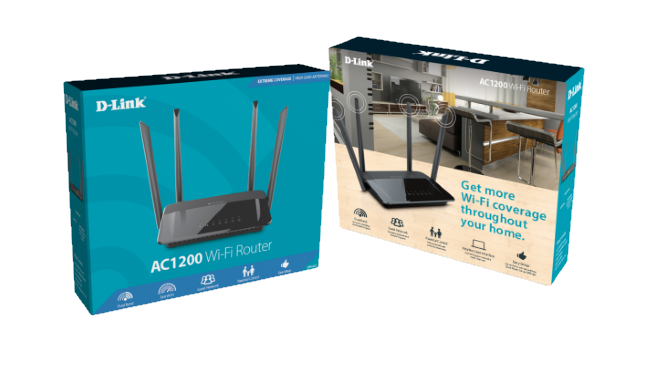
The D-Link DIR-822 AC1200 wireless router comes in a relatively thin blue box with a picture of the devices on its front. On the sides, you can see printed some of its essential features and basic information about this product.
When you open the package, you find inside the following: the router itself, the power adapter, a short network cable, the quick setup guide, the warranty and information about the licensing terms for the D-Link firmware. We found the cable of the power adapter to be rather short, so you need to keep the router close to a plug.
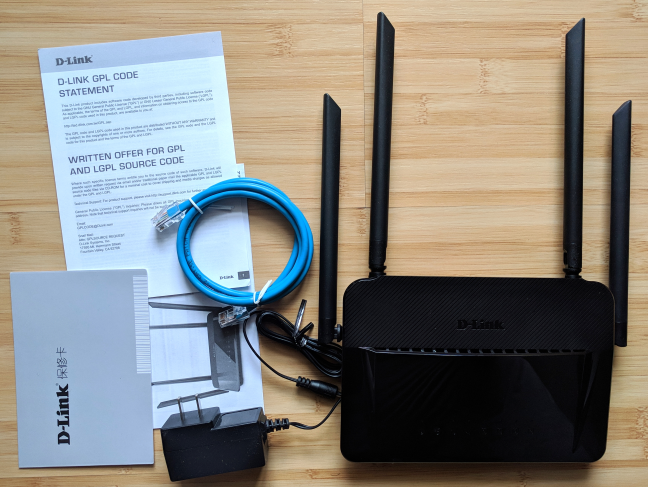
The unboxing experience is quick and easy, just as you would expect from an affordable device of this type. Inside the package, you get the basics you need to make the router work.
Hardware specifications and design
D-Link DIR-822 has a single core Realtek RTL8197DL processor running at 660 MHz, 64 MB of RAM, and just 8 MB of storage space for the firmware. This processor offers support for the latest 802.11ac wireless standard and 2x2 MU-MIMO transfers.
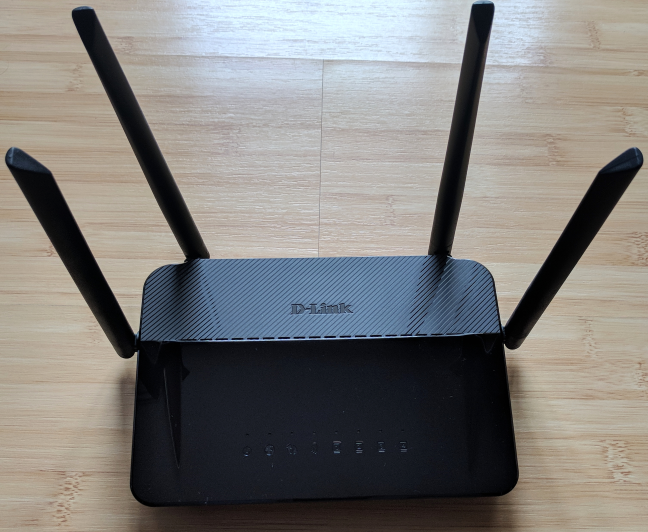
This router is dual-band, with a maximum theoretical bandwidth of 300Mbps for the 2.4GHz band, and 867Mbps for the 5GHz wireless band. It has four external antennas that cannot be detached, only moved to the position you desire. On the top side, you also have LEDs signaling the status of the internet connection, the two wireless networks that are broadcast and the Ethernet ports on the back of the router.
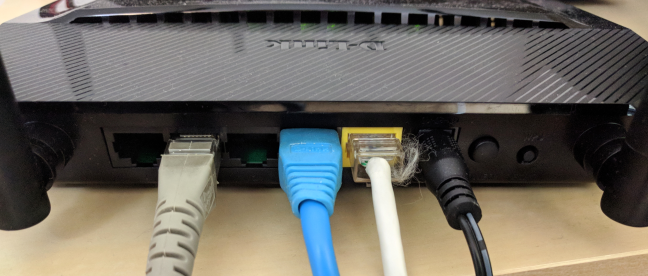
On the bottom, there are a few mounting holes, so that you can place this router on walls. On the back, there are four LAN ports that work at a maximum speed of 100 Mbps, and the port for connecting the router to the internet. There you have the power connector, the Power button, and the WPS button.
Regarding size, D-Link DIR-822 is rather small, at 7.48 x 5.23 x 1.49 inches or 190 x 133 x 38 mm in length x width x height. It also weighs just 9.2 ounces or 263 grams.
If you would like to read all the official specifications of this product, go to this page: D-Link DIR-822 Datasheet.
Setting up and using the D-Link DIR-822 AC1200 wireless router
You can set up the D-Link DIR-822 wireless router using a computer and a web browser or your smartphone and a mobile app. The fastest method involves using the Easy Setup page that opens when you type the IP address of the router, in a web browser. This page asks for the internet connection details, as well as the name and the password for each of the two wireless networks that are going to be broadcast by the router.
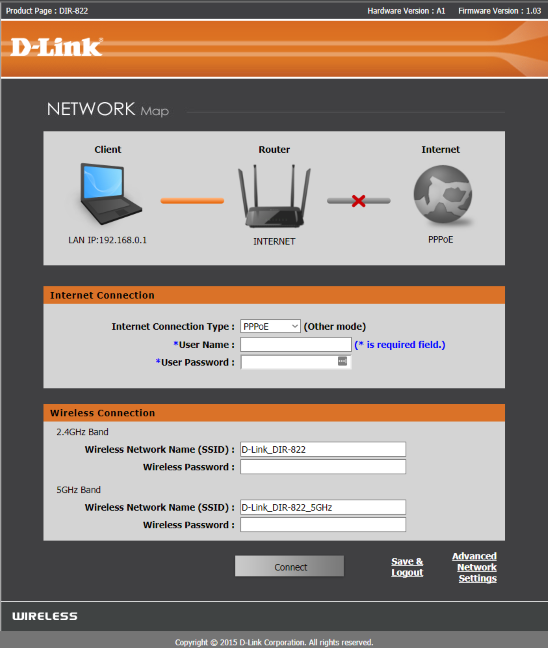
While this method is incredibly fast and easy, it does not set an administrator password for the router and you cannot set the type of security used for the WiFi, making your router easy to hack and remote control by others.
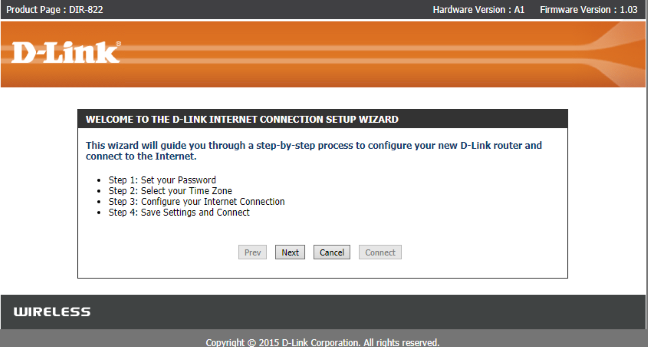
The best method is to load the standard Internet Connection Setup Wizard, which starts by setting up a password for the router, and then configures your internet connection. Once you are done with that, load the administration user interface, configure your wireless network, change the way the router works, and update the firmware to the latest version.
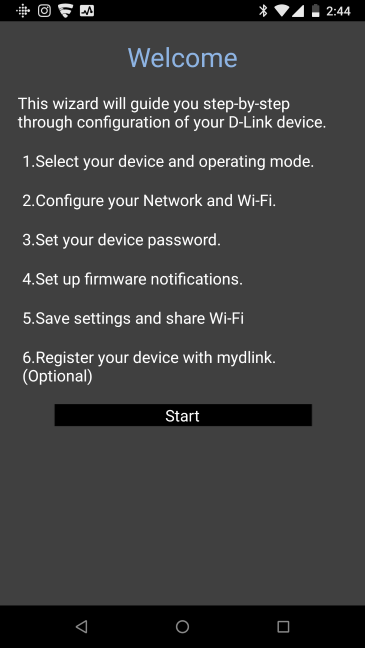
Another easy method is to use the QRS Mobile app for iOS and Android. The app allows you to select the operating mode for the router, configure its connection to the internet, the name and the password for the WiFi, set up firmware notifications, and save your settings.
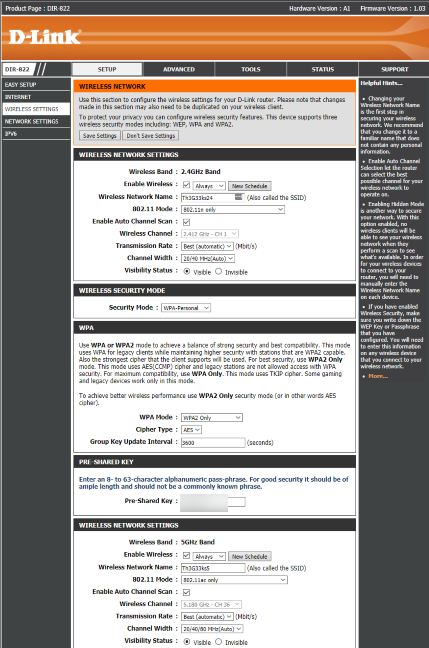
Once the initial set up is done, you should load the administration interface. Unfortunately, it looks dated, and it is cumbersome to use. There's too much data, too much jargon, and too many manual settings to perform. If you are not a technical person, it is difficult not to feel overwhelmed.
Even features which are marketed as simple and "intelligent" like the QoS service, are a gargantuan task to configure if you are a casual user. You need to choose the queue type, set ID's and the weight of each ID, and then add classification rules.
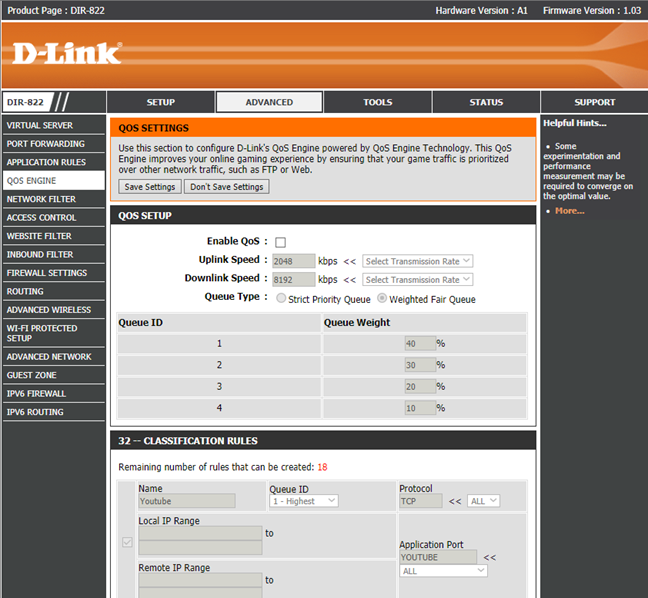
Because of this complexity, you have to consult the user documentation, if you want to change anything more advanced on your router. While the documentation is well done, it is not as easy to navigate as it is on routers from other brands.
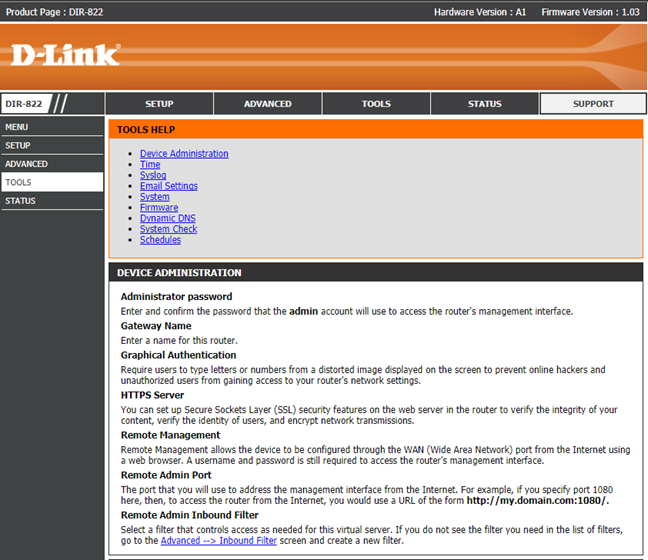
The user interface is available in more languages, but it is not clear which languages are supported. D-Link has a different approach than other manufacturers and does not offer an easy way to change the language. The language used differs based on the country where you purchased the router and the language packs that are installed.
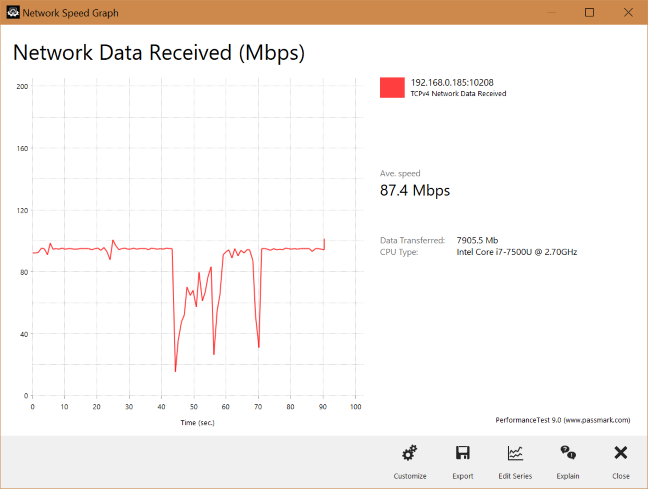
After configuring the D-Link DIR-822 wireless router, we connected all our devices to it: desktop PCs, laptops, tablets, smartphones, smart plugs, a smart bulb, a wireless printer, and an Xbox One console. We had no issues in connecting our devices, and we were able to perform network transfers with ease. The speed we enjoyed was good for an AC1200 wireless router, especially on the 2.4 GHz frequency. However, we did notice sudden drops in performance that plagued some of our network transfers. You can see below a graphical representation of a WiFi network transfer that we performed in the same room with the router. While the average speed was good, it had sudden drops in the middle of the transfer. We encountered this issue daily, for the whole week we tested the D-Link DIR-822 wireless router.
Configuring the D-Link DIR-822 wireless router is easy. However, the administration user interface is dated and hard to use for a home user with limited technical knowledge. D-Link should make its firmware and apps friendlier to use.
If you would like to learn more about the real-life performance of this wireless router and our benchmarks, read the next page of this review.
Wireless network performance
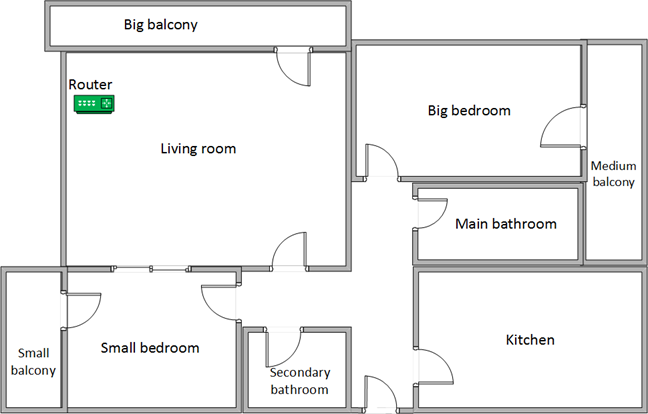
Before we show you the data from our measurements, let's take a look at the apartment that was used in our testing and how it is set up. You can see that the router is placed in the living room. With most wireless routers, the signal strength is not that high in places like the Kitchen and the Medium balcony.
Our testing was done using a fast 1 Gigabit Internet connection that is capable of uploads on the internet of up to 500 Mbps. We used an HP Spectre 13 laptop for all our measurements and several software tools.
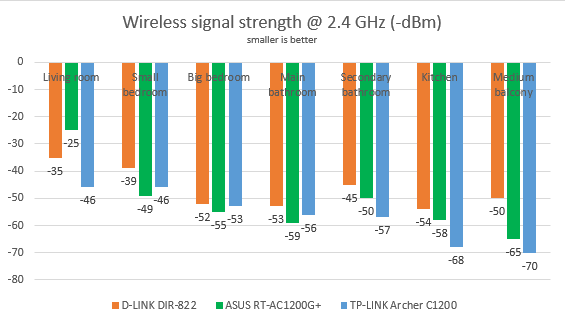
To get a better perspective of the performance offered by D-Link DIR-822, we compared it with ASUS RT-AC1200G+ and TP-Link Archer C1200. We analyzed the 2.4 GHz band first and measured the signal strength with inSSIDer. Below, you can see that the signal strength offered by D-Link DIR-822. As you can see, the signal strength was good in all rooms.
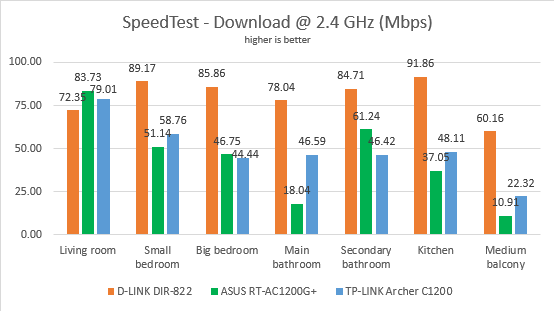
Next, we used SpeedTest to measure how fast the internet connection offered by this router is when using 2.4 GHz wireless network. The average download speed provided by D-Link DIR-822 was excellent, beating its competitors in most rooms.
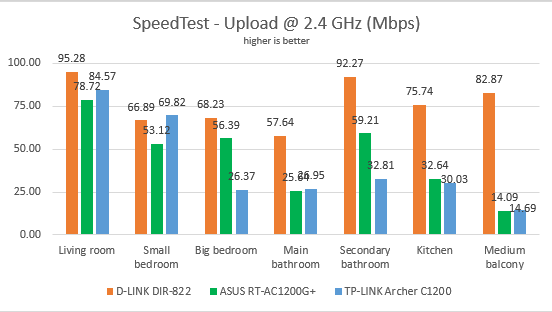
The same was true when measuring the upload speed in each room.
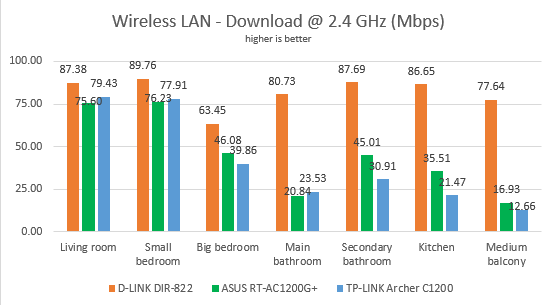
Continuing our measurements on the 2.4 GHz wireless network, we used the PassMark Performance test to transfer data between two computers connected to the network. D-Link DIR-822 was again the fastest router in this comparison, in all the rooms of our test apartment.
The upload speed was similarly fast, in all rooms.
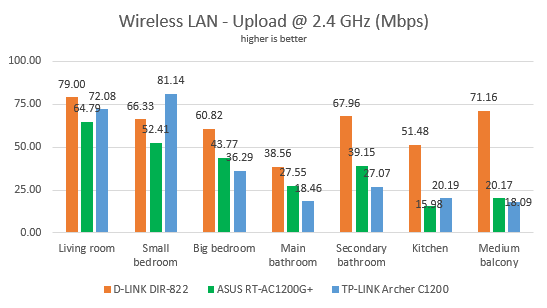
The average speed you get from the D-Link DIR-822 is very fast for an AC1200 wireless router, on the 2.4 GHz wireless band.
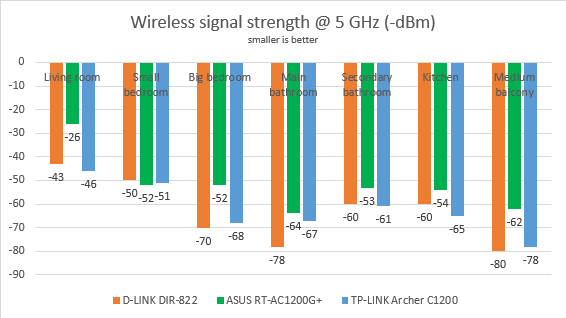
For the next set of measurements, we analyzed the performance of the 5GHz wireless band. We looked at the evolution of the signal strength, from room to room. This time, D-Link DIR-822 performed worse than its competitors.
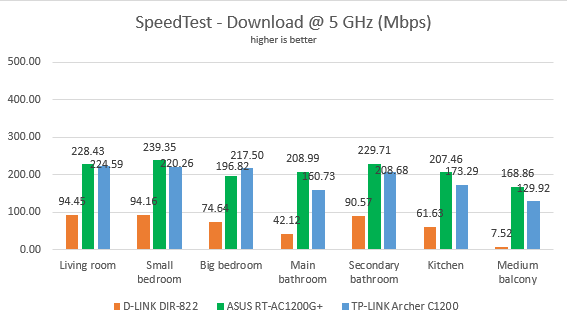
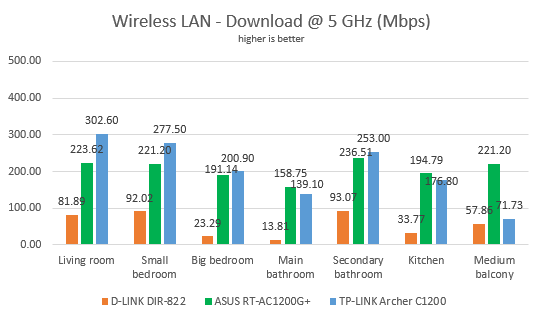
Then, we ran SpeedTest to see how fast the internet connection is when using the 5GHz band. D-Link DIR-822 was much slower than its competitors in all rooms. In the medium balcony, the wireless network barely functioned.
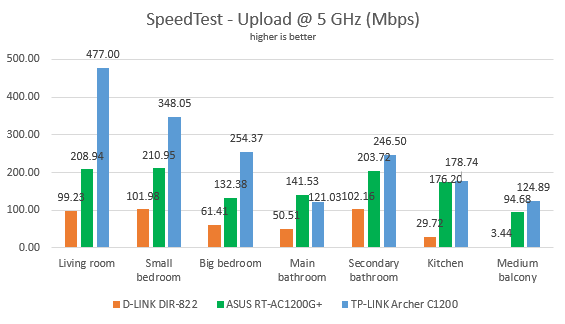
The same trend was noticed when measuring the upload speed on the 5 GHz band.
For the last measurements on the 5GHz wireless network, we used the PassMark Performance test to transfer data between two computers connected to the network. D-Link DIR-822 was again, much slower than its competitors, in all rooms. This time though, the wireless network in the medium balcony worked better than in the previous test.
The upload speed was disappointing in most rooms.
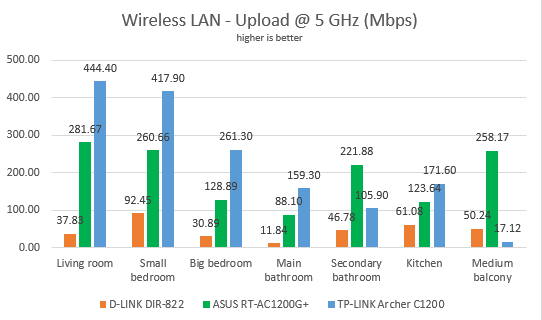
The wireless performance offered by D-Link DIR-822 on the 5 GHz band is disappointing.
Wired network performance
To test the quality of the wired Ethernet connection, we used a desktop PC, equipped with an Intel Core i5 4460 processor, running at 3.20GHz, 16GB of RAM and a very fast Samsung 850 Pro 512GB SSD, and a Lenovo IdeaCentre 610s mini PC.
We measured the speed of the internet connection when using a 1 Gbps Ethernet cable, using SpeedTest. D-Link DIR-822 has offered transfer speeds that were close to 100 Mbps. However, other AC1200 routers with a similar price can provide speeds that are close to 1 Gbps.
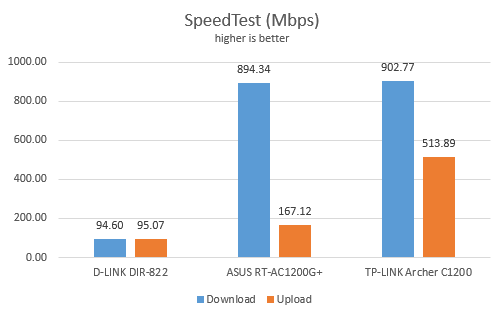
Then, we ran a network transfer between the two computers, using the PassMark Performance test. D-Link DIR-822 offered very similar performance to the previous test.
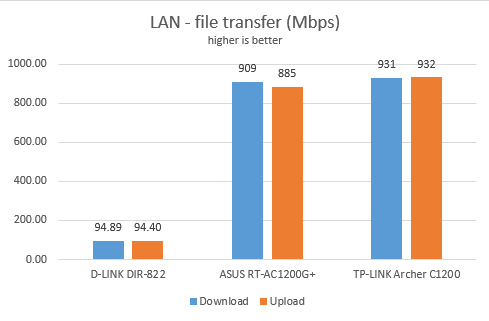
The Ethernet connections offered by D-Link DIR-822 work at 100 Mbps while competing routers with a similar price can deliver 1 Gbps.
Extra features
D-Link DIR-822 is an affordable router and, as a result, it does not bundle many advanced features that you find on mid-range and premium routers. The extra tools that it offers are the following:
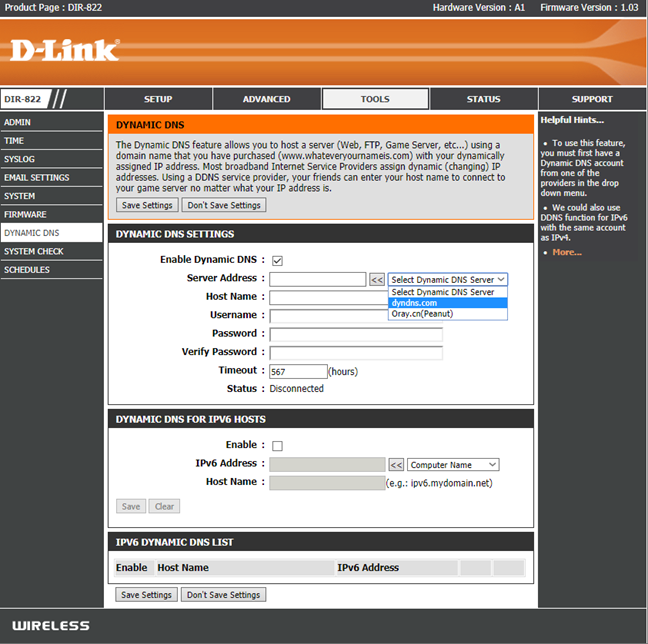
- Dynamic DNS - you can use the Dynamic DNS services offered by dyndns.com and oray.cn with your router so that you can access it from anywhere on the internet.
- QoS - a basic Quality of Service feature, that helps you prioritize network traffic based on your rules. However, it involves a lot of manual labor to set up.
- Parental Controls - are present in the form of website filters that need to be manually setup and maintained. They are not very useful.
- Guest networks - one guest network for each WiFi band. However, you cannot isolate your guests from the rest of the network.
D-Link also offers a mobile app for setting up your wireless router. It is named QRS Mobile and its available for iOS and Android. It is a bare-bones app that has not been updated in a long time, and you can use it only for the initial setup. You cannot use it to administer your router, or the way the network works, making this app very limited in value.
What is your opinion about D-Link DIR-822 AC1200 wireless router?
Now you know our opinion about the D-Link DIR-822 AC1200 wireless router and how it performed in our testing. If you already have this router at home, do not hesitate to share your experience in a comment below. Other readers will find it useful.
Discussion (2)
This is false and misleading advertising by D-Link. This router simply is capped at 100 Mbps for 5 Ghz. This is just another reason not to trust or buy anything from Dlink, ever.
That’s not true. Our review was not a paid one, and we present real numbers with what we’ve obtained on our computers. If you don’t want to believe that, it is your choice, but it doesn’t mean that your belief is based on the reality of our testing.
If you carefully read the review for this router, you also notice that we give it a very low rating. How is that misleading advertising, when we give this router a rating of two out of a maximum of five?