




Microsoft is testing new Copilot actions inside its built-in PDF reader in Edge. The changes make it easier to understand documents without leaving the browser. Edge is also testing a "faster Read Aloud " experience for PDFs. This change applies only to the new PDF viewer.
New Copilot actions appear inside PDFs
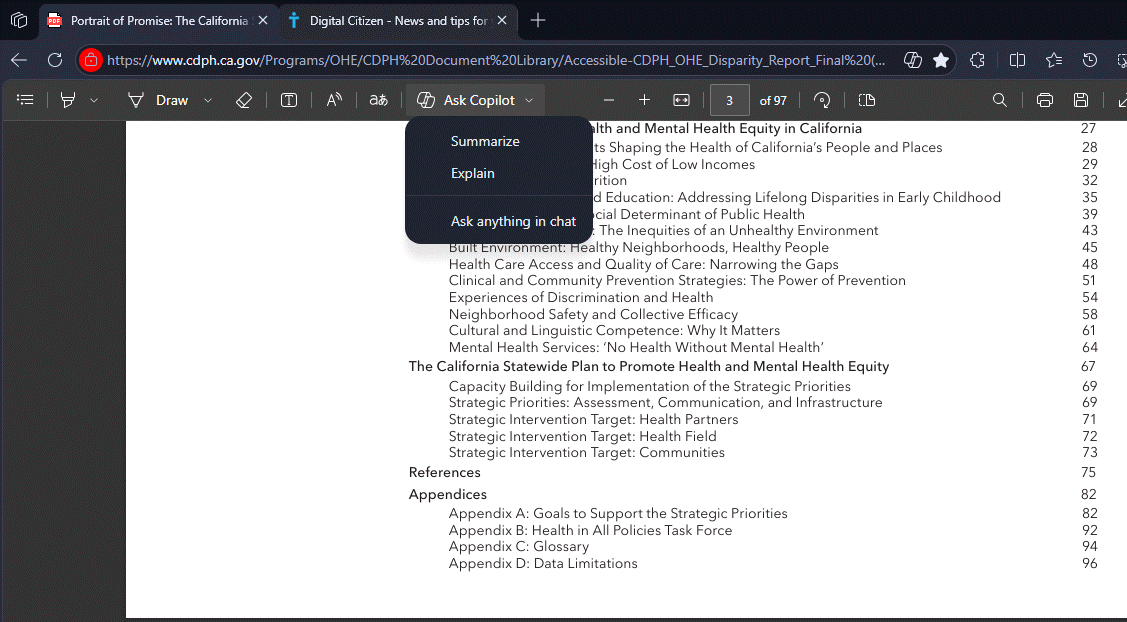
Microsoft Edge already includes Ask Copilot inside the PDF reader. The browser now expands this menu with three actions: "Summarize", "Explain" and "Ask anything in chat".
The Summarize action creates a short overview of a full PDF or a selected section.
The Explain action rewrites complex text in simpler language.
Ask anything in chat opens a Copilot conversation where users can ask questions about the document.
These actions appear directly under the Ask Copilot option inside the PDF viewer. Users can start with a specific task or open chat right away.
Faster Read Aloud works only in the new PDF viewer
Microsoft is also testing a faster Read Aloud option for PDFs in Edge.
A new flag description in Edge Canary labeled, "Enable improved PDF Read Aloud experience in the new PDF viewer" states that the "faster and more performant Read Aloud experience for PDFs "works only in the new PDF viewer, which is based on Edge’s Adobe PDF engine. It does not apply to the older PDF viewer.

The new Copilot PDF actions and the faster Read Aloud experience are still under testing. Microsoft has not shared a timeline for when these changes will reach the stable version of Edge.


Discussion (0)
Be the first to comment.