




If you want to know how to watch Tubi on LG Smart TV, the good news is that most modern LG webOS models support the free Tubi app. Tubi offers thousands of free movies and TV shows, making it a great choice for anyone who wants a streaming service without a subscription. At the time of writing, installing and using Tubi on LG Smart TV only requires a few simple steps.
Check LG Smart TV Compatibility With Tubi
Before you install Tubi on LG Smart TV, confirm your LG model supports the app. Tubi works on most webOS 3.0 and newer models, but older TVs may not appear in the LG Content Store.
- Press the Home button on your LG remote.
- Select the LG Content Store.
- Use the search bar and type Tubi.
- Check whether the Tubi app appears in the results for your LG Smart TV.
If the app appears, your LG Smart TV supports Tubi. If not, you can still stream Tubi using an external device like Roku, Fire TV, Chromecast, or a gaming console.
Download And Install Tubi On LG Smart TV
Once you confirm compatibility, you can install the Tubi app directly from the LG Content Store. The installation process only takes a moment.
- Press Home on the LG remote to open the home screen.
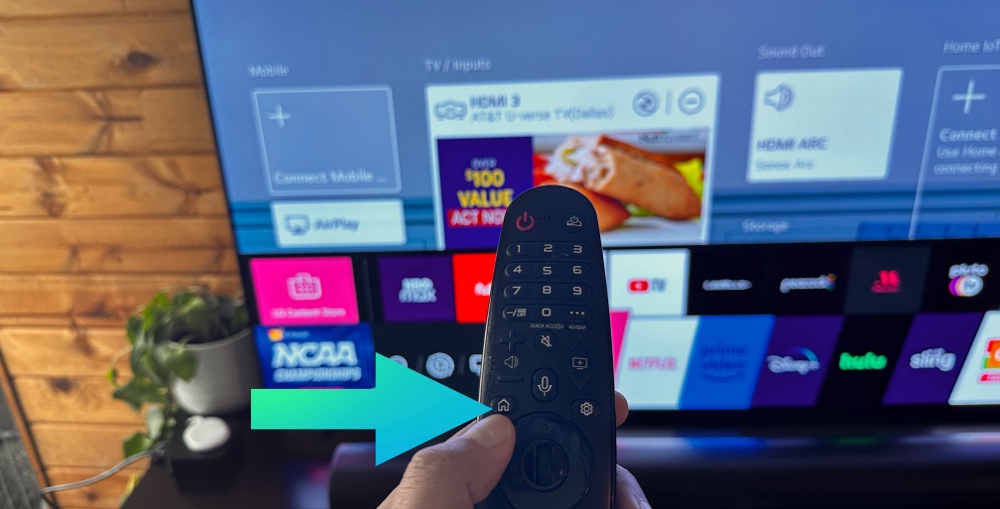
- Navigate to the LG Content Store.
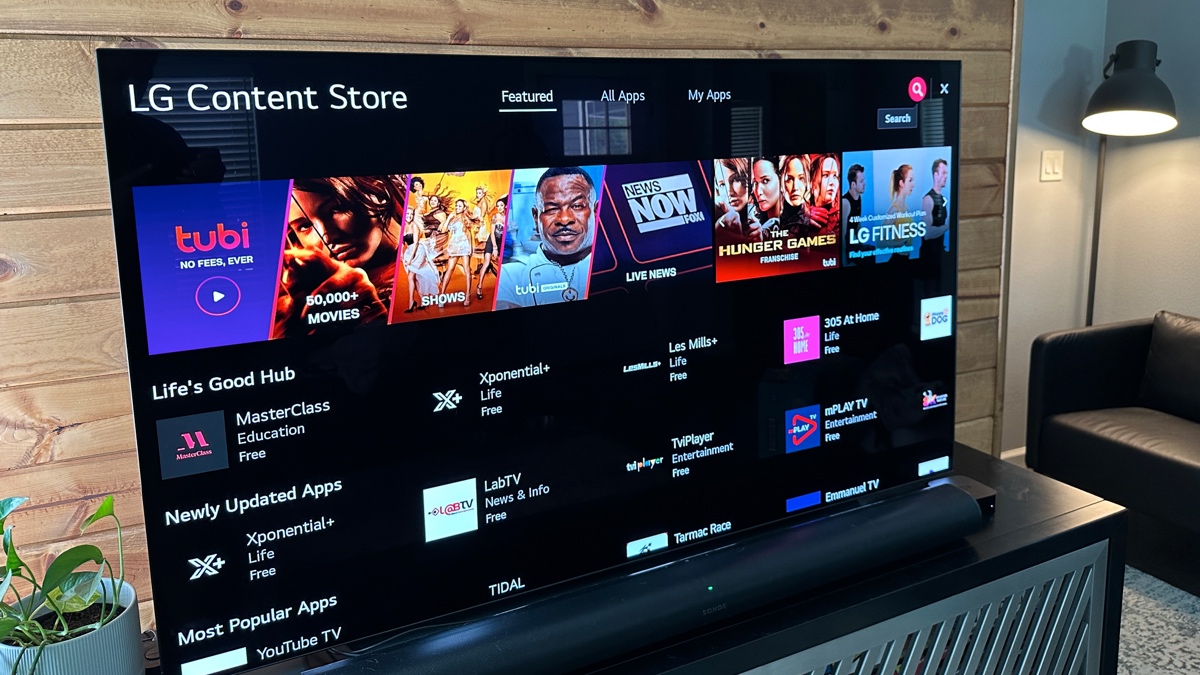
- Open the Apps category.
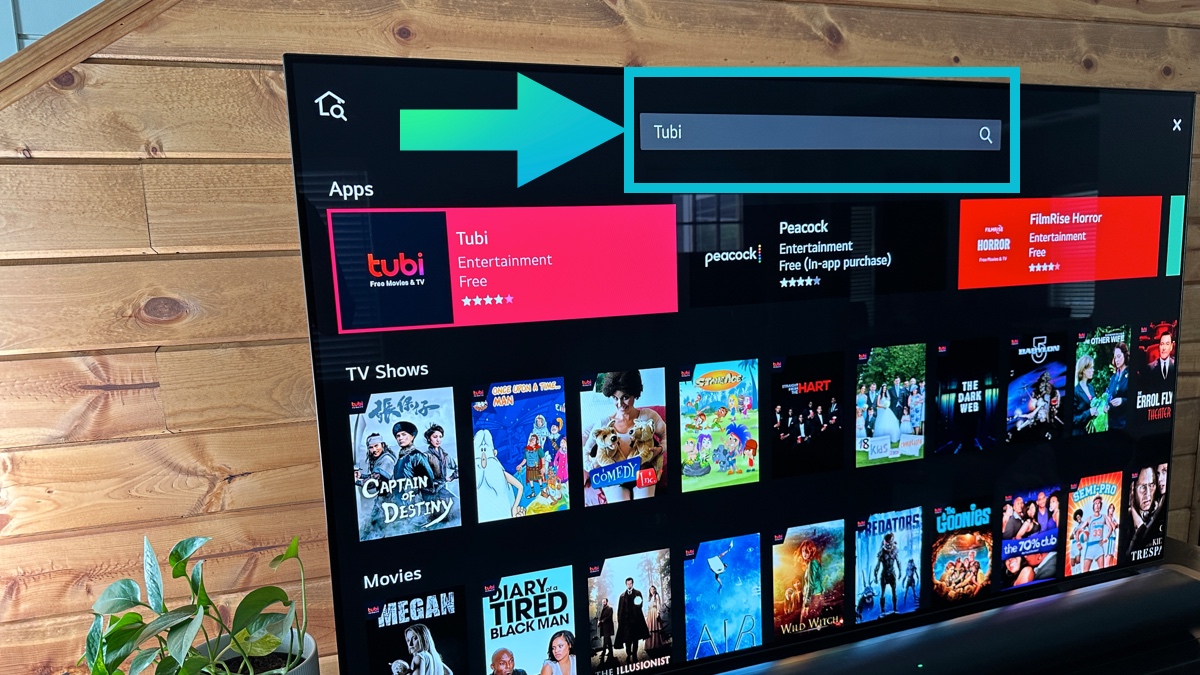
- Search for Tubi in the store.
- Select the Tubi app from the list.
- Choose Install to download it to your LG Smart TV.
- Wait until the installation finishes and the Tubi icon appears on your home screen.
After installation, the app becomes accessible directly from your LG Smart TV home screen or in the My Apps section.
Activate Tubi On LG Smart TV
Activating Tubi lets you sync your watchlist, resume shows across devices, and access parental controls. Activation is quick and requires a phone or computer.
- Launch the Tubi app on your LG Smart TV.
- Select the Sign In or Activate option.
- Write down the activation code displayed on your TV.
- On your phone or computer, visit tubi.tv/activate.
- Enter the activation code in the field on the website.
- Sign in or create a free Tubi account if necessary.
Your LG Smart TV automatically refreshes after activation, and your Tubi account connects instantly.
Explore Tubi’s Free Movies And TV Shows
With Tubi activated, you can browse thousands of free titles. The platform includes categories such as comedy, drama, action, documentaries, kids content, and classic films. Because Tubi is ad-supported, you do not pay monthly fees.
- Open the Tubi app from your LG Smart TV home screen.
- Explore categories like Featured, Trending, Movies, TV Shows, and Genres.
- Use the search function to find specific films or shows.
- Select a title to view details and press Play to start streaming.
- Add shows to your Watchlist to view later.
- Use playback controls to pause, rewind, or fast-forward during viewing.
Tubi updates its library frequently, so you can expect new free titles on a regular basis.
Frequently Asked Questions
Why Can't I Find Tubi On My LG Smart TV
If Tubi does not appear in the LG Content Store, your TV may use an older webOS version. You can still watch Tubi by connecting a Roku, Fire Stick, Apple TV, or Chromecast device.
Is Tubi Free On LG Smart TV
Yes. Tubi is completely free and supported by ads. You never need to enter payment information.
Do I Need An Account To Watch Tubi
You can watch most Tubi content without signing in, but creating a free account gives you access to watchlists and parental controls.
Why Does Tubi Buffer Or Freeze On LG Smart TV
Slow internet, Wi-Fi congestion, or outdated app versions may cause buffering. Restart your LG Smart TV, reboot your router, or update the Tubi app to improve performance.
Summary
- Check whether your LG Smart TV model supports the Tubi app.
- Install Tubi through the LG Content Store.
- Activate Tubi using the activation code on tubi.tv/activate.
- Browse and stream free movies and shows instantly.
Conclusion
Knowing how to watch Tubi on LG Smart TV makes it easy to unlock a huge library of free entertainment. With a quick installation and activation process, you can start streaming movies and shows on your LG Smart TV within minutes. Whether you enjoy action films, documentaries, kids programming, or classic TV series, Tubi offers something for every viewer at no cost.


Discussion (0)
Be the first to comment.