




Snapchat never sends a notification when someone removes you from their friends list, which makes the situation confusing. If you suspect someone unadded you on Snapchat, several small but reliable signs can help you confirm it without guessing or confronting them.
Unadding works differently from blocking, and Snapchat leaves enough clues behind if you know where to look. The steps below focus on visible changes inside the app that still work and accurately reflect how Snapchat handles friend status.
Check For Changes In Chat Icons And Calling Options
One of the fastest ways to tell if someone removed you on Snapchat involves checking the chat screen. Snapchat limits interaction features as soon as you are no longer friends.
- Open Snapchat and go to the Chat screen.
- Find your conversation with the person you suspect.
- Look at the icon next to their name.
If the camera icon changes into an X, Snapchat no longer treats you as friends. You may also notice that voice and video call buttons disappear from the top of the chat.
Open Their Profile And Look For Missing Details
Snapchat profiles lose most personal details when someone unadds you. This makes the profile appear empty compared to what friends normally see.
- Open the chat with the person.
- Tap their Bitmoji or profile icon.
- Review the available profile information.
If you no longer see a Snap Score, birthday, Charms, or other personal details, Snapchat likely removed you from their friends list.
Search Your Friends List Directly
The most direct confirmation comes from checking your actual friends list. Snapchat removes names immediately when someone unadds you.
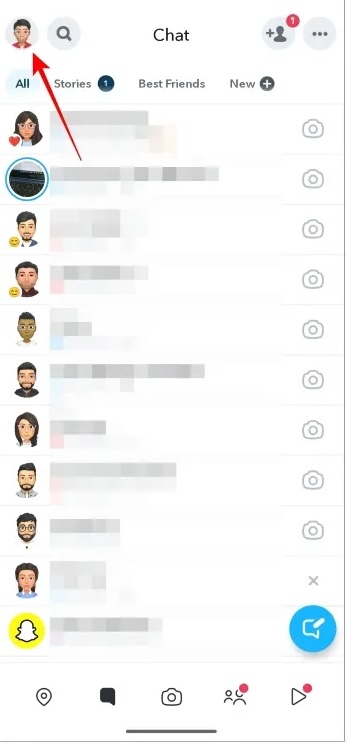
- Tap your Bitmoji in the top-left corner.
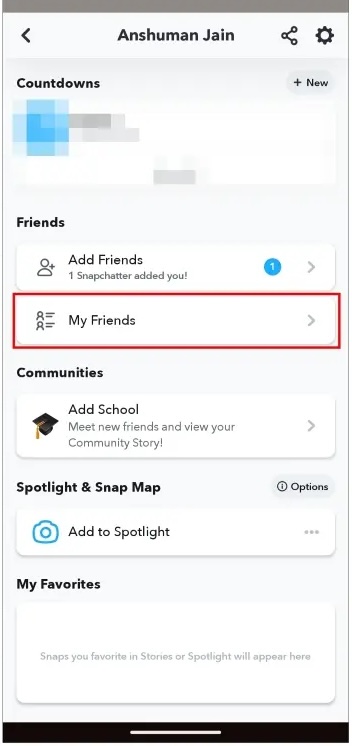
- Select My Friends.
- Use search to look for their username.
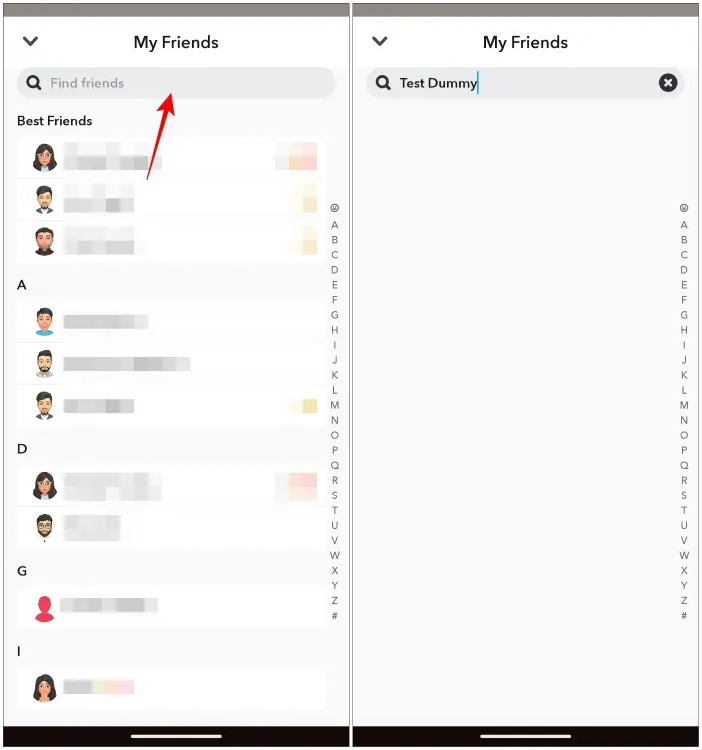
If the name does not appear, you are no longer friends, even if the person still shows up in search.
Watch What Happens To Their Stories
Story visibility changes quickly after someone unadds you on Snapchat. Private and Friends-only Stories stop appearing without warning.
- Check the Friends Stories section.
- Look under Subscriptions for public content.
- Compare what you saw before with what appears now.
If their Stories disappear entirely or move to public-only viewing, Snapchat restricted your access.
Send A Snap And Monitor Its Status
Snapchat still allows messages to non-friends, which makes this step confusing. The delivery status provides context when combined with other signs.
- Send a Snap or chat message.
- Check whether it shows Delivered.
- Observe whether it ever changes to Opened.
If the Snap stays delivered for days while the person remains active, Snapchat likely prevents it from reaching them fully.
Download Your Snapchat Data For Confirmation
Snapchat data downloads include a record of removed friends. This method works if you want proof without interacting inside the app.
- Open Snapchat Settings.
- Request your Snapchat data download.
- Open the downloaded files once ready.
- Locate the friends.html file.
The Deleted Friends section shows usernames you removed or users who no longer appear as friends during the selected period.
Troubleshooting Common Problems
Snapchat glitches can mimic removal signs. Temporary loading issues, cache problems, or partial outages sometimes hide profile details or Stories.
Restart the app, log out and back in, and check again after several hours before assuming someone unadded you.
Tips
- Avoid relying on one sign alone.
- Combine profile, chat, and friends list checks.
- Respect privacy and avoid repeated requests.
- Give Snapchat time to sync changes.
- Keep interactions balanced to reduce removals.
FAQ
How do I tell if someone removed me on Snapchat without messaging them?
Check their profile details and your friends list. Missing Snap Score and profile data usually confirm removal.
Can I still message someone who unadded me on Snapchat?
Yes, but messages usually remain delivered and unopened unless they add you back.
Does unadding differ from blocking on Snapchat?
Yes. Blocking removes search visibility and chat access, while unadding limits features but keeps search active.
Summary
- Check chat icons and call buttons.
- Review profile details for missing information.
- Search your friends list directly.
- Monitor Story access changes.
- Use Snapchat data downloads if needed.
Conclusion
Snapchat makes unadding subtle, but the app still leaves clear clues when you know where to look. By checking profile access, chat features, and your friends list together, you can confirm whether someone removed you without guessing or unnecessary interaction.


Discussion (0)
Be the first to comment.