



Before you start, safety first. If you suspect a breach, change reused passwords on other sites, enable two-factor authentication, and only reveal saved passwords on trusted devices.
Method 1: Use Google Password Manager on Android
This is the quickest way to find your email password on Android.
- Open Settings > Google > Manage your Google Account.
- Tap Security > Password Manager.
- Select your provider entry (for example, google.com).
- Authenticate with PIN, fingerprint, or face.
- Tap the eye icon to reveal the password.
On Samsung, this also covers how to find your email password if you use Google Password Manager. If you use Samsung Pass, go to Settings > Security and privacy > Samsung Pass.
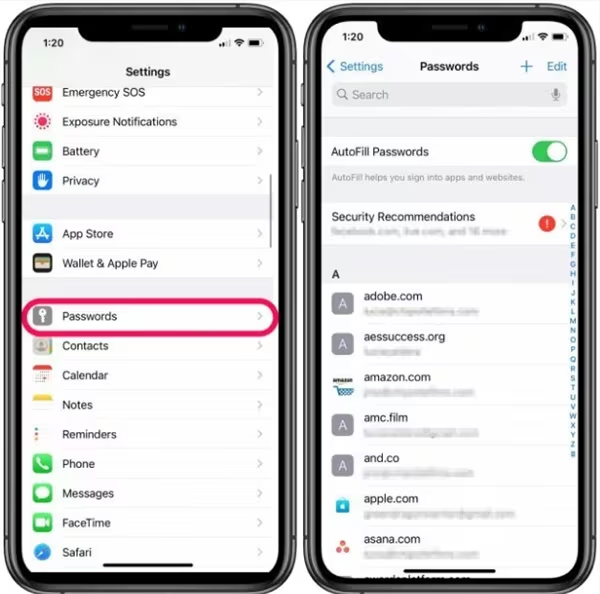
Method 2: iPhone or iPad (Saved Passwords)
This addresses how to find your email password on an iPhone and how to find your email password on your iOS device.
- Go to Settings > Passwords.
- Authenticate with Face ID or Touch ID.
- Search your provider (for example, google.com, outlook.live.com).
- Open the entry and tap the eye icon to reveal it.
If you use iCloud Keychain, your saved login appears here. This is ideal when you forgot your email password, but stored it on your phone.
Method 3: View Saved Passwords in Your Browser (Windows & Mac)
If you sign in via desktop, you may just need to view saved email passwords in Chrome or another browser.
Google Chrome (Windows/macOS)
- Open Chrome > Menu (⋮) > Settings.
- Select Autofill and passwords > Google Password Manager.
- Search your provider domain and reveal the credentials.
Microsoft Edge
- Open Edge > Menu (⋯) > Settings.
- Go to Profiles > Passwords.
- Find the entry and reveal it after authenticating.
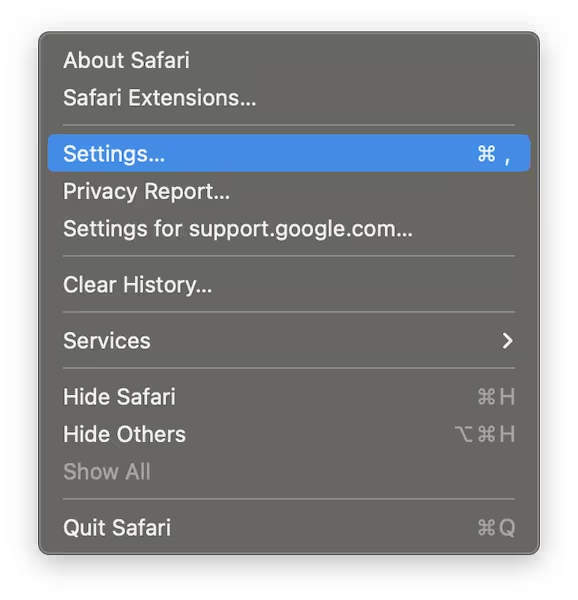
Safari (macOS)
Open Safari > Settings
Click Passwords.
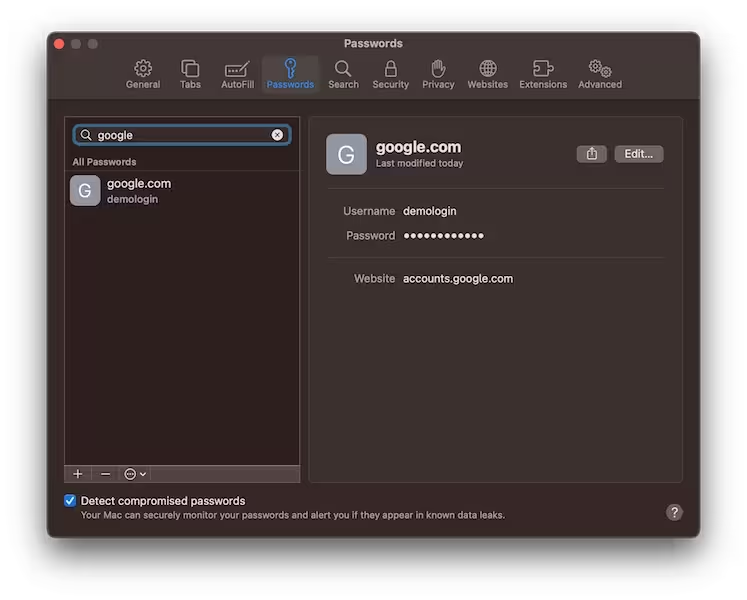
Authenticate, then search and reveal the saved password.
Method 4: Use the Provider’s Reset Flow
If nothing’s saved, resetting is most reliable, especially for finding your Gmail password when you need a new one.
- Open your provider’s sign-in page and click Forgot password.
- Verify via backup email, phone, or security questions.
- Create a strong new password and save it to your manager.
Keep your backup phone and email up to date for smoother recovery from Gmail, Outlook, Yahoo, and iCloud.
Method 5: Check a Third-Party Password Manager
If you use 1Password, Bitwarden, Dashlane, or a similar service, search the vault. This often solves the problem of finding the email password in settings when the credential lives in the manager, not the device.
- Open the app or browser extension.
- Search the provider domain or account name.
- Authenticate and reveal the password.
Method 6: Contact Support When Recovery Fails
If recovery info is outdated, contact your provider and verify ownership. Details like approximate creation date, labels, or recent contacts can help.
Smart Practices So You Don’t Get Stuck Again
- Use a password manager and save credentials immediately.
- Enable two-factor authentication for your mailbox.
- Update recovery email and phone, then test them.
- Avoid weak or reused passwords—especially for email.
FAQs
I forgot my email password. What should I try first?
Check saved passwords on your phone or browser. If nothing appears, use the provider’s reset flow and store the new password.
How to see my Gmail password in mobile?
On Android: Settings > Google > Manage your Google Account > Security > Password Manager > google.com.
How to find your email password on a Samsung?
Use Google Password Manager or Settings > Security and privacy > Samsung Pass to reveal the saved login.
Can I show my email address and password in mobile?
You can reveal saved passwords after biometric or PIN authentication. Never share screenshots or display them in public.
Does this work if I never saved the password?
No. If nothing is saved, complete the provider’s recovery steps to create a new password.
Summary
- Check saved passwords on Android, iPhone, or your browser.
- If none appear, use the provider’s Forgot password link.
- Search your third-party password manager vault.
- Contact support if recovery details are outdated.
- Secure the account with a manager and two-factor authentication.
Conclusion
Most users regain access by revealing a saved credential or completing a reset. Save the new password in a manager, enable two-factor authentication, and keep recovery info up to date so you won’t need to ask anyone how to find your email password again.
Discussion (0)
Be the first to comment.