




If you want to know how to download TeaTV on Fire TV using Downloader, the process is straightforward as long as you enable sideloading and use a trusted APK source. At the time of writing, TeaTV is not available in the Amazon Appstore, so installing it requires the Downloader app. This guide walks you through each step so you can safely install the TeaTV APK on a Fire TV Stick and start streaming.
Enable Apps From Unknown Sources
Before you install TeaTV on a Fire TV Stick, you must enable sideloading on your device. This setting is required to download the TeaTV APK using Downloader.
- Turn on your Fire TV Stick and open the Settings menu.
- Select My Fire TV or Device & Software, depending on your model.
- Choose Developer Options.
- Enable Apps From Unknown Sources.
- Confirm the warning message to proceed.
This allows your Fire TV Stick to install the TeaTV APK later in the process. Only install apps from sources you trust to avoid security issues.
Install The Downloader App
The Downloader app is the safest and most common way to download TeaTV on Fire TV Stick. It lets you enter a direct URL and download the TeaTV APK file immediately.
- Go to the Fire TV home screen and select the Search icon.
- Type Downloader in the search bar.
- Select the official Downloader app from the list.
- Choose Get or Download to install it.
- Launch Downloader once the installation completes.
Downloader is available directly from the Amazon Appstore and remains the recommended tool for sideloading TeaTV.
Launch Downloader And Grant Permissions
After installing Downloader, you must permit it to access files on your device. This allows it to save the TeaTV APK to your Fire TV Stick.
- Open the Downloader app from Your Apps & Channels.
- Approve the prompt requesting access to storage.
- Select Allow when the permission window appears.
Downloader will now be ready to fetch the TeaTV APK file.
Enter The TeaTV Download URL
To download TeaTV on Fire TV Stick using Downloader, you must enter a direct download link for the TeaTV APK. Always use reputable sources for APK files.
- In Downloader, highlight the URL field.
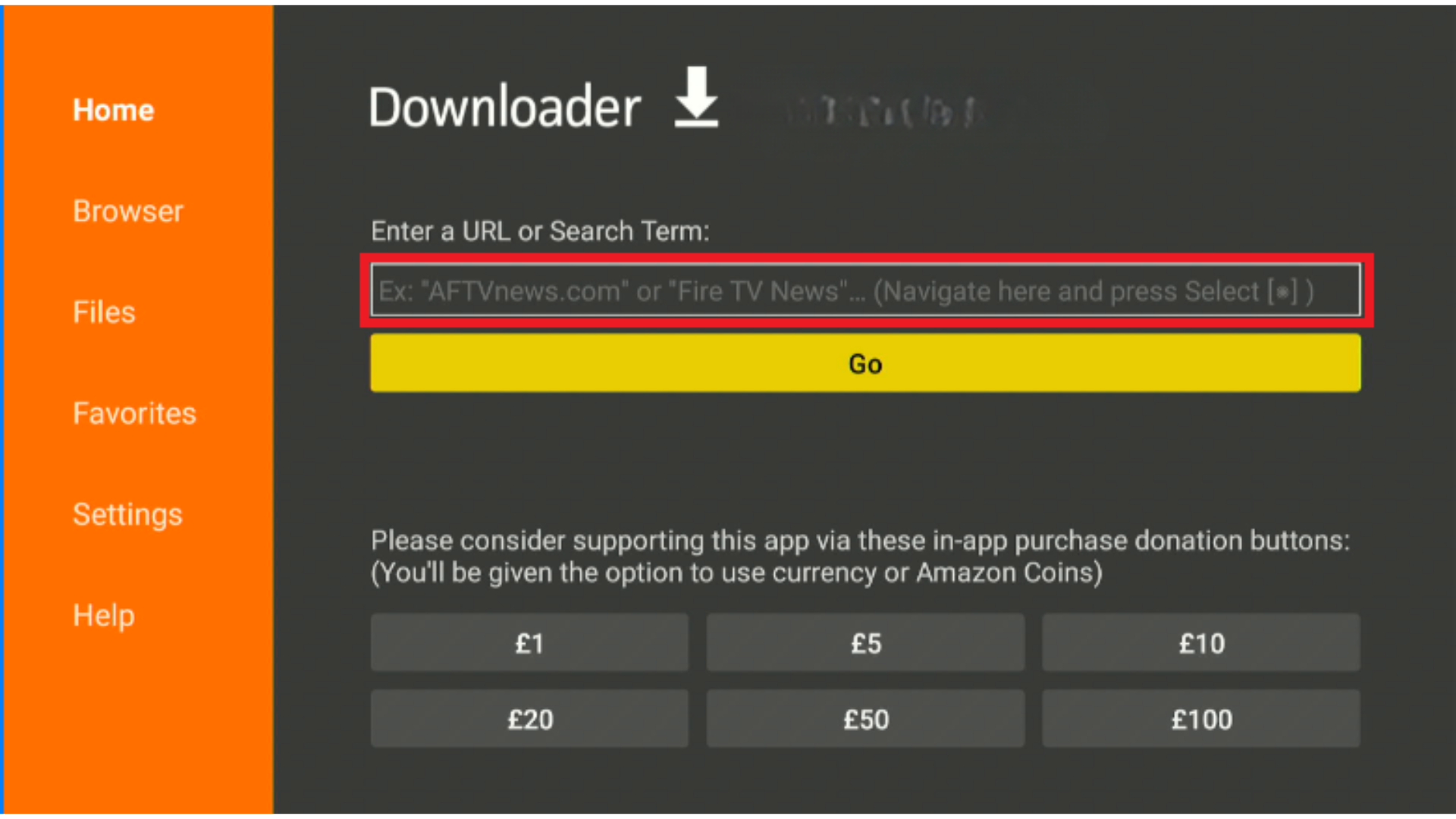
- Enter the official or trusted TeaTV APK download link.
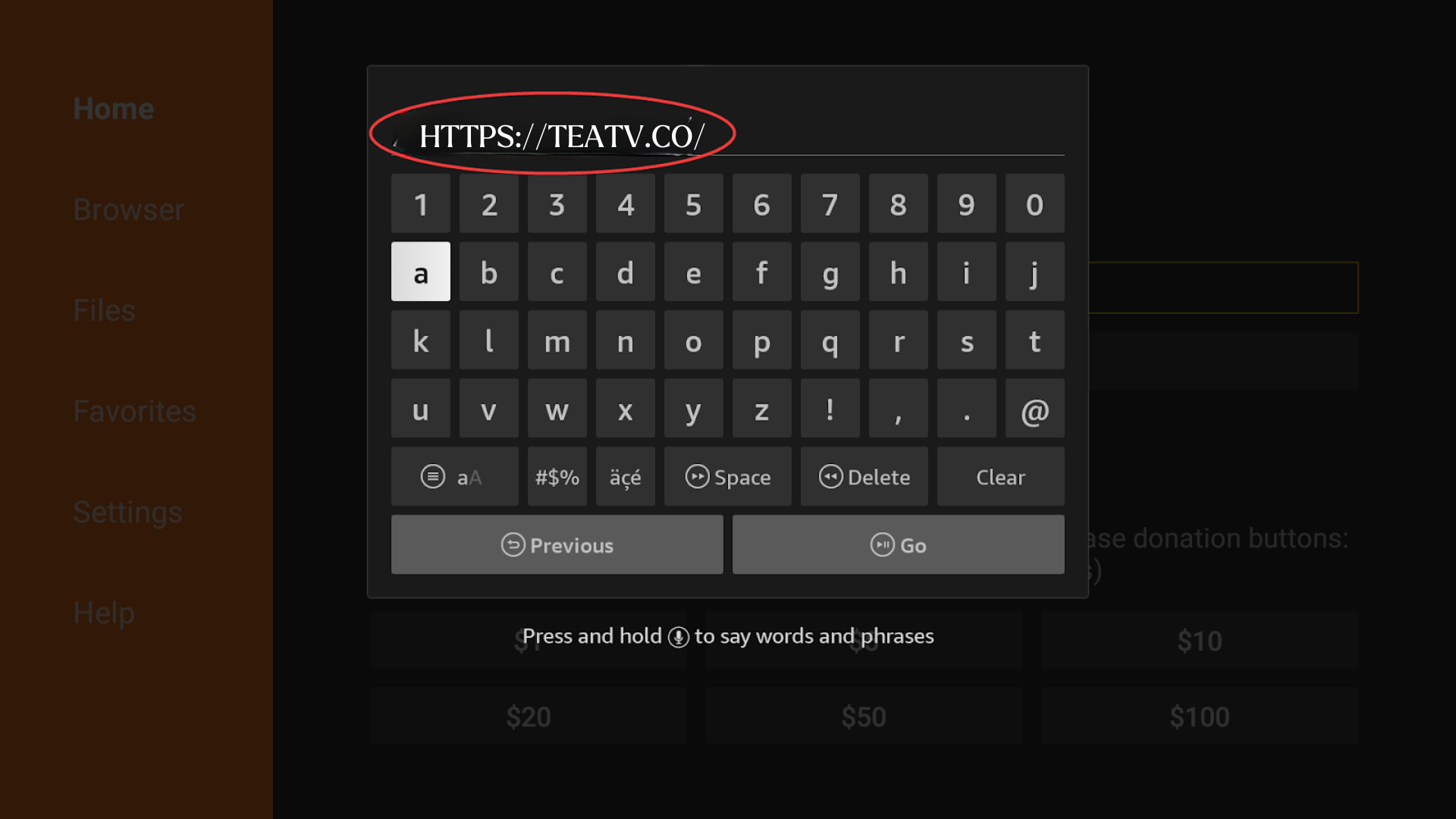
- Select Go to open the download page.
- Wait for the file to begin downloading automatically.

Downloader will connect to the URL and retrieve the TeaTV APK file. Avoid links from unknown websites to reduce the risk of installing unsafe APKs.
Download The TeaTV APK File
Once the TeaTV download URL loads, your Fire TV will begin downloading the TeaTV APK file. The process typically takes a few seconds.
- Wait for the APK to finish downloading inside Downloader.
- Do not exit the app during the download.
- When prompted, select Install to begin setup.
After the download completes, your Fire TV Stick will automatically open the installation window.
Install TeaTV On Fire TV
You can now complete the installation and launch TeaTV directly from your Fire TV Stick. This final step adds the app to your Apps & Channels list.
- Select Install when the APK installer appears.
- Wait for the confirmation message showing TeaTV has been installed.
- Select Done to return to Downloader.
- Choose Delete to remove the APK and free up storage space.
- Open TeaTV from Your Apps & Channels to begin streaming.
TeaTV will now be ready to use. You can explore movies, TV shows, and categories directly on your Fire TV Stick.
Frequently Asked Questions
Is TeaTV Safe To Install on Fire TV Stick?
Downloading TeaTV on Fire TV Stick is generally safe when you use a trusted APK source. Avoid unknown websites and always enable security settings when possible.
Why Isn’t TeaTV On The Amazon Appstore
TeaTV is a third-party app, so it cannot be downloaded directly from the Amazon Appstore. Sideloading through Downloader is required.
Can I Update TeaTV On Fire TV Stick?
Updates usually require downloading a newer APK version and repeating the installation steps. TeaTV may prompt you when new versions are available.
Summary
- Enable sideloading by turning on Apps From Unknown Sources.
- Install Downloader from the Amazon Appstore.
- Launch Downloader and allow file permissions.
- Enter a trusted TeaTV APK download URL.
- Download and install the TeaTV APK on Fire TV Stick.
Conclusion
Knowing how to download TeaTV on Fire TV Stick using Downloader helps you unlock more streaming options and enjoy a wider range of content. As long as you follow safe practices, use trusted APK links, and understand the sideloading process, installing TeaTV on Fire TV Stick remains quick and reliable. Once installed, you can browse TeaTV’s categories, stream movies and shows, and customize your viewing experience.


Discussion (0)
Be the first to comment.