




If you want live sports streams on your Fire TV Stick, you can sideload the Dofu Sports app in minutes. This guide shows you how to prepare your Firestick, use Downloader to grab the APK, install it safely, and solve the most common issues. At the time of writing, Dofu Sports is not available in the Amazon Appstore.
Important: Only install apps from sources you trust. Sideloading bypasses the official store and requires extra care with file origins and permissions.
- Stable Wi-Fi on your Firestick.
- Downloader app to fetch the APK file.
- Enough free storage for the APK and app data.
- Time to review sideloading safety basics.
Step 1: Prepare Fire TV Stick for Sideloading
First, allow app installs from outside the Amazon Appstore.
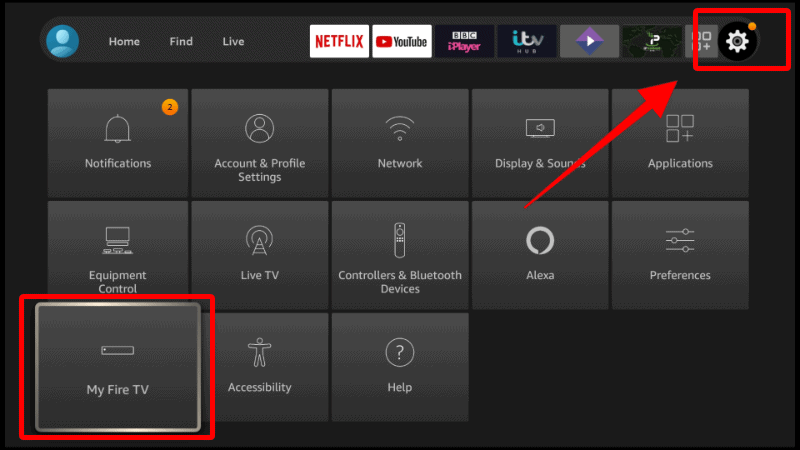
- From the Fire TV home screen, select Settings.
- Open My Fire TV > Developer options.
- Turn on ADB debugging (optional) and set Apps from Unknown Sources to On.
- When prompted, confirm you understand the risks.
Step 2: Install the Downloader App
Downloader lets you input a direct URL or short code to fetch APKs safely and fast.
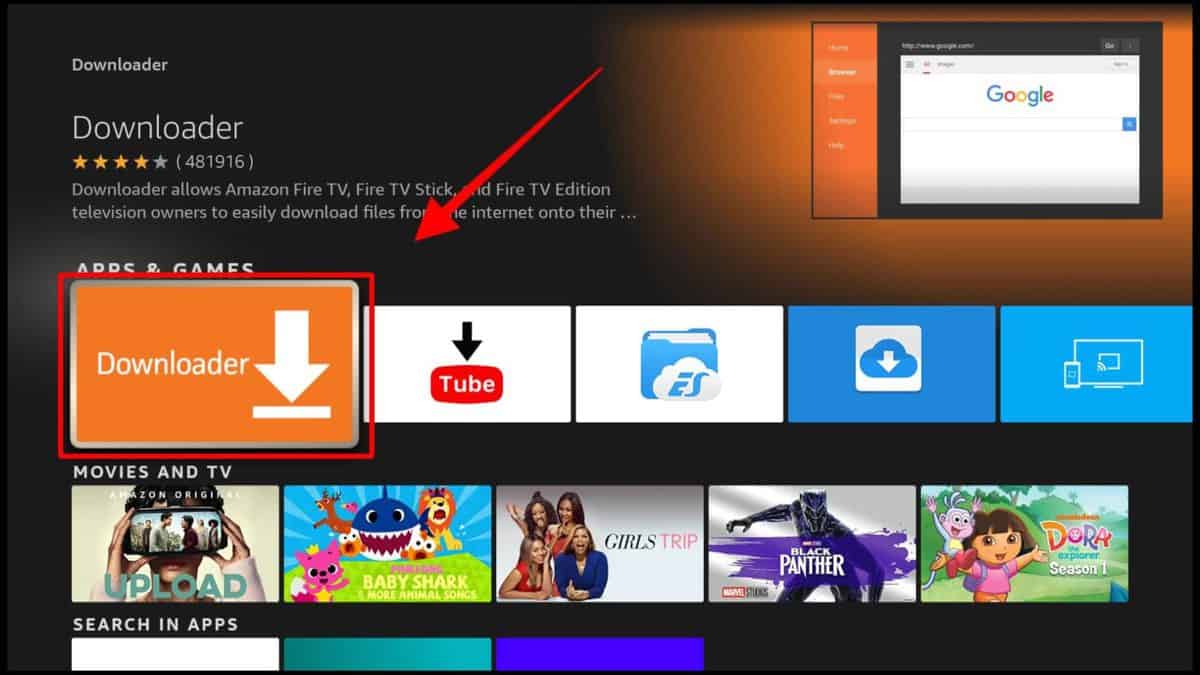
- Go to Find > Search, type Downloader.
- Select the Downloader app (orange icon) and choose Get or Download.
- Open Downloader and allow requested permissions.
Step 3: Download the Dofu Sports APK
Use a reputable source. Avoid mirror sites that bundle adware or altered packages.
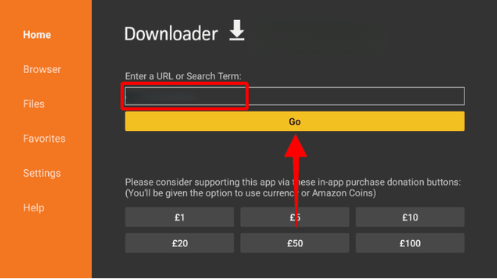
- Open Downloader and select the URL field.
- Enter the direct APK link or a known short code from a trusted source, then select Go.
- Wait for the download to complete. Do not exit the app while it downloads.
Step 4: Install Dofu Sports on Firestick
- When Downloader finishes, choose Install.
- After it installs, select Done to remove the APK or Open to launch the app.
- To find it later, go to Apps & Channels and move Dofu Sports to the top row.
Step 5: Set Up and Start Streaming
- Launch Dofu Sports from your apps list.
- Grant media or storage permissions if prompted.
- Pick a league or event and select a stream. If playback fails, try another source within the app.
How to Update Dofu Sports Later
- Open Downloader and re-enter the trusted APK link or short code.
- Download the latest version and choose Install when prompted.
- Confirm the update replaces the existing build without clearing app data.
Troubleshooting: Common Errors
Here are fast fixes for frequent install and playback problems.
“App Not Installed”
- Insufficient storage. Uninstall unused apps, then retry.
- Corrupt APK. Re-download from a trusted source.
- Conflicting package signature. Uninstall older modded builds before updating.
Downloader Can’t Fetch the File
- Recheck the URL or short code for typos.
- Verify network connectivity and DNS. Restart your router and Firestick.
- If a site blocks the built-in browser, try a direct HTTPS link.
Buffering or Lag During Games
- Connect to 5 GHz Wi-Fi and move closer to the router.
- Stop background downloads and force close unused apps.
- Lower stream quality in the player when available.
Privacy and Safety Notes
- Only install from sources you trust and verify file hashes when possible.
- Review app permissions and revoke anything unnecessary in Settings.
- Keep your Fire TV firmware up to date for the latest security patches.
FAQs
Is Dofu Sports available in the Amazon Appstore?
No. At the time of writing, you need to sideload the APK with Downloader.
What is the safest way to get the APK?
Use a reputable source, avoid mirrors, and verify the APK’s hash.
How do I update the app later?
Repeat the Downloader process with a known good link and install over your current version.
The Install button is greyed out. What now?
Toggle the on-screen cursor with the Downloader browser, back out, then reopen the APK page.
Summary
- Enable Apps from Unknown Sources on Fire TV.
- Install and open Downloader.
- Enter a trusted Dofu Sports APK URL or short code.
- Download and Install the APK.
- Launch Dofu Sports and start streaming.
For safer sideloading and smoother playback, review our internal guides linked above.


Discussion (0)
Be the first to comment.