



If you want a bigger sandbox in Garry’s Mod, you need addons. Learning how to download mods for Gmod lets you add new maps, weapons, vehicles, and full game modes with just a few clicks. The safest and easiest way uses the Steam Workshop, but you can also install Gmod mods manually from trusted sources when you need something more advanced.
What Is Gmod Modding?
Garry’s Mod, or Gmod, works as a physics sandbox that thrives on community content. Creators build addons that change almost everything in the game, from simple player models to complex roleplay frameworks.
These addons install like plug-ins. You subscribe or copy them into the right folder, then enable them in the menu. Once you understand the basics, you can refresh your setup whenever your current collection starts to feel stale.
Before You Download Gmod Mods
Before you start downloading Garry’s Mod addons, check a few basics so everything works smoothly.
- Install Gmod through Steam and launch it at least once.
- Make sure you have enough free disk space for large map and content packs.
- Update Gmod to the latest version and let Steam finish any pending downloads.
- Sign in with the Steam account that owns Garry’s Mod.
- Disable cracked launchers or third-party “Workshop downloaders” that bypass Steam, since they often cause issues or break the game.
Once you prepare your system, you can safely download mods for Gmod from the Workshop or other reputable sites.
How To Download Mods For Gmod From Steam Workshop
The Steam Workshop gives you the most reliable way to install and update Gmod mods. Steam handles downloads, updates, and load order automatically, so you rarely need to touch the files.
From The Steam Client:
- Open Steam and go to your Library.
- Click Garry’s Mod in the game list.
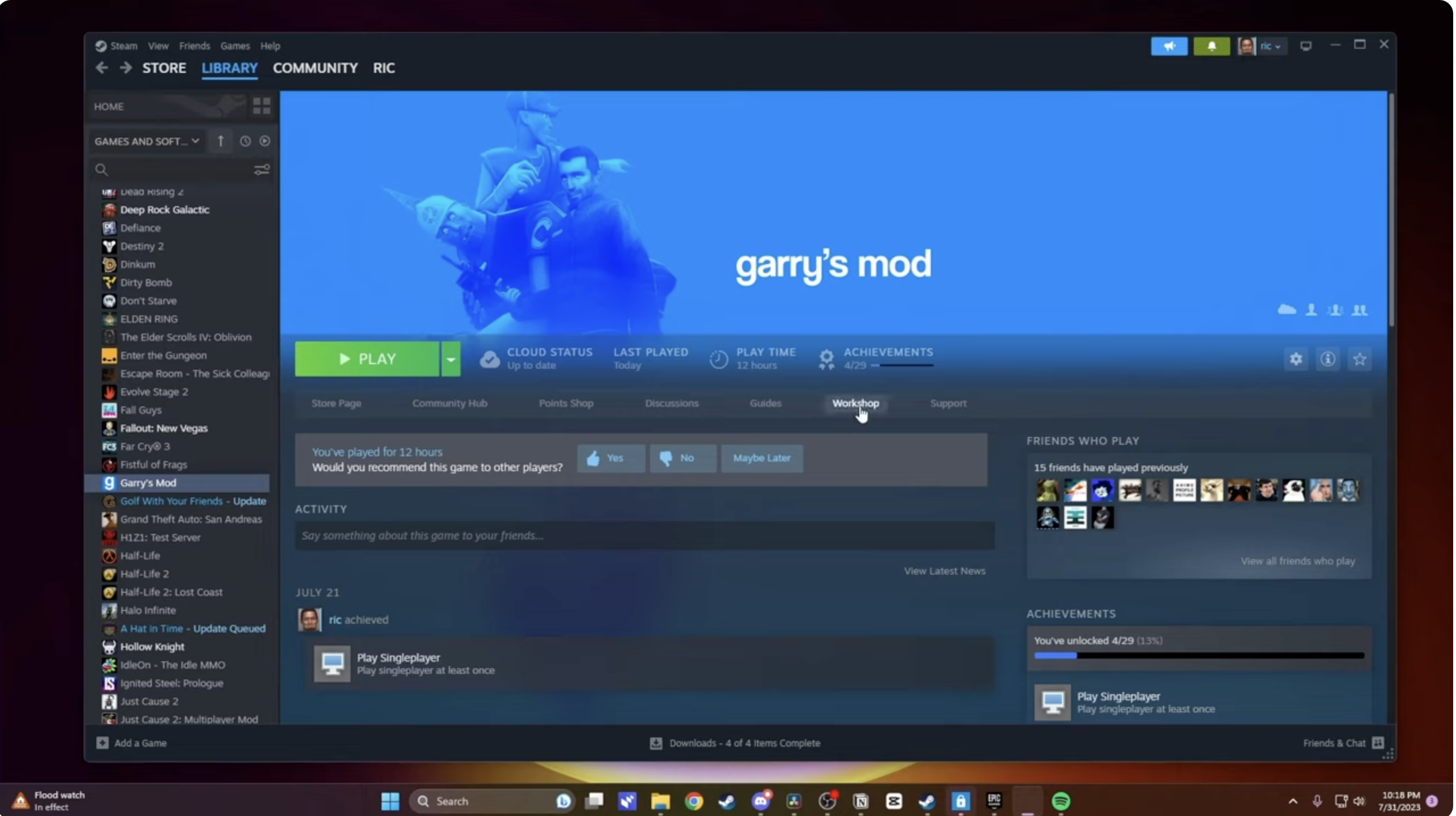
- Select the Workshop link on the game page.
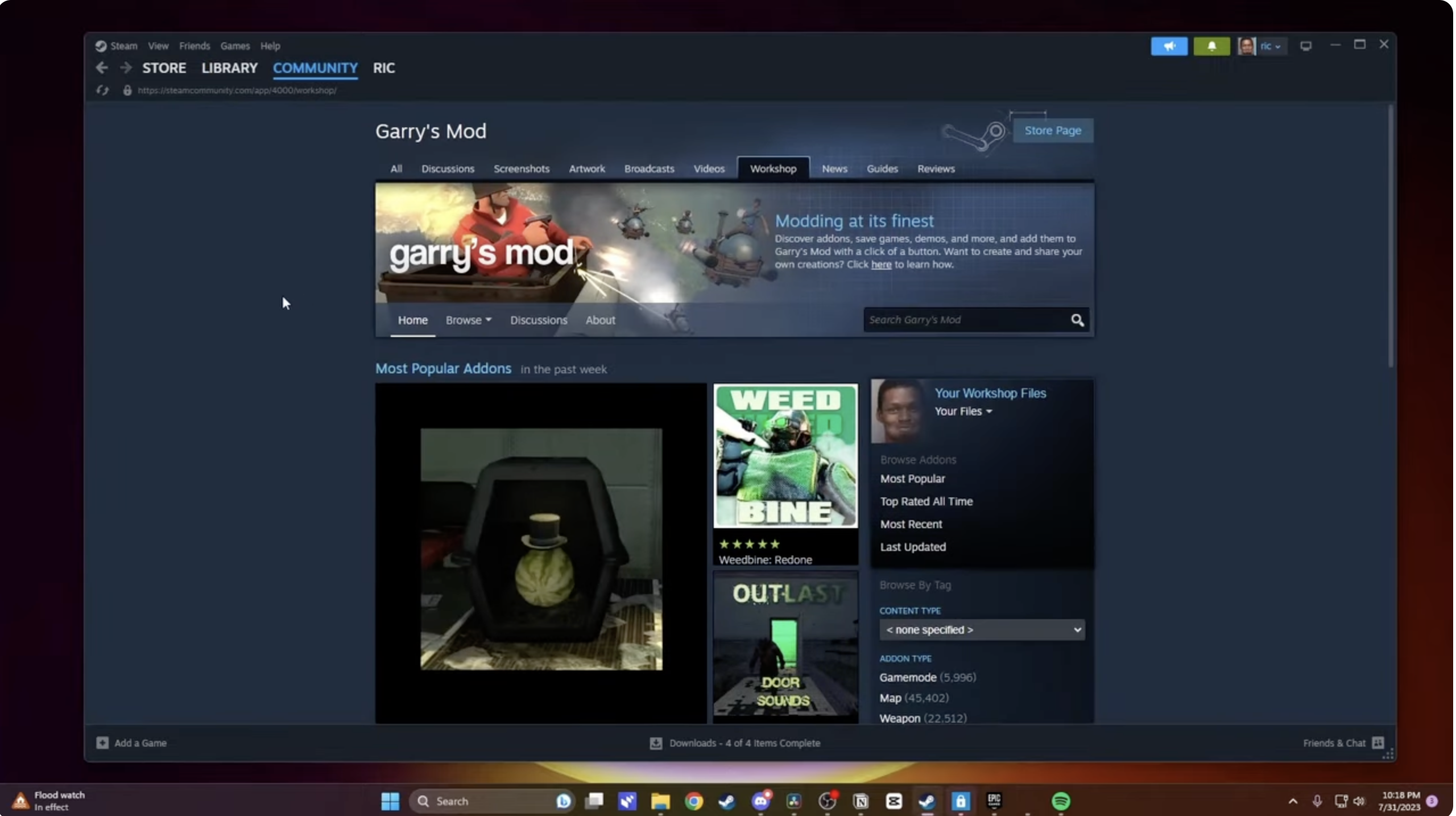
- Browse categories like Maps, Weapons, Vehicles, or Gamemodes, or use the search bar.
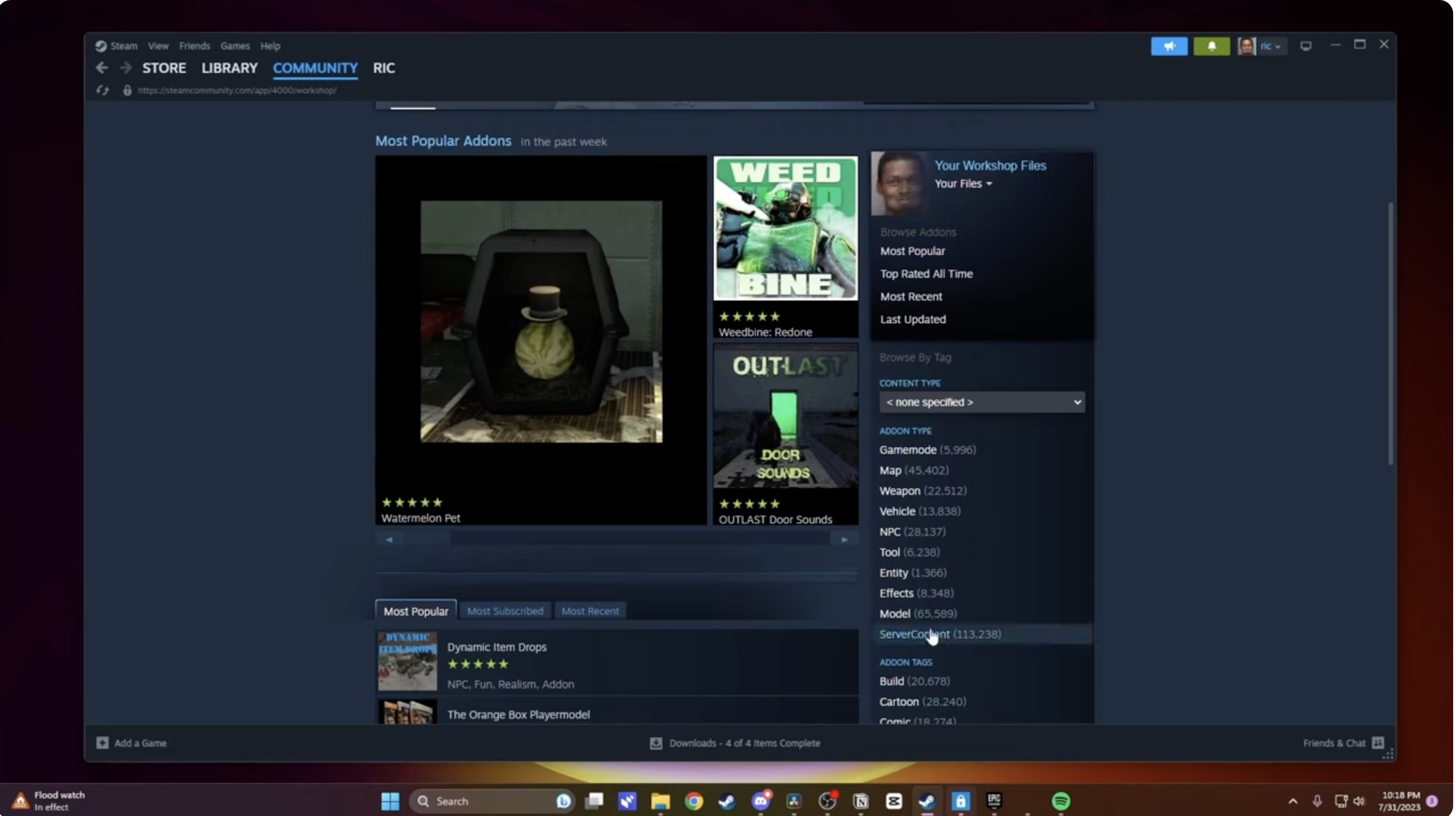
- Open an addon page and read the description, required content, and user ratings.
- Click Subscribe to start downloading the addon.
- Repeat for each mod you want to add to your Gmod setup.
After you subscribe, Steam downloads the files in the background. When you start Garry’s Mod again, the game loads your new workshop addons automatically.
From A Web Browser:
- Visit the Garry’s Mod Workshop page while signed in to Steam.
- Search for the addon you want to install.
- Click Subscribe on the addon page.
- Open Steam and let it download the new workshop items.
- Launch Garry’s Mod to finish loading the addons.
For most players, this method covers everything they need. You rarely need manual file work when the Workshop already hosts the addon you want.
How To Install Gmod Mods Manually
Sometimes creators release Garry’s Mod addons outside the Workshop, especially older maps, legacy packs, or paid content from marketplaces. Only use well-known sources, and avoid any site that tries to bundle extra launchers or suspicious installers.
Find Your Addons Folder:
- Open Steam and go to your Library.
- Right-click Garry’s Mod and choose Manage > Browse Local Files.
- Open the garrysmod folder.
- Open the addons folder inside it.
This addons folder stores most manual mods. Some newer Workshop items store data elsewhere, but manual content still loads correctly from here at the time of writing.
Install A Folder-Based Addon:
- Download the addon archive, usually a ZIP or RAR file.
- Extract the archive with a tool like 7-Zip or WinRAR.
- Look for a folder that contains subfolders like
materials,models, orlua. - Move that entire addon folder into the addons directory.
- Start Garry’s Mod and check the Addons menu to confirm it appears.
Install A .GMA Addon (Advanced):
- Download the
.gmafile from the creator. - Open the Gmod installation folder and then the bin folder.
- Locate gmad.exe.
- Drag the
.gmafile onto gmad.exe to extract it into a folder. - Move the extracted folder into the addons directory.
- Launch Gmod and enable the addon in the menu.
Manual installation works best when you trust the source and you understand how to remove the addon later if it causes problems.
How To Enable And Disable Addons In Gmod
After you download mods for Gmod, you control them from the in-game Addons menu. This menu lets you toggle content without deleting files, which helps when you test different setups.
- Launch Garry’s Mod from Steam.
- On the main menu, click Addons.
- Scroll through the list to find the workshop addons and manual mods you installed.
- Click the checkbox beside an addon to enable or disable it.
- Restart the game if you change a large number of addons or see missing textures.
When you disable an addon here, you keep the files on disk but stop them from loading, which makes troubleshooting much easier.
How To Fix Gmod Mods Not Working
Even well-made Garry’s Mod addons can conflict with each other or break after big updates. You can usually fix problems with a few quick checks.
- Restart Gmod after new downloads so the game mounts every addon properly.
- Verify the integrity of game files from Steam’s Properties menu.
- Disable all addons, then enable them in small groups until you find the one causing errors.
- Remove outdated or abandoned mods that throw Lua errors or crash the game.
- Check the addon description for required content like Counter-Strike: Source or Half-Life 2 textures.
- Unsubscribe from broken Workshop items and delete any remaining files from the addons folder.
If you host a Gmod server, make sure your workshop collection matches the addons that your clients need to download when they connect.
Are Gmod Mods Safe To Use?
Most popular Gmod mods from the Steam Workshop stay safe and stable because thousands of players use and review them. Problems usually appear when you grab content from random file hosts or use tools that scrape Workshop files without Steam’s permission.
- Stick to Steam Workshop and reputable community sites whenever possible.
- Avoid cracked copies of Garry’s Mod or unofficial launchers that claim to download mods for free.
- Scan manual downloads with antivirus software before you extract them.
- Read the comments and check the update history on each addon page.
If a mod looks abandoned, conflicted, or tied to copyright takedowns, remove it and look for an updated alternative instead.
Final Thoughts
Once you know how to download mods for Gmod, the game turns into an endless playground of community content. Use the Steam Workshop for quick, safe installs, and keep manual installs for special cases where you trust the creator. Manage your Garry’s Mod addons through the in-game menu, clean up broken mods when they cause trouble, and you’ll keep your sandbox fast, stable, and packed with fresh ideas.


Discussion (0)
Be the first to comment.