In a previous tutorial, we've shown how to turn any Windows 8.1 laptop or device into a WiFi access point. The process involved creating a virtual wireless network adapter that was used to broadcast the wireless network. When you are done using your Windows 8.1 device as a WiFi access point, it is good to disable and remove the virtual wireless network adapter that you have created. Here's how this is done:
A Bit of Background About Virtual WiFi Adapters in Windows 8.1
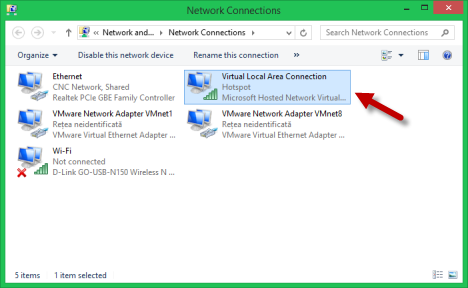
In order to Turn Your Windows 8.1 Device Into a WiFi Access Point you have to use several batch commands that create a virtual WiFi adapter. The resulting device is named Microsoft Hosted Network Virtual Adapter.
disable, wireless, network, access point, virtual adapter, Windows 8, Windows 8.1
A very important detail is the fact that it is not possible to have more than one Microsoft Hosted Network Virtual Adapter enabled.
To disable it, you have to run two batch commands which are the reverse of the ones we used to create the virtual adapter in the first place.
How To Disable The Microsoft Hosted Virtual WiFi Network Adapter
To begin, you'll have to open the Command Prompt with administrator rights. Then, enter the following command:
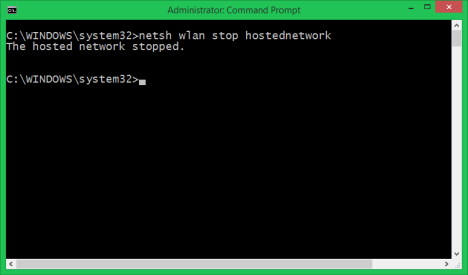
netsh wlan stop hostednetwork
You will receive a message confirming that the wireless hosted network stopped. However it is not yet disabled.
disable, wireless, network, access point, virtual adapter, Windows 8, Windows 8.1
In order to disable it, enter this command:
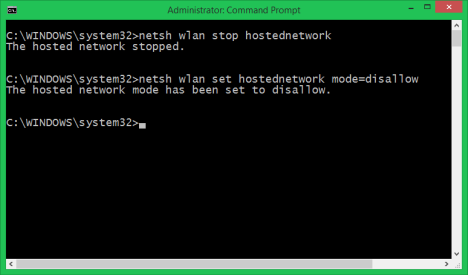
netsh wlan set hostednetwork mode=disallow
The result is a plain message telling you that "The hosted network mode has been set to disallow".
disable, wireless, network, access point, virtual adapter, Windows 8, Windows 8.1
You'll also notice that the virtual adapter is no longer listed in the Network and Sharing Center.
Furthermore, if you want to double check the status of the hosted network, you can run the following batch command:
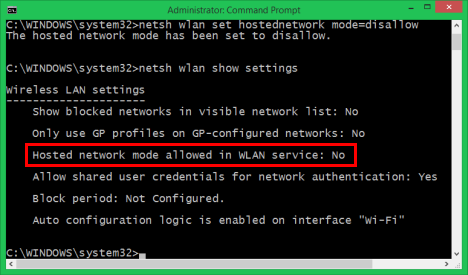
netsh wlan show settings
Then, check the hosted network line, as shown below:
disable, wireless, network, access point, virtual adapter, Windows 8, Windows 8.1
If it says No it means the virtual network and the virtual adapter are both disabled.
Conclusion
This is how you cleanup Windows 8 and Windows 8.1 after you have turned them into WiFi access points and you no longer need to use this feature. I hope our explanations were good enough for you to get this done from the first try. If you have any questions or comments, don't hesitate to use the form below.
My Os is Window 8.1 and when I do Hospot by command and after I want to network share so that time sharing selection check box not display so waht i do
the problem is when i enter the command :
netsh wlan start hostednetwork it shows an error that “the hosted couldn’t be started. the group or resource is not in the correct state to perform the requested operation.” please help me
I have created hotspot using cmd.Now when i open my laptop cmd pops up.I want to remove hotspot.I have used netsh wlan set hostednetwork mode=disallow but it did not work.
Makena ·
I followed the instructions for enabling the hotspot and the message i received was: the wireless local area network interface is powered down and doesn’t support the requested operation.
Please help.
rukmangathan ·
i disabled the virtual wlan adapter. it’s icon is now missing in “network and sharing center”. How to enable it.
also in command prompt when i try to start hosted network connection. it says something like”the group source in not in correct state” plz help me… 🙂
Milan ·
Try from command prompt IN ADMINISTRATOR mode
>netsh wlan stop hostednetwork
>netsh wlan set hostednetwork mode=disallow
>netsh wlan set hostednetwork mode=allow
>netsh wlan start hostednetwork
if that dont work for you then reinstall (DE-install then install again) real WiFi adapter from device menager
Milan ·
I find a way to do it soft! 😉
I made a .bat
My Internet connection is on Wireless Network Connection 2 so i don`t need its virtual WiFi
@echo off
cls
netsh interface set interface name=”Wireless Network Connection 2″ admin=disabled
timeout /t 5 /nobreak > NUL
:: To give it a little time to disable and whit it also a Virtual WiFi
netsh wlan set hostednetwork mode=allow
:: To enable Virtual WiFi on one working Wireless Connection
netsh interface set interface name=”Wireless Network Connection 2″ admin=enable
netsh wlan start hostednetwork
netsh wlan show hostednetwork
timeout /t 5 > NUL
:: To give it a little time to see is everything ok
exit
and converted in to an .exe
change property to run as administrator and start it whit Task Scheduler to Run with highest privileges on user log on.
So when i start my computer it start automatically to run as AP.
BTW
No need to type ssid and key every time unless you want to change it…. 🙂
Maybe someone had similar problem so I decided to share my solution!
Now i can use my old Ateros PCI card as AP. 😉
Avi ·
I have followed all steps as you mentioned. Virtual area connection established, I can connect my phone through that network, local area connection also showing internet… but in my mobile no internet connection displaying… Can you plz help here
Milan ·
Firewall maybe?…
Try to disable firewall for connection to your mobile…
Ian ·
When you made the hotspot in cmd by going to cmd with admin rights. and you typed in:
netsh wlan set hostednetwork mode=allow ssid=yourroutername key=yourpassword
press enter, leave cmd open. Then go to network and sharing then click on the ethernet. A box will come up that shows the status. click properties, then another box will appear then click sharing. make sure the check box is checked. in the combobox aka drop down menu select the area local lan connection.
Press ok and then go back to the cmd and enter the following:
netsh wlan start hostednetwork
press enter. To see if everything is connected correctly type this:
netsh wlan show hostednetwork
press enter. This will show the clients and the MAC Adress to each device. Look on your phone and see if it is listed.
also you can look to see if your able set up properly by typing:
netsh wlan show settings
press enter. This will will show you if every thing is set up correctly. This is the two that needs to be yes:
Hosted network mode allowed in WLAN service: Yes
Allow shared user credentials for network authentication: Yes
Once it has been created and marked as sharing then started. then when you connect to other devices then it should connect like any other WiFi enabled device. If you have any questions then you can contact me and also watch my video tutorial as well to get you a better understanding. The video is located here:
Hi, I had downloaded your original program for making my computer a hotspot and now it pops up everytime i turn on my laptop. Is there a way to prevent it from popping up or just removing it.
bala ·
hi buddy..i just want to know where did u get the original progrm
Milan ·
From Gates maybe 🙂
SHARJEEL ·
This problem has also occured to me.I think this will work.Go to C drive >windows>system31 and search for wifi.bat file delete it.
Apoorva ·
Hi,
I created hotspot. Sometimes it says obtaining IP address and authenticating, but never gets connected. Single strength shows excellent. Can you please help with this?
Milan ·
Did you enable ICS?
Meaning:
Open Network and Sharing Center/
Change adapter settings/
Then chose adapter that have connection to internet and by right click/ Properties you open window that has Sharing tab in background…
You click on it and check “Allow other network users to connect trough this computer`s Internet connection” check box
and in following menu “Home Network Connection:” select your Wireless Network Connection {number} that has your Microsoft Virtual WiFI Miniport A……….
Any luck?
Milan ·
Oh, and it can be DHCP…
Sending on 255.255.255.255
And mobile if it is Android (meaning Linux) looking for DHCP on 0.0.0.0…
You have then two solution:
sett mobile to static ip!
your ip: 192.168.0.3 or 4 or something like that
subnet: 255.255.255.0
gateway: 192.168.0.1
dns : 192.168.0.1
or dns from your provider (see status/details of your connection to internet)
or 4.4.4.4 and 8.8.8.8 (google DNS)
or 208.67.222.222 and 208.67.220.220 (open DNS)
to reduce response time (ping)…
And other (complex) solution is to change Registry SharedAccess/Parameters of DHCP for zero broadcast…
Milan ·
I think I find a workaround…
Meaning temporary fix that implies that a genuine solution to the problem is needed cause my workaround is an redneck solution to problem. 😉
Namely I rip my wifi card whit directional antenna from the computer (luckily it is on USB) and sett the parameters for hostednetwork…
>netsh wlan set hostednetwork mode=allow ssid=test key=testpasword
>netsh wlan start hostednetwork
Then I plug back and sett ICS…
I try everything else without success…
disabling virtual WiFi or not allowing the computer to turn off oder virtual WiFi do nothing…
I even have some experience whit regedit (set up DHCP and some other stuff) but when I edit one virtual adapter then bout of them disappear?!
I cannot understand people who created hostednetwork without simple switch to chose which adapter to boot?!
And then again some people say Linux is…
Know what i never had a problem without a solution in Linux…
Among other things> in a world without walls and fences who need windows and gates?
Ian ·
Hey Milan. This only works with an Ethernet based connection. I had seen post yesterday and i get asked this questions a lot. So what i did was I made a tutorial video located here. https://www.youtube.com/watch?v=0XIYoL4IKkw Now a quick question? Do you use Ethernet Connection? Also you said your using a plug in adapter does your computer have the wireless adapter in it?
You cannot have to virtual WiFi’s running at the same time time. Watch my tutorial i posted and you will see the correct way to do it. I have my whole house running off my laptop.
Also the thing is if you unplug the adapter, turn off your computer or anything. Your network is still there just not visible. you will have to repeat the steps over again to start it, by using the same ssid and key. then all your devices will connect automatically.
I hope this tutorial will help you. If it does or doesn’t please email me and i will make another in depth tutorial.
Milan ·
Ty Ian for your time!
A1:
I don`t use Ethernet Connection on computer in question… (all WiFi) …can`t drag over 200m cable across the yard even if signal don`t degrade and even I had S-FTP cat7 don`t think I can put throe over 150Mbps on that distance 😉 not to mention price for cat7 cable https://www.ebay.com/itm/Bulk-cable-305-m-SFTP-CAT-7-Orange-/151048206789
A2:
I have various adapters, but plug in adapter I use (one of many) is RT3070 (TL-WN7200ND) 150Mbps 802.11n on directional antenna for connection to my intern home connection where i have NAS, and web server installed (on linux) witch handle PPPoE connection to ISP…
I have other WiFi card built in on PCI but it is 54Mbps 802.11b adapter old atheros AR2413A (TL-WN551G) witch i was planning to turn in AP with omni 360 degree antenna cause is ground solid not like RT73 or some other…
BTW
I got my problem analyzed by me and I figure it out! o/
Namely, Windoz call drivers when they appear!
Meaning that it is old American rule FIRST COME -FIRST SERVE!
Knowing that means that first card that appears (on USB in my case) takes virtual WiFi adapter.
Since IT CAN BE ONLY ONE (another rule -as You mention) when second card (on PCI in my case) appears there is no virtual for that card!
I try to change that “order of appearance” but without any luck cause Win is what it can do and not what you want him to do (limited with HW and almost no optimization)…
Knowing that it was easy to overcome my problem!
SOLUTION:
Take two USB WiFi adapters and change USB plugs and reboot computer until you see in devMGM properties of virtual adapter -Details/parent ID of adapter you want to use as AP….
NOTICE:
If someone know how to change in Windows witch drivers will be first initialized it is welcome to comment on that subject…
Milan ·
I have some issue whit Virtual Hotspot…
First of all just some data:
I have 2 wifi card on my comp. one is on directional antenna outside and second one is inside and have small antenna should be AP…. But problem begins when i try to explain that to hostednetwork…
HOW TO TALE netsh wlan TO START hostednetwork FOR WIRELESS NETWORK 2?
Is someone smart built in the code something like #iwconfig wlan0 / wlan1? and hide that command or it is totally wrong?!
Tahir ·
Hi,
I was successfully able to convert my laptop into hotspot but then i disabled it.
Now i want to convert my laptop into hotspot again using a different SSID and password but it gives my following error when i enter this command ” netsh wlan start hostednetwork”
The error shown is “The hosted network couldn’t be started. The group of resource is not in the correct state to perform the requested operation.”
Please help.
Basavaraj C. Wadi ·
Hey, I also had faced the same issue and resolved successfully by following the commands in reverse way like:
>netsh wlan stop hostednetwork
>netsh wlan set hostednetwork mode=disallow
>netsh wlan set hostednetwork mode=allow
>netsh wlan start hostednetwork
Rishabh Gupta ·
I think your wifi is turned off. Make sure you are not on the airplane mode.
And rum command prompt as administrator; else you cant do it.
-Rishabh Gupta
Ian ·
Hey Tahir, When you disable it. It will disappear in the network sharing. However its still there. All you have to do is type in the the same ssid and key then start it. That error means that its there but not started. You have to put in the same ssid and key then you start it look at my post at then end of the thread and watch the video link of my tutorial.
Rares ·
Hi,
I am in a bit of a trouble. I accidentally disabled the Virtual Hotspot from Network Connections. I though it was my wireless card (just wanted to disable it and enable it again to solve some issues) but it was the Virtual Hotspot.
After I disabled it, the hotspot disappeared from active connections and never found it again. I tried this tutorial and then switching the hotspot back on but no luck.
Can you help me out and tell me how to enable it ?
Aditya Reddy ·
Hi,
I have exactly the same problem, I disabled it by mistake, and I’m not able to turn it back on, it says the same. Just wanted to ask you if you got a solution for it 🙂
akhil ·
open the device manager and right click on network adapter to enable it
vineel ·
Which network adapter we should enable it. And most of it all the adapters grouped under Network adapters are in enabled mode. But still I am unable to see the same in network connections
Eser ·
Hi, it did not work with my android phone, it connects and then disconnects instantly trying to connect again 🙁 I closed the firewall on my Win8.1 and tried to use a static IP on my phone as you suggested. But not working either way. Anyway, thanks for the info you shared 🙂
ajay ·
i created a portable hotspot correctly… when i connect to my mobile, it gets connected bt i m not able to open a single page…
Plz help me
Codrut Neagu ·
Did you try disabling the firewall on your computer?








Discussion (36)
My Os is Window 8.1 and when I do Hospot by command and after I want to network share so that time sharing selection check box not display so waht i do
i have this problem pls someone help
https://oi57.tinypic.com/ndmmj8.jpg
could you please help me out.
the problem is when i enter the command :
netsh wlan start hostednetwork it shows an error that “the hosted couldn’t be started. the group or resource is not in the correct state to perform the requested operation.” please help me
same problem to me
https://oi57.tinypic.com/ndmmj8.jpg
I have created hotspot using cmd.Now when i open my laptop cmd pops up.I want to remove hotspot.I have used netsh wlan set hostednetwork mode=disallow but it did not work.
I followed the instructions for enabling the hotspot and the message i received was: the wireless local area network interface is powered down and doesn’t support the requested operation.
Please help.
i disabled the virtual wlan adapter. it’s icon is now missing in “network and sharing center”. How to enable it.
also in command prompt when i try to start hosted network connection. it says something like”the group source in not in correct state” plz help me… 🙂
Try from command prompt IN ADMINISTRATOR mode
>netsh wlan stop hostednetwork
>netsh wlan set hostednetwork mode=disallow
>netsh wlan set hostednetwork mode=allow
>netsh wlan start hostednetwork
if that dont work for you then reinstall (DE-install then install again) real WiFi adapter from device menager
I find a way to do it soft! 😉
I made a .bat
My Internet connection is on Wireless Network Connection 2 so i don`t need its virtual WiFi
@echo off
cls
netsh interface set interface name=”Wireless Network Connection 2″ admin=disabled
timeout /t 5 /nobreak > NUL
:: To give it a little time to disable and whit it also a Virtual WiFi
netsh wlan set hostednetwork mode=allow
:: To enable Virtual WiFi on one working Wireless Connection
netsh interface set interface name=”Wireless Network Connection 2″ admin=enable
netsh wlan start hostednetwork
netsh wlan show hostednetwork
timeout /t 5 > NUL
:: To give it a little time to see is everything ok
exit
and converted in to an .exe
change property to run as administrator and start it whit Task Scheduler to Run with highest privileges on user log on.
So when i start my computer it start automatically to run as AP.
BTW
No need to type ssid and key every time unless you want to change it…. 🙂
Maybe someone had similar problem so I decided to share my solution!
Now i can use my old Ateros PCI card as AP. 😉
I have followed all steps as you mentioned. Virtual area connection established, I can connect my phone through that network, local area connection also showing internet… but in my mobile no internet connection displaying… Can you plz help here
Firewall maybe?…
Try to disable firewall for connection to your mobile…
When you made the hotspot in cmd by going to cmd with admin rights. and you typed in:
netsh wlan set hostednetwork mode=allow ssid=yourroutername key=yourpassword
press enter, leave cmd open. Then go to network and sharing then click on the ethernet. A box will come up that shows the status. click properties, then another box will appear then click sharing. make sure the check box is checked. in the combobox aka drop down menu select the area local lan connection.
Press ok and then go back to the cmd and enter the following:
netsh wlan start hostednetwork
press enter. To see if everything is connected correctly type this:
netsh wlan show hostednetwork
press enter. This will show the clients and the MAC Adress to each device. Look on your phone and see if it is listed.
also you can look to see if your able set up properly by typing:
netsh wlan show settings
press enter. This will will show you if every thing is set up correctly. This is the two that needs to be yes:
Hosted network mode allowed in WLAN service: Yes
Allow shared user credentials for network authentication: Yes
Once it has been created and marked as sharing then started. then when you connect to other devices then it should connect like any other WiFi enabled device. If you have any questions then you can contact me and also watch my video tutorial as well to get you a better understanding. The video is located here:
https://www.youtube.com/watch?v=0XIYoL4IKkw
i have this problem pls help
https://oi57.tinypic.com/ndmmj8.jpg
Hi, I had downloaded your original program for making my computer a hotspot and now it pops up everytime i turn on my laptop. Is there a way to prevent it from popping up or just removing it.
hi buddy..i just want to know where did u get the original progrm
From Gates maybe 🙂
This problem has also occured to me.I think this will work.Go to C drive >windows>system31 and search for wifi.bat file delete it.
Hi,
I created hotspot. Sometimes it says obtaining IP address and authenticating, but never gets connected. Single strength shows excellent. Can you please help with this?
Did you enable ICS?
Meaning:
Open Network and Sharing Center/
Change adapter settings/
Then chose adapter that have connection to internet and by right click/ Properties you open window that has Sharing tab in background…
You click on it and check “Allow other network users to connect trough this computer`s Internet connection” check box
and in following menu “Home Network Connection:” select your Wireless Network Connection {number} that has your Microsoft Virtual WiFI Miniport A……….
Any luck?
Oh, and it can be DHCP…
Sending on 255.255.255.255
And mobile if it is Android (meaning Linux) looking for DHCP on 0.0.0.0…
You have then two solution:
sett mobile to static ip!
your ip: 192.168.0.3 or 4 or something like that
subnet: 255.255.255.0
gateway: 192.168.0.1
dns : 192.168.0.1
or dns from your provider (see status/details of your connection to internet)
or 4.4.4.4 and 8.8.8.8 (google DNS)
or 208.67.222.222 and 208.67.220.220 (open DNS)
to reduce response time (ping)…
And other (complex) solution is to change Registry SharedAccess/Parameters of DHCP for zero broadcast…
I think I find a workaround…
Meaning temporary fix that implies that a genuine solution to the problem is needed cause my workaround is an redneck solution to problem. 😉
Namely I rip my wifi card whit directional antenna from the computer (luckily it is on USB) and sett the parameters for hostednetwork…
>netsh wlan set hostednetwork mode=allow ssid=test key=testpasword
>netsh wlan start hostednetwork
Then I plug back and sett ICS…
I try everything else without success…
disabling virtual WiFi or not allowing the computer to turn off oder virtual WiFi do nothing…
I even have some experience whit regedit (set up DHCP and some other stuff) but when I edit one virtual adapter then bout of them disappear?!
I cannot understand people who created hostednetwork without simple switch to chose which adapter to boot?!
And then again some people say Linux is…
Know what i never had a problem without a solution in Linux…
Among other things> in a world without walls and fences who need windows and gates?
Hey Milan. This only works with an Ethernet based connection. I had seen post yesterday and i get asked this questions a lot. So what i did was I made a tutorial video located here. https://www.youtube.com/watch?v=0XIYoL4IKkw Now a quick question? Do you use Ethernet Connection? Also you said your using a plug in adapter does your computer have the wireless adapter in it?
You cannot have to virtual WiFi’s running at the same time time. Watch my tutorial i posted and you will see the correct way to do it. I have my whole house running off my laptop.
Also the thing is if you unplug the adapter, turn off your computer or anything. Your network is still there just not visible. you will have to repeat the steps over again to start it, by using the same ssid and key. then all your devices will connect automatically.
I hope this tutorial will help you. If it does or doesn’t please email me and i will make another in depth tutorial.
Ty Ian for your time!
A1:
I don`t use Ethernet Connection on computer in question… (all WiFi) …can`t drag over 200m cable across the yard even if signal don`t degrade and even I had S-FTP cat7 don`t think I can put throe over 150Mbps on that distance 😉 not to mention price for cat7 cable https://www.ebay.com/itm/Bulk-cable-305-m-SFTP-CAT-7-Orange-/151048206789
A2:
I have various adapters, but plug in adapter I use (one of many) is RT3070 (TL-WN7200ND) 150Mbps 802.11n on directional antenna for connection to my intern home connection where i have NAS, and web server installed (on linux) witch handle PPPoE connection to ISP…
I have other WiFi card built in on PCI but it is 54Mbps 802.11b adapter old atheros AR2413A (TL-WN551G) witch i was planning to turn in AP with omni 360 degree antenna cause is ground solid not like RT73 or some other…
BTW
I got my problem analyzed by me and I figure it out! o/
Namely, Windoz call drivers when they appear!
Meaning that it is old American rule FIRST COME -FIRST SERVE!
Knowing that means that first card that appears (on USB in my case) takes virtual WiFi adapter.
Since IT CAN BE ONLY ONE (another rule -as You mention) when second card (on PCI in my case) appears there is no virtual for that card!
I try to change that “order of appearance” but without any luck cause Win is what it can do and not what you want him to do (limited with HW and almost no optimization)…
Knowing that it was easy to overcome my problem!
SOLUTION:
Take two USB WiFi adapters and change USB plugs and reboot computer until you see in devMGM properties of virtual adapter -Details/parent ID of adapter you want to use as AP….
NOTICE:
If someone know how to change in Windows witch drivers will be first initialized it is welcome to comment on that subject…
I have some issue whit Virtual Hotspot…
First of all just some data:
I have 2 wifi card on my comp. one is on directional antenna outside and second one is inside and have small antenna should be AP…. But problem begins when i try to explain that to hostednetwork…
HOW TO TALE netsh wlan TO START hostednetwork FOR WIRELESS NETWORK 2?
Is someone smart built in the code something like #iwconfig wlan0 / wlan1? and hide that command or it is totally wrong?!
Hi,
I was successfully able to convert my laptop into hotspot but then i disabled it.
Now i want to convert my laptop into hotspot again using a different SSID and password but it gives my following error when i enter this command ” netsh wlan start hostednetwork”
The error shown is “The hosted network couldn’t be started. The group of resource is not in the correct state to perform the requested operation.”
Please help.
Hey, I also had faced the same issue and resolved successfully by following the commands in reverse way like:
>netsh wlan stop hostednetwork
>netsh wlan set hostednetwork mode=disallow
>netsh wlan set hostednetwork mode=allow
>netsh wlan start hostednetwork
I think your wifi is turned off. Make sure you are not on the airplane mode.
And rum command prompt as administrator; else you cant do it.
-Rishabh Gupta
Hey Tahir, When you disable it. It will disappear in the network sharing. However its still there. All you have to do is type in the the same ssid and key then start it. That error means that its there but not started. You have to put in the same ssid and key then you start it look at my post at then end of the thread and watch the video link of my tutorial.
Hi,
I am in a bit of a trouble. I accidentally disabled the Virtual Hotspot from Network Connections. I though it was my wireless card (just wanted to disable it and enable it again to solve some issues) but it was the Virtual Hotspot.
After I disabled it, the hotspot disappeared from active connections and never found it again. I tried this tutorial and then switching the hotspot back on but no luck.
Can you help me out and tell me how to enable it ?
Hi,
I have exactly the same problem, I disabled it by mistake, and I’m not able to turn it back on, it says the same. Just wanted to ask you if you got a solution for it 🙂
open the device manager and right click on network adapter to enable it
Which network adapter we should enable it. And most of it all the adapters grouped under Network adapters are in enabled mode. But still I am unable to see the same in network connections
Hi, it did not work with my android phone, it connects and then disconnects instantly trying to connect again 🙁 I closed the firewall on my Win8.1 and tried to use a static IP on my phone as you suggested. But not working either way. Anyway, thanks for the info you shared 🙂
i created a portable hotspot correctly… when i connect to my mobile, it gets connected bt i m not able to open a single page…
Plz help me
Did you try disabling the firewall on your computer?
Open this link & follow from Step 7 onward:
https://www.t2lead.in/how-to-share-ethernet-connection-via-wifi-in-windows/