




Instagram Stories can disappear for simple reasons like muted accounts or temporary app glitches. They can also fail because of network issues, outdated app versions, or account-level restrictions. Start with the quick checks below, then move through the fixes in order until Stories appear again.
Table of contents
- Quick checks to restore Instagram Stories fast
- Fix app-related issues causing Stories not to show
- Check account and privacy settings that hide Stories
- Fix network and data issues affecting Stories
- Fix Instagram Stories not showing after an update
- When Instagram Stories still don’t appear
- Tips to prevent Instagram Stories from disappearing again
- FAQs about Instagram Stories not showing
- Summary
Quick checks to restore Instagram Stories fast
These steps help you confirm whether the problem comes from a temporary issue you cannot control.
Check Instagram server status
Instagram outages or partial service disruptions can stop Stories from loading. If other users report problems, wait until Instagram restores service.
Restart the Instagram app and your phone
Close Instagram fully, then reopen it. Restart your phone to clear background processes that block media loading.
Fix app-related issues causing Stories not to show
Most Story issues start with the Instagram app itself.
Update Instagram to the latest version
Open the App Store or Google Play and install the latest update. Instagram often changes how Stories load, and older versions can stop working correctly.
Clear Instagram cache (Android only)
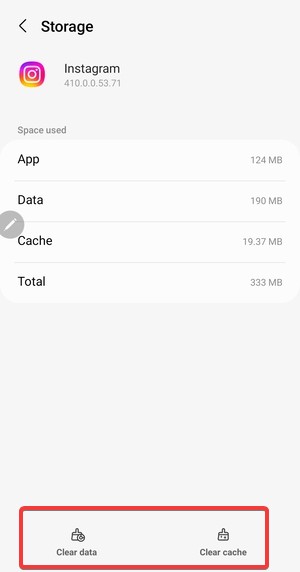
Open Settings > Apps > Instagram > Storage, then tap Clear cache. This removes corrupted temporary files without deleting your account data.
Reinstall Instagram
Delete Instagram, restart your phone, then install it again. This resets app files, permissions, and background services that control Stories.

Check account and privacy settings that hide Stories
Instagram settings can hide Stories without warning.
Make sure you didn’t mute someone’s Stories
Muted Stories appear at the far right of the Stories bar. Tap and hold a profile icon, then choose Unmute story to restore visibility.
Check Close Friends and story visibility rules
Some Stories only appear to Close Friends or selected audiences. If you are not included, Stories will not show even though the account remains visible.
Verify you are not restricted or blocked
If someone restricts or blocks you, their Stories can disappear while posts still show. This behavior points to an account-level limit, not a bug.
Fix network and data issues affecting Stories
Stories load large media files and fail easily on unstable connections.
Switch between Wi-Fi and mobile data
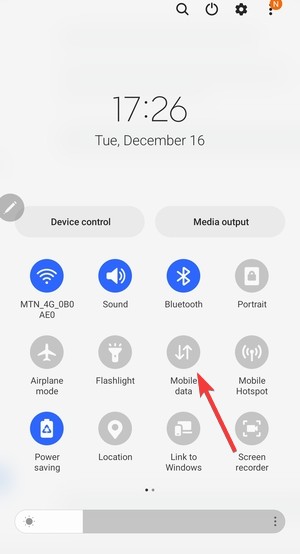
Turn off Wi-Fi and test mobile data, or do the opposite. This helps you isolate router, DNS, or ISP issues.
Disable VPN or ad blockers
VPNs, private DNS tools, and network blockers can interfere with Instagram media servers. Turn them off, then reload Stories.
Fix Instagram Stories not showing after an update
New updates sometimes introduce short-term bugs.
Log out and log back into your account
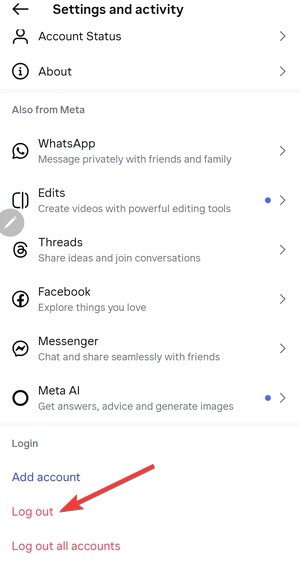
Open Settings, tap Log out, then sign back in. This refreshes account data after updates that break Story syncing.
Use Instagram Web as a temporary workaround
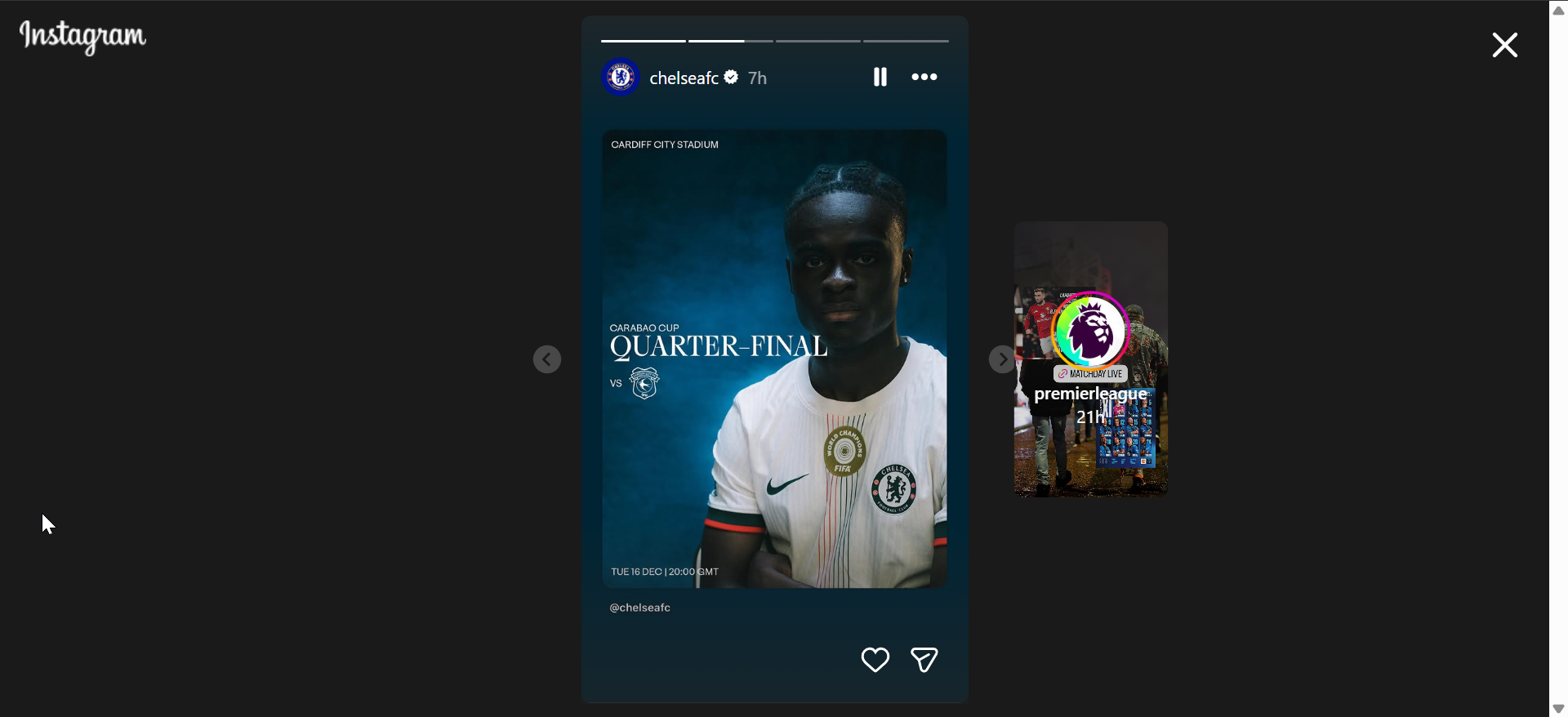
Open Instagram in a browser and check Stories there. If Stories load on the web, the issue likely sits with the mobile app, not your account.
When Instagram Stories still don’t appear
These scenarios happen less often, but they still matter.
Check if your account has temporary limits
Instagram can limit features after rapid follows, unfollows, or repeated actions. These limits can reduce Story visibility until they expire.
Contact Instagram support
Report the issue through Settings > Help > Report a problem. Account-level bugs often require a server-side fix.
Tips to prevent Instagram Stories from disappearing again
- Keep Instagram updated at all times
- Avoid aggressive follow or unfollow activity
- Disable VPNs when you use Instagram
- Clear app cache monthly on Android
- Restart your phone after major app updates
FAQs about Instagram Stories not showing
Why do Instagram Stories show for some accounts but not others? Muted Stories, Close Friends settings, or account restrictions usually cause this behavior.
Can Instagram Stories disappear because of a shadowban? Shadowbans affect reach, not Story visibility. Missing Stories usually point to settings or restrictions.
Why do Stories load on Wi-Fi but not mobile data? Your carrier or DNS can block Instagram media servers. Switching networks helps you confirm this quickly.
Summary
- Check Instagram server status and restart the app
- Update, clear cache, or reinstall Instagram
- Review muted accounts and privacy settings
- Fix network issues and disable VPNs
- Check account limits and contact support if needed
Instagram Stories usually disappear due to small, fixable issues rather than permanent problems. Start with the quick checks, then move through app, account, and network fixes in order. Once Stories reappear, keep the app updated and avoid aggressive activity to prevent the issue from returning.
Lastly, if you can see other people's stories but are unable to see the people who viewed your Instagram story, check out our detailed guide to fix the issue quickly.


Discussion (0)
Be the first to comment.