




Instagram does not include a single reset button for your feed. You can still fully retrain what you see by removing old signals and sending clear new ones. The steps below work on iPhone and Android and start improving recommendations within days.
Table of contents
- What “resetting” your Instagram feed actually means
- Fastest way to reset your Instagram feed
- Reset Instagram recommendations more aggressively
- Resetting specific parts of Instagram
- How long it takes for the Instagram feed to reset
- What does not reset your Instagram feed
- Common problems when resetting Instagram feed
- Tips to keep your Instagram feed clean long-term
- FAQs
- Summary
What “resetting” your Instagram feed actually means
Instagram rebuilds recommendations based on how you interact with content. A reset removes negative signals and replaces them with intentional engagement.
Feed vs Explore vs Reels recommendations
Instagram treats the home feed, Explore page, and Reels as separate systems. You must reset each surface to see consistent results.
Fastest way to reset your Instagram feed
Start with these steps for the quickest visible improvement.
Clear your Instagram search history
Search history strongly influences suggested posts. Clearing it removes topic bias immediately.
- Open Instagram or go to Instagram.com on your browser.
- Click the search icon.
- Now, click the Clear all option next to the Recent tab under the search bar.


Use “Not interested” on posts, Reels, and Explore
Negative feedback retrains the algorithm faster than ignoring content.
- Tap the three dots on a post or Reel.
- Select Not interested.
- Repeat for similar content types.
Mute or unfollow accounts shaping your feed
Repeated exposure from the same accounts reinforces topics you dislike.
- Visit the account profile.
- Tap Following.
- Choose Mute or Unfollow.

Reset Instagram recommendations more aggressively
Use these steps if your feed feels completely off.
Review and remove ad interests
Ad interests affect organic suggestions more than most users expect.
- Go to Settings on Instagram and select Meta Account Center.
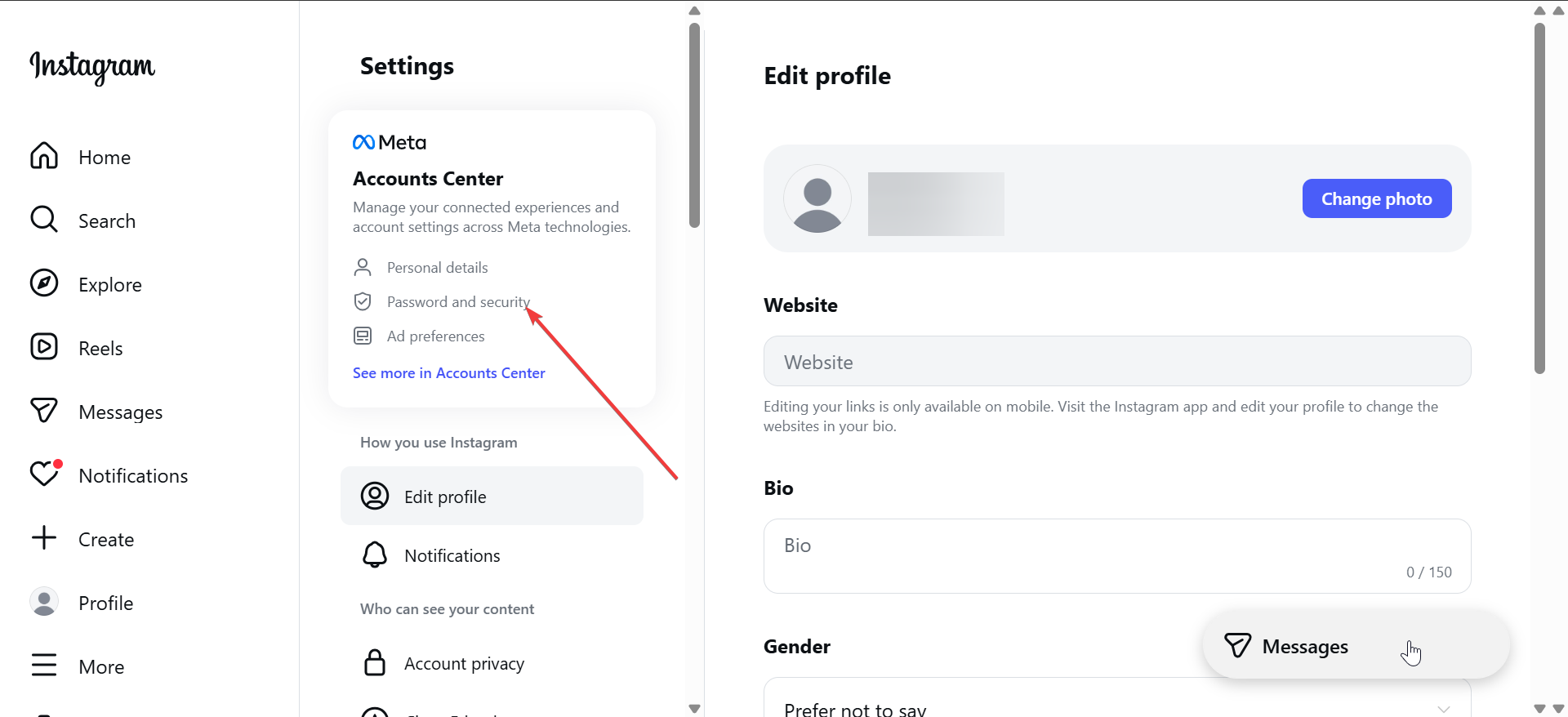
- On the new page, choose Ad preferences.

- Now, open Ad topics and Ad interests.

- Remove irrelevant categories.
Interact intentionally with content you want more of
Positive signals rebuild your feed faster than removals alone.
- Like posts you want repeated.
- Save content you value.
- Watch Reels fully instead of scrolling away.
Reset suggested content from sensitive topics
Topic controls limit recurring themes like politics or appearance-related content.
- Open Settings then Content preferences.

- Next, click the Sensitive content option.

- Reduce exposure where available.
Resetting specific parts of Instagram
Target individual surfaces to speed up results.
How to reset Instagram Explore page
Explore reacts quickly to negative feedback. Use Not interested on every unwanted tile until topics shift.
How to reset Instagram Reels recommendations
Reels rely heavily on watch time. Scroll past unwanted Reels immediately and fully watch preferred ones.
How to reset ads showing in your feed
Ad controls limit themes but do not remove ads entirely. Consistent interest removal reduces repetition.
How long it takes for the Instagram feed to reset
Results depend on past engagement volume and consistency.
What changes immediately
Search-based suggestions and some Explore tiles update within hours.
What changes over days or weeks
Reels and home feed themes usually shift after several days of consistent actions.
What does not reset your Instagram feed
- Clearing app cache
- Uninstall and reinstall the Instagram app on your laptop or phone
- Switching accounts
- Using a new device
Common problems when resetting Instagram feed
- Feed not changing after following all steps: Heavy interaction history or business accounts may require longer retraining.
- Recommendations revert after a few days: Accidental likes, comments, or long watches retrain the algorithm quickly.
Tips to keep your Instagram feed clean long-term
- Use Not interested weekly.
- Avoid doom-scrolling content you dislike.
- Save posts you want repeated.
- Review ad interests every few months.
FAQs
Can you fully reset Instagram algorithm to zero? No. You can only retrain it by changing behavior.
Does blocking accounts help more than unfollowing? Blocking removes all signals but works best for spam.
Does switching to a private account change recommendations? Privacy settings do not affect recommendation logic.
Do business or creator accounts behave differently? Yes. Higher engagement volume slows visible changes.
Summary
- Clear search history and remove negative signals first.
- Use Not interested across Feed, Explore, and Reels.
- Engage intentionally with content you want more of.
- Allow several days for full adjustment.
You cannot reset Instagram with one tap. You can still rebuild your feed by removing old signals and reinforcing new ones consistently. Follow these steps daily for a week to see lasting improvement.


Discussion (0)
Be the first to comment.