




If you posted the wrong Snapchat Story or shared something with the wrong audience, deleting it quickly can prevent unwanted views. Snapchat allows you to remove Stories instantly, whether they are Private, Public, Shared, or Friends-only.
The steps work the same on iPhone and Android, and once deleted, the Story disappears permanently unless it was saved to Memories.
How To Delete A Snapchat Story On iPhone And Android
You can delete a Snapchat Story directly from your profile. The process depends slightly on the Story type, but the core steps remain the same.
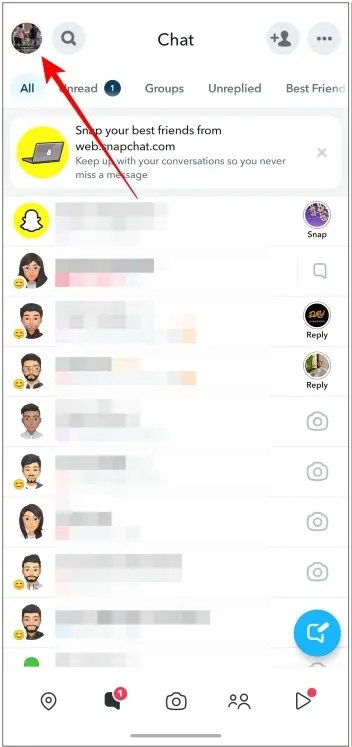
- Open the Snapchat app and tap your Bitmoji in the top-left corner.
- Scroll to the My Stories section on your profile.
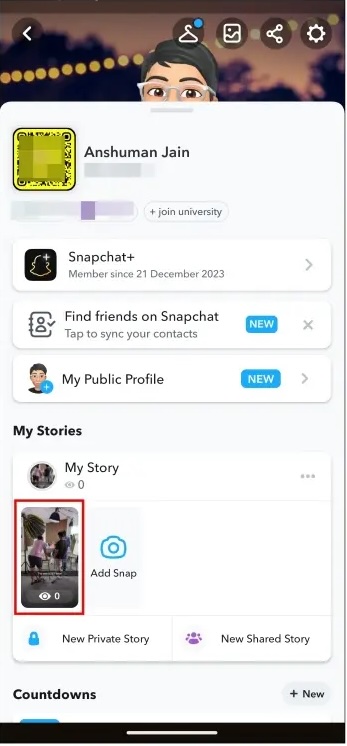
- Tap the Story you want to remove to open it.
- Tap the three-dot menu or trash icon on the Snap.

- Select Delete, then confirm to remove the Story.
The Story disappears immediately and can no longer be viewed by friends or followers.
How To Delete A Private Snapchat Story
Private Stories limit visibility to selected friends, but you can still remove them at any time.
- Open Snapchat and go to your profile.
- Tap the three-dot menu next to the Private Story.
- Select Delete Private Story.
- Tap Delete again to confirm.
This removes the Story for everyone included in that private list.
How To Delete A Public Snapchat Story
Public Stories reach a wider audience, so deleting them quickly matters even more.
- Open your Snapchat profile.
- Tap your Public Story under My Stories.
- Tap the trash icon on the Snap.
- Confirm by tapping Delete Snap.
Once removed, the Public Story no longer appears on your profile or discovery feeds.
How To Delete A Shared Snapchat Story
Shared Stories allow multiple contributors, but you can only delete your own Snaps.
- Open Snapchat and go to your profile.
- Tap the three-dot menu next to the Shared Story.
- Select Delete Story.
- Confirm deletion.
Your Snap is removed, but other contributors’ posts remain visible.
What Happens After You Delete A Snapchat Story
When you delete a Snapchat Story, it disappears immediately. View counts may linger briefly, but the content itself cannot be accessed.
Deleted Stories cannot be recovered unless they were saved to Memories before posting.
Troubleshooting Common Problems
If the delete option does not appear, make sure you are viewing your own Story and not someone else’s. You may need to refresh the app or update Snapchat to the latest version.
If a Shared Story remains visible, remember that deleting only removes your contribution, not the entire Story.
Tips
- Use Private Stories to limit your audience before posting sensitive content.
- Double-check whether a Story is Public or Friends-only before sharing.
- Enable Auto-Save to Memories if you want a backup before deleting.
- Delete Stories quickly to reduce the chance of screenshots.
FAQ
Will people know if I delete a Snapchat Story?
Snapchat does not send notifications when you delete a Story.
Can I recover a deleted Snapchat Story?
No. Once deleted or expired, the Story cannot be restored unless saved to Memories.
Can I delete someone else’s Snap from a Shared Story?
No. You can only remove your own Snaps from Shared Stories.
How long do Snapchat Stories last if I don’t delete them?
Stories automatically expire after 24 hours unless extended with Snapchat Plus.
Summary
- Snapchat Stories can be deleted instantly from your profile.
- Private, Public, Shared, and Friends-only Stories use similar steps.
- Deleted Stories disappear permanently unless saved to Memories.
- Quick deletion helps reduce unwanted views and screenshots.
Conclusion
Deleting a Snapchat Story is fast and straightforward on both iPhone and Android. Whether you posted by mistake or changed your mind, Snapchat gives you full control over your content.
Act quickly, review your privacy settings, and use Private Stories to avoid future slip-ups.


Discussion (0)
Be the first to comment.