



Google has started early work on a new tab-related interface in Chrome for Android, now visible in the Canary version behind an experimental flag.
Tab bottom sheet in Chrome for Android
The new UI appears when you tap the tab counter button and choose New tab. Instead of opening a full-screen page right away, Chrome brings up a bottom sheet from the bottom of the screen.
The panel already shows a clear layout. It includes a header bar, a large content area, and a Google search or address bar inside the sheet. The search bar looks the same as the one used on the New Tab page, which ties this panel directly to the new tab experience.

At the same time, the panel is still unfinished. There are no shortcuts, no buttons, and no useful actions inside it yet. Some parts still look like placeholder UI.
This suggests Google is building the structure first before connecting it to real features.
The feature is being tested behind a flag called Tab bottom sheet. Its description says it adds a basic bottom sheet with placeholder content, which matches what is currently visible in Canary.
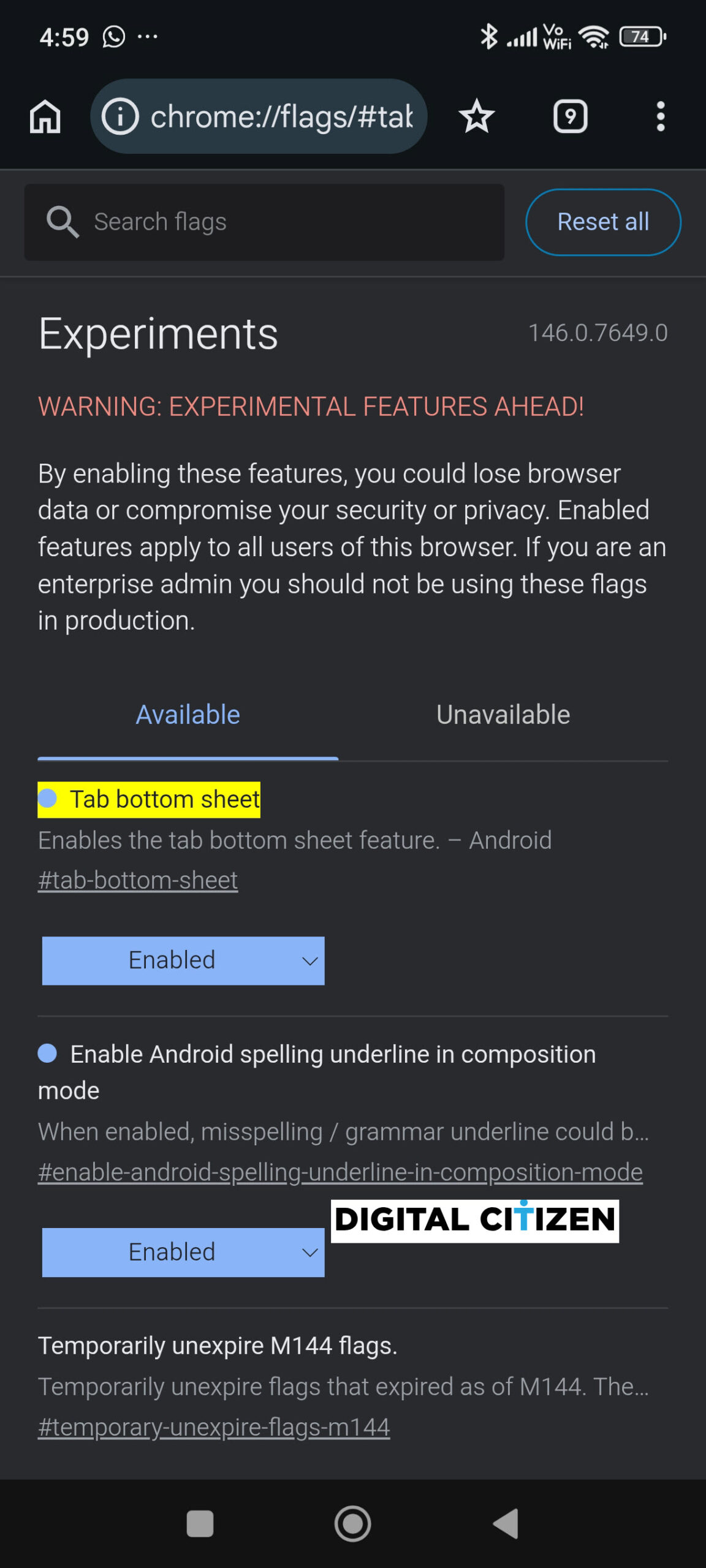
Bottom sheets are common in Android apps because they keep actions closer to the thumb. Chrome already uses similar panels for downloads, permissions, and some menus. This new work adds a bottom sheet that is clearly linked to tabs and new tab creation.
The feature is limited to Canary and is not ready for regular users. Google has not shared any explanation for what will eventually appear inside this panel.
For now, Google is actively working on a new tab-related bottom sheet UI in Chrome for Android.
Google is also testing a Browse with AI button in Chrome Canary and has limited clipboard paste on Windows to 256 MB.

Discussion (0)
Be the first to comment.