UP

Security

What is an antivirus or security suite? How do you use your computers and devices, safely? How do you protect your privacy?

tutorial 2 ways to create a password-protected ZIP file in Windows

2 ways to create a password-protected ZIP file in Windows

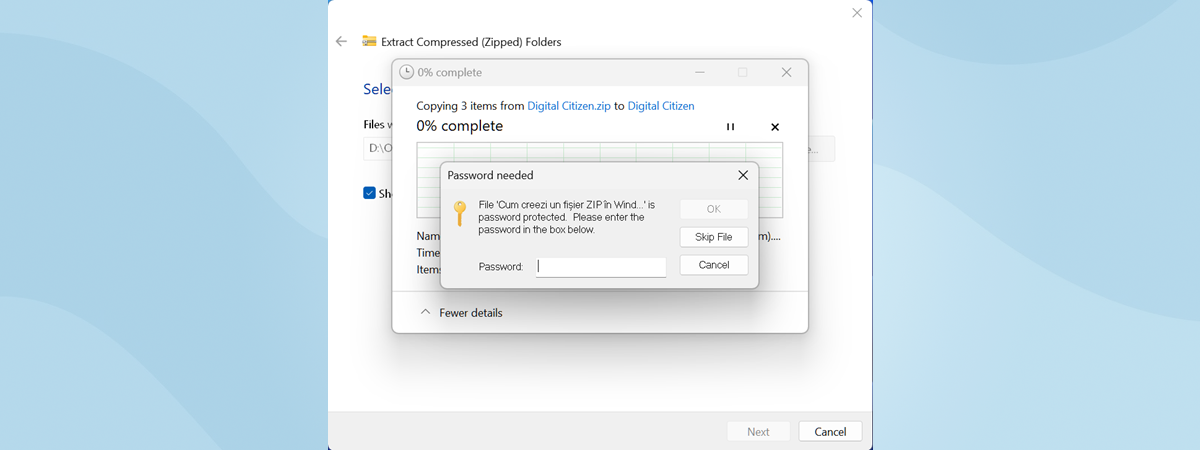
If you are used to working with files and documents, you are also probably used to working with ZIP files. You meet them everywhere: on the websites where you download files, to the documents your colleagues send through email. ZIP files are common because they reduce the size of files or folders and thus make it easier to send them over the internet or

7 ways in which browsers should improve private browsing (Incognito, InPrivate, etc)

Privacy is a hot topic, and our web browsers are at the center of most of our privacy battles. The first web browser that launched the private mode was Safari for Mac OS, in 2005. Since then, all the major web browsers have developed a "private browsing" mode. The privacy delivered by each browser has significant differences, and all of them fall short of our expectations about what it means

Windows Defender Firewall with Advanced Security: What is it? How to open it?

The Windows Defender Firewall with Advanced Security is a tool which gives you detailed control over the rules that are applied by the Windows Defender Firewall. You can view all the rules that are used by the Windows Defender Firewall, change their properties, create new rules or disable existing ones. In this tutorial, we share how to open the Windows Defender Firewall with Advanced Security, how to find your way

Cybersecurity through education: Kaspersky Interactive Protection Simulation

Kaspersky Lab has developed a strategy that emphasizes education in cybersecurity. Alongside the investment in technology, education is just as crucial for the cybersecurity of a home as it is for a business. What is the point of mounting the most sophisticated lock on the door if the people using the door leave it wide open? Kaspersky Interactive Protection Simulation is a critical component of their education platform. Let's have

MIO MiVue J60 review: Dash cam with built-in Wi-Fi and GPS tracking

The dash cams market has grown slowly but steadily over the last few years and is now filled with many choices. MIO is one of the most prolific manufacturers of dash cams, and most of them are excellent. We received in testing one of their more discreet dash cams called the MiVue J60. It is a camera that hides from sight in the back of the rearview mirror and which

Simple questions: What is two-factor authentication or two-step verification?

In recent years a new security concept has made the headlines - two-step verification or two-factor authentication (2FA). It all started with Google enabling it for its users, and since then, many companies followed their example, including Microsoft, Apple, and Facebook. Even gaming companies joined this trend. If you would like to understand what two-factor authentication is, how it works, why you should enable it and where read this article:

Review CyberGhost: One of the best VPNs money can buy

CyberGhost VPN is one of the most popular VPN services in the world. Also, it is one of the easiest to use and one of the most affordable. Due to the elimination of Net Neutrality rules in the USA, and other legislative changes around the world, privacy and security have become more critical than ever. Is CyberGhost's VPN service up to the task of protecting your privacy? Find out from

How to use Diagnostic Data Viewer and see what data Windows 10 sends to Microsoft

In Windows 10, starting with April 2018 Update (version 1803), Microsoft introduced a new app called the Diagnostic Data Viewer. It is a tool that you can download and install on your Windows 10 PC to see what diagnostic data you are sending to Microsoft. The information it displays is structured into categories and can be filtered as you wish. But even so, understanding it is not easy for a

8 reasons why Cyberghost VPN is one of the best VPNs on the market

CyberGhost has built itself an excellent reputation because it offers one of the most secure and reliable VPN services in the world. The company follows a strict a no-logs policy, the network of VPN servers that it maintains is large, and the price per value ratio is one of the best that you can find. These are just a few reasons why you should consider subscribing to CyberGhost's premium plan.

How to activate two-step verification for your Apple ID, on an iPhone or iPad

Two-step verification or two-step authentication is a second layer of security that you can add to your online accounts, to stop hackers from breaking in, even if they know your password. Not all companies offer this security feature but, fortunately, Apple is one of them. If you have an Apple ID, you can use your iPhone, iPad or Mac to enable two-factor authentication for your Apple ID and be safer.

How to read the passwords stored by Windows, and which are easy to crack

Windows stores the passwords that you use to log in, access network shares, or shared devices. Some of these passwords are stored safely, in an encrypted format, while others are not. Here is how to see which passwords are insecurely stored by Windows, and identify those that can be easily stolen by others: [DC-SUMMARY-BREAK] Step 1. Download Network Password Recovery, for free First, you need an app that knows where

Digital Citizen Awards: The most popular antivirus product of the year 2018

This year we asked our readers again to cast a vote for their favorite antivirus product. The nominees from which you could choose were the best security products we reviewed in the last couple of months. Alphabetically, your choices were: Bitdefender Total Security, BullGuard Premium Protection, ESET Smart Security Premium, F-Secure Total, G Data Total Security, and Kaspersky Total Security. The voting has ended, and it is time to reveal

Digital Citizen Awards: The best antivirus product of the year 2018

One of the most asked questions on Google regarding security is: "What is the best antivirus?". It is a legitimate question as most people are not security experts and need recommendations to identify the best antivirus product for their computers and devices. The time has come for us to name the best antivirus product of the year, based on our experience in testing the many commercial antivirus products for Windows

Digital Citizen Awards: The best free antivirus product of the year 2018

Many users look for free antivirus software. Unfortunately, this niche of products is dominated by products which do things that are not in the interest of their users. For example, some try to change your browser's homepage to a page that is monetized by your antivirus provider. Others, bundle crapware or dodgy tools that compromise your privacy. However, there are a few antivirus products that do not do that and

Comparison: Which is the best antivirus for Windows devices, in 2018?

Antivirus products and security solutions in general, come in various forms, shapes, and sizes, and most of them include more than a few distinct protection layers. The number and variety of security solutions that are sold to Windows users is quite large, and it is difficult to classify them. We checked the best security products that are found on the market for Windows users, we reviewed them one by one,

MIO MiVue 786 WiFi review: A premium dash cam with high-end specs

Dash cams have grown in popularity in the last few years, and drivers are becoming more critical about their hardware specs and features. Recently, we had the opportunity to use and test one of the latest high-end dash cams manufactured by MIO, the MiVue 786 WiFi. It is an elegant dash cam that can record videos in 1080p, transmit them over WiFi and even broadcast them on Facebook if you
tutorial Fix problem: Google Chrome uses a lot of processor (CPU) when I visit a website

Fix problem: Google Chrome uses a lot of processor (CPU) when I visit a website

A new trend on the internet is that of using websites to mine cryptocurrencies without the knowledge of their visitors. As a result, the visitor's web browser gets slow, and the web browsing experience becomes incredibly frustrating. If you use Google Chrome and your computer's processor usage goes up a lot, when visiting a specific website, then you must read this article. We explain