



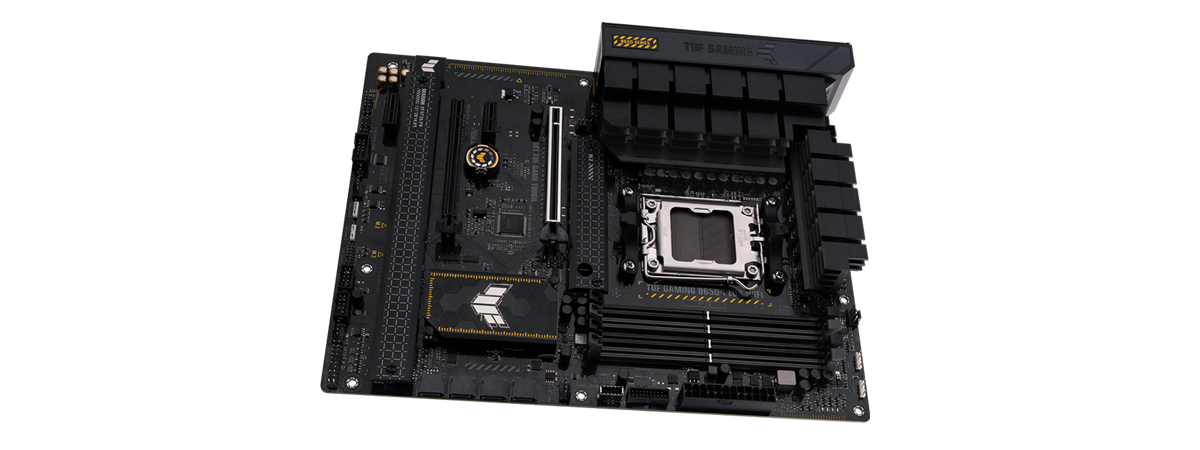
Building a new desktop computer with one of AMD’s latest Ryzen 7000 processors is rather costly. However, there are some things you can do to keep the costs in check, like choosing a mid-range motherboard. If you’re a gamer, one of the options you’ll find in online and retail stores nowadays is the ASUS TUF Gaming B650-Plus WiFi motherboard. Although it’s based on an affordable AMD B650 chipset, it comes with gamer-oriented features, a beautiful design, and premium components. Are you curious to see what it has to offer and how it fares in real life? Then read this review and find out more about the ASUS TUF Gaming B650-Plus WiFi:
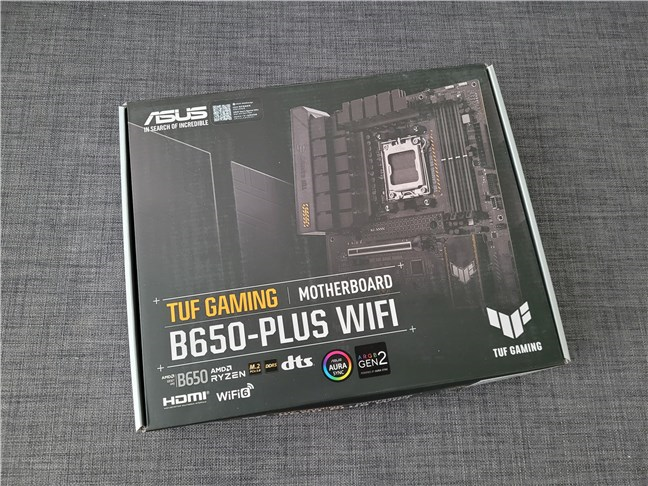
 The box of the ASUS TUF Gaming B650-Plus WiFi
Inside the box, there’s the motherboard and a generous bundle of accessories that includes SATA 6Gb/s cables, an ASUS Wi-Fi antenna kit, a couple of screws, stickers, a DVD with drivers, the warranty, and the user guide.
The box of the ASUS TUF Gaming B650-Plus WiFi
Inside the box, there’s the motherboard and a generous bundle of accessories that includes SATA 6Gb/s cables, an ASUS Wi-Fi antenna kit, a couple of screws, stickers, a DVD with drivers, the warranty, and the user guide.
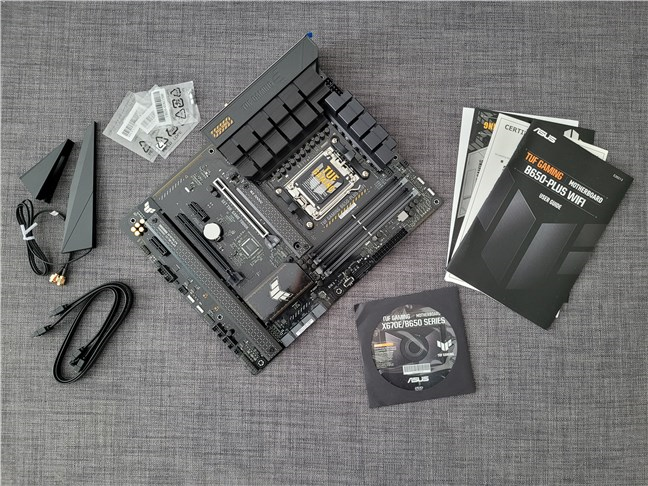 ASUS TUF Gaming B650-Plus WiFi: What's inside the box
The box of the ASUS TUF Gaming B650-Plus WiFi is good-looking, and the bundle inside is generous.
ASUS TUF Gaming B650-Plus WiFi: What's inside the box
The box of the ASUS TUF Gaming B650-Plus WiFi is good-looking, and the bundle inside is generous.
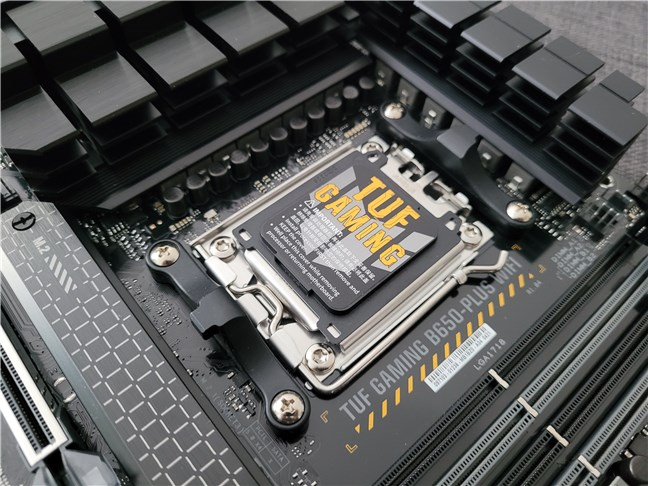 ASUS TUF Gaming B650-Plus WiFi is an AM5 motherboard
Similar to other TUF Gaming motherboards from ASUS, the B650-Plus WiFi has an overall rugged look that gives you confidence in its capabilities. The components appear to be high-quality, and the large heatsinks seem sturdy and efficient at their job. That’s especially true for the CPU VRM heatsink, which nicely blends into the input/output panel. The covers on top of the chipset and M.2 slots also feature an interesting “mathematical” design that makes the whole picture look rough but delicate at the same time.
ASUS TUF Gaming B650-Plus WiFi is an AM5 motherboard
Similar to other TUF Gaming motherboards from ASUS, the B650-Plus WiFi has an overall rugged look that gives you confidence in its capabilities. The components appear to be high-quality, and the large heatsinks seem sturdy and efficient at their job. That’s especially true for the CPU VRM heatsink, which nicely blends into the input/output panel. The covers on top of the chipset and M.2 slots also feature an interesting “mathematical” design that makes the whole picture look rough but delicate at the same time.
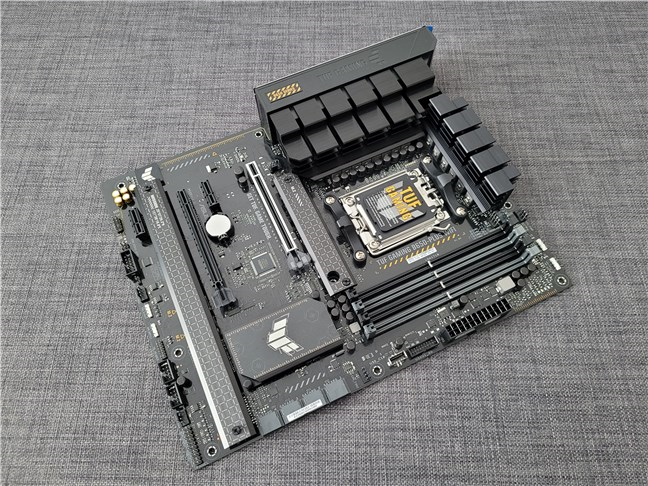 The ASUS TUF Gaming B650-Plus WiFi looks solid
Although I wouldn’t say that a chipset like the AMD B650 is great for overclocking, this motherboard will probably perform above expectations if you try. I say that because the VRM (Voltage Regulator Module) is robust and offers a 12 + 2 phase processor power supply able to handle 60 amperes. The energy required by the CPU is delivered through two regular 8 + 4 EPS power connectors.
The ASUS TUF Gaming B650-Plus WiFi looks solid
Although I wouldn’t say that a chipset like the AMD B650 is great for overclocking, this motherboard will probably perform above expectations if you try. I say that because the VRM (Voltage Regulator Module) is robust and offers a 12 + 2 phase processor power supply able to handle 60 amperes. The energy required by the CPU is delivered through two regular 8 + 4 EPS power connectors.
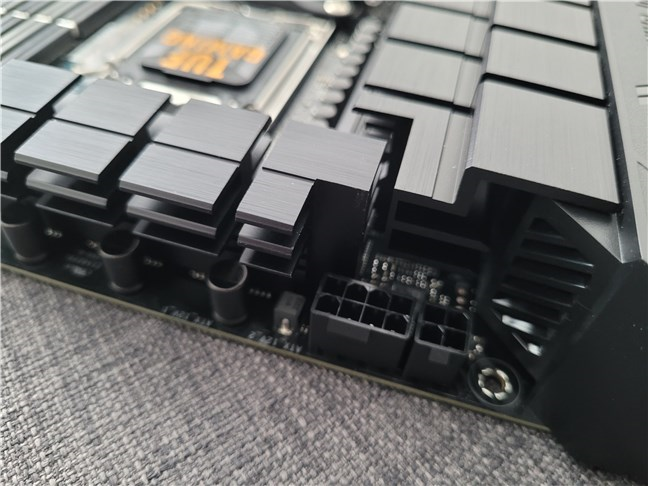 The VRM heat spreaders are large and robust
Towards the top-right corner of the mainboard, there’s a standard 24-pin ATX main power connector and next to it, the four DDR5 DIMM slots. The motherboard supports a maximum of 128 GB and a wide range of different memory frequencies, from 4800 MT/s (mega transfers per second) to over 6400 MT/s in overclocking mode.
The VRM heat spreaders are large and robust
Towards the top-right corner of the mainboard, there’s a standard 24-pin ATX main power connector and next to it, the four DDR5 DIMM slots. The motherboard supports a maximum of 128 GB and a wide range of different memory frequencies, from 4800 MT/s (mega transfers per second) to over 6400 MT/s in overclocking mode.
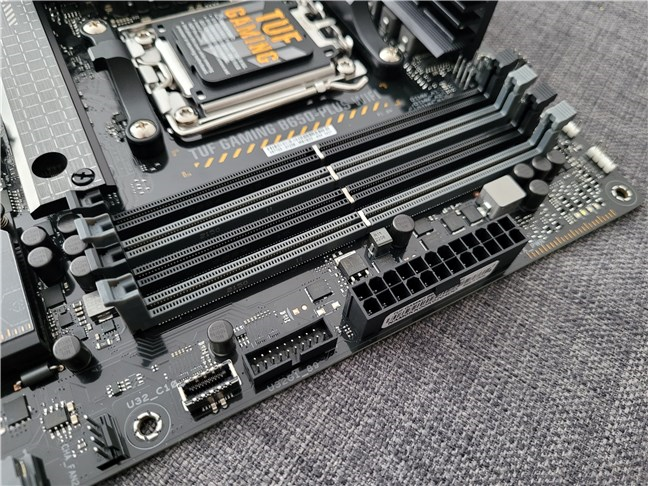 This motherboard uses DDR5 RAM only
There are plenty of expansion and storage slots available on the motherboard, and they’re fast too. The PCI Express lanes that are routed to the processors include:
This motherboard uses DDR5 RAM only
There are plenty of expansion and storage slots available on the motherboard, and they’re fast too. The PCI Express lanes that are routed to the processors include:
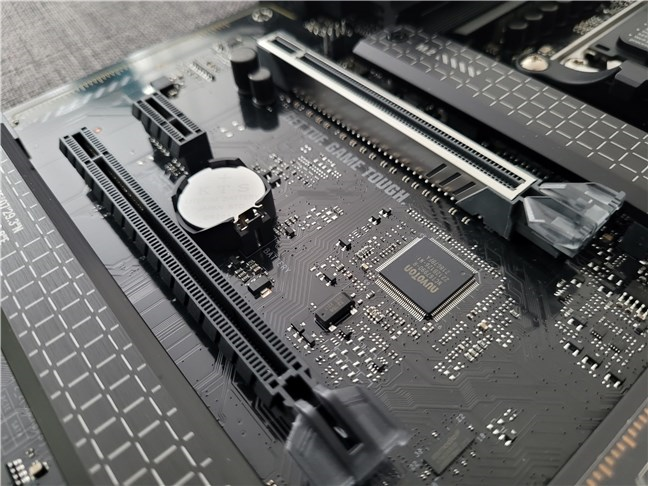 The motherboard comes with PCI Express 5.0 and 4.0
In terms of connectivity, ASUS equipped the motherboard with a 2.5Gbps Realtek Ethernet chip and also with a MediaTek Wi-Fi 6 card with 2x2 MIMO and support for 802.11 a/b/g/n/ac/ax standards on the 2.4 and 5 GHz bands. Of course, Bluetooth is also present: version 5.2 to be exact. For audio, we get a Realtek 7.1 surround sound high-definition codec that supports 24-Bit/192kHz playback.
On the rear I/O (input/output) panel, there’s one USB 3.2 Gen 2x2 port (Type-C), three USB 3.2 Gen 2 port (two Type-A and one Type-C), four USB 2.0 (Type-A), one DisplayPort, one HDMI port, one Wi-Fi module connection, the 2.5Gb Ethernet port, five audio jacks, and a BIOS FlashBack button.
The motherboard comes with PCI Express 5.0 and 4.0
In terms of connectivity, ASUS equipped the motherboard with a 2.5Gbps Realtek Ethernet chip and also with a MediaTek Wi-Fi 6 card with 2x2 MIMO and support for 802.11 a/b/g/n/ac/ax standards on the 2.4 and 5 GHz bands. Of course, Bluetooth is also present: version 5.2 to be exact. For audio, we get a Realtek 7.1 surround sound high-definition codec that supports 24-Bit/192kHz playback.
On the rear I/O (input/output) panel, there’s one USB 3.2 Gen 2x2 port (Type-C), three USB 3.2 Gen 2 port (two Type-A and one Type-C), four USB 2.0 (Type-A), one DisplayPort, one HDMI port, one Wi-Fi module connection, the 2.5Gb Ethernet port, five audio jacks, and a BIOS FlashBack button.
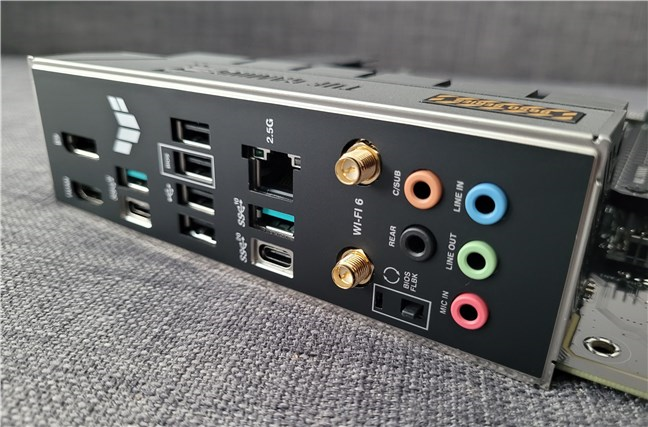
 The ports selection on the rear I/O panel
On the motherboard, there are other internal I/O connectors too. For your PC case front panel, you get a USB 3.2 Gen 1 connector that supports USB Type-C, a USB 3.2 Gen 1 header that supports two additional USB 3.2 Gen 1 ports, and two USB 2.0 headers that can accommodate four USB 2.0 ports.
Other internal connectors are available as well, including fan controllers (CPU, CPU OPT, AIO Pump, four chassis fans), RGB headers (three addressable, one Aura RGB), front panel audio, and even a Thunderbolt header.
The ports selection on the rear I/O panel
On the motherboard, there are other internal I/O connectors too. For your PC case front panel, you get a USB 3.2 Gen 1 connector that supports USB Type-C, a USB 3.2 Gen 1 header that supports two additional USB 3.2 Gen 1 ports, and two USB 2.0 headers that can accommodate four USB 2.0 ports.
Other internal connectors are available as well, including fan controllers (CPU, CPU OPT, AIO Pump, four chassis fans), RGB headers (three addressable, one Aura RGB), front panel audio, and even a Thunderbolt header.
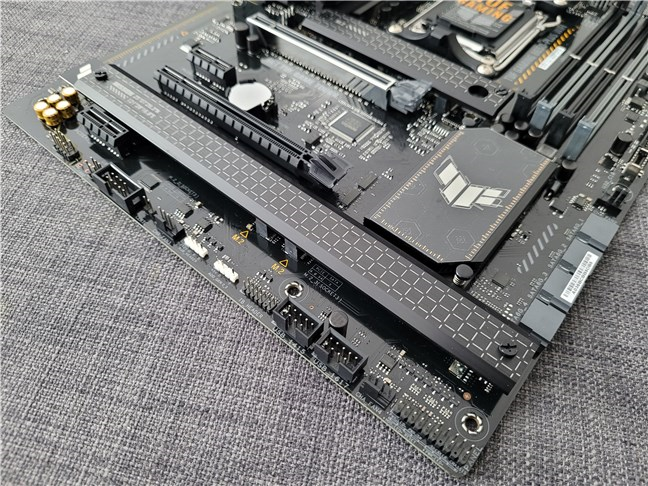 The number of internal headers is above average
If you want to check all the bits and pieces of the technical information, you can visit the motherboard’s official webpage: ASUS TUF Gaming B650-Plus WiFi Tech Specs.
Because it’s based on the more affordable AMD B650 chipset, the ASUS TUF Gaming B650-Plus WiFi is, theoretically, a mid-range motherboard. However, the choices ASUS made when designing it, and the premium components used to make this motherboard feel higher-end.
Read the next page of this review if you’re curious to see what results I got in benchmarks with a computer based on the ASUS TUF Gaming B650-Plus WiFi motherboard.
The number of internal headers is above average
If you want to check all the bits and pieces of the technical information, you can visit the motherboard’s official webpage: ASUS TUF Gaming B650-Plus WiFi Tech Specs.
Because it’s based on the more affordable AMD B650 chipset, the ASUS TUF Gaming B650-Plus WiFi is, theoretically, a mid-range motherboard. However, the choices ASUS made when designing it, and the premium components used to make this motherboard feel higher-end.
Read the next page of this review if you’re curious to see what results I got in benchmarks with a computer based on the ASUS TUF Gaming B650-Plus WiFi motherboard.
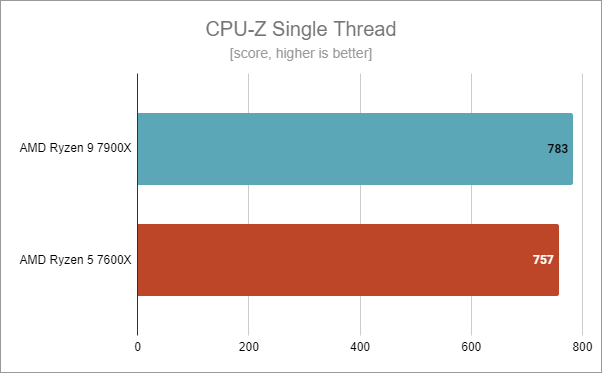
 ASUS TUF Gaming B650-Plus WiFi: Benchmark results in CPU-Z Single Thread
In CPU-Z’s Multi-Thread test, which benchmarks all the cores of the processor, both the Ryzen 9 7900X and the Ryzen 5 7600X performed great. These results show that the motherboard can sustain demanding workloads even if your processor has a high core count, which is the case for the Ryzen 9 7900X.
ASUS TUF Gaming B650-Plus WiFi: Benchmark results in CPU-Z Single Thread
In CPU-Z’s Multi-Thread test, which benchmarks all the cores of the processor, both the Ryzen 9 7900X and the Ryzen 5 7600X performed great. These results show that the motherboard can sustain demanding workloads even if your processor has a high core count, which is the case for the Ryzen 9 7900X.
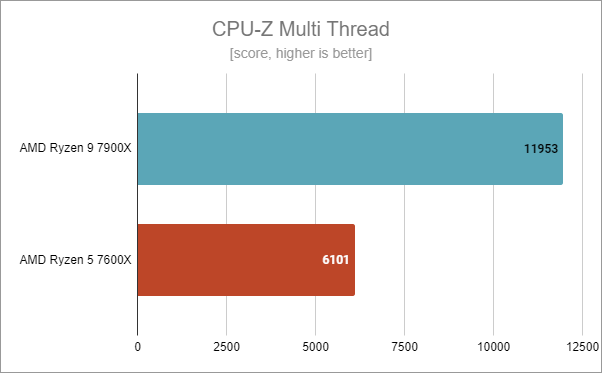 ASUS TUF Gaming B650-Plus WiFi: Benchmark results in CPU-Z Multi Thread
Similarly, the motherboard and the two processors had no issues in performing very well in Cinebench R23, a benchmark that also runs advanced calculations and makes the CPUs demand a lot of electrical power.
ASUS TUF Gaming B650-Plus WiFi: Benchmark results in CPU-Z Multi Thread
Similarly, the motherboard and the two processors had no issues in performing very well in Cinebench R23, a benchmark that also runs advanced calculations and makes the CPUs demand a lot of electrical power.
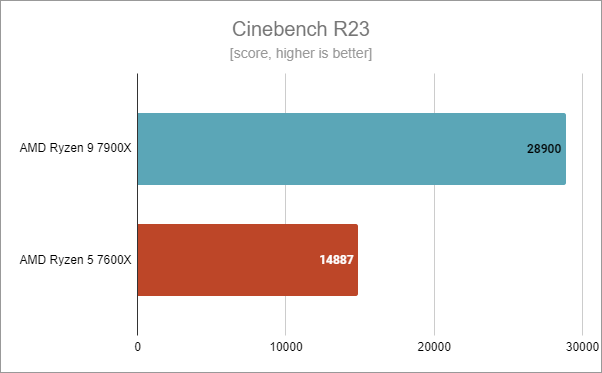 ASUS TUF Gaming B650-Plus WiFi: Benchmark results in Cinebench R23
In Blender, another rendering benchmark that’s also heavy on the processor and motherboard, I got excellent scores on the ASUS TUF Gaming B650-Plus WiFi motherboard. While the Ryzen 5 7600X had a lower result, as it only has 6 cores, the 12-core Ryzen 9 7900X performed above expectations on this motherboard.
ASUS TUF Gaming B650-Plus WiFi: Benchmark results in Cinebench R23
In Blender, another rendering benchmark that’s also heavy on the processor and motherboard, I got excellent scores on the ASUS TUF Gaming B650-Plus WiFi motherboard. While the Ryzen 5 7600X had a lower result, as it only has 6 cores, the 12-core Ryzen 9 7900X performed above expectations on this motherboard.
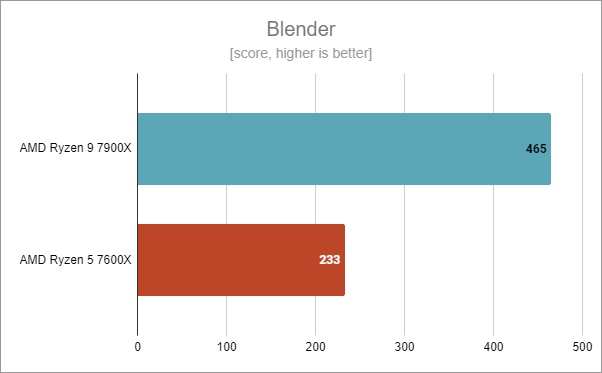 ASUS TUF Gaming B650-Plus WiFi: Benchmark results in Blender
Next, I used PCMark 10 to run a couple of benchmarks that evaluate the real-life performance of the computer. Using either processor, the PC I assembled with the AMD TUF Gaming B650-Plus WiFi proved to be very adept at all kinds of daily tasks, including web browsing, video conferencing, productivity tasks, and digital content creation.
ASUS TUF Gaming B650-Plus WiFi: Benchmark results in Blender
Next, I used PCMark 10 to run a couple of benchmarks that evaluate the real-life performance of the computer. Using either processor, the PC I assembled with the AMD TUF Gaming B650-Plus WiFi proved to be very adept at all kinds of daily tasks, including web browsing, video conferencing, productivity tasks, and digital content creation.
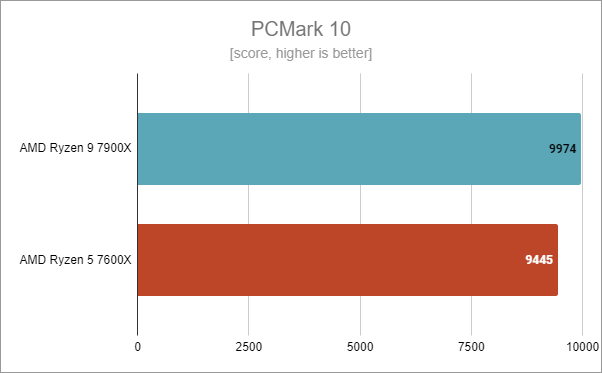 ASUS TUF Gaming B650-Plus WiFi: Benchmark results in PCMark 10
In JetStream 2, both AMD Ryzen 7000 processors I had (Ryzen 5 7600X and Ryzen 9 7900X) got the same huge score of 319 points. Evidently, the motherboard was stable, and I had no issues in running these tests.
ASUS TUF Gaming B650-Plus WiFi: Benchmark results in PCMark 10
In JetStream 2, both AMD Ryzen 7000 processors I had (Ryzen 5 7600X and Ryzen 9 7900X) got the same huge score of 319 points. Evidently, the motherboard was stable, and I had no issues in running these tests.
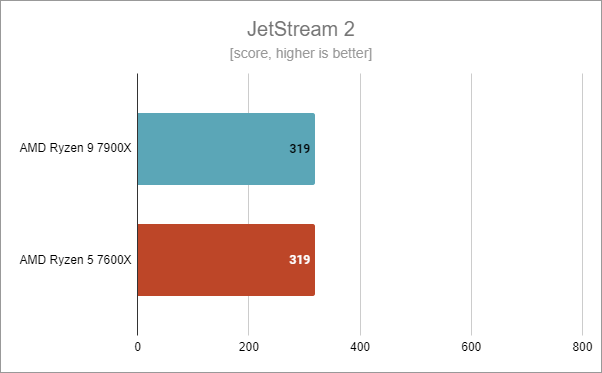 ASUS TUF Gaming B650-Plus WiFi: Benchmark results in JetStream 2
I noticed the same thing when I ran the benchmark tool from 7-Zip, a popular file compression application. Both the AMD Ryzen 9 7900X and the AMD Ryzen 5 7600X managed top compression speeds.
ASUS TUF Gaming B650-Plus WiFi: Benchmark results in JetStream 2
I noticed the same thing when I ran the benchmark tool from 7-Zip, a popular file compression application. Both the AMD Ryzen 9 7900X and the AMD Ryzen 5 7600X managed top compression speeds.
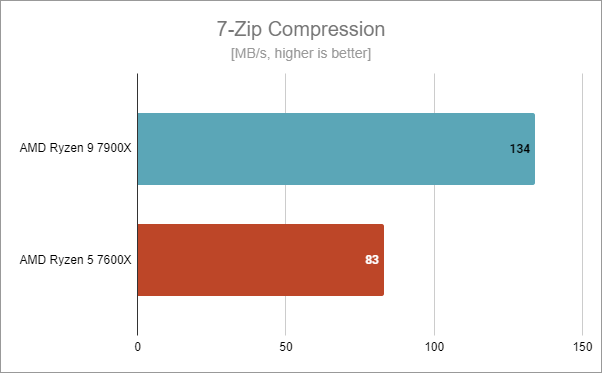 ASUS TUF Gaming B650-Plus WiFi: Benchmark results in 7-Zip Compression
Similarly, in 7-Zip’s decompression test, both processors pulled off some very high speeds, obviously each according to their number of cores and threads.
ASUS TUF Gaming B650-Plus WiFi: Benchmark results in 7-Zip Compression
Similarly, in 7-Zip’s decompression test, both processors pulled off some very high speeds, obviously each according to their number of cores and threads.
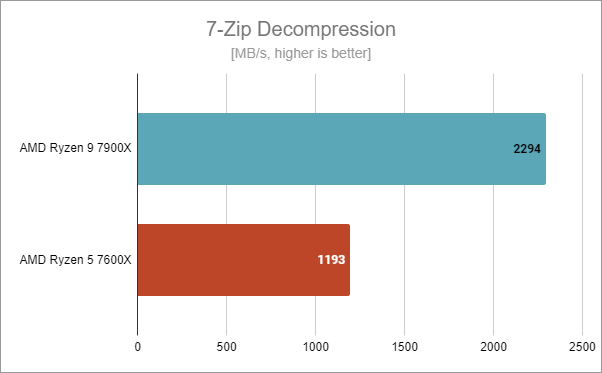 ASUS TUF Gaming B650-Plus WiFi: Benchmark results in 7-Zip Decompression
The ASUS TUF Gaming B650-Plus WiFi motherboard proved to be powerful and well-built for gaming too, as these next results will show you:
In Shadow of the Tomb Raider, using the ASUS TUF Gaming B650-Plus WiFi motherboard, both the Ryzen 9 7900X and the Ryzen 5 7600X managed to render about 300 frames per second on average. It’s a high number, no matter how you look at it.
ASUS TUF Gaming B650-Plus WiFi: Benchmark results in 7-Zip Decompression
The ASUS TUF Gaming B650-Plus WiFi motherboard proved to be powerful and well-built for gaming too, as these next results will show you:
In Shadow of the Tomb Raider, using the ASUS TUF Gaming B650-Plus WiFi motherboard, both the Ryzen 9 7900X and the Ryzen 5 7600X managed to render about 300 frames per second on average. It’s a high number, no matter how you look at it.
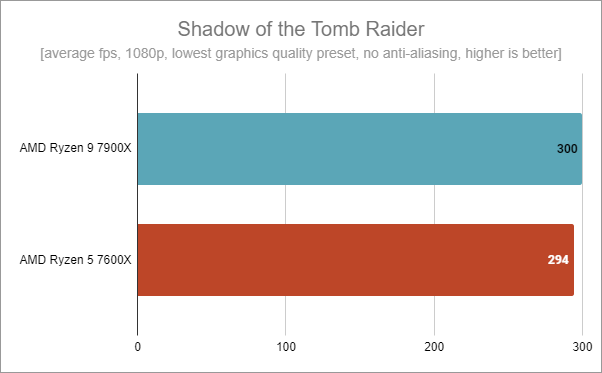 ASUS TUF Gaming B650-Plus WiFi: Benchmark results in Shadow of the Tomb Raider
In Metro Exodus, the processors were pushed to their limit, as this game is extremely demanding. However, the motherboard was able to sustain them without fault, and the average number of frames rendered per second got over 300.
ASUS TUF Gaming B650-Plus WiFi: Benchmark results in Shadow of the Tomb Raider
In Metro Exodus, the processors were pushed to their limit, as this game is extremely demanding. However, the motherboard was able to sustain them without fault, and the average number of frames rendered per second got over 300.
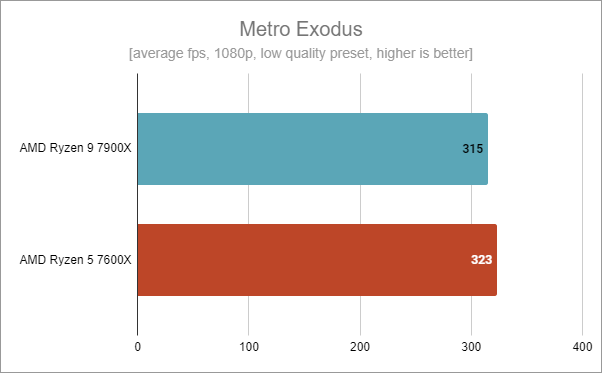 ASUS TUF Gaming B650-Plus WiFi: Benchmark results in Metro Exodus
In Assassin’s Creed Valhalla, I got the exact same framerate with both processors, and while the motherboard didn’t have any issues, it looks like my graphics card became a bottleneck here.
ASUS TUF Gaming B650-Plus WiFi: Benchmark results in Metro Exodus
In Assassin’s Creed Valhalla, I got the exact same framerate with both processors, and while the motherboard didn’t have any issues, it looks like my graphics card became a bottleneck here.
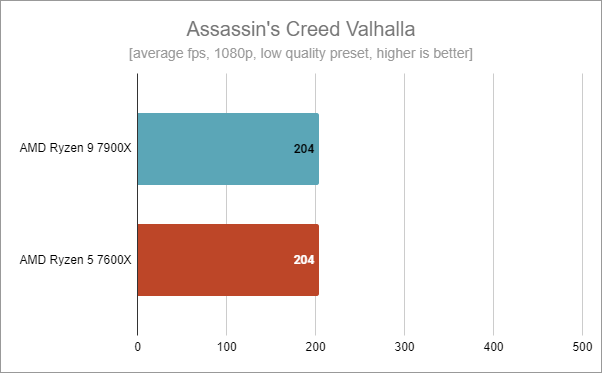 ASUS TUF Gaming B650-Plus WiFi: Benchmark results in Assassin's Creed Valhalla
During all the benchmarks I ran, the ASUS TUF Gaming B650-Plus WiFi motherboard proved to be excellent. Everything was stable, and I encountered no issues whatsoever. Moreover, the motherboard was reliable even in the most demanding scenarios, including rendering jobs and gaming.
ASUS TUF Gaming B650-Plus WiFi: Benchmark results in Assassin's Creed Valhalla
During all the benchmarks I ran, the ASUS TUF Gaming B650-Plus WiFi motherboard proved to be excellent. Everything was stable, and I encountered no issues whatsoever. Moreover, the motherboard was reliable even in the most demanding scenarios, including rendering jobs and gaming.
 The Armoury Crate app is useful
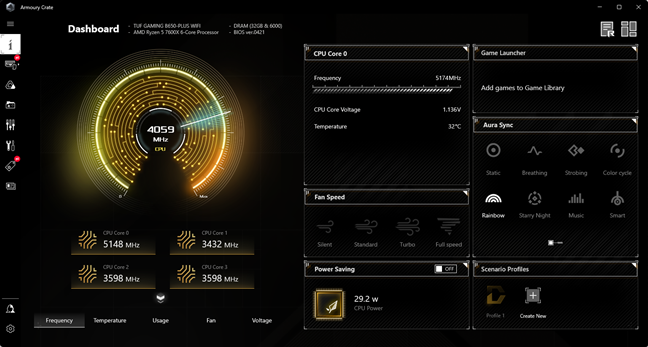
Armoury Crate is a handy application that you might want to keep on your computer. I find it helpful for checking my PC’s state from time to time, and I also use it to control fan speed and RGB lights. If you own an ASUS TUF Gaming B650-Plus WiFi motherboard, you should at least try the Armoury Crate app and only decide whether it’s worthwhile using after some time.
The Armoury Crate app is useful
Armoury Crate is a handy application that you might want to keep on your computer. I find it helpful for checking my PC’s state from time to time, and I also use it to control fan speed and RGB lights. If you own an ASUS TUF Gaming B650-Plus WiFi motherboard, you should at least try the Armoury Crate app and only decide whether it’s worthwhile using after some time.
ASUS TUF Gaming B650-Plus WiFi: Who is it good for?
The ASUS TUF Gaming B650-Plus WiFi motherboard is an excellent choice for:- Gamers who are looking to switch to the AMD AM5 platform with a Ryzen 7000 processor
- Anyone who wants a high-quality mid-range motherboard with plenty of features
- Those who don’t want to pay unreasonable amounts of money for their PC
Pros and cons
The most positive aspects of the ASUS TUF Gaming B650-Plus WiFi are these:
- Its price is lower than that of motherboards based on AMD X670E, X670, or B650E chipsets
- It has an attractive look and a nice design
- The Voltage Regulator Modules (VRMs) are solid and have large heatsinks
- You get PCI Express 5.0 and 4.0 slots, and quite a generous number of ports
- It includes a Wi-Fi 6 chip
- It proved stable even with a high-end AMD Ryzen 9 7900X processor
- The x16 (graphics) port is limited to PCIe 4.0; it’s not PCIe 5.0
Verdict
Thanks to the fact that it’s based on the more affordable AMD B650 chipset, the ASUS TUF Gaming B650-Plus WiFi shapes up to be quite an attractive motherboard. It has all the goodies of the AMD AM5 platform, including PCI Express 5.0 and PCI Express 4.0 support (say goodbye to PCIe 3.0!), a generous amount of ports, and a solid VRM (Voltage Module Regulator). Moreover, just like all ASUS TUF devices and hardware, the ASUS TUF Gaming B650-Plus WiFi looks solidly built, and its components appear to be high-quality. If you also take into account its price, which is more affordable than what manufacturers ask for motherboards based on high-end chipsets, I believe that this motherboard should be on the shortlist for any gamer who wants to build a new desktop PC based on an AMD Ryzen 7000 processor. This is especially true if you’re looking into buying an AMD Ryzen 5 7600X and want to keep the overall costs in check.Unboxing the ASUS TUF Gaming B650-Plus WiFi motherboard
The ASUS TUF Gaming B650-Plus WiFi motherboard arrives in a beautiful box made of premium cardboard. Just like the packaging of all ASUS TUF devices, the main colors used are gray and orange. On the box, you’ll see images of the mainboard together with a generous amount of information about its features and specs.Hardware specifications and design
With a length of 30.5 cm (12 inches) and a width of 24.4 cm (9.6 inches), the ASUS TUF Gaming B650-Plus WiFi is an ATX motherboard in terms of size. As it’s based on the mainstream AMD B650 chipset and has features targeted at gamers, I’d call it a mid-range gaming motherboard. However, we’ll see exactly what it can do in games later in this review. The mainboard is designed to work with AMD’s latest desktop processors from the Ryzen 7000 family, so it sports an AM5 socket and supports only DDR5 memory.- one PCIe 4.0 (x16 mode) slot for the graphics card
- one M.2 PCIe 5.0 (x4 mode) slot for a fast solid-state drive (type 2242/2260/2280)
- one M.2 PCIe 4.0 (x4 mode) slot for a fast solid-state drive (type 2242/2260/2280/22110)
- one PCIe 4.0 x16 slot (x4 mode)
- two PCIe 4.0 x1 slots
- one PCIe 4.0 M.2 slot (x4 mode, type 2242/2260/2280)
- four SATA 6Gb/s ports
ASUS TUF Gaming B650-Plus WiFi - Benchmark results
I tested the ASUS TUF Gaming B650-Plus WiFi motherboard on a desktop PC that had the following hardware and software:- Processor: AMD Ryzen 5 7600X and AMD Ryzen 7 7900X
- CPU cooler: Cooler Master MasterLiquid ML360R RGB
- Memory: Kingston Fury Beast RGB DDR5-6000 32GB
- Graphics Card: AMD Radeon RX 6800 (16GB)
- Storage: Kingston KC3000 NVMe PCIe 4.0 SSD (2TB)
- Monitor: ASUS ROG Strix XG32VQ Curved Gaming Monitor (1440p, 144Hz)
- Power Supply Unit: ASUS ROG Thor 850W Platinum
- Operating System: Windows 11 Pro version 22H2
The software bundled with ASUS TUF Gaming B650-Plus WiFi
The ASUS TUF Gaming B650-Plus WiFi motherboard doesn’t bundle any bloatware, and that’s great. The only thing you get, besides the mandatory drivers, is the well-known Armoury Crate app, and I find it useful. This software allows you both to view information about your system and manage the ASUS motherboard and other ASUS hardware components you might have inside your PC. You can use it to do things like check your processor’s temperature and voltage, adjust lighting effects, configure fan speed, or enable the power-saving mode. And first and foremost, it helps you download and install all the drivers needed, plus update the UEFI BIOS.
Discussion (2)
Is it expected that this B650 board can be upgraded with future Zen generations? I know AMD plans to support AM5 platform with future CPU generations, but looking at AM4 lower-end boards have trouble with higher-end Zen 3 CPUs.
Im hoping to do a 7600x build with this board, and in the future upgrade to newer CPU 3D variants, hence this question.
Hello. It probably will support at least a couple of new CPU generations. AMD has a good history with that. And this motherboard is really well-made so I believe you won’t have any issues in the future, even if you’ll get a more powerful (and power-hungry) processor.