The Wi-Fi 6 or 802.11ax wireless networking standard is slowly gaining a foothold on the market of consumer WiFi products. We had a few premium wireless routers launched with support for this technology, and now we are seeing the first mesh WiFi systems with Wi-Fi 6. ASUS RT-AX92U is an interesting kit, that combines the best of ASUS wireless routers with the mesh WiFi technology, and the new Wi-Fi 6 networking standard. See what you get from the ASUS RT-AX92U, in this review:
People who want to invest in the Wi-Fi 6 standard and plan to buy devices with support for it
Users who want the best security for their smart home devices and have many diverse devices in their network
People who desire an advanced mobile app from which they can remote control their network
Owners of ASUS wireless routers who want to extend their network
Knowledgeable users who want advanced firmware that offers complete control
People who want task automation services from their network, through IFTT (If This, Then That)
Users who want to control their home network using the Alexa voice assistant
Pros and cons
The ASUS RT-AX92U AiMesh WiFi system has the following positives:
It has support for the new Wi-Fi 6 (802.11ax) standard
Excellent speed
Advanced firmware with tons of features and settings
Can be remote controlled from a mobile app
It has two USB ports: USB 3.0 and USB 2.0
Plenty of Ethernet ports (four on each station)
It offers LAN port aggregation and WAN port aggregation
Excellent security features that secure your smart home
Great multilingual support and easily accessible Help documentation
It works with other ASUS networking devices that support AiMesh
There are also negatives to consider:
The firmware updates should be installed on the entire system at once, not on each station individually
To get the best experience, you must upgrade the firmware to newer versions
If you have laptops and devices with Intel wireless adapters, you must update the drivers for the network card(s)
Product rating5/5
Verdict
When you compare it with other mesh WiFi systems, ASUS RT-AX92U clearly stands out: it has powerful hardware, it has four Ethernet ports while other systems have two, and it has two USB ports while other systems have none. Also, the mobile app used to remote control it includes many tools and configuration options. It also stands out because it is the first of its kind to support the new Wi-Fi 6 standard. If you want to invest in Wi-Fi 6, and you want the fastest mesh WiFi system that money can buy, ASUS RT-AX92U is a solution that you should take into consideration.
Unboxing the ASUS RT-AX92U AiMesh Wi-Fi system
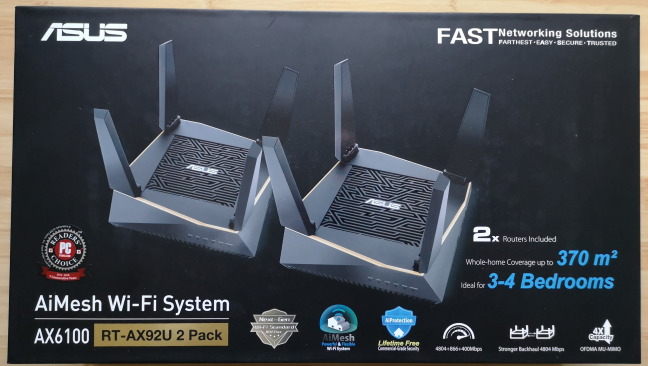
The ASUS RT-AX92U AX6100 AiMesh Wi-Fi system comes in a black box with a picture of the two devices that make up the kit, and a list of its most important characteristics. On the back and on the sides you find further information about the product you just bought.
The packaging used for ASUS RT-AX92U
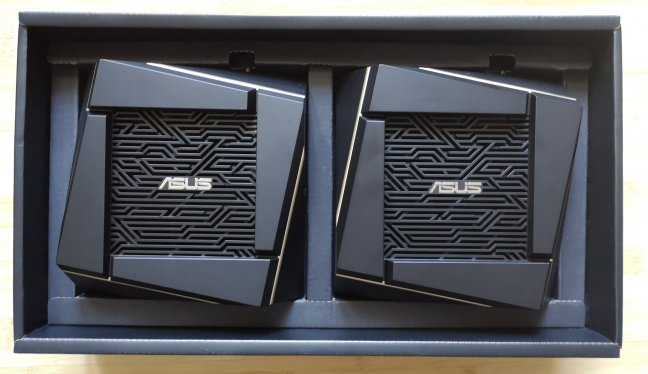
When you open the box, you immediately see the two devices that make up the kit.
Unboxing ASUS RT-AX92U
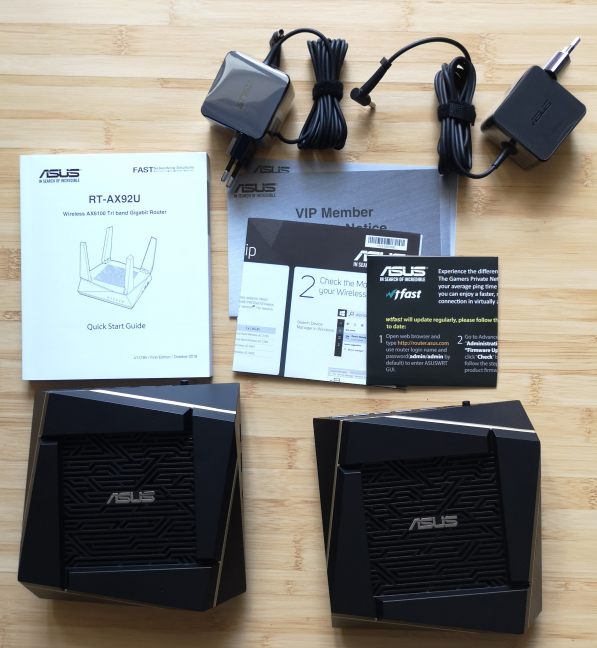
Beneath all the packaging, you find the following elements: the two stations in the kit, their power adapters, the quick start guide, the warranty, a leaflet with compatibility aspects that you should keep in mind when using the Wi-Fi 6 standard, and the user guide for using the WTFast VPN service for gamers that is bundled with ASUS RT-AX92U.
ASUS RT-AX92U - what is inside the box
The unboxing experience offered by the ASUS RT-AX92U AiMesh WiFi system is quick, and pleasant. Inside the box you find everything you need to get started.
Hardware specifications and design
ASUS RT-AX92U is a tri-band mesh WiFi system that uses ASUS's proprietary AiMesh technology. This means that you can use this kit in conjunction with other ASUS wireless routers and mesh WiFi systems. Its total theoretical bandwidth is split as follows: 400 Mbps for the 2.4 GHz band, 867 Mbps for the first 5 GHz band, and 4804 Mbps for the second 5 GHz band, if you are using the new Wi-Fi 6 (802.11ax) standard. However, if you are not using the Wi-Fi 6 wireless standard, the theoretical bandwidth of the second 5 GHz band lowers from 4804 Mbps to 867 Mbps.
The ASUS RT-AX92U AX6100 AiMesh WiFi System
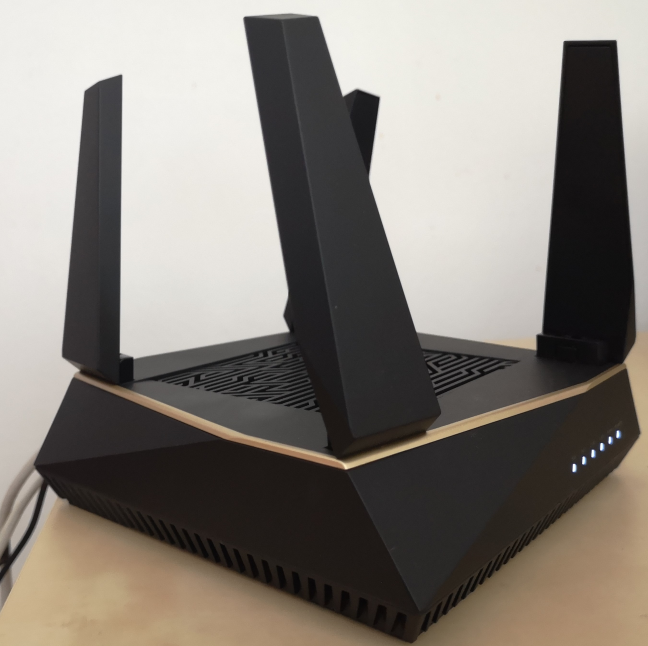
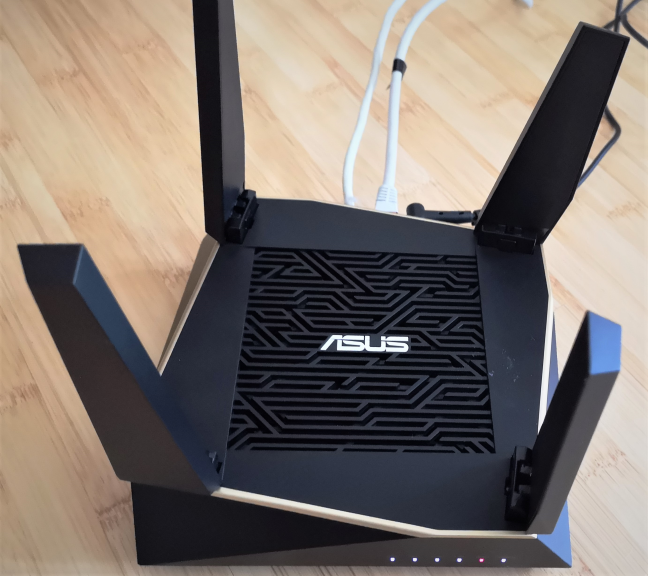
Another important aspect is that one of the two 5 GHz bands acts as a backhaul, meaning that it is used exclusively by the stations in your AiMesh to communicate with each other, and exchange data as fast as possible. Therefore, you can use only two of the three wireless bands to connect your network devices. As you can see in the picture below, each station in this kit has four external antennas. They are not detachable but they are retractable. There are also two internal antennas. On the top of each station, there are the ventilation grids, and the ASUS logo.
The top side of ASUS RT-AX92U
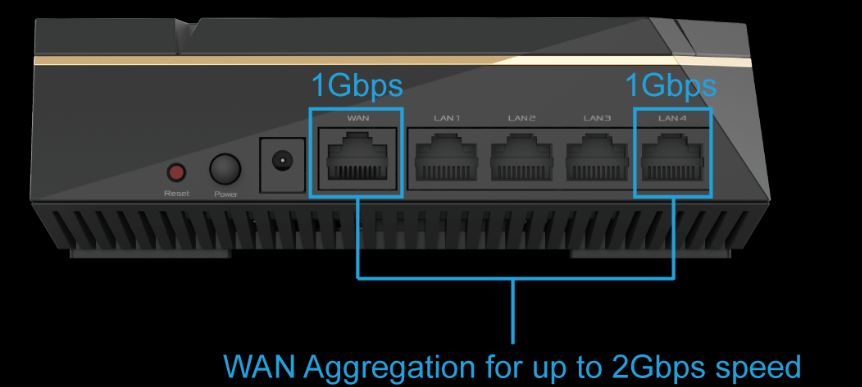
On the back side of each station, you find one WAN port, four Ethernet ports that work at 1 Gbps, the Power button, and the Reset jack. One useful feature is that ASUS RT-AX92U offers port aggregation. Therefore, you can either use LAN port aggregation and connect a NAS (Network Attached System) to the network, or you can use WAN aggregation and enjoy an internet connection up to 2 Gbps, if your internet provider supports this feature.
ASUS RT-AX92U - the ports on the back
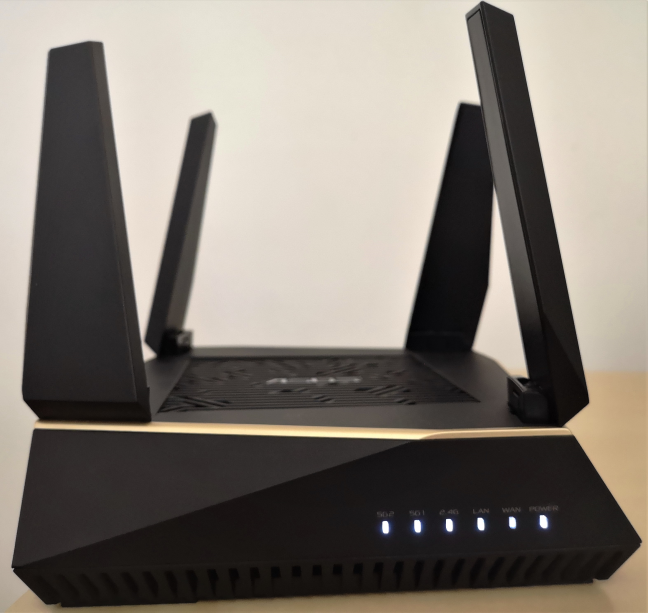
On the front side of ASUS RT-AX92U there are several LEDs that display the status for the following: the internet connection, the WiFi on the three available bands, the Ethernet connections, and the power. The LEDs are small, discreet, and not annoying, not even during the night. If you do not like them, you can turn them off from the firmware.
ASUS RT-AX92U - the LEDs on the front
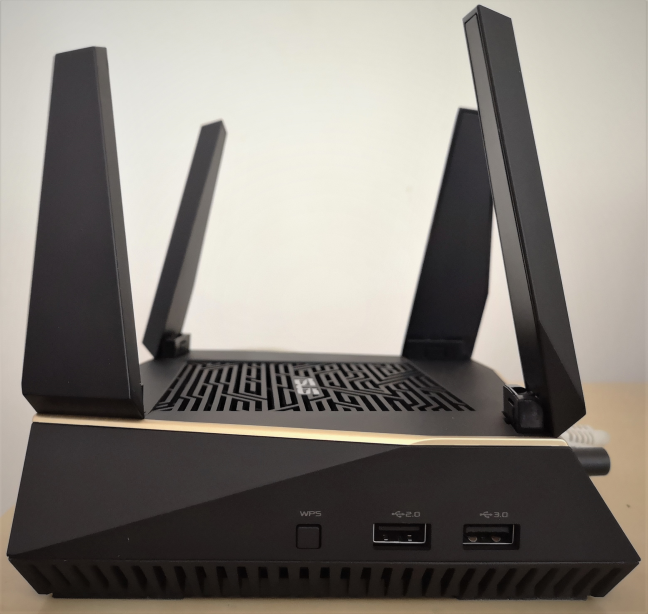
On one of the sides, you find one USB 3.0 port, and another USB 2.0 port, as well as the button for the WPS function.
ASUS RT-AX92U - the USB ports
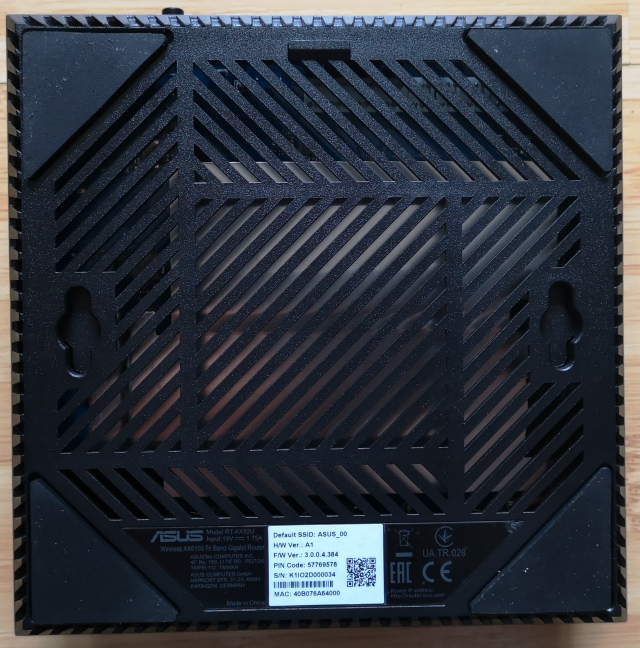
On the bottom of each ASUS RT-AX92U there are two holes for mounting it on walls, a sticker with information about the product, and further ventilation grids that help cool the hardware inside: a dual-core Broadcom BCM4906 processor, running at 1.8 GHz, with 512 MB of RAM and 256 MB of storage space for the firmware and the apps that you install. One interesting feature is that ASUS RT-AX92U offers 4x4 MU-MIMO transfers for the backhaul that exclusively transfers data between the nodes in your AiMesh, and 2x2 MU-MIMO for network clients.
The bottom of ASUS RT-AX92U
Each ASUS RT-AX92U has the following dimensions: 15.5 x 15.5 x 5.26 inches or 39.4 x 39.4 x 13.3 cm in width x depth x height. It also weighs 651 grams or 22.9 ounces.
If you would like to learn more about the official specifications of this AiMesh WiFi system, go to this page: ASUS RT-AX92U AiMesh AX6100 WiFi system Specifications.
Setting up and using the ASUS RT-AX92U AiMesh Wi-Fi system
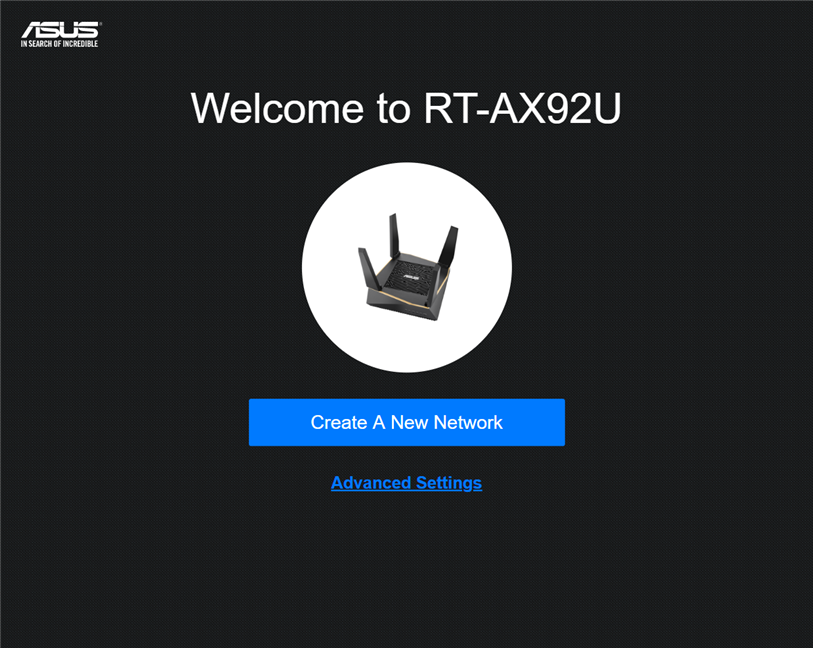
You can set up the ASUS RT-AX92U AiMesh WiFi system from the ASUS Router mobile app for iOS and Android, or from a web browser on your PC. We went the browser route, and the steps involved are pretty standard: you provide the details of your internet connection, enter the name and password for the wireless network broadcast by this AiMesh system, enter the username and password used for managing the kit, and then you add the second node to the system.
Setting up ASUS RT-AX92U
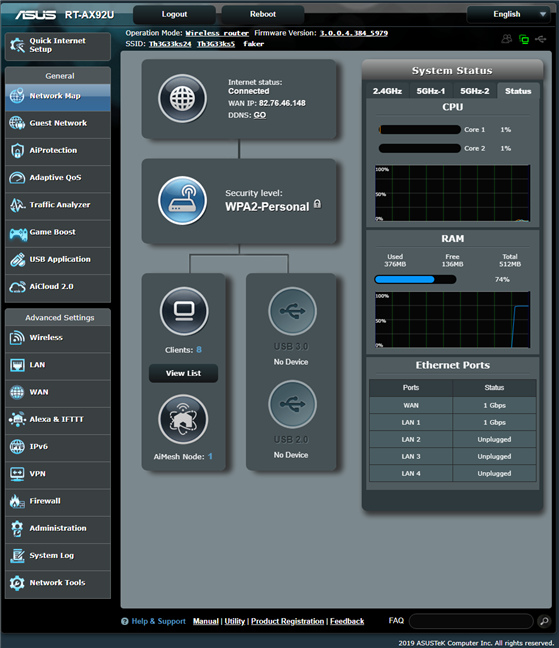
When you are done with the quick setup wizard, you can access the administration user interface, and configure how everything works, in detail. With AiMesh, you configure the mesh system as if it were a wireless router, not two mesh WiFi devices. This is a positive for advanced users who appreciate the complete control offered by ASUS's firmware.
The user interface available for ASUS RT-AX92U is friendly, and easy to use. All the settings are organized logically, and easy to find. Also, if you are an advanced user, you are going to appreciate the complete control that you get.
The firmware on the ASUS RT-AX92U
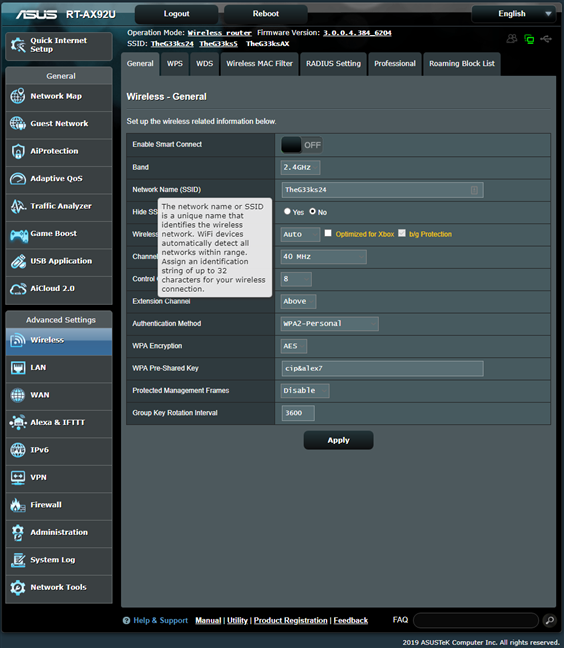
The user documentation is accessible and well built. One neat trick is to move the mouse cursor over a setting that you do not understand, and a question mark is shown. Click on the question mark, and you will see information explaining that setting. One downside is that the documentation has not been updated to include information about the newest features included by ASUS in their firmware. Therefore, for a few settings, this trick does not work.
ASUS RT-AX92U - Help tooltips
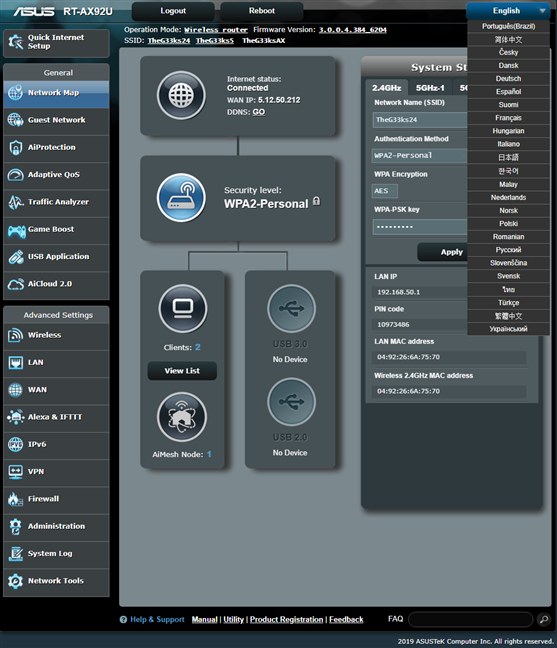
The firmware is available in 25 languages, which is something that you do not see often on mesh systems from other brands. ASUS has always stood out in this regard, offering excellent multi-lingual support in their firmware.
ASUS RT-AX92U - The languages for the firmware
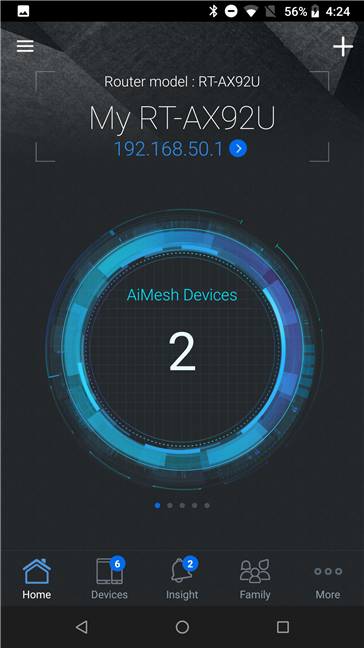
If you want to control your wireless network from a smartphone or tablet, including when you are not at home, you can use the ASUS router app. It offers many advanced customization options, including the ability to check on your children' devices, and set up rules for parental controls. The remote network diagnostics can be useful too when your family has problems with their WiFi, and you are not at home to help.
The ASUS router mobile app
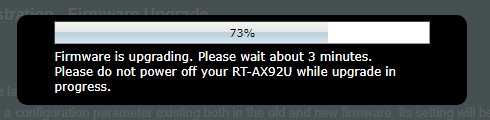
Regarding firmware - we noticed that the initial version that is shipped with ASUS RT-AX92U, tends to be buggy and unstable. We experienced random disconnects, and the WiFi was not always stable and fast. Luckily, we upgraded to the newest firmware version, and the situation improved a lot. However, we also found a downside to the firmware upgrade process: the firmware updates are handled separately for each device in the AiMesh, and this can become a complex task for home users who do not have a lot of technical knowledge. ASUS should simplify the firmware updates, so that they are handled globally, for the entire mesh system, not individually.
Updating the firmware on the ASUS RT-AX92U
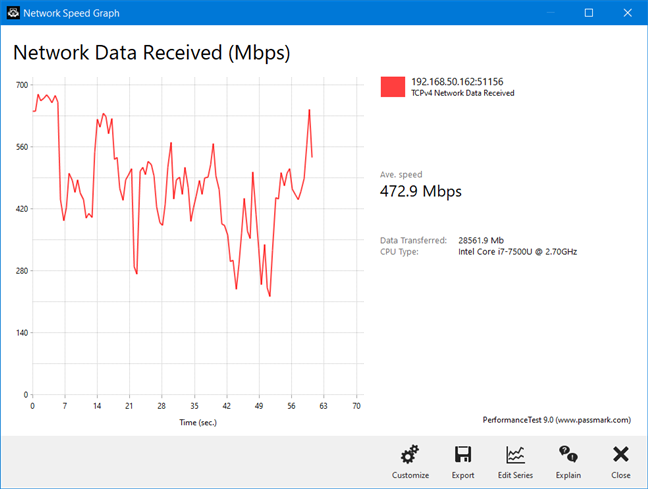
We connected more than a dozen devices to the network managed by ASUS RT-AX92U, including two desktop PCs, one laptop, one tablet, several smartphones, one wireless printer, two smart plugs, one smart bulb, an intelligent robot vacuum cleaner, and an Xbox One console. Then, we started sharing data and making data transfers. We enjoyed fast WiFi everywhere in our apartment. However, when making detailed measurements, we noticed quite a bit of variability. This is an area where ASUS should improve future firmware, so that WiFi transfers have a more stable throughput. To better understand this subject take a look at the transfer below, made in a room that was separated by one wall from the main station. If the transfer had been more stable, the average speed would have been even higher.
ASUS RT-AX92U - A wireless network transfer on the 5 GHz band
If you want to know more about the real-world performance offered by ASUS RT-AX92U, including comparisons with competing mesh Wi-Fi systems, go to the next page of this review.
Wireless network performance
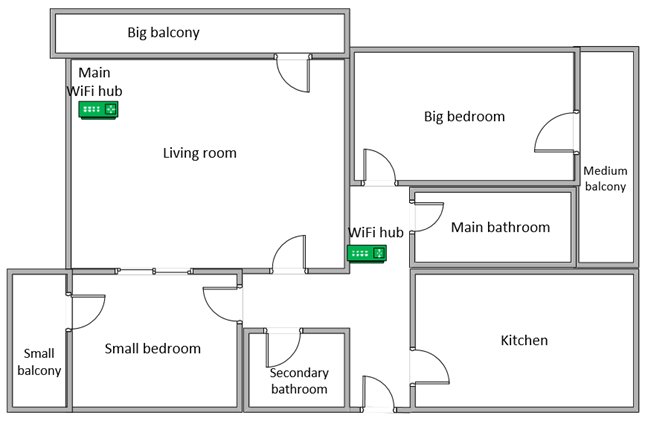
Let's take a look at the apartment that was used in our testing and how it is set up. You can see that the central ASUS RT-AX92U hub is placed in the living room. When we use wireless routers, the signal strength is not that high in rooms like the Kitchen and the Medium balcony. To improve the coverage of the network, we placed the ASUS RT-AX92U hub in the hallway, close to the entrance to the Kitchen, to cover most of the apartment as well as possible.
The apartment where we tested ASUS RT-AX92U
Our testing was done using a fast 1 Gigabit Internet connection that is capable of uploads on the internet of up to 500 Mbps. We used an HP Spectre 13 laptop for our measurements.
We compared the ASUS RT-AX92U AiMesh AX6100 WiFi system with two AC (Wi-Fi 5) mesh systems: Synology MR2200ac and TP-Link Deco M9 Plus. We did not test any AX (Wi-Fi 6) mesh systems so far, so we could not compare it to other models that have support for this standard. Also, we do not have network equipment with support for the Wi-Fi 6 standard, so our measurements were not made using Wi-Fi 6, but Wi-Fi 4 and Wi-Fi 5.
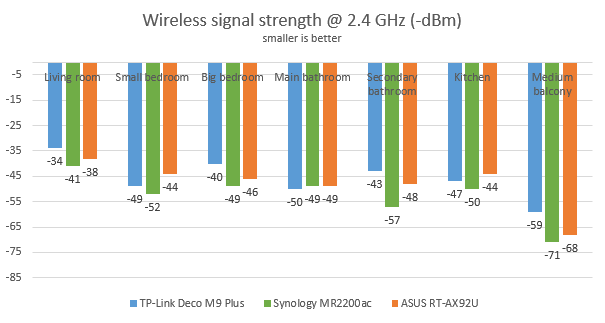
We started by evaluating the 2.4 GHz wireless network and measured the signal strength offered in each room, using a tool named NetSpot Pro. You can see the evolution of the WiFi signal strength, in the graphic below. ASUS RT-AX92U delivered good signal strength, without being the best mesh system in our comparison.
ASUS RT-AX92U - The signal strength on the 2.4 GHz band
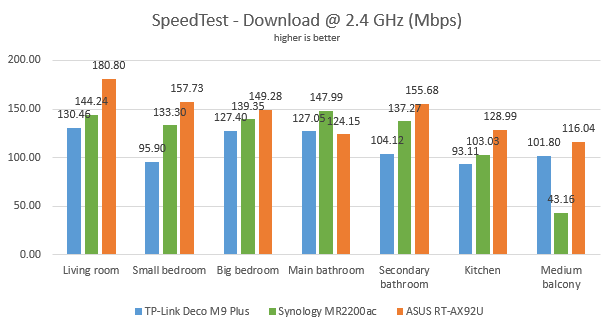
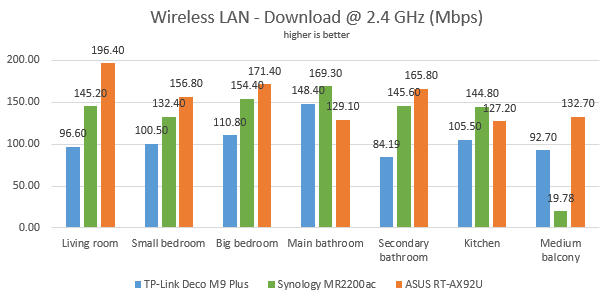
Then, we used SpeedTest to see how fast the internet connection is when using the 2.4 GHz wireless frequency. ASUS RT-AX92U delivered the fastest downloads in this comparison.
ASUS RT-AX92U - The download speed in SpeedTest, on the 2.4 GHz band
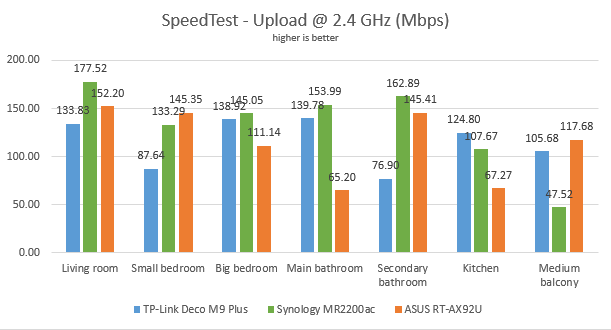
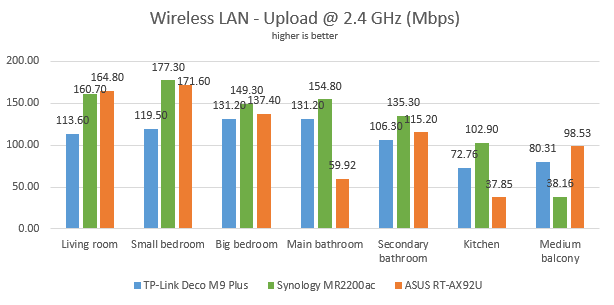
When we measured the upload speed, ASUS RT-AX92U was outmatched by Synology MR2200ac.
ASUS RT-AX92U - The upload speed in SpeedTest, on the 2.4 GHz band
For the next measurements, we used the PassMark Performance test to transfer data between two computers connected to the network, using the 2.4 GHz wireless frequency. This time too, ASUS RT-AX92U delivered the fastest downloads.
ASUS RT-AX92U - The download speed on WiFi, on the 2.4 GHz band
When we measured the upload speed, ASUS RT-AX92U was no longer the leader in our comparison.
ASUS RT-AX92U - The upload speed on WiFi, on the 2.4 GHz band
When you use the 2.4 GHz wireless frequency, ASUS RT-AX92U offers fast download speeds.
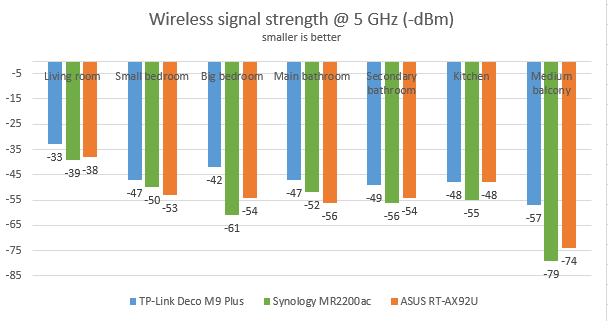
Next, we analyzed the performance offered by the 5GHz wireless network. First, we looked at the evolution of the signal strength, from room to room. ASUS RT-AX92U performed well, without being spectacular.
ASUS RT-AX92U - The signal strength on the 5 GHz band
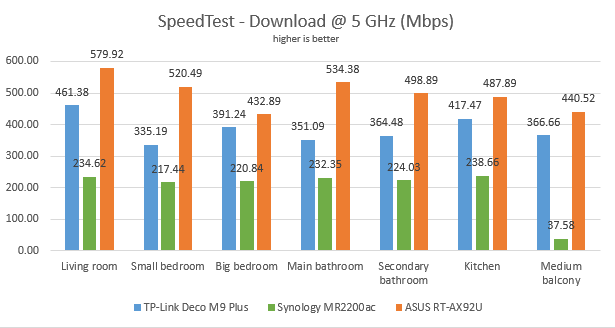
We then ran SpeedTest to see how fast the internet connection is on the 5GHz band. ASUS RT-AX92U impressed us with blazing fast downloads in all rooms. The results were excellent!
ASUS RT-AX92U - The download speed in SpeedTest, on the 5 GHz band
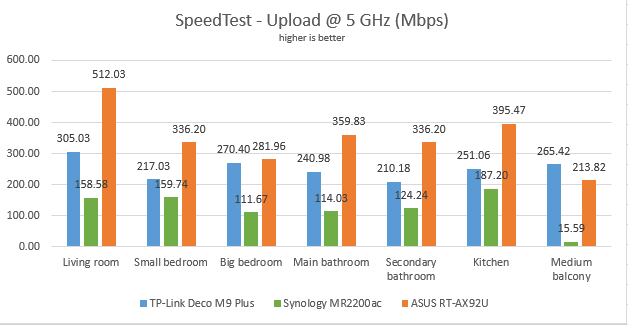
The same happened when measuring the upload speed with SpeedTest.
ASUS RT-AX92U - The upload speed in SpeedTest, on the 5 GHz band
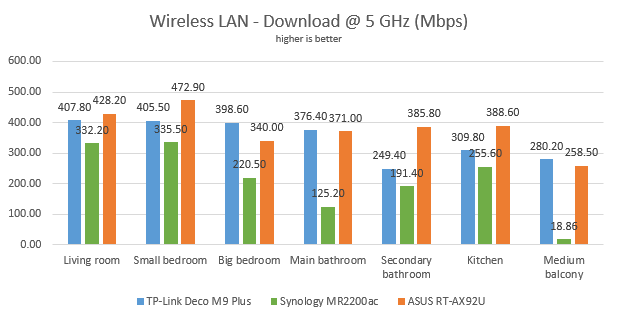
For the last measurements on the 5GHz wireless network, we used the PassMark Performance test to transfer data between two computers connected to the network. The speed difference between ASUS RT-AX92U and the other mesh WiFi systems decreased, due to the fact that network transfers had a relatively high degree of variability, when compared to the other mesh WiFi systems.
ASUS RT-AX92U - The download speed on WiFi, on the 5 GHz band
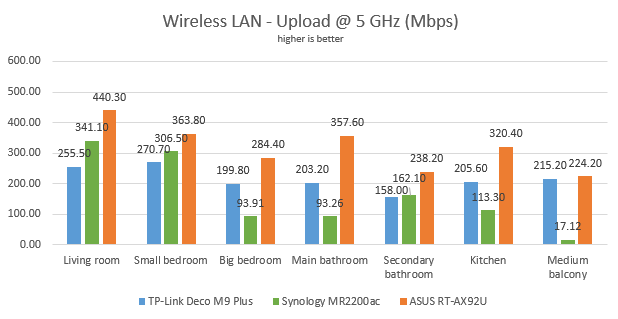
However, ASUS RT-AX92U was the speed champion when we measured the upload speed.
ASUS RT-AX92U - The upload speed on WiFi, on the 5 GHz band
When you use the 5 GHz wireless frequency, ASUS RT-AX92U offers impressive speeds, both for the download and upload.
Wired network performance
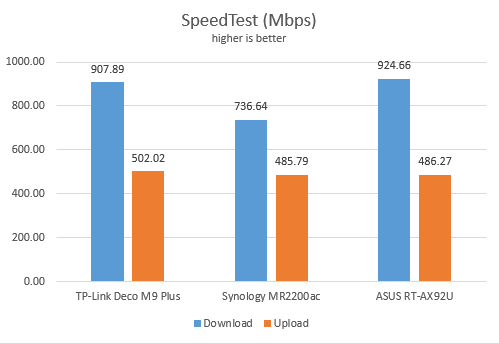
To test the quality of the wired Ethernet connection, we used a desktop PC and a mini PC, both equipped with a fast SSD. We measured the speed of the internet connection when using a 1 Gbps Ethernet cable, using SpeedTest. In this test, ASUS RT-AX92U reached the maximum potential of our internet connection.
ASUS RT-AX92U - SpeedTest on Ethernet connections
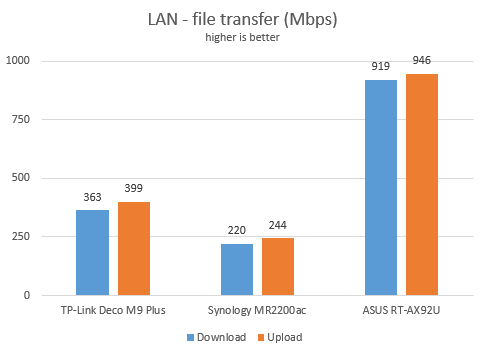
Then, we ran a network transfer between the two computers, each connected with an Ethernet cable to the main hub, and we ran data transfers between them, using PassMark Performance test. ASUS RT-AX92U reached speeds close to 1 Gbps, as promised in its specifications.
ASUS RT-AX92U - network transfers on Ethernet connections
The other mesh WiFi systems we compared it to delivered lower speeds, because they do not have enough ports to connect two desktop computers to the same station. Therefore, the network transfers were mediated through WiFi.
The Ethernet ports on the ASUS RT-AX92U work well, at speeds close to 1 Gbps. One upside is also the fact that each node in this kit has four Ethernet ports, while most mesh Wi-Fi systems only have two.
USB performance
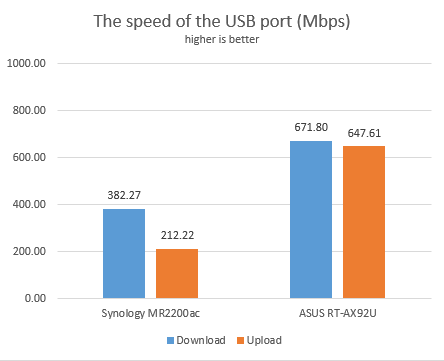
We connected a portable SSD to the USB 3.0 port of the ASUS RT-AX92U. We then transferred data between a desktop PC and the SSD. As you can see below, the USB 3.0 port on this AiMesh WiFi system can be fast. It was two to three times faster than the USB port of the Synology MR2200ac. We did not include TP-Link Deco M9 Plus in this comparison, because it does not have a usable USB port.
ASUS RT-AX92U - the speed of the USB 3.0 port
Unlike most mesh WiFi system, ASUS RT-AX92U does have USB ports. Also, the USB 3.0 port on it is the fastest we have encountered so far on a mesh system.
Extra features
The ASUS RT-AX92U AiMesh AX6100 WiFi system bundles many advanced features that are useful to users:
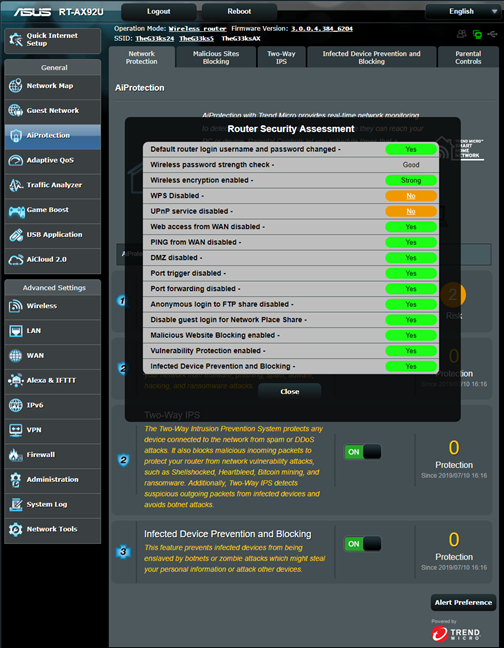
A comprehensive Router Security Assessment tool which verifies whether your settings are secure. When it finds problems, it proactively informs you and takes you where you need to be to fix things.
Malicious Sites Blocking - an efficient cloud-based module that blocks malicious websites on all the devices connected to your network.
Two-Way IPS - a two-way intrusion prevention system that protects all your network from spam, DDoS attacks, network attacks, and more. Additionally, it also scans the packets that are sent from your network to the internet.
Infected Device Prevention and Blocking - if your network devices get infected, and they become zombies in malware networks, they are automatically blocked, and you are informed about this problem so that you can fix things.
Parental Controls - useful, cloud-based parental controls that parents can use to set rules about internet access for their children's devices.
Adaptive QoS - an advanced Quality of Service feature that can be used to optimize network traffic, including but not limited to online gaming.
Guest Network - you can enable up to three wireless networks for each band, with individual security and access settings.
Traffic Analyzer - offers visual traffic statistics which give you a clear picture of how your network is used and by which devices.
USB Applications - apps that are designed to work with all kinds of devices that you can connect to the router using USB: external hard disks, printers, and 3G or 4G dongles or modems. You also have a Download Manager that you can use to set your AiMesh to download stuff from the internet, to an external hard disk that's connected to it.
AiCloud 2.0 - a mobile app that keeps you connected to your data wherever and whenever you have an Internet connection. With it, you can access the folders shared in your home network from your Android or iOS smartphone or via a personalized URL
IPv6 - support for IPv6 addresses that are going to replace IPv4.
VPN - you can set the AiMesh system to work as a VPN server, and you can also use it to turn your network-connected devices into VPN-enabled clients, without additional VPN software required.
Network Tools - for analyzing the network and identifying what's wrong. They are useful when you need to troubleshoot problems.
Dual WAN - excellent for both small businesses and professionals who require always-on internet connections. You can also use a dual WAN to improve the quality of your internet connection and get the best possible performance.
DDNS - a service that allows you to connect to the AiMesh from the internet, even if your internet provider gives you a dynamic public IP address.
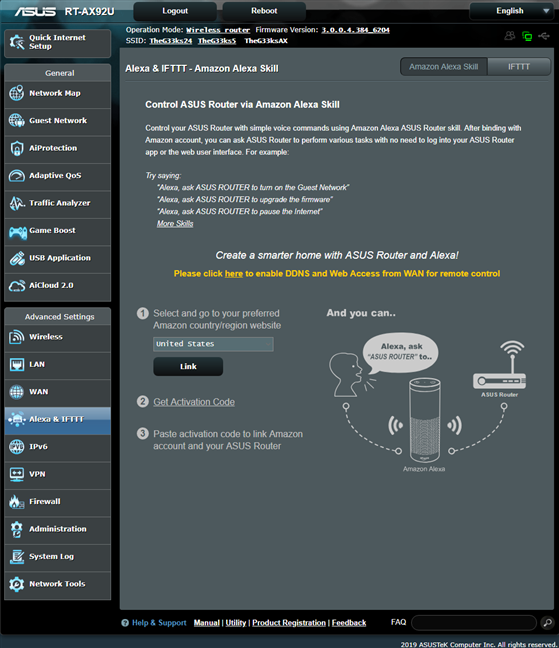
Integration with Amazon's Alexa voice assistant and IFTT (If This, Then That) - you can automate tasks that might otherwise be repetitive or unable to "talk to each other." With the help of these services, you can do things like saying "Alexa, ask ASUS ROUTER to upgrade the firmware" or getting an email when your child gets home and connects his or her smartphone to the home WiFi.
Alexa & IFTT integration
What is your opinion of the ASUS RT-AX92U AiMesh Wi-Fi system?
Now you know our opinion about ASUS RT-AX92U, what we like and do not like about it. Before closing this review, tell us your opinion about this product. Do you consider it a good choice? If you already have it, what has it been your experience with it? Comment below and let's discuss.
You wrote: “The LEDs are small, discreet, and not annoying, not even during the night. If you do not like them, you can turn them off from the firmware.”
I bought this pair after reading the review, but I’m having trouble disabling the LED:s. I’m accessing the settings through https://router.asus.com/ , and I’ve checked under Advanced Settings – Administration. I can’t find any option to disable the LED:s where are they?
Anonymous ·
We no longer have this mesh Wi-Fi system at hand. However, it was there in the firmware.
marlon ·
I purchase this set and I wasnt able to get these speeds, or anything close to that. I have a 300Mbs link. and the speeds match fine when using the master node. but the additional router(imesh node) speeds were significantly slower(lower than 10mb). were you using ethernet cable between the 2 routers or the 5G-2 as backhaul?
Anonymous ·
Nope, it was a 5 GHz wireless backhaul. You should optimize the positioning of the second node, if you get speeds that are this slow.
peter ·
Hi, thanks for the review, one thing i missed was the ram-usage.
I´m looking at this system but i need routers that don´t use like 80-99% of totalt ram. If you please, could you test the ax92u on how much ram your system is using in both idle and working.
Regards/peter
Anonymous ·
We no longer have them for testing. They got returned after the review.
Khaynn ·
Do you mean your AX92U is using 80-99% of the 512 MB of Ram ?
i have the same “issue”. I was using a AC88U just before, with the same amount of 512 MB of Ram, and the 88U was just using 25-30% .



































Discussion (7)
Thanks for an in-depth review!
You wrote: “The LEDs are small, discreet, and not annoying, not even during the night. If you do not like them, you can turn them off from the firmware.”
I bought this pair after reading the review, but I’m having trouble disabling the LED:s. I’m accessing the settings through https://router.asus.com/ , and I’ve checked under Advanced Settings – Administration. I can’t find any option to disable the LED:s where are they?
We no longer have this mesh Wi-Fi system at hand. However, it was there in the firmware.
I purchase this set and I wasnt able to get these speeds, or anything close to that. I have a 300Mbs link. and the speeds match fine when using the master node. but the additional router(imesh node) speeds were significantly slower(lower than 10mb). were you using ethernet cable between the 2 routers or the 5G-2 as backhaul?
Nope, it was a 5 GHz wireless backhaul. You should optimize the positioning of the second node, if you get speeds that are this slow.
Hi, thanks for the review, one thing i missed was the ram-usage.
I´m looking at this system but i need routers that don´t use like 80-99% of totalt ram. If you please, could you test the ax92u on how much ram your system is using in both idle and working.
Regards/peter
We no longer have them for testing. They got returned after the review.
Do you mean your AX92U is using 80-99% of the 512 MB of Ram ?
i have the same “issue”. I was using a AC88U just before, with the same amount of 512 MB of Ram, and the 88U was just using 25-30% .