ASUS Transformer Book T100 is one of the most popular 2-in-1 devices that were sold with Windows 8.1. It's a device that mixes a netbook with tablet and the result is a hybrid that is powerful enough to withstand common day to day activities, yet light enough to carry with you anywhere you go and with great battery life. This popular model has now received an upgrade, called ASUS Transformer Book T100HA. The new version has a slightly better processor, a rear camera (which the old T100 didn't have), a different screen resolution and comes with Windows 10 instead of Windows 8.1, but otherwise it's rather similar to its older brother. We were curious to learn how well it performs, so we tested it for a while and ran several benchmarks on it. If you want to learn what you get when you buy the ASUS Transformer Book T100HA , read this review:
Unboxing the ASUS Transformer Book T100HA
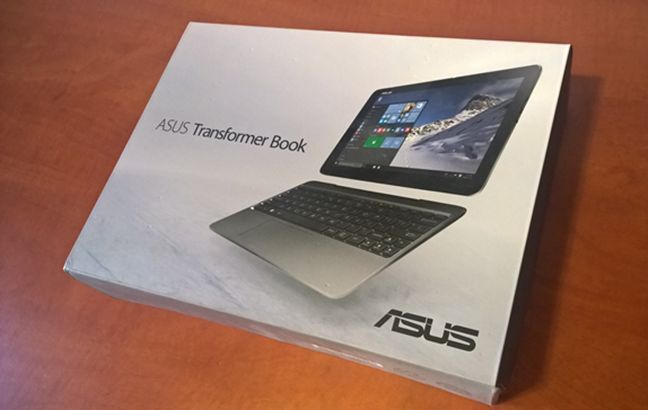
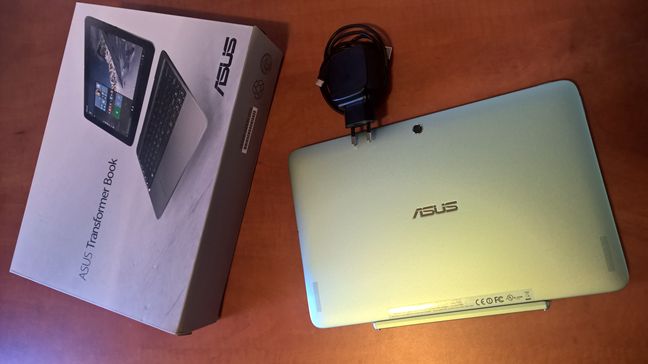
The ASUS Transformer Book T100HA comes packaged in a good looking box. It's colored in gray and black and on its top side there's an image of the device. In general, when you're thinking about budget devices, you also assume that they lack attention to detail, at least when it comes to the packaging. That's not the case with this product.
Inside the box, you'll find the ASUS Transformer Book T100HA (the tablet plus the keyboard dock), the charger, a micro USB cable, the quick start guide and the warranty documents.
If you'd like to get a better picture at what the package looks like and see what's inside the box, watch this unboxing video:
Hardware specifications
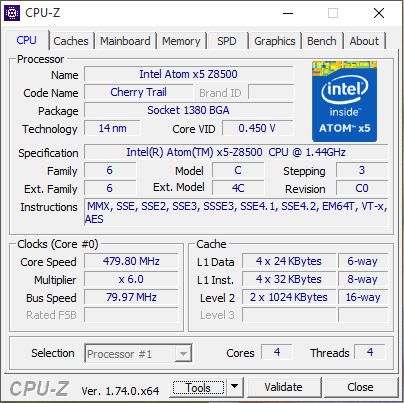
In terms of hardware processing power, the ASUS Transformer Book T100HA runs on a n Intel Atom Z8500 "Cherry Trail" quad core processor with Intel HD Graphics, at a default speed of 1.44 GHz. However, when needed, the CPU can automatically turbo boost its speed up to 2.16 GHz.
When it comes to RAM memory, depending on the model you purchase, the ASUS Transformer Book T100HA is sold with either 2GB of DDR3 RAM or with 4GB. The model we had for testing was the one with 2GB of RAM.
The ASUS Transformer Book T100HA is available in configurations with 32GB of storage space, 64GB or 128GB. If you need more space, you can always add a microSD card into the appropriate slot.
This device includes 2 cameras: one found on the rear of the tablet (offering a resolution of 5 megapixels) and one on the front (with a resolution of 2 megapixels).
The communications are handled by an integrated wireless network card capable of using the 802.11 a/b/g/n network protocols, and by a built-in Bluetooth 4.0 chip. Unfortunately this device can't connect to modern 802.11ac wireless networks.
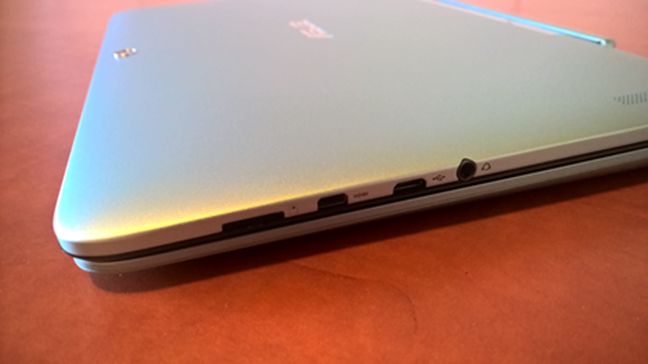
In terms of connectivity, the ASUS Transformer T100HA is quite generous, considering that most of the ports are found on the tablet. On the tablet's right side you get a 3.5 mm combo audio jack (which means you can use it to plug in both a microphone or headphones/speakers), a micro USB port, one micro HDMI slot and a slot for adding microSD cards.
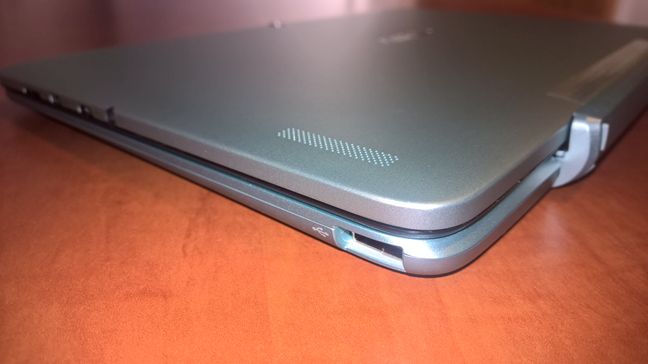
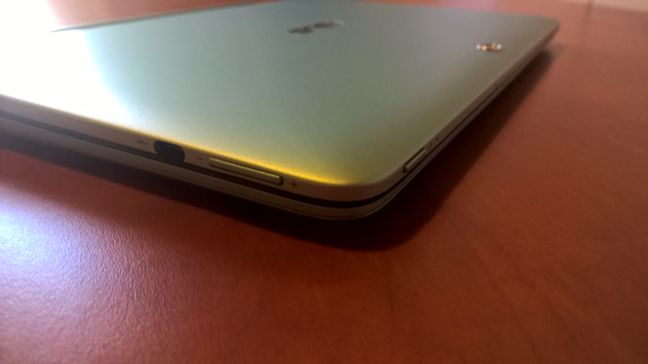
On the left side of the tablet, you'll find only one connector: a USB-C port, capable of transfers of up to 5 Gbps. On the keyboard dock you'll find only one connector: a normal USB 2.0 port.
Besides the various interface ports found on the sides of the tablet, you'll also find a power button placed on the top left, and a volume rocker positioned to the top of the tablet's left side.
It's worth mentioning that the tablet also has built-in speakers and a microphone.
In terms of size, the tablet part of the ASUS Transformer Book T100HA is 265 x 175 x 8.45 mm (10.43 x 6.89 x 0.33 inch) in width, depth and height, while the keyboard dock is 265 x 173.7 x 10 mm (10.43 x 6.89 x 0.28 ~0.39 inch). The tablet weighs 0.58 kg (1.28 lbs), and the keyboard dock 0.46 kg (1.04 lbs).
The ASUS Transformer Book T100HA is powered by a 30 Whrs lithium-polymer battery, that promises to last up to 12 hours. The battery is obviously placed in the tablet portion of the device. Unfortunately, the keyboard dock doesn't include an additional battery so using it won't increase the autonomy of this 2-in-1 device.
Finally, we believe that it's important for you to know that the ASUS Transformer T100HA comes with Windows 10 installed. If you'd like to see more details about the specifications of the ASUS Transformer Book T100HA, head to its official web page, here: ASUS Transformer Book T100HA Specifications.
Using the ASUS Transformer T100HA
We tested, benchmarked and used the ASUS Transformer T100HA for more than a week now. But before we get to the tests and benchmarks section of this review, we'd like first to tell you more about how it feels to use it and how well it handles daily computing activities. After all, that's what we did mostly, as the benchmarks took only a day or so. In all the other days we had it in our hands, we did things like writing articles and reviews for Digital Citizen , surfing the web, chatting on Skype or watching movies. We even did some light gaming.
We're happy to say that we did all these tasks without issues. The hardware of the ASUS Transformer T100HA is enough to handle all these common computing tasks and both the universal apps and the desktop apps we used, worked great.
The Intel Atom Z8500 processor and the 2 GB of RAM memory from our test model might not seem much if you compare the ASUS Transformer Book T100HA with a laptop, but they are quite something when comparing this device with other tablets.
We grew fond of the ASUS Transformer Book T100HA when using it on a daily basis. Sure, it may not be the greatest 2-in-1 out there and it's also not a premium device. But for its price, it offers a lot. Good performance and good looks. It's mainly built from aluminum, so it looks nice and feels nice when you hold it in your hands.
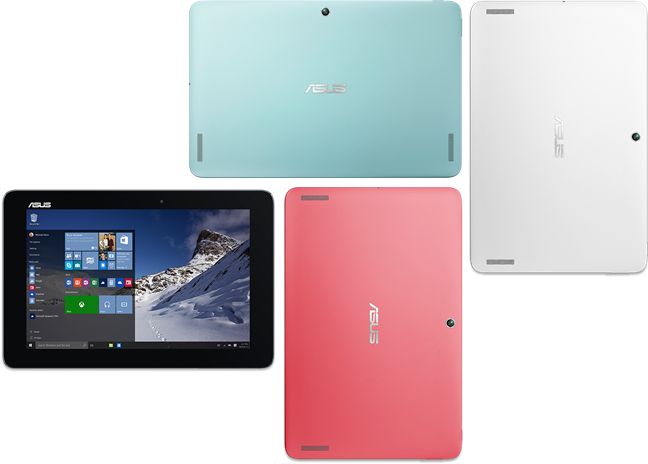
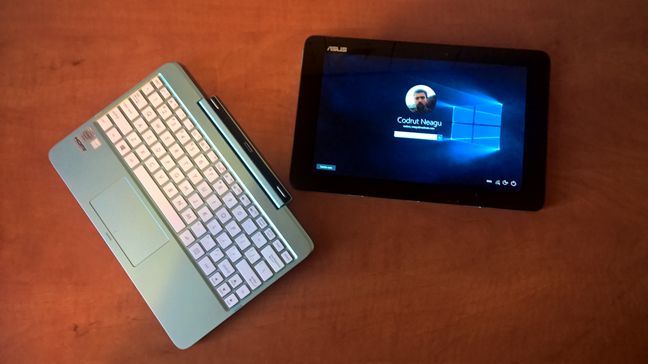
The ASUS Transformer Book T100HA is available in four vivid colors: Tin Grey, Silk White, Aqua Blue, and Rouge Pink. Our test sample was an Aqua Blue and we must say that we liked it. It's a fresh and optimistic color, that fits this device very nicely.
The screen looks good and its IPS panel offers good contrast, natural colors and wide viewing angles. You'll have no problems using this device indoors or outdoors, and the screen is bright enough to be visible even in direct sunlight. What we don't like about the T100HA's screen is the fact that it's glossy. It's easy for it to gather dust and fingerprints. We know that most people like glossy screens, however, we'll always prefer matte displays.
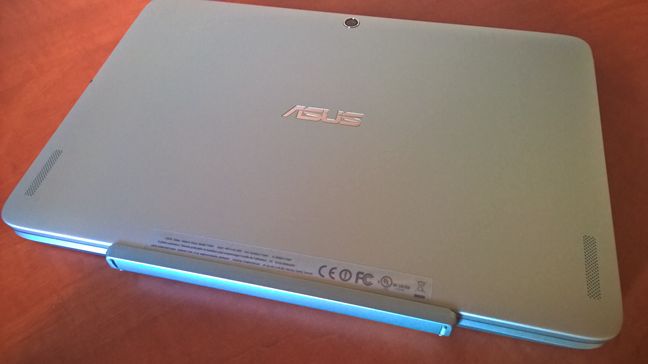
The first ASUS Transformer Book T100 model had glossy surfaces everywhere, even on the back of the tablet. In contrast, the new model has a smooth matte finish on the back of the tablet, which we consider an improvement, as it makes it a lot more comfortable to hold in your hands and helps fight fingerprints.
The back of the tablet is also the place where you'll find two built-in stereo speakers. While listening to music or watching movies, we found the sound to be quite good for a tablet: it's clear enough and loud enough to enjoy listening to music and watching videos. However, as is the case for almost all small form devices, the speakers suffer from distortion when maximizing the volume level. We don't recommend that you take the volume to its maximum level. If you really want loud sounds, you might want to take advantage of the 3.5 mm audio jack or the built-in Bluetooth chip to connect a headphones set or portable speakers.
The ASUS Transformer Book T100HA that we tested came with an eMMC drive of 64 GB. We found that to be enough to install all the apps and desktop programs we normally use. However, after that, the device only had about 10 GB of free storage space left on it. If you consider buying the ASUS Transformer Book T100HA, we recommend that you go with the 128 GB version, as the difference in price is not large. Either way, you'll probably be happy that this device has a microSD slot which you can use extend your storage space.
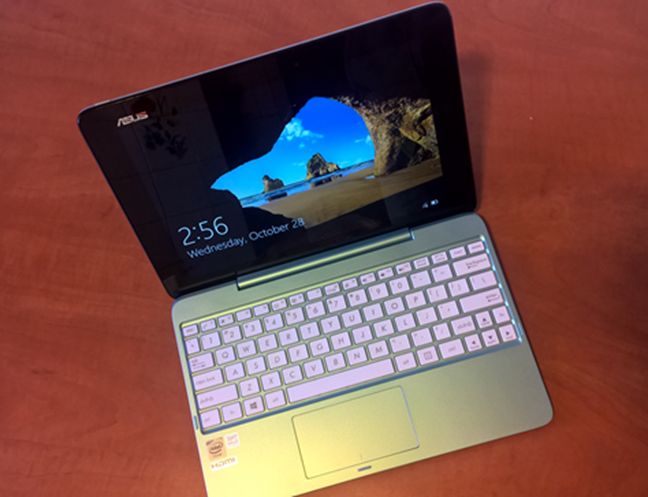
Next, let's take a look at the keyboard dock and start with what we liked about it. It's nice that, unlike what we've seen on other 2-in-1s, the keyboard dock doesn't attach to the tablet just with the help of magnets. Sure, it does have magnets, but the keyboard dock is physically connected to the tablet - the tablet actually stays inside the keyboard dock, making the whole setup look very much like a laptop. This has another advantage too: you don't risk accidentally splitting the 2-in-1 and drop the tablet or the dock when you hold the device. One negative is that the keyboard dock, even if it's made of metal, is lighter than the tablet. Unless you use the device on a flat surface, the tablet i s very likely to fall on its back . For instance, it's quite difficult to keep the ASUS Transformer Book T100HA on your lap.
Speaking of the keyboard, it's OK to use it for short to average periods of time. The keys have enough space between them to feel comfortable, considering how small the device is. However, it will take some time for you to get used to its "crowded" key layout. While the keyboard can do its job properly, the trackpad can not. We liked the fact that the trackpad is large enough to be usable, but it has a problem of not responding at times. We don't know why that happens, but it can happen anytime. This bug is quite annoying, so our recommendation for you would be to buy and use a wireless bluetooth mouse. It will make your life a lot easier.
ASUS Transformer Book T100HA has its flaws here and there, but it's still a very good device to get your work done when you're on the go. It looks nice, it works well and it feels good when you hold it. We liked the IPS screen with its rich colors and wide viewing angles, we liked the matte finish of the case, and we especially liked how the hardware handles most apps the average user will work with.
The apps bundled with the ASUS Transformer Book T100HA
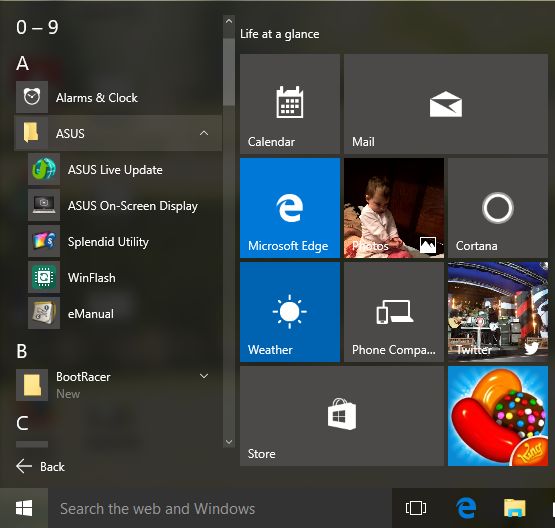
Most hardware devices come with various apps bundled by their manufacturers. Some devices have way too many bundled apps, while others don't. ASUS Transformer Book T100HA is somewhere in the middle. ASUS bundled a few apps and some can prove to be useful to you:
ASUS WinFlash - an application dedicated to updating the BIOS software of the device. You should keep it.
ASUS Live Update - an application that you can use to manage the operating system updates. Very similar to the settings found in Windows.
ASUS eManual - the user manual of the ASUS Transformer Book T100HA.
ASUS Splendid Utility - an application that you can use to switch between color presets for the display.
ASUS On-screen Display - turns on or off the on-screen display of notifications, other than those already shown by Windows.
Netflix - depending on where you live, you'll either love this app or dislike ASUS for bundling it. In the US and a couple of other countries where Netflix is available, you will want to use this app and stream movies and TV shows to your device. In countries where this service is unavailable, you should uninstall this app as it will not provide any value to you.
Flipboard - a popular news app which you can use to create customized magazines based on your news feed. You may want to experiment it with before deciding on whether to keep it or not.
Twitter - the official Windows app for this social network.
The ASUS Transformer Book T100HA doesn't bundle too many apps and some of them are useful and you should keep them.
Performance in benchmarks
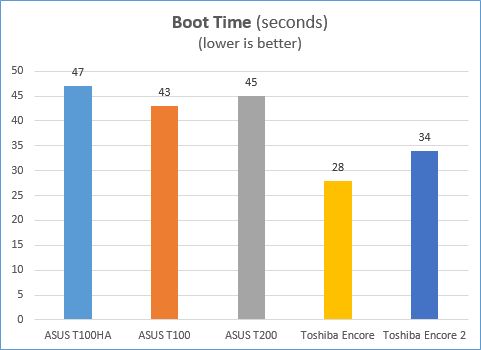
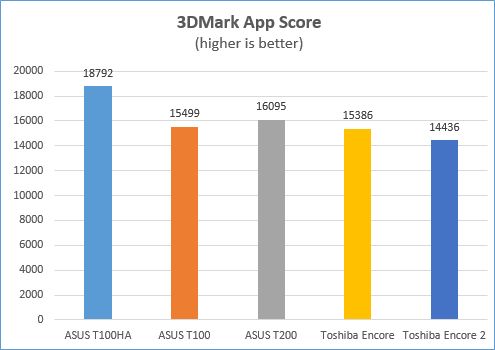
The hardware of the ASUS Transformer Book T100HA is less powerful than what you'd find in a laptop, but it's also quite a lot for a tablet. To get a clearer picture of its performance we've run a few benchmarks and compared the results with those we got on the original ASUS Transformer Book T100, those we got from the ASUS Transformer Book T200 and two similar devices from Toshiba: the Toshiba Encore and the Toshiba Encore 2.
The first thing we measured is the average boot time. To do that, we used BootRacer. As you can see from the chart below, our ASUS Transformer Book T100HA was quite slow. However, we must also mention that the T100HA is the only one that runs on Windows 10 and that may hold significance.. The other devices in our chart were all running Windows 8.1.
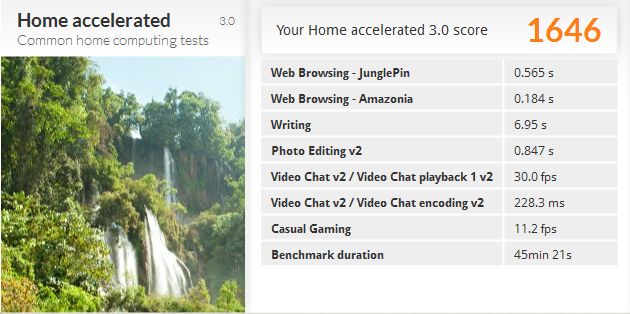
Next, we wanted to assess this device's performance in everyday computing situations, like when you're writing documents in Office, browsing the web, chatting on Skype or playing some casual games. We turned to the PCMark 8 benchmark and we ran a few tests with its Home accelerated preset. As you can see in the screenshot below, we got a score of 1646 points
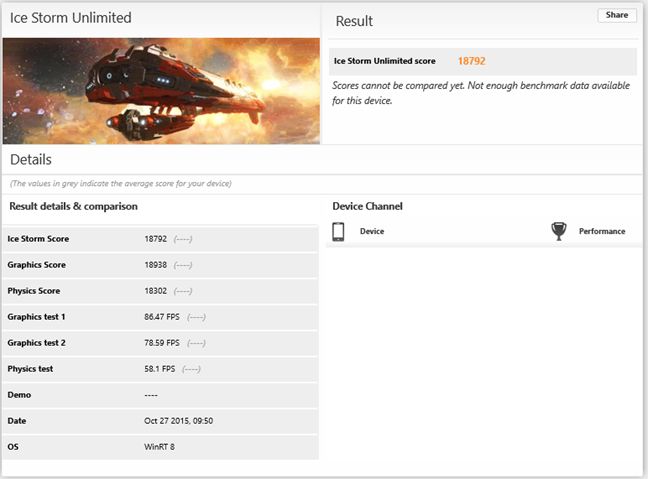
Then, we ran the 3DMark, a popular gaming benchmark app, in order to measure the gaming performance offered by the ASUS Transformer Book T100HA when playing casual games aimed at tablet users. We ran the Ice Storm Unlimited tests and we got a score of 18792 points.
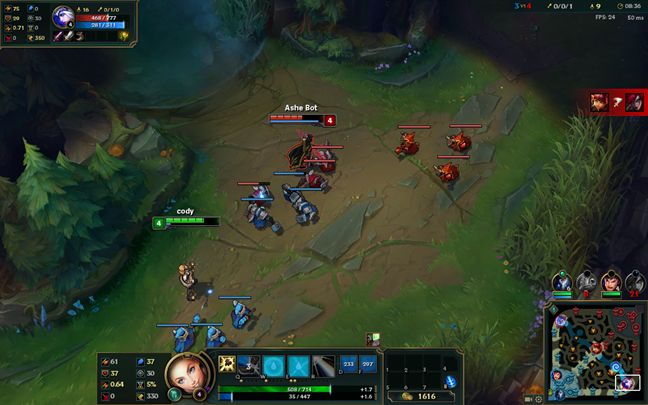
ASUS Transformer Book T100HA does quite well even in light gaming situations. After seeing that, we thought "What if… we'd actually try playing a desktop game? It should be a game that's wildly popular and one that does require average hardware resources. Let's play League of Legends!". It sounds awkward, right? Playing League of Legends on a device that's actually a hulked tablet. Well, we tried it! We downloaded the League of Legends client and we played a few games. The ASUS Transformer Book T100HA actually did OK!
We were able to play League of Legends on high settings at a medium frame rate of about 35 fps, with the lowest frame drop going to about 24. Changing the video settings to medium or low raised the average fps we got to about 50 - 60. This is great - a "tablet-like" device that's able to run games decent!
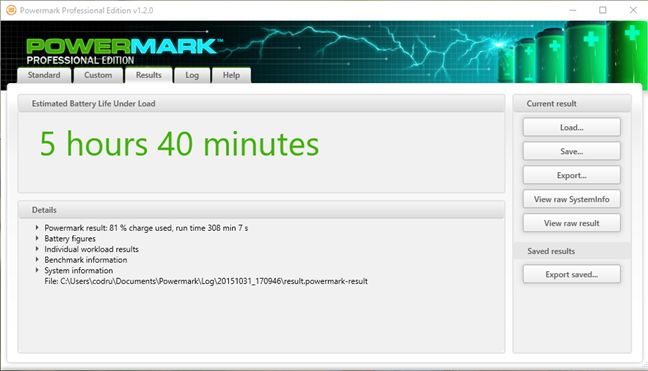
Finally, we ran PowerMark in order to see how well the ASUS Transformer Book T100HA does in terms of its autonomy. We chose to run the Balanced tests so that we'd get results for battery life when doing all kinds of stuff, like browsing the web, doing some light photo editing, watching movies or chatting online. After all the tests were ended, we got an estimated battery life of 5 hours and 40 minutes, which is OK in our opinion.
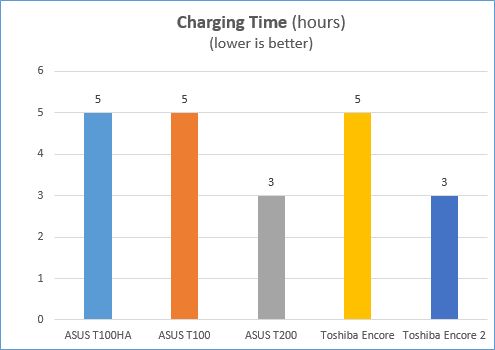
After we measured the battery discharge time of the ASUS Transformer Book T100HA, it was only natural to also check its charging time. It took 5 hours to fully charge this device back to 100% battery, which is exactly the amount of time it took for it to go empty. It's not a great result, if you ask us, even though it is on par with the first ASUS Transformer Book T100.
The ASUS Transformer Book T100HA offered good results in all the benchmarks we ran. It's a well-rounded device that can handle normal computing activities, like browsing the web, writing documents or video chat without any issue. Even more, it's also powerful enough for you to be able to do some casual gaming sessions on it.
Product rating3/5
Verdict
The ASUS Transformer Book T100HA is a good looking device, with a better than average build quality, a good level of performance and an affordable price tag that makes it stand out. There may be other similar devices out there that perform better or look nicer, but they will surely cost more. If you want a device that's easy to carry with you anywhere you go, with good battery life and powerful enough to do your work and even some light gaming, ASUS Transformer Book T100HA should be among your top choices. We liked the new version of ASUS Transformer Book T100 and we think that it deserves our "Budget choice" award.
Hi, I liked your description of the Asus transformer device. I am using the older version now and it was working fine until the sound stopped working. I believe you might be able to help me.
The device has a message that says video hardware not found. I tried everything I knew how but I think I might have it messed out a little. I changed the Sound, video and game controller drivers and now I do not remember the original ones it had ” Please send me the details of them and link to download them.” and I do not know what the video hardware relates to.
I do not know if I came to the right place but if you can, please help me.

















Discussion (1)
Hi, I liked your description of the Asus transformer device. I am using the older version now and it was working fine until the sound stopped working. I believe you might be able to help me.
The device has a message that says video hardware not found. I tried everything I knew how but I think I might have it messed out a little. I changed the Sound, video and game controller drivers and now I do not remember the original ones it had ” Please send me the details of them and link to download them.” and I do not know what the video hardware relates to.
I do not know if I came to the right place but if you can, please help me.