



ASUS has been kind enough to send us one of their newest Transformer Book devices. It is the big brother of the T100 that we tested a while ago - the new ASUS Transformer Book T200. We were very curious to learn what's different about this device and whether it is a worthy upgrade over its predecessor. We've tested it for a week and today we are ready to share what we have learned about it. Read on as this is one of the first reviews in the world for this device.
Unboxing the ASUS Transformer Book T200
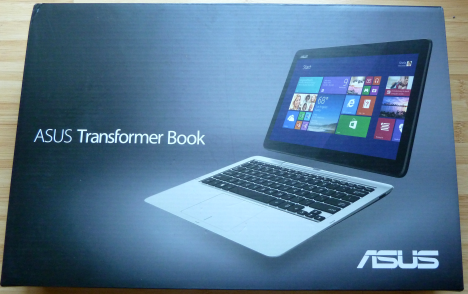
The ASUS Transformer Book T200 is packaged in a box that's very similar to the ASUS Transformer Book T100, with a big picture of the device on the front.
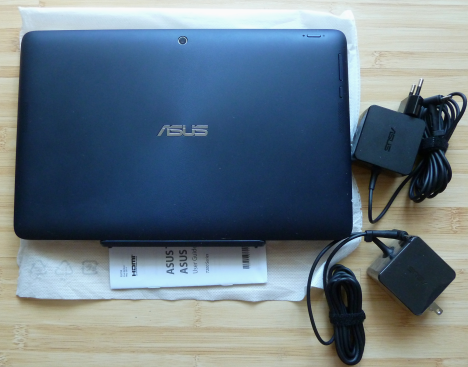
The box we have received for review contains the tablet, the keyboard dock, and two charging adapters. Unlike the ASUS Transformer T100, the charging adapter does not feature a USB port in which you can plug different cables. Paper-wise, you will find a quick start guide, the warranty, and some other leaflets, depending on where you have purchased this device.
Hardware Specifications
The hardware specifications of the model we reviewed are the following: a 11.6" IPS screen with a 1366x768 resolution and fairly decent viewing angles, a quad-core Intel Atom Z3775 CPU clocked at 1.33 GHz with Intel HD Graphics, 2GB of RAM memory (LPDDR3 ), clocked at 1066 MHz, 64GB eMMC of storage space manufactured by Hynix, containing the operating system and a 500GB Hitachi hard disk drive for storage. There's also a front-facing 2 megapixel camera for occasional video chat and a 5 megapixel rear camera for occasional photos (if you are one of those people using their tablets to take photos, that is). The tablet portion of the ASUS Transformer Book T200 houses two built-in rear facing speakers, a microphone, the cameras, the volume rocker, the power/lock switch and the Start button. Its size is 305 x 194 x 11.95 mm (Width x Depth x Height) while the dock's dimensions are 305 x 200 x 26 mm (Width x Depth x Height). The tablet weighs around 0.78 kg / 1.71 pounds (battery included) while the dock weighs 0.76 kg / 1.67 pounds. The device is powered by a polymer battery with a capacity of 38 Whrs, lasts up to 11 hours. The battery is obviously placed in the tablet portion of the device. The dock doesn't include a battery though, so using it won't make the device last longer in terms of autonomy. In terms of connectivity, the ASUS Transformer Book T200 includes one USB 3.0 port located on the left side of the dock right next to a RJ45 LAN connector, a USB 2.0 port on the right side, a 802.11a/b/g/n compatible wireless network adapter and a Bluetooth 4.0 chip.
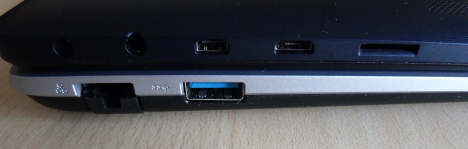
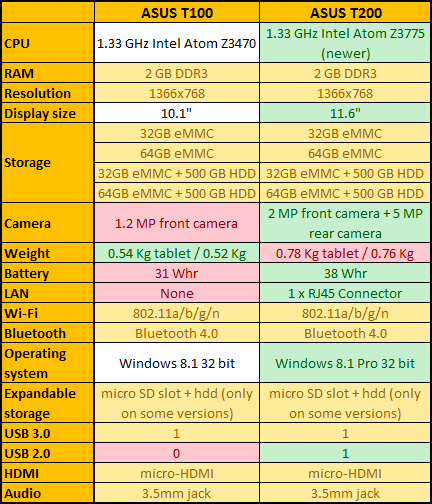
For multimedia purposes, ASUS included a micro-HDMI port located on the left side of the tablet, where you can also find a micro-USB port, a Micro SD card reader and a 3.5mm audio jack. On the right side of the tablet, there are no buttons. The operating system preinstalled on this device is Windows 8.1 Pro 32-bit. This device is available in multiple storage configurations: 32GB eMMC, 64GB eMMC, 32GB eMMC with 500 GB HDD and 64GB eMMC With 500 GB HDD (the model we have tested). You cand find its official hardware specifications here: ASUS Transformer Book T200 Specifications. To gain a better overview of the T200 compared to its brother, the T100, take a look at the table below.
Using the ASUS Transformer Book T200
I have been using the ASUS Transformer Book T200 for one week, every day, for a relatively wide array of tasks including reading and sending emails, connecting to social networks, browsing the web, streaming videos and writing articles for 7 Tutorials. In fact, most of this review was written on the device itself. Looking back to the user experience offered by this device, the ASUS Transformer Book T200 doesn't disappoint in terms of performance. The quad-core Atom processor paired with 2GB of LPDDR3 RAM didn't have any kind of problem when running any Windows Store apps, except for a few more demanding games that caused the device to stutter every now and then. The CPU is a small improvement over the one found in the T100 and it doesn't make a big difference in terms of performance.
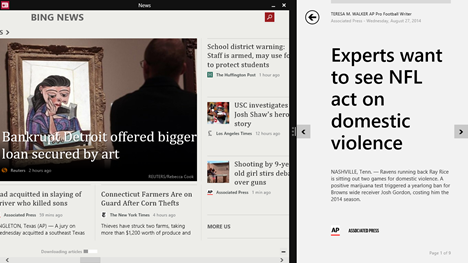
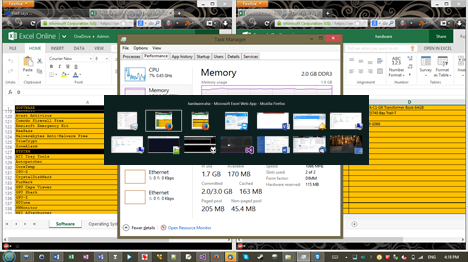
The devices also does a good job at handling desktop applications. I ran most of the applications that I use on my personal computer on the ASUS Transformer Book T200 and there were very few signs of stuttering. The desktop version of Skype, Office 2013, Steam, Winamp, multiple web browsers, IrfanView or SnagIt, all ran fairly well. There was, however some latency when switching between more than 4 or 5 desktop applications, and this is where the biggest issue of the T100 makes another graceful appearance. The fact that this device has only 2GB of RAM doesn't help when you have to work with many desktop applications at the same time.
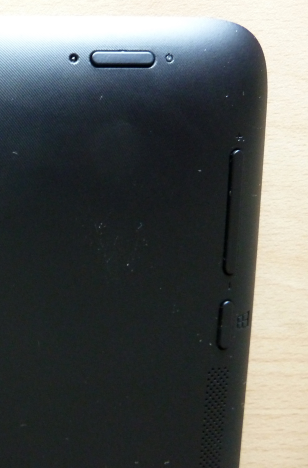
On the positive side, ASUS seems to have learned their lesson after launching the T100 and we were very happy to see that the glossy surface on the back of the tablet is gone. The T200 has a smooth, matte textured surface on the back of the tablet. This improves the grip and leaves no room for fingerprints. Kudos to ASUS for this welcome improvement. On the back of the tablet you'll find two built-in speakers of decent quality. Even if the volume can be fairly loud, I don't advise maxing it out because the sound becomes distorted at high levels. Fortunately, the 3.5mm jack is present on the left side of the tablet, so you can plug in your favorite pair of headphones. The volume rocker is also better fixed into the case, unlike the one on the T100, which I often had to press deep inside the tablet's case in order for it to respond. Our test model had 64GB of storage space on an eMMC drive containing the operating system and this was paired with a classic 500GB hard disk, located in the docking station. This is an improvement over the T100, since you can now store a lot more data on it. While on the T100 I had quickly arrived at the point where I had to uninstall apps in order to make room for others, that was not the case here. The 64GB eMMC storage was more than enough for the software and apps to be installed properly. You will definitely notice an interesting contrast between the tablet itself and the dock, since the latter has a smooth matte grey texture unlike the dark case of the tablet. The keyboard dock offers a more pleasant experience than the T100. The keyboard is better spaced and less cramped. After a few hours of typing, I managed to hit the right keys without looking too much at them. The only issue we've experienced with the keyboard is that some of the keys don't always respond well. For instance, we had some problems with the CTRL+C/CTRL+V shortcuts which didn't get registered all the time. Judging by other forums on the Internet, we're not the only ones with this problem, as keyboard issues affect some T100 and T200 owners.
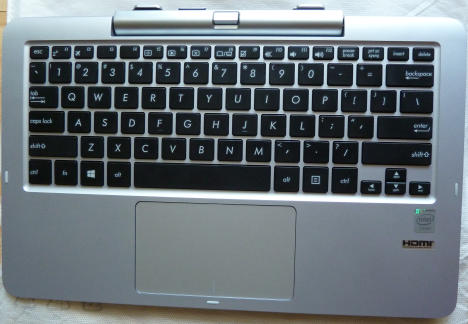
Another positive aspect is that the tablet stays inside the keyboard dock, so you don't have to worry about it falling while typing on your lap. It only comes out when you push the button to remove it. The trackpad is also better than the one found on the T100, having a better response time and not being very noisy. However, we still recommend using a Bluetooth mouse with this device. We have reviewed several Bluetooth mice here at 7 Tutorials, including the Microsoft Wedge Touch. You should consider browsing through our section of reviews in order to find a good mouse to go with the ASUS Transformer Book T200. ASUS chose again to place the Start button on the left side of the tablet, near the volume rocker. Unfortunately, using this button is uncomfortable and unintuitive. For example, if you're holding the tablet in your left hand and want to go to the Start screen, you have to either move the tablet to the other hand and press the button with the left hand or use the software Start button on the Windows 8.1 taskbar. Taking screenshots on the tablet is also difficult because it involves pressing both the Start button and the volume rocker.
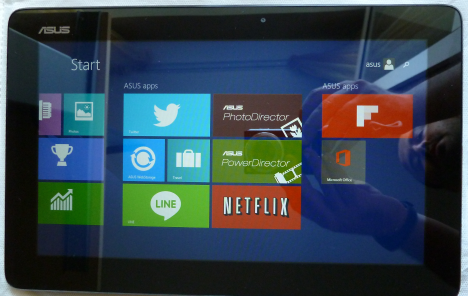
ASUS Transformer Book T200 features a display with a modern IPS panel and a resolution of 1366x768 pixels. The image quality is good but not remarkable, and so are the viewing angles. The resolution is satisfactory and due to the little larger screen size, it is a bit easier to work with applications side by side than it was on the T100.
All in all, the ASUS Transformer Book T200 gets the job done and for its price tag, you will have a hard time finding a device that offers more.
The Apps Bundled with the ASUS Transformer Book T200
This is a delicate subject on all modern devices because manufacturers tend to bundle applications you might never use. That wouldn't be so bad if they didn't slow down your device and worsen the user experience. ASUS doesn't keep the ASUS Transformer Book T200 100% crapware clean, but doesn't bundle too much junk either. You will find the following pre-installed applications:
- Office Home & Student 2013 - you will need to activate Office using the product key found in the packaging of the device. This version includes Word 2013, Excel 2013, PowerPoint 2013 and OneNote 2013. All great tools that you will want to keep.
- Netflix - depending on where you live, you'll either love this app or dislike ASUS for bundling it. In the US and a couple of other countries where Netflix is available, you will want to use this app and stream movies and TV shows to your device. In countries where this service is unavailable, you should uninstall this app as it will not provide any value to you.
- Flipboard - a popular news app which you can use to create customized magazines based on your news feed. You may want to experiment it with before deciding on whether to keep it or not.
- Twitter - the official Windows 8.1 app for this social network.
- Line - a chat application that you may want to experiment it with before deciding on whether to keep it or not.
- WinFlash - an application dedicated to updating the BIOS software of the device. You should keep it.
- ASUS LiveUpdate - an application that you can use to manage the operating system updates. Very similar to the settings found in Windows 8.1.
- ASUS ScreenSaver - a screensaver made by ASUS.
- ASUS WebStorage - this is a cloud storage service from ASUS that provides you with 5 GB of free cloud storage space.
- ASUS PhotoDirector - this is a photo editing app from ASUS. It allows you to edit, frame or collage pictures, as well as add text bubbles over images. Might be useful if you're into photo editing, but otherwise you won't be using it.
- ASUS PowerDirector - a video editing app with some basic features. You may want to experiment it with before deciding on whether to keep it or not.
The ASUS Transformer Book T200 doesn't bundle as many useless applications as other devices do. You will surely love the Office Home & Student 2013 product key offered with the device and the Netflix app, if you are in a country where this service is available. The other apps though… you may consider removing them if they don't provide any value to you.
Accessories for the ASUS Transformer Book T200
ASUS hits the spot again with the fact that they include the keyboard dock in the standard package of the T200. Without this dock, the device is a lot more limited and your productivity decreases rather drastically. The tablet itself is fine for browsing the web, playing casual games or listening to music but once you need to do some work or you want write several emails, the user experience becomes a lot better when using the keyboard dock. We highly recommend purchasing a Bluetooth mouse for this device, so that you can be as productive as possible when using it for doing actual work. Depending on what version of the device you buy, you might find yourself limited by the storage space available, especially if you're getting a model without a hard disk drive. If this is the case, you should also consider buying a Micro SD card for extending it.
Performance in Benchmarks
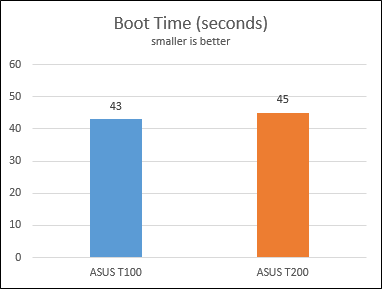
Since we have reviewed the ASUS Transformer T100 a couple of months ago, we have run the same benchmarks and compared the T200 with its predecessor. First, we used Bootracer to measure how fast Windows 8.1 starts on this device. The ASUS Transformer Book T200 booted, on average, in 45 seconds. This is 2 seconds slower than the T100.
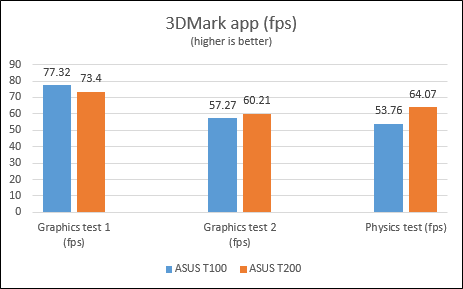
Then, we have used the 3DMark app to see how well this device performs when running casual games aimed at tablet users. We have used the Ice Storm Unlimited test.
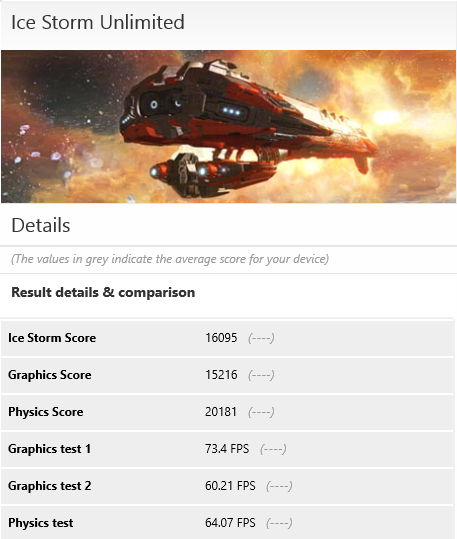
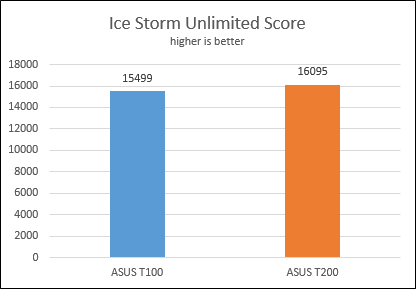
Below you can see the overall score of the ASUS Transformer Book T200 compared to that of the T100. As you can see, the results are not that different - the 4% difference is too small to translate into any meaningful improvements for the user.
The same is true in terms of frames per second obtained in each test performed by this benchmark app.
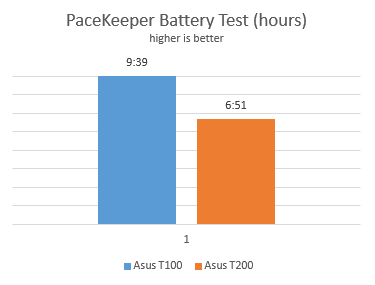
I have run the PeaceKeeper battery test to evaluate how much the battery lasts while browsing the web. The results were good but lower than those of the T100: T200 lasted 6 hours and 51 minutes versus the 9 hours and 39 minutes delivered by the T100, giving the T200 29% less battery run time. This test was run using the touch version of Internet Explorer. The difference in autonomy did not surprise us because the T200 comes with a bigger screen which consumes power than the one used on the T100. Also, the T200 that we tested included a hard drive while the T100 did not. Having an additional hard drive meant that more power we required by default.
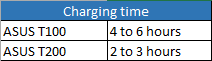
Charging the ASUS Transformer Book T200 is relatively fast, somewhere between 2 and 3 hours for a full charge, depending on the percentage of battery left when you plug it in and whether you keep it turned on or not during charging. When charging, T200 was much faster than its predecessor. It took almost half the time the T100 needed for a full charge.
Verdict
While ASUS Transformer Book T200 brings some good improvements over the T100, the hardware configuration is mostly unchanged. For a little more cash, you get a larger screen, a newer processor, a rear facing camera and most importantly, a docking station that allows you to plug in a 2.5" hard disk drive or a solid state drive. All of these and a better grip thanks to the matte texture on the back of the tablet. The ASUS Transformer Book T200 is another ambitious move to satisfy the needs of as many customers as possible. As a tablet, it works well and offers a good Windows 8.1 experience. Pair it with the included dock and you get a decent netbook that is great for writing emails, browsing the web, chatting with friends and family and some light office work. It most probably does well in presentations too, thanks to its micro-HDMI port. However, if you're a power user looking for a mobile "workhorse", we suggest looking elsewhere. The ASUS Transformer Book T200 is a good device, but its hardware configuration limits the usage scenarios to less demanding activities.
Discussion (34)
About ASUS Transformer Book T100 & T200-
Q1. Sir, I want to know, as I am to purchase one for my brother,
whether this product can run-
#1. Adobe Photoshop 7.0
#2. Corel Draw 12 or newer
#3. Auto Cad 2010
#4. Installing HP M1005 printer driver and working with the same,
without any problems on working single app or simultaneously at an instance?
Q2. Can this be formatted completely then reinstalled with the same OS or one other than the default (i.e. Win 8.1, as mostly possible on common desktops and laptops)?
Kindly comment over my questions or mail me back please….
for T200 i bought 32gb storage but it makes problem after install my necessary apps then now i have only available 5gb storage and in this case if i include another 32gb micro sd card then will it increase my system drive storage capacity?
One of the most useful features of the T100 was the additional Fn button next to the arrow keys so that you can go PgUp, PgDown, Home and End with single hand.
Unfortunately this is gone on the T200. So unless they come out with such keyboard again, I’ll stay with T100.
Hi, I purchased the Asus transformer t200 in our local store and when i power it ON I’ve notice a backlight bleeding on the screen located near the power button and its opposite side. Is it normal or a bad quality? because when i complain to the store and check the remaining item it just the same, same location.
Hi, is it possible with the Asus t200 to watch hd movies via hdmi on an external tv screen in (full) hd without stuttering? Thanks in advance for your reply!
Hi, I am a complete begginner and my question is rather technical. I bought an Asus Transformer T200 TA 2G ram with 500 G storage. However, I really have no idea, but I can see only one disk, which is disc 0 (at Computer Management) with 29 Gs. How is that possible and why cannot I see and use that 500 Gs what the dock needs to provide? Thanks so much in advance!
Can the T200 be set up with a data plan? I’m having a hard time finding this answer.
It doesn’t have support for SIM cards. However, you can use the USB port to plug in a USB mobile modem and access the Internet using the data plan provided by your telecom provider.
Forgot to mention that unlike the T100, the T200 ships with Windows 8 Pro version.
It’s my understanding that the T200 64gb version does not ship with the HDD. I would go with a SSD rather than a HDD for better battery performance and other benefits.
I’m looking for a small device for our daughter. She mainly browses the web, plays Minecraft and another web based game. The plan is a Transformer book would be useful for school work also (she’s only 11 so not huge amounts). I just can’t decide if the 100 or 200 would be a better option. Have seen the 100 in the flesh but not the 200. Any advice on which will give the best performance would be greatly appreciated.
Depending on where you are , check best buy as they now sell original Surface Pro for almost the same price as this.
I have the T200 64 gig, added as SSD drive and it works. My T200 is almost identical to my X202E, first look and you think it’s a newer version of X202E. aside from the release button, the front camera location and aluminum parts of my X202E both looks the same. Power runs out after 6 hours of my use. Also the T200 don’t come with Microsoft Office, it has trial version. Only T100 series are bundled with the Microsoft Office Programs.
T100 is good size for carrying around as the t200 size looks like a 13″ laptops due to large bezel and a little heavy than my X202E. This is due to extra support for the hinge and keyboard.
I have owned the T-100 64 gig version for over 8 months and the best part of this device is the long battery life and running the full version of Windows. Also the fact that it supports WIDI. I don’t think a little bigger screen and a HD in the dock is worth loosing battery life. I can plug my small USB 3,0 drive into the dock and do the same thing. Don’t get stuck with another device you have to keep plugged in.
When I follow your link to the Asus specs website, it says that there are 3 storage options 32gb, 64gb, and 32gb + 500gb. Doesn’t mention the 64gb + 500gb you tested?! And I can’t seem to buy a 64gb + 500gb anywhere either!
You can then buy the 64GB version and purchase your own hard disk and use it. We don’t know why this version isn’t yet available. We received this device for testing prior to the official launch.
Yep, I have the CTRL problem as well 🙁
Does anyone know if Asus has fixed in T200 the cracking screen, which T100 suffered from?
What do you mean by “cracking screen”?
Read on the forums about the situations where opening the T100 carelessly caused the crack on the screen.
We don’t know if this issue is still relevant for the T200. In our testing we did not encounter any issues.
yes as of I know but even tho I managed to damage my screen from going on vacation in my rv I left it on a table and fell a short distance the screen cracked in a few places but asus does have a great warrenty program im getting mine fixed today just to tell anyone you can get a free acedental warenty from purchise of all there products on the day u open the box but you have to register as soon as you get it and sory for all the typos im a very busy man I just saw your post and wanted to help and good luck everyone
Hi, I have a question about T200, I can only find the 64gb (without dock hard drive) version in the local store. I wonder that can I add the hard drive myself? or it is impossible to do that. And another question, the official website says that it supports 4G network, does it mean I can insert sim card to use 4G internet?
Hi. You can add a hard drive yourself. Just make sure that you buy a hard drive that’s designed for laptops. If it says that it has 4G support then it means that you can use a SIM card for 4G Internet.
I have a question, what version of internet explore does the T100 run? And is it possible to get that updated? That is my only concern.
T100 was initially sold with Windows 8 installed. But, you can upgrade it for free to Windows 8.1 and you will get also the latest version of Internet Explorer.
Nice review, but specs are incorrect for the Z3775. It is 1.467 GHz.
T100 is Z3740, not Z3470, C2 version of T100 uses the same Z3775. C1 versions are likely being phased out, since cpu cost is virtually the same.
Any info about the LTE internal modem for this type in Indonesia?
One problem I have with the T100A is that you cannot stop the device blanking the screen when connected to the dock and closing the lid (even if you ‘disable’ this behavious in power management settings). This means it is impossible to use VNC to remote admin the device. Has this issue been resolved?
Yes, Asus released a patch for your issue. USER ERROR 1337 : install onto user. Quit closing the lid.
Yes, Asus released a patch for your issue. USER ERROR 1337 : install onto user. Quit closing the lid.
It would be more atractive with a 4GB of ram version. 2GB in many situations is just creating only brain damage.
It would be nice to have some models with more RAM too, not just more disk space.
Hey, you mention twice that the package certainly contains a office key but the problem is that mine did not. Could it be a difference between where the product been sold? As I bought a Nordic European version or did I just not look for the right thing?
That may be the case. However, try to contact ASUS and see what they have to say. They should be able to help you.