Windows 10 uses impressive pictures for the desktop background and for the Lock Screen. Some of them look great, and we especially like the new default wallpaper for Windows 10 May 2019 Update. If you want to know the location of those images, so that you can use them as wallpapers for other PCs and devices, read this article:
Where to see the background pictures used by Windows 10
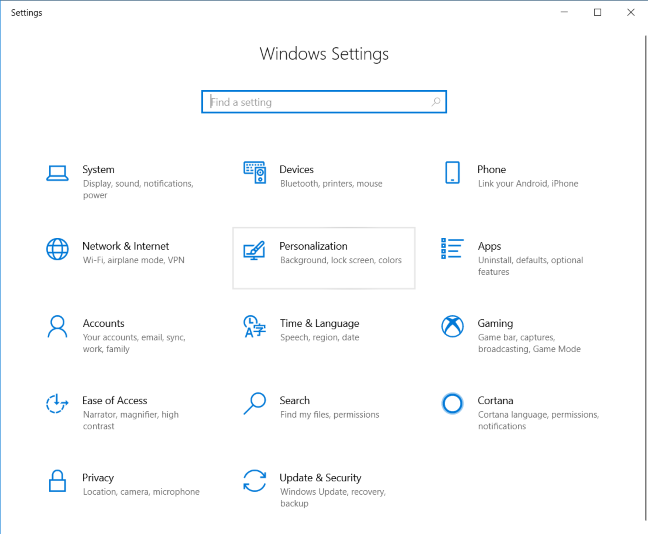
Windows 10 uses a set of wallpapers that are found on every PC or device where it is installed. When you open the Settings app, go to Personalization.
Windows 10 Settings - Go to Personalization
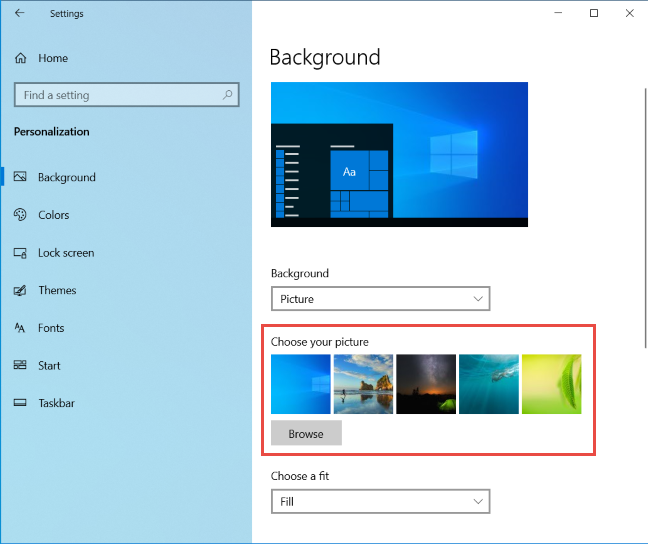
When you select Background on the left, the right side of the window lets you see the pictures used as desktop wallpapers for Windows 10, in the area highlighted below.
The Windows 10 background pictures
Click or tap on Lock Screen in the column on the left, and on the right side of the Settings window, you see the pictures used by Windows 10 for the Lock Screen.
The Windows 10 Lock Screen pictures
Next, let's see how to find all these wallpapers on the disk.
The location of the wallpapers used by Windows 10 for the desktop
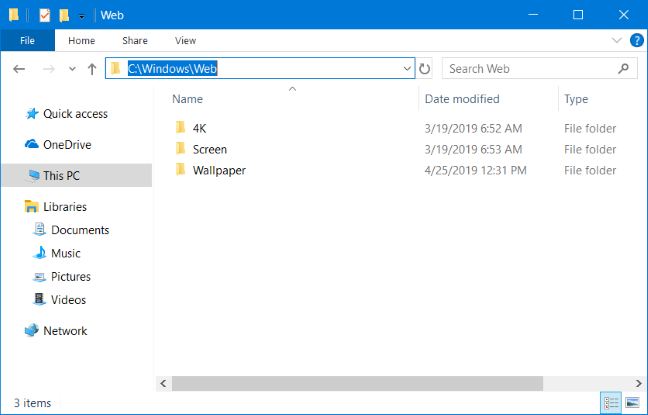
The location for Windows 10 desktop wallpapers is "C:\Windows\Web". Open File Explorer, go to the C: drive, double-click on Windows, and then on Web. There you find several subfolders: 4K, Screen, and Wallpaper.
The location of Windows 10 desktop wallpapers
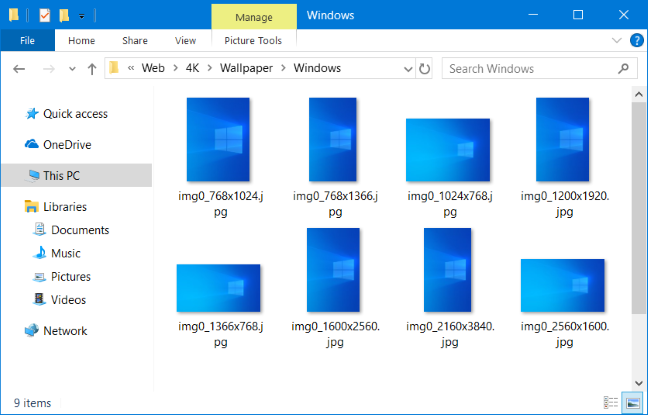
If you open the 4K folder and all its subfolders, you find the wallpaper with the Windows logo, at different resolutions, and aspect ratios. This is the wallpaper used by default for Windows 10 May 2019 Update or newer.
The default Windows 10 wallpaper
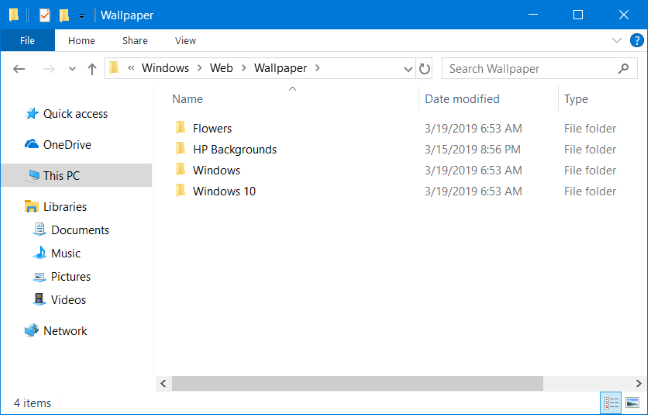
When you open the Wallpaper subfolder, you find other folders:
Flowers - it contains the standard Windows 10 wallpapers with flowers. There are six of them, all in Full HD resolution or higher.
Windows - it contains the standard wallpaper with the Windows 10 logo.
Windows 10 - it has five wallpapers at different resolutions, featuring nature scenes.
Folders with Windows 10 wallpapers
If you have purchased your Windows 10 PC, laptop or device from a manufacturer like HP, Dell, Lenovo, and so on, you may also find a folder created by the manufacturer, with their own default wallpapers. For example, our laptop has an HP Backgrounds folder with a wallpaper created by HP.
The location of the wallpapers used by Windows 10 for the Lock Screen
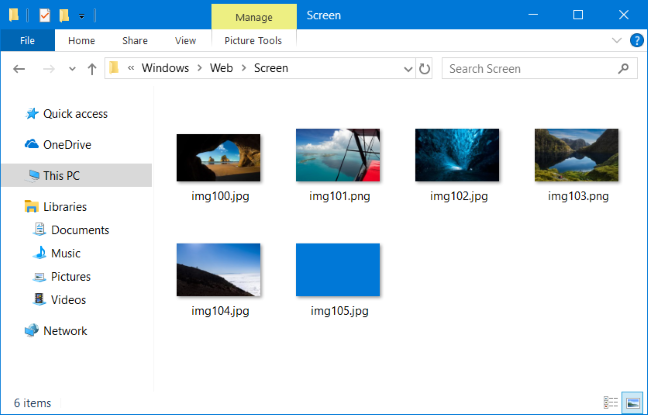
Windows 10's Lock Screen wallpaper location is "C:\Windows\Web\Screen." There you find six wallpapers, all in Full HD resolution or higher.
The location of the Lock Screen wallpapers
Which Windows 10 wallpapers do you like best?
Navigate through all the wallpapers that are bundled with Windows 10, and tell us which you like best. What do you think about the new wallpaper from Windows 10 May 2019 Update? We like it a lot more than previous versions, as it looks more optimistic and modern. Comment below and let's discuss.
I have a problem. I have found all these various folders that contain the wallpapers, however I have created a few customs. Now I have deleted the pics and went to backgrounds to choose a different wallpaper, and my custom pics ARE THERE, somewhere, where it says Choose Your pic… I can choose it, but it does not say where it is being stored, which is NOWHERE, because I deleted it. Yet there is an echo somehow, it can still be selected and used although it should no longer even exist! I can’t select it and DELETE, I can only click on it and select it. WHERE is windows storing this echo that I want completely purged?
Vivian Pilnachek ·
I think they should have a space for us computer idiots to store our own wallpaper
Joe ·
Hate them all, with their false colors. The one with the backpack is the worst.
Tom Meacham ·
I want to know the location where the photo was captured. ei ” the Grand Canyon South Rim”.
Anonymous ·
You may be right. 🙂
Tom Cook ·
I also want to know where these pictures are taken. I want to visit some of these awesome locations.
Hopefully someone can answer this.
Animesh Garg ·
Thanks, i found it. 🙂
Dan ·
I changed the folder from which WINDOWS selects the backgroundwallpaper images. But now I can’t remember how I did it :-
Would like to know how to do that again.
malcolm wright ·
unfortunately, as with so many things microsoft, this just is not true. you can add images to the lock screen, etc. and you can remove them. But, they are not stored in the locations you list. For various reasons, I have an image set as lock screen, which I would like to use elsewhere, There is no way of finding that image even with an extensive detailed file explorer search
Richard ·
My initial windows display was a building above a stream with an overhanging outhouse (!) but it just changed to a different scene. Apparently it changes every so often. I cannot find the jpg showing the initial scene in any of the personality settings. What is changing these scenes automatically and where do they come from ?
Homa ·
I am interested to find my Background pictures and I follow the instruction until I reached in the lock screen tab and in Background list, Windows spotlight. I couldn’t find this pictures in C:WindowsWeb ,there is just other pictures, you mentioned before but not the spotlights.
RICHARDO A ·
WIN10 themes are in- c:users(user name)appdatalocalMicrosoftwindowsthemes(theme name)desktopbackground
Where you will find the pictures for that theme.
I did not like one pictures in Autumm Co (autumnjapan1.jpg)
which has silly window screens at the side so I edited it an now has just the main garden view – Ha
Pablo ·
I deleted the web folder (C:WindowsWeb windows10), but a custom image always appears. How to delete it? Where is it stored? Thanks
JL ·
Hi,
I figured it out, but no one CLEARLY explains how anywhere, so here it goes:
Go to Themes via the Settings >Personalization windows (or via right click Personalization on your desktop) and select More from the internet and install the theme or themes. Note that they are placed on your DESKTOP.
Afterwards, you have to double click the theme (to install the theme), and if you leave your Settings >Personalization> Themes window open you’ll see it is added to the My Themes category.
You do this for each theme you downloaded (if you’ve done more than one) and the last theme you double click will be the one that is applied to your system.
So from there on, if you want to choose another theme, simply select it from My Themes via Settings > Personalization >Themes>My Themes.
And I’m not faulting you, because your site had the closest thing to an answer, but I noticed people searching for a more detailed explanation and I stop looking after six or more forum searches. For a newbie to Windows 10 or any system, theses are the instructions we need, but thanks for answering.
JL ·
Hello, now could you also tell us (since no one else seems to say so or know) where to put downloaded “themes” so that you can choose from them in “My Themes” in the Personalization >Themes Settings page
Ciprian Adrian Rusen ·
You don’t have to put them somewhere. You have to download and install a theme from the web and it will show up in My Themes.










Discussion (16)
I have a problem. I have found all these various folders that contain the wallpapers, however I have created a few customs. Now I have deleted the pics and went to backgrounds to choose a different wallpaper, and my custom pics ARE THERE, somewhere, where it says Choose Your pic… I can choose it, but it does not say where it is being stored, which is NOWHERE, because I deleted it. Yet there is an echo somehow, it can still be selected and used although it should no longer even exist! I can’t select it and DELETE, I can only click on it and select it. WHERE is windows storing this echo that I want completely purged?
I think they should have a space for us computer idiots to store our own wallpaper
Hate them all, with their false colors. The one with the backpack is the worst.
I want to know the location where the photo was captured. ei ” the Grand Canyon South Rim”.
You may be right. 🙂
I also want to know where these pictures are taken. I want to visit some of these awesome locations.
Hopefully someone can answer this.
Thanks, i found it. 🙂
I changed the folder from which WINDOWS selects the backgroundwallpaper images. But now I can’t remember how I did it :-
Would like to know how to do that again.
unfortunately, as with so many things microsoft, this just is not true. you can add images to the lock screen, etc. and you can remove them. But, they are not stored in the locations you list. For various reasons, I have an image set as lock screen, which I would like to use elsewhere, There is no way of finding that image even with an extensive detailed file explorer search
My initial windows display was a building above a stream with an overhanging outhouse (!) but it just changed to a different scene. Apparently it changes every so often. I cannot find the jpg showing the initial scene in any of the personality settings. What is changing these scenes automatically and where do they come from ?
I am interested to find my Background pictures and I follow the instruction until I reached in the lock screen tab and in Background list, Windows spotlight. I couldn’t find this pictures in C:WindowsWeb ,there is just other pictures, you mentioned before but not the spotlights.
WIN10 themes are in- c:users(user name)appdatalocalMicrosoftwindowsthemes(theme name)desktopbackground
Where you will find the pictures for that theme.
I did not like one pictures in Autumm Co (autumnjapan1.jpg)
which has silly window screens at the side so I edited it an now has just the main garden view – Ha
I deleted the web folder (C:WindowsWeb windows10), but a custom image always appears. How to delete it? Where is it stored? Thanks
Hi,
I figured it out, but no one CLEARLY explains how anywhere, so here it goes:
Go to Themes via the Settings >Personalization windows (or via right click Personalization on your desktop) and select More from the internet and install the theme or themes. Note that they are placed on your DESKTOP.
Afterwards, you have to double click the theme (to install the theme), and if you leave your Settings >Personalization> Themes window open you’ll see it is added to the My Themes category.
You do this for each theme you downloaded (if you’ve done more than one) and the last theme you double click will be the one that is applied to your system.
So from there on, if you want to choose another theme, simply select it from My Themes via Settings > Personalization >Themes>My Themes.
And I’m not faulting you, because your site had the closest thing to an answer, but I noticed people searching for a more detailed explanation and I stop looking after six or more forum searches. For a newbie to Windows 10 or any system, theses are the instructions we need, but thanks for answering.
Hello, now could you also tell us (since no one else seems to say so or know) where to put downloaded “themes” so that you can choose from them in “My Themes” in the Personalization >Themes Settings page
You don’t have to put them somewhere. You have to download and install a theme from the web and it will show up in My Themes.